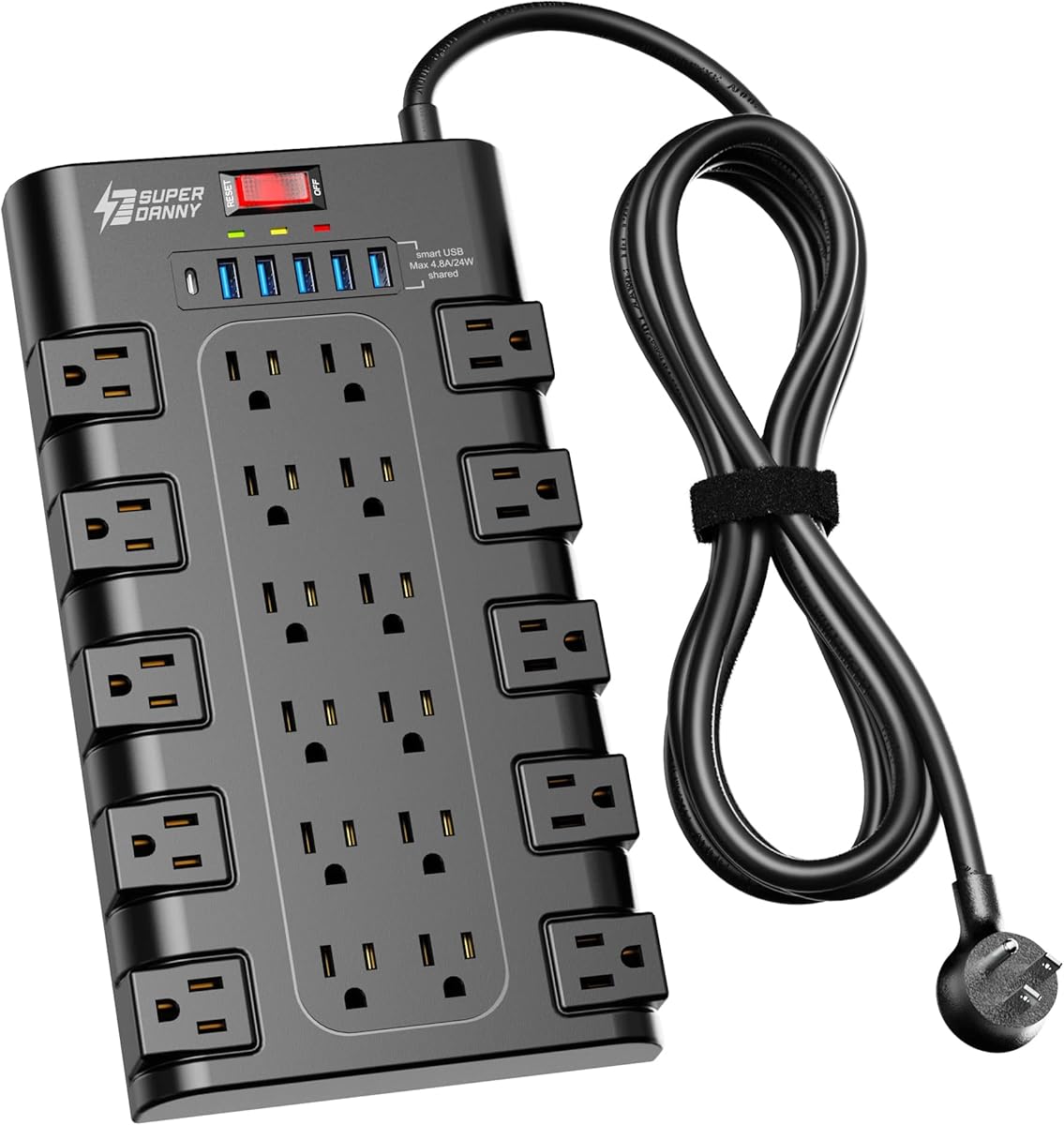
SUPERDANNY Power Strip Surge Protector
4.8Editor score
Twenty-two grounded AC outlets
Six convenient USB charging ports
Two-thousand-one-hundred-joule surge protection
This surge protector for Starlink guide compares ten top-rated power strips, whole-home suppressors, and heavy-duty options for safe setup.
A surge protector for Starlink can provide a safer, more organized power setup for the router, power supply, and related accessories. The right model should offer appropriate surge protection, enough outlets, manageable cord length, and a design that suits the intended installation location.
We compared ten products based on their listed outlet configurations, surge-protection ratings, safety features, cord options, mounting methods, and suitability for powering a Starlink setup. The list includes compact strips, USB-equipped models, heavy-duty units, and whole-home surge suppressors.
Each pick highlights a different practical advantage, from abundant AC outlets to stronger surge capacity or space-saving installation. Product ratings and availability can change, so readers should confirm the latest specifications and current pricing before making a purchase.
4.8Editor score

4.7Editor score

4.8Editor score
The table below compares outlet count, surge capacity, power capacity or installation type, and standout practical features. It helps distinguish basic strip protection from high-capacity, USB-equipped, and whole-home alternatives.


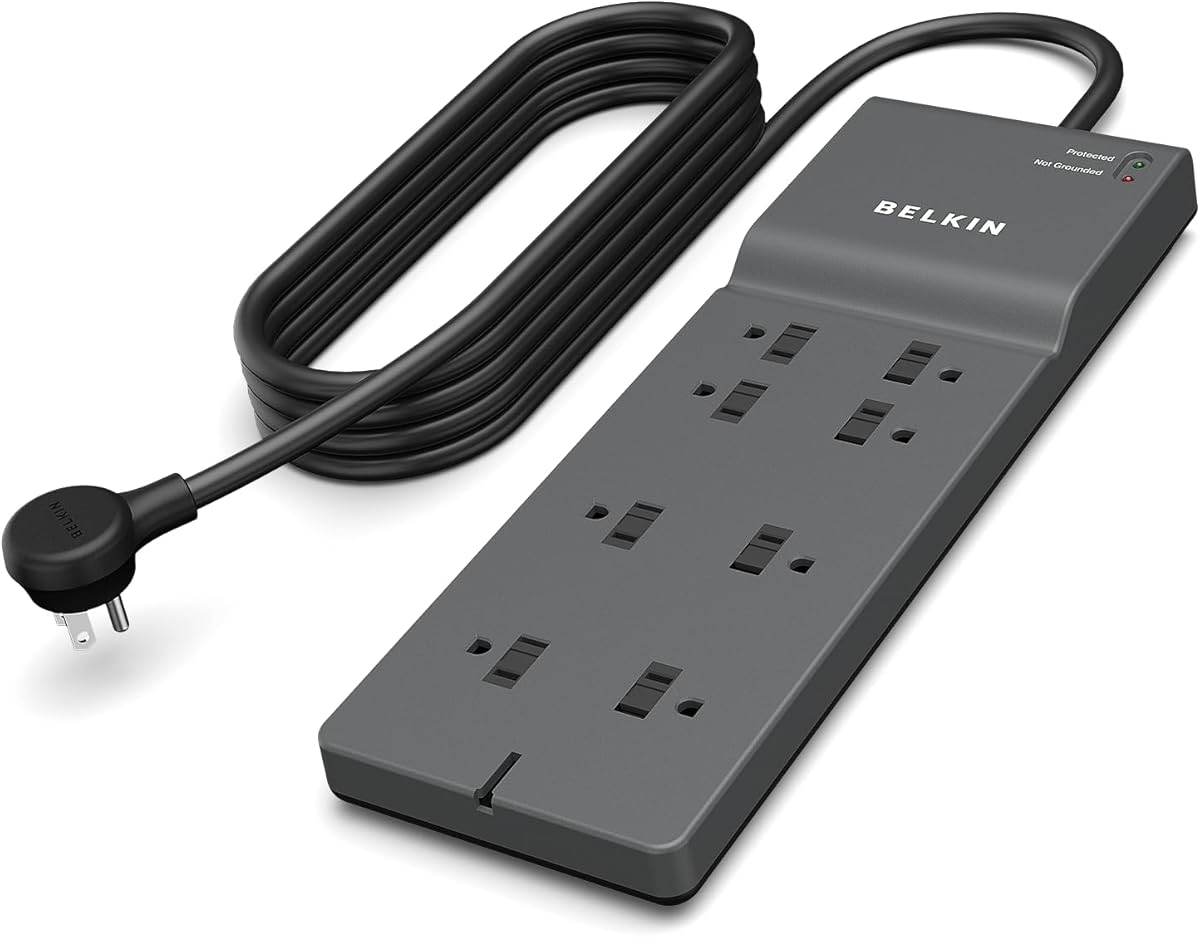


The Belkin 12-Outlet Surge Protector Power Strip combines generous outlet capacity with a high surge-protection rating and a practical eight-foot cord. Its 4.7 rating reflects a strong balance of useful features, making it an especially logical choice for a Starlink installation that also needs to power routers, computers, monitors, charging bricks, or entertainment equipment.
We may earn a commission when you buy through this link, at no additional cost to you.
Twelve AC outlets give the strip more flexibility than a compact six-outlet model. The widely spaced positions are designed to accommodate bulky power adapters without forcing adjacent plugs to compete for space. Its listed 3,780-joule protection level offers a substantial capacity cushion compared with many basic strips, while the safety indicator provides a quick visual indication of protection status.
The flat three-prong plug and eight-foot cord give the installer flexibility when the wall outlet is behind furniture or partially obstructed. The housing is also wall-mountable, which can reduce clutter around desks, entertainment centers, or home-office equipment. The main omission is USB charging, so users who want a modern all-in-one charging hub may prefer one of the USB-equipped alternatives in this guide.
This is the most versatile option for most readers. It is especially useful when the Starlink power supply and router sit apart from a nearby outlet or when the same strip must serve several home-office devices. For a single router and power brick, it may feel larger than necessary, but its flexibility makes it a strong all-around recommendation.
The wide outlet spacing is valuable when a Starlink power adapter, router brick, or other large charger is plugged in. Multiple oversized plugs can remain connected without blocking as many neighboring receptacles as they would on a densely arranged basic strip.
The long cord and wall-mountable housing make it easier to position the strip where it remains accessible but visually unobtrusive. This is useful near a desk, television console, or other permanent electronics station.
We may earn a commission when you buy through this link, at no additional cost to you.
The Belkin Surge Protector Power Strip with eight rotating and four standard outlets earns a 4.8 rating and stands out for its adaptable outlet arrangement. It is a premium choice for Starlink owners who expect to connect several devices or need to fit large power bricks into a limited power hub.
We may earn a commission when you buy through this link, at no additional cost to you.
Its 4,320-joule protection rating is the highest listed among the portable strips in this guide. Eight rotating outlets can be repositioned to accommodate large adapters, while four standard outlets provide convenient fixed positions. The 1-in-2-out RJ11 telephone protection and coaxial protection add versatility for a broader home-entertainment setup, even though those features are not necessary for a basic Starlink connection.
The eight-point safety system covers multiple electrical hazards, including over-temperature, overcurrent, overload, short-circuit, and clamping conditions. Three-line AC protection addresses surges between hot, neutral, and ground lines, while LED indicators show surge and ground status. A flat pivot plug and eight-foot cord also help the strip fit neatly into a variety of locations.
The tradeoff is that this model is more elaborate than a straightforward Starlink setup requires. It does not include USB charging, and some buyers may prefer the simpler design of a six-outlet wall unit. Even so, it is an excellent choice for a permanent workstation, media area, or installation where several substantial power adapters need to coexist without crowding one another.
The adjustable positions are the defining advantage. A large Starlink power adapter, router plug, or charging brick can be turned away from neighboring plugs, making the strip practical in crowded outlets.
Telephone and coaxial line protection broaden the product's usefulness for connected home-entertainment equipment. It is a meaningful addition when the same strip supports a router, television, and related components.
We may earn a commission when you buy through this link, at no additional cost to you.
The SUPERDANNY 28-in-1 Power Strip provides an unusually large number of connections, including 22 grounded AC outlets and six USB ports. Its 4.8 rating and 2,100-joule surge protection make it a compelling value for users who want one central hub for a Starlink setup and numerous household electronics.
We may earn a commission when you buy through this link, at no additional cost to you.
Five USB-A ports and one USB-C port reduce the need for separate wall adapters. The listed smart charging system can detect connected devices and deliver up to 5V/3A through USB-C. Four rows of AC outlets, wide spacing, and a three-side design help organize numerous plugs while accommodating bulky adapters.
Installation flexibility comes from the 6.5-foot heavy-duty cord, 45-degree flat plug, and four rear keyholes for wall or furniture mounting. Eight-fold protection includes surge, overload, grounded, short-circuit, overcurrent, overvoltage, and overheat protection, along with a fire-retardant casing. The strip is rated for 1,875 watts and 15 amps.
Its sheer size may be excessive for a router and power supply alone, and the side outlets do not rotate. Nevertheless, the abundant connections and built-in charging make this one of the most practical choices for a busy desk, gaming area, dorm room, or shared home electronics station.
Twenty-two AC outlets eliminate the need for several daisy-chained strips in many homes. The result is a centralized setup that can keep the Starlink router, display, computer, speakers, and everyday charging devices connected in one place.
The USB-A and USB-C ports offer a convenient way to charge compatible devices without occupying AC receptacles. That makes the strip especially useful in home-office and gaming environments where adapter space is limited.
We may earn a commission when you buy through this link, at no additional cost to you.
The Belkin Six-Outlet Surge Protector Power Strip is a compact, direct wall-plug model with a 4.7 rating. It suits a simple Starlink installation where the router and power supply are close to a wall outlet and additional cords or adapters would be inconvenient.
We may earn a commission when you buy through this link, at no additional cost to you.
Six surge-protected AC outlets are enough for a Starlink power brick, router, and several smaller devices. A powered USB-C port and one USB-A port add convenient charging for compatible phones, tablets, and accessories without requiring separate charging adapters. The 1,680-joule protection capacity is lower than that of the larger models in this guide, but the strip still includes overcurrent and overload protection.
Its 14-point safety system covers over-temperature, overload, overcurrent, short-circuit, clamping, and overvoltage conditions, along with three-line AC protection, warning lights, automatic shutdown, and fire-resistant material. Because it plugs directly into a wall receptacle, there is no extension cord to route across a desk or floor.
This is not the best choice for a large entertainment center, but it is an effective option for a modest Starlink setup near a wall. Its main advantages are compactness, easy placement, and useful USB charging. Buyers who need many outlets or more substantial surge capacity should move up to a larger strip.
The direct wall-plug format removes the extension cord, helping keep the setup visually tidy. It is well suited to a wall outlet near a desk, nightstand, sofa, or entertainment unit where a freestanding strip could be unnecessary.
The safety indicator allows a quick visual check of protection status. Integrated USB-A and USB-C charging makes this compact model more versatile for everyday device charging than a basic six-outlet strip.
We may earn a commission when you buy through this link, at no additional cost to you.
The 20AC Power Strip with USB Ports is built for users who want extensive connection capacity in a single unit. Its 4.8 rating, 20 AC outlets, six USB charging ports, and 2,700-joule surge protection make it well suited to a large Starlink and home-electronics station.
We may earn a commission when you buy through this link, at no additional cost to you.
Four USB-A ports and two USB-C ports provide a combined maximum output of 18 watts, while individual USB-A ports are listed at 5V/2.4A and USB-C at up to 5V/3A. Smart charging technology is included to identify connected devices and provide suitable output. The 1,875-watt, 15-amp capacity matches a full-size household circuit.
The three-side construction and listed 1.67-inch spacing between receptacles should help larger adapters fit without blocking adjacent outlets. Its six-foot extension cord offers a practical balance between reach and manageable routing, while the compact dimensions are intended for desks, offices, dorm rooms, and travel-oriented setups.
Some listing details vary between the title and feature description, including the stated cord length, so buyers should verify the final package specifications. Even with that caveat, the high outlet count and charging integration are compelling. It is best for a large shared setup and excessive for a router-only installation.
Twenty AC outlets can support a Starlink router alongside computers, televisions, speakers, lamps, and mobile accessories. A three-side layout helps maximize access when the strip is positioned against a wall or beneath a desk.
The mixture of USB-A and USB-C ports supports a broader range of compatible accessories. This reduces the number of separate wall adapters needed in a busy home-office or entertainment area.
We may earn a commission when you buy through this link, at no additional cost to you.
The Belkin Eight-Outlet Surge Protector is a straightforward, dependable option with a 4.7 rating. Its eight outlets, 2,500-joule protection rating, and eight-foot cord provide enough flexibility for a Starlink router and several associated devices without the size of a 12- or 22-outlet strip.
We may earn a commission when you buy through this link, at no additional cost to you.
The widely spaced receptacles are designed to accept large plugs and charger bricks, which is important when a Starlink power supply sits beside other equipment. A 2.4-meter cord and three-prong flat plug make it easier to reach an outlet positioned behind furniture or in a tight area.
Safety slide locks close unused receptacles, providing an added layer of protection in homes with children. The strip is UL safety certified and is described as offering protection from overload, short circuits, power spikes, lightning strikes, and fluctuations. The listed lifetime warranty and connected equipment warranty add reassurance for a permanent installation.
Its lack of USB charging and lower surge capacity make it less suitable for a large media hub than several premium competitors. For a moderate number of devices, however, it offers a balanced and familiar design that should satisfy users seeking a simple extension point.
The sliding safety covers help block unused sockets, which can be useful around a busy home-office floor or a shared family space. The feature adds security without requiring a separate accessory.
Eight outlets strike a practical middle ground for a Starlink installation with a few peripherals. The extended cord also makes the strip easier to position than a short, wall-mounted alternative.
We may earn a commission when you buy through this link, at no additional cost to you.
The ECHOGEAR ShockBlocker 8 Outlet Surge Protector combines a 4.8 rating with 3,420 joules of surge protection. Its slim profile makes it especially appealing beside a television, gaming console, desk, or entertainment center where a large traditional power strip would be visually intrusive.
We may earn a commission when you buy through this link, at no additional cost to you.
The strip can power and protect up to eight devices, making it suitable for a Starlink router, television, receiver, console, speakers, and similar equipment. Extra spacing at three receptacles helps larger plugs fit without preventing access to neighboring outlets. Its low profile also allows it to be concealed behind or under furniture.
Safety covers remain over unused receptacles, helping prevent objects from being inserted into them. Fire-proof MOVs are used to absorb excess voltage, while the product is described as filtering harmful signals from the power supply. The housing is wall-mountable, allowing users to keep cords organized and the power hub close to a mounted television or desk.
It lacks USB charging, so it is not the most convenient choice for a mixed charging station. It is also an indoor strip rather than a weather-resistant device. Even so, the combination of high surge capacity, slim construction, and discreet placement makes it a particularly good fit for indoor Starlink and entertainment installations.
The low-profile housing can sit behind a television or entertainment console with less visual bulk than a tall strip. This makes the ShockBlocker useful when equipment is mounted close to a wall or placed on a narrow shelf.
With 3,420 joules of protection and eight outlets, the strip can cover a router and several media components in one location. That combination offers more capacity than a compact model without reaching the footprint of a 20- or 22-outlet hub.
We may earn a commission when you buy through this link, at no additional cost to you.
The Eaton Complete Home Surge Protector is a Type 2 surge protective device intended for installation at the electrical panel. Its 4.6 rating reflects a different use case from the portable strips in this guide: it protects an entire home rather than only the devices connected to one extension cord.
We may earn a commission when you buy through this link, at no additional cost to you.
The device is rated for 60,000 amps of surge current and has a 10-kilampere nominal discharge rating. Its weather-resistant housing is listed for indoor or outdoor installation, while the hardwired Type 2 design and pre-attached wiring leads support connection at the electrical panel.
LED indicators make it possible to verify protection status at a glance. The product is described as UL listed and compliant with National Electrical Code requirements, providing an important foundation for homes that also use outlet-level surge protectors. It can help protect computers, televisions, HVAC equipment, and other sensitive electronics from damaging voltage spikes.
This is not a direct substitute for a power strip beside the Starlink router. It requires installation at the service panel, normally by someone qualified to work on household electrical systems. For owners seeking broad, infrastructure-level protection, however, it is one of the strongest solutions in this guide.
A Type 2 device is intended to limit surge energy before it reaches branch circuits. That makes it a more comprehensive layer of defense for a home with computers, networking equipment, televisions, and other connected electronics.
Pre-attached leads simplify the connection process, and LED indicators provide a visible status check. The stated indoor and outdoor rating also gives installers more flexibility in choosing a suitable enclosure location.
We may earn a commission when you buy through this link, at no additional cost to you.
The Square D HEPD80 is a universal whole-house surge protection device designed for a residential load center. With an 80-kilampere capacity and a 4.7 rating, it provides infrastructure-level protection for appliances and electronics that may not be connected to individual outlet strips.
We may earn a commission when you buy through this link, at no additional cost to you.
Unlike a portable power strip, the HEPD is intended to safeguard devices throughout the home's electrical system. Its coverage can include computers, televisions, kitchen appliances, HVAC systems, security equipment, and smart-home devices. Preventing damaging voltage spikes is also intended to extend the useful lifespan of sensitive electronic equipment.
The unit supports single-phase, three-wire residential systems operating at 120 or 240 volts. Its compact form factor is designed for installation in a load center, and an LED status indicator shows when replacement is needed. This gives the owner an at-a-glance way to confirm that the protective device remains operational.
The HEPD80 is most appropriate for homeowners with compatible electrical systems who want whole-home protection rather than a strip near one device. It does not provide extra outlets and should not be treated as a charging hub. Installation should be handled by a qualified electrician or someone with appropriate panel expertise.
Protecting the main residential system can help reduce the voltage reaching sensitive equipment throughout the house. It is particularly relevant for networks containing Starlink equipment, computers, entertainment systems, and smart-home controls.
The load-center format avoids adding another bulky device to a work area. The status LED gives owners an immediate indication of whether the protective unit is still functioning as intended.
We may earn a commission when you buy through this link, at no additional cost to you.
The Eaton Tripp Lite IBAR2-6D Isobar Heavy Duty Metal Surge Protector is a compact two-outlet option with a 4.6 rating. It is purpose-built for smaller installations and harsh environments where a durable metal housing is more valuable than a large collection of receptacles.
We may earn a commission when you buy through this link, at no additional cost to you.
Its 1,410-joule rating provides surge suppression, overload handling, and automatic shutdown through a 12-amp circuit breaker. The patented isolated filter bank limits noise interaction between connected devices, while EMI/RFI line-noise filtering is listed at up to 80 dB. These conditioning features may be particularly relevant to sensitive audio, video, or network equipment.
A six-foot cord provides reach from an outlet, while the right-angle plug allows the unit to sit close to a wall. Keyhole slots on the underside offer wall or desk mounting. The all-metal housing is built for a heavy-duty role and fits applications such as garages, workshops, network equipment, and industrial surroundings.
Two outlets are enough for a Starlink router and power supply but not for a broader collection of devices. Its surge capacity is also lower than that of the mid-size strips in this guide. The IBAR2-6D is best for a dedicated two-device installation or a rugged workstation where metal construction and line conditioning are the deciding factors.
The all-metal housing is a notable step up from typical plastic strips. It is a practical choice for a garage, workshop, utility area, or other location where a compact unit must withstand frequent handling.
The isolated filter bank and line-noise filtering help reduce interference between connected devices. That makes the IBAR2-6D relevant to networking, audio, and video setups where clean power is a priority.
We may earn a commission when you buy through this link, at no additional cost to you.
The best choice depends on how many devices you plan to connect, where the Starlink equipment will be installed, and whether you want local outlet protection or a broader whole-home solution. Use the following factors to narrow the field before comparing final specifications.
Surge-protection capacity is commonly expressed in joules, which indicates how much transient energy the device is designed to absorb. Models in this guide range from 1,410 joules for a compact metal protector to 4,320 joules for the Belkin rotating-outlet strip. A larger rating is generally useful when several sensitive electronics share the same protection path.
Choose based on the size of the connected system rather than the rating alone. For a Starlink router and one or two accessories, a reputable protected strip is generally the central requirement. For a larger electronics hub, more capacity and broader protections provide a stronger margin.
Count not only the devices that need power but also the physical size of their adapters. A Starlink power supply can occupy substantial space, and large laptop or television chargers can block adjacent receptacles. Wide spacing, rotating outlets, and three-sided layouts are often more useful than raw outlet count.
Six to eight outlets cover a simple router setup with several accessories, while 12 to 22 outlets suit shared stations or entertainment rooms. If only the router and power brick are involved, prioritize a compact six- or eight-outlet design over a large power hub.
USB-A and USB-C ports can simplify a Starlink setup by providing convenient charging for phones, tablets, and accessories. Some models support USB-C power delivery, while others use standard low-power charging outputs. These ports are useful for reducing adapter clutter but are not essential to powering the router itself.
Telephone and coaxial protection serves a different purpose. It is relevant when the same power strip supports modems, satellite receivers, or home-entertainment components, but it does not affect the basic Starlink router connection. Choose cable-line protection only when the connected equipment needs it.
The ideal strip is long enough to reach a suitable outlet without stretching the cord, but short enough to route neatly. Six- and six-and-a-half-foot cords suit many desks, while eight-foot cords provide more flexibility when the router is placed around furniture, near a window, or behind a television.
A direct wall-plug model eliminates a loose extension cord and works well when the Starlink equipment is close to an outlet. A flat or right-angle plug can also fit more easily into obstructed receptacles. Consider furniture placement, cable reach, and whether the strip will be mounted or left freestanding.
Look for protection against overcurrent, overload, short circuits, overvoltage, over-temperature, and grounding issues. MOV-based surge suppression is common in the portable models listed here, while the heavy-duty metal unit adds an automatic circuit breaker. A lighted protection indicator gives users a simple way to check the unit's status.
Safety certification provides another important layer of confidence. Products in this guide list UL, ETL, FCC, or RoHS credentials, depending on the model. Consumers should verify the certification markings and warranty terms on the actual listing, especially when purchasing through a marketplace.
A portable power strip protects only the equipment connected to it. A Type 2 surge protective device or whole-house electronic protective device is installed at the electrical panel and is intended to reduce surge energy across the home. These devices solve a broader problem but require compatible wiring and suitable installation expertise.
For most people, a local strip is the relevant choice for a Starlink router and nearby electronics. A whole-home device makes more sense for homeowners seeking protection for multiple circuits, sensitive household equipment, or a broader electrical system. It should complement, not replace, properly selected point-of-use protection when a specific device warrants it.
A slim plastic strip works well indoors and is easy to conceal. An all-metal housing is more rugged for a workshop, garage, or utility area, while the Eaton Type 2 unit has a weather-resistant housing listed for indoor and outdoor installation. Material alone does not determine suitability, so the placement must be considered.
For an indoor Starlink installation, prioritize outlet spacing, cord reach, and a low profile. For an exposed exterior location, do not assume an ordinary indoor strip is weather resistant. Select a device specifically listed for the environment or keep the equipment and connection in a suitable protected enclosure.
Before connecting anything, inspect the strip, cord, and plug for visible damage. Confirm that the surge protector is in good condition, that the wall receptacle is properly grounded, and that the connected equipment does not exceed the strip's listed wattage and amperage limits. Do not use a damaged power strip.
Place the strip in a dry, accessible location with enough ventilation, then connect the Starlink power supply and router according to the equipment instructions. Keep the power button and status indicator visible, route the extension cord so it cannot be pinched or tripped over, and avoid daisy-chaining the strip with another power strip.
Periodically check the protection indicator and inspect the cord for heat, discoloration, fraying, or bent plugs. If the indicator shows that protection is no longer active, the breaker trips repeatedly, or the housing becomes unusually hot, unplug the connected devices and discontinue use. Replace the unit as needed and follow its stated warranty and replacement procedures.
A surge protector adds a layer of protection against voltage spikes and overloads, which can be useful for a router installed near a window, exterior wall, or shared electronics hub. It does not guarantee protection from every electrical event. A properly grounded outlet and the manufacturer's guidance remain important, while a surge protector should not be used with damaged wiring or an overloaded circuit.
The Belkin 12-Outlet Surge Protector is the most versatile option in this guide for many readers because it combines 12 outlets, wide spacing, a long cord, and a 3,780-joule protection rating. The SUPERDANNY model is a strong budget choice when many AC and USB connections are needed, while the rotating-outlet Belkin is preferable for crowded installations with bulky adapters.
Two AC outlets may be enough for the router and its power supply alone, but three or more provide room for a router, power brick, and basic accessories without using a second adapter. Count every large charger carefully because its width may block neighboring receptacles. A model with wide or rotating outlets can be more effective than one with a much higher raw outlet count.
A whole-home surge protective device can provide system-level protection that includes the circuit serving the Starlink equipment. It is not a substitute for a local strip if you want extra outlets, USB charging, or point-of-use protection. Whole-home units are installed at the electrical panel and should be installed in a compatible system by a qualified professional.
No. A standard surge protector conditions and protects incoming power, but it does not keep the Starlink router operating during an outage. A separate backup power system or uninterruptible power supply would be needed for that function, and it should be sized for the equipment it will support.
The two devices solve different problems. A surge protector focuses on transient voltage protection, while a UPS provides battery backup and may also include surge protection. If uninterrupted operation is important, a properly sized UPS with enough outlets and appropriate power requirements is the more relevant choice; a conventional power strip is sufficient when only surge protection and outlet expansion are needed.
The indicator generally shows whether the internal surge-protection components are active. If the light turns off, changes color, or otherwise indicates a fault, discontinue use and follow the manufacturer's replacement guidance. A tripped breaker may also mean that the connected load exceeds the safe capacity, so unplug devices and investigate before resetting it.
Many strips in this guide have keyholes or other mounting points, but only use a listed mounting method and ensure the strip remains accessible for switching off or inspection. Do not cover a ventilation opening, pin the cord against a sharp edge, or place the unit where heat can build up. Confirm the model supports the intended surface and orientation.
The Belkin 12-Outlet Surge Protector is the strongest all-around choice for most Starlink installations, offering ample outlets, wide spacing, useful placement flexibility, and substantial surge protection. The Belkin rotating-outlet model is the premium pick for crowded setups, while the SUPERDANNY 28-in-1 strip is the budget leader when numerous AC and USB connections are needed.
Prioritize the requirements of the actual installation rather than choosing only by outlet count. Adapter fit, cord length, surge capacity, safety features, and mounting options can matter more than having the largest number of sockets. Homes seeking broader coverage should consider a panel-installed Type 2 or whole-home suppressor in addition to any local power strip.
Before buying, verify the current listing details, certification marks, warranty terms, and compatibility with your equipment and electrical setup. Ratings, configurations, and availability can change, and current prices should be compared separately when shopping. Choosing the right model can produce a safer, cleaner, and more convenient Starlink power station.