
dbx 286s
4.5Editor score
Microphone and instrument preamp
Four integrated processing sections
Balanced insert loop point
Best Channel Strips for Recording compared for preamps, EQs, compressors, mixers, controllers, and premium analog options to help you choose the right fit.
A channel strip places several recording tools in one signal path, typically combining a microphone or instrument preamp, equalization, dynamics processing, routing, and output control. A strong strip can simplify a recording setup while providing repeatable controls for vocals, drums, guitars, and other sources.
This guide compares ten recording channel strips, rack processors, desktop mixers, and control surfaces according to their documented features, signal-processing options, construction, format, and practical recording roles. The list includes budget-friendly and premium models, plus alternatives for users who want a mixer or DAW controller rather than a conventional rack unit.
Each review identifies the product's most useful qualities, limitations, and ideal operator. The dbx 286s stands out as the most complete conventional channel strip, the Yamaha MG10XU provides a convenient all-in-one recording mixer, and the Universal Audio LA-610 Mk II represents a premium tube-processing option. Product configurations and availability can change.
4.5Editor score

4.6Editor score

5.0Editor score
The comparison covers traditional rack channel strips, compact analog processors, USB recording tools, a desktop mixer, and a DAW control surface, with the key differences in preamplification, EQ, compression, connectivity, and workflow.




The dbx 286s is a conventional rack-mount channel strip with a 4.5 rating, and it stands out because it combines a microphone and instrument preamp with four processing sections in one 1U unit. That combination gives a solo recorder, project studio, or small commercial facility a useful front-end without requiring several separate processors.
We may earn a commission when you buy through this link, at no additional cost to you.
Its processing chain includes compression, a de-esser, an enhancer, and an expander or gate. A balanced 1/4-inch TRS line input handles instruments or pre-recorded tracks, while the floating balanced XLR microphone input accepts balanced or unbalanced microphone connections. The insert jack is particularly valuable because it creates a balanced loop-out between the preamp and processing sections, allowing external hardware to be inserted without taking over the entire channel.
There are trade-offs to consider. The 286s is an analog processor with physical controls rather than recallable presets, so its settings must be adjusted by ear and documented for repeat sessions. Its listed operating voltages focus on North American power systems, and the provided specifications do not describe the same level of modern digital recall found in software-based workflows. Even so, those limitations are reasonable for a hardware processor intended to remain in the signal path.
The dbx 286s is the most practical recommendation for someone who wants one rack unit to handle vocals, instruments, line sources, gating, and basic corrective processing. It is especially compelling for users who value external inserts and a straightforward 1U footprint. The combination of microphone preamp, line input, metering LEDs, and four distinct processors makes it unusually complete for a conventional channel strip.
The 286s puts preamp, dynamics, tonal shaping, and a metering reference into a single rack space. That concentration reduces the need for extra outboard gear while keeping the operator focused on a repeatable sequence of gain, compression, EQ-style enhancement, and gating.
The balanced insert point lets users place another processor in the chain. It is useful for vintage preamps, special-purpose EQ, hardware saturation, or restoration devices when the channel-strip preamp should remain active.
We may earn a commission when you buy through this link, at no additional cost to you.
The PreSonus STUDIOCHANNEL is a vacuum-tube channel strip with a 4.1 rating that combines a 12AX7 preamp, a three-band EQ, and a flexible VCA compressor. Its high-voltage Class A design gives it a distinctively analog character and makes it appealing for singers, guitarists, and engineers who enjoy shaping a sound while tracking.
We may earn a commission when you buy through this link, at no additional cost to you.
The front panel provides gain, tube drive, a high-pass filter, a minus-20 dB pad, phantom power, and polarity reversal. Its three-band EQ includes a variable-Q parametric middle band and peak or shelving choices for the low and high bands. The compressor offers automatic attack and release, soft and hard knee options, and a variable threshold, allowing a range from transparent level control to firmer vocal and instrument shaping.
Instrument, line, and microphone inputs broaden the unit beyond vocal recording. The tradeoff is that this is still a hands-on analog processor, so it does not provide instant recall of settings for different engineers or sessions. Tube drive also changes the signal by design, and users who want perfectly predictable behavior may need to leave it at a lower setting and monitor closely. Its 4.1 rating reflects a solid but not universally exceptional customer reception.
Choose the STUDIOCHANNEL when you want an expressive preamp and classic compressor in a rugged 1U channel strip. It is a strong fit for project studios, tracking rooms, and producers who prefer an audible hardware signal path over software recall. While it does not offer as many specialized processors as the dbx 286s, its tube drive and flexible EQ make it especially compelling for expressive recording.
The dedicated drive control lets the operator choose how much tube coloration enters the chain. It can serve as a source of harmonic density for vocals and instruments, but the most useful setting will depend on the microphone, instrument, and desired level.
The combination of a parametric middle band, selectable low and high curves, and a variable-threshold compressor handles most essential channel shaping. The automatic timing options also make the compressor approachable when the operator does not want to set every attack and release value manually.
We may earn a commission when you buy through this link, at no additional cost to you.
The Solid State Logic Super 9000 is a premium analog channel strip with a 5 rating. Its defining feature is a choice between SuperAnalogue 9000 and VHD microphone preamplifiers, giving operators two distinct approaches before the signal reaches the EQ and compressor.
We may earn a commission when you buy through this link, at no additional cost to you.
The Input Flip function moves the VHD preamp out of the microphone path and into the line input path, where it can be used for saturation and distortion processing during mixdown. A high-performance THAT 2181A VCA compressor sits alongside a four-band EQ with fully parametric middle bands. Two Super 9000 units can also use sidechain linking to function as a stereo compressor pair.
This is an ambitious piece of studio infrastructure, not a simple beginner channel strip. Its specialized routing and premium signal path are most useful for engineers with a properly configured studio, high-quality conversion, and a clear reason to compare preamp voicing. The 5 rating is excellent, though ratings alone cannot communicate how extensively users have operated such a specialized product.
The Super 9000 is best suited to a serious facility that wants flexible preamp selection, deliberate harmonic coloration, detailed EQ, and professional compressor options. It is less relevant to someone who merely needs a straightforward vocal processor. For that buyer, the dbx 286s, PreSonus STUDIOCHANNEL, or SSL SiX provides a more focused path with fewer decisions and a smaller scale of investment.
The ability to choose between SuperAnalogue and VHD paths changes the character of the front end. The Input Flip function further extends the VHD circuit, giving it a deliberate role in line-level saturation work rather than restricting it to microphone recording.
Fully parametric mid bands, a dedicated VCA compressor, and sidechain linking provide the control expected in advanced mix and tracking environments. These are particularly useful when a facility wants two units to operate as a matched stereo recording and processing pair.
We may earn a commission when you buy through this link, at no additional cost to you.
The SSL SiX is a compact channel strip from the 500 Series with a 4.7 rating. It concentrates the essentials into a smaller format: phantom power, a high-pass filter, flexible EQ curve selection, a single-knob compressor, and a front-panel line input with a Hi-Z switch.
We may earn a commission when you buy through this link, at no additional cost to you.
Its 48V phantom-power switch supports condenser microphones, while the switched 12 dB-per-octave 75 Hz high-pass filter helps reduce low-frequency rumble. The EQ can switch between shelf and bell curves, allowing faster tonal choices than a deeply parameterized design. The compressor focuses on a variable threshold, and its one-knob control makes level control more approachable.
The limitation is its deliberately restrained feature set. Compared with the Super 9000 or dbx 286s, the SiX does not offer multiple processing types, inserts, or extensive routing. Its single-knob compressor also gives less direct control over attack, release, and knee behavior. Those limitations are not necessarily flaws; they make the unit easier to operate and less prone to excessive adjustment.
The SiX is a strong choice for engineers who want SSL styling and a broad collection of tonal and dynamics options without carrying a full-featured rack processor. It works well for vocals, instruments, mix buses, or smaller project racks, and its 4.7 rating gives it one of the strongest customer-feedback profiles in this list. For a beginner-friendly channel strip with serious studio credentials, it is particularly appealing.
The ability to change the EQ from shelf to bell curves reduces the number of adjustments needed for common corrective moves. A high-pass switch, phantom power, and Hi-Z input cover several essential front-end decisions without requiring menu navigation.
The single-knob compressor prioritizes immediate results over deep adjustment. That makes it useful for fast tracking sessions, although engineers seeking a specific vintage compression behavior may prefer a model with selectable voicing and more timing controls.
We may earn a commission when you buy through this link, at no additional cost to you.
The ART Pro Channel III is a mono tube channel strip with a 2 rating. Its specification sheet presents an appealing selection of tools: switchable microphone impedance, selectable opto or FET compression voicings, a four-band semi-parametric EQ, and a tube-based signal path.
We may earn a commission when you buy through this link, at no additional cost to you.
The compression choices are the most interesting feature. Opto and FET detectors can create different responses, allowing the operator to explore a smoother optical character or a faster FET-based one. Switchable input impedance gives another degree of matching flexibility, particularly for microphone and source comparisons, while the four-band semi-parametric EQ provides more tonal control than a simple two-band layout.
The 2 rating warrants caution. A low aggregate score can reflect limited customer feedback, a specific production run, fulfillment issues, or dissatisfaction with the finished product, and the available information does not establish which of these applies. Users should therefore examine recent customer feedback and the seller's return policy rather than assuming that the advertised feature set guarantees satisfaction.
On paper, the Pro Channel III can suit engineers who want traditional tube coloration and selectable compression behavior. Its mono format also suits straightforward vocal, overdub, and instrument channels. The final recommendation is more cautious than for the consistently well-rated models in the list: verify recent owner feedback, confirm the exact delivered configuration, and make sure the seller provides a straightforward return path.
The opto and FET voicing switch offers a meaningful choice rather than simply changing the threshold. Each detector type can shape how the compressor reacts to transients and sustained material, giving the operator two distinct starting points.
Switchable microphone impedance can help create a degree of source interaction and tonal variation. It should be used as part of a controlled comparison, since changing impedance can also alter level and apparent brightness.
We may earn a commission when you buy through this link, at no additional cost to you.
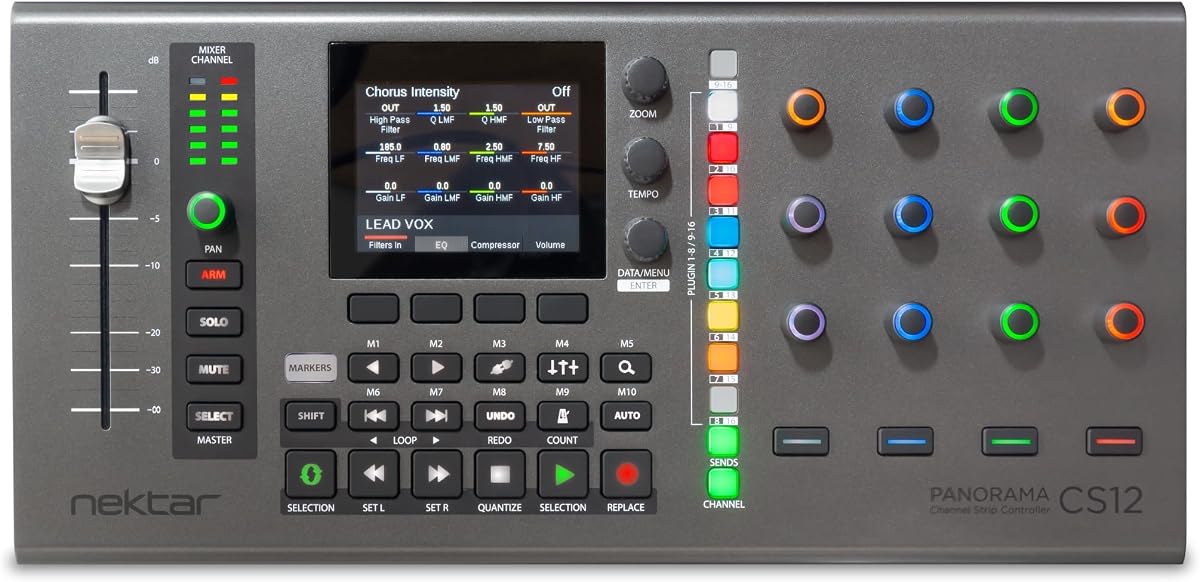
The Nektar Panorama CS12 is not a conventional audio-processing channel strip. It is a channel-strip plug-in controller with DAW integration, a 3.5-inch TFT display, a motorized fader, transport buttons, and rotary encoders. Its 3.9 rating places it in the middle of the list, but its purpose is distinct from the rack processors and mixers included here.
We may earn a commission when you buy through this link, at no additional cost to you.
For a software-based studio, this controller can provide a more tactile relationship with the mixer or selected plug-in. The motorized fader supports precise level movement, the display provides visual feedback, and the transport controls reduce repeated keyboard and mouse actions. The rotary encoders are intended to make frequently used parameters easier to reach while a track or channel is active.
The key limitation is that the CS12 does not process audio itself. It needs a DAW, a compatible channel-strip plug-in, and an existing audio interface or recording system. Its effectiveness therefore depends heavily on software, mapping, and workflow. Compared with an analog rack strip, it offers less tactile sound-shaping and no standalone preamp, but it may provide a better bridge to a large collection of virtual processors.
Choose the CS12 for a software-first home studio that wants motorized control, visual feedback, and faster navigation. Skip it if your priority is a self-contained analog front end, immediate microphone gain control, or a signal path that can operate without a computer. It complements rather than replaces the other products in this guide.
A motorized fader gives virtual mixing a repeatable physical feel, while the TFT display can show the selected channel and its controls. This is especially useful when a project relies on many plug-ins and frequent navigation.
Dedicated transport buttons and rotary encoders reduce workflow interruptions. Their value is greatest when they are assigned to the parameters and actions used most often in the operator's DAW.
We may earn a commission when you buy through this link, at no additional cost to you.
The YAMAHA MG10XU is a 10-input stereo mixer with effects and a 4.6 rating. It is the most approachable way to record several sources at once in this guide, combining microphone and line preamps, three-band EQ, channel compressors, high-pass filters, digital effects, and USB connectivity in a compact desktop enclosure.
We may earn a commission when you buy through this link, at no additional cost to you.
Its discrete class A D PRE amplifiers use an inverted Darlington circuit, with the stated goal of delivering full bass and smooth, soaring highs. The three-band EQ and high-pass filters help clean up individual sources, while one-knob compressors make it easier to control loud guitars, tighten bass, add punch to a snare, or clean up vocals. The metal chassis is designed for impact resistance and portable use.
The limitation is that this is a mixer, not a single 1U rack channel strip. It has a limited number of physical channels and less elaborate routing than a modular recording console. Its size also makes it less convenient for a permanent studio rack. Conversely, those same qualities make it excellent for rehearsal rooms, mobile recording, podcast-style sessions, and small studios where one compact box must handle several sources.
The MG10XU is the best choice for a new recorder who wants preamps, EQ, compression, effects, and USB connectivity without assembling a collection of separate devices. It offers enough processing for solid demos and small productions, while the 4.6 rating supports its reputation as a dependable, approachable mixer. It is a broad solution where the dbx 286s and PreSonus STUDIOCHANNEL are more focused one-channel tools.
Ten inputs allow several microphones and instruments to be recorded without a rack of separate preamps. Built-in EQ, compression, and effects make the mixer useful for rehearsals, voice-over work, demos, and compact production setups.
One-knob compressors and three-band EQ controls help new operators establish a usable starting point quickly. The design does not replace careful gain staging, but it keeps essential processing within reach during a live session.
We may earn a commission when you buy through this link, at no additional cost to you.
The SSL Revival 4000 is an all-analog microphone channel strip inspired by the SSL 4000 Series and offered in a compact 1U format. Its 1 rating is the lowest among the products with a numerical score, while the brief product description focuses on the channel's signature analog sound and iconic design lineage.
We may earn a commission when you buy through this link, at no additional cost to you.
For listeners familiar with classic SSL consoles, the main attraction is the character of the 4000 Series channel concept in a smaller standalone processor. A fully analog path can be attractive for users who want to engage directly with the hardware and avoid software-based channel-strip emulation. The 1U format also makes the unit practical for studios with limited rack space.
However, the supplied information gives very few detailed specifications, and the 1 rating signals a need for careful verification. The available facts do not establish the exact preamp topology, EQ range, compressor controls, input format, or output routing. It would be a mistake to assume that the 4000 Series name guarantees an identical recreation of a full console channel. Recent customer feedback, warranty coverage, and the final contents should be reviewed before purchase.
The Revival 4000 may appeal to an engineer who prioritizes SSL styling and compact analog hardware, but the evidence available here supports a cautious recommendation. Compare its documented controls with the Super 9000 or SiX, and check whether a more clearly specified channel strip better matches the required routing. Its name and design concept are compelling, yet customer feedback should carry more weight than the badge alone.
Drawing inspiration from the 4000 Series lets the product target users who recognize SSL's traditional console character. Packaging that sound into 1U can make the concept accessible to smaller studios, although buyers should verify the complete control layout.
Because the supplied description is brief, the most responsible buying step is a direct comparison of input, output, processing, and metering details. Recent owner feedback is particularly important for a product with a low aggregate rating.
We may earn a commission when you buy through this link, at no additional cost to you.
The Universal Audio LA-610 Mk II is a premium tube channel strip with a 5 rating. It combines a vacuum-tube microphone, instrument, and line preamp with an optical compressor, offering a focused signal path built around two classic recording concepts rather than a broad collection of modern processors.
We may earn a commission when you buy through this link, at no additional cost to you.
Tube amplification can contribute harmonic density and an audible sense of density when a source is driven appropriately. The optical compressor is designed to offer a smooth, musical response, making the unit particularly interesting for vocals, bass, and instruments where controlled gain reduction and stable tone are priorities. Supporting microphone, instrument, and line sources makes it more versatile than a microphone-only processor.
The tradeoff is specialization and scale. It does not offer the four distinct processing sections or external loop point of the dbx 286s, nor the dual preamp and sidechain options of the SSL Super 9000. The supplied description also does not enumerate every front-panel control, so users should confirm the operating details in the manual. As a premium option, it is best evaluated for sound character and signal quality rather than maximum feature count.
Choose the LA-610 Mk II for a serious studio seeking a renowned tube preamp and optical compressor in a dedicated processor. Its perfect 5 rating and established Universal Audio name make it a compelling high-end recommendation. It is less suitable for a learner who wants many processors, but more satisfying for an engineer who wants a small number of high-quality tools used with care.
The preamp provides a path for adding harmonic density and a classic analog response. It is most effective when the input level and source are matched carefully, allowing the operator to use the tube circuit without allowing level changes to obscure the recording decision.
The optical compressor gives the channel a focused dynamics tool. Rather than offering numerous detector or voicing choices, it centers the workflow around a single classic processor, which can be attractive to users who prefer fewer, more deliberate controls.
We may earn a commission when you buy through this link, at no additional cost to you.
The Neve 1073SPX-D is a USB audio interface and channel strip that combines a Class A preamp and EQ with computer connectivity. Its published features include 24-bit/192kHz conversion, an insert send and return, a headphone amplifier, and ADAT I/O, making it a bridge between a familiar channel-strip concept and a modern digital recording setup.
We may earn a commission when you buy through this link, at no additional cost to you.
Class A circuitry provides a recognizable technical approach to the preamplifier, while the USB connection allows the unit to record directly into a computer. The insert send and return offers a way to incorporate another processor, and ADAT I/O provides a path for additional digital channels. These features make the unit more integrated than a standalone rack strip paired with a basic interface.
It is not a conventional one-rack-space processor with a broad set of front-panel dynamics tools, and the available data does not provide a numeric customer rating. Buyers should therefore review recent feedback, confirm the detailed I/O layout, and check computer compatibility for their operating system and DAW. The 24-bit/192kHz specification and ADAT connection are useful, but they do not eliminate the need to verify the complete signal path.
The 1073SPX-D is most appropriate for a project studio that wants Neve-style channel-strip character and direct computer recording without assembling a separate interface. It is less compelling when a comprehensive standalone rack processor is required. With careful compatibility checks, it can serve as a central recording front end and a useful bridge between analog processing and a DAW.
USB connectivity turns the channel strip into a self-contained recording front end. That simplifies the signal chain for a home or project studio and makes it easier to capture vocal and instrument performances directly in a DAW.
ADAT I/O can extend the interface's digital channel count, while the insert point adds an external processing route. Together, these features make the unit useful for sessions that may grow beyond a single mic preamp and a small complement of line inputs.
We may earn a commission when you buy through this link, at no additional cost to you.
The right channel strip depends on the source, room, recording format, and level of control required. Compare signal flow, input flexibility, processing quality, and integration before choosing a model.
A rack channel strip is suited to a permanent studio installation, while a compact mixer works well for mobile recording, rehearsals, and small rooms. A USB interface is appropriate when computer recording is central, and a DAW controller is useful when the audio processing already exists in software. The physical format should follow the workflow rather than simply the number of features.
The preamp is the first major source of a channel strip's identity. Examine whether the product supports microphones, line-level material, and instruments, and whether phantom power, input impedance, padding, and polarity controls are available. A clean preamp is essential, while a tube or saturating design may offer harmonic character that is useful with the right microphone and gain strategy.
A versatile strip may include a de-esser, enhancer, parametric mids, switchable curves, or multiple compressor types. More controls are not automatically better. Consider whether the EQ offers enough resolution for the source, whether the compressor has useful threshold and timing controls, and whether these processes can be bypassed for comparison.
Check the input and output connectors, balanced and unbalanced support, insert points, headphone monitoring, USB compatibility, and digital expansion. A channel strip with an external insert can extend its usefulness, while a model with ADAT or multiple digital outputs can serve a larger session. Confirm that every connection matches the existing studio equipment.
Useful status LEDs and metering can reveal clipping, excessive gain reduction, or a processor being bypassed. Monitoring is equally important when a channel strip also serves as an interface. Consider output control, headphone amplification, metering clarity, and whether the unit offers enough information to diagnose a signal without interrupting the recording.
The surrounding room, microphone, acoustic treatment, and source level often influence the recording more than the final processor. A channel strip cannot repair a poor performance, eliminate unavoidable room reflections, or create a balanced mix by itself. Use it to capture a clean, repeatable signal and make controlled tonal or dynamic changes rather than compensating for every problem in one stage.
A 1U rack format matters when rack space is limited, while a rugged metal chassis is valuable for mobile use. Software users may value a motorized fader and display more than analog switches. Check recall, build quality, physical controls, and the amount of setup required against the way the product will actually be operated each week.
Customer ratings can reveal recurring concerns, but they should be interpreted carefully. New products may have few reviews, while a specialized unit can attract a small number of highly opinionated users. Read recent feedback, examine the amount of customer history, verify the delivered configuration, and compare any reported issue with the manufacturer's documented specifications.
Begin with proper gain staging. Set the preamp and source level conservatively, confirm that the signal is reaching the channel cleanly, and leave adequate headroom for peaks. Engage processing one stage at a time so each gain reduction or tonal change can be heard independently rather than hidden inside a dense chain.
Build a repeatable starting point for each important source, such as lead vocals, bass, snare, and acoustic guitar. Record notes that describe the microphone, preamp gain, EQ settings, compression amount, and any insert equipment used. This documentation becomes more valuable than exact dial positions when analog controls are involved.
Power the unit according to its manual, maintain ventilation, and keep controls and connectors free from dust. Do not repeatedly power-cycle a unit to solve an audio problem, and route signal or headphone outputs according to the manufacturer's guidance. Regular inspection of cables and balanced connections helps prevent faults that can masquerade as preamp or EQ problems.
A recording channel strip combines several stages that are commonly used to shape a source. Depending on the model, it may include a microphone preamp, line or instrument input, EQ, compressor, gate, de-esser, insert point, routing, and output control. Its purpose is to give one source a repeatable path from input to mix or recording output.
It depends on the work. An audio interface is usually sufficient for clean digital capture, while a channel strip adds dedicated tone and dynamics processing. Users who want repeatable vocal or instrument treatments, hardware inserts, and fewer software plug-ins may benefit from a standalone strip. A USB channel strip can provide both functions in one box.
One strip can process only one mono source at a time, so a multi-microphone session usually requires additional preamp channels. Some mixers and interfaces combine several preamps, EQ sections, and outputs in one enclosure. The best choice depends on the number of simultaneous sources and how much individual processing each one requires.
No. A tube preamp can add pleasing harmonic density and perceived warmth, but the result depends on the microphone, source, gain level, and taste. A clean preamp may be preferable for a bright vocal or a detailed acoustic instrument. Compare the tube and clean modes, if both are available, while keeping level differences from influencing the decision.
Not necessarily. Some sources benefit from a dedicated compressor, while others may sound better with only gain staging and EQ. Drums often need different treatment for kick, snare, and overheads, and bass can require careful low-end control. Use compression only when the source and desired dynamics justify it.
Use a balanced line-level connection whenever the devices support it. Connect the channel-strip output to an available interface input, then route that input in the DAW. If an external processor is needed, use the strip's insert send and return. Check output levels carefully to avoid overloading the interface or introducing unwanted noise.
EQ changes the relative level of different frequencies, while compression reduces dynamic range according to a threshold and ratio. A de-esser is a specialized compressor that targets harsh high-frequency energy, often associated with sibilance in vocals. These processors solve different problems and are usually used in a deliberate order.
A well-designed mixer can produce excellent recordings, especially in a controlled room with suitable microphones and performers. Professional use also depends on preamp performance, noise, connectivity, monitoring, and workflow rather than appearance alone. Confirm the published specifications, recent owner feedback, and return options before relying on a mixer for important sessions.
The dbx 286s is the most complete conventional pick, combining a microphone and line preamp with compression, de-essing, enhancement, gating, metering, and an external insert. The Yamaha MG10XU serves a different purpose as an approachable all-in-one mixer, while the Universal Audio LA-610 Mk II offers premium tube preamplification and optical compression.
Prioritize the signal path that matches the recording environment. A rack strip supports permanent studio expansion, a mixer simplifies portable and small-room sessions, a USB interface connects directly to a computer, and a DAW controller improves software control. Input flexibility, useful processing, reliable routing, and the ability to make repeatable decisions matter more than a long feature list.
Before finalizing a choice, verify the current product configuration, technical specifications, compatibility, warranty information, and recent customer feedback. Recording gear works best when its strengths match the source and the operator's workflow, so make sure the selected channel strip can deliver the gain, tone, dynamics, and monitoring needed for the intended sessions.