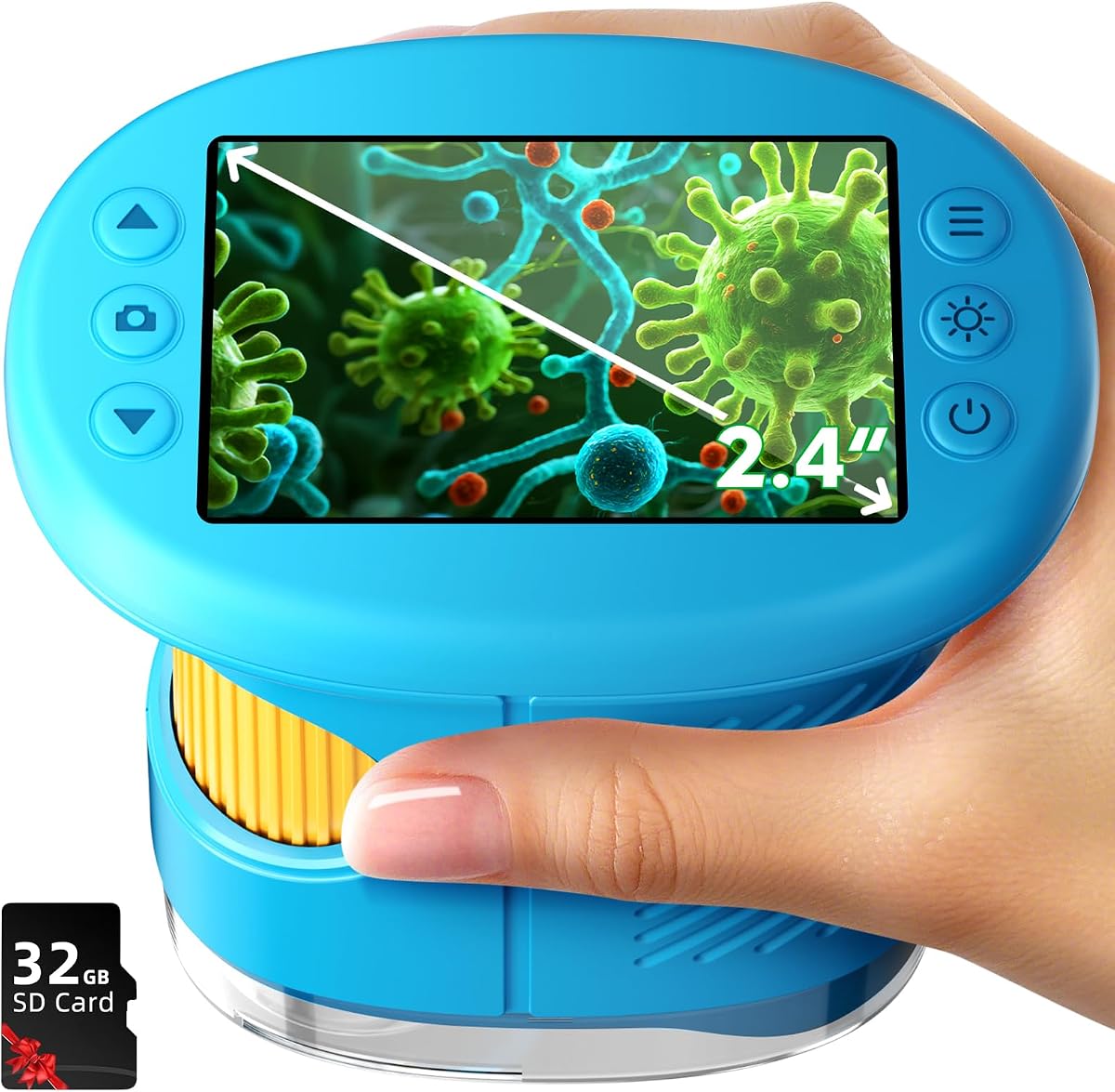
Odatay 4K Kids Microscope
4.5Editor score
On-device 2.4-inch screen
200X to 1000X magnification
Complete 32GB card kit
A digital microscope for studying insects can reveal antennae, wing scales, segmented bodies, and other details that are difficult to appreciate with the naked eye. The most useful models combine suitable magnification, even illumination, clear imaging, and a screen large enough for children or students to interpret what they see during field observations.
We compared all ten products by examining magnification ranges, camera resolution, display size, LED lighting, connectivity, storage, portability, power options, and included accessories. The list covers handheld microscopes for young learners, Wi-Fi and USB models for phones and computers, and larger multi-lens systems for adults, classrooms, and more structured biological observation.
Each review identifies the circumstances in which a microscope makes the most sense, including outdoor bug hunting, home learning, specimen documentation, soldering, coin inspection, or more advanced laboratory-style work. Product details and availability can change, so confirm current specifications, device compatibility, included accessories, and prices before purchasing.
4.5Editor score
4.5Editor score

4.4Editor score
As an Amazon Associate we earn from qualifying purchases.
This side-by-side overview highlights the practical differences among compact kid-friendly microscopes, wireless handheld cameras, and larger multi-lens systems designed for adult observation, classroom demonstrations, and professional-style inspection work.




The Skybasic Wireless Digital Microscope is a 50X-1000X handheld unit designed for casual study of insects, plants, minerals, and small everyday objects. It earns a 4.2 rating and stands out for offering both Wi-Fi and USB operation, giving users a choice between a phone or tablet display and a connected computer workflow.
We may earn a commission when you buy through this link, at no additional cost to you.
Its 2MP CMOS sensor captures images and video, with 1920×1080 resolution available for smartphone use and 720P for computer operation. Eight adjustable LEDs help expose surface texture and body features, while one-button photo and video controls make it practical for children who need a simple way to document discoveries. The supplied bracket and base help maintain more consistent distance from small specimens.
There are important limitations to consider. This is described as a fixed-focus magnifying device rather than a traditional laboratory microscope, and sharpness depends on keeping the lens between 3 and 60 millimeters from the object. Software installation, camera permissions, and computer settings can require a little setup, and the physical on-device controls are primarily intended for Wi-Fi operation.
It is a sensible recommendation for families, casual observers, and travelers who want to inspect insects without buying a large microscope. Anyone seeking a self-contained display, laboratory slide support, or professional-grade specimen control should choose one of the more specialized models in the guide.
Connecting to the microscope's Wi-Fi hotspot and opening the Max-see app turns a phone into a large viewing screen. This arrangement is particularly useful outdoors because the device stays lightweight while the image can be enlarged, captured, and reviewed immediately.
The eight LEDs and 3-60 millimeter working range can help reveal antennae, legs, and wing patterns, but the image will soften if the lens is too far from the specimen. Stable positioning and a small working distance produce more useful insect details.
We may earn a commission when you buy through this link, at no additional cost to you.
The Odatay 4K microscope combines a 200X-1000X magnification range, a 4K camera, and a 2.4-inch screen in a child-oriented handheld package. Its 4.5 rating reflects a balanced combination of features, and the long-distance setting makes it easier to begin with a whole insect before moving closer to inspect details.
We may earn a commission when you buy through this link, at no additional cost to you.
The microscope supports photo taking, video recording, browsing, and deleting directly on the device. A 32GB TF card, 12 prepared slides, data cable, lanyard, viewing cover, and protective silicone case create a ready-to-use educational kit. Eight built-in LEDs with three brightness levels help control illumination, while a tripod hole and low weight support steady outdoor and classroom use.
Its limitations follow from its child-focused design. It does not offer the extensive device compatibility of the Wi-Fi models, and its screen is smaller than those found on more advanced handheld units. The listed 200X-1000X range also gives it less flexibility than the multi-lens systems that include dedicated biological optics.
For parents, teachers, and young explorers, this is an excellent entry point. It is particularly well suited to backyard insects, classroom demonstrations, travel, and independent discovery because the necessary storage and basic accessories are already included.
The included card, prepared slides, viewing accessories, and protective case reduce the need to assemble a separate kit. A student can collect an observation, save a photograph or clip, and organize the material for a later school project or science-fair presentation.
The lowest magnification level is useful for locating an insect and understanding its overall shape. Increasing magnification afterward lets young observers concentrate on legs, wing veins, body segmentation, and other structures without beginning with an unusably close view.
We may earn a commission when you buy through this link, at no additional cost to you.
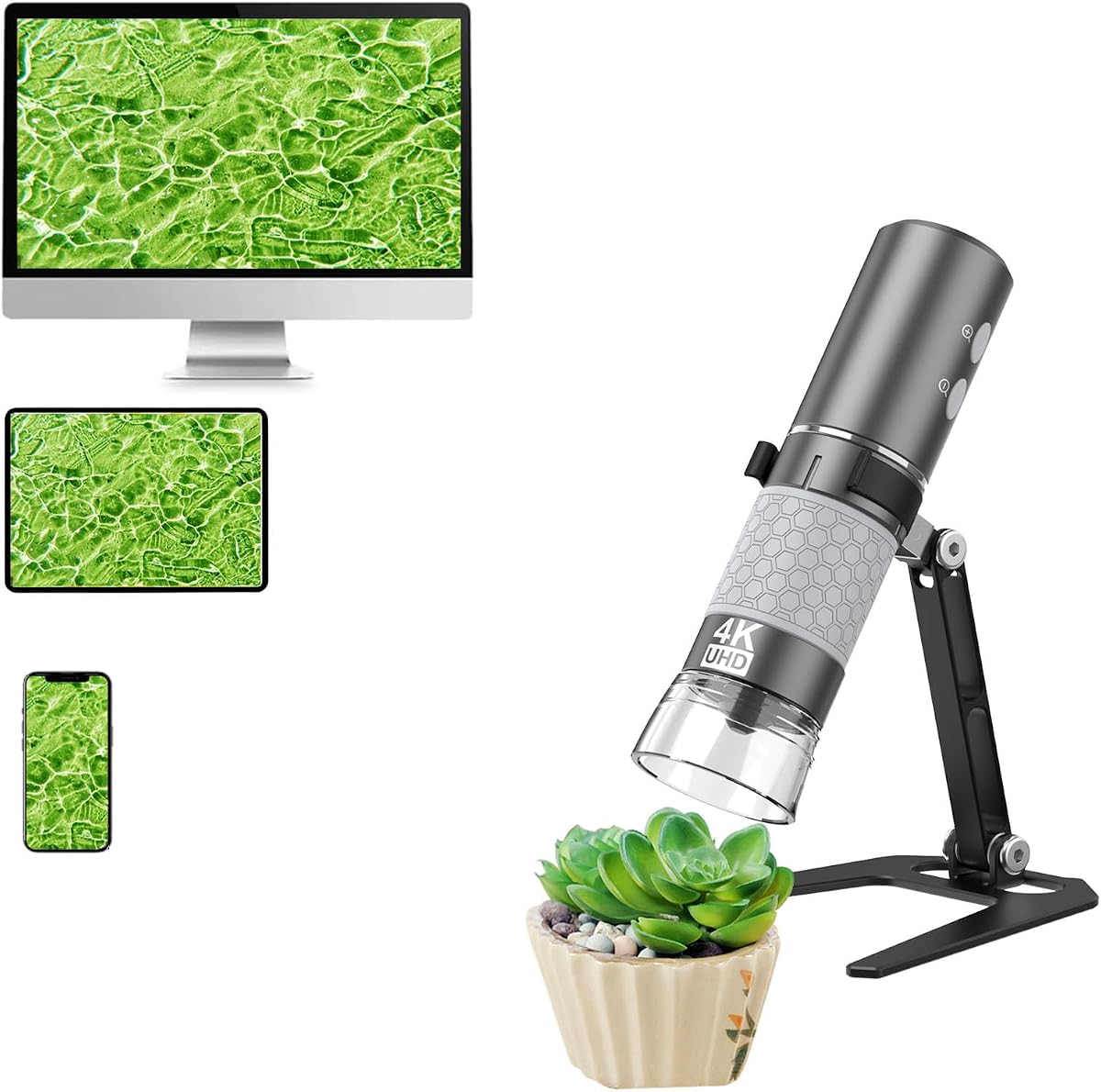
The WiFi Digital Microscope is a well-rounded 50X-1000X option for insect observation, with a 4K camera, eight adjustable LEDs, and both wireless and wired operation. It receives a 4.5 rating and offers a strong combination of image quality, portability, and compatibility across phones, tablets, and major desktop operating systems.
We may earn a commission when you buy through this link, at no additional cost to you.
Its 3840×2160 resolution can provide detailed views, although the final image quality is limited when a connected screen cannot display 4K. The upgraded stand rotates through 180 degrees and has an anti-slip base, while handheld operation remains possible. A stated four-hour battery life gives it more freedom for trails, schoolyards, and extended nature walks than many compact alternatives.
The trade-off is dependence on a separate screen and appropriate software. Users must connect through Wi-Fi or USB, and controls work differently across device ecosystems. The zoom buttons are listed as compatible with iPhone, iPad, Android, Windows, Mac, and Linux, but there is no built-in display for users who want immediate standalone viewing.
This is our most versatile recommendation for families, students, teachers, and casual naturalists. It handles live viewing, image capture, video recording, and outdoor fieldwork without the weight or complexity of a full laboratory microscope, while remaining substantially more flexible than a basic screen-equipped toy.
The rechargeable four-hour battery is one of the strongest reasons to choose this model for outdoor observation. It reduces dependence on a nearby outlet and leaves enough time to compare several specimens under different lighting and viewing distances.
The rotating bracket and anti-slip adhesive base help keep the camera steady over a live insect. A stable support is especially valuable when using high magnification, where small movements can make wing scales, hairs, and fine body patterns difficult to inspect.
We may earn a commission when you buy through this link, at no additional cost to you.
The Andonstar AD246S-M is a desktop-style digital microscope for adults who need more control than a compact handheld provides. It has a 4.5 rating, supports 2160P video and HDMI output, and includes three interchangeable lenses with distinct roles for biological slides, broad object views, and detailed work.
We may earn a commission when you buy through this link, at no additional cost to you.
Lens D is intended for biological slides, Lens A can cover whole coins, plants, and stones, and Lens L is designed for soldering and electronics repair. The metal boom-arm stand is adjustable in multiple directions and at multiple angles, reducing movement during detailed observation. A 32GB Micro SD card, remote control, prepared slides, tweezers, an observation box, and measurement software round out the package.
This microscope is not as convenient for casual backyard collecting as a pocket model. It requires space, a stable tabletop, and attention to lens selection and working distance. Digital magnification varies by lens and display output, so a large headline magnification figure should not be treated as the only measure of image quality.
It is a strong choice for an adult hobbyist, teacher preparing demonstrations, or home laboratory that wants one system for insects, prepared slides, coins, and repair work. The dedicated biological lens and stable stand make it more purpose-built for structured observation than the general-purpose handheld options.
The biggest advantage is the ability to change the optical approach rather than relying only on digital zoom. That makes the system more adaptable when an insect wing needs close examination, a small specimen needs a broader field, or a non-biological task requires a working distance.
HDMI output lets the image move to a larger monitor, while the Windows measurement software can document length and area and capture stills or video. These features support organized observation, teaching displays, and repeatable comparisons between specimens.
We may earn a commission when you buy through this link, at no additional cost to you.
The 1000X Kids Handheld Digital Microscope is designed to make close observation approachable for children. It combines optical and digital magnification, a 2MP camera, a 2.0-inch IPS display, manual focusing, and eight LEDs in a lightweight body made from smooth ABS plastic.
We may earn a commission when you buy through this link, at no additional cost to you.
Three brightness levels, a light diffuser, and an anti-shake design help maintain visibility when examining insects or plant material. Internal storage can hold more than 200 high-resolution photographs or AVI video clips, and files can be transferred to Windows or Mac systems through USB. The rechargeable 600mAh battery supports approximately two hours of use.
Some advertised performance details come from the manufacturer rather than independent testing, including the stated ease of child operation and reported user feedback. The 2-inch screen is also smaller than the displays on the Odatay and BEAVERLAB models. Users should remember that combined optical and digital magnification does not guarantee the same level of detail as a dedicated high-power biological lens.
Despite those qualifications, the microscope is a good fit for children who want a self-contained device with simple controls, internal photo storage, and enough magnification to inspect common backyard insects. It is less suitable for adults who require a large image, interchangeable optics, or laboratory-style measurement.
Oversized focus dials and a smooth, rounded casing are intended to make the device easier for small hands to operate. A lanyard also supports hands-free carrying during a walk or trip to a nature center.
Internal photo and video storage gives young scientists a way to preserve observations without needing a separate device during the expedition. Later USB transfers can turn those captures into a digital project, class presentation, or personal discovery collection.
We may earn a commission when you buy through this link, at no additional cost to you.
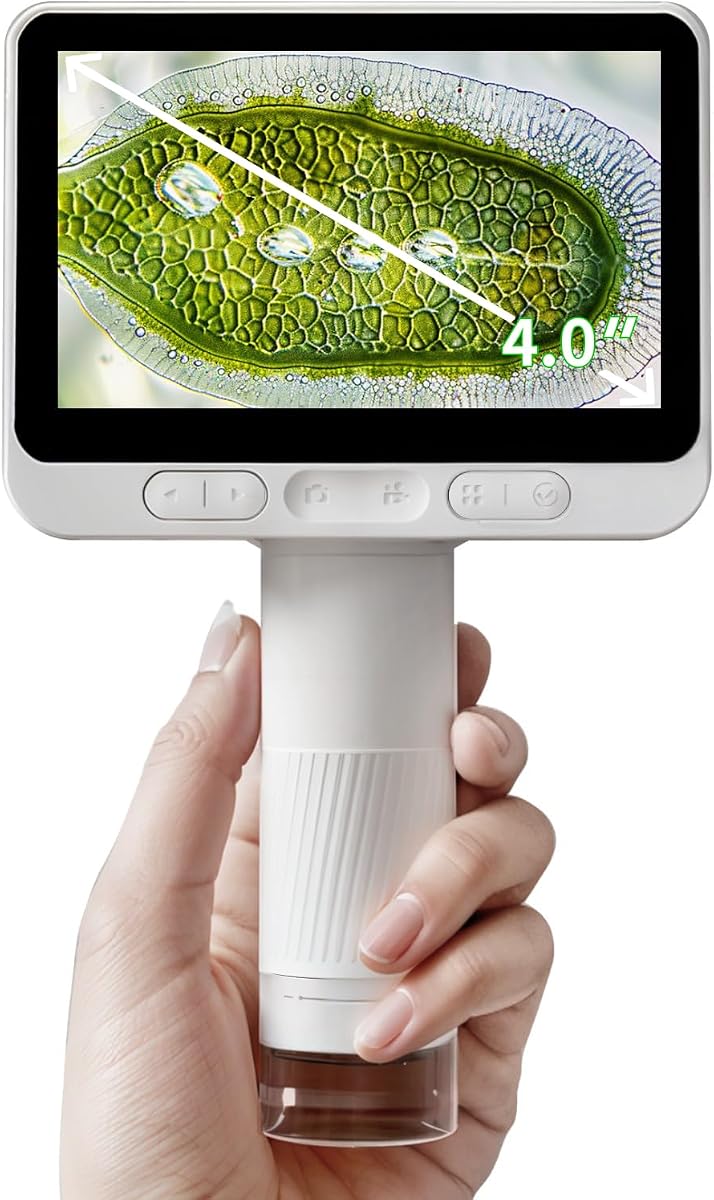
The BEAVERLAB Finder 4.0 receives the highest product rating in this group, at 4.6. Its defining feature is a 4.0-inch IPS display paired with 100X-1600X magnification and 1920×1080 imaging. That combination makes it especially attractive for children who need a large screen to examine insects, leaves, coins, fabric fibers, and other small subjects.
We may earn a commission when you buy through this link, at no additional cost to you.
The 2MP CMOS sensor records full-HD photographs and video. A built-in hotspot allows the captured material to be uploaded to a phone for sharing, while eight adjustable lights help reveal details under different conditions. The handheld format remains compact enough for an on-the-go nature investigation.
The tradeoff is that the specification sheet does not mention internal photo or video storage. Users may need to rely on the hotspot workflow for transferring images, and the product is explicitly positioned for children rather than adult laboratory users. The largest screen helps visibility, but the 2MP sensor does not equal the higher-resolution imaging offered by some competing models.
For families seeking a large, approachable display and a high magnification ceiling, BEAVERLAB is one of the strongest choices. It is especially good for educational insect hunts where children can examine a specimen together and then transfer their discoveries to a mobile device.
The 4.0-inch IPS screen is unusually large for a pocket microscope intended for children. It allows an adult and child to examine the same live image together, which can make identification and discussion easier than looking through a narrow eyepiece.
The built-in hotspot provides a straightforward route for transferring observations to a phone. This is useful for documenting an insect discovery, creating a nature collection, or sharing a surprising image with family members and classmates.
We may earn a commission when you buy through this link, at no additional cost to you.
The 1000X Digital Handheld Microscope is a compact outdoor-oriented option for children and beginners. It offers 100X-1000X magnification, a 2MP camera, a 2-inch color display, eight adjustable LEDs, and a 600mAh rechargeable battery. Its 4.4 rating reflects a useful balance of portability and functionality.
We may earn a commission when you buy through this link, at no additional cost to you.
A textured oversized focus wheel is designed for small fingers, while the stabilization structure helps keep live images steady. Four brightness levels and an anti-glare diffuser support observations in shaded or bright environments. Internal storage can hold more than 200 photos and AVI videos, and the included USB-C cable supports transfers to Windows and Mac computers.
Its main limitations are the small display and 2MP imaging, both of which are modest next to 4K cameras and 4-inch screens. Statements about children mastering the controls and stability are based on manufacturer testing, so buyers should judge those claims as design goals rather than independent conclusions. The 200-gram weight remains suitable for pockets and small bags.
This microscope is a good option for a child who wants to explore outdoors without managing apps or relying on a phone. The self-contained screen, integrated storage, and simple lighting controls make it convenient for backyard bug watching, museum visits, camping, and introductory STEM activities.
Combining a screen, focus control, illumination, storage, and rechargeable battery removes most of the setup associated with Wi-Fi microscopes. A child can pick it up, inspect a specimen, save the result, and continue exploring without adult technical assistance.
The four brightness settings make it possible to adapt to dark soil, shaded leaves, and bright outdoor surfaces. The diffuser also helps reduce harsh reflections that can obscure fine wing membranes or body hairs.
We may earn a commission when you buy through this link, at no additional cost to you.
The Elikliv EM4K-AF is the most technically advanced desktop-style option in the list, with a 4.4 rating, autofocus, a large 8-inch IPS display, 4K video, and up to 2000X magnification. Its focus on clear inspection also makes it suitable for adults, laboratories, classrooms, and detailed technical work beyond insects.
We may earn a commission when you buy through this link, at no additional cost to you.
AI-assisted autofocus continually evaluates image clarity and adjusts focus, including when the subject moves. The fast time-of-flight sensor is advertised as making focal adjustments in about two seconds. Image capture reaches 52MP, video is 3840×2160, and the 1280×800 screen offers a wide viewing angle. HDMI and USB outputs can extend the display to another monitor.
Other advanced functions include freeze-frame comparison, split-screen viewing, a smart controller, a 16GB card, and a built-in rechargeable battery. The broad 10-inch stand has an extendable section and a stable base, helping position the camera over coins, specimens, or workbench projects.
This is the premium recommendation for users who value reliable focus, a large image, and smooth operation more than minimal size. It is less appropriate for children or casual travel, but it offers a much more polished and controlled way to examine an insect, compare samples, and document findings.
Manual focusing can be frustrating when an insect moves or when a sample sits at an awkward height. The EM4K-AF continuously assesses clarity and refocuses, allowing the user to concentrate on the specimen rather than repeatedly adjusting the working distance.
Freeze and split-screen functions support side-by-side examination of separate images or observations. Combined with 4K recording, 52MP stills, external outputs, and 16GB storage, these tools make the microscope practical for teaching, comparison work, and organized documentation.
We may earn a commission when you buy through this link, at no additional cost to you.
The Ninyoon 4K WiFi Microscope delivers 3840×2160 imaging in a compact 50X-1000X handheld format. It has a 4.2 rating and supports wireless operation with iOS, Android, iPad, and tablets, plus wired use across Windows, Mac, Linux, and Chrome OS.
We may earn a commission when you buy through this link, at no additional cost to you.
Wide-angle and telephoto viewing options help adapt the microscope to different subjects. The wider view is useful for fitting an entire coin or insect into frame, while the longer-distance option can keep the camera away from a work area or make framing a specimen easier. The device can also be used with phones and computers for image capture and wireless sharing.
There is no built-in viewing screen, so the product depends entirely on another display. The on-device zoom buttons work with iPhone, iPad, and Android but not with Windows, Mac, Chrome, or Linux, which may produce a less consistent control experience depending on the user's setup. Actual visible resolution also depends on the connected display.
This is a good choice for users with a compatible phone, tablet, or computer who want 4K wireless detail and flexible working distances. It is less convenient than screen-equipped models for children and less structured than the multi-lens desktop systems for laboratory-style study.
The wide-angle and telephoto choices help balance coverage with working distance. This is useful when an insect is delicate, when a full specimen should fit on screen, or when the user needs more room around the subject than a close handheld position allows.
Broad compatibility makes the microscope useful in mixed-device homes and classrooms. A user can explore with a phone, share the image, and connect by USB when a computer is the more convenient way to record or organize observations.
We may earn a commission when you buy through this link, at no additional cost to you.
The Andonstar AD266S is the most specialized and highest-magnification microscope in the guide. It supports up to 5000X magnification, 2160P UHD video, HDMI output, five lens options, and a 7-inch monitor. Its 4.3 rating reflects a feature-rich system aimed at adults, students, laboratories, hobbyists, and detailed inspection work.
We may earn a commission when you buy through this link, at no additional cost to you.
Lens A provides broad views of coins, plants, and stones. Lenses B, C, and M are assigned to biological slides, while Lens L supports soldering and repair. An X-Y movable stage makes it easier to reposition specimens, and the integrated metal stand is designed to minimize shake. External lights serve the broad and soldering lenses, while bottom lighting supports the high-magnification biological sets.
The system requires a permanent work area and deliberate setup. Its many lenses, lighting positions, stage controls, and output options create a learning curve compared with a pocket microscope. High magnification also requires careful focusing and a stable specimen, and a large headline magnification figure should be considered alongside lens type and working distance.
For an adult who wants to move from casual insect viewing to prepared slides, electronics inspection, and coin study, this is the most expandable choice in the list. The included 32GB card, remote, cables, biological slides, tweezers, backdrop boards, and display make it a comprehensive desktop system.
Five lenses cover subjects that would otherwise require separate equipment. Biological lens sets support prepared slides, Lens A frames larger objects, and Lens L provides a working distance suited to soldering and repair tasks.
The X-Y movable stage allows controlled movement across a specimen without repeatedly repositioning the microscope. This is especially useful for scanning a small insect or slide and comparing different regions at high magnification.
We may earn a commission when you buy through this link, at no additional cost to you.
The most useful digital microscope for an insect observation depends on who will use it, where it will be used, and whether the goal is informal exploration, photography, prepared slides, or detailed technical inspection. Magnification, image quality, illumination, focus control, screen size, and portability should be considered together.
A broad 50X-1000X or 100X-1600X range is useful for moving from a whole-insect view to close details, while multi-lens systems offer distinct optical ranges for broad subjects, biological slides, and detailed work. Digital zoom can enlarge an image, but it does not create the same optical detail as moving closer with an appropriate lens. Users should compare minimum magnification, maximum magnification, lens selection, and working distance rather than relying on one headline number.
A 2MP camera with 1080p video is adequate for casual learning and basic documentation, while 4K models provide a better foundation for fine texture, thin wings, and detailed screen presentations. Display resolution matters too, but a 4K microscope cannot display a full 4K image on a screen that lacks the necessary pixel density. On-device screens are convenient for children, whereas phone and tablet displays offer larger viewing areas and easy sharing.
Adjustable LED lights are essential because insects may be viewed on dark soil, pale leaves, inside stems, or under strong outdoor light. Eight LEDs and multiple brightness levels offer better control than a single fixed source, while a diffuser can reduce glare. Focus control is equally important: manual focusing provides direct control, autofocus is convenient for moving subjects, and fixed-focus operation is simplest but least precise.
A handheld microscope is convenient, but insect movement and high magnification make stability difficult. A bracket, tripod hole, anti-slip base, or desktop stand can keep the image steady enough to inspect body segments and wing details. The stand should also allow the working distance to change, because close views of small specimens need careful positioning. Larger desktop systems are less portable but generally provide a more consistent frame.
Wi-Fi models are convenient for phones and tablets, while USB connections support computers, file transfers, and sometimes measurement software. Compatibility lists should be checked against the user's actual devices and operating systems. Some microscopes require an application, camera permission, or a separate viewer, and physical controls may behave differently over Wi-Fi and USB. A built-in screen avoids this setup entirely and is often preferable for children.
Insect observations are more useful when they can be saved and organized. Internal storage or an included memory card supports immediate documentation, while USB or wireless transfer makes sharing easier. Rechargeable battery life determines whether a microscope can support a long walk, and a lanyard, tripod hole, or pocketable body improves portability. Compact models suit children and field exploration; desktop systems trade weight for greater stability and specialized accessories.
A child beginning an insect journal may value large controls, a built-in screen, safety certifications, prepared slides, and simple storage. An adult naturalist may prioritize wireless capture and a compact body. A classroom may need HDMI output, a remote control, and an observation box, while a more serious user may need dedicated biological lenses, a movable stage, measurement software, and higher optical magnification.
Begin with a clean, dry specimen and a safe observation area. For outdoor collecting, respect local rules, avoid handling protected species, and place an insect on a light surface or in a clear observation container. Before examining it, remove the microscope's protective film, install the required app, connect to the device, and confirm that photos and videos can be saved. Keep the lens clean and use a soft cloth rather than harsh chemicals.
Start at low magnification to locate the insect and determine which side or body region looks most interesting. Move gradually closer while watching the live image, then adjust focus and brightness. Use a stand or another stable support for detailed work, and keep the specimen from moving where possible. Capture a wider view for orientation, followed by close images or short videos of antennae, legs, wings, eyes, and body segmentation.
After the session, release the insect in a suitable place and wash your hands. Save images with useful names, organize them by species or observation date, and transfer them to a computer if the model uses external storage. Turn the microscope off when finished, wind the cable loosely, and store the device in a dry place. Recharge the battery periodically and avoid exposing the microscope to moisture, extreme heat, or impacts.
A broad range is most useful because a low setting helps frame the entire insect while a high setting reveals body and wing details. For casual outdoor work, 100X-1000X or 50X-1000X models cover many needs. Dedicated biological systems can offer more precise optical ranges, so actual lens quality and working distance matter as much as the maximum magnification number.
A digital microscope can reveal diagnostic features such as antennae, wing veins, body segmentation, and coloration. It is useful for making preliminary observations and documenting specimens, but identification may also require location, season, behavior, and other context. For uncertain or regulated species, consult an appropriate field guide or a qualified local identifier.
A built-in screen is most convenient for children, independent field use, and avoiding app or computer setup. Wi-Fi models that use a phone or tablet provide a much larger display and easier sharing. A desktop model with its own monitor is useful when stability, long sessions, or classroom presentation are the priority.
Yes, the listed models support still-image or video capture, although exact functions vary by device and connection method. Live movement is easier to study with autofocus or a stable handheld view. For sharp stills, position the insect carefully, steady the microscope, adjust focus, and use sufficient lighting before pressing the capture control.
No. Very high magnification narrows the field of view and makes focusing and stabilization more difficult. A useful microscope supports lower magnification for orientation and higher magnification for selected details. The best result comes from the right lens, controlled lighting, a manageable working distance, and a stable camera position.
Keep the insect in a clear, ventilated container with minimal handling, preferably only for a short observation period. Provide a clean light-colored background and avoid compressing delicate wings or legs. After viewing, return the insect to its environment, and use a prepared slide only when the specimen has been collected and preserved appropriately.
The listed compatibility ranges are broad but not universal, and the required application or computer viewer may vary. Check the operating-system list, download the latest software, grant camera access, and follow the setup instructions before relying on a device in the field. A model with internal storage and a built-in screen offers the fewest connection dependencies.
A stable stand, clear specimen container, small flashlight, specimen labels, and a notebook or digital storage system are the most useful basics. Prepared slides help young learners begin, while tweezers and an observation box support more organized handling of slides or small objects. Avoid tools that could crush or damage a live insect.
The WiFi 4K Digital Microscope is the most versatile overall choice because it combines detailed 4K imaging, eight adjustable LEDs, broad device compatibility, a useful battery, and a portable format. The Odatay 4K Kids Microscope is the strongest budget-oriented alternative for young explorers who need a self-contained screen and complete accessory kit, while the Elikliv EM4K-AF is the premium selection for automatic focusing, a large display, and advanced comparison features.
Before buying, consider the user first. Families may prioritize safe construction, simple controls, and internal storage; casual naturalists may prefer wireless phone viewing; and adults or teachers may need a stable stand, larger display, interchangeable biological lenses, measurements, or HDMI output. The highest magnification alone is not the most useful measure of a microscope's value.
Finally, check the current specifications, device compatibility, included accessories, warranty terms, and price before ordering. Product configurations and software requirements can change, and current pricing may differ from earlier listings. Choose the model that matches the intended level of insect study, then verify the essential features on the current product page.