
Dell Latitude 7220 Rugged
4.3Editor score
1000-nit outdoor display
Glove-capable touchscreen
Gorilla Glass protection
Core i5-8365U processor
Windows 11 Pro license
Rugged Windows 11 tablets combine familiar desktop software with a durable, portable form factor built for warehouses, construction sites, vehicles, field service, classrooms, and other demanding environments. The right model should withstand dust, moisture, drops, and daily wear while remaining comfortable to carry and simple to operate.
We compared these ten tablets using the information supplied for each listing, focusing on Windows edition, processor, memory, storage, display, battery, connectivity, ports, scanner support, ingress protection, and warranty coverage. The list includes compact handheld models, larger 10.1-inch and 11.6-inch tablets, and business-focused devices with LTE or barcode capabilities.
Each review explains the strongest reasons to consider a particular tablet and the compromises worth considering. Ratings reflect the supplied marketplace feedback, while durability claims and specifications are based on the listed product information. Availability, configuration details, promotions, and prices can change, so confirm the current listing before purchasing.
4.3Editor score

5.0Editor score

4.0Editor score
As an Amazon Associate we earn from qualifying purchases.
The table below compares screen size, core performance specifications, connectivity, and the most important rugged or enterprise features across all ten tablets, making it easier to identify the model suited to a particular workflow.


The Fusion5 256GB Rugged Tablet is a balanced Windows 11 machine for users who need more durability than a conventional tablet without moving to a large enterprise handheld. It carries a 4.0 rating and stands out for its 12GB of RAM, 256GB SSD, Intel 13th Gen N100 processor, 500-nit display, protected ports, and included hands-free strap and stand.
We may earn a commission when you buy through this link, at no additional cost to you.
Its 10.1-inch 1920×1200 IPS touchscreen is protected by 2.5D G+G glass and works well for forms, work orders, browsing, inventory review, and ordinary Windows applications. Dual Full HD cameras, dual speakers, dual-band WiFi, and Bluetooth 5.0 make it a versatile connected device. Covered Micro HDMI, USB Type-C, and USB 3.0 ports add practical protection in dusty or frequently handled environments.
The main compromise is that this is a general-purpose rugged tablet rather than a dedicated data-capture computer. There is no integrated barcode scanner, RFID reader, or specialized enterprise handheld keyboard, so inventory teams needing constant scanning should look at the Vanquisher or Arrvel instead. Its 256GB storage is also lower than the closely related 512GB Fusion5 configurations.
This model is a strong recommendation for field technicians, construction supervisors, education users, warehouse staff, and mobile teams that need a familiar Windows interface in a travel-friendly form. The 24-month warranty, accidental-damage coverage, 6000mAh battery, expandable storage, and included 30W charger make it especially easy to justify as an all-around work tablet.
The 12GB RAM configuration provides more headroom for multitasking than many entry-level rugged tablets, while the N100 processor is designed for practical productivity applications. A 256GB SSD keeps everyday files responsive and the available MicroSD expansion provides a straightforward way to add capacity for photos, offline maps, or media.
Shockproof and dustproof construction addresses the realities of mobile use, while covered ports help limit dust and impact exposure. The hands-free strap supports one-handed carrying, and the back mount allows the tablet to be positioned as a hands-free workstation when that is more convenient.
We may earn a commission when you buy through this link, at no additional cost to you.
The Fusion5 512GB Rugged Tablet shares the same well-rounded foundation as the 256GB model but provides substantially more internal storage. Its 4.0 rating reflects a capable 10.1-inch Windows 11 Pro tablet with 12GB RAM, a 512GB SSD, an Intel 13th Gen N100 processor, a 500-nit touchscreen, and a 6000mAh battery.
We may earn a commission when you buy through this link, at no additional cost to you.
The larger SSD is useful for field teams that retain documents, photographs, offline maps, diagnostic files, or local copies of enterprise software on the device. Additional 512GB MicroSD expansion is listed, while protected Micro HDMI, USB Type-C, and USB 3.0 ports help preserve frequently used connections. WiFi, Bluetooth, front and rear cameras, speakers, strap, stand, and charger round out a practical package.
Its main limitation is that the 512GB capacity does not change the processor, display, or physical design, so buyers should determine whether they genuinely need the extra internal space. Like the 256GB version, it is not equipped with an integrated barcode scanner, RFID reader, or dedicated enterprise data-capture controls. Those specialized features may justify choosing another model.
The 512GB configuration is ideal for organizations that want local data capacity without carrying a separate drive or relying constantly on network storage. For mobile inspection, education, logistics administration, and field documentation, it offers a practical balance of endurance, expansion, screen quality, and Windows productivity.
A 512GB SSD gives users more room to retain local working sets, which can be valuable when connectivity is inconsistent. It can reduce reliance on cloud transfers and make large collections of inspection photos, forms, maps, and project documents easier to keep on the device.
Windows 11 Professional supports the kind of broad software compatibility many organizations expect from a PC. The 12GB RAM helps when several browser tabs and business applications remain open, although demanding workloads should be matched carefully to the N100 processor's capabilities.
We may earn a commission when you buy through this link, at no additional cost to you.
This Fusion5 512GB Rugged Tablet is another well-equipped general-purpose configuration, combining Windows 11 Professional, 12GB RAM, and a 512GB SSD with a 10.1-inch Full HD IPS display. Its 3.9 rating remains competitive within the group and reflects a tablet aimed at buyers who prioritize storage, durability, and everyday performance.
We may earn a commission when you buy through this link, at no additional cost to you.
The Intel 13th Gen N100 chip provides a modern platform for office applications, communication tools, web-based systems, and routine multitasking. A 6000mAh battery, included 30W Type-C charger, dual-band WiFi, Bluetooth 5.0, and dual cameras support mobile work, while protected ports help guard frequently used connections. The hands-free strap and adjustable back mount improve handling.
Because many core specifications match the other Fusion5 listings, discerning buyers should compare the current configurations and availability carefully. The main functional limitation remains the absence of a dedicated barcode scanner, RFID reader, or highly visible outdoor screen. Teams performing continuous warehouse scanning or working under intense direct sunlight may receive more value from a specialized tablet.
This model remains well suited to classroom deployments, construction documentation, mobile maintenance, inventory administration away from scanning stations, and general business travel. Its combination of storage, memory, expandable storage, a full-size Windows interface, and accidental-damage coverage gives it broad appeal without the complexity of a highly specialized enterprise device.
The 12GB RAM and 512GB SSD create a comfortable baseline for browser-based work, office documents, and several simultaneous applications. MicroSD expansion adds flexibility without requiring users to sacrifice the tablet's internal storage for large media files or offline reference material.
The 1920×1200 IPS panel delivers Full HD resolution, while 2.5D G+G glass protects the touch surface. At up to 500 nits, the display is brighter than many standard tablets, although the 700-nit Arrvel and 1000-nit Dell remain stronger options for intense outdoor use.
We may earn a commission when you buy through this link, at no additional cost to you.
The Vanquisher 6.5-inch Scanner Tablet is a purpose-built enterprise handheld with a 4.6 rating, Windows 11 IoT Enterprise OS, an integrated Honeywell N3680 scan engine, and a notably compact body. It targets warehouse, logistics, retail, point-of-sale, and manufacturing workflows where scanning matters more than large-screen media consumption.
We may earn a commission when you buy through this link, at no additional cost to you.
Professional 1D, 2D, and QR code reading covers common formats including UPC/EAN, Code 128, Code 39, Code 93, Interleaved 2 of 5, PDF417, Data Matrix, and QR codes. The device also includes 13.56MHz HF RFID, NFC, camera, GPS, WiFi, and Bluetooth. Its 20:9 TFT display is designed to provide a useful viewing area without the bulk of a full-size tablet.
Ruggedness is supported by IP65 water- and dust-proof sealing and a listed ability to withstand a 1.5-meter drop to a wooden floor. The trade-offs are 8GB RAM, 128GB storage, and a screen that may feel confined for spreadsheets, forms, or detailed inspection compared with 10.1-inch and 11.6-inch alternatives. Expansion is supported, but exact upgrade flexibility should be confirmed before purchase.
This is an excellent recommendation for organizations standardizing on Windows-based mobile applications and requiring reliable all-in-one data capture. Its scanner, RFID, NFC, and GPS integration reduces the need to carry multiple accessories. The included wall adapter, USB cable, handstrap, 18-month warranty, and lifetime technical and after-sales support add useful ownership benefits.
The Honeywell N3680 engine is the defining feature. It supports common 1D and 2D symbologies and is positioned for intensive data capture, making the tablet more specialized and potentially more useful than a standard Windows slate in a distribution center or retail operation.
The 6.5-inch format is easier to hold one-handed than a 10.1-inch tablet and supports mobile workflows that prioritize mobility. RFID, NFC, GPS, camera, wireless connectivity, and the handstrap create a consolidated enterprise tool rather than a basic tablet with a separate scanner.
We may earn a commission when you buy through this link, at no additional cost to you.
The HIGOLEPC J4105 Rugged Tablet is designed for field work where wireless connectivity, navigation, battery endurance, and a broad selection of ports matter. Its 3.6 rating is the lowest among the listed products, but the supplied specifications describe a practical Windows 11 Pro device with 4G LTE, GPS, an 8000mAh battery, WiFi 5, and Bluetooth 5.0.
We may earn a commission when you buy through this link, at no additional cost to you.
The tablet's high-strength plastic body is listed against MIL-STD-810G testing, with a 1.2-meter fall test, IP67 waterproofing, and dust, shock, and rain resistance. A large battery can support up to 10 hours of mobile work according to the listing. The 10.1-inch display is paired with HDMI 2.0, USB 3.0, USB Type-C 3.1, DB9 serial, headphone, and TF card connections.
Its Intel N4120 processor and 8GB of RAM are better suited to lightweight enterprise tasks than demanding desktop workloads, while 128GB of storage offers limited local capacity. The product description also mentions CPU and GPU throttling, which should be considered when expecting sustained heavy performance. No specialized barcode scanner is listed, despite the enterprise positioning.
The HIGOLEPC is a sensible option for fleet tracking, geological or construction work, mobile inspection, and teams needing LTE, GPS, serial connectivity, and a large battery in one device. The magnetic bottom charging connection and included dock add convenience for fixed setups. Buyers should validate application performance and accessory compatibility before standardizing the tablet across a large fleet.
Simultaneous 4G LTE and dual-band WiFi support is valuable when a job takes the user beyond reliable office networks. GPS adds location awareness for navigation, mapping, and field records, while Bluetooth provides another route for transferring information when a network is unavailable.
The DB9 serial port is especially useful for technicians who need to connect legacy equipment, while USB 3.0 and Type-C support modern peripherals. HDMI enables an external display, and the TF card slot provides an additional avenue for storage or offline data transfer.
We may earn a commission when you buy through this link, at no additional cost to you.
The Arrvel I17J Rugged Tablet is an enterprise-focused 10.1-inch Windows 11 Pro tablet built around the Honeywell N4680 scan engine. Its 5.0 rating is the highest in this group, and the combination of advanced scanning, a 700-nit display, IP65 protection, MIL-STD-810G construction, 4G LTE, and a removable battery makes it especially relevant to warehouse and logistics work.
We may earn a commission when you buy through this link, at no additional cost to you.
The scanner supports 1D and 2D formats including Code 128, UPC-A, EAN-13, and PDF417, with the listing emphasizing rapid capture of damaged, smudged, or poorly printed codes. An 8MP rear camera supports inspection photographs, while a 5MP front camera handles collaboration and documentation. The Intel Celeron N5100, 8GB RAM, and 128GB storage are configured for ERP, WMS, ArcGIS, SAP, and enterprise applications.
The removable 5000mAh battery is listed for roughly eight hours of runtime and can be swapped to extend a shift. A battery-free mode allows operation from USB-C for forklift-mounted or fixed-station users. The trade-off is that 8GB of RAM and 128GB of storage are modest for heavy multitasking or large offline datasets, although storage can be expanded by SD card.
This is the pick for high-intensity scanning, inventory management, retail, ERP and WMS deployments, and fixed industrial use. Its bright screen, cellular connectivity, camera system, and flexible power options create a versatile enterprise platform. The one-year manufacturer warranty, two-year accessory coverage, lifetime technical assistance, and 24/7 online support add long-term ownership value.
The Honeywell N4680 engine is positioned for fast, dependable reading of common 1D and 2D codes. That makes the tablet much more useful for receiving, putaway, picking, cycle counting, retail checkout, and logistics tracking than a conventional Windows tablet without scanning hardware.
A removable battery can be exchanged when power runs low, reducing the need to stop work while a built-in cell recharges. The battery-free USB-C mode is particularly useful when the tablet is permanently mounted in a vehicle, warehouse station, or another location with a dependable power source.
We may earn a commission when you buy through this link, at no additional cost to you.
The Dell Latitude 7220 Rugged is a larger, business-focused tablet with a 4.3 rating and an 11.6-inch Full HD display. Its standout specification is the 1000-nit, outdoor-readable, glove-capable touchscreen, which makes it particularly attractive for field teams that need detailed information visible in direct sunlight or while wearing protective gloves.
We may earn a commission when you buy through this link, at no additional cost to you.
An 8th Gen Intel Core i5-8365U quad-core processor, 16GB LPDDR3 memory, and 256GB PCIe NVMe SSD provide a more substantial computing platform than many competing rugged tablets. The configuration includes a Windows 11 Pro license, along with WiFi, Gorilla Glass, and a chassis designed around enterprise use. The 256GB SSD is fast, although the capacity is modest for heavy local data storage.
The 11.6-inch screen is excellent for forms, maps, technical documentation, and work-order interfaces, but it makes the device less compact than the 6.5-inch Vanquisher or 8-inch Galaxy Tab Active3. The supplied listing does not mention an integrated barcode scanner, so it may require a separate scanning solution for intensive warehouse use.
Dell Latitude 7220 Rugged is best suited to public safety, field service, construction, government, transportation, and other organizations that prioritize a large, exceptionally visible display and business PC performance. It is also a logical choice where Windows software compatibility and multitasking memory are more important than pocketability.
A 1000-nit display is among the strongest outdoor specifications represented in this roundup. The glove-capable touch capability also improves usability in warehouses, maintenance facilities, and outdoor jobs where removing work gloves to operate a screen would be inconvenient or unsafe.
The 16GB of memory is generous for a rugged tablet and helps when users run several browser sessions, communication tools, and line-of-business applications. The Core i5 processor and NVMe SSD also provide a more familiar PC-style performance profile for productivity-focused deployments.
We may earn a commission when you buy through this link, at no additional cost to you.
The Microsoft Surface Go 4 is included in this roundup as the lightest, most conventional Windows 11 option. It has a 4.0 rating, a portable 10.5-inch slate design, 8GB of memory, 128GB of storage, and Windows 11 Pro. Rather than emphasizing enterprise scanning or sealed construction, it focuses on mobility and familiar Microsoft software.
We may earn a commission when you buy through this link, at no additional cost to you.
The listed 12.5-hour battery runtime can be valuable for travel, note-taking, presentations, and light office use. Bluetooth and NFC support modern peripherals and convenient sharing, while the quad-core processor and 8GB RAM support routine productivity and multitasking. The Platinum slate design is understated and easy to carry for extended periods.
The most important limitation is that no IP rating, MIL-STD specification, drop resistance, or protected-port construction appears in the supplied information. It should therefore not be treated as equivalent to a sealed industrial tablet. Its 8GB RAM and 128GB storage may also become restrictive for large datasets or numerous simultaneous applications.
The Surface Go 4 is best for mobile professionals, students, light field users, and organizations already invested in the Microsoft ecosystem. It is most appropriate where portability, battery life, and Windows compatibility matter more than certified dust protection, water resistance, or integrated enterprise scanning.
The 10.5-inch screen is large enough for ordinary documents and media while remaining small enough to carry comfortably. Its long stated battery life supports a full workday of light use, making it convenient for commuters, students, and mobile office workers.
Windows 11 Pro provides the familiar desktop interface, file management, and application behavior expected in many workplaces. NFC and Bluetooth simplify accessory pairing, though buyers with demanding field requirements should not mistake the portable design for certified rugged protection.
We may earn a commission when you buy through this link, at no additional cost to you.
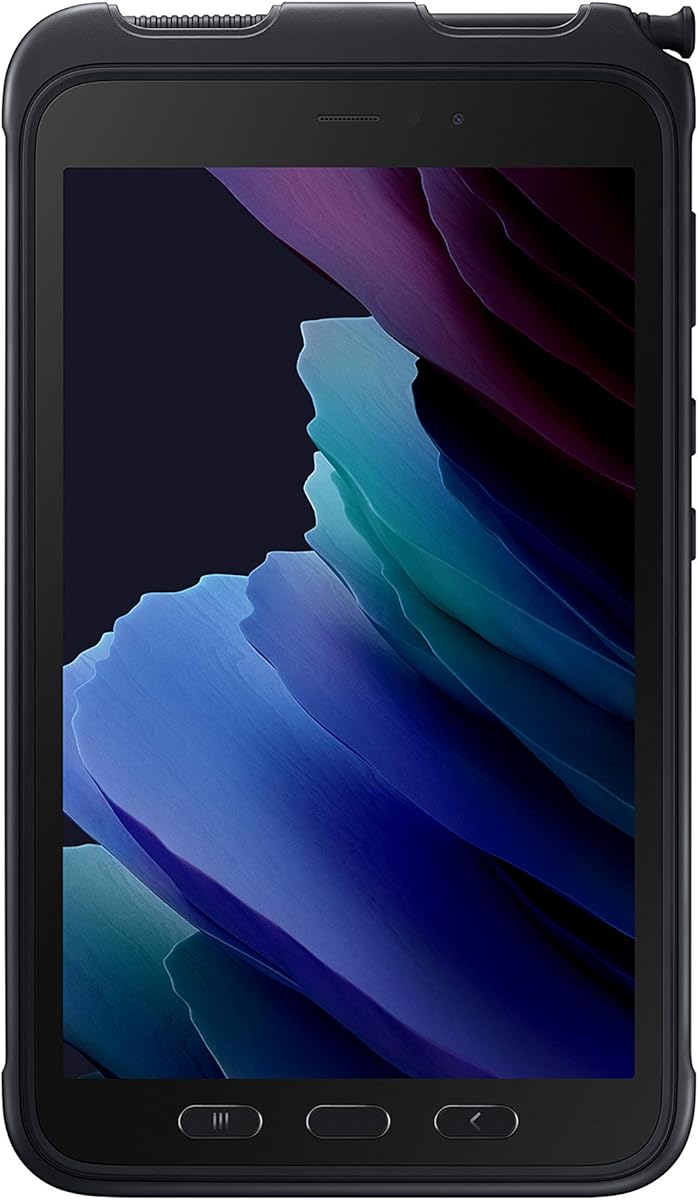
The Samsung Galaxy Tab Active3 Enterprise Edition is an eight-inch rugged tablet with a 5.0 rating, unlocked LTE, 64GB storage, WiFi, and biometric security. It is built for users who need a compact, highly durable mobile device with flexible battery and desktop-style workflows, although it runs Android rather than Windows 11.
We may earn a commission when you buy through this link, at no additional cost to you.
The tablet carries IP68 protection and MIL-STD-810H2 compliance, with a stated ability to absorb a 1.5-meter drop. Its replaceable, fast-charging battery supports long workdays, and No Battery Mode allows continuous operation from a dedicated power source in vehicles or fixed kiosks. Wireless DeX provides a PC-like experience that can improve productivity on compatible business applications.
The primary caveat is the operating system. Android applications and workflows differ from Windows software, so organizations standardized on Windows-specific ERP, industrial, or line-of-business tools may encounter compatibility issues. The 64GB storage also offers limited room for local files, and the eight-inch screen is smaller than the 10.1-inch and 11.6-inch alternatives.
The Galaxy Tab Active3 is a strong choice for mobile teams that value compactness, glove-compatible touch, replaceable power, and strong physical protection more than Windows compatibility. It works particularly well for field service, logistics, public-sector deployments, and vehicle-mounted use where replaceable batteries and No Battery Mode add operational flexibility.
A fast-charging, replaceable battery allows users to carry a charged spare and continue working without waiting for a full recharge. In fixed installations, No Battery Mode removes the battery from the equation and powers the tablet from a dedicated source, which can simplify vehicle or kiosk deployment.
Samsung Wireless DeX lets compatible users connect to a display and work with a more desktop-oriented interface. This can make the small eight-inch screen more useful for documentation, communication, and common office tasks without requiring a separate full-size computer.
We may earn a commission when you buy through this link, at no additional cost to you.
This Samsung Galaxy Tab Active3 listing offers the same broad enterprise concept as the other Active3 model: a compact eight-inch rugged tablet with 64GB storage, unlocked LTE, WiFi, and biometric security. Its 4.2 rating places it among the stronger entries in the roundup, particularly for buyers who do not require a Windows operating system.
We may earn a commission when you buy through this link, at no additional cost to you.
IP68 protection, MIL-STD-810H2 compliance, and a stated 1.5-meter drop capability make it suitable for harsh field conditions. The replaceable fast-charging battery supports extended work, while No Battery Mode suits vehicles and fixed kiosks. Enhanced touch settings allow operation with gloves, and Wireless DeX can provide a more PC-like workflow on compatible devices and applications.
Its limitations mirror those of the other Active3 listing: it is an Android product despite appearing in a Windows-focused comparison, its internal storage is only 64GB, and its eight-inch display is smaller than most 10-inch alternatives. Organizations that require specific Windows desktop applications, active directory integration, or Windows-based line-of-business software should confirm compatibility before purchase.
This model is worth considering for compact mobile computing, field service, transport, construction, and public-sector work where unlocked cellular service and rugged protection are priorities. It is particularly attractive for teams willing to standardize on Android and its app ecosystem, allowing them to benefit from a small, durable tablet with flexible power management.
IP68 protection limits exposure to dust and water, while MIL-STD-810H2 compliance supports confidence in harsh operating environments. These are meaningful benefits for mobile users who carry a tablet through rain, dirt, dust, or busy industrial spaces.
Compatibility with Verizon, AT&T, and T-Mobile networks gives users more carrier choice than a permanently locked tablet. The combination of LTE, WiFi, and Bluetooth supports communication, navigation, and peripheral connectivity across mobile and fixed environments.
We may earn a commission when you buy through this link, at no additional cost to you.
The best rugged Windows 11 tablet is not simply the one with the longest specification list. A useful purchase must match the device's size, protection, connectivity, scanning capability, battery behavior, and Windows compatibility to the demands of its intended users.
Windows 11 is the defining requirement for many business applications, but the supplied list also includes two Android-based Samsung Galaxy Tab Active3 models. Confirm that every required ERP, WMS, inventory, service, security, or line-of-business application is available and supported on the chosen operating system. Pay particular attention to drivers, authentication tools, peripheral support, and mobile device management requirements rather than relying only on general operating-system compatibility.
Windows 11 Pro, Windows 11 IoT Enterprise, and an Android-based enterprise edition serve different purposes. Standard Pro suits general productivity, IoT Enterprise is positioned for specialized commercial use, and Android may be preferable for teams built around Google services and mobile applications.
Look for specific evidence of durability, including IP dust-and-water ratings, MIL-STD compliance, stated drop heights, and protected ports. IP65 is associated with protection against dust and water spray, while IP68 indicates stronger water protection. MIL-STD-810H or MIL-STD-810G references indicate testing against specific environmental stresses, but they do not mean every tablet will survive every condition equally.
Choose the certification level that matches the real environment, and combine it with practical features such as covered connectors, reinforced glass, hand straps, and replaceable batteries. A more rugged model is most valuable where drops, moisture, dust, vibration, or accidental impacts are routine.
Screen size affects both information density and portability. A 6.5-inch handheld is easier to carry and scan one-handed, while 10.1-inch models offer a more practical balance for forms, maps, and desktop work. The 11.6-inch Dell is best for detailed documentation, and the eight-inch Samsung is convenient for mobile teams that prefer a smaller device.
Brightness is critical outdoors. The listed panels range from ordinary visibility to 500 nits, 700 nits, and 1000 nits. Glove-capable and enhanced touch modes help when users work in warehouses, cold environments, or other situations where bare-hand interaction is inconvenient.
The Fusion5 tablets pair an Intel 13th Gen N100 with 12GB of RAM, while the Dell uses a Core i5-8365U and 16GB of memory. The Arrvel, Vanquisher, and HIGOLEPC models use lower-capacity 8GB configurations with Celeron or N-series processors. Match available resources to the number of simultaneous applications, the complexity of the software, and the amount of data held locally.
Storage choices also matter in disconnected workflows. Models with 256GB or 512GB SSDs provide more room for offline records and media, while smaller 64GB and 128GB configurations may depend on microSD cards, external storage, or network access. Confirm expansion support and supported card capacities before relying on additional storage.
A Windows tablet is not automatically an enterprise data-capture device. The Vanquisher includes a Honeywell N3680 scan engine, RFID, and NFC, while the Arrvel uses a Honeywell N4680 scanner. These devices can reduce the need to pair a tablet with a separate Bluetooth scanner and improve workflow efficiency for receiving, picking, counting, and checkout.
Consider the required symbologies, reading range, scan speed, camera needs, and physical controls. If scanning is occasional, a separate accessory may be sufficient. If scanning occurs continuously throughout a shift, an integrated engine is usually more convenient and less vulnerable to connection or pairing problems.
Battery capacity alone does not reveal real runtime because processor load, screen brightness, wireless activity, and battery age all affect results. The listed capacities range from 5000mAh to 8000mAh, while the Samsung supports a replaceable battery and No Battery Mode. For extended or unattended operations, hot-swappable or removable power can be more valuable than a slightly larger fixed cell.
Consider charging speed, included adapters, dock compatibility, USB-C operation, and whether the device can remain powered while mounted in a vehicle or fixed station. The HIGOLEPC includes a magnetic bottom charging connection, the Arrvel supports battery-free USB-C operation, and several Fusion5 models include a 30W Type-C charger.
WiFi and Bluetooth are standard on all ten models, but cellular support varies. Unlocked LTE on the Samsung and 4G LTE on the HIGOLEPC and Arrvel are valuable where field users leave reliable wireless coverage. GPS is also listed on the Vanquisher and HIGOLEPC, supporting navigation and location-aware workflows.
Check the peripherals you already use. The HIGOLEPC includes a DB9 serial port, while the Fusion5 tablets provide covered USB, Type-C, and HDMI connections. The Dell and Arrvel prioritize wireless workflows, so external accessories and docking requirements deserve careful review.
A rugged tablet is a long-term operational tool, and warranty terms can materially affect its total ownership experience. The Fusion5 listings include a two-year full warranty and coverage for up to two accidental-damage incidents following registration. The Vanquisher includes an 18-month warranty with lifetime technical and after-sales support, while the Arrvel lists a one-year manufacturer warranty, two-year accessory coverage, lifetime technical assistance, and online support.
Check whether accidental damage is included, what registration is required, and whether accessories such as scanners, docks, straps, and batteries receive separate coverage. Also verify included items before purchase; some listings mention wall adapters, cables, handstraps, mounts, or charging docks, while optional accessories may require separate orders.
Before deployment, charge the tablet fully, install required Windows or Android updates, configure the organization’s security controls, and test every application, peripheral, scanner profile, and network connection. For business devices, enroll the unit in mobile device management, establish a strong screen lock, enable encryption where supported, and confirm that biometric, RFID, NFC, GPS, or camera permissions meet the organization’s policy.
Protect the device by using the included strap or approved hand strap, keeping ports covered when possible, and avoiding operation outside the stated environmental limits. A case or fitted cover can reduce scratches and impact, but it should not block vents, speakers, cameras, scanners, charging contacts, or access to the battery. Before changing settings, cleaning the glass, or replacing a battery, power the tablet down and follow the manufacturer’s instructions.
Keep records of the device’s condition, assigned user, software versions, accessory compatibility, and warranty registration. Inspect the screen, seals, charging contacts, strap anchors, and scanner window regularly, particularly after a drop. Use only compatible chargers, batteries, docks, cables, and replacement parts, and avoid leaving the tablet in extreme heat, prolonged direct sunlight, or a charging state that could compromise the battery.
A genuinely rugged tablet should have documented protection against dust, water, drops, vibration, and everyday impact. Look for an IP rating, MIL-STD compliance, a stated drop specification, reinforced glass, and protected ports. Certification should be matched to the actual environment because a device suitable for warehouse dust may not be intended for prolonged rain or immersion.
It depends on the software and security policies used by the organization. Windows 11 Pro is useful for standard business applications, familiar administration, and broad compatibility, while Windows 11 IoT Enterprise can suit specialized commercial deployments. An Android rugged tablet may be perfectly effective for teams centered on mobile apps, but Windows-specific workflows should be verified before purchase.
Only if scanning is a frequent part of the workflow. Continuous receiving, picking, cycle counting, or retail work is usually more efficient with an integrated Honeywell engine such as the N3680 or N4680. Occasional scans may be handled adequately with a camera-based application or paired handheld scanner, although separate accessories add cost and management complexity.
A 10.1-inch screen offers a strong compromise between readable forms and maps, portability, and glove operation. The 11.6-inch Dell provides more space and an exceptional 1000-nit display, while the 6.5-inch Vanquisher is easier to carry for intensive scanning. Brightness and glove support are often more important than a slight difference in diagonal size.
A removable battery can be highly useful for long shifts, continuous operation, and large deployments where charging downtime matters. It also allows a spare battery to be carried and swapped quickly. If the tablet will remain mounted in a vehicle or fixed station, a No Battery Mode or direct USB-C power option may offer even greater operational convenience.
At least 8GB of RAM is practical for routine business applications, while 12GB or 16GB provides better headroom for multiple browser sessions, communication tools, and line-of-business systems. Storage needs depend on how much data remains offline. Teams collecting photos, maps, and records should consider 256GB or 512GB, plus verified microSD or other expansion support.
LTE is valuable when work continues beyond dependable WiFi coverage. The HIGOLEPC, Arrvel, and unlocked Samsung models provide cellular options for field communication and cloud access. If a tablet will remain in a warehouse, vehicle, or fixed site with stable WiFi, paying attention to cellular capability may be less important than battery, scanning, or display features.
Verify the current operating system, processor, memory, storage expansion, display brightness, touch behavior, connectivity, scanner formats, battery rating, charger, and included accessories. For business deployments, also review warranty registration, accidental-damage terms, device management needs, application compatibility, and the availability of replacement batteries or docks.
The Arrvel I17J is the strongest all-around enterprise choice in this group because it combines a 5.0 rating, Honeywell N4680 scanning, a 700-nit display, IP65 and MIL-STD-810G construction, 4G LTE, and a removable battery. The compact Vanquisher stands out for mobile scanning and one-handed handling, while the Dell Latitude 7220 offers a large, exceptionally bright outdoor display and more substantial PC-style performance.
For buyers who need Windows without specialized scanning hardware, the Fusion5 tablets provide 12GB of memory, an Intel N100 processor, a 500-nit Full HD display, protected ports, and useful warranty coverage. HIGOLEPC is the more connectivity-oriented option with LTE, GPS, a large battery, and a DB9 port. The Samsung Galaxy Tab Active3 models stand out for compact rugged Android use, replaceable power, and vehicle-friendly operation.
Prioritize the features your team will use every day: certified protection for the environment, scanner support for data capture, screen brightness and glove operation for the field, connectivity for workflow continuity, and battery strategy for shift length. Confirm the live listing, configuration, accessory contents, compatibility details, warranty terms, and current pricing before placing an order.