
Sanliang 36Pcs Torque Screwdriver Set
4.6Editor score
10-70 in-lbs adjustment
Twenty-nine S2 steel bits
Includes sockets and adapter
Building or repairing a PC requires more than a general-purpose screwdriver. A purpose-built torque tool gives sensitive fasteners a measured final turn, helping prevent overtightened screws, stripped threads, damaged connectors, and stressed components. The right choice depends on your build style, fastener size, required precision, and preference for preset or electric assistance.
This guide compares ten PC-focused screwdriver and torque-driver options using their published specifications, included accessories, torque capabilities, drive systems, and suitability for electronics work. The list covers conventional 1/4-inch preset drivers, compact electric screwdrivers with selectable torque, and manual precision kits for delicate internal components.
Each review highlights the tool's strongest practical qualities, possible limitations, and the builds it suits best. The top picks show how the options differ, while the comparison table makes bit coverage and torque features easier to scan. Availability, ratings, and prices can change, so confirm current product details before buying.
4.6Editor score

4.7Editor score

4.6Editor score
As an Amazon Associate we earn from qualifying purchases.
The comparison below organizes all ten tools by drive type, torque control, bit selection, and intended PC-build application, helping you distinguish true preset torque drivers from manual and electric precision screwdrivers.




The coobeast 49Pcs Preset 1/4” Drive Torque Screwdriver combines a conventional preset torque mechanism with one of the broadest accessory selections in this guide. Its 4.7 rating reflects a generally favorable user response, while the published 10-70 in-lbs range, one-inch increments, and stated accuracy of plus or minus two in-lbs make it a strong match for controlled fastener work.
We may earn a commission when you buy through this link, at no additional cost to you.
The central advantage is straightforward torque selection. A main scale, minor scale, and red alignment line help the user combine the displayed values and identify the selected setting. Pulling down the adjustment wheel unlocks the setting, rotating it changes the torque, and pushing it back up locks the selection. A click at the selected value provides immediate tactile and audible confirmation that the target has been reached.
This is a traditional 1/4-inch drive tool rather than an electric driver, which means it works without a battery and gives the user direct physical control. The trade-off is that selecting and locking the setting takes more deliberate action than pressing a button on an electric model. The extensive 49-piece package is also more substantial than a minimal precision kit, but the included long bits, hex bits, Torx bits, sockets, extension, and other pieces reduce the need to hunt for compatible accessories.
Choose this set for PC builds that involve cases, motherboards, power supplies, drives, fans, expansion hardware, or other assemblies where repeatable final tightening matters. It is less appropriate when you only need to remove a handful of tiny laptop screws or want a cordless tool for rapid repetitive work. For a broad, dependable preset-torque package, it is the strongest all-around selection here.
The combination of a readable scale, a red alignment line, and an audible click reduces uncertainty when setting a target. This is particularly helpful when moving between different fastener types during a complex build.
The 1/4-inch drive, extension, long bits, standard bits, and small sockets cover more fastener formats than a conventional precision screwdriver set, making the kit useful beyond a single PC repair.
We may earn a commission when you buy through this link, at no additional cost to you.
The coobeast 13Pcs Preset 1/4” Drive Torque Screwdriver is a smaller, more focused version of the brand's larger torque-driver package. It retains the 10-70 in-lbs range, one-inch increment adjustment, stated plus-or-minus-two in-lbs accuracy, and audible click. Its 4.7 rating aligns it with the brand's other well-regarded preset tool in this comparison.
We may earn a commission when you buy through this link, at no additional cost to you.
The screwdriver uses a 1/4-inch magnetic bit holder, allowing the included alloy tool-steel S2 bits to attach quickly and firmly. A sturdy storage box keeps the tool and its twelve regular bits together. The same pull-and-rotate adjustment process governs the torque setting, and the display uses a redline and minor scale to reduce reading errors.
Its smaller accessory count is the principal trade-off. If your build uses several socket sizes, extension work, or a broad assortment of hex and Torx profiles, the 49-piece coobeast set is better equipped. This 13-piece version is more attractive when you want the same preset torque platform without carrying a larger kit. It is also more specialized for standard 1/4-inch bits than the tiny precision tools designed for laptop and handset internals.
This option suits builders who repeatedly install PC components with standard fasteners and value a cordless-free, manually controlled tool. It works especially well for case assembly, bracket fitting, fan mounting, and component installation where the manufacturer specifies a defined final torque. Choose the larger coobeast package instead if broad accessory coverage is equally important to compactness.
The smaller package retains the same 10-70 in-lbs adjustment range and click feedback as the larger coobeast offering, allowing controlled tightening without carrying every bit format.
A magnetic 1/4-inch holder makes it easier to swap among the twelve S2 bits, which is useful when a build changes between different screw head formats.
We may earn a commission when you buy through this link, at no additional cost to you.
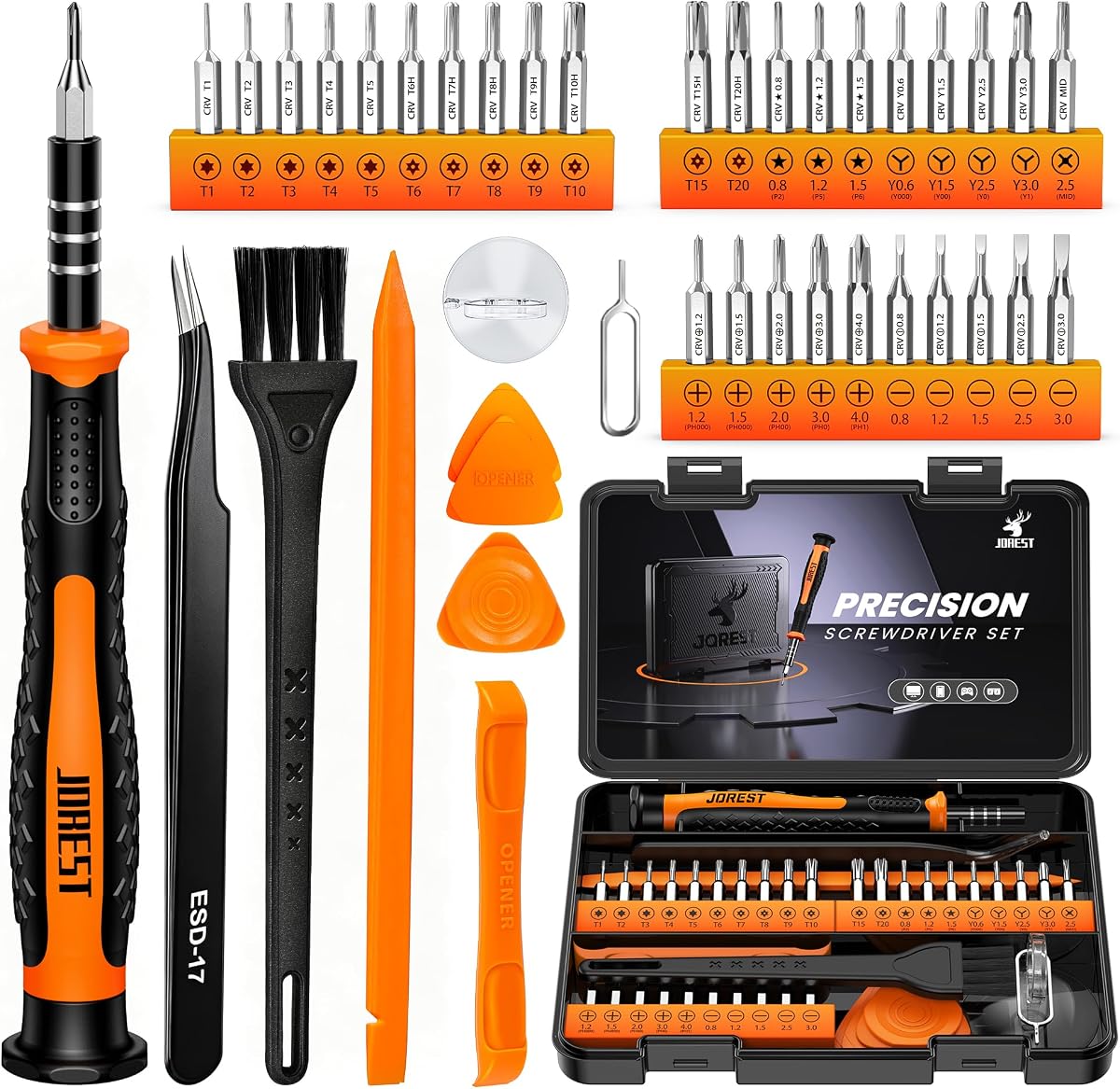
The JOREST 40Pcs Small Precision Screwdriver Set is not a preset torque driver, but it is an important option for PC builds involving laptops, game consoles, controllers, and compact electronics. Its 4.7 rating and broad collection of Phillips, flathead, Torx, security Torx, triwing, pentalobe, and other profiles make it especially useful for delicate internal work.
We may earn a commission when you buy through this link, at no additional cost to you.
The handle combines TPR and PP materials with a non-slip design, while the rotatable top helps the user turn small screws quickly without repositioning the grip. Magnetic adsorption at the handle head helps retain bits and screws. Thirty CR-V bits cover common precision formats, and the package also provides a double-ended spudger, long spudger, triangular spudgers, tweezers, brush, suction cup, and SIM card thimble.
The important limitation is that this kit does not offer a measured or preset torque value. Fine control comes from the user's pressure and technique rather than a calibrated threshold. It should therefore be treated as a precision assembly tool, not a substitute for a torque driver when a component or manual requires a specified final-tightening value. Its small scale also makes it unsuitable for chassis screws and structural hardware.
Buy this kit for a compact PC maintenance drawer, laptop upgrades, controller work, or a general electronics bench. It is especially useful alongside a larger torque screwdriver because it handles tiny fasteners and delicate housings that a 1/4-inch driver cannot reach. For precision access and exceptional bit variety, it is one of the most practical additions to a build toolkit.
Pentalobe, triwing, security Torx, and very small Phillips profiles provide access to hardware found in laptops, game devices, and compact electronics that basic driver kits often miss.
Spudgers, picks, a suction cup, tweezers, and a cleaning brush support case opening, component handling, and dust removal, reducing the need for separate repair accessories.
We may earn a commission when you buy through this link, at no additional cost to you.
The UnaMela Mini Electric Screwdriver Set 140-IN-1 combines a pen-shaped powered driver, a manual precision screwdriver, 120 bits, and 19 repair tools. Its 4.5 rating reflects a versatile but less specialized design. The tool targets PC, laptop, phone, MacBook, RC, drone, keyboard, and game-device work rather than structural or heavy fastening.
We may earn a commission when you buy through this link, at no additional cost to you.
Five electric torque levels cover 0.15-0.35 N·m, and the motor can run at up to 200 RPM. This range is most appropriate for delicate electronics and small fasteners. The balanced, pen-style body is intended to remain comfortable during extended work. A 350mAh lithium-ion battery, approximately 60-minute charging time, and Type-C interface make the powered component practical for a mobile repair kit.
The package's size and tool count are its main trade-offs. Carrying 140 pieces is convenient for broad readiness but less tidy for a highly mobile technician. Manual mode helps when greater feel or higher force is needed, although the electric tool is not designed to replace a full-size driver for large hardware. The lower torque ceiling also means it cannot cover the broader fastening demands addressed by the 1/4-inch preset tools.
Choose the UnaMela kit if you service many types of small electronics, want a rechargeable powered driver, and prefer everything in one workstation. It can make repetitive laptop or console work faster while retaining a manual tool for delicate control. For standard PC chassis assembly, pair it with a separate 1/4-inch driver rather than expecting it to cover every fastener.
Five levels from 0.15-0.35 N·m give users a practical way to vary sensitivity across small electronics, while manual operation preserves direct feedback when a particular fastener needs it.
One hundred twenty precision bits and 19 repair accessories cover disassembly, opening, cleanup, and component handling for a broad range of compact devices.
We may earn a commission when you buy through this link, at no additional cost to you.
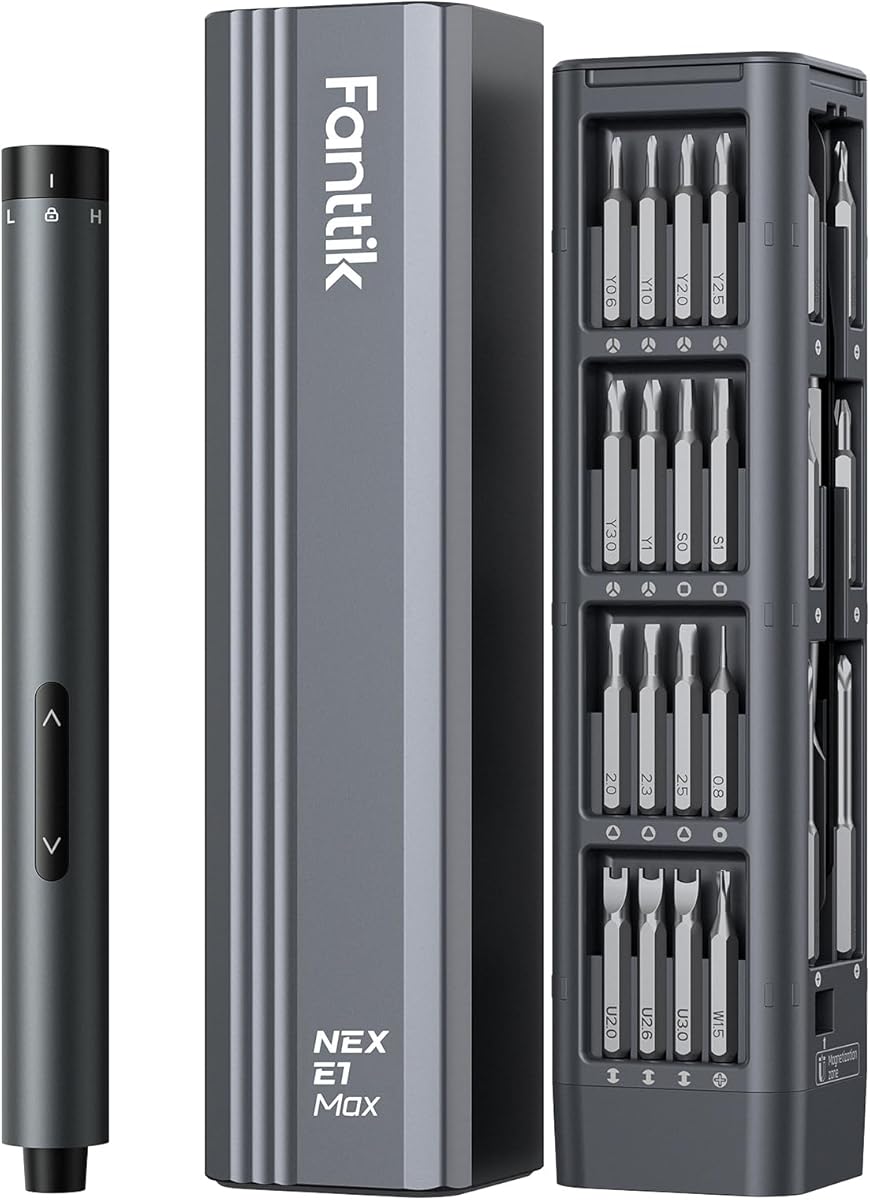
The Fanttik E1 Max Electric Screwdriver is a compact 53-in-1 kit designed for delicate DIY work. Its 4.4 rating places it slightly below the highest-rated products here, but the published features make it relevant to PC builders working on graphics cards, tablets, phones, watches, cameras, and drone components.
We may earn a commission when you buy through this link, at no additional cost to you.
The 200 RPM NeoPulse motor delivers selectable electric torque from 0.05 to 0.2 N·m, while manual operation offers up to 3 N·m. An aluminum alloy body gives the tool a refined, compact form. Fifty S2 steel bits span 12 types, and both the chuck and bits use magnetic retention. The magnetic storage case keeps the driver and accessories orderly.
A 350mAh rechargeable battery is stated to operate on more than 450 M2.5 by 5mm screws per charge, and the included Type-C charging arrangement simplifies recharging. The electric torque ceiling is the main constraint. It is designed for precision electronics rather than large PC fasteners, and the manual mode makes it more adaptable than a purely electric driver. The package is still larger than a basic manual precision set because of its case and powered design.
This is a good pick for a builder who wants a stylish, portable screwdriver for delicate electronics and moderate manual work. It can simplify repetitive graphics card, mobile device, or camera assembly while remaining restrained around sensitive components. For full-size cases, power supplies, and motherboards, keep a conventional 1/4-inch driver available as well.
The three N·m manual mode gives the E1 Max more authority than its low electric range, making it easier to handle slightly larger fasteners while still preserving fine control.
The magnetic case stores the driver and 50 bits together, reducing lost pieces and making the set practical to carry between a workbench and different repair locations.
We may earn a commission when you buy through this link, at no additional cost to you.
The JOREST 155 in 1 Mini Electric Screwdriver is the most elaborate electronics-focused kit in the guide. Its 4.6 rating reflects strong user reception, and its combination of electric and manual modes, 140 precision bits, and 13 accessories makes it a credible option for technicians, advanced hobbyists, and builders who service many compact devices.
We may earn a commission when you buy through this link, at no additional cost to you.
Five adjustable electric levels cover 0.15-0.75 N·m, while the manual handle is stated to provide up to 7 N·m. The electric handle has a lightweight aluminum alloy construction and non-slip grip, while four integrated LEDs illuminate restricted workspaces. A 500mAh rechargeable battery, 200 RPM motor, and one-hour charging time support sustained repair work, and the Type-C port simplifies charging.
The set is still explicitly intended for small electronics rather than large equipment. Its many bits and accessories create a substantial storage footprint, and more components mean more organization is required. The manufacturer also recommends manually loosening screws that may be factory-secured with glue before switching to electric mode, a sensible reminder that powered torque should not be the first response to a stuck fastener.
Choose the JOREST set when your PC projects include laptops, phones, drones, consoles, controllers, and other compact electronics, or when you want a broad technical bench in one case. The anti-static wrist wrap and magnetic mat are particularly relevant to electronics repair. Keep a larger structural driver for conventional chassis and component installation.
The electric mode handles repetitive removal and installation, while the seven N·m manual setting offers more force and tactile feedback for stubborn or larger screws within the tool's electronics-focused range.
Four built-in LEDs improve visibility inside dense cases, helping users locate screw heads and avoid slipping onto nearby components in a cramped PC interior.
We may earn a commission when you buy through this link, at no additional cost to you.
The STREBITO 64-piece Precision Screwdriver Set is built for electronics access rather than calibrated tightening. It earns a 4.6 rating and stands out for the variety of 48 CNC-machined bits, including Phillips, flathead, Torx, security Torx, triwing, pentalobe, hex, triangle, U-type, square, SIM, MID, oval, Gamebit, and nut-driver formats.
We may earn a commission when you buy through this link, at no additional cost to you.
The 60HRC chromium-vanadium bits are designed to resist abrasion, oxidation, and corrosion. A rubberized, non-slip handle supports control, while the smooth swivel cap helps users rotate small screws quickly. Built-in magnetism carries power through the screwdriver tip to hold bits and tiny fasteners. Fifteen accessories add tweezers, a magnetizer, spudger, hook, suction cup, pry tools, picks, and a brush.
As with other manual precision kits, the absence of numerical torque control is the defining limitation. Users must rely on feel, and the tool is not intended for structural hardware. Its strength is access: more specialized profiles mean fewer interruptions to find the correct bit. The removable rubber bit holder and sturdy plastic case are useful for keeping the collection visible and protected.
This set is a strong choice for laptop repairs, game-console work, PC upgrades involving small housings, and general electronics maintenance. It is especially attractive for someone who wants one manual driver rather than a powered tool. Pair it with a 1/4-inch preset torque driver when a build mixes tiny internal screws with fasteners that require measured final tightening.
Profiles such as triwing, pentalobe, security Torx, Gamebit, oval, and U-type make this set particularly useful for consumer electronics that use uncommon screw patterns.
The swivel cap permits quicker finger rotation, while the magnetic bit holder and rubberized grip help maintain control over tiny, easily dropped screws.
We may earn a commission when you buy through this link, at no additional cost to you.
The Fanttik E2 Ultra Electric Screwdriver raises the powered precision ceiling compared with the E1 Max while retaining a compact, electronics-focused design. Its 4.5 rating is supported by a 270 RPM NeoPulse motor, five selectable torque gears, and a maximum electric torque of 0.6 N·m.
We may earn a commission when you buy through this link, at no additional cost to you.
The settings range from 0.05 to 0.6 N·m in defined increments, giving users a useful balance between delicate work and more demanding small fasteners. The 800mAh rechargeable battery is stated to last 2.3 times longer than the E1 Max, and Type-C charging provides convenient recharging. Fifty high-strength S2 bits span 12 types and include a 1.78-inch long HEX 2.0 bit for recessed access.
The RevoStor magnetic storage system keeps bits organized, while a gradient indicator communicates the selected torque gear and the screw's direction. A pry bar and tweezers support disassembly. The clear limitation is scope: the manufacturer identifies the product for assembly and repair of small, precise items and excludes large furniture or appliances. Even at 0.6 N·m, it does not replace a structural driver.
Choose the E2 Ultra for delicate PC electronics that need a little more powered torque than a micro driver offers, especially when a long bit improves access to recessed screws. It is a good middle ground for laptops, tablets, watches, phones, and small appliances. Pair it with the Sanliang or coobeast preset driver for a complete electronics-and-chassis repair setup.
The five settings from 0.05 to 0.6 N·m offer more headroom than many micro drivers while remaining suitable for compact electronics and sensitive components.
A long HEX 2.0 bit reaches deeper into confined spaces, and the rotating magnetic storage bin keeps the 50-bit collection sorted for rapid selection.
We may earn a commission when you buy through this link, at no additional cost to you.
The Sanliang 36Pcs Torque Screwdriver Wrench Driver Set offers a capable 1/4-inch preset mechanism without the need for a powered system. Its 4.6 rating and 10-70 in-lbs range place it firmly among the strongest conventional options, especially for builders who want measured torque without carrying a rechargeable device.
We may earn a commission when you buy through this link, at no additional cost to you.
The set includes 29 S2 steel bits, five chrome-vanadium-steel 1/4-inch sockets, and a socket adapter. The bits receive anti-rust oil for corrosion protection, although the manufacturer notes that additional oil is recommended for longer service life. The screwdriver itself is tested with a torque tester before leaving the factory, adding confidence to its stated reliability.
Setting the value requires pulling down the adjustment wheel and rotating it until the main scale and triangular pointer indicate the desired torque. Pushing the wheel upward locks the setting. A clear click marks the selected torque. This process requires more attention than a simple electric button, but it gives a consistent reference whenever the same setting is needed. The 36-piece assortment is also leaner than the 49-piece coobeast package while still including sockets.
This is a strong budget-focused choice for case assembly, drive installation, fan mounting, power-supply work, and other standard PC fastening tasks. It also suits broader maintenance, tool, bicycle, engine, woodworking, and mounting projects. If you work mostly with tiny internal screws, choose a precision kit instead; if you assemble complete systems, the controlled final turn is the reason to favor this preset tool.
Testing each screwdriver with a torque tester before shipment provides an added quality-control step, while the 10-70 in-lbs range covers a useful span of standard build fasteners.
Twenty-nine S2 bits, five sockets, and an adapter let the tool cover common hex, Torx, Phillips, slotted, and socket-driven fasteners without a separate mini toolkit.
We may earn a commission when you buy through this link, at no additional cost to you.
The Fanttik S2 Pro Electric Screwdriver is the most capable powered torque option in the guide. Its 4.6 rating is backed by seven selectable torque settings from 0.5 to 6 N·m, a 250 RPM MagnaStorm motor, and applications that extend from delicate electronics to computer assembly and furniture installation.
We may earn a commission when you buy through this link, at no additional cost to you.
A mechanical-electronic hybrid control system allows smooth changes among the seven levels. The 0.5 N·m setting supports delicate repair, while the upper settings provide greater authority for common household and PC-building tasks. A 2000mAh rechargeable battery supports extended use, and the 5V/2A Type-C interface enables relatively fast charging. An LED work light illuminates a dim workspace, while the energy bar shows torque strength and motor direction.
The included case uses a magnetic storage design and contains 20 common bits, an extension rod, and a 90-degree angle adapter. The angle adapter is especially valuable in tight PC interiors where a straight driver cannot align easily with a screw. The relatively compact bit collection is the main limitation compared with the 100-plus-bit electronics kits, but it is better matched to general build fastening.
Choose the S2 Pro when you want one powered driver to span delicate electronics and standard assembly tasks. It is ideal for users who dislike manually setting a mechanical preset or need quick adjustment between jobs. Start on a lower setting, increase only as needed, and use manual techniques if a fastener feels bonded or unusually resistant. A full-size structural driver may still be appropriate for heavy chassis hardware.
The 0.5-6 N·m range lets the same tool move from delicate electronics to larger common fasteners, reducing the need for several separate electric screwdrivers.
The included 90-degree adapter helps reach screws oriented away from the user's hand, which is valuable inside cases, drive cages, and tightly packed component layouts.
We may earn a commission when you buy through this link, at no additional cost to you.
The right PC torque screwdriver depends on the scale of the work, the fastener types involved, and whether measured torque, powered speed, or delicate access matters most. These factors help narrow the field before you compare individual models.
Choose a range that covers your normal build without making fine adjustments cumbersome.
Match the drive style to your workflow rather than choosing power solely for convenience.
Verify the drive size and common bit profiles before purchasing.
Prioritize feedback that lets you verify the setting at a glance.
Consider lighting, body clearance, and adapter access before finalizing.
Treat the case and battery as parts of the tool system, not minor accessories.
Balance magnetic convenience with careful screw and component management.
Choose for the actual fastener scale and repair tasks you perform.
Begin by identifying the fastener and the required final torque. If the component manufacturer provides a specification, use it as the primary reference. For a preset tool, unlock the adjustment mechanism, rotate to the correct value using both the main and minor scales, and lock it before inserting the bit. For an electric model, select a gear below the anticipated requirement and increase it gradually only if the screw needs more force.
Seat the correct bit securely, confirm that the screw head and tool are aligned, and begin slowly. Powered tools should generally be used to remove or install screws that are already free; manually loosen a glued or seized fastener before applying electric torque. Stop if the tool stalls, the screw head begins to strip, or the component shifts. For delicate electronics, use the lowest suitable setting and support the opposite side of the board when practical.
After use, remove or loosen the bit if the manufacturer recommends it, clean metal tips with a suitable cleaner, and protect the tool from moisture. Keep S2 or chrome-vanadium bits dry and use the recommended anti-rust oil where specified. Store electric models in their cases, recharge them periodically, and use the supplied Type-C cable when advised. Replace worn or damaged bits because a loose bit can slip and damage fasteners.
It is helpful but not strictly required for every build. Small chassis screws are commonly installed with moderate hand pressure, while delicate components and manufacturer-specified fasteners benefit from controlled torque. A torque screwdriver is especially valuable for repeated builds, hard-drive or SSD mounting, power-supply installation, expansion-card work, and situations where overtightening could damage a component.
Yes, provided the tool is designed for electronics and you use a conservative torque setting. Start with a low gear, verify that the bit is secure, and keep the driver away from exposed fans and cables. If a screw is seized or glued, loosen it manually before switching to electric mode, since sustained powered force can strip the head or damage the surrounding component.
A preset torque screwdriver is set manually and signals when the chosen threshold is reached. It is simple, dependable, and requires no battery, but changing the setting takes more effort. An electric screwdriver uses selectable torque gears and a motor to turn the bit, which is faster for repetitive work and easier to adjust, though it requires charging and careful control.
No. Precision kits are designed for tiny internal screws and specialty profiles, while standard case, fan, drive, and power-supply hardware often needs a larger 1/4-inch driver. The most versatile setup combines a precision screwdriver or micro electric driver with a 1/4-inch preset torque tool. This separates delicate electronics work from structural assembly.
The 10-70 in-lbs preset options in this guide cover a broad range of standard build fasteners. Electric tools offer finer low-end settings for tiny screws and higher settings for larger components. Always follow the fastener or component manufacturer's recommendation when one is available, and avoid assuming that a more powerful setting is always better.
Long bits can be helpful when a screw sits in a recessed drive, beneath a bracket, or deep inside a compact case. They also allow the tool body to remain clear of nearby components. However, long bits can be easier to misalign or bend if forced, so choose the correct size and inspect the fit before applying significant force.
The click indicates that the tool has reached its selected torque setting. On the preset models in this guide, that signal helps the user stop at the intended threshold. A click does not guarantee that every screw has reached the same load under every condition, so alignment, friction, thread condition, and manufacturer guidance still matter.
Keep bits organized by type and size in the supplied holder or case, and do not leave magnetic components where they can attract loose metal debris. Protect steel bits from moisture, and use anti-rust oil where the manufacturer recommends it. Store electric tools in a dry case with their bits secured so they cannot damage the handle or other accessories during transport.
The coobeast 49Pcs Preset Torque Screwdriver is the strongest all-around option because it combines a useful 10-70 in-lbs range, clear setting feedback, and extensive bit coverage. The Sanliang 36Pcs set delivers a similar core torque mechanism in a more compact package, while the Fanttik S2 Pro provides the broadest powered torque range and valuable angle-adapter access.
Prioritize the type of work you actually perform. Standard case, drive, and component assembly calls for a 1/4-inch drive, whereas laptop, console, controller, and phone repair calls for tiny specialty bits. Electric operation is convenient for repetitive work, but a manual preset driver can be more direct for a fixed build bench. Many builders benefit from keeping both a controlled 1/4-inch tool and a compact precision driver.
Before purchasing, verify the exact drive size, required bit profiles, torque range, and included accessories. Ratings and product availability can change, and current prices should be checked on the linked listing. The right tool is the one that combines the needed control with the fastener coverage and portability required by your particular PC-building workflow.