
Duyasurs 3Pack Upgraded USB C to USB Adapter
4.6Editor score
Three adapters included
USB 3.0 data support
No driver installation
LED connection indicators
Our Female USB Adapter guide compares ten USB-C and USB-A adapters for compatibility, transfer speed, durability, portability, charging, and everyday use needs.
A female USB adapter connects USB-A accessories, cables, storage devices, and chargers to a USB-C-equipped phone, tablet, or computer. The right model depends on connector direction, supported USB generation, charging behavior, device support, and whether you need OTG, data transfer, audio, or video.
We compared all ten adapters using the supplied specifications, focusing on practical distinctions such as USB 3.0 and 3.2 support, transfer rates, included quantities, aluminum or zinc-alloy construction, connector durability, device compatibility, and functional limitations. The guide covers adapters for phones, Macs, tablets, Windows laptops, and other USB-C systems.
Each product entry explains the adapter's strongest use case, important limitations, and who should consider it. The top selections highlight dependable everyday choices, while the full list also covers multi-packs, charging-focused designs, and higher-speed options. Product details and availability can change, so confirm specifications against your devices before purchasing.
4.6Editor score

4.7Editor score

4.8Editor score
The comparison below places all ten adapters side by side, emphasizing connector type, transfer standard, pack quantity, construction, and the most important compatibility or signal limitations.




The JSAUX USB C to USB 3.0 Adapter is a well-rounded USB-C male to USB-A female solution with a 4.7 rating and a two-adapter bundle. It is particularly attractive for users who want to connect flash drives, keyboards, mice, hubs, and other supported peripherals to modern USB-C devices without replacing legacy accessories.
We may earn a commission when you buy through this link, at no additional cost to you.
Its most useful feature is support for USB 3.0 SuperSpeed data transfer at up to 5Gbps. The stated speed is ten times that of USB 2.0, making the adapter appropriate for moving large files, HD movies, and music collections. OTG support expands the range of peripherals that can work with compatible phones and tablets, while the aluminum body and nylon-braided cable add durability in a travel bag or on a desk.
The important limitation is video output. This adapter is designed for data and compatible peripheral connections, not for projecting a display or carrying an image signal through an HDMI-related function. That restriction makes it less versatile than a USB-C dock, but it remains appropriate for anyone whose goal is data transfer or OTG accessory use.
Choose this adapter if you want a balanced set of transfer performance, broad USB-C compatibility, and durable construction. It is a strong all-around choice for MacBook, iPhone, iPad, Galaxy, and other compatible USB-C users who need to reuse USB-A accessories and do not require video output.
By converting a USB-C port to a USB-A female port, the adapter lets compatible phones and tablets use flash drives, keyboards, mice, hubs, and similar peripherals. USB 3.0 support also makes it more useful when you regularly transfer larger folders than a basic USB 2.0 adapter would allow.
The aluminum body gives the adapter a sturdier feel, while the nylon-braided cable is intended to resist tangling and everyday wear. The two-pack also allows one adapter to remain in a laptop sleeve while another stays in a phone or tablet case.
We may earn a commission when you buy through this link, at no additional cost to you.
The Anker USB C Adapter stands out with a 4.8 rating, a refined aluminum construction, and a practical two-pack format. It converts a USB-C port into a USB-A port for external hard drives, phones, mice, printers, and other USB-A accessories, making it a polished option for MacBook and general USB-C workflows.
We may earn a commission when you buy through this link, at no additional cost to you.
Its slim form is one of the strongest design details. The adapters can sit side by side in a MacBook Pro's USB-C ports without unnecessarily blocking adjacent space. That consideration matters when a user regularly connects multiple peripherals or needs to leave a charging cable in an adjacent port.
The connectors are described as capable of up to 10,000 insertions and removals, while the scratch-resistant aluminum housing is intended to handle daily wear. Together, these details support the premium positioning without requiring a large or complex device. The supplied information identifies high-speed data transfer but does not quote a specific transfer rate.
This is the pick for buyers who prioritize refined construction, compactness, and the highest listed rating in the group. It is especially sensible for MacBook users who connect several USB-A peripherals and want durable adapters that can remain plugged into neighboring ports.
The ultra-slim profile helps preserve access to neighboring USB-C ports. That makes the adapter convenient on laptops with closely spaced connectors, where a bulky converter could interfere with another cable or accessory.
A scratch-resistant aluminum shell provides a refined appearance and helps the adapter tolerate routine handling. Engineered male USB-C and female USB-A connectors add confidence for setups that require frequent plugging and unplugging.
We may earn a commission when you buy through this link, at no additional cost to you.
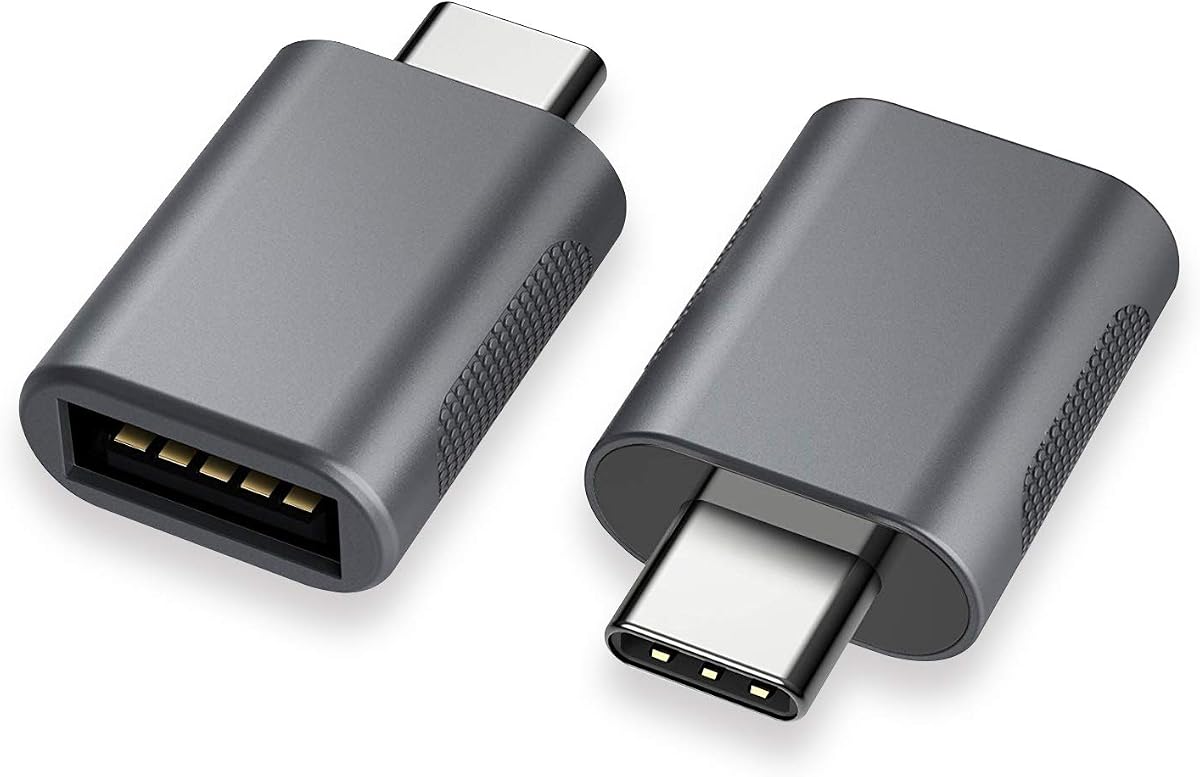
The Duyasurs three-pack offers a practical combination of USB 3.0 performance, phone compatibility, and convenient indicator lights. Its 4.6 rating reflects a generally favorable result, while the three included adapters make it easy to distribute one across several devices or keep backups at home, work, and in a travel kit.
We may earn a commission when you buy through this link, at no additional cost to you.
The adapter supports high-speed data transfer and can charge a phone through the USB-C-to-USB-A arrangement. Two miniature LED indicators provide visible confirmation that a connection has been established, which can be particularly useful when attaching external storage to a phone or tablet.
External-storage use has one important caveat: the connected USB storage device must function properly, and its cable must support USB 3.0. The adapter does not support audio or video functions, and it is not intended for in-vehicle data transfer. These limitations keep its scope focused on data, charging, and compatible peripherals.
Buy this option if you want several adapters without a complicated setup. It is a strong choice for students, mobile workers, and households that use several compatible USB-C devices, especially when OTG storage, phone charging, and straightforward plug-and-play operation are the main requirements.
A three-adapter set reduces the need to move one small converter between a phone, tablet, and computer. The extras can also serve as backups or support separate work and personal device setups.
The dual mini LED indicators make it easier to confirm that the adapter is communicating with a peripheral. This is useful for external drives and other accessories where a silent connection can be difficult to diagnose.
We may earn a commission when you buy through this link, at no additional cost to you.
The UGREEN four-pack is built for users who want high transfer performance and multiple adapters in one set. Its 4.7 rating and advertised speed of up to 10Gbps distinguish it from the many options limited to 5Gbps. It supports connections involving flash drives, card readers, and hard disks used with compatible USB-C devices.
We may earn a commission when you buy through this link, at no additional cost to you.
The construction combines an aluminum alloy housing with a metal connector, and the product is described as having been tested through more than 10,000 insertion cycles. Its thumb-sized profile is portable and fits side by side with a MacBook Pro, while compatibility details include modern laptops, tablets, and several OTG-capable phone families.
As with any high-speed adapter, maximum performance depends on the entire connection chain. The attached drive, cable, host device, and USB generation must all support the intended transfer rate. The product instructions also mention cleaning dust from the interface and finding the front logo to insert the adapter in the correct direction.
Choose the UGREEN pack when data speed and having several adapters both matter. It is especially compelling for users who move large files regularly, maintain several USB-C devices, or want compact converters available in multiple locations without relying on one shared adapter.
The stated 10Gbps capability suits external storage, card readers, and hard disks when the full connection chain supports it. This makes the adapter more relevant to frequent file transfers than a basic USB 2.0 converter.
The small, thin design is easy to carry in a purse or bag, and four units make permanent placement practical. One can stay with a laptop, another with a tablet, and the remaining adapters can serve as backups.
We may earn a commission when you buy through this link, at no additional cost to you.
The Pastall four-pack differs from most entries because it is a USB-C female to USB-A female adapter rather than a simple USB-C male plug. It can therefore work as a coupler between a USB-C cable and a USB-A cable, extending a connection or simplifying the link between devices and accessories.
We may earn a commission when you buy through this link, at no additional cost to you.
Its stated functions include fast charging, data transmission, audio output, and video signal transmission. That broader support is a meaningful advantage over adapters that explicitly exclude audio or video. The product also claims up to 10Gbps transfer when both the input and output ports support that speed, along with output up to 5V/3A.
Construction details include a metal alloy shell, metal connectors, and bare copper conductors intended to support signal clarity and shielding. Its compact form makes it practical for travel, while the four-piece set allows units to be placed around a home, office, or vehicle.
This adapter is for someone who specifically needs a female-to-female cable coupler and values the potential to carry charging, data, audio, or video. Buyers should verify that their USB-C cable and destination device support the function they intend to use, because connector shape alone does not guarantee full compatibility.
Unlike several competing adapters in this guide, the Pastall model is described as supporting audio output and video signal transmission. It can therefore suit cable-extension or coupling setups where those signals are needed.
The female-to-female arrangement is useful when a USB-C male end and a USB-A female end need to be joined through cables. It can extend reach or provide a simple connection between legacy and current accessories.
We may earn a commission when you buy through this link, at no additional cost to you.
This two-pack USB-C to USB 3.0 adapter combines a 4.7 rating with a compact design aimed at modern laptops, tablets, and smartphones. It supports OTG operation up to 5Gbps and works without additional drivers or software, making the connection process straightforward for both technical and nontechnical users.
We may earn a commission when you buy through this link, at no additional cost to you.
The zinc alloy body is designed to resist scratches, while the USB-C connector is described as passing more than 10,000 push-and-pull tests. Compatibility information covers Thunderbolt 4 and 3, recent MacBook Pro and Air models, the Nintendo Switch, and Samsung Galaxy models, among other USB-C devices.
The adapter's primary strength is its direct, conventional design. It does not introduce an unnecessary dock or complex cable arrangement, and the second unit provides a useful spare. However, the supplied specifications do not provide a detailed charging output figure, so buyers focused specifically on power delivery should verify device requirements separately.
Choose this adapter for reliable OTG data access and portable USB-A expansion. It is a balanced option for owners of recent USB-C computers and mobile devices who want a durable two-pack without paying for a full docking station.
Plug-and-play operation removes the need to install software before connecting supported accessories. The USB 3.0 specification also provides a useful speed advantage over older USB 2.0 adapters when the attached device supports it.
A scratch-resistant zinc alloy shell and a connector tested through more than 10,000 push-and-pull cycles target repeated use. The construction is well suited to an adapter that may travel between several devices.
We may earn a commission when you buy through this link, at no additional cost to you.
The JXMOX adapter is a USB-C female to USB-A male converter designed primarily to let legacy USB-A power sources, computers, power banks, and chargers work with USB-C devices. Its 4.7 rating and four-piece set make it a practical option for households with several older chargers and newer phones.
We may earn a commission when you buy through this link, at no additional cost to you.
Charging is the central feature. The adapter supports up to 3A of power output, and a built-in double-sided 56KΩ resistor is intended to improve charging and data-transfer safety. Data transfer works at up to 480Mbps, matching the general speed level associated with USB 2.0 in the product information.
Compatibility covers a long list of iPhone, iPad, Samsung Galaxy, and Google Pixel models, along with other USB-C devices. There are, however, clear boundaries. Video signal transmission is unsupported, and the adapter does not work with a 12-inch MagSafe charger or charge a MacBook because of charging-protocol incompatibility.
Buy this adapter if your priority is converting a USB-A charger or power bank for a compatible phone or tablet. It is less appropriate for large-file transfers, display output, or laptop charging, but the four included units make it easy to keep one near each charging setup.
The USB-C female and USB-A male arrangement lets legacy chargers and power banks serve compatible USB-C mobile devices. The 3A output specification makes the purpose clear, while the safety resistor adds a layer of protection during charging and data transfer.
This adapter does not try to be a universal display or laptop-power solution. Its exclusions are stated directly, helping buyers avoid disappointment when attempting video output, MagSafe charging, or MacBook charging.
We may earn a commission when you buy through this link, at no additional cost to you.
The three-pack USB C to USB Adapter offers USB 3.0 data transfer, charging, and OTG support in black, gray, and silver finishes. Its 4.5 rating is the lowest among the listed products, but the set remains appealing for users who value color coordination, a slim profile, and several adapters in one package.
We may earn a commission when you buy through this link, at no additional cost to you.
Its anti-interference zinc alloy housing is designed to provide a stable connection, while the narrow form is intended not to block adjacent ports. Connectors are described as handling up to 10,000 plug-and-unplug cycles. Compatibility includes the iPhone 15 series, MacBook Pro models after 2016, MacBook Air models after 2018, and other USB-C laptops, tablets, and phones.
The product supports USB 3.0 data synchronization and charging, but it does not state a specific maximum transfer rate. Users should also recognize that charging speed and OTG behavior depend on the host device, accessory, cable, and power source. It is therefore more accurate to describe this as a broad everyday converter than a specialized high-speed solution.
Choose this three-pack when matching adapters to different devices or keeping multiple converters on hand matters. The color assortment is a distinctive touch, and the low-profile shape is useful on crowded laptops, though buyers prioritizing a precisely stated transfer rate may favor a model that provides that detail.
Black, gray, and silver finishes make it possible to match different laptops, tablets, and accessories. This visual variety is more useful than it may first appear when adapters remain plugged into a device rather than staying inside a drawer.
The slim housing is designed to avoid interfering with neighboring ports. That makes the adapter easier to use when a laptop already has a power cable, another dongle, or a storage device connected.
We may earn a commission when you buy through this link, at no additional cost to you.
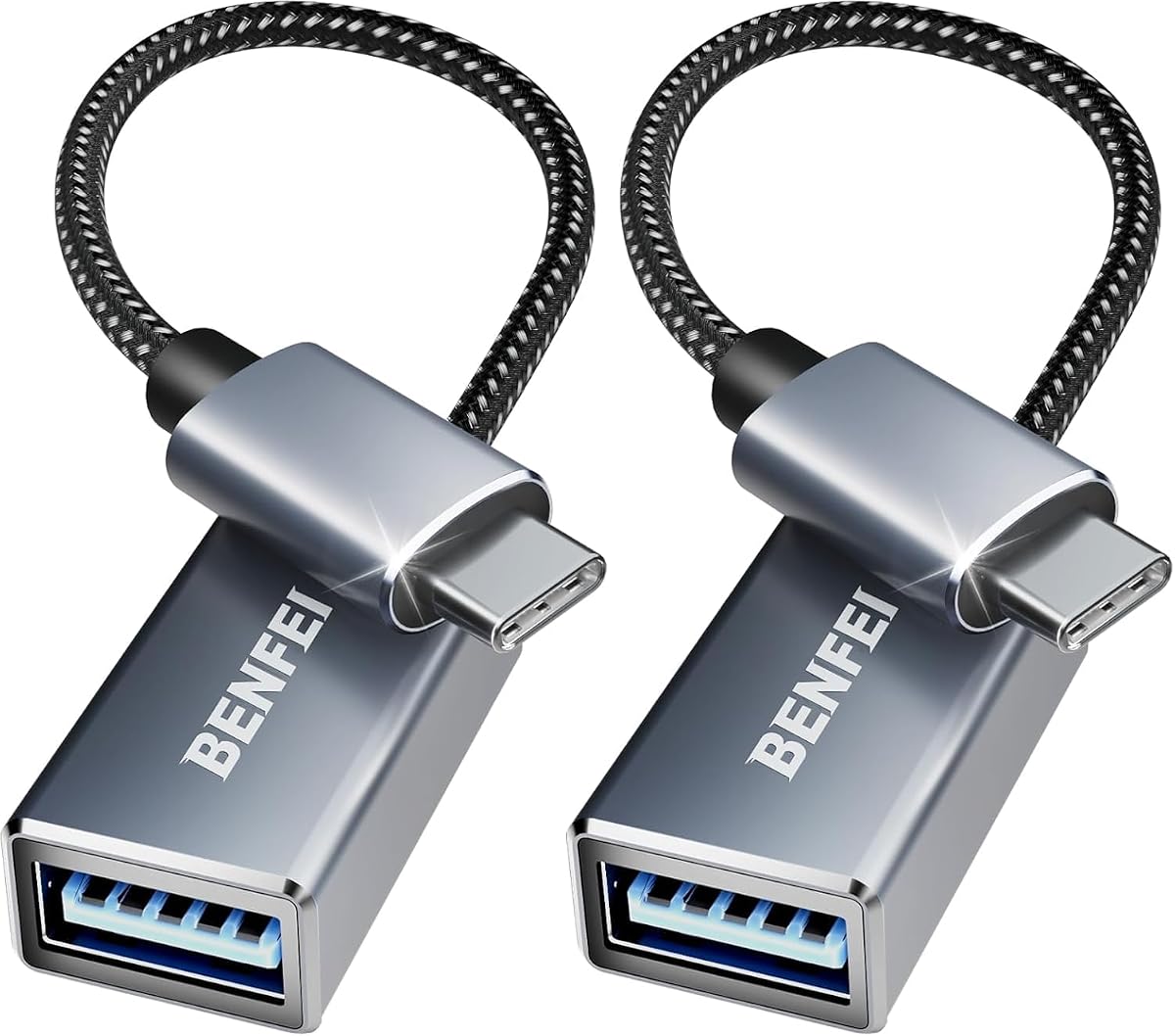
The BENFEI two-pack is a USB-C male to USB 3.0 female adapter aimed at connecting computers, phones, and tablets with USB-C ports to legacy USB accessories. Its 4.6 rating and combination of braided nylon, aluminum, and nickel-plated connectors make it a durable option for regular travel or desk use.
We may earn a commission when you buy through this link, at no additional cost to you.
The adapter supports transfer speeds up to 5Gbps for syncing files such as movies and music. Its advanced compact design is intended to allow two adapters to occupy neighboring closed USB-C slots at the same time, a useful detail for MacBook Pro and Air users. The braided nylon also adds flexibility and a non-slip grip during insertion.
Compatibility spans USB-C laptops, tablets, and smartphones, including MacBook Pro and Air models, iMac, recent iPhone models, Samsung Galaxy devices, and XPS systems. The product supports smartphone OTG, allowing compatible phones to use suitable USB-A peripherals. It does not provide MacBook charging and should be treated as a data-focused adapter.
Buy this set for a durable two-adapter solution with strong five-gigabit transfer support. It is a good fit for people who alternate between accessories and computers, want a connector that resists corrosion and abrasion, and need a compact shape that can coexist with other plugged-in hardware.
The nylon-braided section adds flexibility while making the connector easier to handle. It is a practical construction for an adapter likely to be pulled from a bag, attached to different devices, and moved around frequently.
The USB-A female opening allows existing mice, flash drives, storage, and other compatible accessories to work through the adapter. Five-gigabit speed is useful for larger transfers when the connected device supports the same standard.
We may earn a commission when you buy through this link, at no additional cost to you.
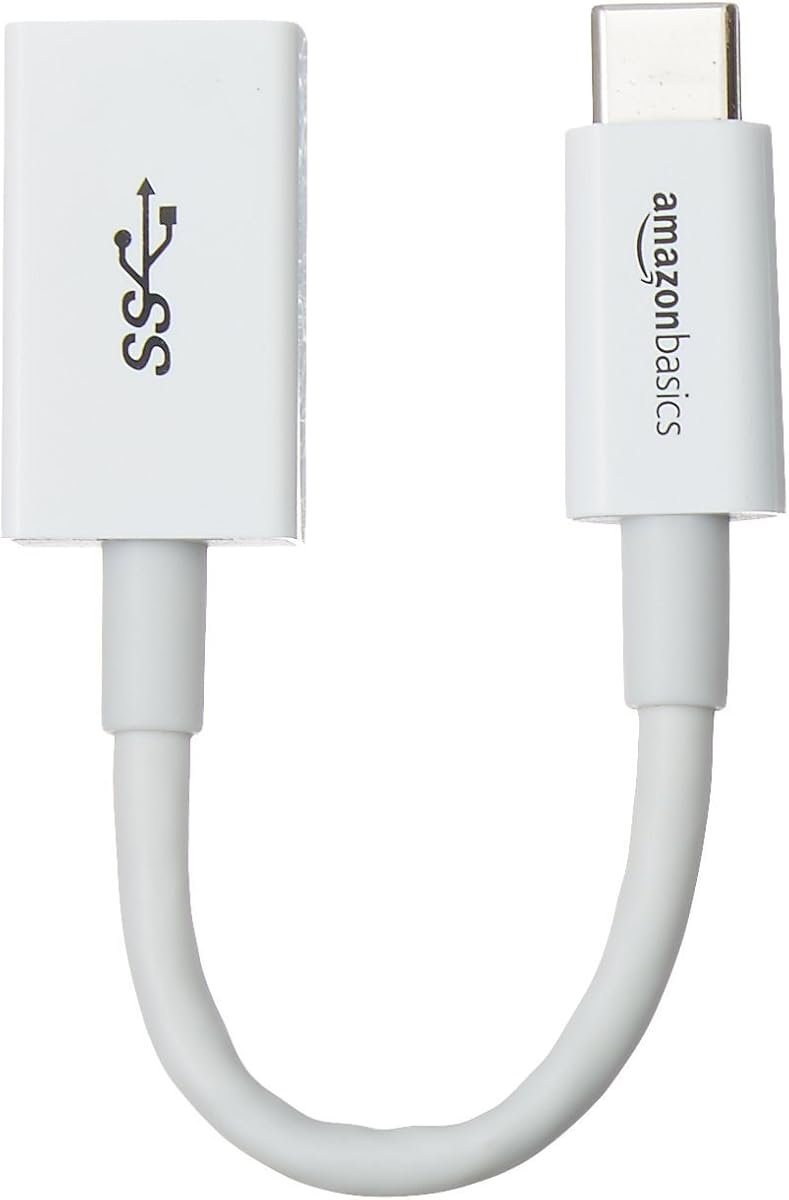
The Amazon Basics USB-C male to USB-A female adapter is a simple single-unit converter with a 4.6 rating and USB-IF certification. It supports both charging and data transfer, making it suitable for connecting a smartphone, tablet, laptop, hard drive, or other standard USB-A device to a USB-C host.
We may earn a commission when you buy through this link, at no additional cost to you.
The adapter is specified for USB 3.1 Gen 1 transfer at up to 5Gbps and remains compatible with USB 3.0 and USB 2.0. It supports charging up to 15W at 5V/3A, although devices that support USB Power Delivery may charge at a limited rate. It should not be treated as a high-wattage laptop charging solution.
Its compact 5.5-inch form follows the proportions of the USB-C connector, which is narrower and smaller than a standard USB-A plug. The simple white design can look less conspicuous on a desk, and the one-year limited warranty provides a basic level of support beyond the product itself.
Choose this adapter when certification and a single, uncomplicated converter are more important than a multi-pack. It is a sensible option for occasional file transfers, light charging, and connecting legacy accessories, while users needing more simultaneous conversions can look to one of the four-piece alternatives.
USB-IF certification provides a clear standards-based reason to consider this adapter. It is intended to connect USB-C hosts with standard USB-A devices for both charging and data transfer.
The single converter and compact body keep the setup uncomplicated. It works well for occasional media transfers, hard-drive access, and low-to-moderate charging tasks without adding a larger dock to the workspace.
We may earn a commission when you buy through this link, at no additional cost to you.
Choosing a female USB adapter requires matching connector direction, intended function, device support, and physical design. The most important distinction is whether you need a USB-C male plug, a USB-C female coupler, or a specific charging and data configuration.
The words female and male describe the openings and plugs on each end, and reversing them can make an adapter unusable for the intended task. Most products in this guide have a USB-C male plug that inserts into a device and a USB-A female opening that accepts a standard USB-A cable. The Pastall is a USB-C female to USB-A female coupler, while the JXMOX has a USB-C female end and USB-A male plug for charging from a legacy source.
For standard data use, choose the male USB-C to female USB-A arrangement. A female-to-female adapter usually needs two suitable cables, one with a USB-C male end and one with a USB-A male end. A female-to-male charging converter is most useful when the goal is to power a USB-C device from a USB-A charger, power bank, or computer port.
USB 3.0 adapters in this group generally specify transfer rates up to 5Gbps, while the UGREEN and Pastall products list up to 10Gbps. The JXMOX is explicitly a USB 2.0 product with transfer speeds up to 480Mbps. Actual performance depends on the host device, attached storage, intermediary cable, and whether every component supports the same USB generation.
A higher advertised rate does not automatically make every connected drive faster. To benefit from 5Gbps or 10Gbps, the host port, adapter, cable, and peripheral must all support that standard. For basic document transfer, USB 2.0 may be sufficient; for large media libraries, backups, and external drives, matching the full chain is more important.
Data transfer, charging, OTG, audio, and video are separate capabilities. The JSAUX explicitly excludes video output, while the Duyasurs excludes both audio and video. The Pastall is described as supporting audio and video as well as data and charging. OTG support matters when connecting flash drives, keyboards, mice, hard disks, card readers, or microphones to compatible phones and tablets.
Charging capability also requires checking output limits. The Amazon Basics adapter is specified up to 15W, the JXMOX up to 3A, and the Pastall up to 5V/3A. A USB-C port does not guarantee that every attached accessory or cable will accept full power delivery. List the function you need first, then exclude adapters that clearly do not support it.
The listed compatibility covers many iPhone, iPad, MacBook, MacBook Air, Samsung Galaxy, Google Pixel, LG, Dell, HP, Lenovo, and other USB-C devices. Nevertheless, the presence of a USB-C port does not guarantee OTG, charging, or display functionality. MacBook charging is especially problematic with the JXMOX because of charging-protocol incompatibility, and the product also excludes use with a 12-inch MagSafe charger.
For mobile devices, check whether the model supports OTG and whether the intended accessory is recognized. For computers, check the port generation and whether the operating system supports the peripheral. For display use, a separate video adapter or docking solution may be required because many simple data adapters cannot carry display signals.
Multi-packs are useful because USB-C adapters are small and easy to leave behind. The UGREEN and Pastall include four units, the Duyasurs and three-color set include three, and the JSAUX, Anker, two-pack USB 3.0 adapter, and BENFEI include two. The Amazon Basics includes one, making it the simplest option for occasional use.
Choose a larger pack when you own several compatible devices, travel between locations, or want an adapter permanently installed in each device bag. A single-unit option makes more sense when the adapter will remain attached to one computer or serve as a temporary solution for a particular legacy accessory.
Aluminum alloy and zinc alloy housings are used across many of the products, helping resist wear while keeping the adapter body compact. The JSAUX and BENFEI use braided nylon cable sections, which add flexibility and a secure grip. The UGREEN, Anker, and BENFEI emphasize slim dimensions that allow adapters to sit beside other cables without blocking adjacent ports.
Pay attention to the dimensions of the device rather than only the adapter. Some phone cases are too thick for an attached converter, while closely spaced laptop ports may be obstructed by a bulky housing. The UGREEN states compatibility with cases up to 2mm thick, and the BENFEI is specifically designed for simultaneous use in neighboring slots.
Repeated insertion and removal can stress the plug and socket, making connector durability a meaningful factor for frequently used adapters. The Anker, Duyasurs, UGREEN, three-color adapter, and USB-C to USB 3.0 two-pack all describe connectors tested or engineered for approximately 10,000 cycles. These figures indicate attention to repeated mechanical use rather than a guarantee against all failures.
Treat the rating as a comparative construction detail. A user who changes devices every day should still avoid forcing the connector, keep the port clean, and insert it in the indicated orientation. Good habits remain important even with a well-engineered USB-C plug.
Most adapters are small enough for a pocket, laptop sleeve, or tech pouch. The compact Anker design is particularly focused on fitting beside other MacBook cables, while the UGREEN is described as thumb-sized. The JSAUX and BENFEI include short braided sections that may remain attached more comfortably during frequent use.
Appearance is a secondary but legitimate factor. The Anker uses a space-gray aluminum finish, the Amazon Basics adapter is white, and the three-color USB C to USB Adapter includes black, gray, and silver. Matching finishes can reduce visual clutter when an adapter remains plugged into a device.
Begin by identifying the host port and the accessory you want to connect. For the common USB-C male to USB-A female design, insert the USB-C plug into the device and wait for the operating system to recognize it. Attach the USB-A peripheral only after the adapter is seated, and consult the device documentation if OTG mode must be enabled manually.
For file transfers, use a compatible USB drive, card reader, or external hard disk and verify that the intermediary cable supports the required USB generation. Clean the adapter interface and device port before insertion, and never force the connector. The UGREEN instructions specifically recommend locating the front logo and inserting the adapter in the indicated direction to reduce the risk of damage.
For charging, confirm that the charger, cable, adapter, and target device use compatible protocols and that the adapter's output does not exceed the device requirement. Disconnect the adapter when it is no longer needed, avoid leaving it exposed to moisture or impact, and store it in a small pouch so the connector does not bend or collect debris.
A female USB adapter typically converts a USB-C port into a USB-A connection so you can reuse legacy accessories. Common uses include flash drives, external hard disks, card readers, keyboards, mice, printers, chargers, and power banks. The exact functions depend on the adapter, so verify data, charging, OTG, audio, and video support separately.
It can, provided the phone has USB-C and supports the connection you want. Flash drives and some peripherals usually require OTG support, while charging also depends on the adapter and connected charger. The listed products cover several iPhone and Galaxy families, but compatibility should always be checked against the exact phone model.
Not every USB-C adapter carries display signals. The JSAUX explicitly does not support video output, and the Duyasurs excludes audio and video. The Pastall is described as supporting video signal transmission. If display output is essential, confirm the feature directly rather than assuming that a USB-C-shaped plug can transmit video.
A higher transfer rate can reduce the time needed to move larger files when every part of the connection supports it. The UGREEN and Pastall products list up to 10Gbps, while several others specify 5Gbps. The host device, adapter, cable, and peripheral must all support the same generation, and USB 2.0 devices will still operate at their own limits.
Only if the adapter and connected power source support the MacBook's required charging protocol and power level. The JXMOX explicitly cannot charge a MacBook and also does not fit a 12-inch MagSafe charger. Other adapters should not be assumed to provide laptop charging merely because they include a female USB-A port.
Most adapters that operate as standard data or OTG converters are plug-and-play and do not require additional drivers. The Duyasurs and the two-pack USB 3.0 product are specifically described as requiring no driver or software. The host device must still support the peripheral and connection type for it to function correctly.
A multi-pack is convenient when you use several USB-C devices or travel regularly, because it allows an adapter to remain with each device. Single-adapter sets are adequate for occasional use with one computer. The best choice depends on how many devices you connect, how often you switch between them, and where you need access to a converter.
Start by checking that the connected device supports the USB-C port, OTG function, and peripheral in question. Inspect both interfaces for dust, confirm the adapter is fully seated, and make sure the attached cable supports the same USB standard as the adapter and drive. Compatibility also matters because some adapters explicitly exclude audio, video, or certain charging protocols.
The JSAUX adapter is the strongest all-around selection because it combines USB 3.0 transfer, OTG support, a two-adapter bundle, and durable braided construction. The Anker option is the premium choice for its refined aluminum housing, slim adjacent-port fit, and 4.8 rating, while the Duyasurs three-pack delivers a particularly useful combination of multiple adapters, indicator lights, and straightforward phone and storage support.
Your priority should determine the rest of the list. Choose UGREEN for up to 10Gbps transfer and four adapters, Pastall for a female-to-female coupler that is described as supporting audio and video, or JXMOX for USB-A charger conversion to compatible mobile devices. The remaining options provide useful alternatives based on pack size, color coordination, certification, or cable construction.
Before making a final selection, verify the connector direction, transfer generation, charging protocol, OTG support, and physical fit with your exact devices. Product specifications, compatibility details, and availability can change over time, so check the current listing and your own hardware requirements at the time of purchase.
