
A1175 Laptop Battery for MacBook Pro 15-inch
4.3Editor score
10.8V 5800mAh capacity
Six-cell battery configuration
Multi-layer safety protections
Wide 2006–2008 model support
An A1175 battery replacement can restore mobility to older 15-inch MacBook Pro models, but choosing a genuinely compatible pack requires more than matching the model year. Capacity, voltage, connector design, physical dimensions, and the exact A-series designation all help determine whether a replacement will work safely and reliably.
This guide compares ten replacement batteries using the supplied compatibility lists, electrical specifications, safety protections, warranty terms, and included accessories. It separates true A1175 options from batteries intended for other MacBook families and explains why confirming the exact case and battery numbers is essential before making a selection.
Each entry highlights the most useful benefits and practical trade-offs of its battery, while the comparison table provides a faster way to review fit and specifications. Ratings and product details can change over time, so readers should verify the latest listing information and current price before ordering.
4.3Editor score

4.2Editor score

4.1Editor score
As an Amazon Associate we earn from qualifying purchases.
The following side-by-side comparison covers every product in the guide. It highlights the major differences in intended laptop family, electrical specifications, protections, installation support, and warranty coverage so readers can distinguish actual A1175 replacements from alternatives that serve entirely different MacBook models.


This A1175 replacement carries a 4.3 rating and stands out as the most directly aligned option in the guide for owners of older 15-inch MacBook Pro systems. It is marketed for the A1175 and the closely related A1260, A1150, A1211, and A1226 models from the 2006 through 2008 versions. That makes it a sensible starting point for buyers who recognize one of those designations but still need to verify the exact battery on their laptop.
We may earn a commission when you buy through this link, at no additional cost to you.
The supplied specifications describe a new six-cell lithium-ion battery rated at 10.8 volts and 5800mAh. Its compatibility list includes MB133XA, MB133LLA, MA348, MA348GA, MA348JA, MA348LLA, MB134XA, MA463, several MA463 regional variants, MA600JA, and MA601. Grade A cells and protections against overcharging, short circuits, and overheating form the core of its safety proposition, while a stated 30-day return period and 12 months of quality assurance add visible after-sales support.
The main advantage is its combination of broad model coverage and one of the higher stated capacities among the true A1175 choices. The trade-off is that the listing does not provide a detailed rated recharge-cycle figure, and physical connector or case differences can never be ruled out from model names alone. Buyers should therefore compare the printed battery number, dimensions, and connector arrangement rather than treating every compatible-looking model as interchangeable.
This is the best balanced pick for a user seeking a clearly described A1175 replacement with 5800mAh capacity, extensive safety claims, and solid compatibility information. It is especially appropriate for 2006–2008 aluminum-body 15-inch MacBook Pro configurations listed by the seller. Confirm all identifiers before ordering, retain the purchase record, and use a proper installation procedure to disconnect and reconnect the battery safely.
The unusually detailed model list gives this option a practical advantage for owners with several related A-series identifiers. Because the battery is specified for 2006, 2007, and 2008 versions, checking the original battery label and the laptop's bottom-case markings can help eliminate an incorrect match.
Grade A cells, overcharge protection, short-circuit protection, and overheating protection address several common battery hazards. The stated return window and quality-assurance period also make the purchase easier to evaluate if the new pack does not behave as expected.
We may earn a commission when you buy through this link, at no additional cost to you.
The SOLICE battery is an Editor's Choice because it combines one of the guide's strongest A1175-specific compatibility descriptions with a clear 10.8-volt, 5800mAh specification and a stated 68Wh energy capacity. Its 4.2 rating places it among the stronger-reviewed actual A1175 alternatives, although that rating should be treated as a snapshot rather than a guarantee of long-term performance.
We may earn a commission when you buy through this link, at no additional cost to you.
Its stated fitment covers A1175, A1260, A1150, A1211, and A1226 models from the 2006–2008 versions. The product information also names MB133XA, MB133LLA, MA348 variants, MB134XA, MA463 variants, MA600JA, and MA601. Overcharger and discharger circuit protections are highlighted, alongside CE, FCC, and RoHS certification, giving buyers more than a bare capacity claim to evaluate.
Compared with the first pick, the SOLICE option provides nearly the same nominal capacity and similarly broad year coverage. Its most noticeable distinction is the additional 68Wh figure, although watt-hours and milliamp-hour ratings are not directly interchangeable without also considering voltage. It does not state a rated number of recharge cycles, so long-term longevity is not as clearly documented as it is for the third option.
Choose this battery if you want a well-specified A1175 replacement with explicit circuitry protections, recognized certifications, and a stated quality-assurance period. It is best suited to owners who can match the relevant A-series and model identifiers. As always, compare the original battery's label and connector before ordering, and disconnect the old battery properly during installation.
A stated 10.8V, 5800mAh, and 68Wh configuration gives purchasers a more complete picture than voltage alone. These figures make it easier to compare the SOLICE pack with the other 5800mAh A1175 alternatives and with the lower-capacity upgrade-chip option.
The listing identifies CE, FCC, and RoHS certification and includes charger and discharger circuit protection. Those claims are useful when comparing otherwise similar replacement batteries, although buyers should still inspect the delivered product for damage and verify compatibility.
We may earn a commission when you buy through this link, at no additional cost to you.
This New Upgrade A1175 replacement has a 4.1 rating and earns the Best Premium distinction for the most clearly stated long-term cycle claim in the guide. The battery is rated at 10.8 volts and 4200mAh with six cells, while the listing says it can deliver more than 500 recharge cycles over its service life. It is explicitly intended for A1175, A1226, A1260, A1150, and A1211 15-inch MacBook Pro configurations from 2006 through 2008.
We may earn a commission when you buy through this link, at no additional cost to you.
Its compatibility list includes the familiar MB133, MA348, MB134, MA463, MA600JA, and MA601 identifiers. The upgrade chip is presented as the central technology improvement, and the listing additionally describes overcharger and discharger circuit protection plus CE, FCC, and RoHS certification. Customer support includes 24-hour email support, a 30-day refund guarantee, and a stated 12-month exchange arrangement for defective products.
The obvious trade-off is capacity. At 4200mAh, this battery is not equivalent on paper to the two 5800mAh A1175 alternatives in the guide. Its longer stated cycle life may appeal to owners who keep the same computer for many years, but capacity, longevity, and runtime are separate considerations. Buyers should not assume that more rated cycles automatically compensates for a lower milliamp-hour rating in every workload.
This is the premium choice for someone who values documented cycle endurance, an upgraded chip, and support terms more than maximum stated capacity. It may be particularly relevant for a heavily used but still serviceable 15-inch MacBook Pro. Confirm that the case, connector, and printed battery number match, and follow safe installation practices when replacing the original pack.
The more-than-500-recharge-cycle claim is the distinguishing feature of this option. For a laptop expected to remain in service for an extended period, the stated longevity makes this battery worth comparing carefully against alternatives with larger initial capacity ratings.
The upgrade chip, charger and discharger protection, and listed certifications create a more technology-focused feature set. These protections do not substitute for correct installation, but they complement careful handling and regular battery-care practices.
We may earn a commission when you buy through this link, at no additional cost to you.
This battery has a 4.2 rating and is one of the most feature-rich options in the comparison, but it is not a direct A1175 replacement. It is designed for 12-inch Retina MacBook models with the A1534 or A1705 designation, including early 2015, early 2016, and mid-2017 configurations identified through several EMC and board-part numbers.
We may earn a commission when you buy through this link, at no additional cost to you.
The listing describes a 7.55-volt lithium-polymer pack with 39.71Wh and 5263mAh, while another line refers to 5300mAh and 40Wh. It claims premium cells rated for more than 1500 recharge cycles, high-cobalt cells, and a smart chip for faster charging and lower power consumption. It also provides overcharge, overload, and short-circuit protection, along with UL, CE, FCC, and RoHS certification claims.
Installation convenience is a major strength because the package includes two screwdrivers and step-by-step instructions. However, the different capacity figures should prompt buyers to inspect the current listing for clarification, and those figures should not be compared directly with the 10.8-volt A1175 packs. Most importantly, this battery's voltage, case, connector, and intended model family are different from an A1175 replacement.
The product is an excellent fit for the listed 12-inch Retina systems, but it should never be selected merely because its listing includes the word A1175 or because a user is searching broadly for a MacBook battery. A buyer of an older 15-inch A1175 laptop should use one of the first three products instead. For the intended 12-inch owner, the tools, instructions, protections, and strong cycle claim are meaningful advantages.
Including two screwdrivers and instructions lowers the need for separate supplies. The package is therefore more convenient for first-time installers, provided the owner has fully matched the 12-inch Retina model identifiers.
A rating above 1500 recharge cycles is among the highest figures in this guide. Because the listing also presents slightly different capacity descriptions, buyers should verify the final specifications on the product page and physical packaging.
We may earn a commission when you buy through this link, at no additional cost to you.
The Futurebatt A1527 earns a 4.3 rating, tying for the highest rating among the products featured, but it serves a different MacBook category rather than replacing an A1175. It is intended for 12-inch Retina models from 2015, 2016, and 2017, including MacBook8,1, MacBook9,1, and MacBook10,1 identifiers.
We may earn a commission when you buy through this link, at no additional cost to you.
Its stated specifications are 7.55 volts and 39.71Wh, with Grade A cells described as supporting fast charging and low power consumption. The compatible-part-number list includes A1527, A1534, A1705, 661-02267, MF855LL/A, MK4M2CH/A, MNYG2LL/A, MF855CH/A, MF865CH/A, MF865LL/A, and MJY42CH/A. Overcharge, overdischarge, over-temperature, and short-circuit protections are listed.
The battery is also described as capable of up to 500 charge cycles. That claim is less ambitious than the 1500-plus cycle claim attached to the preceding 12-inch option, but it remains a useful stated metric. Support terms include a 30-day refund, 12 months of replacement coverage, and 24-hour email support. The supplied information does not mention included screwdrivers, adhesives, or a printed installation guide.
For owners of the specified 12-inch Retina computers, this is a compact, well-supported option with a strong rating and multiple protection features. It is not relevant to an A1175-based 15-inch MacBook Pro because the voltage and physical platform differ. Do not stretch the search term to include this option when the original battery is clearly labeled A1175; instead, focus on the first three products in the guide.
The inclusion of model identifiers, EMC numbers, and multiple board part numbers gives owners several ways to confirm fitment. Checking more than one identifier reduces the chance of confusing the A1527 with an unrelated MacBook battery.
Overcharge, overdischarge, temperature, and short-circuit protection form a comprehensive stated safety set. The 30-day refund and 12-month replacement terms provide additional recourse if an issue appears.
We may earn a commission when you buy through this link, at no additional cost to you.
This iFixit replacement has a 3.5 rating and is compatible with the MacBook Pro 15-inch Retina A1707 from late 2016 to 2017. It uses battery model A1820 and is specified at 11.4 volts, 76Wh, and 6667mAh, with a note that the new battery has capacity greater than 6340mAh.
We may earn a commission when you buy through this link, at no additional cost to you.
The package includes installation adhesive, which is valuable because many laptop batteries are secured within the chassis rather than attached with visible screws. The product is covered by iFixit's stated one-year battery warranty. Its electrical output is much higher than the true A1175 alternatives in this guide, but that reflects a physically and electrically different battery platform.
The 3.5 rating is the lowest among the ten entries. That makes this option less compelling as a broad recommendation, particularly since buyer feedback may be sensitive to installation method, adhesive quality, and exact model fit. Still, the stated warranty, recognized repair-focused branding, included adhesive, and clearly identified A1820 specifications give it defined strengths within its intended platform.
This battery is appropriate for a late-2016 or 2017 15-inch Retina MacBook Pro, not for an A1175-era computer. The two model families have different battery shapes, connectors, and electrical characteristics, so physical or functional fit cannot be assumed. An A1175 owner should choose from the first three entries, while a Retina owner may consider this option after verifying the exact A1707 identifiers.
Installation adhesive is important in a Retina MacBook Pro because the battery may remain secured inside the case during removal. Having the specified adhesive included reduces the need to source an unsuitable substitute.
The 76Wh and 6667mAh specifications place this option well above the older A1175 packs in raw capacity. That does not make it interchangeable; each platform requires its own physical design and power-management requirements.
We may earn a commission when you buy through this link, at no additional cost to you.
The iFixit 13-inch Retina Touch Bar Fix Kit has a 3.4 rating, the lowest in this comparison, and is designed for the MacBook Pro 13-inch Touch Bar A1706 from late 2016 to mid-2017. The battery is tested to have capacity greater than 4090mAh, although no exact voltage or watt-hour rating is supplied in the product information.
We may earn a commission when you buy through this link, at no additional cost to you.
Its clearest advantage is completeness. The kit includes all tools and adhesive needed for the DIY repair, making it more convenient for a user who does not already own the necessary installation supplies. That practical focus distinguishes it from listings that provide only the battery and basic instructions.
The relatively low rating is the main drawback. A repair kit can be easier to install while still receiving a modest rating, and the supplied information does not break down customer feedback by battery life, fit, tools, or installation. Buyers should therefore evaluate the complete package while recognizing that the feedback signal is not especially strong compared with the other entries.
This kit is suitable for the specifically listed Touch Bar model and should not be considered for an A1175 MacBook Pro. An A1175 searcher should focus on the purpose-built 10.8-volt packs in the first three reviews. For the correct 13-inch Retina buyer, however, the included tools and adhesive may deliver more installation value than a battery-only product.
Including the tools and adhesive gives this kit a ready-to-install structure. That can reduce friction during the repair, particularly for a first-time owner who would otherwise need to identify suitable supplies before opening the laptop.
The A1706 late-2016 through mid-2017 limitation defines the eligible machines. Checking the bottom-case identifiers and original battery label remains necessary even within that generation.
We may earn a commission when you buy through this link, at no additional cost to you.
This iFixit battery has a 3.8 rating and is designed for the MacBook Pro 13-inch Touch Bar A1706 from late 2016 to mid-2017. Its stated capacity is greater than 4090mAh, and the product is intended to replace a dead or malfunctioning battery.
We may earn a commission when you buy through this link, at no additional cost to you.
Installation adhesive is included, reducing the chance that the replacement will not be secured properly inside the case. A one-year battery warranty is another meaningful benefit for buyers who want a defined period of coverage. Unlike the preceding fix kit, the product information identifies this as a battery and adhesive package rather than a complete tool bundle.
The rating is moderate rather than exceptional. The listing does not provide a precise voltage, watt-hour rating, or cycle-life figure, so technical comparisons are more limited than with the entries that publish full electrical specifications. The stated A1706 fitment is clear, but the product cannot be generalized to every 13-inch Touch Bar configuration without checking the identifiers.
For the correct late-2016 to mid-2017 Touch Bar owner, this is a simple battery replacement backed by warranty coverage and supplied adhesive. It is not relevant to anyone searching for an A1175 pack because it belongs to a newer and physically different platform. A1175 buyers should return to the first three products, which explicitly list the relevant 15-inch models and 10.8-volt specifications.
The included adhesive supports proper placement of the battery inside the chassis. It is a meaningful inclusion for modern laptops where the pack is not secured by a simple set of external screws.
The stated one-year warranty gives the product stronger after-sales framing than listings with no explicit coverage. Buyers should retain the purchase record and follow the seller and manufacturer's guidance if a problem develops.
We may earn a commission when you buy through this link, at no additional cost to you.
The ASUNCELL A1465/A1406 battery has a 4.3 rating and offers one of the guide's strongest customer ratings, but it targets the 11-inch MacBook Air rather than the 15-inch MacBook Pro. It is listed at 7.6 volts, 39Wh, and 5100mAh for the A1370 and A1465 families.
We may earn a commission when you buy through this link, at no additional cost to you.
Compatibility is broad and clearly qualified. The product supports A1370 from mid-2011 but explicitly excludes the mid-2010 version. For A1465, it covers mid-2012, mid-2013, early 2014, and early 2015 versions across EMC 2471, 2558, and 2631. Model identifiers MacBookAir4,1 through MacBookAir7,1 and numerous A1495/A1406 part numbers are listed.
Built-in circuit protection is included, and the product is described as CE, RoHS, and FCC certified. Its strong rating and extensive compatibility references make it a compelling option for the intended Air users. One practical point to verify is that the listing calls the pack a replacement for A1495 and A1406 battery types while the title also uses A1465 and A1406; the original battery label should guide the final decision.
This battery is a good match for the specified 11-inch MacBook Air generations but has no stated compatibility with A1175 systems. The lower voltage, different form factor, and entirely separate model family make it unsuitable as a substitute for an A1175 pack. Anyone with an A1175-labeled MacBook Pro should choose one of the first three entries instead.
The listing distinguishes the supported mid-2011 A1370 from the excluded mid-2010 version, illustrating why exact model-year checking matters. The long list of EMC numbers and part numbers provides several ways to verify the intended system.
Built-in protection and stated CE, RoHS, and FCC certification make the technical feature set clear. As with every replacement battery, these protections work best when the pack is correctly installed, undamaged, and operated within normal charging conditions.
We may earn a commission when you buy through this link, at no additional cost to you.
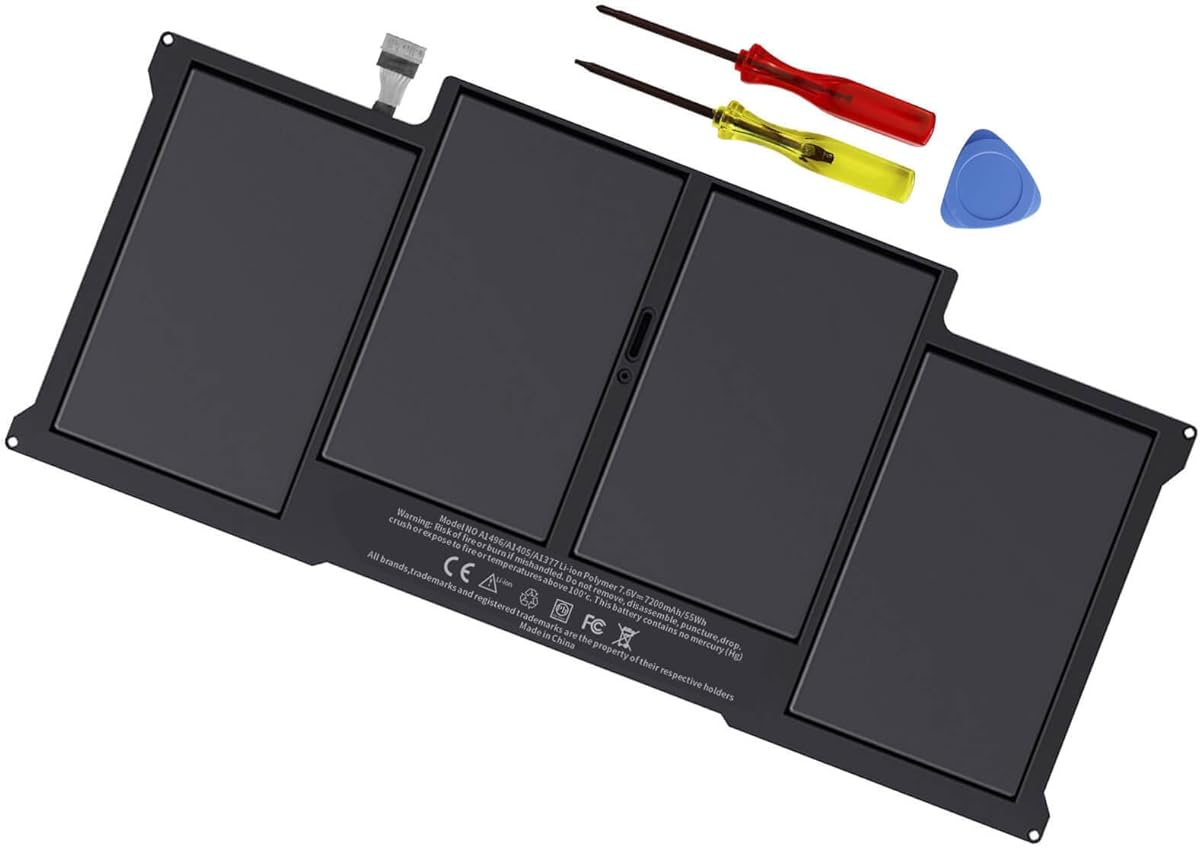
The A1405/A1466 replacement has a 4.4 rating, the highest numerical rating among the ten products. It is intended for 13-inch MacBook Air systems, including A1466 configurations from 2017, early 2015, early 2014, and mid-2013, along with listed A1369 versions from late 2010 and mid-2011.
We may earn a commission when you buy through this link, at no additional cost to you.
The battery is described as an A1405 pack rated at 7.6 volts, 7200mAh, and 55Wh with four cells. The compatibility list covers numerous MC503, MC504, MC965, MC966, MD231, MD232, MD760, and MD761 part numbers, along with A1377, A1405, and A1496 identifiers and several 661-series numbers. A 60-day return period is offered.
Installation convenience is excellent because the package includes two screwdrivers and an instruction sheet. The listing also states that the battery meets CE, FCC, RoHS, and UL certified standards. Its prominent warning is equally important: the A1405 battery is only compatible with 13-inch MacBook Air models and not with 11-inch systems. That limitation reduces the risk of confusing it with the previous ASUNCELL option.
This is the strongest-rated entry and a well-equipped choice for the stated 13-inch MacBook Air range, but it has no role in an A1175 replacement. The correct buying action is to determine the model on the underside of the computer and read the label on the current battery. If that label says A1175, select among the first three products rather than this higher-capacity Air battery.
The stated 7200mAh and 55Wh configuration provides ample power for its intended platform. Because watt-hour ratings and physical designs vary across MacBook families, it should not be substituted for a lower-voltage A1175 pack.
Two screwdrivers and a replacement instruction sheet create a more convenient package than a battery-only listing. Users should still consult model-specific service information and disconnect the battery according to established repair procedures.
We may earn a commission when you buy through this link, at no additional cost to you.
The most important buying decision is not capacity but confirmed compatibility. Start with the A1175 label on the original battery, then confirm the MacBook's exact A-series model, year, voltage, connector arrangement, and physical case dimensions before comparing any of the options in this guide.
An A1175 search should begin by inspecting the label inside the MacBook. The correct replacement should explicitly support A1175 and any additional model identifiers required by the seller, such as A1226, A1260, A1150, or A1211. Search results can include batteries for unrelated MacBook Air and Retina models, so matching the battery number is more dependable than relying on screen size alone.
In summary, verify A1175 on both the original pack and the replacement listing before considering any other specification.
The relevant A1175 options in this guide describe six-cell packs rated at 10.8 volts. Capacity differs between them: two list 5800mAh, while the upgrade-chip option lists 4200mAh. Voltage and cell count should align with the original platform, and milliamp-hour ratings should be compared only among batteries intended for the same computer.
In summary, prioritize 10.8-volt six-cell compatibility over chasing the largest headline capacity number.
A1175-era batteries appear in several 15-inch configurations from 2006 through 2008. The listings include MA348, MA463, MB133, MB134, MA600JA, MA601, and related regional identifiers. Confirming the model on the bottom case and the complete battery number prevents confusion with similarly sized A1175 alternatives used in different aluminum-body versions.
In summary, compare the full model string and manufacturing era rather than relying only on the broad A1175 name.
Capacity and cycle life represent different attributes. A 5800mAh pack may offer greater nominal capacity, while a battery rated for more than 500 recharge cycles may be better positioned for long-term ownership. There is no universal winner because runtime, age, charger behavior, and individual usage patterns all affect the experience. The listed values are best treated as comparative specifications rather than guaranteed real-world results.
In summary, choose between higher capacity and a documented cycle rating according to whether you value immediate runtime or long-term replacement value.
The leading A1175 choices include circuit protection for charging, discharging, temperature, or short-circuit conditions. The 5800mAh A1175 battery specifically mentions overcharge, short-circuit, and overheating protection, while the other true A1175 options describe charger and discharger circuitry. These features improve confidence but do not make an incorrectly sized or poorly installed battery safe.
In summary, select a battery with multiple stated protections and still inspect it for swelling, impact damage, or other visible defects before installation.
CE, FCC, and RoHS certification appears on all three purpose-built A1175 options, and one also identifies CE, FCC, and RoHS certification within its description. Warranty information also varies: two listings mention 12 months of quality assurance, while the upgrade-chip option offers exchange handling for defective products and a refund guarantee. These terms are useful when choosing between otherwise similar replacements.
In summary, compare certification and after-sales coverage, but confirm the current listing because policies and seller details can change.
The three actual A1175 options do not receive a full installation kit in the supplied data, unlike several 12-inch and 13-inch alternatives that include screwdrivers, instructions, or adhesive. A1175 owners may need to source suitable tools and follow a model-specific guide. The external replacement process generally requires opening the bottom case, disconnecting the old battery, seating the new connector, and securing the pack according to the laptop's design.
In summary, plan for the tools and service steps your specific MacBook requires rather than assuming every battery listing includes the same kit.
Most non-A1175 entries in this guide are useful examples of what not to select for an A1175 system. They target the 12-inch Retina A1527 platform, 15-inch Retina A1820, 13-inch Touch Bar A1706, 11-inch MacBook Air A1495/A1406, or 13-inch MacBook Air A1405. Their different voltages, capacities, connectors, and case shapes make them separate products rather than upgraded versions of the A1175 pack.
In summary, cross-model compatibility cannot be established by voltage or by the shared Apple MacBook name; use the original battery label as the authority.
Before installation, power the MacBook down fully and disconnect the charger. Open the bottom case using a procedure appropriate for the exact model, carefully disconnect the old battery, and avoid using metal tools around exposed connectors or the logic board. The new battery should be inspected for damage and matched against the model and electrical specifications one final time.
Seat the A1175 replacement in the same position as the original, reconnect its plug securely, and reinstall the bottom case without trapping cables beneath the cover. After startup, check the battery's percentage, charging behavior, and any warning messages. If the battery appears swollen, becomes unusually hot, or triggers a diagnostic alert, stop using it and have the system inspected.
To extend service life, avoid frequent complete discharges, use a compatible charger, keep the laptop ventilated, and remove unnecessary high heat sources. Periodic real-world use and occasional full charge are generally preferable to leaving a battery permanently stored in a deeply depleted state. Store the computer in a cool, dry place and follow current battery-care guidance for prolonged periods of inactivity.
The A1175 battery is associated with selected 15-inch MacBook Pro configurations from the 2006–2008 era, including models listed as A1175, A1226, A1260, A1150, and A1211. Compatible submodels include several MA348, MA463, MB133, MB134, MA600JA, and MA601 identifiers. Always confirm the battery number printed on the original pack because model naming can be confusing.
The top three A1175-focused products in this guide are explicitly marketed for A1175, A1226, and A1260 alongside several other related identifiers. That does not mean every battery with one of those names is physically interchangeable. Compare the connector, case dimensions, voltage, cell count, and original battery label before ordering.
A 5800mAh battery has a higher stated capacity than the 4200mAh upgrade-chip alternative. The 4200mAh option, however, states a rated life of more than 500 recharge cycles. Choose according to your priorities: higher stated capacity for the closest match among these options, or the documented cycle claim for longer-term ownership.
Do not assume that a MacBook battery can be transferred between product families. The A1527, A1820, A1706, A1495/A1406, and A1405 batteries in this guide use different platforms and electrical characteristics. An A1175 owner should stay with a battery specifically listed for A1175 and the verified model identifiers.
Check the label on the installed battery first, then compare it with the model number printed on the MacBook's bottom case. If the existing battery is inaccessible, use the service information for the exact machine rather than relying only on screen size or approximate release year. The full A-series and EMC identifiers provide the most reliable basis for a match.
First power the system down and disconnect the charger, then reopen the case and check that the battery connector is fully seated. Confirm that the replacement matches the original model and that no charger or power-related issue is preventing detection. If it still fails, follow the MacBook's battery diagnostic procedure and contact the seller or a qualified repair professional.
No. Overcharge, overdischarge, temperature, and short-circuit protections are valuable safeguards, but they cannot prevent damage caused by an incorrect fit, pinched connector, physical impact, or misuse. Inspect the battery, use the correct installation procedure, and stop using it if swelling, unusual heat, odor, or system warnings occur.
No cycle rating can guarantee a precise service life because charging habits, heat, storage, battery age, and laptop workload all influence wear. A stated cycle figure is still useful for comparing manufacturer claims. Use it alongside capacity, compatibility, protections, and warranty terms rather than treating it as the only measure of quality.
The A1175-focused shortlist is clear: the first option combines 5800mAh capacity, broad 2006–2008 compatibility, multi-layer protections, and quality assurance; the SOLICE choice adds detailed certification and a stated 68Wh rating; and the upgrade-chip option leads the group with an explicit 500-plus recharge-cycle claim. Each remains a strong candidate when paired with exact model verification.
Prioritize the original battery label and the computer's complete model identifiers before comparing capacity or protection features. The remaining products are useful replacements for different MacBook families, but they should not be treated as substitutes for A1175. Once compatibility is confirmed, evaluate runtime, cycle longevity, safety protections, warranty terms, and installation requirements together.
Ratings, availability, seller policies, and prices can change, so review the current listing before making a final decision. Confirm the electrical specifications and fitment one last time, retain the purchase record, and use a model-appropriate installation procedure for a safe, reliable result.