
Yueyinpu Wireless Page Turner Pedal For Tablets iPad Smartphone Rechargeable Anti-Skid Pad (Plus)
4.7Editor score
Five programmable control modes
Thirty-three-foot wireless range
Sixty-hour rechargeable battery
Our Bluetooth Foot Pedal Page Turner guide compares ten wireless options for sheet music, reading, presentations, app control, battery life, range, and
A Bluetooth foot pedal page changer removes the need to interrupt music practice, rehearsals, readings, or presentations to tap a screen. The best model should feel stable, respond consistently, translate pedal presses into the right commands, and work with the applications and devices you already use.
This guide compares ten Bluetooth foot pedal page turners across compatibility, control modes, wireless range, battery life, construction, portability, and practical features. It covers compact dual-pedal designs, rugged touring models, programmable illuminated pedals, and single-switch controllers designed to occupy minimal stage space.
Each review explains who should consider the product, where it stands out, and where compromises may arise. Ratings reflect the supplied customer feedback, while technical details come from the listed product information. Availability, features, and prices can change, so verify current listings before buying.
4.7Editor score
4.5Editor score

4.4Editor score
The comparison below highlights the main differences in pedal layout, programmability, power, wireless range, compatibility, and intended use, helping readers match a controller to their music, reading, or presentation setup.


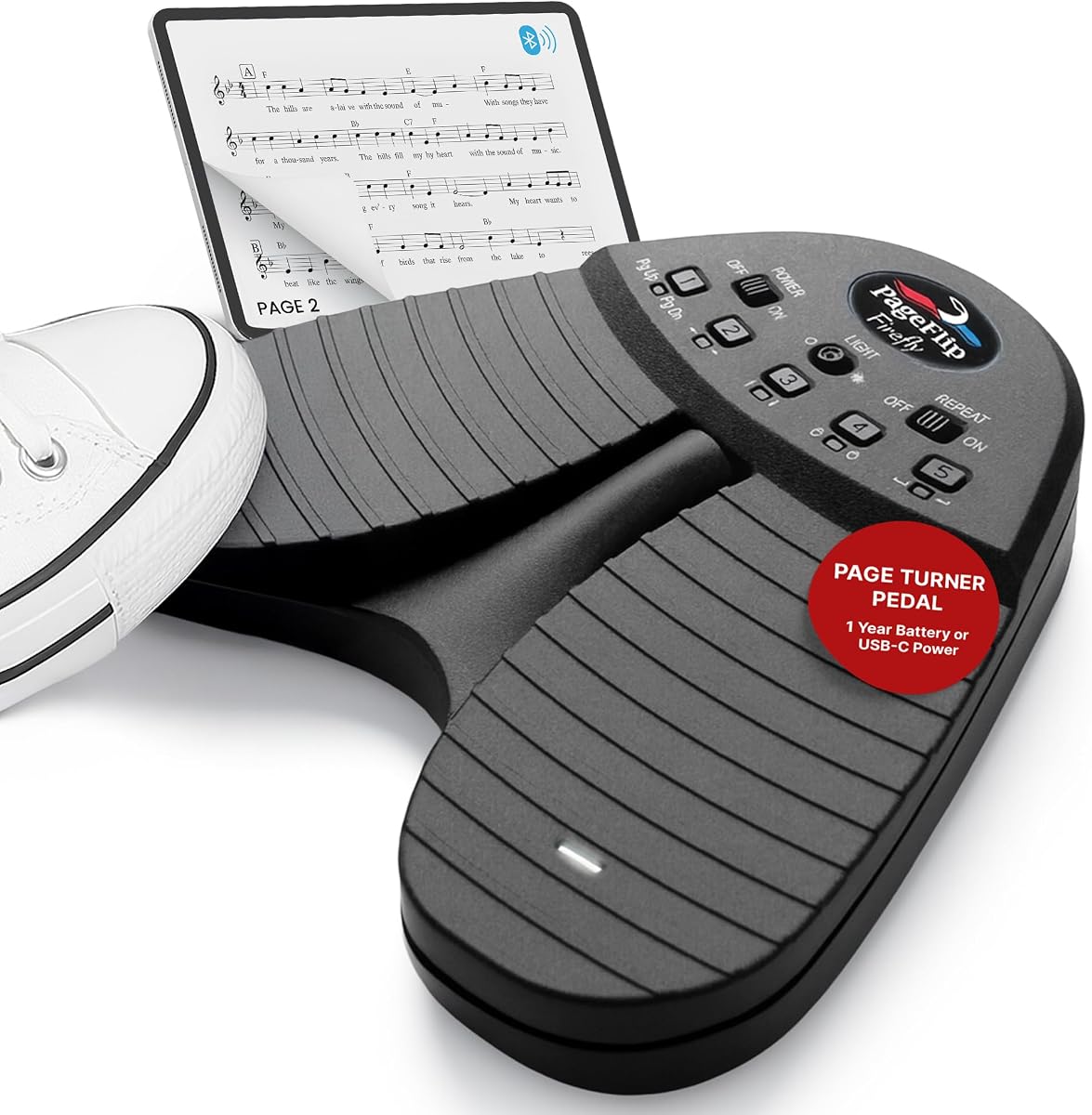
The PageFlip Firefly Bluetooth Page Turner Pedal is a programmable, illuminated controller built for musicians, readers, and presenters who want more control than a basic forward-and-back switch can provide. Its listed 4.5 customer rating reflects a well-regarded feature set, and the illuminated dual-pedal design immediately distinguishes it from simpler compact units. The combination of customizable actions, useful app compatibility, and visible switches makes it especially appealing in dim rehearsal rooms or on stages where the pedal position is not obvious.
We may earn a commission when you buy through this link, at no additional cost to you.
Both pedals can be assigned through the associated software, with five preset modes and the ability to map hotkeys for functions such as arrow keys, mouse clicks, or page turns. That flexibility helps bridge different ecosystems: a musician can use conventional page navigation, while a presenter may prefer mouse-style movement, and a reader may need a different command in another application. The pedal supports iPad, Android, Mac, Windows, and Linux devices through Bluetooth or USB-C, and the listed information names forScore, MobileSheets, and OnSong among compatible apps.
Physical construction and stage usability are also strong points. The rugged enclosure, silent action, illuminated surfaces, and dual auxiliary ports for external pedals or assistive switches make the Firefly more than a basic remote. Powering it through USB-C can suit a long session, while two AA batteries are claimed to provide up to a year of operation. An automatic sleep function after 30 minutes of inactivity helps preserve power. The trade-offs are that programming takes more setup than choosing a fixed command set, and users who specifically want a USB-C rechargeable internal battery may prefer another option.
This is a strong recommendation for anyone who changes apps, performs in low light, or needs assignable commands rather than a one-size-fits-all page changer. It is particularly well suited to stage performers, studio users, and assistive-control setups because the auxiliary expansion and silent operation add flexibility. Buyers should still confirm that their preferred software supports an external Bluetooth pedal and review the programming process before committing. For most users who value customization over minimalism, the Firefly offers the most complete control package in this roundup.
Programmable commands are the Firefly's defining advantage. Mapping separate pedals to page navigation, arrows, or mouse clicks allows the same hardware to move from sheet music to a PDF or presentation. This is useful for performers who rotate between several apps or for users who need a command that a standard left/right pedal cannot provide.
Illuminated pedal surfaces improve visibility in dark venues without requiring the user to look away from the music or audience. Silent switching also reduces mechanical noise during studio work, practice, and live performances, although external accessories connected through the auxiliary ports may have their own sound characteristics.
We may earn a commission when you buy through this link, at no additional cost to you.
The Wireless Foot Pedal Double Switch is a straightforward two-pedal controller aimed at musicians, readers, and anyone who wants to turn pages without touching a tablet. It carries a listed 4.3 rating and supports both horizontal and vertical navigation through five operating modes. The design is less elaborate than a fully programmable illuminated pedal, but that simplicity is precisely why it works well for users who want dependable basic control across books, PDFs, and music applications.
We may earn a commission when you buy through this link, at no additional cost to you.
The pedal functions like a wireless keyboard and can be configured to send page-up and page-down, left and right, up and down, left and right mouse buttons, or space and enter. Compatibility includes iPad and iPhone with iOS 11 or later, Android tablets, and PCs, with listed support for iBooks, Kindle, WPS, Foxit PDF, Adobe PDF, PiaScore, and forScore. The advertised 33-foot range and approximately 60 hours of use per charge make it suitable for rehearsal rooms, home studios, classrooms, and ordinary stages.
A notable choice point is size. The Classic version measures 6.69 by 4.33 by 0.91 inches, while the Plus version measures 7.08 by 5.08 by 1.08 inches. The supplied information says both function the same way, so the larger model is primarily relevant to users who want more floor area or a slightly different footprint. The Classic uses micro-USB charging, which is a drawback for people who have standardized on USB-C cables and may need to keep a legacy cable nearby.
Choose this pedal if your priority is broad everyday compatibility and multiple navigation modes without a complicated programming process. It is a good fit for keyboardists rehearsing with PiaScore or forScore, students working through digital books, and office users navigating documents. It may be less ideal for someone who needs illumination, highly customizable commands, rugged metal construction, or a rechargeable USB-C design, but within the basic dual-pedal category it provides a generous feature set.
The available keyboard and mouse-style commands allow the pedal to handle more than conventional page changes. Users can select a mode that matches their app, which is helpful when moving among sheet music, e-books, PDFs, and presentation software. The lack of freely assigned hotkeys keeps setup straightforward.
Classic and Plus versions offer the same core operation but different dimensions and charging interfaces. The larger Plus may feel more substantial underfoot, while the Classic is easier to fit into a tight bag. Check whether the charging connector matters to your normal kit before selecting a version.
We may earn a commission when you buy through this link, at no additional cost to you.
The Yueyinpu Wireless Page Turner Pedal Plus is an appealing, budget-conscious option with a listed 4.7 rating, making it one of the strongest customer-rated products in the guide. It provides two pedals, five control modes, a rechargeable battery, and compatibility with the kinds of phones, tablets, reading applications, and music apps that most foot-controlled page turners are expected to handle. Its Plus format also updates charging to USB-C, a practical advantage over micro-USB alternatives.
We may earn a commission when you buy through this link, at no additional cost to you.
The pedal can control iPad and iPhone devices running iOS 11 or later, Android tablets, and PCs. Named app support includes iBooks, Kindle, WPS, PDF applications, Adobe PDF, PiaScore, and forScore. Instead of a single page-turn command, it can emulate up-and-down keys, left-and-right keys, mouse buttons, space, and enter. This gives users enough flexibility for sheet music, e-books, documents, and photo browsing while avoiding the complexity of a desktop programming utility.
Its listed 33-foot wireless range and approximately 60-hour battery life support extended practice sessions without frequent charging. The Plus body measures 7.08 by 5.08 by 1.08 inches and includes an anti-skid platform intended to keep the controller stable underfoot. The main limitation is that users are limited to a preset menu of command modes rather than custom hotkeys. That makes it less adaptable for unusual software, but it also makes day-to-day operation more approachable.
This pedal is a strong choice for pianists, guitarists, singers, and readers who want reliable hands-free navigation without spending on a fully programmable stage controller. It is also well suited to travel because the rechargeable design removes the need for spare cells. Choose it when app compatibility, USB-C charging, and versatile navigation matter more than free-form command assignment. Among the simpler designs, the combination of feature coverage and a 4.7 rating makes this an especially compelling recommendation.
Five preset modes cover most navigation patterns used by reading and music applications. Users can switch modes instead of mapping individual keys, which reduces setup time and makes the controller approachable for beginners. The tradeoff is that specialized applications requiring unusual commands may need a more advanced pedal.
A claimed 60-hour operating time is useful for rehearsals, lessons, and long sessions, while USB-C charging simplifies recharging with common cables. The anti-skid platform adds stability, although floor condition, cable placement, and the user's footwear can still affect how firmly the pedal stays in position.
We may earn a commission when you buy through this link, at no additional cost to you.
The LEKATO Wireless Page Turner Pedal combines ordinary page navigation with a specialized ability to control a compatible loop station. Its listed 4.1 rating places it below the category leaders, but the product is not trying to be just another tablet accessory. The loop-station integration could be valuable to guitarists and performers who want to move between a score, lyrics, guitar tabs, or recorded loops without leaving the pedal behind.
We may earn a commission when you buy through this link, at no additional cost to you.
Beyond loop control, the unit supports iOS versions above 13.4, Android, and applications for reading sheet music, scrolling lyrics, guitar tabs, teleprompter material, and photo albums. The external pedal connects to a compatible loop station over Bluetooth and can switch to the previous or next loop. Both the loop station and pedal must be powered on, and the supplied instructions explain that a blue indicator confirms the link. That makes the device more specialized than a standard reading pedal.
The solid metal enclosure and four anti-slip pads create a stable foundation, while the internal rechargeable lithium battery is claimed to last more than 48 hours per charge. Its listed 60-foot connection range is generous for a rehearsal room, home studio, church, or small stage, and the included USB cable simplifies recharging. The lower listed rating may reflect the narrower device or operating-system requirements compared with more universally compatible controllers.
Buy this pedal if you already use a compatible LEKATO loop station or need a single controller for both page turning and loop switching. It is less appropriate if broad compatibility is your first priority or if you need free-form hotkey programming. For musicians with a matching loop-station setup, however, the specialized control can make the product more valuable than a generic dual-pedal page changer.
The ability to control a compatible loop station distinguishes this model from conventional page turners. That means the same foot controller can potentially handle both navigation and performance workflow, reducing the need to reach for a separate switch. Compatibility with the intended loop station should be confirmed before purchase.
The metal enclosure is intended to withstand regular stage and rehearsal use, and four anti-slip pads help limit movement. A rechargeable battery and long listed range support extended sessions. Users should still test the pedal on their actual floor surface and keep the charging cable accessible after long outings.
We may earn a commission when you buy through this link, at no additional cost to you.
The STOMP Mini is built around a simple idea: provide forward and backward navigation in a controller small enough to fit where a conventional dual-pedal cannot. Its listed 3.8 rating is the lowest in this group, so buyers should weigh its compactness and feature claims carefully. Even so, the two-by-two-by-one-inch enclosure, rechargeable USB-C battery, and broad app support make it a distinctive option for crowded stages and mobile setups.
We may earn a commission when you buy through this link, at no additional cost to you.
A single switch supplies bidirectional page control, allowing the user to move forward or backward without reaching for a second pedal. The triple-mode system offers 12 command configurations, and multi-unit pairing can support coordinated control across more than one device. Compatibility covers iOS, Mac, and Android, with listed support for OnSong, Planning Center Music Stand, forScore, BandHelper, Music Sheets, Orpheus, and many other applications.
The pedal claims more than 100 hours of operation and a wireless range exceeding 100 feet, both of which are useful for lengthy tours or multi-service schedules. Its ABS enclosure and metal switch are designed for portability and repeated use, while the switch is described as quiet and tactile. The principal compromise is that one switch must handle both directions, which may feel less immediate than independent left and right pedals. The rating also suggests some buyers may have encountered issues not addressed in the available specifications.
This is a compelling recommendation for performers who value stage space more than a traditional two-pedal layout. It may also suit presenters who want a tiny directional controller for slides, teleprompter software, or documents. Choose it for its portability, long battery life, and app flexibility, but confirm that your app supports the required commands and that a single-switch workflow feels comfortable before buying.
The single-switch layout can be especially useful on compact stages where every pedal, cable, and accessory competes for floor area. A single action produces either forward or backward navigation depending on the selected command configuration. Users who prefer immediate independent pedal responses may find a dual-switch design easier to operate.
A rechargeable USB-C battery, stated 100-plus-hour runtime, and a stated 100-foot range reduce some of the daily logistics associated with touring. The compact ABS body is easy to pack, and the metal switch should withstand repeated pressing. Actual results will depend on app support, configuration, and operating conditions.
We may earn a commission when you buy through this link, at no additional cost to you.
The Stomp Bluetooth Page Turner is a rugged, dual-switch controller aimed at gigging musicians who need more durability than a lightweight plastic pedal can offer. Its listed 4.4 rating reflects strong customer reception, and the metal enclosure and included protective case create a clear premium case. It is designed for touring, rehearsals, and regular stage use where dependable physical construction is as important as wireless control.
We may earn a commission when you buy through this link, at no additional cost to you.
The pedal supports iPad, iOS, Android tablets, and most Bluetooth 4.0 devices. Left and right switches can navigate horizontally or vertically, and compatible applications can be used for customized control. Listed music-stand software includes forScore, Nkoda, MobileSheets, OnSong, and Planning Center Music Stand. Its 50-plus-foot range allows the connected tablet to remain away from the pedal, and certain apps can control multiple devices together for group page changes.
Power is another standout. A single 9V battery is claimed to deliver up to 150 hours, while a 9V DC power supply enables continuous operation. The attached USB terminal can also keep a connected phone or tablet charged when external power is used. This makes the pedal suitable for long rehearsals or an entire performance, but the 9V battery arrangement is less convenient than a built-in USB-C rechargeable system. The power supply is not included, and the pedal is larger than mini controllers.
This is the premium option for working performers who repeatedly transport their equipment and value ruggedness over compact size. It is well suited to musicians controlling several devices, teachers using large displays, and anyone who prefers the familiarity of physical left and right pedals. Choose it when durability, battery endurance, and multi-device coordination matter most. For users who prioritize USB-C charging, minimal floor space, or the lowest possible weight, a smaller rechargeable controller may be a better fit.
The solid metal enclosure is the core reason to consider this model over a plastic alternative. A protective travel case is also included, which helps organize the pedal during transport. Although the product description mentions an unusual durability demonstration, that is not the same as an independent standardized test, so buyers should base their decision on the stated construction and their own touring needs.
A claimed 150-hour runtime from one 9V battery is notable, while the option to use a DC supply supports continuous work. The attached USB terminal offers added value for keeping a phone or tablet powered during externally powered sessions. Those who favor universal USB-C charging may prefer a pedal with a built-in rechargeable cell.
We may earn a commission when you buy through this link, at no additional cost to you.
The Wireless Page Turner Pedal is a general-purpose Bluetooth controller with an unusually broad list of compatible applications. It carries a 4.3 rating and targets people who do more than turn sheet music: musicians, photographers, presenters, teachers, cooks, and other users navigating slides, recipes, photos, or online media. Its Bluetooth 5.2 foundation and five selectable modes make it a versatile option for mixed-purpose use.
We may earn a commission when you buy through this link, at no additional cost to you.
The listed app compatibility includes forScore, OnSong, PDF tools, Nextpage, Music Reader4, Do Gigbook, Teleprompter+3, Paperless Music, PiaScore, and Musicstand, with support across iPad, Android, PC, and Mac. Its five modes cover page-up and page-down, arrow keys, swipe gestures, and a repeat setting. That is more flexible than a basic two-position pedal, although it is not equivalent to fully custom key mapping.
The pedal uses a silent ABS body with a non-slip base and stands 2.2 inches high, making it relatively unobtrusive and easy to place in a gig bag. Its internal rechargeable battery is claimed to last about 60 hours, and a three-color battery indicator lets the user check the remaining level. The listed description says it is designed for extended rehearsals without foot fatigue, but comfort will vary with footwear, floor surface, pedal position, and session length.
This is a good recommendation for users whose software list extends beyond music reading. A teacher moving between a score and slides, or a presenter handling teleprompter and photo applications, can benefit from the multiple command styles. The main limitation is the lack of truly custom hotkey assignment. Confirm that the apps you use are on the compatibility list and that their expected command format matches the pedal's modes before purchasing.
The broad application list is this pedal's most meaningful distinction. Repeat and gesture modes can be useful for teleprompting and presentations, while conventional page commands remain suitable for scores and documents. This makes it a practical single controller for users who switch among rehearsal, teaching, and presentation tasks.
Silent operation helps in recordings and quiet rooms, while the anti-slip base improves stability. A compact 2.2-inch height and claimed 60-hour runtime suit mobile use, and the color-coded battery indicator reduces uncertainty before a session. Long-term comfort still depends on where and how the pedal is placed.
We may earn a commission when you buy through this link, at no additional cost to you.
The LEKATO USB-C Wireless Page Turner combines a 4.7 rating with thoughtful controls for people who regularly move between devices. It supports tablets, smartphones, Mac, Windows, Android, and HarmonyOS, while five built-in modes cover common navigation patterns. A physical repeat toggle and a hardware reset procedure are especially useful details that distinguish it from many simpler wireless page changers.
We may earn a commission when you buy through this link, at no additional cost to you.
The pedal can be switched between modes with one press of the mode button, and a yellow LED shows the active selection. Its repeat switch lets the user hold the pedal for continuous scrolling, which is valuable for long documents and teleprompter applications. Turning repeat off enables a single light tap to advance exactly one page, reducing the chance of accidental jumps. The top and bottom of the back use non-slip rubber, and the switching mechanism is described as silent.
Power comes from a built-in 400mAh battery charged through USB-C. A full charge is claimed to provide approximately 40 hours of continuous use, and red, yellow, and green indicators communicate the battery level. Smart sleep mode activates after 25 minutes of inactivity while paired or five minutes while unpaired. The reset hole, operated for three seconds with a pin or toothpick, clears stored pairing information and lets the pedal be paired with a new device without manually forgetting it first.
This pedal is a strong fit for musicians and readers who value straightforward controls, continuous scrolling, and painless re-pairing. It is particularly helpful for users who alternate between personal, rehearsal, and stage devices. The stated 40-hour battery life is shorter than several alternatives, but USB-C charging offsets some of that inconvenience. Confirm that your chosen app supports the relevant command mode, and use the reset feature as intended when changing devices.
The physical repeat switch separates continuous scrolling from single-page taps. That gives users direct control over page behavior without cycling through every setup mode. It is especially useful for teleprompting, extended reading, and quickly moving through a long document.
The three-second reset procedure clears old pairing data directly from the pedal. This can save time for performers or students who regularly alternate among tablets, phones, and computers. The rainbow LED flash provides a visible confirmation that the reset has taken place.
We may earn a commission when you buy through this link, at no additional cost to you.
The LEKATO Rechargeable Bluetooth Page Turner is a practical dual-pedal controller designed for musicians, practice sessions, and general hands-free navigation. Its listed 4.3 rating reflects a balanced feature set, while the rechargeable battery, silent mechanism, and anti-slip base address common practical concerns. It supports phones, tablets, and laptops through Bluetooth and is intended for sheet music, images, and other app-based material.
We may earn a commission when you buy through this link, at no additional cost to you.
Five selectable modes cover page-up and page-down, left and right, up and down, left and right mouse clicks, space, and enter. This gives the pedal enough flexibility for different apps without requiring a computer to assign arbitrary hotkeys. A real-time battery indicator helps users avoid unexpected power loss, and the claimed 60-hour operating time is sufficient for multiple rehearsals or a full performance under typical use.
The 30-foot connection range covers many rehearsal rooms, stages, classrooms, and home setups, though it is shorter than the 50-to-100-foot claims made by several competitors. The silent design is particularly welcome in studios or intimate performances where pedal clicks could be audible. A fixed plate and anti-slip rubber help keep the unit steady, while the absence of illuminated switches means users may need to remember pedal positions in darkness.
This pedal makes sense for pianists, guitarists, singers, and readers who need several navigation styles in a dependable, rechargeable design. It is a sensible middle ground between a basic page switch and a fully programmable stage controller. Users operating in very large venues should confirm the range is sufficient, while those requiring custom key assignments may need a more advanced unit. For ordinary room-scale use, its claimed range is generally practical.
The five modes provide several ways to move through digital content while keeping the setup approachable. Keyboard and mouse-style commands cover common app expectations, and the mode can be changed without assigning individual hotkeys. This balance makes the pedal useful to both beginners and regular performers.
Silent operation reduces unwanted mechanical noise during recordings, rehearsals, and performances. The fixed plate and anti-slip rubber are intended to limit movement, improving command consistency. Users should still position the pedal on a level surface and adjust its placement to suit their footwear and natural foot movement.
We may earn a commission when you buy through this link, at no additional cost to you.
The Donner Wireless Bluetooth Page Turner Pedal is a multi-purpose controller for readers, musicians, and anyone who wants to navigate digital content hands-free. Its listed 4.5 rating places it among the stronger-reviewed products, and its broad platform support is one of its most useful qualities. Rather than focusing on one specialized workflow, it handles page movement, scrolling lyrics, media control, and other compatible functions.
We may earn a commission when you buy through this link, at no additional cost to you.
The listed compatibility spans phones, tablets, Android tablets, Mac, PC, and other major platforms. It works with most major music and reading applications, with the important qualification that software must support external Bluetooth pedals in its settings. That caveat is normal for page turners because apps handle external keyboard or controller input differently. Users should check their intended app before purchasing rather than assuming every PDF or music reader will respond.
A built-in rechargeable battery is claimed to deliver more than 50 hours per charge, and the included USB cable makes recharging convenient. The stated 30-foot range is adequate for a home, classroom, rehearsal room, or modest stage, though it trails several extended-range competitors. The device also avoids the need for replaceable batteries, which can simplify travel and long-term ownership. Its control functions appear less granular than models advertising five explicit modes or programmable hotkeys.
Choose the Donner pedal when broad device support and straightforward media control are your priorities. It is a natural fit for keyboardists, singers, readers, and presenters who want one compact accessory to manage several kinds of apps. It may be less attractive for a touring professional who needs programmable commands, illuminated pedals, very long range, or multi-device synchronization. For everyday use within a moderate room, the combination of rechargeability, range, and platform flexibility remains appealing.
The controller is not limited to conventional page changes; the listed functionality also includes lyric scrolling and media control. That makes it useful for rehearsals, practice, reading, and casual media navigation. Each app still needs to support the appropriate external input method.
The internal battery and included USB charging cable remove the need to carry spare cells. A claimed runtime above 50 hours should cover many ordinary sessions between charges. The 30-foot range is most appropriate when the connected device remains nearby, such as on a music stand, desk, or small performance area.
We may earn a commission when you buy through this link, at no additional cost to you.
The right Bluetooth foot pedal page turner depends less on raw feature count than on how you work. App compatibility, command configuration, physical stability, power method, and room size should guide the decision before you compare aesthetics or extras.
Choose a pedal explicitly compatible with your primary app and device. Do not rely on a generic Bluetooth label alone.
Match the control set to your workflow: simple navigation for reading, flexible modes for mixed apps, and custom hotkeys for specialized software.
Prioritize a layout you can operate consistently without looking down. Test dimensions, stability, and footwear compatibility whenever possible.
Choose enough range for the actual performance space and keep the controller within a clear line of the connected device.
Select the power method that matches your session length, travel habits, and charging setup rather than focusing only on the largest battery claim.
Match enclosure strength and base grip to how mobile or demanding your setup is. Touring users gain from ruggedness, while home users may prioritize compactness and quietness.
Favor visible mode, pairing, and battery indicators if you perform in low light or need quick confidence that the controller is ready.
For frequently changing setups, prioritize a clear reset process. For ensemble work, verify multi-device support in the specific apps you plan to use.
Begin by fully charging the pedal, then confirm that its Bluetooth device appears in the tablet, phone, or computer's Bluetooth menu. Pair the unit according to the product instructions, open the intended application, and check its settings for external pedal, keyboard, or Bluetooth controller support. If navigation does not work, switch to the appropriate control mode and test one pedal at a time. This separates pairing problems from app compatibility or command-configuration issues.
Place the pedal on a level, clean surface where it will not be stepped on accidentally, and position it near your natural foot movement without creating a trip hazard. Wear consistent footwear during rehearsals and performances because changes in grip can affect how firmly the pedal stays in place. For a two-pedal model, assign left and right functions that match the app. For a single-switch model, choose a direction or repeat mode that makes the next movement predictable. Test the setup before every important session.
To maintain the pedal, keep the switches free of dust, wax, grit, and sticky liquids, and avoid dragging it across abrasive surfaces. Inspect the charging port, base, and cable for damage, and keep the battery away from extreme heat. When pairing becomes unreliable, use the pedal's reset procedure if one is provided; otherwise remove it from the device's Bluetooth list and pair it again. Store the unit in a protective case during transport and recharge it before long periods of inactivity.
No. The pedal and application must both support external Bluetooth controllers, keyboards, or pedal commands. Check the product's stated compatibility and the app's settings before purchasing. Even compatible apps may respond differently to page keys, arrow keys, mouse clicks, or swipe commands, so testing with the exact app and operating-system version is important.
The best live option depends on the rig and the musician's priorities. The Stomp Bluetooth Page Turner emphasizes metal construction, long battery life, and multi-device coordination, while the PageFlip Firefly adds programmability and illumination. A single-switch model such as the STOMP Mini may be better when stage space is limited. Stability, quiet operation, and reliable app support should matter more than the longest advertised range.
Rechargeable models are usually easier to maintain because you do not need to carry spare cells, and USB-C charging adds convenience. Replaceable-battery models can last far longer between replacements, however, with some products claiming up to a year or 150 hours. Choose according to your session length, access to charging cables, and preference for battery longevity versus a self-contained rechargeable design.
A dual-pedal controller usually provides immediate left and right navigation, while a single-switch unit can send forward, backward, or other programmed commands through one switch. The single-switch format takes up less stage space and may be useful for presenters, but some musicians prefer the faster visual and physical distinction of two pedals. Test the command sequence to make sure it feels natural for your workflow.
The pedal may be paired correctly while the second app lacks support for external input or uses different commands. First switch to the pedal's matching keyboard, mouse, arrow, or page mode. Then check the app's help page and operating-system requirements. If the app supports only certain functions, the pedal may control scrolling but not page turns, or it may require enabling an accessibility or external-controller option.
Most home, classroom, and rehearsal setups need only a modest range, while performers may require more distance between the pedal and tablet. Listed maximum ranges range from about 30 feet to over 100 feet, but walls and interference can reduce effective performance. Choose enough range for the intended space and test the complete setup in the room where it will be used.
Many can, provided the relevant app supports external page-turn, arrow, mouse, swipe, or repeat commands. The Wireless Page Turner Pedal explicitly lists presentation and teleprompter applications, and other models support generic keyboard or mouse actions. Verify the app name and required command mode before buying, since a pedal working in sheet-music software may not behave identically in presentation software.
Start by checking the manufacturer's pairing instructions, because reset procedures vary. Some models provide a physical reset hole that clears saved pairing information after a three-second press, while others ask you to forget the device from the tablet or phone's Bluetooth menu. After resetting, put the pedal into pairing mode and reconnect it, then repeat the app's control-mode test.
The PageFlip Firefly stands out for programmable controls, illuminated pedals, silent dual-switch operation, and broad device support, making it the strongest all-around recommendation. The Yueyinpu Plus delivers an excellent 4.7 listed rating, five control modes, USB-C charging, and long advertised battery life for a more straightforward approach. For touring musicians who value rugged metal construction, the Stomp Bluetooth Page Turner offers the premium durability and multi-device emphasis.
Prioritize compatibility with your exact app and device first, then choose the command modes and pedal layout that suit your work. Music readers need reliable page and arrow commands, presenters may value repeat and gesture modes, and touring users should consider metal construction, wireless range, and power logistics. Budget-conscious buyers can find capable dual-pedal alternatives, while users with specialized loop-station requirements may prefer the additional control described for that product.
Customer ratings and product information offer a useful starting point, but the final decision should reflect your venue, applications, and operating system. Features, firmware behavior, availability, and prices can change, so check the current product listing and app requirements before purchasing. Once compatibility is confirmed, choose the controller that offers the most useful control without adding complexity your routine does not need.