
360 View 4 Channel Dash Cam
4.3Editor score
Four simultaneous camera views
Full HD 1080P recording
Infrared-assisted night vision
Included 128GB memory card
Boat dash cameras are not simply car cameras placed inside a hull: marine use demands dependable visibility, corrosion-conscious installation, readable low-light footage, and a way to document activity around a vessel. The right unit should also suit the electrical system, storage plan, and mounting positions available on your particular boat.
This guide compares ten relevant recording and marine-camera options across resolution, field of view, night performance, parking surveillance, GPS, wireless connectivity, displays, and power requirements. It also explains an important category limitation: most products below are automotive dash cameras, while one is purpose-built for marine monitoring.
Each review identifies the strongest use case, important specifications, installation considerations, and trade-offs based strictly on the available product information. Ratings and product details can change, while prices and promotions also move frequently, so readers should verify current listings and vessel compatibility before purchasing.
4.3Editor score
4.9Editor score

4.5Editor score
As an Amazon Associate we earn from qualifying purchases.
The table below compares recording resolution, coverage, connectivity, and notable features. Because most entries are automotive rather than purpose-built marine cameras, it also highlights where power, mounting, weather exposure, and vessel installation need special attention.



The ROVE R2-4K Dual is a sophisticated front-and-rear automotive dash camera with a 4.5 rating. Its most compelling feature for a boat-related installation is the combination of a Sony STARVIS 2 IMX675 front sensor, wide apertures, HDR, dual-band Wi-Fi, built-in GPS, and a three-inch IPS screen. These features make it a strong candidate for an adapted windshield or protected cabin installation.
We may earn a commission when you buy through this link, at no additional cost to you.
The front camera records at 2.5K and upscales the result to 4K, while the rear records at 1080P. It is important to understand that the front footage is not native 4K, so buyers should judge its value by the underlying 2.5K capture and sensor performance rather than the resolution label alone. The front lens uses an f/1.5 aperture, while the rear uses f/1.8, giving both cameras a useful low-light foundation.
The package includes a 128GB memory card, a dual USB car charger, mounting hardware, trim tools, and a rear camera cable. A supercapacitor supports heat management and parking-mode use, although continuous 24-hour parking operation requires a separately sold hardwire kit. The complete accessory approach is extensive, but adapting it to a boat's electrical system still requires careful planning and suitable marine-rated connections.
This camera is best for a boater who wants more sophisticated image handling, GPS data, fast phone downloads, and a rear view from a protected location. It is not a purpose-built marine camera, so weather exposure, saltwater, power standards, and the legality of windshield or cabin recording should be evaluated first. Despite that limitation, it offers the most advanced feature combination in this group.
The STARVIS 2 front sensor, f/1.5 aperture, HDR, and Super Night Vision are particularly useful around dusk, dawn, tunnels, and poorly illuminated marinas. They improve the likelihood that road signs, plates, and surrounding activity remain visible, although a boat camera's angle and exposure will still depend heavily on mounting and lighting.
Dual-band Wi-Fi supports downloads of up to 20MB/s, which is valuable when transferring sizeable dual-camera files. Built-in GPS can add route, speed, and compass information, but those coordinates should be treated as location metadata rather than proof of a vessel's exact activity in every environment.
We may earn a commission when you buy through this link, at no additional cost to you.
The 360 View 4 Channel Dash Cam has a 4.3 rating and is built around broad, simultaneous vehicle coverage. Four Full HD 1080P channels can record the front, rear, left, right, and an adjustable interior-facing perspective. For a boat, that architecture could potentially cover the helm, cockpit, engine area, and several exterior directions, provided the cameras can be safely mounted and powered.
We may earn a commission when you buy through this link, at no additional cost to you.
Night vision, Wide Dynamic Range, and eight infrared lights help balance exposure in changing light. The 160-degree maximum angle broadens the scene, while time-lapse recording compresses 60 minutes into one minute to reduce storage use. Loop recording preserves continuous operation, and a collision event locks the relevant footage so it is less likely to be overwritten.
The included 128GB card makes the system ready for basic recording, and 5GHz Wi-Fi provides convenient phone access through an iOS or Android app. However, the GPS logger and ACC hardwire kit are optional purchases. That distinction matters for anyone who wants route tracking or 24-hour parking surveillance, because the core package does not include those accessories.
This model makes the most sense when coverage is more important than native high-resolution recording or a large display. It could serve as a multi-camera monitoring system in a protected cabin, but buyers should not assume automotive cameras are waterproof. A secure, sheltered installation and a vessel-appropriate power connection are essential. For broad camera count and included storage, it is a well-rounded value-oriented choice.
Recording four directions at once is the standout benefit. Instead of showing only a forward-facing scene, the system can document activity across a helm, cabin, cockpit, and exterior approach, making it one of the more adaptable designs for a carefully protected multi-camera installation.
Compressing an hour into a minute is useful for extended monitoring where card capacity is limited. The approach is less useful for fast-moving details, so drivers or owners should choose time-lapse for broad awareness and ordinary recording for incidents that require frame-by-frame review.
We may earn a commission when you buy through this link, at no additional cost to you.
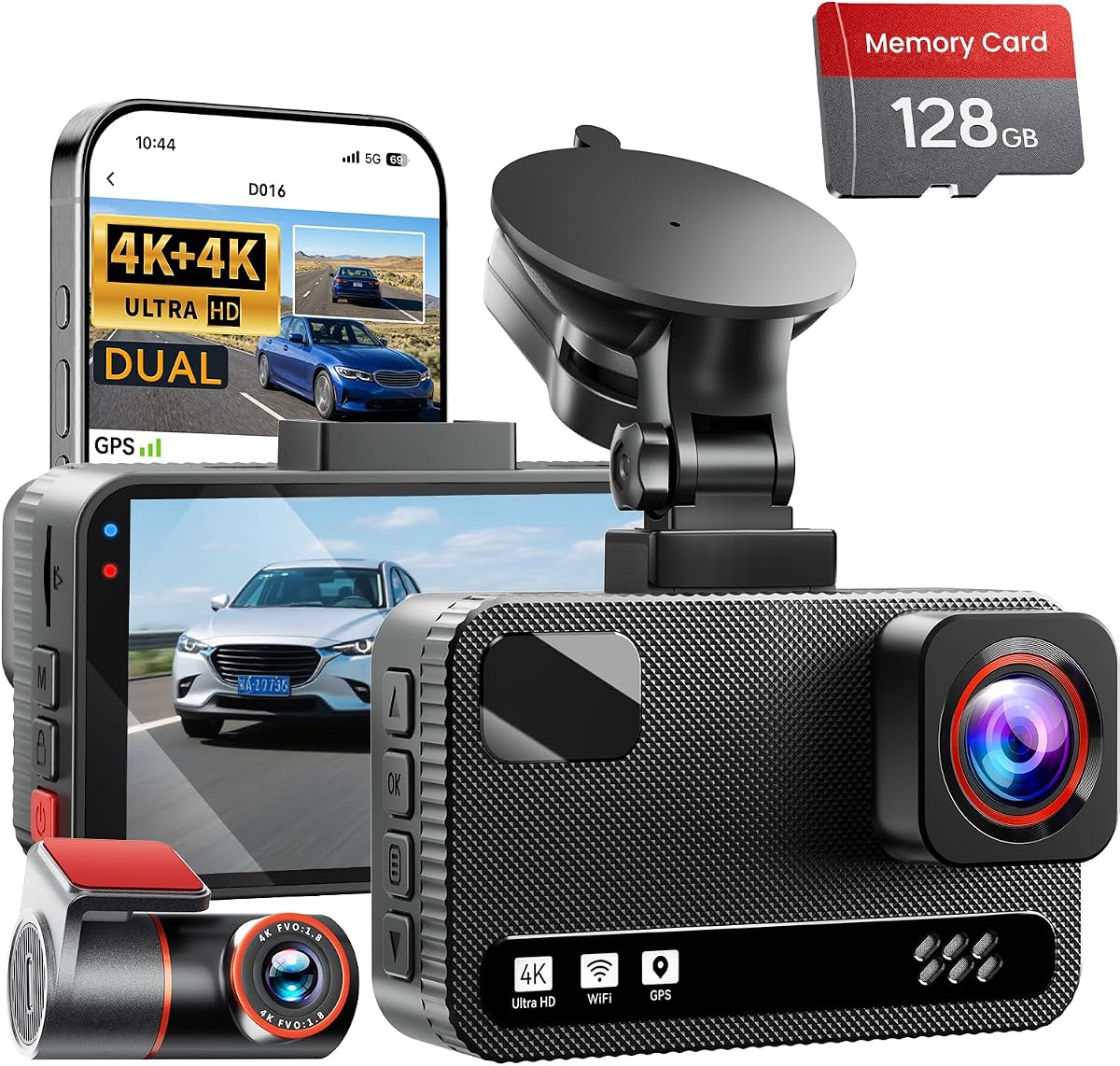
The 4K+4K Dual Dash Cam stands out with a 4.9 rating and simultaneous 3840 by 2160P recording from both front and rear cameras. Unlike upscaled systems, this model provides native 4K on each channel. That makes it a strong selection for a boat owner who prioritizes fine detail, broad lenses, and the ability to inspect small objects from both directions.
We may earn a commission when you buy through this link, at no additional cost to you.
The front camera uses a 170-degree lens and the rear uses a 150-degree lens. An f/1.5 aperture, five-element optical lens, WDR, and Starlight-level sensor technology support low-light and high-contrast capture. The camera also provides dual-band 5.8GHz and 2.4GHz Wi-Fi for previewing, downloading, playing back, and sharing recordings through a smartphone app.
GPS positioning, voice guidance, app-based photo capture, emergency locking, loop recording, and a collision sensor create a well-rounded feature set. Parking mode can capture and lock a one-minute event clip when a collision is detected, but it requires a separately sold hardwiring kit. Materials are described as resistant to extreme cold and heat, which is helpful, though not the same as a marine waterproof rating.
This is the leading choice in the list for resolution and overall listed customer satisfaction. It is especially relevant to a vessel with a forward and rearward monitoring need, such as a center-console boat with protected cabin views. Installation should remain within the manufacturer's electrical and environmental limits, with the camera protected from direct rain, salt spray, and excessive vibration.
Recording native 4K from both cameras provides more retained detail than an upscaled front image paired with a 1080P rear. This can help when reviewing distant signage, wakes, dock structures, or other small details, although storage use will be greater than with a lower-resolution dual-camera setup.
The large aperture, multi-element lens, and Starlight-level sensor are designed to improve clarity in weak illumination. On a boat, that matters during predawn departures, night approaches, and marina transits, though reflections from water and instrument lighting can still influence the final image.
We may earn a commission when you buy through this link, at no additional cost to you.
The REDTIGER F7NP combines a 4K front camera with a 1080P rear camera and carries a 4.1 rating. Its STARVIS 2 sensor, f/1.5 aperture, six-layer optical lens, WDR, and HDR make it a practical choice when night visibility matters. The wide 170-degree front lens also provides broad forward coverage.
We may earn a commission when you buy through this link, at no additional cost to you.
Its 5.8GHz Wi-Fi supports app-based preview, playback, downloads of up to 20MB/s, and access to GPS information. Seamless loop recording maintains coverage, while the G-sensor locks important clips. A memory card is included, and parking support offers both low-bitrate time-lapse and collision-triggered recording through a separately required hardwire kit.
The supercapacitor is an important detail for long parking periods and hot conditions because it is designed to resist heat better than a conventional lithium battery. The manufacturer recommends original or officially recommended charging accessories and warns against long high-temperature exposure. Those cautions deserve attention in a vessel's enclosed helm, where temperatures can rise quickly.
This is a sensible middle ground for boaters who want a capable front image, a secondary rear view, and smartphone management. It does not provide native 4K at the rear like the 4K+4K model, and it is not certified as marine equipment. Its strongest use is a protected installation with carefully secured wiring and a power source appropriate to the vessel.
The sensor and large aperture support clearer nighttime footage, a valuable characteristic for boats that travel before sunrise or after sunset. A polarizer is not listed, so reflections from a windshield, wet surfaces, and water may be more pronounced than with models that include one.
The two parking options cover both continuous time-lapse and impact-triggered recording. Since a hardwire kit is not included, owners who want unattended operation must add compatible power hardware and install it according to the vehicle-focused instructions.
We may earn a commission when you buy through this link, at no additional cost to you.
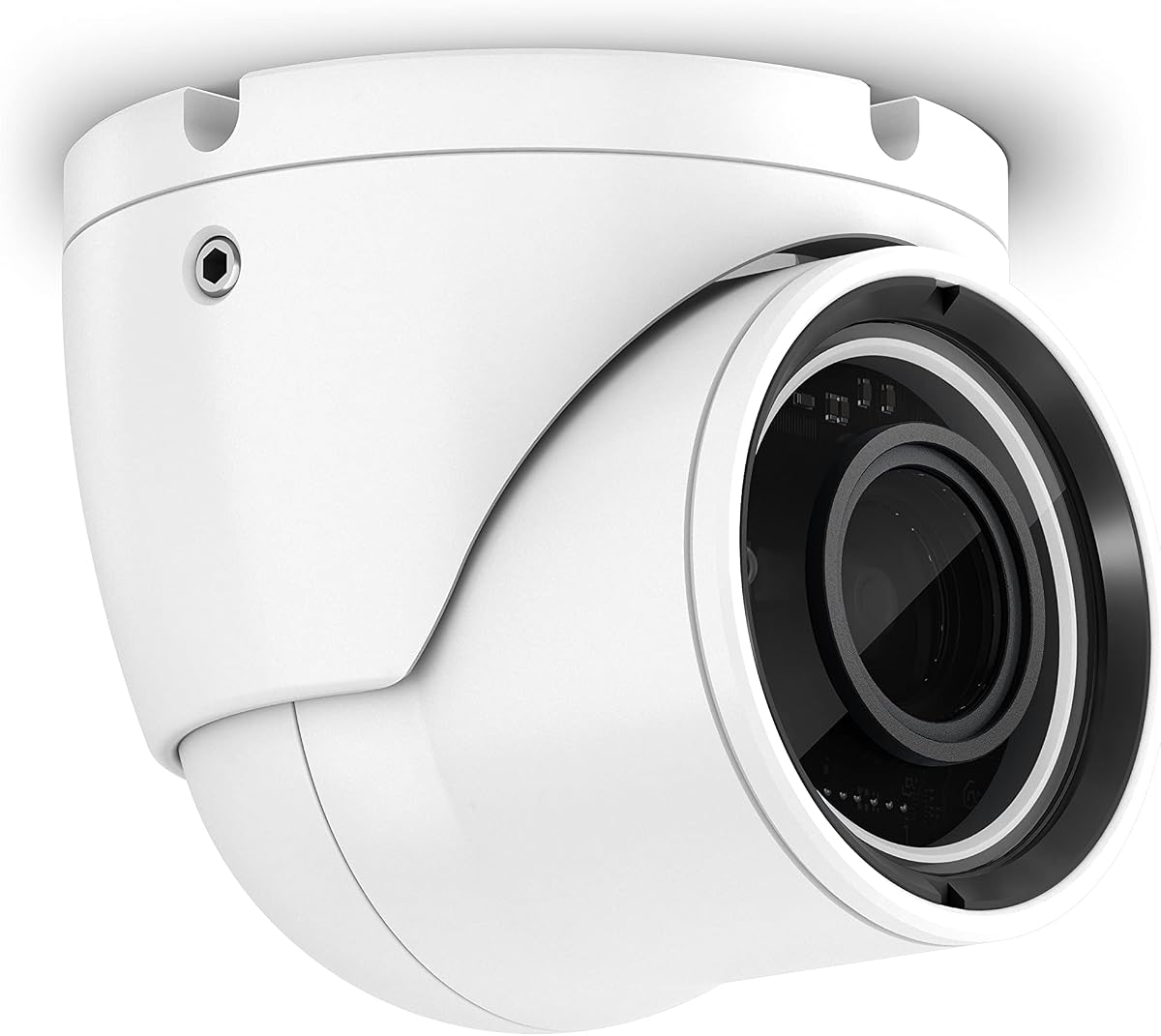
The Garmin GC 14 Marine Camera is the only product in this list designed specifically for a vessel. With a 3.9 rating, it is not the highest-rated option, but its marine purpose changes the comparison. It is intended to provide an extra view above or below decks, including in engine rooms and other areas that are difficult to monitor directly.
We may earn a commission when you buy through this link, at no additional cost to you.
Its analog camera provides low-light visibility up to 15 meters and can broadcast to one chartplotter or multiple networked compatible chartplotters. On compatible units, a reverse-image setting can help during backing maneuvers in crowded marinas. That is a genuinely marine feature, unlike the navigation, route, and lane markings emphasized by the automotive cameras.
The GC 14 does not function as a standalone dash camera with its own microSD card, incident detection, or phone-based video library. Instead, it acts as a camera source for a compatible marine display network. Owners must therefore evaluate the entire ecosystem, including chartplotter model, networking capability, cabling, and display placement.
This is the most appropriate product for an owner who wants engine-room or below-deck awareness within an existing Garmin setup. It is not a substitute for a forward-facing road-style camera or a four-channel surveillance system. Its value lies in purposeful marine integration, making it a specialist choice rather than a general-purpose boat dash camera.
A dedicated below-deck view can reveal smoke, water, moving equipment, or other conditions in spaces that are hazardous or inconvenient to inspect directly. Viewing that feed through an existing chartplotter gives the operator useful information without requiring a separate screen.
The camera must work with a compatible Garmin chartplotter and the required marine network and power connections. Because the product does not independently save footage, a compatible display and its recording capabilities are central to the purchase decision.
We may earn a commission when you buy through this link, at no additional cost to you.
The Garmin Dash Cam X110 is a compact 1080p camera with a 4.4 rating, a 140-degree field of view, and an integrated Clarity polarizer. It mounts discreetly behind a rearview mirror in a car, making it a simple choice for a protected boat windshield or cabin view. The two-inch display also allows quick local checks.
We may earn a commission when you buy through this link, at no additional cost to you.
Its most notable feature is the built-in polarizing filter, which is intended to reduce glare and reflections from windshields and other vehicles. Voice commands let a user save clips, take still photos, and start or stop audio recording without handling the camera. Automatic recording begins with vehicle startup and uses looping storage.
Incident files are protected from overwriting as the oldest unlocked footage is replaced. GPS and automatic incident saving add useful context, although the product is primarily a single-camera automotive unit rather than a multi-camera marine system. A boat owner should assess whether the fixed power lead, mount, and intended window location can be adapted safely.
The X110 is listed as renewed, which can make it appealing for buyers seeking a compact Garmin system with fewer advanced networking features. Condition should be checked carefully, and the age of the unit may affect availability of accessories or support. It is best for simple, discreet front-facing evidence rather than all-around vessel monitoring.
The integrated polarizer is valuable where bright daylight reflects from glass or water into the camera's view. It can make signs and surrounding objects more legible, especially compared with a conventional unprotected lens.
Voice control reduces the need to touch the unit while the boat is underway. Saving a clip, taking a photo, and controlling audio can all be handled with spoken instructions, although the voice-control language support is not specified in the supplied listing.
We may earn a commission when you buy through this link, at no additional cost to you.
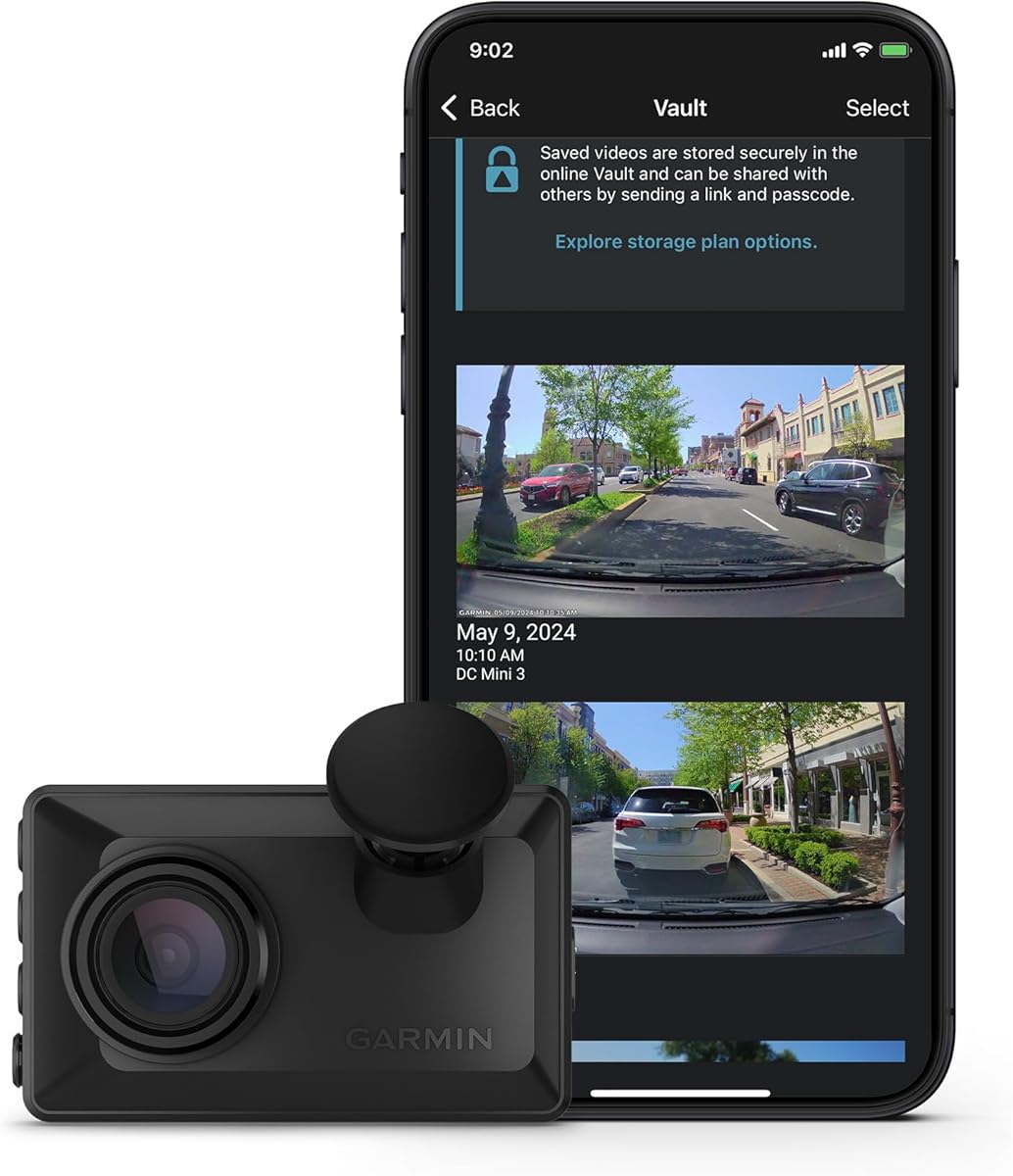
The Garmin Dash Cam Mini 3 pairs a 4.2 rating with a small footprint, 1080p recording, and a 140-degree field of view. It is designed to capture useful detail in strong and low light, while the built-in polarizer reduces windshield glare. For a boat, its discreet size makes it easier to place in a protected viewing area without dominating the helm.
We may earn a commission when you buy through this link, at no additional cost to you.
The camera can automatically save detected events. Voice commands are available for saving video and starting or stopping audio recording. Its more distinctive remote features include live access from a compatible smartphone when the owner is away from the parked vehicle, plus Parking Guard notifications when an event is detected.
Those remote functions require a paid Garmin Vault plan, an active Wi-Fi connection, constant power, and the Garmin Drive app. Constant power is particularly important for a boat because unattended surveillance can otherwise drain a battery. The product's heavy-duty construction is designed for harsh vehicle environments, including direct sunlight and high interior temperatures, but no marine waterproof specification is provided.
The Mini 3 is a good fit for someone who values a small camera, glare control, and Garmin's connected ecosystem more than maximum resolution. It is less suitable for owners seeking local 4K footage, multiple simultaneous angles, or a complete marine monitoring network. Its strongest advantage is convenient remote awareness when supported power and subscription requirements are in place.
The small camera can be mounted where it is less likely to obstruct a windshield or helm sightline. Its 140-degree field still captures a broad forward scene, making it useful for documenting approaches, marina activity, or conditions ahead.
Remote viewing and Parking Guard notifications are subscription-dependent and require a reliable power supply and Wi-Fi connection. Boaters should confirm those requirements are practical at the intended location before relying on the camera for unattended monitoring.
We may earn a commission when you buy through this link, at no additional cost to you.
The IIWEY N6 360 is a four-channel system with a 4.4 rating, recording front, rear, left, and right perspectives. Its ultra-wide fields of view cover 170 degrees at the front and rear and 150 degrees at the sides, while adjustable side cameras and eight infrared lights improve night coverage. That all-around design is unusually relevant to a boat's blind spots.
We may earn a commission when you buy through this link, at no additional cost to you.
The system records Ultra FHD video and includes a 128GB card. 5.8GHz Wi-Fi supports app previews and downloads of approximately 20MB/s, while built-in GPS logs speed and route for playback on a map. Loop recording automatically replaces older segments, and the G-sensor locks critical footage following sudden braking, collision, or another abrupt event.
The N6 is wired and has no built-in battery. A supplied car charger is available for ordinary powered use, but 48-hour parking surveillance requires a separately sold hardwire kit. Time-lapse can record at 1, 3, or 5 frames per second, and impact detection captures and locks a ten-second clip when a bump or tampering event is detected.
This is a compelling option for a larger powerboat or work-oriented vessel that needs several viewpoints, although it requires more careful cable routing than a single compact camera. The system is not stated to be waterproof, and its infrared illumination should not be confused with marine certification. Its strongest advantage is the breadth of simultaneous coverage combined with built-in GPS and rapid wireless access.
Front, rear, and side cameras can document activity that a single forward-facing unit would miss. The adjustable side cameras are particularly useful around an open cockpit, dock approach, or work area, though each added viewpoint also increases installation and cable-management demands.
Because the camera has no internal battery, it must remain connected to vehicle-style power. That limitation can simplify long-duration use with a suitable fused circuit, but it also means hardwire installation is more involved than simply plugging in a compact camera.
We may earn a commission when you buy through this link, at no additional cost to you.
The WOLFBOX G840S combines a 4K front camera, 1080p rear camera, and a large 12-inch curved display in a mirror-style package. Its 4.3 rating and broad 170-degree front lens make it visually engaging, while the 140-degree rear lens provides a second view. The display offers 1.5 times the viewing area of a standard mirror and supports a smart split screen.
We may earn a commission when you buy through this link, at no additional cost to you.
An external GPS antenna supplies route, speed, and location information, while 5.8GHz Wi-Fi connects to the WOLFBOX app for live viewing, playback, and sharing on iOS or Android. A low-reflectivity LCD is intended to reduce daytime screen reflections, while WDR, HDR, a professional-grade sensor, and a six-glass lens support image quality in varied lighting.
The package includes a 32GB card and a rear camera. A 24-hour parking monitor can use low-frame-rate time-lapse recording, although a hardwire kit is required. The product also has a 12-month guarantee, and the manufacturer advises using original accessories and correct installation to avoid coverage issues for damage or improper setup.
The G840S is appealing where a large visual display is important, perhaps in a larger cabin with a broad windscreen. Its mirror-style form is much bulkier than a compact camera and may require more space around an existing rearview mirror. It is not listed as marine-rated, so weather protection and secure placement are crucial.
The 12-inch curved screen gives both forward and rear views a prominent place in the cabin. That can be useful during docking, but it may obstruct visibility or interfere with a boat's existing mirrors if mounting space is limited.
The external GPS antenna adds visible route and speed information, and the app makes downloaded footage easier to review and share. As with other wired multi-camera systems, cable routes should be secured away from controls, moving parts, and areas exposed to persistent moisture.
We may earn a commission when you buy through this link, at no additional cost to you.
The standard Garmin Dash Cam Mini 3 is a key-sized 1080p camera with a 4.0 rating. It records with a 140-degree field of view and automatically saves videos of detected incidents with date and time. Its small body can fit discreetly in a protected windshield or cabin area, making it straightforward to carry on a smaller vessel.
We may earn a commission when you buy through this link, at no additional cost to you.
A built-in Garmin Clarity polarizer reduces windshield glare. Voice control lets users save clips and control audio recording in several listed languages. The Garmin Drive app can also present synchronized video from as many as four separate dash cameras, which gives a boat owner a way to compare multiple viewpoints even though this unit does not record all four channels itself.
The online Vault automatically stores important saved clips, while live view and Parking Guard notifications require a paid subscription, active Wi-Fi, constant power, and a compatible smartphone. The camera is designed for harsh vehicle environments, including direct sunlight and hot interiors, but the supplied information does not state that it is waterproof or salt-resistant.
This model is best for straightforward documentation with minimal visual impact. It lacks a rear camera, local multi-channel recording, and the larger 4K resolution found in higher-specification systems. For a boat owner already using multiple Garmin cameras, its synchronized viewing could be useful, but for one-camera coverage, the compact form remains its defining strength.
The key-sized housing can be mounted without taking up much windshield space. At 1080p with a 140-degree field of view, it offers a practical balance of coverage and unobtrusive installation for a protected viewing position.
The app can synchronize clips from up to four separately purchased dash cameras. That is not the same as a four-channel recorder, but it can still help owners compare forward, side, and rear footage if they install several units.
We may earn a commission when you buy through this link, at no additional cost to you.
A useful boat dash camera must fit the vessel's environment as well as its recording needs. Start with whether you need a standalone evidence recorder, a multi-camera monitoring system, or a camera that feeds a marine chartplotter, then evaluate power, protection, and night performance.
Marine suitability is the first issue because most dash cameras are engineered for vehicle interiors, not open decks or spray-exposed helm areas. A purpose-built marine camera may offer a clearer path to suitable connectors, enclosure expectations, and integration with a boat's systems. An automotive unit can still work inside a protected cabin, but its specification does not establish that it can tolerate rain, salt spray, direct sun, or vibration. Check the product's environmental information and avoid assuming that a heat-resistant supercapacitor or a rugged vehicle housing makes a camera waterproof.
The number of cameras determines how much of the vessel can be observed at once. A single compact camera is useful for a forward view, while front-and-rear systems add evidence of what is behind the boat. Four-channel products can cover the helm, cockpit, engine area, and exterior approaches, but they require more mounting work, more power, and more attention to blind spots. Wide lenses can improve context, yet an excessively wide field may make small objects appear smaller. Assess the actual positions you want to monitor rather than choosing solely by channel count.
Resolution is only one part of image quality, and native capture is more meaningful than an upscaled label. The 4K+4K model records native 4K from both channels, while the ROVE front image is upscaled from 2.5K to 4K. Night performance depends heavily on sensor size, aperture, lens design, HDR or WDR processing, and the scene's illumination. Marine footage is especially challenging because reflective water, instrument lighting, and darkness can produce extreme contrasts. A good low-light sensor and balanced exposure are therefore at least as important as a high pixel count.
Most multi-camera dash cameras are wired and some include a supercapacitor for heat resistance. Parking surveillance also generally requires a hardwire kit, which is frequently sold separately. On a boat, the correct approach is to use an appropriately fused and protected circuit rather than assuming a cigarette-lighter-style connection is suitable for long-term operation. Constant-power parking features must be balanced against battery drain, especially for an unattended vessel. A camera that records continuously can consume meaningful power even if it never captures an incident.
High-resolution and multi-channel recording consumes considerable card capacity, so a large, reliable microSD card is valuable. Loop recording keeps the newest footage available, while emergency locking protects clips associated with sudden motion or a collision. Time-lapse is efficient for broad monitoring but may miss fast events or fine motion. Check whether the included card is appropriate for the chosen resolution, and use the camera's file-management system rather than assuming every event will remain on the card indefinitely.
Dual-band Wi-Fi makes it much easier to preview and download recordings, while 5GHz is especially useful for larger video files. Some systems also include built-in GPS, an external GPS antenna, or an optional GPS logger. Location and speed metadata can add context to a recording, but it is not a substitute for accurate visual evidence. Remote live view, phone notifications, and cloud storage may require an active connection, constant power, a compatible app, or a paid service, so those ongoing requirements should be evaluated before selection.
A large mirror-style display can make front and rear views easy to inspect, while a compact camera is less likely to interfere with a windscreen or helm sightline. Voice control is useful because it reduces physical interaction while underway, though its exact command set and language support vary. On a boat, mounting demands are more constrained than in a car: the camera, bracket, and cable must not block navigation instruments, interfere with wipers, or sit where passengers can strike them. Confirm the product's supplied mount and cable length before drilling or adding permanent hardware.
Garmin offers several distinct paths: the GC 14 is a marine camera for compatible chartplotters, the Mini 3 is a connected vehicle camera, and the X110 is a compact windshield model. These products should not be treated as interchangeable simply because they share a brand. A boat owner with an established chartplotter network may value native display integration, while a general-purpose recorder may be better suited to independent evidence capture. Verify model compatibility, supported recording functions, and the need for additional cables or subscriptions.
Before installation, identify each intended viewpoint, confirm that the camera and cable lengths suit the route, and inspect the hull, console, and windshield for sharp edges or moving components. Clean the mounting surface, secure cables with appropriate marine-safe fasteners, and keep connectors away from standing water. For an automotive model placed in a protected cabin, test the power connection and view each camera before relying on it for monitoring.
After mounting, verify the horizon, focus, field of view, date, and time. Use a short test recording in both daylight and darkness, and check the actual files through the app or compatible display rather than judging only the live preview. Adjust camera angles, enable or disable reversing guidelines as appropriate, remove any protective lens film, and confirm that the memory card is recognized. Review parking-mode, event-lock, time-lapse, and GPS settings before leaving the vessel unattended.
Care begins with regular visual inspections. Clean the lens gently with an appropriate cloth, check the mount for vibration, and make sure salt, moisture, or debris has not collected around the connectors. Review storage capacity and back up important clips, while respecting local recording laws and privacy expectations. If a camera overheats, loses power, or shows corrupted footage, stop using the affected installation, allow the equipment to cool, and have the wiring and power system checked.
They can be suitable inside a protected cabin or windshield area, provided the power connection is appropriate and the unit is not exposed to rain, salt spray, or excessive vibration. They should not be assumed to be waterproof or marine-rated. A purpose-built marine camera is preferable for exposed decks, engine rooms, and locations requiring integration with a chartplotter.
Native 4K can preserve more detail in wide scenes, particularly with a large exterior field of view. It also consumes more storage and power, and a good 1080p camera may still be sufficient for close-range documentation. Sensor quality, aperture, lens clarity, and exposure balancing should be considered alongside resolution.
Many parking-surveillance features require constant power and therefore a hardwire kit. The ROVE, REDTIGER, 4K+4K, IIWEY, and WOLFBOX listings specifically identify a hardwire kit as necessary for their relevant parking functions, and it is not included in each case. Boaters should use a suitably protected and fused power circuit rather than simply extending a low-quality cable.
It can, provided it has a reliable constant-power connection and a compatible hardwire installation. Time-lapse can reduce storage use, while impact detection can lock short incident clips. The camera should still be checked for heat, moisture, vibration, and adequate power, and unattended recording should never be allowed to compromise the vessel's electrical safety.
It can be important because marinas, waterways, and unlit approaches often contain weak or uneven illumination. A capable sensor, large aperture, WDR or HDR, and infrared-assisted exterior cameras can help. Reflections from water, instruments, and other lights may still reduce clarity, so testing at the actual mounting position is essential.
A marine camera is designed to integrate with a vessel's electrical environment, enclosure needs, and navigation displays. A dash cam is generally designed for a vehicle windshield or cabin, using automotive-style mounts, power, apps, and event recording. The Garmin GC 14 is a marine camera; the other products in this guide are automotive dash cameras that may suit protected locations.
Not necessarily. One camera can document a forward view, while two cameras can add a rear perspective. Four-channel systems are useful when the helm, cockpit, engine space, and multiple exterior approaches all need coverage. More cameras improve awareness but also increase installation, power, storage, and maintenance demands.
Many of the listed systems support app-based preview, download, playback, and sharing through 5GHz or dual-band Wi-Fi. Remote live view and event notifications may require a paid cloud plan, an active Wi-Fi connection, constant power, and a compatible phone. Owners should review these ongoing requirements before choosing a model based on remote access.
The 4K+4K Dual Dash Cam is the strongest all-around choice in the list for native detail, wide front and rear coverage, built-in GPS, and strong low-light specifications. The 360 View 4 Channel model offers the best budget-oriented expansion into multiple viewpoints, while the ROVE R2-4K Dual earns the premium designation for its sensor, fast wireless transfers, GPS, and parking-mode features.
Boat owners should prioritize marine suitability before resolution or channel count. A protected cabin may accommodate several automotive cameras, but exposed equipment calls for a purpose-built marine solution. Verify the power circuit, weather limitations, mounting position, storage needs, and whether remote features require subscriptions or extra hardware. A large display is useful only if it does not interfere with navigation or visibility.
Finally, recheck the current listing, specifications, compatibility information, and price before purchasing. Product configurations, accessory bundles, app requirements, and promotional terms can change, and the most suitable camera depends as much on the vessel's electrical system and layout as on the headline resolution.