
Kasa Smart Light Bulbs A19
4.5Editor score
Full multicolor lighting
No hub required
Two-bulb pack
Best bulbs for Google Home compared for compatibility, brightness, colors, app controls, automation, and setup ease to help you choose the right smart bulb.
Bulbs for Google Home can transform ordinary fixtures into responsive, colorful lighting, but the strongest choice depends on network support, color range, app quality, and local-control features. The best options pair straightforward setup with useful controls for dimming, schedules, scenes, and hands-free voice commands. Compatibility should be checked before appearance because the right protocol can make a major difference in daily use.
This guide compares ten smart bulbs on Google Home compatibility, connectivity, brightness, color temperature, RGB options, dimming, automation, app support, and setup considerations. It includes conventional Wi-Fi bulbs as well as Matter models designed to work across broader smart-home ecosystems. We also consider practical limitations such as 2.4GHz-only networks, physical dimmer incompatibility, hub requirements, and differences between white-only and full-color lighting.
Each review identifies the product's strongest use case and the compromises a buyer should understand before installing it. The first three recommendations cover an overall favorite, a budget-friendly multicolor option, and a premium four-bulb Hue option. Product configurations and availability can change, so check the current listing, regional electrical requirements, and current price before purchasing.
4.5Editor score

4.6Editor score

4.5Editor score
The comparison below highlights each bulb's Google Home support, lighting range, connection method, and most important practical limitation, making it easier to match a smart bulb to a particular room, network, or existing smart-home setup.



The Govee Smart Light Bulbs A19 combine a 4.6 rating with 800 lumens, full color changing, and direct Google Home voice control. Their appeal comes from the unusually broad selection of features in one approachable bulb: 16 million DIY colors, 54 preset scenes, music synchronization, group control, timers, and sunrise and sunset routines. For shoppers who want an expressive bulb rather than only basic on-and-off automation, this is a compelling all-around choice.
We may earn a commission when you buy through this link, at no additional cost to you.
Its standout strength is the range of everyday lighting adjustments. Voice commands can handle power, brightness, and color, while the Govee Home app makes it possible to create schemes, synchronize several bulbs, and schedule gradual changes. Music mode can coordinate color and brightness with sounds detected through the phone microphone, giving parties and gaming sessions a more dynamic atmosphere without requiring a separate entertainment hub.
There are important constraints. The bulb operates on AC 120V, needs a stable 2.4GHz Wi-Fi connection, and cannot be used with a smart switch. The music feature also depends on the phone's microphone being available and the appropriate permissions being enabled. These limitations make it less suitable for people who need 5GHz-only networks, extensive physical-wall-switch control, or a lighting system that can operate independently of a phone microphone.
This Govee bulb is best for renters and smart-home users who want colorful, versatile lighting with a large scene library and detailed routines. It works especially well in bedrooms, living rooms, gaming spaces, and accent fixtures. As the overall choice, it offers a stronger mix of color, automation, and convenience than white-only alternatives without requiring a separate hub.
With 16 million DIY colors and 54 preset scene modes, this bulb gives you substantial control over mood and décor. The app can save routines and group bulbs so a living room or gaming setup changes with one command.
Timer, schedule, sunrise, and sunset options make gradual lighting changes practical for waking and winding down. These routines add value without requiring a separate wall controller or smart switch.
We may earn a commission when you buy through this link, at no additional cost to you.
The Kasa Smart Light Bulbs A19 pair a 4.5 rating with multicolor output, dimming, energy monitoring, and direct Google Assistant control at a budget-friendly level. Each 9-watt bulb produces 800 lumens and supports 16 million colors plus tunable white from 2500K to 6500K. The two-bulb format makes this an efficient way to begin building a connected lighting setup.
We may earn a commission when you buy through this link, at no additional cost to you.
The Kasa app covers the core functions without making setup unnecessarily complex. You can dim the bulbs, change their color, create schedules, and use sunrise offsets to begin the morning gradually. Energy monitoring is a useful addition for households trying to understand consumption, while group and timer functions make repeated tasks less disruptive. Voice control through Google Assistant adds hands-free convenience in kitchens, bedrooms, and entry areas.
The bulb requires 2.4GHz Wi-Fi and no hub, which keeps ownership straightforward but may cause friction on newer networks that separate the 2.4GHz and 5GHz bands. The listed features also do not include music synchronization, so buyers seeking audio-reactive effects should look elsewhere. Its warm-white range begins at 2500K rather than offering the extremely warm 1800K setting found on some competitors.
Choose the Kasa KL125P2 if you want a balanced introduction to smart color lighting without spending heavily or adding a hub. It is particularly well suited to paired table lamps, bedroom fixtures, and an apartment or first home. As the budget recommendation, it delivers the most familiar core controls in a straightforward package.
Sixteen million colors and tunable white from 2500K to 6500K cover most ordinary lighting needs. You can shift from warm evening illumination to neutral task lighting or create colorful accents for entertaining.
Real-time energy monitoring helps you see how lighting contributes to household consumption. It is a practical addition for users who want visibility as well as automated timers and schedules.
We may earn a commission when you buy through this link, at no additional cost to you.
The Linkind Color Smart Light Bulbs A19 offer one of the most unusual feature sets in this guide, with 16 million RGB colors, 104 preset scenes, dynamic DIY effects, music synchronization, and an AI assistant that can generate requested atmospheres. They work with Google Home through the AiDot app and support both 2.4GHz Wi-Fi and Bluetooth. No numerical customer rating was supplied, so the assessment must focus on the verified specifications rather than a rating trend.
We may earn a commission when you buy through this link, at no additional cost to you.
Creative control is the defining strength. Users can select swing, loop, ripple, flow, fading, and jumping patterns, then ask Dotis AI for a party mood or calm atmosphere. Four music modes react to rhythms detected by the phone microphone, while the broad 1800K-to-6500K range allows extremely warm relaxation lighting through cool daytime white. A claimed 25,000-hour lifespan and potential energy savings of up to 85% add practical appeal.
The feature density comes with trade-offs. Initial setup requires 2.4GHz Wi-Fi and Bluetooth, and the bulb supports AC 120V only. Traditional dimmer switches are not compatible and may cause flickering or buzzing, so brightness should be adjusted through the app or voice assistant. If you prefer a simple bulb, the large number of effects may be more than necessary.
This Linkind model fits creative users who enjoy DIY scenes, social gatherings, music-reactive lighting, and experimenting with changing atmospheres. It is a particularly compelling choice when a standard white bulb would feel too limited, though buyers who require a Matter-based, app-agnostic setup should consider a Matter-certified alternative.
Custom effects such as ripple, flow, fading, and jumping go beyond a basic color wheel. These modes are useful for parties, displays, and users who enjoy making lighting part of their décor.
Bluetooth backup provides local control even when the Wi-Fi connection is unavailable. That makes the bulb more dependable in bedrooms, hallways, and other areas where wireless coverage can be inconsistent.
We may earn a commission when you buy through this link, at no additional cost to you.
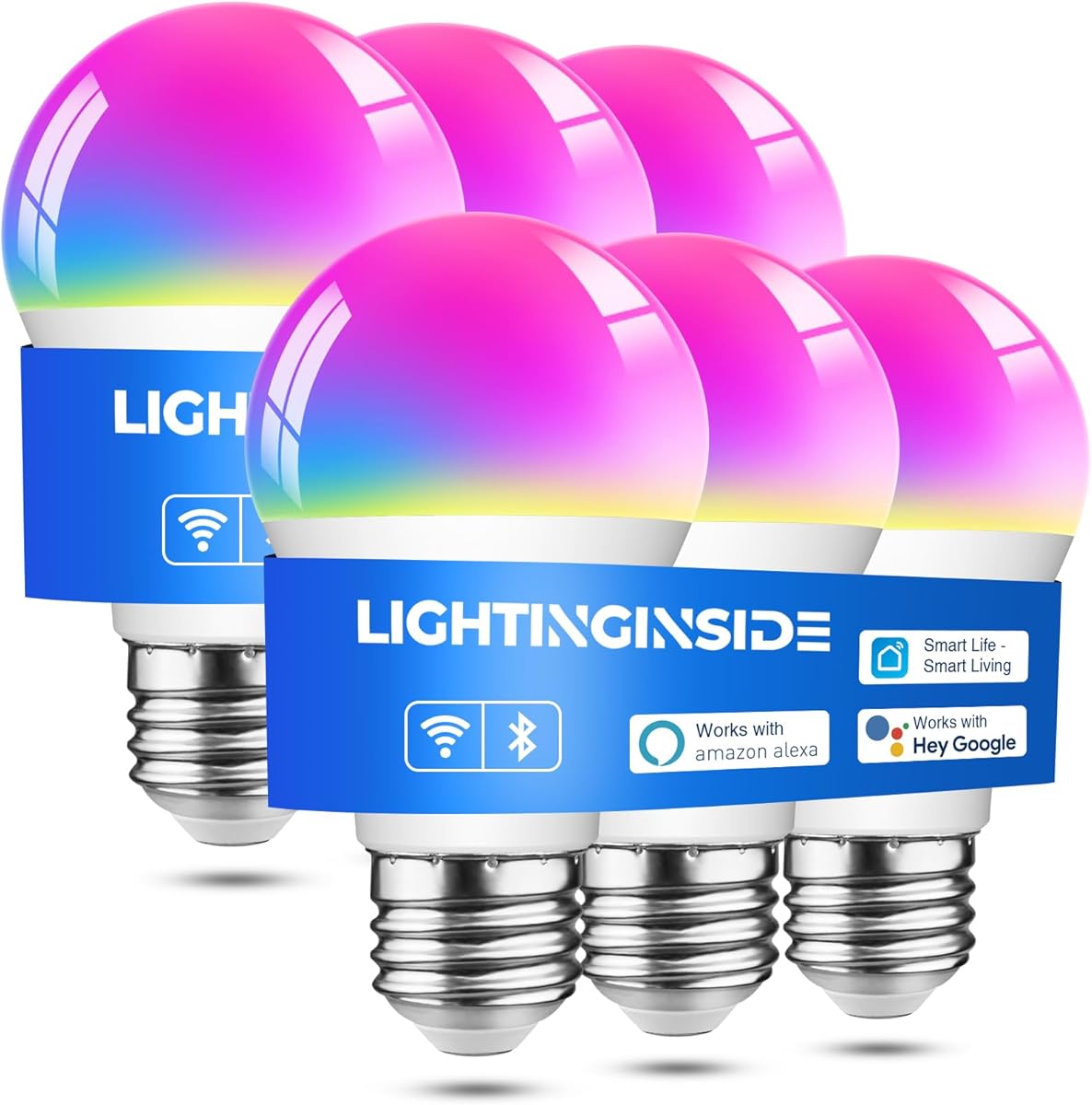
The Lightinginside Smart Light Bulbs are a 4.4-rated six-pack designed for larger Google Home lighting projects. Each 9-watt E26 bulb is a 60-watt equivalent, while the package supports 16 million RGB colors, tunable white from 2700K to 6500K, dimming, music mode, and a claimed 25,000-hour lifespan. It is an efficient choice when several rooms or fixtures need to be upgraded at once.
We may earn a commission when you buy through this link, at no additional cost to you.
The second-generation BLE and Wi-Fi chip is central to the setup experience. Pairing can be up to three times faster according to the listed information, and the bulb can connect locally through Bluetooth or remotely through Wi-Fi. Once configured, it switches between the two connections as needed. A two-year warranty also adds reassurance for a package containing so many bulbs.
SmartLife provides controls for individual bulbs, groups, schedules, timers, plans, and biorhythm functions. These can handle color, brightness, and power, while music mode adds synchronized effects for celebrations. The trade-off is ecosystem dependence: Wi-Fi setup requires both a 2.4GHz network and Bluetooth, and the lights operate through SmartLife rather than a Matter-first standard.
Choose Lightinginside for a new home, rental, or renovation that needs multiple connected lights. The six bulbs are particularly useful for kitchens, bedrooms, common areas, and outdoor-rated fixtures, although you should confirm fixture suitability and local environmental requirements. It earns its place by balancing capacity, colorful output, and a generous warranty.
The combination of Bluetooth and 2.4GHz Wi-Fi supports both local and remote control. Initial Wi-Fi pairing requires Bluetooth, but subsequent operation can use whichever connection is more appropriate.
Individual, grouped, scheduled, timed, and biorhythm controls make the six-pack practical for coordinated routines. The result is less need to adjust each lamp separately throughout the day.
We may earn a commission when you buy through this link, at no additional cost to you.
The DAYBETTER A19 Smart Light Bulbs pair a 4.3 rating with 800 lumens, full RGB color, tunable white, music synchronization, and Google Home compatibility. They are designed for standard E26 fixtures and offer a range of controls through the DAYBETTER app. The result is a versatile smart bulb for parties, gaming, everyday rooms, and scheduled routines.
We may earn a commission when you buy through this link, at no additional cost to you.
The app includes Christmas, Halloween, dinner, and other preset scenes, as well as sunrise modes, schedules, and group control. Music synchronization offers several rhythm options, although the bulb detects sound through the phone's microphone rather than through onboard audio hardware. Wi-Fi and Bluetooth support improve setup flexibility, and 2700K-to-6500K white light covers most common preferences.
Compatibility needs careful attention. These bulbs require AC 120V, 2.4GHz Wi-Fi, and the DAYBETTER app; they do not work with Tuya, SmartLife, Magic Home, Matter, or Home Assistant. They also should not be connected to a physical dimmer switch. A dual-band router can work, but the 2.4GHz network must be selected during setup, and separate network names may be required if pairing fails.
This is a strong choice for households already invested in the DAYBETTER ecosystem or willing to adopt it. It is less attractive for people seeking Matter interoperability or compatibility with several third-party apps. If that is not a concern, its scene selection, group tools, and 800-lumen output make it a practical multicolor option.
Holiday, dinner, and everyday scene presets reduce the work involved in changing a room's mood. The app also allows custom colors and schedules for recurring activities.
The 9-watt bulb reaches 800 lumens in white mode and offers a 2700K-to-6500K range. That makes it suitable for ambient illumination as well as decorative RGB use.
We may earn a commission when you buy through this link, at no additional cost to you.
The Philips Hue Essential Smart LED A19 four-pack carries a 4.5 rating and delivers a refined, established smart-lighting experience. It supports millions of colors, a large library of expert-designed scenes, and voice control through Google Assistant, Alexa, and Apple Home. The key distinction is not merely compatibility but the quality and depth of the Hue control experience.
We may earn a commission when you buy through this link, at no additional cost to you.
Smooth dimming from full brightness down to 2% is especially useful for relaxing, entertaining, and nighttime lighting. The Hue app provides remote control, customizable scenes, and a polished interface for building routines. Adding a Hue Bridge can unlock further features, including home-security functions and synchronization with music, movies, and video games.
The optional bridge reflects the product's premium positioning. A Hue setup can therefore cost more than a simple Wi-Fi bulb system, and some advanced entertainment features require additional hardware or compatible services. The listing also focuses on the Essential line, so buyers should verify exactly which automation and integration features they expect from a particular package before purchase.
Choose this four-pack for households that value a refined app, broad voice-platform compatibility, nuanced dimming, and room to expand a Hue installation. It is well suited to a living room, bedroom set, or entertainment area. As the premium recommendation, it combines thoughtful design controls with a strong brand ecosystem.
Dimming down to 2% creates a much subtler nighttime range than many standard smart bulbs. This makes the product useful for bedside lamps, movie viewing, and gradual bedtime routines.
The basic experience works through the Hue app, while a Hue Bridge opens additional integration possibilities. Homeowners with several rooms can build a consistent system that may also integrate with entertainment and security devices.
We may earn a commission when you buy through this link, at no additional cost to you.
The Linkind Tunable White A19 is a 4.4-rated, white-only smart bulb for shoppers who do not need RGB color. It delivers 800 lumens, adjusts from 2700K to 6500K, dims from 1% to 100%, and has a CRI above 90. These characteristics make it particularly attractive for reading, work, makeup, food, and display lighting where accurate color reproduction matters.
We may earn a commission when you buy through this link, at no additional cost to you.
The AiDot app is required before linking the bulb to Alexa or Google Home, but once configured, voice commands can adjust power, brightness, and color temperature. Group control makes it easy to manage several rooms together, while timers and schedules can create sunrise and nighttime routines. Bluetooth local control remains available after initial setup even if the internet connection is unavailable.
The important limitation is that this is a non-Matter white-light bulb. It works with Alexa and Google Home but not Apple Home, SmartThings, Tuya, or SmartLife. It also requires 2.4GHz Wi-Fi, AC 120V, and both Wi-Fi and Bluetooth for initial setup. Traditional dimmer switches are unsupported, and the stated 1% to 100% range should be controlled through the app or voice interface.
Choose this model for bedrooms, home offices, studios, and reading areas where neutral and warm white light are more important than colorful effects. It is a focused alternative to the full-color Linkind bulb and may be more appropriate for people who want a minimalist lighting system. The high CRI and smooth dimming are the primary reasons to favor it.
A CRI above 90 helps colors appear more natural than they would under many lower-CRI alternatives. This is useful for makeup, artwork, food presentation, and detailed work.
Dimming from 1% to 100% provides a broad range for reading, relaxing, and bedtime. Bluetooth local control can keep the bulb usable when the internet is temporarily unavailable.
We may earn a commission when you buy through this link, at no additional cost to you.
The OREiN Matter Smart Light Bulbs A19 are a 4.4-rated four-pack built around the Matter standard. They can be added to Matter-certified apps such as Google Home, Alexa, Apple Home, and SmartThings, as well as AiDot. This makes the set a strong fit for users who want Google Home compatibility without committing to one proprietary lighting ecosystem.
We may earn a commission when you buy through this link, at no additional cost to you.
As Matter devices on the local network, the bulbs can continue operating smoothly even when the internet is offline. The lighting itself is versatile, with more than 16 million colors, 1800K-to-6500K tunable white, 800-lumen equivalent brightness, and a claimed 25,000-hour lifespan. Four rhythm options through AiDot add music-responsive effects for parties and dynamic ambience.
Setup remains dependent on 2.4GHz Wi-Fi because 5GHz is unsupported. As with many smart bulbs, a physical dimmer switch can cause flickering, buzzing, or premature failure, so brightness should be controlled through a hub or app. The product's Matter interoperability is a clear advantage, but users still need to understand the requirements of the particular platform and controller they plan to use.
Choose OREiN for a multi-platform household or a Google Home setup that may later include Apple Home, SmartThings, or other Matter services. The four-pack is suitable for a coordinated living room, bedroom set, or several accent fixtures. It combines a broad lighting range with standards-based control at a practical package size.
Matter allows the same bulbs to participate in several certified smart-home systems. That reduces the risk of choosing a light that only works inside one manufacturer's app.
Matter devices on the local area network can continue operating when the internet is unavailable. This local capability makes everyday commands less dependent on cloud connectivity.
We may earn a commission when you buy through this link, at no additional cost to you.
The Linkind Matter Smart Light Bulbs combine a 4.5 rating with 16 million colors, 104 preset scenes, Matter certification, and 800-lumen output. They work with Google Home, Alexa, and Apple Home, either through Matter-compatible hubs such as HomePod or Echo or directly through the AiDot app. This gives the bulbs an attractive balance of colorful capability and ecosystem flexibility.
We may earn a commission when you buy through this link, at no additional cost to you.
The scene library is one of the strongest elements, with options for reading, sleeping, movie nights, parties, and other activities. Music synchronization uses the AiDot app and the phone microphone to adjust color and brightness with detected rhythms. Voice and remote app controls cover power, dimming, and color changes, while Matter allows users to consolidate control across multiple smart-home systems.
The bulb supports only 2.4GHz Wi-Fi and, like most smart bulbs, is not compatible with traditional dimmer switches. Although it can work without an extra hub, the precise setup route depends on the platform and available Matter controller. Buyers should confirm that their speaker, display, or hub supports Matter before installation to avoid unnecessary troubleshooting.
Choose Linkind Matter for a home that wants full RGB lighting, extensive scenes, and future-facing interoperability. It works well in entertainment rooms, social spaces, and bedrooms where both warm white and color are useful. It is a particularly balanced choice when the buyer values Linkind's creative lighting features but does not want to remain tied to a non-Matter app.
Sixteen million RGB colors and 104 scenes cover everything from focused reading to party lighting. Users can also customize effects through the AiDot app.
Google Home, Alexa, and Apple Home support makes the bulbs useful in mixed ecosystems. A Matter-compatible hub can provide a unified control path for related devices.
We may earn a commission when you buy through this link, at no additional cost to you.
The Kasa Dimmable Soft White A19 four-pack is a 4.4-rated option for households that want uncomplicated Google Home lighting. Each 9-watt bulb produces 800 lumens of 2700K soft white light, with dimming from 1% to 100%. The result is a comfortable, familiar illumination choice for bedrooms, living rooms, kitchens, and reading nooks.
We may earn a commission when you buy through this link, at no additional cost to you.
The free Kasa app supports remote power, dimming, color, and brightness control, although this particular model is dedicated to soft white rather than full RGB color. Energy monitoring provides visibility into consumption, and timers, schedules, and sunrise offsets make it easy to automate familiar routines. Voice commands through Google Assistant add hands-free control without requiring a hub.
The trade-offs are visual rather than technical. A fixed 2700K color cannot be shifted toward cooler task lighting, and the absence of RGB limits decorative use. The package still requires a 2.4GHz Wi-Fi network, though it offers a straightforward installation for compatible routers. Its two-year warranty and UL certification add confidence for a four-bulb set.
Choose the Kasa KL110P4 for a home seeking warm, dimmable lighting without the complexity or expense of a full-color system. It is especially good for bedside lamps and other areas where a gentle warm glow is preferable. As the final recommendation, it serves a specific but common need: reliable, energy-conscious soft-white lighting in a convenient four-pack.
The 1% dimming setting is useful for nighttime navigation, reading, and winding down. A 2700K output creates a warm atmosphere without the cooler tone some bulbs produce.
Energy monitoring, timers, schedules, and sunrise offsets make it easier to balance convenience with consumption. The four-pack is practical for synchronizing several lamps around the home.
We may earn a commission when you buy through this link, at no additional cost to you.
A useful Google Home bulb must do more than accept a voice command. Compare protocol support, network requirements, lighting quality, local control, app behavior, and physical fixture compatibility before making a choice.
Every bulb in this guide supports Google Home or Google Assistant, but the connection path can differ. Some use a conventional Wi-Fi integration and manufacturer app, while others support Matter for more standardized control. Confirm that the product works with the specific Google Nest speaker or display you own, and follow the manufacturer's linking instructions carefully. Voice commands may cover power, brightness, color temperature, or RGB color depending on the model.
Most of these bulbs require 2.4GHz Wi-Fi and do not support 5GHz-only networks. A dual-band router generally works if you explicitly select its 2.4GHz network during setup. Some products also provide Bluetooth for local control or faster initial pairing, which can preserve operation during an internet outage. Check whether Bluetooth is required only for setup, available as a backup, or needed continuously.
Matter is especially attractive if your household uses Google Home alongside Apple Home, SmartThings, or another certified platform. OREiN and the selected Linkind Matter bulb are explicitly designed around the standard, while DAYBETTER is expressly not Matter compatible. Matter can also support local control on a home network, reducing reliance on cloud availability. Confirm that your hub or smart-home controller supports the relevant Matter device type.
Full-color bulbs offer RGB effects, while white-only models are usually simpler and better suited to task and ambient lighting. Look for a wide tunable-white range when you want warm relaxation light and cooler daytime illumination. A high CRI can improve the appearance of food, artwork, skin tones, and décor. Choose 16 million RGB color support for parties and decorative effects, or a 1800K-to-6500K range for more atmospheric white light.
An 800-lumen output is common among the A19 options in this guide and is suitable for many standard lamps and ceiling fixtures. Dimming quality varies: Philips Hue reaches 2%, while Kasa and selected Linkind models extend to 1%. Check the maximum brightness needed for the room rather than assuming a 60-watt-equivalent bulb will illuminate a large space identically to a traditional lamp.
Beyond voice control, useful apps should offer schedules, timers, scenes, groups, and remote access. Music synchronization can add atmosphere, but it usually relies on the phone's microphone and permissions. Some bulbs provide sunrise and sunset routines, while others include scene effects such as ripple, flow, or fade. Consider how much creative control you actually need, since highly featured apps can also require more initial configuration.
Most smart bulbs perform best with a regular on/off wall switch, and many explicitly warn against using physical dimmer switches. A mismatch can cause flickering, buzzing, reduced performance, or early failure. Govee additionally states that its A19 bulb cannot be used with smart switches. If you require dimming, adjust it through the app, Google Home, or another supported software control rather than an in-wall dimmer.
Most of the listed products use a standard A19 form factor with an E26 screw base, but that does not make every fixture appropriate. E12 candelabra and GU10 pin-base fixtures require a different bulb. Several models are designed for AC 120V only, and all of the 2.4GHz requirements still apply. Confirm the socket, voltage, fixture rating, and any enclosed-fixture or outdoor-use limitations before installation.
Begin by confirming that the fixture accepts an A19 E26 bulb and that its voltage matches the product requirements. Install the bulb while the power is off, then restore power and switch it on conventionally. Download the required manufacturer app, connect the phone to a 2.4GHz Wi-Fi network, and follow the app's pairing prompts. For Matter bulbs, use the relevant Matter controller or the QR-code-based setup process described in the listing.
After setup, link the bulb to Google Home through the manufacturer's account or supported integration process. Test basic commands for power, brightness, and any available color or color-temperature controls. Next, create groups for rooms, set schedules that match your routine, and test scenes before relying on them for parties or nighttime lighting. If the bulb is not discovered, confirm that the phone is on the correct Wi-Fi band, Bluetooth permissions are available when required, and the router is not blocking local discovery.
For care, use a soft dry cloth to clean the bulb and avoid liquids around the electronics. Do not install a smart bulb in a fixture or switch that conflicts with its instructions, especially when using a physical dimmer. Update the manufacturer's app and firmware when prompted, periodically review linked services and account access, and use the app or voice assistant to dim the bulb before replacing it. If a bulb flickers, buzzes, behaves inconsistently, or becomes unusually warm, switch off the fixture and investigate the compatibility issue before reusing it.
Most models in this guide work without a separate hub, provided you have a compatible 2.4GHz Wi-Fi network and the required manufacturer app. Matter bulbs may also connect through a Matter-compatible controller or hub. Philips Hue can operate with the Hue app, but adding a Hue Bridge unlocks additional features such as deeper entertainment synchronization and home-security integrations. Check the current product listing to see which accessories are optional or required.
Physical dimmer switches are generally not recommended for smart bulbs, and several products explicitly warn that they may cause flickering, buzzing, or early failure. The most reliable approach is to use a regular on/off switch and adjust brightness through Google Home or the manufacturer app. If an existing fixture has an in-wall dimmer, verify compatibility before installation or plan to replace it with a standard switch.
Yes, but the available voice commands depend on the bulb. White-only models generally support power and brightness, while color-changing models may also accept commands for RGB color or color temperature. Kasa's tunable-white and multicolor models offer broader control than the fixed soft-white Kasa option. Linking the correct manufacturer account to Google Home is what makes those supported controls appear in the assistant.
The most common causes are using the wrong Wi-Fi band, an unsupported 5GHz-only network, skipping the manufacturer's initial setup, or failing to link the correct account. Move the phone to the 2.4GHz network before pairing and confirm that Bluetooth is enabled if the bulb uses it for setup. If the bulb already appears in its app but not Google Home, repeat the platform-linking process in the app's integration settings.
Matter bulbs are advantageous when you want standardized control across multiple smart-home ecosystems or local operation when the internet is unavailable. The OREiN and Linkind Matter options can work with Google Home and other certified apps. They are not automatically better in every situation, however: their benefits depend on having compatible controllers, and simpler non-Matter bulbs may still provide all the features a particular user needs.
Only use a smart bulb in a location for which it is rated. A standard indoor A19 bulb should not be assumed suitable for exposed outdoor fixtures, damp locations, or fully enclosed housings unless the product documentation says otherwise. Check the current listing and fixture instructions for environmental and temperature limits. If an outdoor-rated fixture is fully enclosed, the bulb itself must still be approved for that fixture type.
Most of the listed music features use the phone's microphone through the manufacturer's app rather than a microphone built into the bulb. You generally need to allow microphone permission and keep the app's required audio access active. Because sound is detected by the phone, response may depend on placement and whether another app is actively occupying the microphone. The Linkind and DAYBETTER descriptions both explicitly note this type of dependency.
The useful limit depends on the bulb, its app, the router, and the number of linked Google Home rooms, groups, and routines. The products here support grouping and individual control, so a household can organize many bulbs by room or activity. Very large installations may require attention to Wi-Fi coverage, app performance, and sensible grouping rather than adding every bulb to one unwieldy command group.
The Govee Smart Light Bulbs A19 are the strongest all-around recommendation because they combine rich RGB color, numerous scenes, music synchronization, group controls, and detailed scheduling in a hub-free design. Kasa's multicolor KL125P2 is the best budget option for a straightforward two-bulb setup, while Philips Hue Essential earns the premium recommendation for its refined app, nuanced dimming, broad voice-platform support, and expandable ecosystem.
Before choosing, prioritize the features you will genuinely use. Matter is valuable in a multi-platform home, Bluetooth backup is useful where Wi-Fi is weak, and high CRI benefits task-oriented spaces. White-only bulbs can provide a cleaner experience for ordinary rooms, while full-color models suit parties, gaming, and decorative lighting. Also verify the E26 base, 120V requirement, 2.4GHz network, and physical dimmer restrictions before purchase.
Current prices, stock, app behavior, and product configurations can change, so review the live listing before buying. Confirm the latest Google Home linking instructions, regional compatibility, package quantity, and any app or hub requirements. With those checks completed, you can select a smart bulb that matches your room, network, and preferred level of automation.


