
PERLESMITH Corner TV Wall Mount
4.7Editor score
26–65 inch screen support
19.17 inch extension
Swivel tilt and leveling
Pre-assembled wall plate
A corner TV mount can turn an awkward wall junction into a useful viewing area while reducing visual clutter and improving sightlines. The best models combine strong load ratings, useful articulation, sufficient reach, smooth adjustment, and compatibility with the wall construction in your home. Those factors matter more than decorative features.
This guide compares ten corner TV mounts based on supported screen sizes, weight capacities, VESA patterns, extension, swivel, tilt, leveling, installation systems, and intended room layouts. The selection includes compact, long-arm, heavy-duty, single-stud, and high-capacity options, but every product still needs to be matched carefully to your television and wall.
Each pick highlights a different practical advantage, from budget-friendly movement to extra-long reach or support for very large displays. Ratings and product details reflect the supplied listings, while availability, installation requirements, and prices can change. Always verify your TV measurements, VESA pattern, wall type, and current product information before ordering.
4.7Editor score

4.8Editor score

4.8Editor score
As an Amazon Associate we earn from qualifying purchases.
The comparison below organizes each mount by television size, load capacity, reach, and articulation. These figures make it easier to identify a model for a compact bedroom, a conventional living room corner, or a large home-theater installation.




This Perlegear corner TV mount offers the strongest all-around balance in the group, combining broad television compatibility with long reach and extensive viewing adjustments. It supports screens from 37 to 75 inches and VESA patterns from 200 by 100 millimeters to 600 by 400 millimeters. Its 4.8 rating reflects a well-regarded product, while the listing emphasizes secure construction, practical motion, and relatively straightforward installation.
We may earn a commission when you buy through this link, at no additional cost to you.
The arm extends up to 32.37 inches from the wall and retracts to 3.12 inches, giving it a useful balance between corner positioning and a clean, compact appearance. Swivel reaches plus or minus 90 degrees, tilt spans negative 15 to positive 5 degrees, and post-installation leveling adjusts plus or minus 4 degrees. A solid hinge pin supports smooth movement, while the tool-free tilt adjustment makes routine changes straightforward.
Its maximum stated load is 100 pounds, and the mount is UL-listed. The single-stud design broadens placement possibilities, but the wall must be a suitable wood stud, concrete, or brick surface; drywall alone is not acceptable. The included manual, labeled hardware, and single-stud wall plate simplify the process, although larger televisions can still require an extra pair of hands during installation.
This is an excellent choice for a living room, bedroom, kitchen entertainment area, or other space where a television must project from a corner and serve more than one viewing area. It also suits medium-to-large displays that fall between 37 and 75 inches. Choose it when you want generous reach, detailed adjustment, and a versatile mount without stepping into the highest load category.
The 32.37-inch extension can carry the screen around an obstacle or pull it into a more useful viewing position, while the short retracted profile helps preserve the room's clean appearance. Combined with wide swivel, tilt, and leveling, this gives the mount considerable flexibility for seating changes and glare control.
A single-stud layout offers more placement options than a two-stud design, and the package includes necessary hardware and a user-friendly manual. Installation still requires a properly located wood stud or a suitable concrete or brick wall, along with correct anchoring and the appropriate fasteners.
We may earn a commission when you buy through this link, at no additional cost to you.
The USX MOUNT Long Arm Corner Mount provides a capable full-motion option for 26- to 65-inch televisions without moving into a larger mounting class. It carries displays up to 80 pounds and accommodates VESA patterns from 75 by 75 millimeters through 400 by 400 millimeters. Its 4.7 rating and broad screen range make it a practical choice for many apartments, bedrooms, and living rooms.
We may earn a commission when you buy through this link, at no additional cost to you.
Reach is one of its defining strengths. The arm extends 31.22 inches from the wall, enough to improve viewing from several positions around a corner, and retracts to only 2.52 inches when the television is not in use. It swivels plus or minus 90 degrees, tilts from negative 12 to positive 5 degrees, and offers plus or minus 4 degrees of post-installation leveling.
The trade-off is its 80-pound capacity, which is lower than several heavier models in this list. That limitation is sensible for most modern mid-size televisions, but owners of older plasma screens, large 65-inch models, or displays with unusually heavy soundbars should check the complete weight of the equipment. A solid hinge pin is designed to maintain a firm hold and smooth motion.
This mount fits buyers who want substantial corner reach and full-motion control in a conventional living area or bedroom without selecting a heavy-duty model. The instructions and pre-labeled hardware make it approachable for a confident DIY installer. Confirm the wall type, locate a stud when needed, and verify the television's weight and mounting pattern before beginning.
The 31.22-inch extension gives smaller and mid-size screens the freedom to move out from the corner, while the 2.52-inch retracted depth keeps the setup visually restrained. This is particularly useful when a fixed display position would be awkward for furniture placement.
Wide swivel allows the screen to follow the main seating area, while upward and downward tilt can reduce reflections from windows or lamps. Post-install leveling is useful for correcting minor alignment changes after the arm has been positioned.
We may earn a commission when you buy through this link, at no additional cost to you.
The PERLESMITH Full Motion Corner Mount is a well-rounded option for 37- to 70-inch displays, with a 99-pound capacity and a long list of supported VESA patterns. It fits common LED, LCD, OLED, and 4K televisions, including patterns as wide as 600 by 400 millimeters. The 4.8 rating indicates strong customer reception for a product that prioritizes familiar compatibility and solid construction.
We may earn a commission when you buy through this link, at no additional cost to you.
Its movement is more restrained than that of a long-arm model. The television swivels up to 45 degrees, tilts from positive 5 to negative 10 degrees, and levels plus or minus 3 degrees after installation. The swivel maximum depends on television size, so buyers should account for screen width when deciding whether the intended viewing position is possible.
A high-strength steel frame with a powder-coated finish provides durability without adding unnecessary bulk to the listed design. The mount can be pushed back after adjustment, which helps free tabletop space for décor and audiovisual components. Detailed instructions and standard mounting hardware are included, making the product a practical choice for a straightforward corner installation.
This is a good match for buyers who want dependable movement and broad television support but do not need the reach of a 30- or 40-inch arm. It is well suited to living rooms, bedrooms, and offices where the screen needs to serve more than one seating area. Choose it when steel construction, familiar dimensions, and comprehensive VESA support are your priorities.
Compatibility with multiple VESA dimensions makes this mount adaptable to many popular television sizes and brands. Measure the exact hole pattern on the back of your display and compare it with the supported range before ordering.
The negative 10-degree tilt can reduce reflections when a window or light source sits high in the viewing area. Combined with leveling and moderate swivel, the controls provide enough adjustment for many typical room arrangements.
We may earn a commission when you buy through this link, at no additional cost to you.
The Perlegear PGMF25B is built for buyers who want more reach than a conventional corner bracket and a higher load rating than many mid-size options. It supports most 32- to 65-inch televisions, weighing up to 110 pounds, with VESA patterns from 100 by 100 millimeters to 400 by 400 millimeters. Its 4.7 rating reflects a well-liked product with a clear emphasis on stability.
We may earn a commission when you buy through this link, at no additional cost to you.
The 37.4-inch extension is the centerpiece of the design. It can pull the screen well away from the wall, redirect it around furniture, or bring it toward a preferred viewing zone. The arm retracts to 2.6 inches, swivels plus or minus 90 degrees, tilts from positive 5 to negative 15 degrees, and levels plus or minus 3 degrees after mounting.
A reinforced wall plate, thicker heavy-duty steel, and a solid central pivot support the 110-pound maximum load, including when the arm is extended. The single-stud layout makes placement easier in some rooms because the mount does not require two studs at a fixed distance. Its detailed manual, pre-labeled hardware, and drilling template support organized installation.
The mount is particularly suitable for indoor patios, poolside areas, backyards, and other unique layouts, but the listing explicitly states that it is not intended for outdoor use. It is a strong option for mid-size displays where substantial reach and sturdy construction matter more than support for very large screens. Check stud position carefully and make sure the television and attached equipment stay within the stated limit.
The 37.4-inch extension can make a corner-mounted screen usable from locations that would be too far away with a short arm. It also helps the television clear nearby furniture or a projecting wall, although the room must provide enough space for the arm to move safely.
Thicker steel, a reinforced wall plate, and a solid central pivot are designed to control movement and maintain stability. Correct fasteners, a suitable wall, and balanced installation remain essential even when using a single-stud design.
We may earn a commission when you buy through this link, at no additional cost to you.
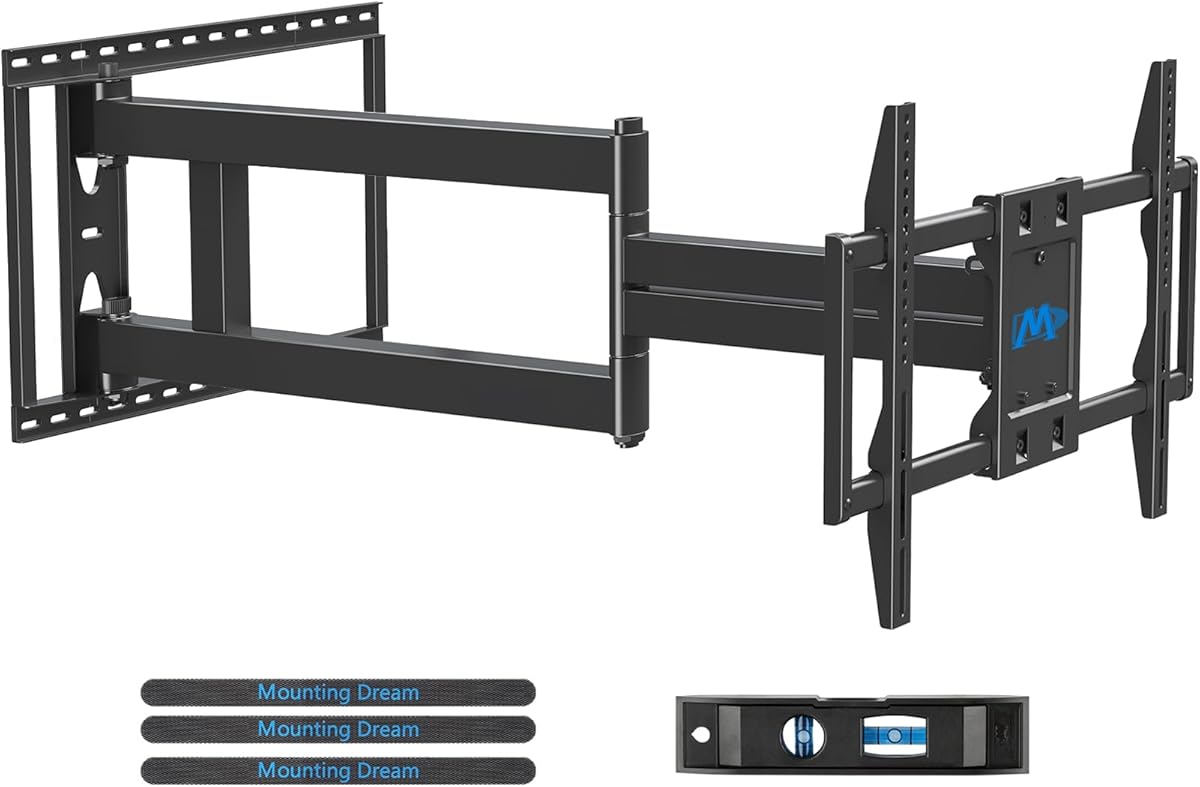
Mounting Dream's 40 Inch Long Arm TV Mount is aimed at large displays and rooms that need substantial reach. It supports most 42- to 94-inch televisions, including 16-, 18-, 24-, and 18-inch wood stud spacing according to the listing, with VESA patterns from 200 by 100 millimeters to 800 by 400 millimeters. It also carries screens up to 150 pounds.
We may earn a commission when you buy through this link, at no additional cost to you.
The defining feature is the 40-inch extension. Combined with a retraction depth of 3 inches, it gives the display a wide range of positions around corners or other obstructions. Swivel spans plus or minus 90 degrees, tilt runs from negative 12 to positive 5 degrees, and leveling adjusts plus or minus 3 degrees. That articulation can help the screen serve several areas in an open-plan room.
The main practical trade-off is the space the arm requires. A mount with this much reach needs a clear path and a wall position that allows the television to swing without striking furniture, trim, windows, or nearby walls. The listing states that the mount is not for drywall alone, and the correct wall type and fasteners are just as important as the weight rating.
Buyers with a large screen, a wide VESA pattern, and a room that can accommodate a long arm will find this option capable and adaptable. The package includes clear instructions, necessary hardware, a mounting template, and a bubble level. Concrete anchors can be requested, with the listing specifying 10 by 50-millimeter anchors for that application.
The 150-pound capacity and support for VESA patterns up to 800 by 400 millimeters provide a useful envelope for large displays. Buyers should still check the combined weight of the television, soundbar, mounting hardware, and any other attached accessories.
A 40-inch reach allows a corner-mounted television to be redirected toward different activity zones. That flexibility is useful in rooms where the screen serves a sofa area, dining space, kitchen, or other gathering point, provided the arm has enough unobstructed travel.
We may earn a commission when you buy through this link, at no additional cost to you.
The VIVO MOUNT-CR70C stands out for its wide 180-degree swivel and separating wall plates, which are designed to accommodate different angled corner walls. It supports flat-panel and curved televisions from 32 to 70 inches, with a stated capacity of 99 pounds. The mount also supports an extensive range of VESA patterns, including 600 by 400 millimeters.
We may earn a commission when you buy through this link, at no additional cost to you.
Its movement system is designed to provide more directional freedom than a standard short corner bracket. Tilt ranges from positive 5 to negative 15 degrees, and the adjustable arms allow the screen to be repositioned by hand. The separating wall plates may be especially useful where the two walls do not meet at a perfect right angle.
That geometry also requires careful planning. Before purchase, check the room corner, nearby trim, and the available path for the arms. The screen's size and weight can also influence how a wide swivel behaves, so installation should be performed with care. Solid steel construction is listed as being tested at three times the stated capacity.
This VIVO mount is a strong candidate for owners who value swivel freedom and need compatibility with flat or curved displays. Detachable VESA plates, included hardware, and instructions simplify setup, while a three-year manufacturer warranty adds support after the purchase. Choose it when a true corner installation and unusually broad side-to-side movement are the main priorities.
Separating wall plates give the installer more freedom when the corner walls are not perfectly square. This can improve positioning in rooms with unusual architecture, but it should not be treated as permission to install into an unsuitable surface.
The stated 180-degree swivel lets the display face different directions more dramatically than conventional brackets. It can be useful for side seating, open rooms, and corner positions where the audience changes throughout the day.
We may earn a commission when you buy through this link, at no additional cost to you.
The USX STAR Corner TV Wall Mount combines a long arm, single-stud installation, and built-in cable management in one flexible package. Its listing names many common screen sizes from 37 through 84 inches, supports televisions up to 100 pounds, and fits VESA patterns from 200 by 100 millimeters through 600 by 400 millimeters. Its 4.7 rating reflects strong reception among buyers seeking versatile corner positioning.
We may earn a commission when you buy through this link, at no additional cost to you.
The arm extends 32 inches from the wall and retracts to 2.52 inches. It offers plus or minus 90-degree swivel, positive 5 to negative 15-degree tilt, and plus or minus 4 degrees of post-installation leveling. The maximum swivel angle depends on screen size, which matters when planning a position in a narrow room or beside a protruding wall.
Integrated Velcro cable management helps conceal and organize cords, a feature that can keep the retracted setup looking cleaner. The steel construction is intended to support the stated load, and the wall plate can be attached to a single wood stud or to solid brick or concrete. The package includes a cable manager, bubble level, instructions, and labeled hardware.
The listing suggests a wide range of uses, including living rooms, bedrooms, kitchens, studies, conference spaces, lobbies, showrooms, restaurants, and waiting areas. It also mentions patios and outdoor-inspired spaces, though buyers should verify environmental suitability before using a mount outside. This is an attractive all-around choice when cable organization and broad motion matter alongside long reach.
Built-in Velcro storage gives the installer a way to gather and conceal wiring as the arm moves. Good cable routing also reduces loose leads around furniture and makes later adjustment of the television or attached components easier.
Single-stud support can make location planning easier in many homes, while solid brick and concrete are also supported. Concrete anchors are sent on request, so buyers should confirm the wall type before installation and request the appropriate hardware if needed.
We may earn a commission when you buy through this link, at no additional cost to you.
HCMOUNTING offers a heavy-duty alternative for displays that need more support than a standard 70- or 80-pound corner bracket. It supports televisions from 26 to 70 inches, with a maximum weight of 132 pounds and VESA compatibility from 75 by 75 millimeters to 400 by 400 millimeters. The 4.7 rating suggests that buyers appreciate the combination of capacity, reach, and unusually broad swivel.
We may earn a commission when you buy through this link, at no additional cost to you.
The arm extends 30.2 inches and retracts to 2.68 inches. A stated center-alignment feature keeps the VESA plate aligned with the wall plate when retracted, reducing the chance of a visibly crooked television. Swivel spans plus or minus 180 degrees, tilt runs from positive 5 to negative 15 degrees, and leveling adjusts plus or minus 3 degrees.
The product uses heavy-duty steel and a single-stud swivel design. It includes a mounting template, necessary hardware, cable clamps, and an Allen key, while the listing notes that anchors for concrete and brick are included. Drywall alone is not an acceptable installation surface. Because the mount supports large displays, a two-person lift is recommended for 55- to 70-inch televisions.
This is a compelling option for a 65- or 70-inch screen, an older heavier display, or a setup with a sizable soundbar. Its 132-pound capacity offers more margin than many alternatives, while the broad swivel and center-aligned retraction help it adapt to changing seating areas. Confirm that the total installed weight remains under the limit and that the wall structure can support the bracket safely.
The 132-pound limit is the defining advantage for buyers with large televisions or heavier accessories. It provides more capacity than many typical long-arm mounts, but the total load should still include the television, soundbar, mounting hardware, and attached equipment.
Keeping the television centered as the arm retracts can improve the appearance of a finished room. It is especially useful in bedrooms, apartments, and other spaces where a crooked screen would be noticeable from the main seating position.
We may earn a commission when you buy through this link, at no additional cost to you.
The PERLESMITH 26–65 Inch Corner TV Mount offers a compact and economical way to add full-motion corner placement. It supports most televisions from 26 to 65 inches, up to 70 pounds, and accommodates VESA patterns from 100 by 100 millimeters to 400 by 400 millimeters. Its 4.7 rating shows that the product is well regarded for covering common screen sizes at a lower load limit.
We may earn a commission when you buy through this link, at no additional cost to you.
This is not the longest-reaching mount in the guide, but its 19.17-inch extension still provides meaningful corner positioning. The arm retracts to 3.2 inches, swivels plus or minus 90 degrees, tilts from positive 5 to negative 15 degrees, and offers plus or minus 3 degrees of leveling. Those controls are sufficient for many bedrooms, children's rooms, and standard living room layouts.
Its pre-assembled design is listed as reducing installation steps by 30 percent, making it attractive for buyers who want a straightforward setup. Standard mounting hardware and a detailed instruction manual are included. Installation can use a single wood stud, solid concrete, or brick, but drywall alone is not permitted.
The 70-pound maximum is the main constraint. It should not be chosen for a large screen combined with a heavy soundbar unless the complete weight remains comfortably within the limit. For compatible displays, however, this mount provides a tidy retracted profile, capable articulation, and a simpler installation. It is a sensible value-focused selection for a modest-sized television.
The pre-assembled structure is designed to reduce the number of installation steps. Labeled hardware and clear instructions can make the process easier to organize, although proper stud detection, drilling, and anchoring are still necessary.
Although its extension is shorter than that of the long-arm models, 19.17 inches gives smaller screens enough movement to improve many corner layouts. A compact 3.2-inch retraction also helps the display sit close to the wall when it is not being adjusted.
We may earn a commission when you buy through this link, at no additional cost to you.
The Perlegear PGXLF02 is the most substantial option in this roundup, combining support for displays up to 97 inches with a 150-pound capacity. It fits VESA patterns from 200 by 100 millimeters to 800 by 400 millimeters and works with 8-, 12-, 16-, and 24-inch wood stud spacing, as well as concrete and brick walls. Its 4.8 rating supports its reputation as a capable large-screen mount.
We may earn a commission when you buy through this link, at no additional cost to you.
The 40.1-inch extension is the largest listed reach among these picks, while the retracted depth is 3.7 inches. The arm swivels plus or minus 90 degrees, tilts from positive 5 to negative 15 degrees, and provides plus or minus 4 degrees of leveling. This range makes the screen useful in large rooms, open layouts, and built-in cabinet-inspired corner installations.
Construction uses strong cold-rolled steel and a wide wall plate. The listing reports testing that includes a four-times load test and a 6,000-cycle test, indicating attention to sustained mechanical use. It is pre-assembled and includes detailed instructions, a complete hardware kit, a drilling template, and a bubble level to streamline installation.
Its capabilities come with physical demands. The room must have enough clearance for a long arm and a very large television, and drywall alone is not a valid mounting surface. It is best for owners of oversized displays who need long reach, broad stud compatibility, and high load support. For those requirements, the PGXLF02 delivers the most specialized feature set in the group.
A 150-pound capacity and broad VESA range make the PGXLF02 suitable for oversized televisions and substantial home-theater displays. The total weight of the screen and every attached component must remain within the stated limit.
The 40.1-inch extension can move a large screen into a more favorable viewing position, clear nearby obstructions, and serve multiple zones. Its 3.7-inch retracted depth helps reduce visual bulk when extended movement is unnecessary.
We may earn a commission when you buy through this link, at no additional cost to you.
The right corner mount depends on the television's size, weight, VESA pattern, wall structure, room geometry, and desired range of movement. Comparing those specifications before buying is more reliable than choosing solely by screen size or appearance.
Start with the television's actual screen size and weight rather than the room size alone. These products range from 26-inch compatibility to support for 97-inch displays, and their load limits range from 70 to 150 pounds. A mount that supports your screen size is not automatically suitable if a soundbar, mounting plate, or other accessories push the installation over the stated limit. Include all attached equipment when calculating total weight, and leave some margin below the maximum whenever possible.
Choose a model whose listed capacity and size range comfortably cover your setup. Do not assume that a similar-sized modern television will weigh the same as an older display with a larger chassis.
VESA refers to the distance between the four mounting holes on the back of a television. The mounts in this guide support different ranges, from 75 by 75 millimeters on some models to as much as 800 by 400 millimeters on the largest Perlegear option. Measure both the width and height of the hole pattern, then compare those numbers with the mount's supported specifications.
Also account for unusual mounting hardware, recessed holes, adapters, or a manufacturer-specific bracket. If the television's measurements do not fall clearly within the stated range, do not rely on an assumption or force a fit.
Nearly every mount in this group requires a wood stud, solid concrete, brick, or another suitable structural surface. Several listings explicitly warn against installing into drywall alone. A wall anchor cannot transform unsupported drywall into a proper structural installation, and the wall must be suitable for the load and movement of the arm.
Use a stud finder or other reliable method to identify framing, verify the wall type, and use the specified fasteners and anchors. A broad or heavy wall plate does not compensate for attaching the mount to an unsuitable section of wall.
Reach determines how far the television can move away from the wall and around an obstruction. Options in this guide extend approximately 19.17, 30.2, 31.22, 32, 32.37, 37.4, 40, or 40.1 inches. A longer arm can make a corner much more useful in an open room, but it also needs clear space and may place a large television farther into the room.
Measure the diagonal from the intended wall position to the farthest likely viewing point. Check furniture, doors, windows, trim, and other walls along the arm's path before selecting an especially long model.
Swivel moves the screen horizontally, tilt changes its vertical angle, and leveling corrects minor alignment differences after installation. Most options provide about plus or minus 90 degrees of swivel, plus or minus 3 or 4 degrees of leveling, and tilt ranging from approximately negative 15 to positive 5 degrees. The VIVO model offers a listed 180-degree swivel, while the HCMOUNTING model also states plus or minus 180 degrees.
Choose movement that reflects how the room is used. Wide swivel helps when seating changes, tilt helps with window glare, and leveling keeps the screen visually straight. Always consider the maximum swivel allowed for the selected screen size.
Single-stud systems can make placement easier because the wall plate does not need two studs at a fixed distance. Pre-assembled mounts can reduce setup work, and several products include a drilling template, bubble level, labeled hardware, cable management, or installation instructions. Concrete or brick installations may require separate appropriate anchors, which some manufacturers provide on request.
Compare the complete package and instructions rather than assuming all hardware is included. A professional installer can also be worthwhile for large, heavy, or high-reach mounts, especially when the wall position is complicated.
A compact retracted profile helps a mounted television blend into a finished room. Retraction depths in this group range from about 2.52 to 3.7 inches, and the HCMOUNTING product is specifically designed to remain center-aligned as it retracts. Consider cables, wall trim, nearby furniture, and the viewing angle when the arm is pushed back.
A full-motion mount should not permanently protrude into a walkway if the room is narrow. The best result comes from a television that can sit neatly against the wall while still reaching outward when needed.
A true interior corner is only one type of installation. Some mounts can work around a projecting wall, fireplace area, window wall, or angled corner, but the geometry must be compatible with the arm and television dimensions. The VIVO mount's separating wall plates are designed for a variety of angled corner walls, while long-arm models are better for pulling a screen away from an obstruction.
Sketch the room, identify the wall structure, mark the intended mounting point, and check the screen's full movement path. This planning prevents a technically compatible mount from becoming awkward or unsafe in the actual space.
Before installation, identify the wall structure, locate the stud or determine whether the wall is concrete or brick, and confirm that the mount's size, VESA range, reach, and load capacity fit your television. Check the entire movement path for furniture, windows, lighting fixtures, doors, trim, and other walls. Read the included manual and inventory all labeled hardware before drilling.
Attach the wall plate securely using the required fasteners and anchors, then assemble the articulating arm and VESA plate. Use the supplied template or level where applicable, keep the arm supported while connecting the television, and ask another person to help with larger screens. After attaching the display, make small swivel, tilt, and leveling adjustments before tightening the final hardware.
For routine care, move the arm slowly within its intended range and avoid forcing it against a stop. Keep cables organized so they cannot catch on the joints, inspect fasteners periodically, and follow the manufacturer's cleaning directions. Do not exceed the load limit, add unapproved accessories, or mount the product into drywall alone. If the arm develops unusual movement, remove the load and check the installation.
Most of the mounts in this guide should not be installed into drywall alone. Their listings specify a suitable wood stud, concrete, brick, or other approved structural surface, and several explicitly warn against drywall-only mounting. A hollow wall anchor may hold screws, but it does not provide the structural support needed for a heavy television on a moving arm. Locate proper framing or choose a suitable masonry wall before installation.
Measure the horizontal and vertical distance between the four mounting holes on the back of the television. Those measurements are the VESA pattern and should be expressed in millimeters. Compare them with the mount's full supported range, not just its maximum dimensions, and account for any unusual adapters or recessed mounting hardware. A mount must support the exact pattern without forcing the television into alignment.
A long-arm mount is better when you want to pull the screen away from a corner, redirect it toward different seating areas, or clear an obstruction. A short bracket takes up less room and may be sufficient for one fixed viewing position. The best choice depends on room geometry, furniture placement, and how much daily movement you actually need rather than on reach alone.
The listed products support different maximum weights, ranging from 70 pounds to 150 pounds. The television's weight should be checked against the mount's limit, and attached equipment such as a soundbar should be included in the total. A screen that fits within the advertised size range can still exceed the weight limit, so verify both specifications independently before ordering.
Yes. Most of these mounts include tool-free or hand-adjustable tilt, commonly ranging from approximately negative 15 degrees to positive 5 degrees. Tilting can help reduce reflections from windows or lights positioned above or behind the viewing area. Swivel and post-installation leveling provide additional control, although the best angle depends on the room and the location of the light source.
Not always. Several products in this guide use a single-stud design, allowing more flexible placement when only one stud is conveniently located. Other installation requirements depend on the model and wall type, and some may support multiple stud spacing. Check the specific product instructions and the fasteners supplied before deciding where to position the wall plate.
Some products in this guide explicitly support flat or curved screens, while others list screen types or simply state compatibility by size and VESA pattern. Curvature does not automatically prevent mounting, but the television's weight, hole pattern, overall depth, and manufacturer instructions still apply. Confirm those details and ensure the display can move through the intended range without contacting nearby surfaces.
Professional installation can be worthwhile for a very large television, a long-reaching arm, a masonry wall, or a difficult corner. The mount may weigh little compared with the display, but lifting and supporting a 65- to 97-inch screen during attachment can be awkward and risky. At minimum, follow the manufacturer's lifting guidance and use a second person for larger screens.
The Perlegear Long Arm Corner Mount is the strongest general choice because it combines a 4.8 rating with broad television support, 32.37-inch reach, full-motion adjustment, and a versatile single-stud layout. The PERLESMITH 26–65 Inch Mount offers a more compact value option, while the Perlegear PGXLF02 stands out as the premium choice for very large displays and high loads.
Prioritize compatibility before features. Confirm the television's weight, VESA pattern, and dimensions, then select a mount with suitable reach and articulation for the actual room. The wall structure, arm clearance, total attached load, and installation hardware are just as important as swivel range, and no mount should be installed into unsupported drywall alone.
Product details, ratings, availability, and prices can change, so review the current listing before making a final decision. Use the product links in this guide to check the latest specifications, included components, wall requirements, and current price, and compare those details with your television and room before ordering.