
SANSUI 24 Inch 160Hz
4.5Editor score
Compact 24-inch design
Full HD native resolution
160Hz refresh rate
1ms MPRT response time
A curved 160Hz gaming monitor combines smooth motion with a wider, more immersive viewing experience, but the best model depends on your screen size, resolution, graphics hardware, and preferred type of curvature. Resolution, latency, adaptive sync, color coverage, and useful gaming features all influence the final result.
This guide compares ten curved gaming monitors that support 160Hz or provide a clearly documented alternative high-refresh mode. It covers compact Full HD models, 27-inch QHD options, 4K performance screens, and expansive 34-inch ultrawides while examining the trade-offs of each format.
Each recommendation highlights the strongest use case, from budget gaming to premium immersion and productivity. Product features and availability can change, and retailers frequently adjust pricing, so check the current listing and verify compatibility before making a final purchase.
4.5Editor score

4.6Editor score
4.5Editor score
As an Amazon Associate we earn from qualifying purchases.
The comparison below covers screen size, resolution, maximum refresh rate, and core gaming capabilities. It also makes it easier to distinguish value-focused Full HD monitors from high-resolution and ultrawide alternatives.






This SANSUI model offers a straightforward route into high-refresh curved gaming without moving to a large ultrawide format. It combines a 24-inch 1500R panel with a 160Hz refresh rate, 1ms MPRT response time, and FreeSync compatibility. Its 4.4 rating reflects a generally positive balance of performance and value.
We may earn a commission when you buy through this link, at no additional cost to you.
The feature set is competitive for a compact gaming display. Its VA panel covers 110% of sRGB, reaches 300 nits, and carries a 3000:1 contrast ratio, while HDR support broadens the intended visual experience. Game-oriented tools include adjustable black levels, a crosshair, a game timer, and separate FPS, RTS, movie, and standard modes.
Connectivity is also sensible for a modern gaming PC. One HDMI 2.0 port and one DisplayPort 1.4 port can accept signals up to 160Hz, and an audio jack is available for external headphones or speakers. The stand provides tilt adjustment but does not offer the height, swivel, or pivot range found on many larger premium models.
Its main limitation is native Full HD resolution. At 24 inches, the pixel density remains practical for gaming, but it cannot provide the fine desktop detail of a QHD or 4K display. Even so, it is a persuasive pick for budget-conscious players who prioritize a high refresh rate, fast motion, and a compact curved footprint over maximum resolution.
A 160Hz refresh rate and 1ms MPRT response time make this monitor better suited to fast movement than a standard office display. The adjustable black level and crosshair can also help players track details in darker competitive scenes.
The 24-inch format makes this easier to accommodate than a 32-inch or 34-inch monitor. Its 1500R curve adds visual wraparound without requiring an ultrawide desk, while the included HDMI and DisplayPort connections support flexible PC setups.
We may earn a commission when you buy through this link, at no additional cost to you.
The 27-inch SANSUI expands on the appeal of compact high-refresh gaming with a larger 1500R curved display. It supports refresh rates up to 160Hz and can operate at 144Hz or 120Hz depending on the output of the source device. Its 4.4 rating makes it one of the stronger choices for mixed gaming, work, and entertainment use.
We may earn a commission when you buy through this link, at no additional cost to you.
Gaming tools are particularly comprehensive. A game assistant includes black-level adjustment, crosshair, timer, and counter, while presets cover FPS, RTS, racing, office, movie, and sRGB. Low blue light, anti-flicker, and anti-glare features are also listed, giving this model several options for longer viewing sessions.
The panel specifications include 4000:1 contrast, 300 nits of brightness, and 110% sRGB coverage. HDR can be enabled through the on-screen menu when the monitor is connected by HDMI, an important distinction to understand before expecting every input path to offer the same feature set.
This is a practical pick for someone who wants more screen area than a 24-inch model but does not need QHD. Its tilt-only stand may limit placement flexibility, and Full HD is less detailed for productivity than higher-resolution alternatives, but the balance of size, smoothness, and gaming tools is strong for the intended audience.
The extensive mode selection lets players start with a useful baseline for shooters, strategy games, racing, movies, and general use. The dedicated counter and timer are particularly useful for competitive sessions where match timing and performance tracking matter.
The larger panel can make open-world games and entertainment more engaging while remaining less demanding on desk space than a 32-inch or ultrawide display. Full HD keeps the specification accessible for a broad range of gaming systems.
We may earn a commission when you buy through this link, at no additional cost to you.
This second SANSUI 24-inch offering stands out with a 4.5 rating, a 160Hz refresh rate, and a fast 1ms MPRT response time. It uses a 1500R curved VA panel at Full HD resolution, making it a strong choice for competitive players who want a high-refresh display without taking on the space demands of an ultrawide.
We may earn a commission when you buy through this link, at no additional cost to you.
Its color specifications are particularly appealing for the size and resolution. The display is listed at 110% sRGB coverage, 97% DCI-P3, 300 nits, eight-bit color, and a 3000:1 contrast ratio. It also includes HDR, blue-light reduction, flicker-free operation, and a wide 178-degree viewing angle.
A few practical details distinguish it from a basic budget screen. It includes a Kensington security lock, VESA 75 by 75mm compatibility, HDMI 2.0 and DisplayPort 1.4 inputs, and an HDMI cable plus adapter in the box. The stand allows a specified tilt range of negative five to positive 15 degrees.
Those same compact and entry-level characteristics also define its limitations. There are no built-in speakers, and the stand does not provide height adjustment. Nevertheless, the strong rating, high refresh rate, broad color specifications, and generous connectivity make it an excellent budget pick for a dedicated gaming station.
The listed color coverage gives this compact monitor more flexibility than a basic gaming panel. Full HD resolution also allows the denser rendering to be viewed at a comfortable 24-inch size without making small interface elements unnecessarily difficult to read.
HDMI 2.0 and DisplayPort 1.4 each support input up to 160Hz, allowing the user to choose the connection that best fits the graphics card or laptop. VESA support also makes a wall-mounted arrangement possible.
We may earn a commission when you buy through this link, at no additional cost to you.
The CRUA 32-inch model combines a 4K UHD panel with a 160Hz refresh rate, creating a high-resolution option for gamers who want sharper interfaces and more visual detail. Its 1500R curve and 32-inch size are intended to provide immersion for open-world games, movies, and multitasking. The monitor carries a 4.3 rating.
We may earn a commission when you buy through this link, at no additional cost to you.
The visual specification includes 120% sRGB coverage, 320 cd/m² brightness, and a 3000:1 contrast ratio. AMD FreeSync is supported for smoother synchronization with compatible graphics hardware. Unlike many budget curved screens, this model includes built-in speakers, which can reduce desktop clutter for casual system audio.
Its connection options include HDMI 2.1 and DisplayPort 1.4, and it supports 75 by 75mm wall mounting. That makes it suitable for a dedicated gaming room, a two-monitor arrangement, or a streaming station. The relatively compact 32-inch format can also be easier to manage than a 34-inch ultrawide.
The tradeoff is workload. Driving a 4K panel at 160Hz places substantial demands on a graphics card, particularly in demanding games. The lower rating also suggests some variability in overall satisfaction. Even so, for a capable system and a buyer prioritizing pixel density over an ultrawide workspace, this is a distinctive and useful option.
The native 3840 by 2160 resolution provides a noticeably finer image than Full HD or QHD. When paired with a powerful graphics card, the 160Hz rate can provide a useful combination of clarity and motion smoothness without giving up either resolution or refresh rate.
Integrated speakers are convenient for system sounds and casual media, although they do not replace a dedicated gaming headset. VESA compatibility also provides a straightforward route to an arm or wall mount when desk space needs to be reclaimed.
We may earn a commission when you buy through this link, at no additional cost to you.
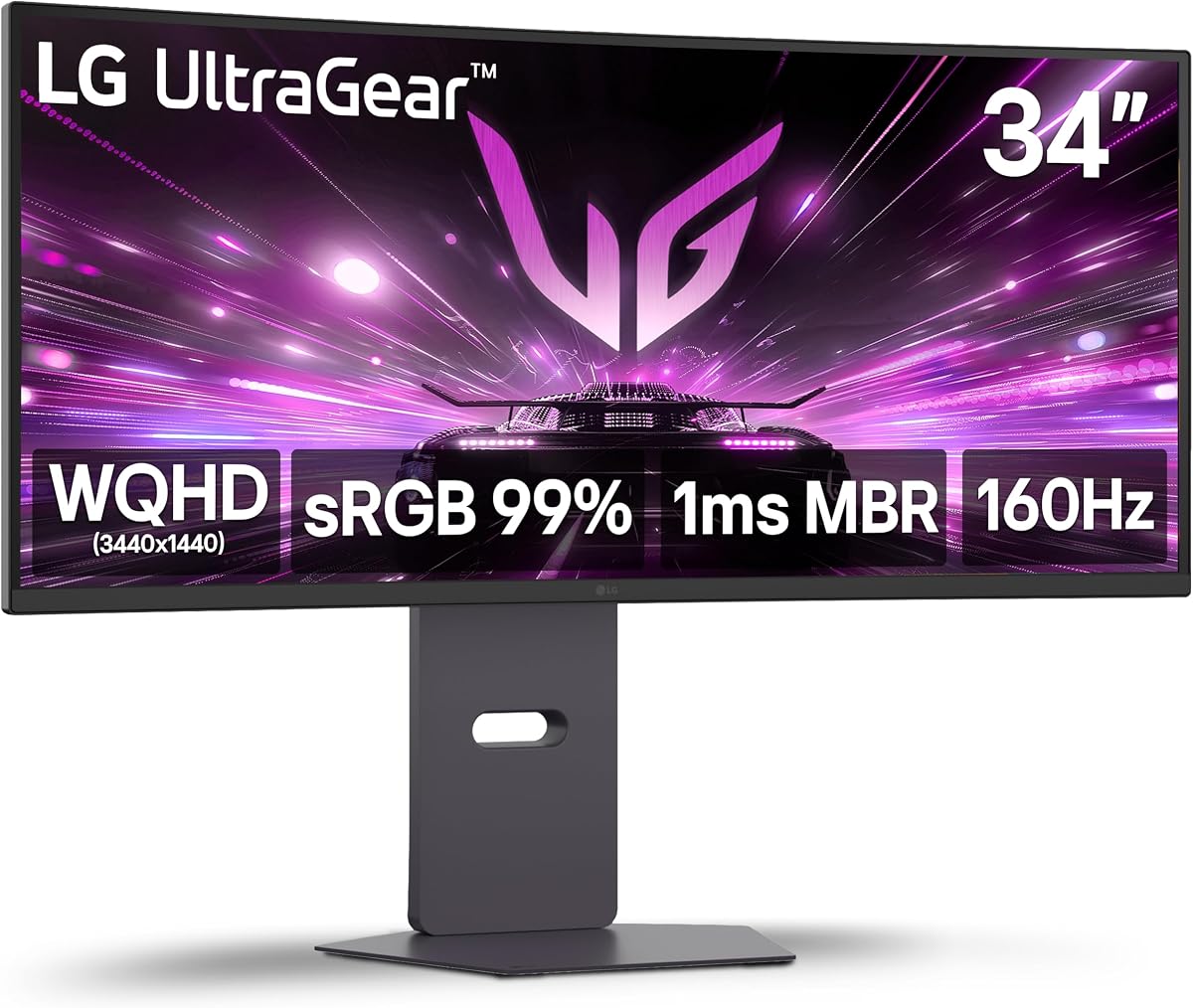
LG's 34G600A-B combines a 34-inch 1800R curved display with WQHD resolution and 160Hz refresh rate. The format offers more horizontal room than a conventional monitor while remaining less extreme than some 21:9 alternatives. With a 4.5 rating, it balances immersive gaming, useful features, and a flexible physical design.
We may earn a commission when you buy through this link, at no additional cost to you.
Motion performance is supported by AMD FreeSync Premium, 1ms Motion Blur Reduction, and Dynamic Action Sync. HDR10 adds a wider visual range, while up to 99% sRGB coverage supports vivid imagery. Black Stabilizer can brighten dark scenes, and the center-display crosshair is aimed at first-person shooters.
This model is more complete as an everyday display than many competitors. It includes a stereo speaker system with Waves MaxxAudio, Reader Mode, HDMI 2.1, DisplayPort, and a stand that supports tilt, height, and swivel. Those ergonomic adjustments make it easier to align a large curved panel with a seated user.
The principal consideration is hardware and desk space. A 34-inch ultrawide benefits most from a capable gaming PC, and the wide aspect ratio can make full-screen productivity applications feel constrained. For a buyer who values immersion, smooth motion, adjustable positioning, and integrated convenience, however, it is one of the most complete picks in the guide.
The 1800R curve wraps content around the viewer while retaining a conventional 21:9 ultrawide layout. This creates enough space for games, communication applications, and side panels without moving into the unusually wide proportions associated with some super-ultrawide displays.
FreeSync Premium, HDR10, Black Stabilizer, Dynamic Action Sync, and the gaming crosshair cover several common competitive needs. Reader Mode and adjustable stand expand its usefulness for reading and general desktop work.
We may earn a commission when you buy through this link, at no additional cost to you.
The renewed version of the LG 34G600A-B offers the same core specification as the standard model: a 34-inch 1800R WQHD display, 160Hz refresh rate, AMD FreeSync Premium, and 1ms Motion Blur Reduction. Its 5.0 rating is the highest listed among these products, although the rating should be considered alongside the renewed condition.
We may earn a commission when you buy through this link, at no additional cost to you.
The feature list is especially useful for mixed setups. HDR10, up to 99% sRGB coverage, Dynamic Action Sync, Black Stabilizer, and a gaming crosshair support competitive play. Built-in stereo speakers with Waves MaxxAudio handle system sound, while HDMI 2.1 and DisplayPort provide modern wired connections.
Ergonomics remain a major strength. The stand supports tilt, height, and swivel, which is particularly valuable on a large curved display. Adjusting height and swivel can help align the panel more precisely with a desk and reduce the chance that the wide format will feel awkwardly positioned.
The important caveat is the renewed designation. Buyers should review the seller's condition description, included accessories, return terms, and warranty coverage. If the presentation and protections are acceptable, this listing delivers an unusually well-equipped ultrawide with a 160Hz refresh rate and the strongest listed customer rating in the comparison.
The renewed model retains the full feature set rather than offering only a basic high-refresh screen. Adaptive sync, HDR, gaming aids, built-in audio, and an adjustable stand make it suitable for a broad mix of gaming and productivity tasks.
A renewed product may show signs of previous use or have been professionally inspected and restored. Review the exact condition grade, return window, and warranty before purchasing, because the seller's policies can materially affect the ownership experience.
We may earn a commission when you buy through this link, at no additional cost to you.
The Samsung Odyssey G55C takes a different approach from conventional 1500R and 1800R monitors. Its 32-inch 1000R curve is more pronounced, placing the viewer deeper inside the visual field. QHD resolution and a 165Hz refresh rate make it a strong high-refresh option, earning a 4.4 rating.
We may earn a commission when you buy through this link, at no additional cost to you.
The 165Hz rate is slightly above the 160Hz target and pairs with a 1ms MPRT response time. AMD Radeon FreeSync is included to reduce image tearing and help synchronize the display with compatible graphics hardware. This makes the monitor suitable for players who want smooth motion without moving to a 34-inch ultrawide.
HDR10, high pixel density, deep dark blacks, and luminous whites are emphasized for visual impact. Eye Saver Mode reduces blue light, while flicker reduction is designed to make extended sessions more comfortable. The tighter curve may make the gaming experience more enveloping than a gently curved display.
There is an important comfort consideration. A 1000R radius can feel immersive to some users but overly curved to others, particularly when viewing large documents or sitting close to the panel. The G55C is best for players who prioritize presence and atmosphere over a more neutral 16:9 viewing experience.
Curvature is commonly expressed as a radius in millimeters, and a smaller number generally indicates a tighter bend. The G55C's 1000R design can make edges feel closer to the viewer, increasing peripheral immersion in racing, flight, and action games.
A 165Hz refresh rate, 1ms MPRT response time, and FreeSync provide a strong motion package. QHD resolution also offers more workspace and finer detail than Full HD while avoiding the extreme width of an ultrawide.
We may earn a commission when you buy through this link, at no additional cost to you.
The Sceptre C345B-QUT168 combines a 34-inch 21:9 curved display with WQHD resolution and refresh rates listed up to 180Hz or 165Hz. It targets gamers who want wide immersion and a high-refresh experience, while its 4.2 rating is the lowest in this particular comparison.
We may earn a commission when you buy through this link, at no additional cost to you.
The 3440 by 1440 panel contains roughly five million pixels and provides around 30% more screen space than a conventional monitor, according to the product information. That additional width can accommodate game menus, voice chat, video, or multiple productivity windows without requiring a second display.
A 1ms MPRT response time is designed for fast action, and 99% sRGB coverage provides a conventional gaming color target. Two DisplayPort connections simplify multi-input arrangements, while built-in speakers add convenience for system audio. The listed R1500 curvature creates a pronounced but manageable wraparound effect.
The lower rating means this model has less visible customer consensus than the leaders, and the supplied specification is less comprehensive than that of several alternatives. It may still be worthwhile for a buyer focused on width, high refresh modes, and useful connectivity. Confirm current port details, stand adjustment, and operating mode support on the retail listing before purchase.
The 21:9 format is useful when gaming is only part of the routine. A communication application, video feed, inventory list, or performance overlay can remain open beside a game, while the curved panel helps keep peripheral content within the main field of view.
Support for high refresh modes and two DisplayPort connections creates flexibility for PCs and compatible equipment. The built-in speakers offer a convenient fallback for system audio, though they are not a substitute for a headset in competitive games.
We may earn a commission when you buy through this link, at no additional cost to you.
The Alienware AW3425DWM is the strongest all-around recommendation in this group. It combines a 34-inch 1500R curved WQHD panel with an 180Hz refresh rate, 1ms gray-to-gray response time, and both AMD FreeSync Premium and VESA AdaptiveSync. Its 4.6 rating is the highest among the listed non-renewed products.
We may earn a commission when you buy through this link, at no additional cost to you.
Color and visual certification strengthen its premium positioning. The display is listed at 95% DCI-P3 coverage with VESA DisplayHDR 400 certification, giving it a broader color target than many competing gaming monitors. Its 21:9-style expansive canvas is well suited to open worlds, racing games, strategy titles, and simultaneous desktop applications.
The feature set is tuned for long sessions. A dedicated console mode and hardware-based low blue light solution are designed to improve comfort without the same compromises associated with some purely software-based filters. Adaptive sync helps reduce tearing, while the fast refresh and response specifications support fast-moving content.
This is not the simplest option for a small desk or a modest graphics card. Sustained 180Hz performance at WQHD resolution benefits from capable hardware, and the wide panel requires enough physical space. For a buyer seeking the strongest balance of rating, motion, color, immersion, and everyday flexibility, it is the most complete recommendation.
The 180Hz rate exceeds the 160Hz target, while 1ms gray-to-gray response and dual adaptive-sync support address different aspects of fast motion. The result is a specification set aimed at competitive shooters, sports simulations, and action-heavy games.
With 95% DCI-P3 coverage and DisplayHDR 400 certification, the monitor is more compelling for vibrant media than a basic sRGB gaming panel. It does not replace a professional color-calibrated display, but it offers a broad and attractive entertainment gamut.
The hardware-based low blue light solution and dedicated console mode are designed to make longer sessions more comfortable. These features are worth considering when the display will be used for gaming, media, and productivity throughout the day.
We may earn a commission when you buy through this link, at no additional cost to you.
The AOC CU34G4H pushes refresh and response specifications further than most of the alternatives. It combines a 34-inch 1500R WQHD VA panel with refresh rates up to 200Hz over DisplayPort 1.4 and a stated 0.3ms MPRT response time. Its 4.5 rating reflects a strong balance of specifications and customer response.
We may earn a commission when you buy through this link, at no additional cost to you.
Adaptive-Sync is supported to reduce screen tearing, and HDR Ready adds a broader contrast target for compatible content. The 21:9 format provides a panoramic gaming surface and useful multitasking room, while the fast refresh rate is particularly relevant to competitive shooters, sports games, and other high-motion genres.
Connectivity is one of its strongest attributes. The monitor includes one DisplayPort 1.4, two HDMI 2.0 ports, and audio output. DisplayPort is specified for up to 200Hz, while HDMI is limited to 100Hz in the supplied information, so the PC connection should be planned accordingly for the highest refresh rate.
The stand supports height adjustment, tilt, and swivel, making this easier to position than many gaming displays. The catch is hardware demand: reaching 200Hz at WQHD resolution requires a suitably powerful graphics card, and most conventional video modes will not support that rate. Even with those caveats, it is an excellent choice for a system built specifically for maximum refresh performance.
A 200Hz ceiling gives competitive players additional headroom over 160Hz and 180Hz alternatives. Achieving the full rate requires compatible graphics hardware and the correct DisplayPort connection, so the PC specification should be checked before purchase.
Two HDMI inputs, DisplayPort 1.4, and audio output provide good flexibility for a multi-device desk. Height, tilt, and swivel adjustments make it easier to position the wide curved panel comfortably and align it with a seated user.
We may earn a commission when you buy through this link, at no additional cost to you.
A suitable curved high-refresh monitor depends on more than the headline refresh rate. Screen size, resolution, curvature, latency, adaptive sync, color, connectivity, and desk space should be evaluated together.
A 24-inch curved monitor is easiest to fit on a modest desk and can provide a noticeable visual benefit without the footprint of a 32-inch or 34-inch panel. A 27-inch model offers a middle ground for entertainment and gaming, while 32-inch displays provide a larger conventional 16:9 viewing area. A 34-inch ultrawide adds substantially more horizontal space and generally demands a wider desk, a closer seating position, and a graphics system capable of driving the additional pixels.
Choose a size you can comfortably view rather than simply the largest option available. Check the full stand footprint and the amount of clearance required for the curved panel and cables.
Full HD is practical for compact monitors and helps a capable graphics card concentrate its performance on a high refresh rate. QHD adds a substantial increase in pixel density and is the sweet spot for many 27-inch and 34-inch gaming displays, offering more room for detailed interfaces while remaining practical for modern graphics hardware. The CRUA 32-inch model goes further with native 4K resolution, which is ideal for clarity but places much greater demand on the GPU at high refresh rates.
Match the resolution to both your screen size and graphics hardware. A 4K monitor is not automatically smoother than a lower-resolution model if the available GPU cannot maintain the target frame rate.
A 160Hz refresh rate shortens the interval between displayed frames, making motion appear smoother when the game and graphics card can supply enough frames. Several monitors in this guide offer 165Hz, 180Hz, or up to 200Hz, but the active rate can depend on the input path. The AOC model, for example, supports its highest listed rate over DisplayPort 1.4 while HDMI 2.0 is limited to 100Hz.
Verify that your graphics card and the selected connection can carry the intended refresh rate. Also check whether the source device and game expose a compatible mode.
Manufacturers may quote response times using different methods. MPRT is a motion-based measurement that can be useful for judging visible blur, while gray-to-gray figures describe panel pixel transitions. The SANSUI models use 1ms MPRT, the LG UltraGear uses 1ms Motion Blur Reduction, the Alienware specifies 1ms gray-to-gray, and the AOC lists 0.3ms MPRT. These values are not perfectly interchangeable.
Treat the headline number as one part of the performance picture. Adaptive sync, refresh rate, panel quality, and the actual frame rate of the game all influence how responsive the display feels.
Curvature is expressed as a radius such as 1000R, 1500R, or 1800R. A smaller radius generally means a tighter bend. The Samsung Odyssey G55C uses 1000R for strong wraparound, while the CRUA, Sceptre, SANSUI, Alienware, and AOC models use 1500R. The LG models use 1800R, which generally feels more restrained. There is no universally ideal radius, because seating distance, screen size, and personal sensitivity matter.
Visit a display if possible or examine multiple curvature options. A curve that feels immersive during a game can be less desirable for long text-heavy work, so consider how you actually use the monitor.
Adaptive sync coordinates the display refresh with the graphics output, helping reduce tearing and stuttering. The list includes FreeSync, FreeSync Premium, Radeon FreeSync, and VESA AdaptiveSync, so confirm compatibility with your graphics card. Gaming aids such as crosshairs, timers, counters, black-level adjustment, Black Stabilizer, and dedicated game modes can make competitive play more convenient.
Choose features that match your games rather than paying for a crowded on-screen menu. The most valuable tools are usually those you will actually adjust for different titles or play styles.
For vivid gaming and media, compare sRGB and DCI-P3 coverage, brightness, contrast, and HDR support. The Alienware reaches 95% DCI-P3 with DisplayHDR 400 certification, the SANSUI 24-inch model lists 97% DCI-P3, and the CRUA reaches 120% sRGB. These figures are not directly equivalent, because the gamuts and measurement standards differ. HDR mode may also be limited to particular inputs or require compatible content.
For competitive play, stable color and dark-scene visibility may matter more than a headline gamut. For content creation, use calibration software and do not treat a gaming monitor's listed coverage as a guarantee of factory-calibrated accuracy.
DisplayPort is generally the preferred connection for high-refresh PC gaming, while HDMI offers broad compatibility with consoles, laptops, and media devices. Check the maximum refresh rate for every port rather than assuming all inputs behave identically. Audio output, built-in speakers, VESA mounting, and ergonomic adjustment can further improve convenience. The LG 34G600A-B supports height, swivel, and tilt, while several SANSUI models provide tilt only.
List the devices you plan to connect before buying. Confirm the cable type, mounting pattern, stand range, speaker needs, and whether you want to route audio to external equipment.
Start by placing the monitor at a height where the upper portion of the screen is near or slightly below eye level. Keep the center of the display around arm's length away, particularly with a 32-inch or 34-inch model. Connect the PC through the port capable of the highest supported refresh rate, then set both the operating system and graphics control panel to the intended rate.
Use the on-screen display to select the correct input and a suitable picture mode. HDR should only be enabled when the source device, cable, and game support it. Competitive players can adjust black levels, crosshairs, timers, and response-related settings, but should avoid excessive sharpness or artificial enhancement that creates visual noise. FreeSync or AdaptiveSync should also be configured consistently on the monitor and graphics card.
Clean the curved panel with a soft, lint-free microfiber cloth and avoid abrasive cleaners or excessive liquid. Do not press on the screen, and route cables so they do not push against the panel or stand. Periodically check that the stand remains stable and that vents, if present, are unobstructed. For renewed models, inspect the screen and accessories promptly and preserve the condition documentation provided by the seller.
A 160Hz curved monitor can provide smoother motion and a more immersive field of view, but the curve is not automatically better for every task. A 144Hz flat display may be preferable for productivity or if it costs less and offers the same resolution, adaptive sync, and response performance. The best choice depends on screen size, comfort, and the games you play.
Yes, a capable graphics card helps ensure that the game can deliver frame rates close to the monitor's refresh rate. The required performance varies with resolution and game complexity, so Full HD is generally less demanding than QHD, while 4K at 160Hz places the greatest demand on the system. Adaptive sync can make fluctuations less disruptive, but it cannot create frames the hardware cannot render.
Curvature does not automatically cause eye strain. A well-positioned curved display can reduce peripheral distortion and feel comfortable at a suitable distance, especially with a 1500R or 1800R panel. However, a very tight curve or improper placement may be uncomfortable for some people. Adjust the height, tilt, brightness, and viewing distance before deciding that curvature is unsuitable.
The 24-inch option is easier to fit on a desk, usually costs less, and may be simpler for a gaming PC to drive. A 34-inch ultrawide provides much more horizontal space, stronger immersion, and greater multitasking room. Choose the smaller model for a compact setup and value focus, or the ultrawide if your hardware can support WQHD gaming and your desk can accommodate the wider panel.
MPRT estimates how long a motion artifact remains visible, while gray-to-gray response describes the transition speed between pixel brightness levels. The measurements are not interchangeable, so a 0.3ms MPRT figure cannot be compared directly with a 1ms gray-to-gray figure. Refresh rate, adaptive sync, panel technology, and actual game frame rates also shape the perceived result.
A renewed monitor can be a sensible way to access a premium specification at a lower cost, but the condition and protections matter. Review the seller's inspection process, cosmetic description, included accessories, return window, and warranty. A strong product rating alone does not guarantee that every renewed unit will present identically.
Not necessarily. The SANSUI 27-inch model specifically states that HDR can be enabled through the OSD only when connected by HDMI, while other models may list broad port support without identical restrictions. Compatibility also depends on the source device, cable, and content. Check the manual and current manufacturer specifications before assuming every input supports the full feature set.
Yes, and many of the models offer useful productivity features such as multiple inputs, adjustable stands, reading modes, and broad resolutions. QHD and ultrawide screens can provide ample room for documents, communication tools, and side-by-side applications. Keep the brightness moderate, position the screen correctly, and use the least distracting game preset for general work.
The Alienware AW3425DWM is the strongest overall recommendation because it combines a well-regarded 4.6 rating with a 34-inch 1500R WQHD panel, an 180Hz refresh rate, fast response, adaptive sync, and broad DCI-P3 coverage. The renewed LG 34G600A-B offers a similarly capable feature set and the highest listed rating, while the compact SANSUI 24-inch model delivers 160Hz gaming at a more accessible entry point.
Prioritize resolution and size before choosing a model. Full HD works well for compact systems, QHD is an excellent all-around compromise, and 4K delivers maximum detail when the graphics card can sustain the target frame rate. Within those formats, verify port-specific refresh rates, adaptive sync support, stand adjustment, and whether the curvature feels comfortable in your intended viewing position.
Retail listings and promotional pricing can change at any time, and renewed inventory may vary by condition. Check the current product page, warranty terms, compatibility details, and recent customer feedback before purchasing. Comparing the final cost against the required screen size and GPU capability will usually lead to the most satisfying result.