
Garmin Descent G2
4.6Editor score
AMOLED watch-style display
Surface GPS navigation
Broad diving mode support
Dive computers for beginners: compare ten leading models for easy controls, readable displays, safety, connectivity, battery life, comfort, and overall value
A dive computer is more than a digital depth gauge; it is a central piece of equipment for tracking depth, time, gas, and decompression information. For beginners, the best models balance essential dive data with uncomplicated menus, clear screens, dependable alerts, and an interface that remains easy to understand underwater.
This guide compares ten dive computers using the supplied product specifications and customer ratings. It evaluates display clarity, control methods, supported modes, navigation tools, data transfer options, battery expectations, wrist size, and other practical features for new divers who need a versatile first computer.
Each review explains who benefits most from a particular model and where trade-offs appear. The picks range from approachable single-button designs to feature-rich GPS and multisport watches, while current prices and availability can change, so buyers should confirm the latest listing before purchasing.
4.6Editor score

4.7Editor score

4.2Editor score
The table below compares all ten dive computers by display, controls, supported activities, and practical extras, making it easier to identify a model that matches a beginner's preferred interface, navigation needs, and logging habits.

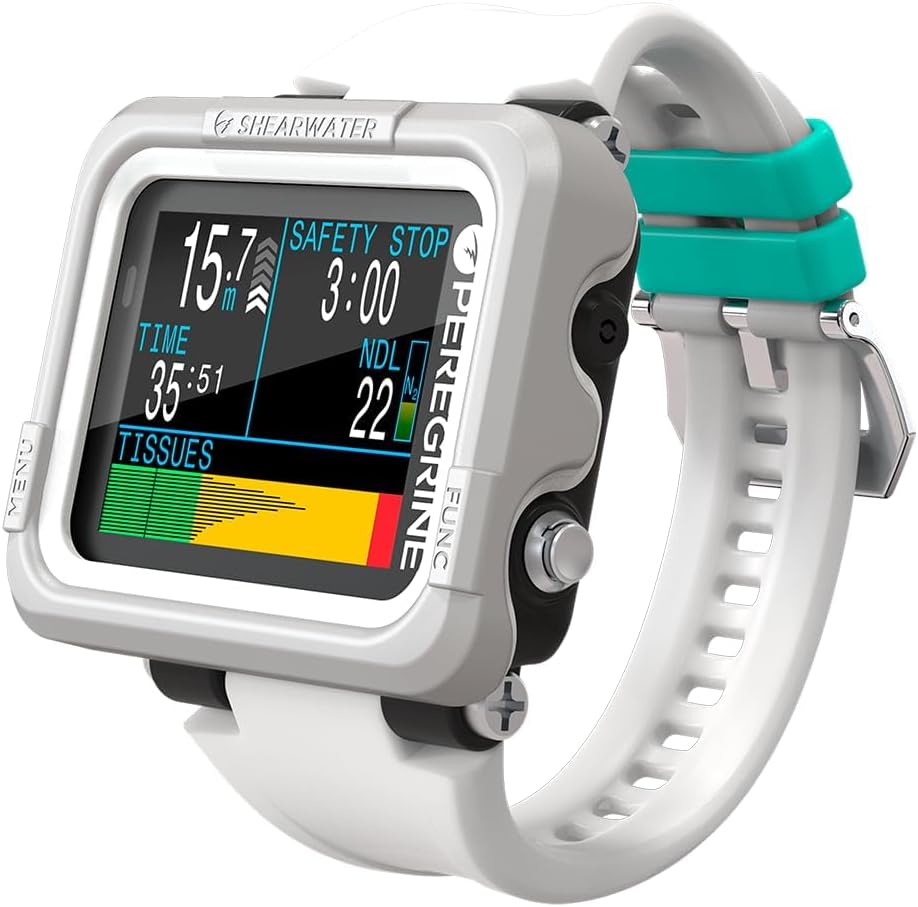


The Shearwater Research Peregrine is an excellent all-around choice for a new diver who wants serious dive-computer capability without a complicated watch interface. It carries a 4.7 customer rating, and its two-button layout, state-aware menus, and included charging station create a package that feels focused and purposeful. Instead of burying essential information beneath smartwatch features, the Peregrine concentrates on the data a recreational diver is most likely to need.
We may earn a commission when you buy through this link, at no additional cost to you.
Its 316 stainless steel buttons should be dependable in demanding conditions, while the two-button arrangement gives users a straightforward way to move through menus. The state-aware structure is particularly useful for beginners because it can keep the available options relevant to the current mode. Battery life reaches up to about 30 hours on medium brightness, and the included USB wireless charging station simplifies routine charging without asking users to hunt for a proprietary cable.
The main compromise is that the Peregrine does not offer the surface navigation, multisport tracking, or everyday smartwatch ecosystem of the Garmin models. Some divers may also prefer a model with explicit tank-pressure integration. Even so, those omissions are reasonable for a buyer whose priority is an approachable, capable dive computer rather than a general-purpose wearable. The Peregrine gives beginners a focused tool that can also remain useful as skills progress.
Choose the Peregrine if you want a readable, modern dive computer with minimal menu complexity and a strong customer rating. It is particularly suitable for recreational scuba divers who appreciate physical controls and a dedicated charging setup. As the first dive computer in this roundup, it offers the best balance of approachability, capability, and focused design.
The two-button interface limits physical controls without hiding essential information. A state-aware menu structure is helpful when a diver is concentrating on depth, buoyancy, and surroundings rather than learning a complicated keypad.
The included USB wireless charging station is a meaningful convenience, and the stated battery life supports full-day use at medium brightness. A routine charging habit can help prevent the computer from becoming an avoidable source of dive-day stress.
We may earn a commission when you buy through this link, at no additional cost to you.
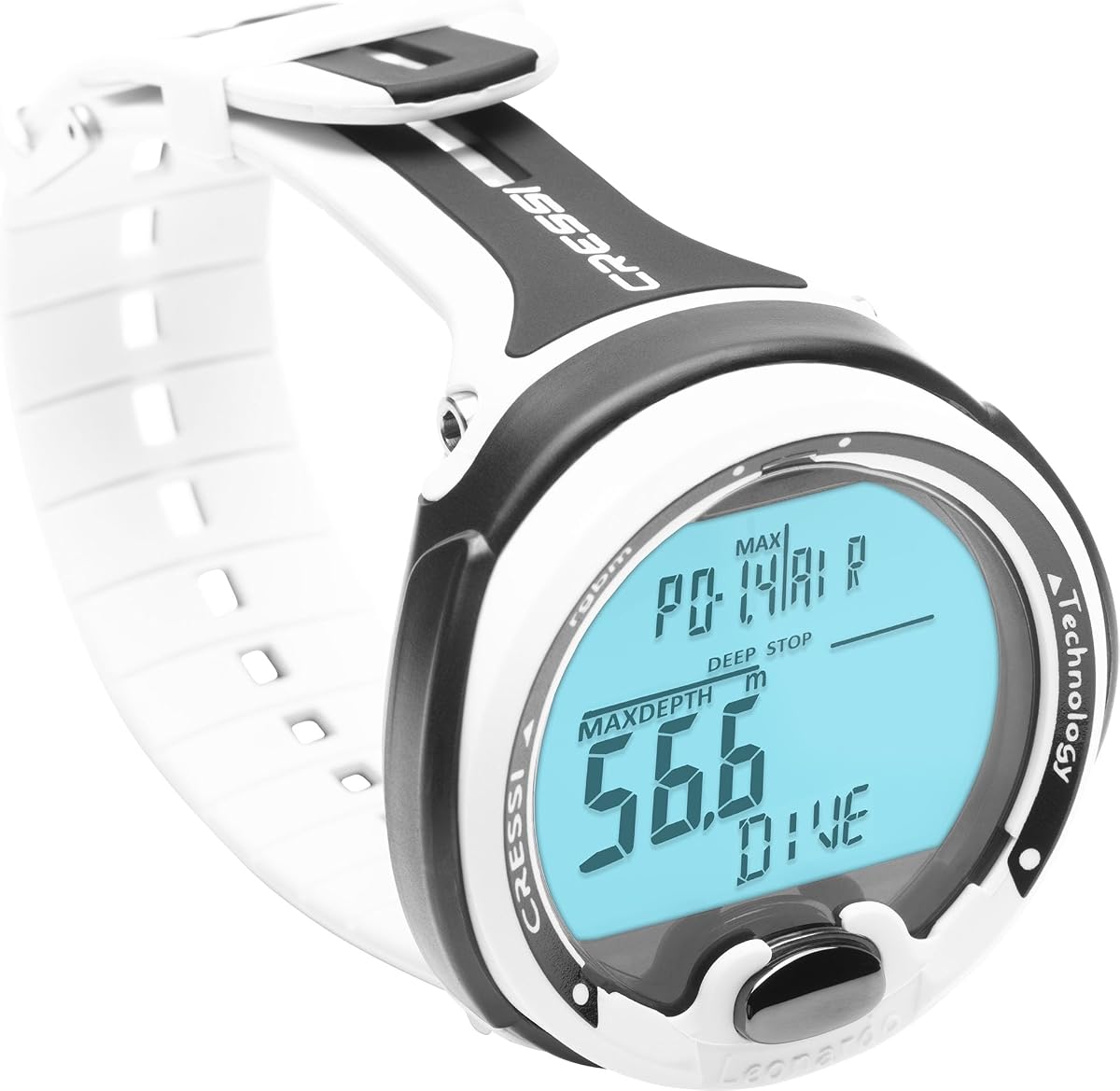
The CRESSI Leonardo 2.0 G2 is a logical entry point for beginners who want the essential functions of a dive watch in an uncomplicated format. Its 4.2 rating reflects a well-regarded but less universally acclaimed product than the leaders in this list, yet the supplied features show a capable recreational computer. Air, Nitrox, and Gauge modes cover the most familiar configurations, while the one-button interface minimizes underwater operating confusion.
We may earn a commission when you buy through this link, at no additional cost to you.
A single control can be a major advantage when a diver is wearing thick gloves or has limited visibility. The Leonardo also provides visual and audible critical alerts, ensuring important information is not limited to a subtle vibration. USB and infrared transfers make logs easier to manage, and pairing with either iOS or Android devices broadens its appeal to divers who like reviewing activity data in an app.
It does not include the wireless tank-pressure feature, built-in compass, surface GPS, or extensive multisport functions found in higher-tier devices. Its 4.2 rating is also lower than those of the Shearwater and Garmin selections. Nevertheless, the supplied specification does not require buyers to sacrifice basic modes, alerts, or data transfer to gain an easy interface. That makes the Leonardo a sensible value-oriented choice for straightforward recreational diving.
The Leonardo 2.0 G2 is best for new divers who want simple controls, familiar watch-style operation, and core recreational modes without paying for every advanced feature. It may also appeal as a first computer for travel because the single-button layout is easy to understand. Those prioritizing a larger color screen, GPS, or tank-pressure integration should look toward the Shearwater or Garmin alternatives.
The single-button interface is easy to learn and particularly useful underwater. It reduces the chance of pressing the wrong control while the diver is focused on breathing, buoyancy, and surroundings.
Air, Nitrox, and Gauge modes cover common recreational uses. Visual and audible alarms provide redundancy when a diver cannot or does not want to rely only on vibration.
We may earn a commission when you buy through this link, at no additional cost to you.
The SUUNTO D5 is a capable connected dive computer for beginners who appreciate a color screen and wireless accessories. Its 4.0 rating is the lowest among the ten products, so it does not lead this roundup, but the listed features address several genuine needs: wireless tank pressure, a digital compass, vibration alarms, and mobile connectivity. It is a practical choice for divers who want more than a basic depth-and-time display.
We may earn a commission when you buy through this link, at no additional cost to you.
Wireless tank-pressure integration is especially valuable for divers using a pressure transmitter, while the digital compass adds a useful orientation tool for navigation. Vibration alarms allow the D5 to communicate important information without depending on sound alone. The 100-meter water resistance and wireless mobile connection round out a familiar feature set that can support both dive monitoring and post-dive review.
The supplied information is relatively brief, making it harder to assess details such as supported gas configurations, battery longevity, log capacity, and wrist sizing. Its 4.0 customer rating also suggests the overall satisfaction level is less consistent than that of the top-rated models. Divers who require highly specialized multisport features, extensive health tracking, or a large color display may find better matches elsewhere.
The D5 is most appropriate for a new diver who wants wireless tank data, a compass, and phone connectivity in a conventional dive computer. It is a good middle ground for recreational divers who do not need the smartwatch breadth of the Garmin G2. Confirm the current configuration, transmitter compatibility, and fit against the seller's full listing before buying.
Wireless tank pressure and mobile connectivity make the D5 attractive for divers who want less manual logging. Tank-pressure functionality is especially useful when paired with a compatible transmitter.
The built-in digital compass provides orientation, while vibration alarms communicate information without producing audible noise. Both features support a more versatile recreational setup.
We may earn a commission when you buy through this link, at no additional cost to you.
The Shearwater Research Peregrine Adventures Edition combines an easy two-button layout with a large, vivid 2.2-inch LED LCD. Its 4.7 rating places it among the strongest products in the guide. Air, Nitrox, 3 Gas Nitrox, and Gauge modes make it versatile, but the more advanced configuration is most attractive to beginners who want room to develop their skills without replacing their computer soon.
We may earn a commission when you buy through this link, at no additional cost to you.
The enhanced color range and saturation should make important information easier to distinguish at a glance. The interface retains the same state-aware menu approach and 316 stainless steel buttons associated with the Peregrine line. Buyers can also customize gradient factors using the Buhlmann ZHL-16C algorithm, giving experienced users more control while retaining a conventional interface that is still approachable.
Some first-time divers may find the range of modes and settings more than they need immediately. The larger 2.2-inch screen may also feel substantial on a smaller wrist. However, the computer does not lock out when a dive plan deviates, and the included wireless charging station with up to about 30 hours of battery life at medium brightness offsets the possibility of battery-management anxiety.
This Adventures Edition is a strong choice for a new diver who values a colorful, large display and may eventually use mixed gases. Choose the standard Peregrine for a more economical, focused purchase, or consider this version when display visibility and expanded gas support matter. It offers a polished experience without turning the wrist into a general-purpose smartwatch.
The 2.2-inch LED LCD provides more room for essential data, while enhanced color helps separate changing values. A readable screen is valuable for beginners who are still learning which numbers deserve immediate attention.
Support for Air, Nitrox, 3 Gas Nitrox, and Gauge modes broadens the computer's appeal. Adjustable gradient factors provide flexibility for divers who later become more confident with deeper planning.
We may earn a commission when you buy through this link, at no additional cost to you.
The Cressi Raffaello is a versatile watch-style dive computer with a 4.4 customer rating and several features that suit both beginners and experienced recreational divers. Its built-in digital compass eliminates the need to carry a separate compass, while mixed-gas planning provides a useful foundation for more involved dive profiles. Bluetooth and USB connectivity also make it easy to move dive logs into a review workflow.
We may earn a commission when you buy through this link, at no additional cost to you.
One of its most attractive features is the user-replaceable battery, which has an expected life of four years. That approach can offer greater long-term ownership flexibility than a sealed rechargeable design, especially for divers who travel regularly or do not want to manage a proprietary charging cable. Four operating modes, including apnea and Gauge, add versatility for freediving and alternative scuba activities.
The primary technical trade-off is its RGBM-based system, which differs from the Buhlmann ZHL-16C approach highlighted in some competing computers. Divers should learn the model they own rather than assume its calculations or settings match another brand. Bluetooth transfer and app-based review also depend on a compatible phone or computer, although the supplied specifications do not identify a dedicated phone app for this model.
The Raffaello is a compelling option for a new diver who values a replaceable battery, a built-in compass, and flexible log-transfer options. It is particularly attractive for travel-oriented divers or anyone who expects to use the computer for freediving as well as scuba. Buyers who prefer Buhlmann-based models or an integrated wireless charging system may prefer a Shearwater instead.
The user-replaceable battery has an expected four-year life, reducing long-term charging and sealed-battery concerns. It is a practical consideration for divers who prefer a device that can be serviced with a fresh battery.
The built-in digital compass adds a reference point underwater, while Bluetooth and USB transfers provide two ways to move logs. Four modes make the watch useful across scuba, freediving, and gauge-oriented activities.
We may earn a commission when you buy through this link, at no additional cost to you.
The Garmin Descent X30 is built for divers who want abundant information on a large screen. Its 4.7 rating reflects a strong reception, and the 2.4-inch vibrant color display makes it especially useful for viewing depth, time, navigation, and decompression information together. The screen can show up to three customizable data fields per page, allowing new divers to avoid an overly cluttered layout.
We may earn a commission when you buy through this link, at no additional cost to you.
Surface GPS, entry and exit point marking, and a three-axis digital compass distinguish it from basic watch computers. Divers can navigate toward a site and retain a visual record of where they entered and exited the water. The 10 ATM dive rating, four large metal leakproof buttons, and top-mounted button orientation also support practical use in demanding conditions.
For beginners, the NDL Aware depth metrics are useful because they show how depth changes affect the remaining no-decompression limit. The flip-screen mode can improve viewing depending on wrist position, while the water temperature sensor helps identify the thermocline. The tradeoff is size: a 2.4-inch display and rugged housing may feel substantial, and some of the trimix and multigas capabilities exceed a beginner's immediate needs.
The X30 is ideal for a diver who prioritizes screen readability, surface navigation, and abundant configurable data. It also suits divers who want to transition toward technical or multigas activities without starting with a basic computer. Those wanting a more conventional watch footprint should examine the Garmin G2, while anyone content with a simpler dedicated dive display may find the X30 excessive.
The 2.4-inch color display gives new divers room to organize several important values without excessive scrolling. Customizable pages help keep the display focused on the information that matters during each stage of the dive.
Surface GPS can guide divers toward sites and mark entry and exit points. Combined with the underwater compass, it creates a useful navigation package for boat-based and shore-based trips.
We may earn a commission when you buy through this link, at no additional cost to you.
The Garmin Descent G2 is the most complete premium option in this guide for a beginner who wants a dive computer and everyday wearable in one package. Its 4.6 rating reflects a strong balance of dive performance and smartwatch functions. The rugged 46 mm watch-style body combines a 1.2-inch AMOLED display, sapphire lens, leakproof buttons, and a 10 ATM dive rating.
We may earn a commission when you buy through this link, at no additional cost to you.
It supports recreational, advanced, technical, freediving, and pool apnea diving, giving the owner considerable flexibility from the start. Multi-GNSS positioning allows surface entry and exit points to be marked, while the Garmin Dive smartphone app supports log review. Dive-readiness insights consider sleep, stress, exercise, and recent dives, which may help experienced divers think beyond time spent underwater.
The extensive feature set is not entirely simple. Health estimates, training metrics, smart notifications, contactless payment options, and Connect IQ personalization require time to configure, and some features depend on a compatible phone, supported bank, or country. The 45.5 by 45.5 by 15.2 mm physical size may also feel large for a smaller wrist. None of that makes it a poor dive computer, but it is less specialized than the Peregrine line.
The G2 is best for a new diver who wants a premium computer capable of growing into advanced and technical diving while also serving as a smartwatch. It is especially attractive for buyers who value a bright AMOLED screen, sapphire lens, surface positioning, health data, and app-based planning. For a smaller, more purely dive-focused package, the standard Shearwater Peregrine is the stronger alternative.
Smart notifications, Garmin Pay, Connect IQ customization, sports tracking, and wellness estimates make the G2 useful between dives. These features add value for owners who want one device rather than separate dive and everyday watches.
The AMOLED display provides a bright, compact view of essential information, while the sapphire lens adds a premium protective surface. Leakproof buttons and a 10 ATM rating support use in demanding dive environments.
We may earn a commission when you buy through this link, at no additional cost to you.
The CRESSI Giotto is a traditional dive watch with capabilities that remain relevant for divers planning varied profiles. It has a 4.2 rating and distinguishes itself through support for as many as three Nitrox mixtures, adjustable oxygen settings from 21 to 99 percent, altitude diving support, and a dive log holding up to 70 hours of data. These specifications make it more versatile than a basic recreational computer.
We may earn a commission when you buy through this link, at no additional cost to you.
The wide oxygen range accommodates many gas configurations, while the 393-foot depth capability suits divers who may progress beyond conventional recreational limits. Altitude support is particularly useful at mountain lakes, where atmospheric pressure differs from sea level. Log data can be downloaded to a PC, allowing divers to preserve and review detailed dive information outside the watch.
The main drawback is that the design and feature presentation feel more conventional than those of modern color-screen or smartwatch-style competitors. The product's 4.2 rating is also lower than the ratings of the leading Garmin and Shearwater choices. With fewer connectivity details supplied, buyers should not assume the same smartphone integration found on several rivals.
The Giotto suits a new diver who wants established multi-mix and logging functions in a conventional wrist computer. It is especially relevant for altitude diving and for divers who prefer reviewing downloaded logs on a PC. Those who care more about GPS, app-based planning, a large color display, or wellness tracking should favor one of the Garmin options.
Support for three Nitrox mixes and a broad custom oxygen range provides flexibility for different dive profiles. Beginners should still receive proper gas-planning instruction before using any advanced configuration.
The 70-hour logbook gives the model room to retain detailed records, and PC downloads make those records easier to analyze. Altitude support adds value for mountain-lake diving.
We may earn a commission when you buy through this link, at no additional cost to you.
The Mares Puck Lite is a focused dive computer for beginners who prefer straightforward operation and modern algorithm support. Its 4.4 rating reflects a favorable reception, and the watch-style design brings essential performance to the wrist. It uses the Bühlmann ZH-L16C algorithm with customizable gradient factors, offering more configuration potential than a basic recreational model.
We may earn a commission when you buy through this link, at no additional cost to you.
The single-button control is described as intuitive and remains usable when wearing gloves. Its crystal-clear 800-segment display uses chip-on-glass technology to maintain visibility in varying underwater conditions. Nitrox mixtures from 21 to 50 percent cover a common range, allowing divers to refine their gas planning without moving immediately to very specialized configurations.
Its user-replaceable power source is expected to last through 100 dives, while integrated Bluetooth supports direct connection to smart devices for firmware updates and data syncing. The logbook stores up to 100 dives with graphs and profiles, and Mares and SSI apps can add review and planning tools. The limitations include a segment rather than color display and a narrower Nitrox range than the Giotto.
The Puck Lite is an excellent first computer for a diver who wants simple controls, a durable interface, and Bühlmann-based customization. Its single-button operation lowers the learning barrier, while the 100-dive log and app connectivity offer room for growth. It is less suitable for divers who need extreme Nitrox mixes, advanced gas configurations, or a colorful smartwatch-style display.
The single-button layout keeps physical interaction simple. A clear 800-segment display provides essential information without the visual complexity of a dense color screen.
Bühlmann ZH-L16C calculations with adjustable gradient factors provide a flexible foundation. A 100-dive log, Bluetooth syncing, and app support make profiles easier to review and preserve.
We may earn a commission when you buy through this link, at no additional cost to you.
The Garmin Descent G1 blends a rugged dive computer with the features of a conventional sports watch. Its 4.6 rating makes it one of the stronger choices in the guide. The easy-to-read monochrome display, sapphire lens, and silicone bands create a durable, focused design, while support for recreational, advanced, technical, freediving, and spearfishing broadens its appeal.
We may earn a commission when you buy through this link, at no additional cost to you.
GPS, GLONASS, and Galileo support allow surface entry and exit points to be marked, providing useful context for each dive. The watch stores up to 200 dives on the wrist and transfers them to the Garmin Dive app for review and sharing. More than 30 built-in sports apps and training features such as VO2 Max make it useful for owners who are active on land as well as underwater.
Heart rate, Pulse Ox, Body Battery, and sleep tracking add everyday health and activity features, although the device is not a medical device and some Pulse Ox functionality depends on the user's country. Smartwatch features require a compatible smartphone, while Garmin Pay depends on a supported country and payment network. The monochrome screen is also less visually rich than the G2's AMOLED display.
The G1 is a good choice for a diver who wants a rugged computer with strong location functions, sports tracking, and a large onboard log. It may appeal to divers who prefer the simpler visual character of a monochrome display over a bright color or AMOLED screen. For the most compact premium watch experience and longer smartwatch battery figure in the supplied specifications, the G2 is the more advanced sibling.
The sapphire lens and rugged watch construction suit a device intended for both water and land. Silicone bands and an easy-to-read monochrome display create a practical everyday appearance.
Multiband satellite support helps record surface entry and exit points, while 200-dive onboard storage keeps a substantial history on the wrist. Garmin Dive app support adds post-dive review and sharing options.
We may earn a commission when you buy through this link, at no additional cost to you.
The right first dive computer should be easy to operate, readable underwater, compatible with your diving plans, and supported by a battery and charging routine you can maintain. The following factors help narrow a large market of watches, wrist computers, and multisport dive devices.
Beginners should prioritize an interface that can be learned before entering the water. One-button models such as the CRESSI Leonardo 2.0 G2 and Mares Puck Lite minimize physical choices, while the Shearwater Peregrine's two-button layout remains easy to navigate through a state-aware menu. More complicated does not mean better for a first computer; every extra control and configuration can divide attention at the moment a diver most needs clarity.
Choose the simplest interface that still supports your intended gas and dive modes. Learn every button, alarm, and menu path during a practice session before relying on the computer underwater.
A dive computer must present depth, time, remaining limits, and warnings in a form that can be interpreted quickly. Segment displays can be highly legible, while color and AMOLED screens add visual hierarchy and room for customizable data pages. The Garmin X30 uses a 2.4-inch color display, the Peregrine Adventures uses a 2.2-inch color LCD, and the Garmin G2 fits a 1.2-inch AMOLED screen into a watch-style case.
Select a screen size that suits your wrist and reading habits rather than automatically choosing the largest display. Check the supplied screen details and ensure the computer is comfortable enough to wear for an entire dive day.
A recreational beginner may need only Air and Nitrox, but a computer can remain useful for years if it supports future activities. Gauge mode is useful for some activities, while apnea and freediving support expands the appeal of a watch to snorkelers and spearfishers. Advanced and technical modes, multigas, and trimix should be treated as future options rather than features a new diver must configure immediately.
Match the modes to your present training and reasonable progression. Confirm every gas-related feature with an instructor before using it, and never use an advanced configuration merely because the computer supports it.
A built-in compass offers a useful orientation reference, while surface GPS and multiband satellite support can help divers navigate toward a site and mark entry and exit points. The Garmin X30, G2, and G1 offer surface location features, while the Cressi Raffaello and SUUNTO D5 include digital compasses. These tools do not replace a thorough navigation plan, trained compass technique, or proper site-specific preparation.
Decide whether underwater compass navigation, surface wayfinding, or both matter to your usual dive environment. More advanced positioning features are most valuable for divers who repeatedly visit unfamiliar shore sites or boat-accessed destinations.
Battery life depends on the model, display brightness, and active features. The Shearwater Peregrine models list up to about 30 hours at medium brightness, the Garmin G2 lists up to 27 hours in dive mode, and the G1 lists up to 25 hours in dive mode. The Cressi Raffaello uses a user-replaceable battery with an expected four-year life, while the Mares Puck Lite uses a replaceable source expected to last through 100 dives.
Choose a charging or battery system that fits your routine. Top up a rechargeable unit after every dive day and carry the appropriate charging equipment for travel, or choose a replaceable-battery model if that maintenance pattern suits you better.
USB, infrared, and Bluetooth transfers can make post-dive review easier than manually recording each profile. The Cressi Leonardo 2.0 G2 supports iOS and Android pairing, the Raffaello supports Bluetooth and USB, and the Mares Puck Lite can sync with smart devices. Garmin computers use the Garmin Dive app, while the Giotto supports PC downloads. Before purchasing, confirm the required app, phone operating system, or computer is supported.
Prioritize seamless transfer if you want graphs, profile analysis, and organized dive records. A larger onboard log is helpful when connectivity is inconsistent, such as during remote or international travel.
A computer must be comfortable enough to wear for a full trip and durable enough for the intended environments. The Garmin G2 provides a 46 mm watch-style case with silicone bands sized from 128 to 224 millimeters, plus an extended band option. Shearwater models use stainless steel buttons, while the Garmin X30 uses four large metal leakproof buttons that are easy to identify with gloves.
Check case dimensions, band range, and button protection before ordering. A secure fit prevents distracting movement, while a readable display and accessible controls reduce the need to remove the watch or adjust it underwater.
Different computers use different decompression algorithms, and their settings may not be directly interchangeable. The Peregrine Adventures and Mares Puck Lite use Bühlmann ZH-L16C with gradient factors, while the Raffaello uses an RGBM-based planning system. A feature-rich computer should never be treated as a substitute for training, conservative planning, or a backup instrument.
Use a model with a reputable algorithm and learn how its displayed limits work. Avoid changing critical settings casually, and keep the manufacturer's guidance and your training provider's recommendations close at hand.
Before your first dive, read the full manual supplied with the computer, install any required app, update the firmware when appropriate, and become familiar with every mode you plan to use. Practice setting the correct gas, units, time, date, and personal limits in dry land. Know how to view remaining dive time, depth, ascent information, alarms, and the logbook without fumbling through multiple menus.
At the surface, check the battery or charge level, confirm that the computer is in the correct dive mode, and verify the displayed gas settings. During the dive, treat the computer as one source of information rather than the only one. Maintain awareness of your surroundings, manage gas according to training, control buoyancy, and follow the dive plan and buddy system. Respond to alerts promptly and never manipulate advanced settings while underwater.
After surfacing, review the profile and log the dive when the device supports convenient transfers. Rinse the computer with fresh water after use in salt or chlorine, especially if the manufacturer permits rinsing, and dry it before storage. Protect the buttons and display from impact, avoid extreme heat and chemicals, and use the specified charging equipment. For replaceable-battery models, follow the manufacturer's instructions for battery type, polarity, and replacement.
The CRESSI Leonardo 2.0 G2 and Mares Puck Lite are especially approachable because both use a single-button interface. The Shearwater Peregrine also has only two buttons and a state-aware menu. The best choice is the one whose controls you can learn quickly and confidently use without looking away from the dive environment for long.
A color display is not required for safe recreational diving, but it can make changing values easier to distinguish quickly. The Peregrine Adventures, SUUNTO D5, and Garmin X30 provide color options, while segment and monochrome screens can remain highly legible. Choose color for additional visual organization or a more watch-like experience, not as a substitute for understanding the computer's information.
GPS is most useful for surface navigation, site finding, and recording entry and exit points. Many boat dives can be completed with conventional compass and navigation skills, so a first-time diver does not need GPS to use every dive computer. If you repeatedly visit remote shore sites, the Garmin X30, G2, or G1 may be especially convenient.
A smartwatch dive computer can be an excellent choice when you want one device for diving, fitness, navigation, notifications, and everyday wear. The Garmin G2 supports numerous dive types and broad wellness features, while the G1 provides a simpler monochrome alternative. More features require more configuration, so spend time learning the settings before a dive trip.
A rechargeable computer is convenient when charging becomes a regular routine, especially for travel across multiple dive days. A replaceable-battery model may be more practical for divers who prefer long service intervals and do not want to depend on proprietary charging equipment. The Cressi Raffaello and Mares Puck Lite use replaceable power sources, while several Garmin and Shearwater options use integrated charging.
No. The presence of a Nitrox mode does not make it appropriate for a diver without proper training, certification, gas-planning practice, and an understanding of oxygen exposure. Beginners should start with the configuration instructed by their training provider and only advance when qualified under appropriate supervision.
A smaller log can still be sufficient for casual divers, particularly if USB, infrared, Bluetooth, or app transfers make regular downloads easy. The Cressi Giotto stores 70 hours, the Mares Puck Lite stores 100 dives, and the Garmin G1 stores 200 dives. Consider both entry capacity and transfer convenience, especially if you dive at remote sites with inconsistent connectivity.
Both features can be useful, but they serve different purposes. A compass supports orientation, while wireless tank pressure shows the diver's cylinder status and can help track gas use. The SUUNTO D5 lists tank pressure and a compass, and the Cressi Raffaello includes a compass. New divers should learn to use either feature only after understanding its limitations.
The Shearwater Peregrine stands out as the best overall pick because it combines a beginner-friendly two-button interface, a strong customer rating, focused dive functionality, and an included charging station. The Garmin Descent G2 takes the premium position for buyers who want an advanced dive computer with AMOLED display, GPS, extensive sports features, and everyday smartwatch functions.
For value-conscious beginners, the CRESSI Leonardo 2.0 G2 provides a simple one-button design, familiar Air, Nitrox, and Gauge modes, alerts, and device connectivity. The rest of the list provides meaningful alternatives, including a large-screen Garmin X30, a replaceable-battery Cressi Raffaello, a classic Cressi Giotto, a glove-friendly Mares Puck Lite, and Garmin models for multisport users.
Prioritize the interface you can learn, the dive modes you actually need, readable information, and a charging or battery system that fits your routine. Current prices and configurations can change, and some advanced features require compatible accessories or apps, so check the seller's latest specifications before making a final purchase.

