
Logitech H390
4.4Editor score
USB-A plug-and-play connection
Rotating noise-canceling microphone
Inline volume and mute controls
Swivel-mounted leatherette cushions
Looking for the best Headsets for Teams Meetings? Compare ten top-rated wired and wireless options for noise cancellation, comfort, battery life, and call
A dependable headset can make a Teams meeting feel more focused by delivering clear speech, limiting distractions, and avoiding distracting cable management. The right model should also fit comfortably through back-to-back calls and integrate easily with your computer, whether you work at home, in an office, or in a shared workspace.
We compared ten wired and wireless headsets for Teams meetings using the specifications and product information supplied for each model. The list covers USB plug-and-play designs, Bluetooth connectivity, dedicated receivers, active noise cancellation, rotating microphones, battery life, comfort features, and compatibility with Microsoft Teams and other meeting platforms.
Each pick reveals what it is best suited for, from a budget-friendly wired headset to premium wireless models with advanced noise control. Product ratings and specifications can change over time, and prices fluctuate, so check the current listing and your own meeting requirements before purchasing.
4.4Editor score

4.1Editor score

4.5Editor score
The comparison below highlights the connection method, audio features, comfort design, and best use case for all ten headsets, helping you distinguish a simple wired solution from a feature-rich wireless model.


The Lenovo Wireless VoIP Headset combines Microsoft Teams certification, a three-microphone noise-suppression system, and flexible wireless connectivity. Its 4.1 rating reflects a solid feature set, but the strongest differentiator is its Open Office certification, which makes it particularly relevant for users who regularly join Teams calls from shared spaces.
We may earn a commission when you buy through this link, at no additional cost to you.
Its USB-A receiver provides a straightforward path to the full set of Teams functionality, while Bluetooth 5.3 multipoint allows two devices to remain connected. That makes the headset useful for moving between a work computer and phone. The stated battery life of up to 31 hours for talking and 60 hours for playback also reduces the likelihood of a mid-meeting power failure.
The 140-gram over-ear design uses adjustable memory foam earcups and a flexible headband, which should help with long sessions. Replaceable earcups are another practical advantage, but this model does not list hybrid active noise cancellation for blocking environmental sound. Its noise control focuses on improving the transmitted microphone signal rather than creating a fully quiet listening environment.
This is a strong recommendation for hybrid workers who place certification and device switching ahead of active noise cancellation. The requirement to use the USB-A receiver for all Microsoft Teams functionality is worth confirming against your computer setup, but once connected, the headset is tailored to professional meeting use.
The combination of a receiver-based Teams connection and Bluetooth multipoint lets one headset serve both desktop meetings and mobile calls. It is particularly attractive for users who move regularly between locations and want the same headset for both work and personal communication.
At 140 grams, the over-ear design remains notably light, while memory foam cushions and a flexible headband support longer wear. Replaceable earcups can also extend useful life and make hygiene easier to maintain over time.
We may earn a commission when you buy through this link, at no additional cost to you.
The Logitech H390 is a straightforward wired USB-A headset with a 4.4 rating, making it an appealing budget choice for Teams users who value dependable setup and familiar controls. Its rotating noise-canceling microphone, digital stereo drivers, and inline volume and mute functions cover the essentials of a virtual meeting without unnecessary complexity.
We may earn a commission when you buy through this link, at no additional cost to you.
Plug-and-play operation means the headset can be connected to a compatible computer without installing software. The 6.23-foot cable gives some freedom to stand or stretch, while swivel-mounted leatherette ear cushions and an adjustable headband are designed for extended wear. The microphone boom rotates out of sight when it is not needed, making the headset look tidier during non-call work.
The main limitation is the wired design. There is no battery, wireless connection, multipoint switching, or active listening noise cancellation. It also lacks some advanced features found in higher-end work headsets, but those omissions are understandable for a model designed to deliver core meeting functions at a modest cost.
The H390 is best for home offices, study spaces, and fixed desks where the computer always remains nearby. If you need to stand during long meetings or move between a laptop and phone, a wireless option may be more convenient. For a fixed workstation, however, its simplicity makes it a convincing budget recommendation.
Inline controls put volume adjustment and microphone muting directly on the cable. This reduces the need to navigate software controls during a meeting, although users should still confirm that their Teams mute status matches the physical headset setting.
Swivel-mounted leatherette cushions, an adjustable headband, and a 4.4 rating make the H390 a proven option for regular computer use. The rotating mic also helps keep the headset presentable when it is not needed.
We may earn a commission when you buy through this link, at no additional cost to you.
This wireless work headset combines hybrid active noise cancellation with environmental noise cancellation and carries a 4.3 rating. The result is a feature-rich option for people who want quieter listening, clearer microphone pickup, and convenient switching between a computer and phone.
We may earn a commission when you buy through this link, at no additional cost to you.
The included Qualcomm USB-A dongle is intended to provide a stable, low-latency link to a PC or Mac, including systems without convenient Bluetooth access. Bluetooth 5.4, a stated 33-foot range, and dual connectivity add flexibility. A flip-to-mute boom gives users a physical way to silence the microphone rather than relying entirely on a meeting application.
There are some boundaries to understand. The dongle is not compatible with landlines, desk phones, or VoIP phones, and the multifunction button is primarily intended for answering and ending cellphone calls. The stated 35 hours of talk time comes after a two-hour charge, so keeping the headset on its charger can be helpful during demanding schedules.
This model suits users who work across both mobile and computer platforms and want genuine active noise reduction in addition to microphone noise suppression. It may be excessive for a quiet fixed desk, but in a busy home or office, the combination of ANC, ENC, and a dedicated receiver is a compelling reason to choose it.
Hybrid ANC works on incoming sound to make listening less distracting, while ENC focuses on reducing background noise captured by the microphone. Together they address both sides of the conversation, which is especially useful in shared rooms.
The rotating boom and flip-to-mute action provide a tactile way to signal or enforce privacy. It can be quicker than searching for a Teams toolbar, particularly during sensitive or fast-moving conversations.
We may earn a commission when you buy through this link, at no additional cost to you.
The Jabra Evolve 20 is a certified wired headset designed for online meetings, with a 4.3 rating and a simple USB-A or USB-C connection. It combines noise-canceling microphones, 28mm speakers, call controls, and a lightweight form that should suit daily work.
We may earn a commission when you buy through this link, at no additional cost to you.
Its most important practical advantage is connector flexibility. Users can connect to compatible laptops and computers that use either USB-A or USB-C, avoiding the need to carry a specific adapter. The headset works with leading online meeting platforms and is certified for Microsoft Teams, adding confidence for business-focused users.
The foam or leatherette ear cushions and lightweight construction are intended to reduce fatigue during extended meetings. Unlike the more feature-heavy wireless choices in this list, the Evolve 20 does not offer active noise cancellation, multipoint Bluetooth, or a battery. It focuses on dependable wired calling and everyday comfort instead.
It is an excellent selection for professionals at a fixed desk, particularly those with a USB-C computer who want a recognized meeting-platform alternative without dongle management. Choose it when reliability, straightforward setup, and Teams certification matter more than wireless freedom.
Supporting USB-A and USB-C makes the Evolve 20 easier to deploy across different computers. That convenience can be more valuable in a workplace than advanced wireless features, especially when simple setup and consistent operation are priorities.
Noise-canceling microphones help improve outgoing speech, while the 28mm drivers provide a fuller sense of audio. The result is a balanced wired headset aimed squarely at calls, meetings, and everyday listening.
We may earn a commission when you buy through this link, at no additional cost to you.
The Logitech Zone Vibe 100 is a wireless over-ear headset designed to transition between office work, home meetings, and entertainment. Its 3.8 rating is the lowest in this group, but the product remains well suited to buyers who value lightness, familiar meeting-platform compatibility, and 40mm sound drivers.
We may earn a commission when you buy through this link, at no additional cost to you.
Beamforming technology and digital signal processing work together to capture the user's voice more clearly and reduce background sound. Multipoint Bluetooth allows switching between devices, and compatibility with Microsoft Teams, Google Meet, and Zoom broadens its usefulness. The flip-to-mute microphone provides a quick way to silence the headset when privacy matters.
Its main compromise is endurance. The stated talk time of up to 18 hours is shorter than the battery figures offered by several competing wireless headsets, and the cable is not included. It also does not list active noise cancellation, so its noise handling focuses on microphone performance rather than reducing sound reaching the listener.
Choose the Zone Vibe 100 for users who want a comfortable wireless headset that is equally suitable for music and meetings, particularly when device switching and 40mm audio are priorities. Users with intensive meeting schedules should consider whether the shorter talk time will be sufficient between charges.
The 40mm drivers are larger and more music-oriented than those in several office-focused headsets here. That makes the Zone Vibe 100 a good hybrid choice for people who use the same headset for Teams, media, and downtime.
Memory foam earpads and a lightweight over-ear design help reduce fatigue during long meetings. The tucked-away flip-to-mute microphone also preserves a clean appearance when the headset is being used casually.
We may earn a commission when you buy through this link, at no additional cost to you.
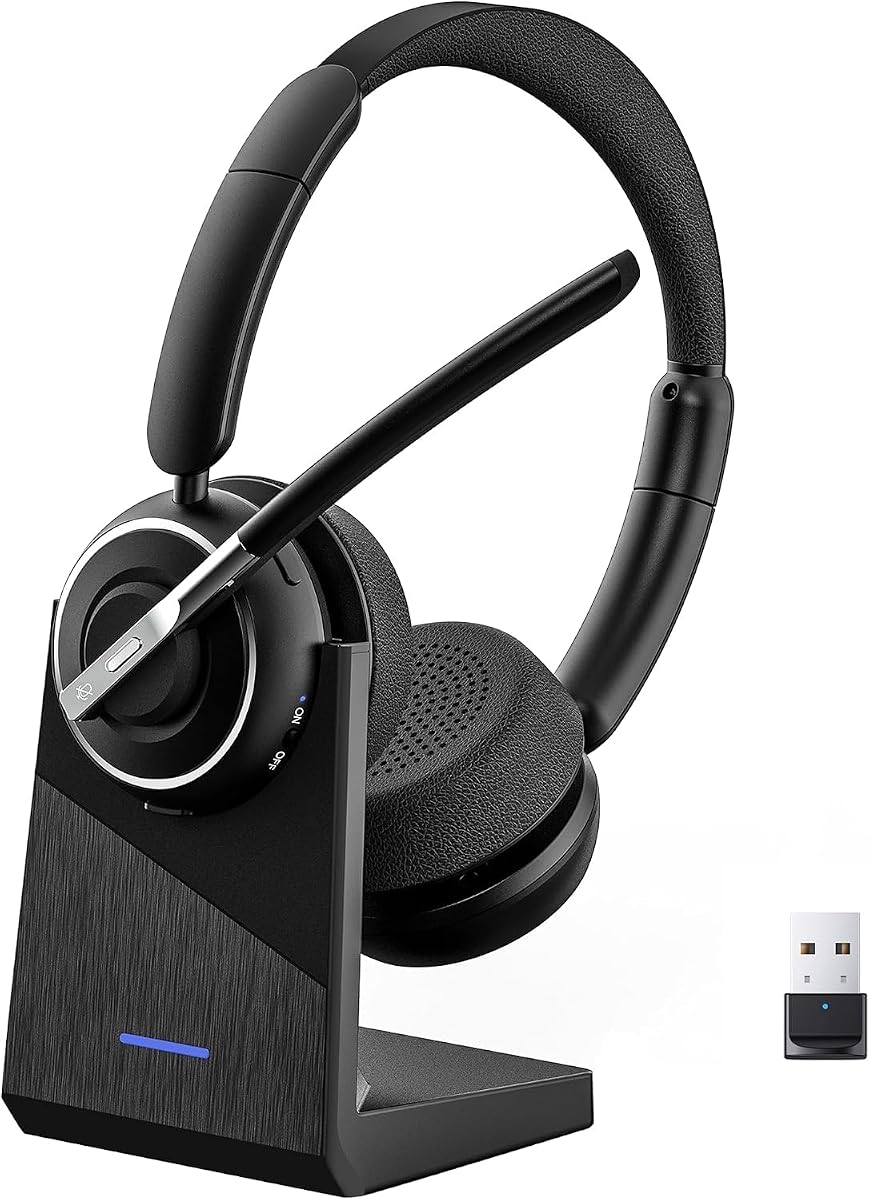
This wireless work headset has a 4.6 rating, the second-highest displayed rating in the selection. It offers Bluetooth 5.3, a dedicated USB-A dongle, dual pairing, environmental noise cancellation, and a stated 40 hours of talk time, giving it a strong balance of everyday features.
We may earn a commission when you buy through this link, at no additional cost to you.
The included receiver is designed for Windows computers, including systems where built-in Bluetooth may be inconvenient or restricted. Bluetooth pairing allows simultaneous connection to a laptop and smartphone, and the stated 33-foot range supports movement around a home or office. A one-touch mute button provides a fast physical way to mute during calls.
Its environmental noise cancellation is focused on reducing distractions captured by the microphone; the supplied information does not list active noise cancellation for incoming sound. The mute control activates only during calls, and the multifunction button handles smartphone functions rather than computer applications. Those distinctions may require a short learning period.
This is a compelling choice for users who want a high-rated, long-lasting wireless headset with a charging stand. It is especially suitable for hybrid workers who regularly alternate between Teams and phone conversations, provided their computer uses a compatible Windows USB-A connection.
A 600mAh rechargeable battery and stated 40-hour talk time support full workdays and travel. The included charging base creates a convenient place to recharge the headset and store its receiver between uses.
An adjustable headband, memory foam earcups, and breathable protein leather cushions are intended for long wear. Environmental noise cancellation helps reduce distracting sounds such as pets and household activity from reaching the person on the other side of the call.
We may earn a commission when you buy through this link, at no additional cost to you.
The Logitech Zone 301 is a compact wireless headset with a 3.9 rating and a 122-gram design. It targets users who want good microphone performance, convenient computer-to-phone switching, and software-based control over their listening preferences.
We may earn a commission when you buy through this link, at no additional cost to you.
Dual beamforming microphones and noise-canceling algorithms are designed to suppress background sound in homes and shared workspaces. The LogiTune application adds customization for sidetone, microphone level, equalization, and firmware updates. Its stated wireless range reaches 30 meters, and it can switch between a computer and phone.
The stated 16-hour talk time is modest compared with several other wireless picks. It does offer a five-minute quick charge for an additional hour of talk time, which can help recover from an unexpected low-battery situation. Replaceable earpads are also available separately, helping extend the headset's useful life.
The Zone 301 is best for users who want a lightweight Bluetooth headset and value fine-grained audio settings. It is less compelling for intensive all-day schedules than models with much longer stated battery life, but its customizability and replaceable components make it a sensible long-term option.
LogiTune gives users access to sidetone, microphone level, equalization, and firmware controls. This makes it easier to tune the headset to different workspaces and preferences without replacing the hardware.
The 122-gram body, enlarged earpads, and padded headband emphasize comfort. Replaceable earpads address a common wear point, helping maintain both fit and hygiene as the headset ages.
We may earn a commission when you buy through this link, at no additional cost to you.
The Wireless AI Noise Cancelling Headset has a 4.5 rating and stands out for its unusual ear-hook form and extraordinary stated battery life of up to 65 hours. It is designed for extended workdays in environments where reliable charging opportunities may be limited.
We may earn a commission when you buy through this link, at no additional cost to you.
AI noise cancellation on the microphone is designed to reduce office chatter, keyboard clicks, and household noise so the user's voice remains natural. Bluetooth 5.2 and the included USB dongle provide flexible computer access, with a stated range of up to 49 feet. The desktop base stores the dongle, reducing the chance of it being misplaced.
The reversible ear hook and 270-degree rotating microphone allow the headset to be worn on either side, which may be useful for users who prefer a lighter, less enclosing design. The tradeoff is that this is not a conventional over-ear headset, and the Bluetooth 5.2 specification is not the newest offered in this comparison.
This headset is best for mobile-heavy workers, call-center employees, and travelers who value battery endurance over a traditional over-ear appearance. It also supports convenient controls for answering calls, adjusting volume, activating a voice assistant, and muting, although exact behavior can vary by connected device.
The stated 65-hour battery provides a large buffer for meetings, online classes, and support shifts. A USB-C charging option provides an alternative when the desktop base is not available.
The reversible hook lets the user select a preferred side, while the rotating mic adjusts to speaking position. This design can feel less bulky than a dual over-ear headset during long sessions.
We may earn a commission when you buy through this link, at no additional cost to you.
The PrancyBt Wireless Work Headset carries a 4.9 rating, the highest displayed rating among these ten products. It combines wireless and USB-dongle connectivity, noise-reducing microphone technology, one-click muting, and a stated 35 hours of continuous operation for a broad range of work scenarios.
We may earn a commission when you buy through this link, at no additional cost to you.
The product information claims that its noise-reduction technology filters out 99.9% of surrounding interference. While real-world results depend on the environment and speaking technique, the engineering focus is clear: improving how the user's voice reaches the meeting. It is listed for Microsoft Teams, Zoom, Webex, Skype, and other calling applications.
A 33-foot wireless range and low-latency Bluetooth connection support movement and stable calls. Adjustable headband, soft protein foam ear pads, lightweight construction, and 270-degree rotating earcups are intended to improve comfort and reduce pressure during extended work. The dongle works only with Windows and is not compatible with desk phones or landlines.
This is a compelling recommendation for Windows users who want broad platform compatibility, a high rating, and flexible connectivity. Teams users should still confirm the device and dongle behavior on their own system, but the combination of wireless range, physical mute control, and all-day comfort features is well suited to meeting-heavy work.
The headset's strongest claim concerns its ability to filter surrounding interference from calls. This makes it especially relevant to users in coffee shops, busy workplaces, and homes where background sound can make meetings harder to follow.
Soft protein foam cushions, an adjustable headband, and rotating earcups are intended to reduce fatigue. The physical one-click mute control adds convenience and helps users react quickly when privacy is needed.
We may earn a commission when you buy through this link, at no additional cost to you.
The Lenovo Wireless ANC Headset 6550 is the premium option in this guide, combining a 4.5 rating with Microsoft Teams Open Office certification and hybrid active noise cancellation. It is built for professionals who spend substantial time in calls and want stronger control over both incoming sound and outgoing voice quality.
We may earn a commission when you buy through this link, at no additional cost to you.
Its USB-C Bluetooth receiver provides a dedicated connection option, while standard Bluetooth supports two connected devices at once and stores up to eight paired devices. That combination is useful for frequent switching among work computers, personal devices, and phones. Dedicated call controls and universal unified-communications compatibility further strengthen its business focus.
Hybrid active noise cancellation reduces distracting environmental sound, while environmental noise cancellation helps keep the user's voice clear. The ergonomic headband, rotating earcups, and plush memory foam cushions support long wear. Battery life reaches up to 60 hours for music with ANC off or 36 hours of talk time with ANC enabled, and a five-minute charge can provide up to two hours of playback.
This model is ideal for travelers, open-office workers, and anyone willing to pay more for certified Teams performance and advanced noise control. Its premium status comes from the combination of ANC, flexible connectivity, fast charging, and certification rather than from basic call functionality alone.
Hybrid ANC targets sound arriving at the listener, while ENC improves the clarity of the captured voice. The combined approach is particularly useful in busy offices, cafés, airports, and other distracting settings.
The USB-C receiver, two-device support, and eight-device pairing memory provide several convenient paths into a meeting. Users can move between devices without treating the headset as a single-computer accessory.
We may earn a commission when you buy through this link, at no additional cost to you.
The right Teams headset depends on your computer, meeting environment, mobility, and tolerance for setup complexity. Connection reliability and microphone quality usually deserve priority, followed by comfort, noise control, and convenient controls.
A wired USB headset offers dependable operation without charging, pairing, or signal concerns. It is often the simplest choice for a fixed desk, although the cable can limit movement and may become an obstacle during long presentations. Wireless models offer greater freedom, but they introduce batteries, pairing procedures, and questions about receiver compatibility. Choose wired when consistency and low maintenance matter most; choose wireless when you regularly move around, attend meetings from different rooms, or switch between a computer and phone.
Microsoft Teams certification indicates that a headset has been evaluated for communication and control behavior within the Teams ecosystem. Certified models may provide dedicated call controls and are a sensible choice for organizations that standardize their equipment. Certification does not guarantee that every user will prefer the microphone or comfort level, so it should be treated as an important compatibility signal rather than the only decision. Confirm the exact USB connection and any platform-specific requirements before ordering.
Microphone noise cancellation, environmental noise cancellation, and active noise cancellation solve different problems. ENC reduces distracting noises captured by the microphone, while ANC reduces incoming sound before it reaches the listener. A headset may offer one or both. Active listening noise control is valuable in shared offices and travel, while microphone-focused noise reduction is essential when speaking from a noisy home. Always consider both sides of the conversation rather than treating any noise-control label as universally superior.
USB-A, USB-C, Bluetooth, and proprietary wireless receivers determine where and how a headset can be used. A USB-A receiver is common but may require an adapter on newer computers, while USB-C is more convenient on recent laptops. Bluetooth works well when the computer supports it and the device is within a stable range. Users with restricted computer policies should favor a receiver-based headset, and Windows users should also check whether a supplied dongle is explicitly limited to that operating system.
The microphone must capture your voice clearly while limiting keyboard, fan, and household noise. Rotating or flip-to-mute mechanisms let you know at a glance whether the mic is active, which is reassuring in privacy-sensitive conversations. Inline and headset controls should also be easy to locate without adjusting the earcups. Verify that physical mute behavior aligns with the mute indicator inside Teams, because application and hardware mute states can occasionally be confusing if they are not checked.
A headset that sounds good but becomes uncomfortable will undermine long meeting productivity. Over-ear models can distribute pressure more broadly, while lightweight hooks or on-ear designs may feel less enclosing. Adjustable headbands, memory foam, breathable cushions, rotating earcups, and a manageable weight all contribute to comfort. Consider glasses, hairstyle, heat sensitivity, and whether one-ear use is needed. Some users also prefer replaceable earcups because they wear fastest and are easier to maintain hygienically.
Compare stated talk time with your actual schedule rather than looking only at the largest number. A headset offering 16 to 20 hours of talk time may be sufficient for standard workdays, while users in support, education, or travel may prefer 35 hours or more. Charging stands are convenient at a fixed desk, and quick-charge functions can rescue a headset between meetings. Review any instructions about powering off before charging and whether use while charging is recommended.
Multipoint Bluetooth allows a headset to remain connected to more than one device, making it easier to move between a Teams meeting and a phone call. Some models also store numerous pairings, but the practical limit is the number of devices connected simultaneously. Look for accessible volume, mute, call-answer, and voice-assistant controls, while confirming that each button performs the expected function on your main device. Software customization can be useful, but it should enhance rather than complicate essential meeting controls.
Before your first meeting, connect the headset according to its manual. For a wired model, plug the USB connector into the computer, wait for the system to recognize it, and then select the headset as the microphone and speaker in the Teams audio settings. For Bluetooth or receiver-based models, pair the headset, connect the appropriate USB receiver, and confirm that the computer is using the headset rather than its built-in microphone or speakers. Test the input level in a short recording before a formal call.
Set your microphone and mute behavior before joining. Speak naturally at a moderate volume and ask a colleague to confirm that your voice sounds clear without being quiet or excessively loud. Use the hardware mute whenever the software display is unclear, and check the Teams mute indicator after activating it. If the microphone boom rotates, move it fully into its intended position; if it flips, verify that the change has registered before discussing sensitive information.
For long-term care, store the headset in a dry, clean place and wipe the headband, earcups, and microphone boom with a soft, lightly dampened cloth. Avoid abrasive cleaners and excessive moisture around the controls and charging contacts. Charge wireless models according to the manufacturer's instructions, clean removable earcups when possible, and replace worn cushions or cables. Periodic testing of the microphone, mute, battery, and connection can prevent a small issue from disrupting your next meeting.
Certification is not essential for every Teams user, but it provides reassurance about tested meeting behavior and can improve confidence in controls. It is especially useful for organizations buying headsets in bulk or relying on dedicated Teams functions. A non-certified headset can still work well if it provides clear audio, stable connectivity, and the controls you need. Verify certification, connector type, and platform compatibility in the product information before purchasing.
A wired headset is often simpler and more reliable because it requires no charging or pairing. It is ideal for a fixed workstation where the cable cannot be tripped or unplugged. Wireless headsets are preferable when you need mobility, use several devices, or want to move around during long calls. The right choice depends less on the meeting platform and more on your work environment and setup habits.
ANC, or active noise cancellation, reduces incoming sound so you hear less background noise. ENC, or environmental noise cancellation, is microphone-focused and helps prevent surrounding noise from being transmitted to other participants. A headset with both can improve the perceived quality of a call from both sides. Actual results vary with the environment, speaking style, and application settings.
Many of the wireless models support Bluetooth multipoint or dual-device connectivity, allowing a laptop and phone to remain connected simultaneously. The included USB receiver may also act as the computer connection while Bluetooth links to a phone. Check the product's simultaneous connection limits and make sure your phone and computer support the relevant Bluetooth profile. Controls may still behave differently between devices.
Place the microphone near your mouth without covering it, keep the boom in the recommended position, and avoid speaking too quietly. Check that the correct headset is selected as both input and output, then test the input level with a short recording. If the headset has a companion application, update its firmware and adjust microphone or equalization settings where appropriate. Teams settings alone cannot correct a poorly positioned or obstructed microphone.
USB-C is more convenient on newer computers that lack a full-size USB-A port, while USB-A remains widely supported and is often easier to find on older systems. Some wireless headsets include a USB-A dongle that requires an adapter. Check the connector on your computer and whether the listed USB function supports audio, data, or both before ordering.
It depends on your surroundings. ANC can make a meaningful difference in open offices, cafés, shared homes, and during travel because it reduces incoming distractions. In a quiet room, the added complexity and cost may matter less. Even without ANC, a well-positioned microphone with ENC can improve how others hear you, so compare both outgoing and incoming call features.
Replace it when recurring problems begin, such as unstable audio, damaged cushions, a loose connector, or a microphone that no longer captures the voice clearly. Cleaning and replacing earcups can extend the life of an otherwise functional headset. Wireless models also require attention to declining battery performance. If you notice persistent audio issues, test the same computer and meeting with another headset before deciding the problem is hardware-related.
The Logitech H390 is the most economical and uncomplicated option, offering a wired USB-A connection, inline controls, and a rotating microphone. The Lenovo Wireless VoIP Headset is a strong all-around choice for users who prioritize Teams certification, multipoint Bluetooth, and long battery life, while the Lenovo Wireless ANC Headset 6550 is the premium option for certified advanced noise control and flexible connectivity.
For most fixed-desk users, stable USB connectivity and a comfortable fit should come first. Mobile workers should prioritize battery life, wireless range, and dependable multipoint switching, while people in noisy environments should look for a combination of microphone noise cancellation and, if affordable, active listening noise cancellation. A physical mute control is also worthwhile for frequent confidential conversations.
Ratings, firmware, platform behavior, and prices can change, so review the current listing before making a final decision. Check your computer's ports, confirm any operating-system restrictions, and verify that the headset works with your specific Teams setup. The most effective choice is the one that combines clear communication, dependable controls, and comfort you can maintain throughout the workday.