
Fractal Design North XL
4.7Editor score
E-ATX motherboard support
Three included 140mm fans
420mm front radiator support
413mm graphics card clearance
Our Industrial PC Case guide compares 10 rackmount and full-tower enclosures for airflow, storage expansion, hardware compatibility, cooling, and builds.
Industrial PC cases are built for systems that need more than a standard desktop enclosure: more drive bays, stronger airflow, secure access, flexible expansion, or a rack-ready installation. The right chassis can make maintenance easier while protecting valuable components from dust, accidental contact, and limited workspace.
The products in this guide range from 4U server enclosures to full towers, compact mid-towers, and high-airflow ATX models. We compared their supplied specifications, considering motherboard support, expansion options, cooling provisions, storage capacity, dimensions, front connectivity, and practical suitability for workstations, home servers, and gaming systems.
Each review identifies the circumstances in which the enclosure makes the most sense and points out any important compatibility limitations. Ratings reflect the listed customer feedback, while product features and availability can change. Review current listings and specifications before ordering, and compare the total configuration needed for your system.
4.7Editor score

4.8Editor score

4.6Editor score
The table below summarizes the form factor, cooling, expansion, and compatibility distinctions of all ten cases, making it easier to identify the enclosure that matches your motherboard, hardware, storage, and operating environment.
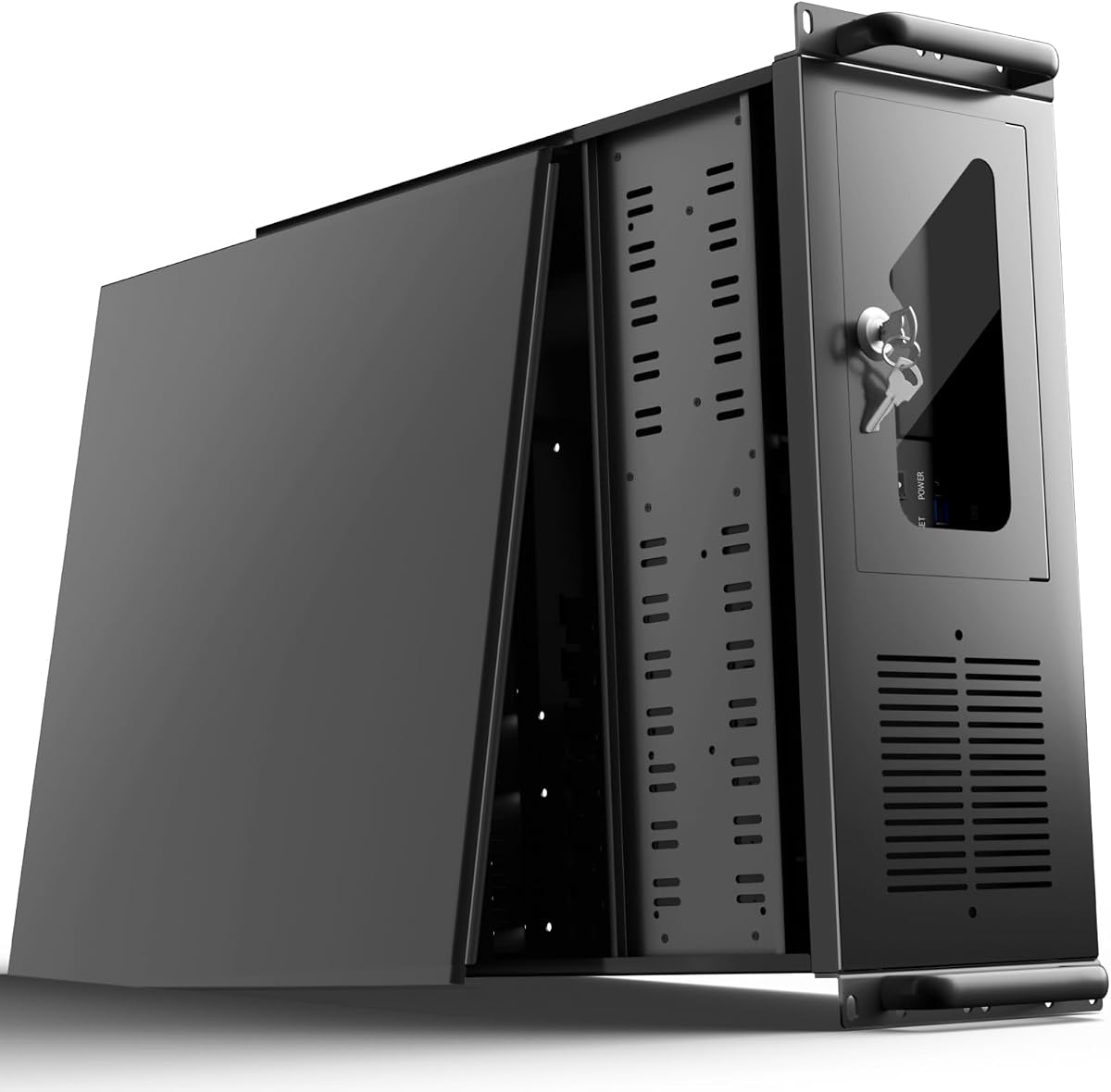



The UTLGAMENG 4U Rackmount is a storage-oriented server enclosure with a 4.0 rating and a specification list built around high-capacity, serviceable systems. Its defining feature is the set of 12 dedicated hard drive bays, which gives it a substantial advantage over nearly every conventional mid-tower in this guide. That capacity makes the chassis relevant to home servers, data-center-style storage arrays, media repositories, and backup systems where multiple disks must operate together.
We may earn a commission when you buy through this link, at no additional cost to you.
Expansion is handled unusually well for a rack enclosure. Seven PCI slots can accommodate graphics cards, network adapters, and additional storage controllers, while the motherboard area accepts ATX, Micro-ATX, and Mini-ITX boards. Standard ATX power supplies are supported, and the stated graphics card clearance reaches 230mm, increasing to 330mm when the hard drive bays are removed. CPU coolers can reach 125mm, or 153mm with the supplied bracket removed.
Operational details support a professional use case. Two front USB 3.0 ports allow quick access to removable media, LED indicators provide a visible system status, and the key-lock mechanism helps protect internal components. A dedicated side-panel air filter is also useful in dusty environments, although buyers should still maintain sensible cable and airflow practices. The main compromises are the case's substantial rack footprint and the need to work within a 19-inch rack installation rather than a normal desk setup.
Choose this case when storage density is more important than compactness or decorative styling. It is a strong candidate for a multi-bay home server or rack-mounted archive, especially if the planned build needs several PCI expansion cards. Prospective buyers should confirm their rack rails, power supply dimensions, and storage connector requirements before ordering, because the 4U format is specialized rather than universally interchangeable with a desktop tower.
Twelve dedicated hard drive bays allow a server design to scale substantially beyond the drive capacity of a typical desktop chassis. The arrangement is particularly useful when the system will operate as a high-capacity archive, virtualization host, or multi-user storage server.
The key lock, status LEDs, front USB ports, dust filter, and seven PCI slots reflect an emphasis on routine maintenance and dependable operation. These details help keep daily access simple while protecting the internal build.
We may earn a commission when you buy through this link, at no additional cost to you.
The Fractal Design Define 7 XL is a refined full tower aimed at builders who need exceptional component clearance without sacrificing a polished appearance. Its 4.6 rating reflects a strong balance of layout flexibility, quiet-oriented construction, and premium materials. The brushed aluminum and steel enclosure gives it a more finished look than a basic server box, while the reversible dual-handed front door and magnetic latch make access more convenient.
We may earn a commission when you buy through this link, at no additional cost to you.
Its internal design is the real reason to pay attention. Motherboards up to E-ATX and SSI-EEB fit inside, giving advanced workstation and server-class boards room to operate. The default storage layout supports up to 18 hard drives and five solid-state drives. For liquid-cooling projects, the Open Layout removes restrictions on internal volume and makes room for large reservoirs and radiators up to 480mm, a significant advantage for elaborate custom loops.
The enclosure also adapts as the build evolves. Multi-brackets can turn an unused fan position into a hard drive, solid-state drive, or pump mount, reducing the need to source separate hardware for less obvious installation points. The tradeoff is size: this is a full tower rather than a compact mid-tower, so buyers need adequate floor or desk space. It is also a premium option, making the Define 7 XL more compelling when aesthetics, custom cooling, and storage flexibility are central goals.
This is an excellent choice for a high-end workstation, enthusiast gaming system, rendering machine, or carefully planned home server that remains outside a rack. Prospective buyers should measure their components, especially CPU coolers, graphics cards, and power supplies, and decide whether they need the default storage layout or the greater freedom of the Open Layout. For that kind of build, the Define 7 XL offers one of the most versatile foundations in the guide.
Support for E-ATX and SSI-EEB boards makes the Define 7 XL relevant to complex workstations and specialized server platforms. The spacious interior also leaves room for cable routing and large power supplies without forcing an unusually compact layout.
The default layout can hold 18 hard drives and five SSDs, while the Open Layout shifts priority toward large radiators and reservoirs. That makes the case suitable for either a storage-heavy system or an ambitious custom liquid-cooled build.
We may earn a commission when you buy through this link, at no additional cost to you.
The Zalman T6 is a straightforward ATX mid-tower with a 4.3 rating and a focus on durable construction, practical cooling, and uncomplicated desktop builds. It supports ATX, Micro-ATX, and Mini-ITX motherboards, giving users flexibility to choose a mainstream or compact board without changing the case. A 120mm rear fan is preinstalled, so a new system begins with a basic cooling arrangement rather than an empty chassis.
We may earn a commission when you buy through this link, at no additional cost to you.
Cooling is aided by the hairline front and side mesh, which permits air to reach the intake area while helping limit the entry of larger particles. Up to four fans can be installed, including an additional position on the side panel. That flexibility is useful for a workstation or gaming system that needs more intake airflow as component temperatures increase. The steel chassis is coated in black powder for resistance to corrosion and general wear.
Storage is more modest than the cases designed explicitly for servers. The T6 provides two dedicated 2.5-inch positions and two 3.5-inch or 2.5-inch positions, plus an external 5.25-inch bay. Front connectivity includes one USB 3.0 port, two USB 2.0 ports, and separate audio input and output connections. The important compatibility caution is that the case will not accept an ATX motherboard with side-facing SATA ports.
The T6 makes sense for a conventional office, home workstation, or gaming PC where steel durability, easy cooling, and familiar ATX support matter more than extensive storage or a modular appearance. Buyers should check the motherboard's SATA orientation before purchasing, especially if they already own the board. It is also a sensible option for a first build that needs a practical case without an elaborate or visually dramatic design.
High-strength steel sheets and a corrosion-resistant powder coat give the T6 a reassuringly substantial foundation. The straightforward shell is well suited to systems that will be moved, serviced, or used in offices and home environments.
The preinstalled 120mm rear fan provides an immediate foundation, and room for up to four fans allows the airflow plan to expand. Front and side mesh panels help maintain a productive intake path.
We may earn a commission when you buy through this link, at no additional cost to you.
The Cooler Master HAF II 500 stands out with a 4.8 rating, the highest listed score among the cases reviewed. Its purpose is immediately clear: move substantial volumes of air through a powerful ATX system using an oversized Mighty40 cooling system. Two 220 x 40mm intake fans occupy the front, while a 180 x 40mm fan handles rear exhaust. The result is a case designed for demanding processors, powerful graphics cards, and sustained high-performance workloads.
We may earn a commission when you buy through this link, at no additional cost to you.
Large ventilation openings reduce airflow resistance, giving the included fans more opportunity to cool the entire chassis. The split-level cable-management design creates space around the rear exhaust area, while the MasterRail mounting system permits different fan and radiator sizes at the front and top. That flexibility is valuable when a build evolves from air cooling to a more substantial liquid-cooling configuration.
The dual-mode GPU holder is another notable feature. It can clamp one graphics card for added stability or support two cards, each up to 3.6 slots or 72mm thick. The flexible storage cage accepts 3.5-inch and 2.5-inch drives in orientations that depend on power-supply length. These features make the enclosure particularly adaptable, although the large 220mm fans can restrict the types of hardware or mounting arrangements that fit comfortably.
Choose the HAF II 500 for a performance-focused gaming PC, rendering workstation, or compute system where sustained cooling is a priority. It is also a good match for a builder who expects to upgrade from a single card to a multi-GPU arrangement or wants the freedom to change cooling hardware later. The best results come from checking radiator dimensions, GPU thickness, and power-supply length before ordering, but for maximum airflow in a standard ATX case, this is the leading option here.
Two 220mm front intakes and a 180mm rear exhaust create a high-volume cooling foundation without requiring immediate fan purchases. Large, low-resistance openings help those fans move air through the chassis with less restriction.
MasterRail mounting positions, a flexible drive cage, and a dual-mode GPU holder let the enclosure change with the system. This is particularly valuable for builders planning substantial hardware upgrades.
We may earn a commission when you buy through this link, at no additional cost to you.
The Antec VSK4000E-U3_US is a steel ATX mid-tower with a 4.1 rating and a layout that remains focused on practical hardware installation. Its SGCC steel construction provides a rigid base for office systems, home workstations, and general-purpose computers. While it does not present the elaborate modularity of some premium cases, its straightforward arrangement can appeal to builders who want conventional drive access and uncomplicated expansion.
We may earn a commission when you buy through this link, at no additional cost to you.
Storage is the main attraction. There are five internal 3.5-inch hard drive bays and three external 5.25-inch drive bays. This provides more flexibility than a minimalist modern enclosure, making the case suitable for systems that need to retain older or optical-format hardware. The front panel includes two USB 2.0 ports, a USB 3.0 port, and separate audio input and output connections.
As with any older mid-tower design, buyers should assess connector relevance rather than simply looking at the number of ports. USB 2.0 remains useful for certain peripherals, but the single USB 3.0 connection may be limiting for a modern workstation requiring multiple high-speed devices. The supplied information also does not describe included fans, radiator support, graphics card clearance, or cable-management features in detail, so those points should be confirmed in the current listing and product manual.
The VSK4000E-U3_US is a reasonable choice for a traditional office build or home server that benefits from numerous drive bays and does not require a compact footprint. It is less compelling for a new high-end build dominated by large graphics cards and liquid cooling, where modern airflow and feature planning deserve more attention. Confirm the dimensions and rear-panel clearance of all major components before purchase.
Five internal hard drive bays and three external 5.25-inch bays offer a familiar path to adding storage or retaining legacy media hardware. The layout is practical for workgroup and home-server configurations.
The SGCC steel shell gives the case a substantial feel and a rigid platform for internal components. It is a sensible construction choice when simple durability matters more than modular styling.
We may earn a commission when you buy through this link, at no additional cost to you.
The Fractal Design North XL combines a distinctive visual design with the component room expected from a full tower. Its 4.7 rating makes it one of the strongest-rated cases in the guide, while the charcoal black finish, wood details, and alloy elements give a workstation or gaming system a more considered appearance. It is particularly attractive for builds that will be visible in an office, studio, or entertainment space.
We may earn a commission when you buy through this link, at no additional cost to you.
The chassis accepts E-ATX, ATX, Micro-ATX, and Mini-ITX motherboards, covering nearly every mainstream desktop platform. Graphics card clearance reaches 413mm, or 380mm when a 420mm front radiator is installed. Front radiators up to 420mm and top radiators up to 360mm are supported, giving builders several routes to a capable liquid-cooling layout. Three 140mm Aspect PWM fans are included, so the system starts with meaningful airflow out of the box.
The emphasis is on a balanced premium build rather than maximum server density. Its full-tower dimensions and decorative front treatment consume more space than a compact mid-tower, and the supplied specifications do not emphasize the very high drive counts found in the rack cases. For a visually prominent workstation, however, those qualities can be less important than clean presentation, long component clearance, and strong cooling provisions.
Choose the North XL when appearance, motherboard flexibility, and cooling capability need to coexist. It is a convincing foundation for a high-end gaming system, a creative workstation, or a showcase home server with a restrained but premium look. Before buying, check the graphics card, power supply, and radiator dimensions, then plan the front and top fan positions around the three included 140mm fans.
The combination of wood and alloy details distinguishes the North XL from utilitarian server steel and black mesh designs. It is a strong choice when the completed system will regularly be seen rather than hidden in a rack or under a desk.
Three included 140mm Aspect PWM fans provide immediate airflow, while support for large front and top radiators leaves room for a more advanced cooling upgrade. The enclosure suits builds that prioritize both presentation and thermal headroom.
We may earn a commission when you buy through this link, at no additional cost to you.
The SilverStone FLP02W is a retro-inspired tower chassis that pairs a distinctive exterior with modern cooling controls. Its 4.7 rating reflects an appealing combination of personality and practical performance. The most immediately noticeable feature is the unique Turbo button, which activates an instant full-speed cooling mode when the system needs additional airflow without requiring software adjustments.
We may earn a commission when you buy through this link, at no additional cost to you.
The chassis supports 360mm liquid-cooling radiators, offering a straightforward path to high-capacity CPU cooling. Graphics cards can measure up to 386mm, which gives modern large-format cards considerable room. Three front 5.25-inch expansion bays are also provided and can work with a hot-swap adapter cage, making the enclosure more accommodating of legacy or specialized storage than many contemporary minimalist designs.
The top I/O panel prevents the retro theme from compromising everyday usability. It includes one USB Type-C connection, two USB 3.0 ports, and one combination audio jack. This is a more current selection than the older external drive arrangement might initially suggest. As with any case, buyers should confirm motherboard form factor, power supply dimensions, cooler height, and radiator placement against the current manufacturer documentation before assembling the system.
The FLP02W is a good match for a gaming PC or enthusiast workstation where visual character and active cooling control are priorities. It is also a thoughtful option for builders who want to combine older expansion hardware with modern processors and graphics cards. Choose it for its distinctive design and flexible cooling, but verify the fine fit details because retro-inspired cases can include design constraints that are not apparent from a general tower classification.
The dedicated Turbo button activates full-speed cooling directly from the chassis. It offers a convenient way to increase airflow during demanding tasks without relying entirely on automatic fan control.
USB Type-C, two USB 3.0 ports, and a combined audio jack give the retro-inspired case a practical external interface. The three front drive bays preserve room for specialized and legacy hardware.
We may earn a commission when you buy through this link, at no additional cost to you.
The Rosewill RSV-L4620 is a 4U rackmount server chassis aimed at modern computing platforms, with a 4.3 rating. It is designed for E-ATX motherboards and also supports SSI-EEB, making it suitable for demanding multi-GPU, rendering, AI, or virtualization configurations. Its rack format is less friendly to casual desktop users, but for an existing server rack it provides a clear and practical installation format.
We may earn a commission when you buy through this link, at no additional cost to you.
Cooling is designed for sustained computational work. The chassis directly supports a 360mm radiator and includes three 120mm PWM fans, allowing an AIO cooler to be combined with conventional airflow. The supplied description specifically highlights multi-GPU support and the potential for high-performance computing, although the exact number and arrangement of graphics cards should be confirmed against the current chassis and motherboard documentation.
Front connectivity includes a 10Gbps USB 3.2 Gen Type-C port, useful for fast transfers and modern accessories. Storage configuration supports up to two 3.5-inch hard drives and four 2.5-inch solid-state drives. That mix favors a modern compute server using SSDs for active data and hard drives for bulk storage, but it does not match the twelve dedicated hard drive bays of the UTLGAMENG 4U in this guide.
Choose the RSV-L4620 for a rack-based system that needs modern high-speed connectivity, capable cooling, and premium motherboard support. It is a stronger fit for compute-dense installations than storage-array projects, where drive count is the priority. Before purchasing, verify the exact drive backplane arrangement, expansion card depth, power supply requirements, and rack accessory details with the seller.
E-ATX and SSI-EEB support gives the chassis room for advanced workstation and server motherboards. That makes it relevant to multi-GPU, rendering, AI, and virtualization builds that need more flexibility than a basic desktop tower.
The front USB 3.2 Gen Type-C connection supports transfers up to 10Gbps. In a rack environment, that provides a convenient way to connect compatible storage, diagnostics, and other modern peripherals.
We may earn a commission when you buy through this link, at no additional cost to you.
The CORSAIR 4000D RS ARGB is a modular mid-tower built around high airflow, visual customization, and the ability to change the case as the system evolves. Its 4.7 rating places it among the strongest cases in the guide. Three CORSAIR RS ARGB PWM fans are preinstalled at the front, offering immediate cooling and a coordinated lighting effect for gaming systems that want a more expressive appearance.
We may earn a commission when you buy through this link, at no additional cost to you.
The FRAME modular system is central to the case's design. It allows the motherboard tray and front I/O panel to be changed or upgraded, meaning the enclosure can adapt to a new layout or a revised set of connections. The InfiniRail steel mounting system adds further flexibility, allowing front fans up to 200mm and roof fans up to 140mm to be positioned where the build needs them. This differs from cases with a fixed set of mounting holes.
Airflow receives equal attention. The three-dimensional Y-pattern steel front panel provides a low-obstruction path for cool air, while the internal side panel can be retained as a cable cover or removed to create side fan positions. The included fans use daisy-chainable four-pin PWM connections and support Zero RPM mode at low loads, while their eight LEDs can be controlled through a compatible motherboard 5V ARGB header.
This case is a strong fit for a gaming PC, creative workstation, or enthusiast system that values both presentation and flexible cooling. Buyers should ensure their motherboard includes a compatible 5V ARGB header and that the desired ARGB ecosystem is supported. It offers more complexity than a basic office chassis, but for a builder planning fan changes or case upgrades, that modularity can deliver long-term value.
InfiniRail lets users slide fan positions rather than work within a fixed pattern. Front fans can reach 200mm, and roof positions support up to 140mm, making it easier to direct cooling around particular components.
The FRAME system allows the motherboard tray and front I/O area to be changed as needs evolve. Combined with the removable cable-cover panel, this creates a case that can adapt to different layouts and cooling strategies.
We may earn a commission when you buy through this link, at no additional cost to you.
The NZXT H5 Flow is a compact ATX mid-tower with a 4.6 rating and a clear emphasis on clean airflow, cable management, and restrained size. It is a compelling general-purpose choice for a gaming system, home office, or workstation that needs ATX support without the footprint of a full tower. Two 120mm Quiet Airflow fans are included, one at the front and one at the rear.
We may earn a commission when you buy through this link, at no additional cost to you.
The front and rear fans provide useful intake and exhaust movement, while ultra-fine mesh on the top, front, and side panels supports airflow and filters dust. The perforated side and bottom sections of the power-supply shroud allow air to enter from two additional 120mm fan positions. Those fans are not included, so buyers should budget for them if the system will run high-load components and additional intake capacity is important.
Liquid-cooling support is more generous than the compact dimensions might initially suggest. A radiator up to 360mm can be installed at the front, while the top supports a 240mm radiator. That gives buyers a path to a substantial custom cooling arrangement, particularly at the front of the case. The included fans also sit at the rear, so cooling performance and noise can be balanced according to the components installed.
The H5 Flow is best for users who want a smaller, tidy build without giving up modern cooling options. Wide cable channels, hooks, and straps make it easier to route and conceal wiring, which can improve both appearance and airflow. Choose it over a larger tower when desk space is important, but check graphics card length, cooler height, and radiator placement for the specific components in your build.
Despite its smaller mid-tower format, the H5 Flow supports a 360mm front radiator and a 240mm top radiator. This allows a capable cooling setup in an enclosure that saves space compared with a full tower.
Wide routing channels, hooks, and straps help keep wiring out of airflow paths and away from view. The perforated power-supply shroud adds flexibility by permitting two optional intake fans.
We may earn a commission when you buy through this link, at no additional cost to you.
The best industrial PC case is the one that matches the hardware, environment, and service requirements of the finished system. Motherboard size, storage quantity, cooling approach, expansion needs, and available installation space should be evaluated before appearance is considered.
Begin with the motherboard rather than the exterior design. The cases in this guide range from ATX and Micro-ATX mid-towers to E-ATX, SSI-EEB, and 4U rackmount platforms. A case described as ATX-compatible may not support every ATX board, particularly when orientation, connector placement, or expansion-card clearance is unusual. Measure from the rear panel to the front intake and check the specified graphics card and CPU cooler limits before committing to a chassis.
Storage requirements can determine the case more decisively than aesthetic preference. The UTLGAMENG 4U provides 12 dedicated hard drive bays, the Fractal Design Define 7 XL supports 18 hard drives and five SSDs in its default layout, and the Rosewill supports a mixture of two 3.5-inch and four 2.5-inch drives. Conventional mid-towers offer fewer positions, so builders using numerous SATA SSDs should check whether a bracket is included or must be purchased separately.
Good airflow depends on more than the number of fans. Large intake fans, low-restriction mesh, properly positioned exhaust, and unobstructed paths around the power supply and drive cage all contribute. The Cooler Master HAF II 500 arrives with unusually large 220mm and 180mm fans, while the NZXT H5 Flow includes two 120mm fans and offers flexible radiator placement. Assess the processor's heat output, graphics card thickness, radiator dimensions, and the case's included fans before deciding whether additional cooling is necessary.
Industrial and server builds often need more than a graphics card. Network adapters, storage controllers, capture cards, and accelerators may occupy PCI slots, and their depth can determine whether a full tower or rack chassis is required. The UTLGAMENG 4U includes seven PCI slots, while multi-GPU systems should also verify spacing, power connectors, lane support, and whether a manufacturer-provided GPU holder is included.
A rackmount enclosure is not simply a tower with handles. The 4U cases in this guide are intended for server-rack installation and may require compatible rack rails, mounting depth, and network or power infrastructure. Rack systems can simplify centralized storage and remote maintenance, but they are harder to move and may be impractical in a home office. Desktop towers offer more flexibility in placement and are generally easier for individual builders to service.
Front connectors matter when a case is operated frequently or stored close to a wall. The available options include USB 3.0, USB 3.2 Type-C with 10Gbps performance, USB 2.0, and combined or separate audio jacks. Match these to the devices that will be connected regularly, and check connector placement if the system may be reached from a rack. A 5.25-inch bay can also be valuable for legacy optical or specialized drive hardware.
A serviceable case makes upgrades and troubleshooting easier. Tool-free fasteners, removable panels, adjustable drive trays, cable-management covers, and clear front access can reduce downtime. The UTLGAMENG includes a key-lock mechanism and LED status indicators, which are useful in shared or semi-secure installations. For a home server, also consider dust filtration, removable filters, and the visibility of drive activity lights during diagnosis.
The dimensions of the motherboard are only one part of the installation. Power supplies with modular cables, large radiators, reservoir tubes, and long graphics cards can require substantially more clearance than a basic specification suggests. Full towers such as the Fractal Design Define 7 XL and North XL maximize room but need more floor space, while compact models such as the NZXT H5 Flow require more careful component selection. Choose an appearance that suits the setting and a footprint that leaves room for airflow and service access.
Begin with a compatibility check before assembly. Confirm the motherboard format, power supply form, graphics card length, CPU cooler height, drive arrangement, and expansion card depth against the manufacturer's current instructions. For rack enclosures, check the rack depth, rails, and required mounting hardware. Lay out the components before moving anything into the chassis so cables can be routed without excessive bending or pressure on connectors.
Protect the enclosure during installation by removing panels only as needed and keeping screws in an organized container. Attach the power supply, motherboard, storage devices, and expansion cards in the order recommended by the manual. Route power and data cables through dedicated channels, and avoid blocking intake or exhaust openings. After the first startup, verify that every installed fan spins in the intended direction and that any temperature monitoring software is reading the correct sensors.
Ongoing care should focus on airflow and cleanliness. Schedule periodic checks of dust filters and remove accumulated debris with methods appropriate for the material. Keep intake and exhaust paths unobstructed, listen for unusual fan noise, and confirm that drives, cables, and panels remain secure. If the system runs in a dusty environment, inspect filters more frequently and avoid placing the enclosure directly against a wall unless the installation guide specifically allows it.
An industrial PC case is a chassis designed around demanding or specialized computing needs rather than only a standard desktop appearance. Depending on the model, it may emphasize rack installation, high drive capacity, multiple expansion slots, secure access, dust filtration, long component support, or continuous serviceability. Industrial-style enclosures can be used for home servers, workstations, data centers, and other systems that need more flexibility than a basic mini-tower provides.
A 4U rackmount case is a good fit when you already have a suitable server rack and want centralized, serviceable hardware. It is especially attractive for systems with many hard drives, expansion cards, or other rack-mounted equipment. However, a desktop tower is easier to move and may consume less total space. Compare rack depth, noise, cooling, drive access, and the availability of rails before choosing the rack format.
Capacity varies significantly by model. The UTLGAMENG 4U supports 12 dedicated hard drive bays, while the Fractal Design Define 7 XL supports up to 18 hard drives and five SSDs in its default layout. The Rosewill RSV-L4620 supports two 3.5-inch hard drives and four 2.5-inch SSDs. Check the exact drive types, connector requirements, and any distinction between dedicated bays and bracket-based positions.
That depends on the included cooling and the thermal demands of the components. The Cooler Master HAF II 500 and NZXT H5 Flow include substantial fan packages, while the Fractal Design North XL includes three 140mm fans. The HAF II 500 is designed around high airflow, whereas the NZXT supports optional intake fans behind its perforated power-supply shroud. Use the manufacturer's airflow guidance and component temperatures rather than adding fans automatically.
It depends on the board and the specific enclosure. The Fractal Design Define 7 XL supports E-ATX and SSI-EEB, while the North XL supports E-ATX, ATX, Micro-ATX, and Mini-ITX. Board form factor alone does not guarantee clearance, so also check connector orientation, rear-panel openings, graphics card length, power supply size, and any manufacturer warnings about side-facing ports.
A server case is generally designed for rack deployment, dense storage, numerous expansion slots, and service access. A large desktop case may offer similar motherboard clearance and abundant drive mounts while remaining easier to place on a desk. The UTLGAMENG and Rosewill options are true 4U rackmount products, while the Fractal Design full towers offer large-build flexibility without requiring server-rack infrastructure.
Dust filtration becomes especially important in offices, workshops, basements, and other environments where airborne particles are common. Filters can reduce debris reaching fans, heatsinks, and drive mechanisms, but they still require maintenance. Clean or replace filters on the schedule recommended by the manufacturer, and ensure that adding filters has not inadvertently restricted the case's airflow.
A perforated shroud can provide another intake path and make the lower section of the case useful for additional cooling. The NZXT H5 Flow, for example, accepts two 120mm fans at the side and bottom of its shroud. This is beneficial for powerful systems, but those fans are not always included, and the configuration must not interfere with the power supply, drive cables, or front intake.
The leading choices serve different priorities. The Cooler Master HAF II 500 is the strongest all-around recommendation for high airflow and hardware adaptability, the Fractal Design North XL stands out as the premium visual option, and the NZXT H5 Flow delivers a capable, compact package for space-conscious ATX builds. Each suits a different style of system while providing modern cooling provisions.
For more specialized systems, compare the actual capacity required. The UTLGAMENG 4U is ideal when 12 hard drive bays and seven PCI slots are priorities, while the Fractal Design Define 7 XL offers extraordinary storage and custom-cooling freedom in a full tower. The Rosewill RSV-L4620 occupies the middle ground with E-ATX, SSI-EEB, 360mm AIO support, and a front 10Gbps USB-C connection.
Before ordering, verify the current product specifications, component dimensions, included accessories, and rack or desktop requirements. Ratings and product configurations can evolve, and current market conditions may change the practical value of each option. Use this guide to establish the right capacity and cooling strategy, then check the latest listing before making the final purchase.