As an Amazon Associate we earn from qualifying purchases. We may earn a commission when you buy through links on this page, at no additional cost to you.As an Amazon Associate we earn from qualifying purchases.Purchases through our links may earn us a commission, at no extra cost to you.
An inline POE tester helps network installers identify a failing power source, mismatched PoE standard, reversed polarity, or power-hungry device without replacing working equipment. The best tools provide accurate electrical readings, identify common IEEE and passive PoE formats, and remain practical in tight racks, remote installs, and active workspaces.
This comparison covers ten inline and multifunction testers based on their published specifications, supported PoE modes, measurement ranges, displays, self-powered operation, cable-testing features, and intended installation workflows. It includes dedicated inline instruments as well as broader tools that combine power diagnostics with continuity, length, resistance, and port-location checks.
Each review explains the product's strongest capabilities, limitations, and ideal users. Ratings and specifications reflect the supplied product information, while models without a published rating are identified accordingly. Availability and current prices can change, so check the latest listing before making a final purchasing decision.
Top 3 Picks for Best Inline POE Tester
Best Budget
PoE-T100 Inline DC & PoE Tester Tool – Test 802.3af/at/bt, PoE+, 4PPoE, Passive PoE & 12-57V DC with OLED Display, Current, Voltage, Power and Polarity
The table below compares the included testers by their primary testing focus, supported PoE technologies, power-reading capabilities, and practical field features, helping narrow the field before a detailed review.
The TRENDnet TC-NTP1 is a compact inline tester with a 4.1 rating and a particularly useful combination of test modes, live power readings, and broad device compatibility. It is designed to help installers identify the PoE standard offered by a switch or injector, check non-standard passive equipment, and measure the power consumed by a connected device without taking the installation offline.
Pros
Clear three-mode workflow
Live voltage, current, wattage
Broad standards compatibility
Compact and battery-free
Two-year manufacturer protection
Cons
No cable continuity testing
Focused on PoE diagnostics
We may earn a commission when you buy through this link, at no additional cost to you.
Its three testing modes give it a structured diagnostic workflow. T-mode determines the supported PoE standard and voltage output of a PSE device, N-mode handles non-standard passive PoE equipment, and I-mode sits inline between the PSE and PD to display voltage, amperage, and wattage. The step button lets an installer move among those measurements or lock the screen to one value for real-time monitoring.
The main limitation is its narrow emphasis on power diagnostics. Unlike several multifunction choices in this guide, the TC-NTP1 does not advertise wire-continuity, resistance, cable-length, or remote fault-location features. It is therefore most appropriate as a dedicated PoE instrument rather than a complete cable certification or wiring troubleshooting solution.
This is the strongest general recommendation for technicians who want a dedicated inline POE tester with clear real-time measurements and no battery dependency. It supports IEEE 802.3af, 802.3at, and 802.3bt devices up to 100W, handles passive systems from 11V to 60V, and includes two years of TRENDnet manufacturer protection for added confidence.
Real-Time Power Visibility
Inline mode provides live voltage, current, and wattage information, making it useful for confirming that a camera, access point, or other powered device is receiving the expected power. Locking the display to a selected reading also helps with extended observation.
Three Practical Test Modes
T-, N-, and I-mode choices cover standard PSE discovery, passive PoE checks, and inline PD monitoring. This separation reduces guesswork when working across different switch and injector configurations.
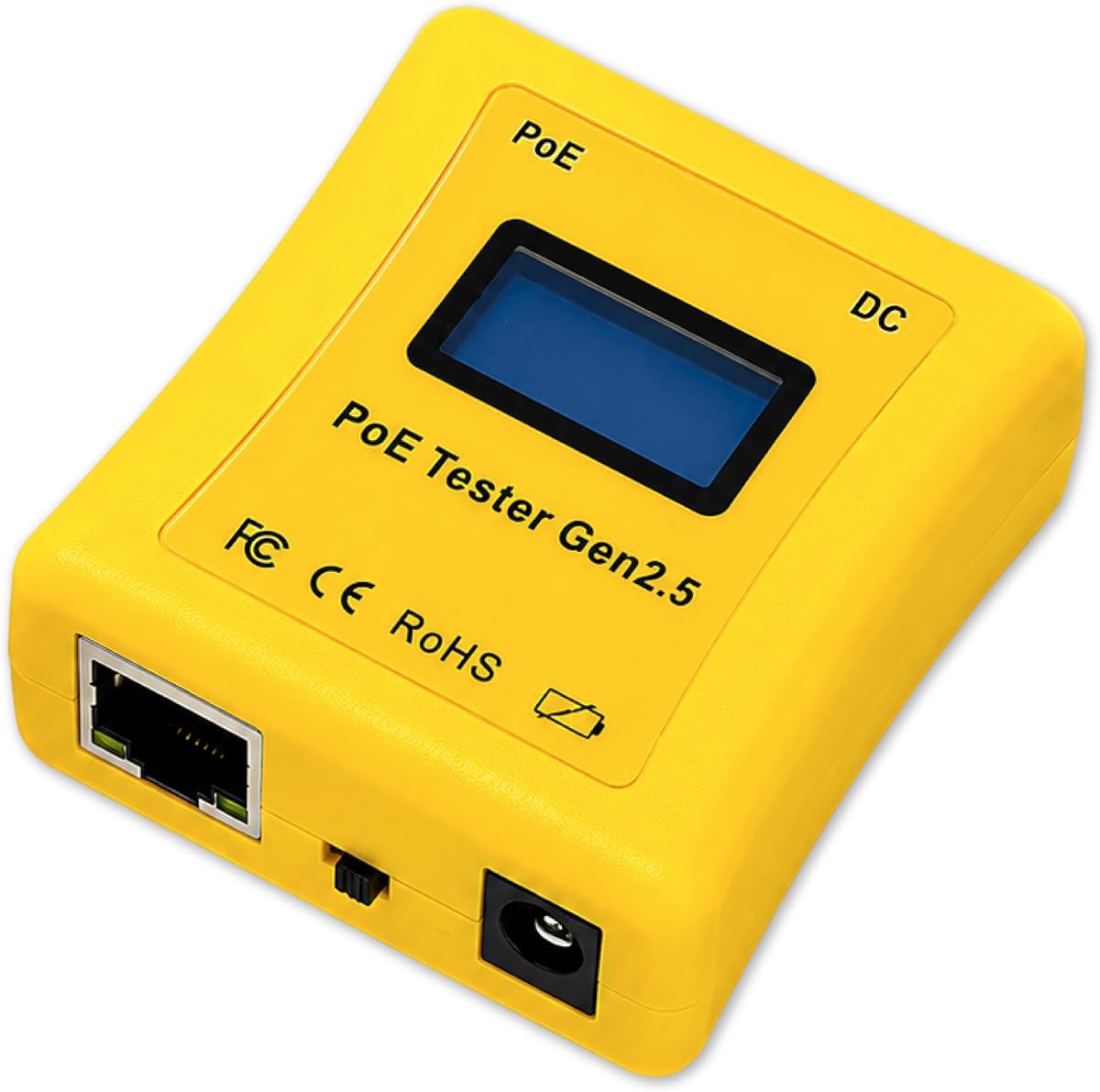
The PoE-T100 is an OLED-equipped inline tool for technicians who need more than a simple present-or-absent PoE indicator. It carries a 4.1 rating and presents voltage, current, power, polarity, PSE type, and power-level information on a single page, reducing the need to cycle repeatedly through separate screens.
Pros
Highly readable OLED screen
Works with standard PoE
Supports broad DC range
Three diagnostic modes
Self-powered operation
Cons
No cable continuity functions
No published user rating
We may earn a commission when you buy through this link, at no additional cost to you.
It supports the broad range of power systems found in modern installations. IEEE 802.3af, 802.3at, and 802.3bt are covered alongside PoE++, passive PoE, and 12–57V DC supplies. Its three operating modes are particularly useful: PD Mode simulates a powered device, Inline Mode measures pass-through consumption, and DC Mode checks non-PoE sources.
The tradeoff is that this is still a focused power-testing tool. It does not advertise Ethernet continuity, resistance, cable length, or miswire detection. Users who regularly terminate and certify network cables may need to keep a separate wire tester in their kit, while power-focused maintainers will find the PoE-T100 more streamlined.
The PoE-T100 is a strong premium choice for network engineers, security installers, and IT departments working with mixed PoE and DC equipment. Its self-powered design, wide voltage support, bright OLED display, and real-time measurements make it especially useful for rapid diagnosis without juggling multiple basic indicators.
One-Screen Diagnostic View
The OLED display consolidates power, voltage, current, PSE type, and inline usage information. That format can speed up diagnosis when a technician needs to compare several values at once.
Mixed PoE and DC Support
Support for passive PoE and 12–57V DC expands the tool beyond standard IEEE deployments. It is particularly relevant where cameras, lighting, or other equipment may use vendor-specific power arrangements.
The PoE Texas Tester is a 4.3-rated inline power diagnostic tool distinguished by its broad electrical range and convenient device-simulation mode. It can check PoE cameras, VoIP phones, WiFi installations, DC supplies, and Gigabit links while reporting voltage, current, and power consumption.
Pros
High supported power range
Simulates powered devices
Self-powered operation
Compact ergonomic housing
Wide DC measurement range
Cons
No cable length measurement
Limited switch-pair detail
We may earn a commission when you buy through this link, at no additional cost to you.
Its Simulate PoE Device mode is particularly valuable when testing managed or auto-negotiating switches. Rather than requiring a powered endpoint, the tester can request power as though it were the device, helping an installer confirm that a PSE port is functional. The LCD then cycles through voltage, current, and power readings, while the tester itself draws power from the line and requires no battery.
Although powerful for electrical measurements, it does not provide a full cable-testing feature set. There is no advertised continuity scan, wire map, resistance verification, or cable-length measurement. The tool is best regarded as a diagnostic instrument for power delivery, not a substitute for a certified cable analyzer.
This is a strong recommendation for field technicians who need to test a device or switch port without attaching the final endpoint. Its broad voltage capability, support for current measurements up to 280W at 56V, compact body, and simulation feature make it particularly effective for installation commissioning and power-related fault isolation.
Test a Port Before Installation
Simulate PoE Device mode lets a technician evaluate a switch or injector before the final camera, phone, or access point is connected. This can shorten installation and commissioning workflows.
Broad Electrical Measurement Range
The tester covers DC supplies from 3.5 to 56 volts and can report substantial power figures. That range is useful across legacy passive systems as well as newer high-power PoE installations.
The NOYAFA NF-488 earns a 4.5 rating and combines PoE detection with conventional network-cable diagnostics. It is a practical choice for installers who need to determine both whether power is present and whether the cable itself has an open, short, crossover, or other wiring fault.
Pros
Highest published rating
Combines power and wiring tests
Detects opens and shorts
Recognizes crossovers
Large backlit display
Cons
No inline power consumption monitoring
Basic rather than advanced measurements
We may earn a commission when you buy through this link, at no additional cost to you.
The PoE side identifies standard and non-standard information, including IEEE 802.3af and 802.3at characteristics, voltage, power polarity, and jumper methods. The voltage range extends from 0 to 60V, providing useful coverage for common passive and standard PoE systems. A remote wiring function supports continuity testing, and the tester can also work with shielded wire.
Unlike a true inline meter, the NF-488 does not provide a continuous live display of a connected device's current and power consumption. It is therefore more useful for confirming source characteristics and cable condition than for monitoring consumption over time. The concise display and anti-slip casing help offset the basic visual design, while independent backlight and shutdown timers improve field usability.
For budget-conscious technicians, the NF-488 offers an unusually useful balance of cable and PoE functions in one device. It is best suited to installation teams, low-voltage contractors, and network maintainers who often face questions involving both wiring faults and missing power.
Two Problems, One Tester
Combining PoE identification with remote continuity checks helps separate power-delivery issues from physical cable faults. That versatility can reduce the number of tools needed during basic troubleshooting.
Field-Readable Backlit Display
The large backlit screen is designed for quick interpretation in dim rooms and equipment cabinets. Separate controls for illumination and shutdown add practical control during extended jobs.
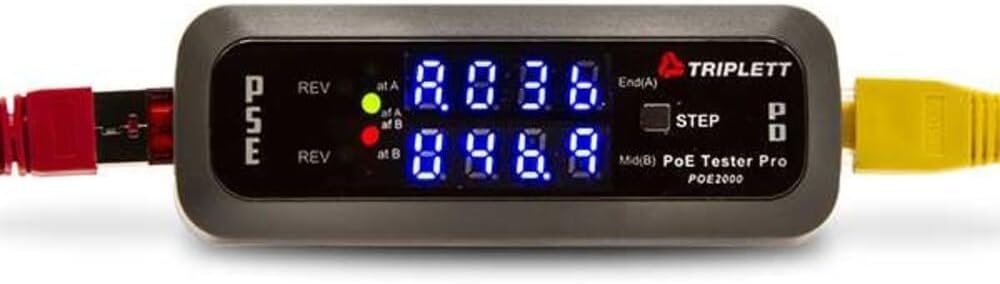
The Triplett POE2000 is a 3.5-rated inline detector focused on identifying the source and delivery method of PoE. Rather than relying only on a general yes-or-no indication, it uses dedicated LEDs to reveal PSE type, class, endspan or midspan power, pair assignments, and reversed polarity.
Pros
Detailed pair-pair source identification
Detects reversed polarity
Distinguishes standard passive power
Selectable inline measurements
Cons
Lowest published rating
LED-based display system
We may earn a commission when you buy through this link, at no additional cost to you.
Its dual seven-digit LED indicators are especially useful when determining whether power is supplied on End Span pairs 1/2 and 3/6, Mid Span pairs 4/5 and 7/8, or across all four pairs. Two yellow indicators identify reversed polarity, and the unit distinguishes standard PoE from non-standard passive PoE. Used inline, it alternates between voltage, current, and power.
The main drawback is the relatively low published rating of 3.5, which suggests less consistency in user satisfaction than the leading products. LED-only feedback also provides less detail than a full numeric screen, making this more appropriate for quick source identification than detailed records or close numerical comparison.
The POE2000 remains appealing to technicians who need direct information about pair-level power delivery. It is a focused inline detector for network engineers familiar with PSE terminology, especially useful when diagnosing unusual switch configurations or passive injectors.
Reveals Pair-Level Power Delivery
The endspan, midspan, and all-pairs indicators make it possible to understand where a PSE is supplying power. This can be valuable when comparing switch behavior or resolving passive injector issues.
Fast Source Classification
Dedicated indicators for PSE class, power source, standard versus passive delivery, and polarity accelerate initial assessment. The result is less dependence on menus or a separate reference guide.
The Triplett POE3000 is a professional in-line PoE tester built around source identification, standard recognition, and live power monitoring. It has no published rating in the supplied information, so its feature set is the most useful basis for evaluating it, but buyers should consider that lack of customer feedback.
Pros
Identifies multiple IEEE standards
Reports PSE class and source
Detects reversed polarity
Supports standard passive PoE
Selectable numeric readouts
Cons
No published user rating
No advertised continuity testing
We may earn a commission when you buy through this link, at no additional cost to you.
Four LEDs identify whether a port supplies IEEE 802.3af power or the higher-power 802.3at/bt category, while two yellow LEDs indicate reversed polarity. More detailed diagnostics include PSE type and class, power source, voltage, current, power, and whether the source is an endspan, midspan, or all-four-pair arrangement. It also recognizes non-standard passive PoE.
Its inline monitoring cycles through voltage, current, and power, with a step button allowing the user to select a specific value. That makes it more flexible than a basic presence detector and similar in concept to other LED-oriented inline models in this guide. However, it does not advertise Ethernet continuity, resistance, or cable-length functions.
The POE3000 is best for technicians who prioritize a quick visual classification of PoE delivery and a selectable inline readout. Its broad standard and passive-mode coverage suits modern installation work, although the lack of a published rating makes it less straightforward to recommend for buyers who depend heavily on customer feedback.
Detailed PSE Classification
Identifying PSE type, class, source, polarity, and pair strategy in one tool gives installers a clear picture of the port's behavior. This information is useful when deciding whether a device is compatible with the available power.
Selectable Inline Readouts
A step button moves between voltage, current, and power, while a locked selection can support continuous observation. The interface remains aimed at fast field diagnosis rather than laboratory analysis.
The Jonard Tools POE-1 is a comprehensive PoE and cable-testing kit with no published user rating in the supplied data. Its appeal lies in combining power diagnostics with resistance and continuity verification for Cat5, Cat5e, Cat6, and Cat6a cabling, making it relevant to both installers and technicians who need more than a PoE detector.
Pros
Complete tool kit included
Combines PoE and resistance tests
Works without batteries on PoE
Supports Cat6a cables
Includes belt clip
Cons
No published user rating
Battery required for unpowered cables
We may earn a commission when you buy through this link, at no additional cost to you.
The tester identifies passive, 802.3af, 802.3at, and 802.3bt power and measures voltage and amperage. Its cable functions can confirm resistance and continuity, helping distinguish a physical cable defect from a power-delivery problem. The package includes the main tester, a cable remote, a female-to-female RJ45 adapter, an instruction manual, and two AA batteries.
Its dual operating approach is both convenient and important. When connected to a powered PoE line, the unit operates without battery consumption. For unpowered cable testing, the included AA batteries provide power, allowing wire checks even where no PSE is available. The compact body and included belt clip support mobile use, although the need to carry batteries for some tasks is a minor inconvenience.
The POE-1 is a strong fit for a new installation kit or for technicians who want power and continuity tools in one package. It is less attractive for buyers who require a large numeric display or a long history of published customer feedback, but its included accessories and dual-function design provide excellent practical coverage.
Power and Cable Verification
Combining amperage, voltage, resistance, and continuity checks helps technicians evaluate both halves of a PoE link. That reduces the need to switch between separate electrical and wire-testing devices for common faults.
Useful Included Accessories
The package includes a remote, an RJ45 adapter, a manual, and batteries. These additions make it easier to begin testing a range of cable arrangements without sourcing separate accessories.
The PoE Cable Tester has the highest published rating in this selection at 4.6 and stands out for combining PoE validation with extensive cable diagnostics. It supports IEEE 802.3af, 802.3at, and 802.3bt, non-standard PoE from 5–60V DC, and load detection from 2–80W.
Pros
Highest published rating
Measures long cable runs
Finds opens, shorts, miswires
Supports STP and UTP
Locates active ports
Cons
Not primarily an inline meter
Rechargeable battery required
We may earn a commission when you buy through this link, at no additional cost to you.
Its cable capabilities are unusually broad. It measures CAT5 and CAT6 lengths from 5 to 300 meters, checks continuity up to 600 meters, and identifies shorts, opens, and miswires in both STP and UTP cable. Port-flash detection can locate active network ports, while load testing checks whether a source is delivering adequate PoE power to a connected device.
The principal limitation is that this is more of a comprehensive installation and fault-finding instrument than a traditional inline power meter. It includes a 1500mAh rechargeable battery, adjustable auto-shutoff intervals of 15, 30, or 60 minutes, and a low-battery indicator. Users must keep the unit charged for field jobs, unlike self-powered inline designs.
This tester is a compelling recommendation for cable contractors and network installers responsible for both physical wiring and power delivery. The combination of length, continuity, fault, port-flash, and load validation makes it particularly valuable when a remote run must be documented and checked before equipment installation.
Built for Long Cable Runs
Length measurement and continuity testing extend well beyond short patch-cable checks. These features help verify permanent runs and locate faults before concealed cabling is put into service.
Practical Field Power Management
A rechargeable battery, selectable auto-shutoff, and low-battery indicator help balance extended use with battery conservation. The controls are especially relevant to technicians working through long installation checklists.
The Inline Cat5/6 Dvm and Network PoE Tester is positioned as a combined digital voltmeter and network PoE diagnostic instrument for Cat5 and Cat6 environments. It has no published rating and very limited descriptive information, which makes it less straightforward to compare with the more fully documented products in this guide.
Pros
Combines digital and network diagnostics
Supports common cable standards
Panel-style inline layout
Useful for active troubleshooting
Cons
Minimal published specification
No published user rating
Unclear feature depth
We may earn a commission when you buy through this link, at no additional cost to you.
The stated combination suggests a useful approach for technicians who want electrical voltage measurements alongside Ethernet and PoE testing in a panel-style inline format. That can be relevant where the tester is placed temporarily between active equipment to observe both network and power behavior during diagnosis.
The biggest limitation is the lack of detail. The supplied listing does not specify supported IEEE standards, passive PoE behavior, measurement ranges, polarity detection, power consumption readings, battery arrangement, display characteristics, or continuity functions. Buyers therefore cannot verify many of the details normally used to distinguish a dependable inline tester.
This product may suit a technician who already understands its capabilities, but for a general buyer it carries more uncertainty than the other options. The more fully specified tools in this guide provide clearer evidence of supported standards, test modes, measurement ranges, and field features, making them safer choices for a first purchase.
Unified Diagnostic Approach
Combining a digital voltage measurement function with network and PoE checks can streamline troubleshooting around active equipment. It may be especially useful for users who already work with panel-style diagnostic instruments.
Verify Before Purchasing
The sparse published specifications justify checking the current product documentation and seller listing carefully. Confirm compatibility, measurement range, power source, and included accessories before relying on it for a specific installation.
The NF-488 Network Cable Tester is a 4.4-rated multifunction tool that checks PoE delivery, Ethernet wiring, loopback behavior, and DC power consumption. It supports CAT5 and CAT6 cabling and detects shorts, crossovers, and open circuits, making it a practical general-purpose choice for installation and basic fault isolation.
Pros
Combines PoE and cable checks
Measures current and power
Tests loops and wiring faults
Includes useful LED lamp
Clear operating ranges
Cons
No high-power PoE emphasis
Basic display interface
We may earn a commission when you buy through this link, at no additional cost to you.
The PoE functions identify IEEE 802.3af and 802.3at information, power voltage, polarity, and operating mode for standard systems. It also identifies voltage, polarity, and mode for non-standard PoE devices. A loopback test helps determine whether a loop is operating correctly, while the electrical measurement function reports voltage, current, and power consumed by DC devices.
Published measurement ranges are 0–60V for voltage, 0–3A for current, and 0–180W for power. These figures are clearly stated, which aids tool comparison, but they indicate a focus on conventional lower-current testing rather than the highest supported device powers emphasized by some inline models. The built-in LED lamp is a thoughtful addition for dark racks.
The NF-488 is a good value-oriented selection for low-voltage installers, security technicians, and general network maintenance. It gives users meaningful PoE information alongside wiring and loopback tests, although buyers needing an exact inline display of a high-power endpoint should compare its measurement limits with the required installation.
Useful Fault-Finding Combination
Wire faults, loop problems, missing PoE, and unusual power arrangements can all be investigated with one device. This breadth helps when the cause of a failed installation is not yet clear.
Clear Electrical Limits
The listed 0–60V, 0–3A, and 0–180W ranges make tool capability easy to assess. They are adequate for many common installations, while very high-power deployments may require a more specialized inline meter.
We may earn a commission when you buy through this link, at no additional cost to you.
Buying Guide – How to Choose the Best Inline POE Tester
A useful inline POE tester should do more than confirm that a port supplies power. The right choice depends on the standards in your network, the equipment being installed, the cable faults you need to diagnose, and how much detail you need at the point of installation.
Supported PoE Standards
Start by confirming that the tester understands every standard found in your network. IEEE 802.3af, 802.3at, and 802.3bt cover mainstream categories of PoE, while PoE++ may also appear in specialized deployments. Passive PoE uses vendor-specific arrangements and can use voltage, polarity, or pair assignments that differ from the IEEE standards. A tester that only recognizes common standards may misclassify a passive injector or make a healthy high-power port appear unusual. Look for explicit support for the exact types of switches, injectors, and powered devices you expect to service.
Voltage, Current, and Power
Basic presence indicators can confirm power but cannot explain a marginal installation. Voltage tells you the potential supplied by the PSE, current shows the load presented by the connected device, and power combines the two into a more meaningful operating figure. An inline tester that displays all three can reveal an overloaded port, an unexpectedly power-hungry endpoint, or a source supplying less power than its label suggests. For modern networks, also compare the maximum supported load with the power class of the equipment being installed.
Passive PoE and DC Range
Passive systems and standalone DC supplies can use voltages outside the normal IEEE range. Some common tools cover 11–60V, others extend down toward 3.5V or 5V, and many top out near 57 or 60V. Review both ends of the stated range rather than assuming every port is identical. Incorrect polarity can also matter to sensitive devices, so a tester that reports polarity is more useful than one that only announces the presence of voltage. Match the tool's limits to the lowest and highest voltages encountered in the field.
Cable Diagnostic Functions
Inline power measurements and cable integrity are separate diagnostic layers. A cable can pass continuity while carrying inadequate power, or it can deliver a stable connection to a port that supplies no PoE. Tools with remote wire mapping can identify opens, shorts, crossovers, and miswires, while length measurement helps document longer permanent runs. Resistance checks add another layer of confidence in cable quality. If your work includes new cabling rather than only maintaining existing devices, these functions may matter more than an inline wattage display.
Power Source and Operating Method
Battery-free and self-powered tools are convenient for emergency work because they can be picked up and used without preparation. Many inline devices draw power directly from the PoE line, while some cable testers need a rechargeable battery or removable cells. Battery operation adds convenience when testing unpowered cables, but it also introduces charging, cell life, and low-battery concerns. Consider how often you will diagnose a dead cable away from a live PSE and whether the tool includes batteries or a remote.
Display Readability and Controls
The display determines how quickly you can interpret a result. OLED screens can present several live measurements together, LCDs are generally easier to read in bright conditions, and LED arrays provide immediate pattern-based answers without a numeric display. Consider whether you need exact figures, quick classification, or a locked value for continuous monitoring. A step button that cycles through voltage, current, and power is useful, but an interface requiring frequent menu navigation can slow work in a crowded rack.
Field Portability and Accessories
Field technicians should consider size, weight, connector durability, and access to included accessories. A belt clip, protective housing, and compact body can make a tester easier to carry between closets and remote locations. Remote units and RJ45 adapters improve compatibility with different termination arrangements. A built-in light is also useful because equipment rooms and distribution boxes are often poorly illuminated. The complete kit should ideally support the cable types and connection methods used in your normal workflow.
Ratings and Support
Published customer ratings can help reveal consistency, but a missing rating is not proof of poor performance. Some technical products have limited review histories simply because they serve a narrower audience. Look for a clear warranty or manufacturer support commitment, a readable manual, and documented technical specifications. For government-focused or security-sensitive installations, procurement requirements may also influence the decision. The right tool should have verifiable capabilities rather than relying on broad marketing language alone.
How to Use and Care for Your Inline POE Tester
Before testing, identify the PSE, the powered device, the cable type, and the expected PoE standard. Inspect connectors and the tester for visible damage, then check the battery or self-powering arrangement specified in its manual. For a basic port test, connect the tester to the switch or injector as directed and let it classify the source before attaching or simulating the endpoint. Record the standard, voltage range, polarity, and power source before troubleshooting begins.
For inline measurements, place the tester between the PSE and PD only when the tool explicitly supports inline operation. Confirm that the connected load and cable are within the stated limits, then observe voltage, current, and power together. Compare the readings with the device's expected consumption, and watch for changes as the endpoint starts. If the readings vary, reconnect the test arrangement, check both cable ends, and inspect the injector or switch configuration before replacing the powered device.
Handle the tester as a precision instrument rather than a general-purpose electrical tester. Keep ports free of dust and moisture, avoid forcing unfamiliar adapters, and do not exceed published voltage or current limits. Charge rechargeable models before long field jobs, remove stored batteries from battery-powered units during prolonged storage, and use a soft dry cloth to clean the housing. Recalibrate or verify the tool against a known source when readings become inconsistent, and follow the manufacturer's instructions for firmware, accessories, and service.
Frequently Asked Questions
What does an inline POE tester measure?
An inline POE tester commonly measures voltage, current, and power as it sits between a power-sourcing device and a powered device. It may also identify the PoE standard, PSE type, polarity, pair arrangement, and whether the source is endspan or midspan. The exact functions vary by model, so compare the specifications with the faults you need to diagnose.
Is every PoE tester compatible with 802.3bt devices?
No. Some tools cover only 802.3af and 802.3at, while others include 802.3bt or broader passive and DC ranges. You should also check the maximum supported power because recognizing the standard does not guarantee that the tester can monitor the device's full operating load.
Can an inline POE tester damage network equipment?
A properly designed inline tester should be safe when connected according to its instructions and within its published limits. The main risks come from exceeding voltage limits, using an adapter incorrectly, or placing unsupported passive equipment in a path the tool cannot accommodate. Verify compatibility and follow the connection sequence in the manual.
Do I need a cable tester as well as an inline POE tester?
It depends on your responsibilities. An inline tester can reveal missing power, incorrect voltage, polarity issues, and excessive consumption, but it may not detect opens, shorts, miswires, or poor resistance in the cable. Installation contractors benefit from a combined model, while maintainers focused on live power diagnostics may find a dedicated inline meter sufficient.
What is the difference between standard and passive PoE?
Standard PoE follows recognized IEEE power-negotiation and delivery conventions. Passive PoE generally applies power without that negotiation and may use a different voltage, polarity, or pair arrangement. Testers that support passive systems can diagnose these vendor-specific installations, but the connected equipment must still be compatible with the measured supply.
What does simulating a PoE device do?
Simulate PoE Device mode makes the tester request or emulate the power relationship of an endpoint so a PSE can be evaluated before the final equipment is connected. This is useful for commissioning a switch port or injector and can help determine whether the power source is operating independently of the device's condition.
Should a POE tester display watts as well as amps and volts?
Watts provides a more direct view of the power delivered to the device, while voltage and current help explain why that result is occurring. A model that displays all three is generally more useful for diagnosing overloaded ports and power loss. Ensure the measurement ranges cover both the source output and the endpoint's expected draw.
How should I maintain an inline POE tester?
Keep the connectors clean, protect the housing from impact, and remain within the tool's voltage and current specifications. Recharge the internal battery before long jobs, store removable batteries according to the manufacturer's guidance, and clean the unit with a soft dry cloth. Periodically verify it against a known working source if readings become inconsistent.
Final Thoughts on Choosing the Best Inline POE Tester
The TRENDnet TC-NTP1 is the most balanced dedicated choice, with three purposeful modes, live inline measurements, support for standard and passive PoE, and battery-free operation. The OLED-equipped PoE-T100 is the premium pick for users who want a bright, information-rich display and broad DC support, while the NOYAFA NF-488 is the budget leader for combining PoE detection with continuity checks.
Prioritize the features that reflect your actual troubleshooting workload. High-power deployments warrant a tester with adequate current and wattage ranges, mixed legacy and modern installations benefit from broad passive and IEEE support, and cable contractors should consider continuity, resistance, length, and fault-location functions. A focused inline meter can be more useful than a broad multifunction tool if the added features do not match your normal jobs.
Before ordering, verify the current listing, supported standards, measurement limits, included accessories, warranty information, and availability. Prices and product details can change, and checking the latest seller page will help ensure that the selected inline POE tester still matches the requirements of your network and installation process.
Discover the best Raspberry Pi for Pwnagotchi with this 2026 expert guide comparing performance, connectivity, expansion options, memory, and project fit.
Discover the 10 best RV kitchen sink faucet options, comparing known features, construction, spray control, installation fit, and buyer priorities for your