
Gigabyte A520I AC
4.4Editor score
Dual DDR4 memory slots
Integrated WiFi and Bluetooth
DisplayPort and HDMI outputs
PCIe 3.0 graphics support
Our guide compares the 10 best ITX motherboards for AMD, covering AM5 and AM4 performance, features, compatibility, networking, storage, and value.
ITX motherboards for AMD combine a compact 170 by 170 millimetre footprint with the performance and expandability needed for capable small-form-factor PCs. A strong model should pair processor and memory support with effective power delivery, modern storage, fast networking, convenient installation features, and enough connectivity for everyday work, gaming, or content creation.
We compared all ten products by examining their processors, memory standards, expansion slots, M.2 support, networking, power delivery, cooling provisions, and installation features. The list includes current AM5 models for Ryzen 7000, 8000, and 9000 processors alongside AM4 alternatives for Ryzen 3000, 4000, and 5000 families.
Each review identifies the board that best suits a particular need, from a cost-conscious AM4 build to a feature-rich premium AM5 system. Ratings and specifications can change as manufacturers revise products, so readers should also verify case support, processor compatibility, memory type, and current pricing before buying.
4.4Editor score

4.1Editor score

4.2Editor score
The comparison below places the ten boards side by side by socket, memory generation, storage capability, networking, and power delivery. It makes clear which options support the latest Ryzen processors, which are designed for AM4 reuse, and which provide the strongest feature set for compact enthusiast systems.



The ASRock B650I Lightning WiFi is a compact AM5 board that brings together current processor support, DDR5 memory, fast storage, and comprehensive networking without the feature overhead of a flagship model. Its 4.1 rating reflects a capable design for compact Ryzen systems, although it is not positioned as an enthusiast overclocking board. The appeal lies in giving builders a straightforward AM5 foundation that can accommodate Ryzen 7000, 8000, and 9000 desktop processors.
We may earn a commission when you buy through this link, at no additional cost to you.
Its 8+2+1 phase power design uses premium Dr.MOS components, providing a solid basis for mainstream and high-performance Ryzen processors. Two DDR5 DIMM slots support memory speeds up to 7200+ when overclocking, while dual-channel operation remains important for a balanced small-form-factor system. Storage is particularly strong for the size, with one PCIe 5.0 x4 M.2 slot and another PCIe 4.0 slot, plus two SATA3 connectors for hard drives or a secondary 2.5-inch drive.
Networking is a major strength. Intel WiFi 6E removes the need for a separate wireless adapter, and the 2.5G LAN port is well suited to fast home networks and file transfers. Multiple USB 3.2 Gen2 ports, including front and rear Type-C connections, make the board practical for modern peripherals. The trade-offs are the limited number of memory slots and WiFi 6E rather than WiFi 7, but neither prevents it from serving as a well-balanced daily or gaming platform.
This board is a strong recommendation for someone who wants AM5 support, modern storage, fast networking, and a manageable set of features in a small enclosure. It is less convincing for extreme CPU overclocking or heavily memory-tuned systems, where higher-end boards offer more extensive VRMs, thermal hardware, and tuning tools. Even so, the combination of processor flexibility, dual fast M.2 support, 2.5G networking, and integrated WiFi makes this one of the most practical choices in the roundup.
The combination of PCIe 5.0 and PCIe 4.0 M.2 slots allows one high-speed drive to receive the newest interface while another remains available for additional storage. SATA3 connectors add flexibility for conventional drives, making the board suitable for both streamlined and multi-drive configurations.
Integrated Intel WiFi 6E and 2.5G LAN cover both wireless convenience and high-speed wired access. This makes the board particularly attractive for compact builds where adding separate network hardware would be inconvenient.
We may earn a commission when you buy through this link, at no additional cost to you.
The GIGABYTE B550I AORUS PRO AX is a well-equipped AM4 option with a 4.3 rating and a useful combination of storage, networking, and installation conveniences. It supports Ryzen 3000, 4000, and 5000 processors, allowing builders to use widely available DDR4 memory and a mature platform. Although AM5 is the newer route, AM4 remains highly relevant when a complete processor, memory, and board configuration can be sourced at a reasonable total cost.
We may earn a commission when you buy through this link, at no additional cost to you.
The board uses an eight-layer PCB, premium chokes and capacitors, and a digital direct power phase design. An extended VRM heatsink and aluminium backplate help manage heat, while the integrated I/O shield simplifies assembly. DDR4 support is joined by a reinforced PCIe 4.0 x16 slot for the graphics card, one PCIe 4.0 M.2 slot, and one PCIe 3.0 M.2 slot. That is a practical pairing for a fast system drive and a second, larger NVMe drive.
Connectivity includes USB 3.2 Gen2 Type-C, USB 3.2 Gen2 Type-A, and four USB 3.2 Gen1 Type-A ports. WiFi 6, Bluetooth, and 2.5GbE LAN provide strong networking, while Q-Flash Plus and WiFi EZ-Plug make initial setup and wireless installation easier. The main limitation is that DDR4 cannot be upgraded to DDR5 within the same system, and future AM5 processors remain outside its compatibility range.
Buyers who already own supported AM4 components will find this board practical and potentially economical. It is particularly good for a compact gaming or productivity system that needs fast NVMe storage and integrated networking. For a new platform intended to last beyond the current socket generation, however, an AM5 board offers a more durable upgrade path. Within AM4 ITX choices, this model stands out for its broad feature set.
One PCIe 4.0 and one PCIe 3.0 M.2 slot provide room for a high-speed primary drive and secondary NVMe storage. The reinforced graphics slot also adds confidence when installing a physically substantial modern card.
Q-Flash Plus can update the firmware without an already-installed processor, while the integrated I/O shield reduces assembly friction. WiFi EZ-Plug further simplifies fitting the wireless module in a tightly packed enclosure.
We may earn a commission when you buy through this link, at no additional cost to you.
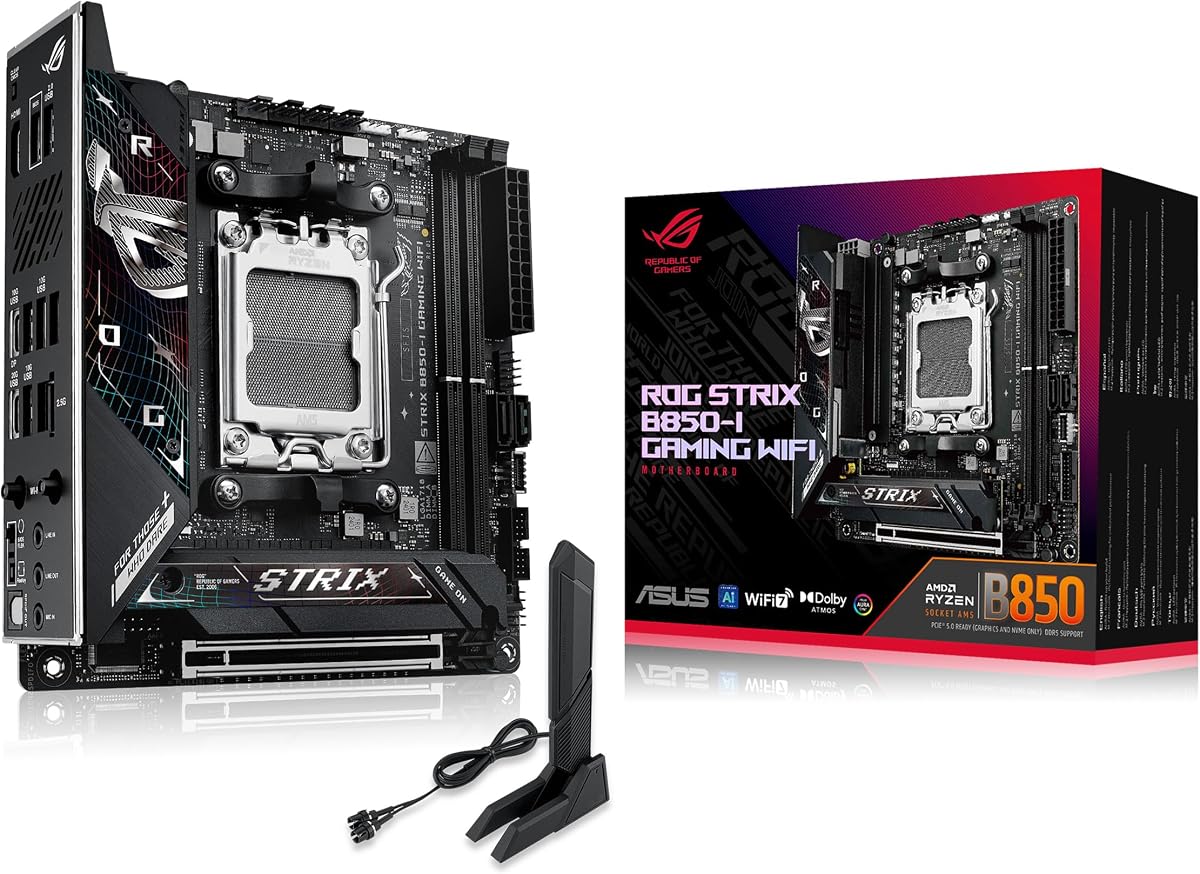
The ASUS ROG Strix B850-I Gaming WiFi carries a 4.3 rating and offers one of the strongest balanced feature sets among the AM5 boards reviewed. It supports Ryzen 7000, 8000, and 9000 desktop processors, uses DDR5 memory, and includes dual PCIe 5.0 M.2 connectivity. The board is designed for compact gaming systems and enthusiast builds that need modern interfaces without giving up the smaller ITX footprint.
We may earn a commission when you buy through this link, at no additional cost to you.
A 10+2+1 power solution is rated for up to 70 amps per stage and uses ProCool power connectors. The thermal design combines substantial heatsinks, an integrated I/O cover, and high-conductivity thermal pads to move heat away from the most heavily loaded areas. Two onboard PCIe 5.0 M.2 slots are provided, with one covered by a large heatsink, allowing high-speed NVMe storage while reducing thermal pressure in the enclosed system.
Wireless connectivity uses WiFi 7, while 2.5G LAN handles wired networks. USB 20Gbps Type-C is listed among the connections, and a PCIe 5.0 x16 slot supports current graphics hardware. ASUS AI Advisor, AI Overclocking, AI Networking II, and AEMP aim to simplify configuration, although the abundance of assisted features may feel unnecessary to experienced builders. Aura Sync adds board lighting and integration with other compatible components.
This is a particularly convincing recommendation for a compact high-end gaming PC or a creator's system that requires current AM5 support, excellent storage, and strong networking. The board does not have the very highest stage current offered by the X870-I model in the list, so extreme overclockers may prefer that alternative. For most enthusiast users, however, the B850-I's thermal design, dual Gen5 storage, and approachable software make it an excellent all-rounder.
Two PCIe 5.0 M.2 slots eliminate the need to choose between a primary Gen5 drive and secondary Gen5 storage. A substantial heatsink on one slot helps a high-performance SSD maintain stability in a compact chassis with limited airflow.
AI Advisor, AI Overclocking, AI Networking II, and AEMP are intended to reduce the complexity of initial configuration. Experienced users can ignore them if preferred, while newcomers gain guided paths through memory, networking, and performance settings.
We may earn a commission when you buy through this link, at no additional cost to you.
The Gigabyte A520I AC is a cost-focused Mini-ITX board with a strong 4.4 rating and enough basic features for a compact everyday or gaming system. It supports third-generation AMD Ryzen processors through the AM4 socket and uses dual-channel DDR4 memory. Its principal strengths are integrated WiFi and Bluetooth, flexible display outputs, and a straightforward design that does not require a large motherboard to provide essential connectivity.
We may earn a commission when you buy through this link, at no additional cost to you.
Power is handled by a direct six-phase digital PWM arrangement using 55A DrMOS components, accompanied by an optimized VRM heatsink. A PCIe 3.0 x16 slot supports a dedicated graphics card, while one PCIe 3.0 x4 M.2 connector accommodates an NVMe solid-state drive. The board does not offer a second M.2 position, so additional storage would need to use SATA or an external enclosure.
Rear display connectivity includes DisplayPort and two HDMI outputs, which is useful for troubleshooting and for systems using supported integrated graphics. Intel dual-band WiFi and Bluetooth are integrated, but wired networking is limited to 1GbE. Q-Flash Plus allows firmware work without an installed processor. These limitations make the A520I AC more suitable for general computing, office systems, and straightforward gaming than for advanced storage or high-bandwidth network tasks.
The Gigabyte A520I AC is a sensible pick when affordability and essential features matter more than future platform headroom. It may also be attractive as a carry-in board, office platform, or compact system for a processor that does not require high-end power delivery. Builders should confirm the exact CPU support, add an appropriate cooling solution, and plan storage around the single M.2 slot. Within its segment, it delivers a notably strong rating and useful integrated networking.
Intel dual-band WiFi and Bluetooth eliminate the need to occupy a limited expansion area with a separate adapter. The included antenna arrangement supports a clean installation in a compact enclosure.
DisplayPort and dual HDMI connections are useful for processor-based systems with integrated graphics. They also make initial setup and troubleshooting easier when a discrete graphics card is not yet installed.
We may earn a commission when you buy through this link, at no additional cost to you.
The MSI MPG B850I Edge TI WiFi stands out with a 4.4 rating, 5GbE networking, WiFi 7, and exceptional advertised memory support. It supports Ryzen 7000, 8000, and 9000 processors on AM5. For a small-form-factor enthusiast system, the combination of current processor support, high-speed memory, and premium storage interfaces is unusually comprehensive.
We may earn a commission when you buy through this link, at no additional cost to you.
Its direct eight-phase 90A SPS VRM is paired with 7W/mK MOSFET thermal pads, additional choke thermal pads, and an extended heatsink. The design should serve high-performance Ryzen processors well, although compact chassis airflow remains important. Two DDR5 SMT memory slots are specified for speeds up to 8200+ MT/s in a one-DIMM, one-rank configuration. That maximum is highly dependent on the processor, memory kit, and BIOS, but it demonstrates the board's enthusiast orientation.
Storage and expansion are equally focused. A PCIe 5.0 x16 Steel Armor II slot supports current graphics hardware, while dual M.2 connectors include a PCIe 5.0 x4 position and a PCIe 4.0 x4 position. The M.2 Shield Frozr adds cooling for a drive installed in the constrained board layout. Networking includes full-speed WiFi 7, Bluetooth 5.4, and a notably quick 5GbE LAN port, along with rear USB Type-C at 20Gbps.
This board is a compelling recommendation for a compact performance build that will use fast wired or wireless networking and high-speed storage. It is less suitable for projects requiring numerous expansion cards, although Mini-ITX systems generally cannot accommodate many anyway. Users willing to tune memory and monitor thermals will appreciate its enthusiast specifications. For simpler AM5 builds, it may offer more than required, but it remains one of the most technically capable options in this roundup.
The 5GbE port provides a clear lead over the 2.5GbE-equipped competitors, while WiFi 7 and Bluetooth 5.4 complete the modern wireless feature set. This is particularly useful for large transfers, high-resolution streaming, and busy local networks.
The board combines very high advertised DDR5 speeds with one PCIe 5.0 and one PCIe 4.0 M.2 slot. It allows a modern primary drive and secondary NVMe storage without relying exclusively on SATA.
We may earn a commission when you buy through this link, at no additional cost to you.
The ASRock B550M-ITX/AC is a straightforward AM4 board with a 4.3 rating. It supports Ryzen 3000, 3000 G-Series, 4000 G-Series, 5000, and 5000 G-Series desktop processors, but not AMD Athlon processors. The board gives builders access to a mature socket and DDR4 platform in a standard Mini-ITX size, making it relevant for office, home, and light gaming systems.
We may earn a commission when you buy through this link, at no additional cost to you.
Two DDR4 memory slots support speeds of 4733+ when overclocking. A full-size graphics slot handles discrete graphics hardware, and DisplayPort plus HDMI outputs allow compatible integrated graphics to be used during setup or as a permanent display solution. Realtek ALC887 audio provides 7.1-channel high-definition audio. The specification list is intentionally straightforward, without the extensive high-end networking and storage claims associated with newer boards.
The primary trade-off is platform age. AM4 has already reached the end of its major upgrade path, so buying a new system around it means accepting DDR4 memory and older connectivity features. The board may still make sense when compatible processors and memory are readily available, particularly if a complete, proven platform can be assembled economically. It is not the natural choice for a new high-end AM5 system.
This model is best for a builder who wants a straightforward Mini-ITX AM4 system and already has suitable components. It can serve a general-purpose PC, an office build, or a compact gaming machine with a suitable graphics card. Buyers creating a fresh platform should compare the total cost with a current AM5 option, because the additional expense may buy a newer CPU, faster memory, and a longer upgrade horizon.
Support across several Ryzen generations gives the board flexibility within AM4. The exclusion of Athlon processors should be checked before purchase, particularly for entry-level and office configurations.
DisplayPort and HDMI outputs provide convenient access to compatible integrated graphics. This can simplify initial setup and allows a system to remain usable without a dedicated graphics card when the CPU supports the required display functionality.
We may earn a commission when you buy through this link, at no additional cost to you.
The ASRock A520M-ITX/AC delivers the essential parts of an AMD AM4 Mini-ITX platform and carries a 4.3 rating. It supports Ryzen 3000 and 4000 series desktop processors, along with future-compatible AM4 processors as stated in the product information. Two DDR4 DIMM slots and a PCIe 3.0 x16 slot provide the fundamentals for a compact system using a discrete graphics card.
We may earn a commission when you buy through this link, at no additional cost to you.
Memory can operate at up to 4733+ through overclocking, although real-world stability depends on the processor, module layout, and memory kit. DisplayPort and HDMI are available for processors with integrated graphics, and Realtek ALC887 supplies 7.1-channel high-definition audio. Compared with more expensive ITX models, the board offers fewer claims about premium networking, memory boosts, and assisted configuration, which keeps the focus on core functionality.
Its age and A520 chipset position are the main limitations. New AM5 boards provide DDR5, newer CPU support, faster storage options, and more advanced connectivity. AM4 can still be a sensible route when the total system cost is favorable or existing components are already owned, but a new buyer should not mistake the board's compactness for modern platform capability.
The A520M-ITX/AC is most appropriate for a basic home computer, office build, or compact gaming system where the primary goal is a small footprint. A compatible CPU, supported memory, and a suitable graphics card form the core of such a machine. It is less appealing for creators who need fast multi-gigabit networking, numerous high-speed storage devices, or a future processor upgrade path.
The board supplies dual DDR4 slots, a full-length graphics slot, and integrated display outputs. These essentials cover the requirements of many compact builds without requiring a larger and more expensive motherboard.
This model makes most sense when supported components are already available or the complete AM4 platform is competitively priced. Builders prioritizing future expansion should examine an AM5 board with DDR5 and newer storage support.
We may earn a commission when you buy through this link, at no additional cost to you.
The ASUS ROG Strix X870-I Gaming WiFi is the premium enthusiast selection in this guide, carrying a 4.2 rating and a feature set aimed at high-end compact Ryzen systems. It supports Ryzen 7000, 8000, and 9000 desktop processors on AM5. The board's defining strength is its 10+2+1 power solution, rated at 110 amps per stage, paired with ProCool II connectors, alloy chokes, and durable capacitors.
We may earn a commission when you buy through this link, at no additional cost to you.
The design is prepared for demanding processors and serious tuning. Dynamic OC Switcher, Core Flex, Asynchronous Clock, and PBO Enhancement provide several approaches to clock and power behavior. AI Overclocking, AI Cooling II, AI Networking, and AEMP can simplify setup, while Q-Release Slim assists with certain hardware installation tasks. Two M.2 connectors and PCIe 5.0 expansion position the board for current and future high-speed components.
Its feature richness creates the main trade-off. A compact system already demands careful component and cooling choices, and the extensive software environment may be more than a simple office or mainstream gaming build needs. The 4.2 rating does not lead the list, but that should not be interpreted as a lack of capability. It reflects the experience of a sophisticated product whose specialized tools are most valuable to users who understand and intend to use them.
The X870-I Gaming WiFi is ideal for a premium small-form-factor gaming PC, enthusiast workstation, or heavily tuned Ryzen build. It provides the electrical headroom and current connectivity expected in that category, along with USB4 and WiFi 7. For most compact systems, the B850-I is more restrained and easier to justify, but this model is the clear choice when power delivery, overclocking control, and premium accessory support are the priorities.
A 10+2+1 configuration with stages rated to 110 amps provides a substantial foundation for high-core-count processors. ProCool II connectors, quality chokes, and durable capacitors further improve electrical headroom and reliability.
Dynamic OC Switcher, Core Flex, asynchronous clock options, PBO Enhancement, and AI-assisted controls give experienced users several paths to tune the processor. The breadth of options is a major reason to choose this premium model.
We may earn a commission when you buy through this link, at no additional cost to you.
The GIGABYTE B850I AORUS PRO offers current AM5 support and modern connectivity, but its 3.6 rating is the lowest among the ten products. The board supports Ryzen 7000, 8000, and 9000 processors, DDR5 memory, PCIe 5.0, dual M.2 storage, WiFi 7, and 2.5GbE. On paper, it covers the principal requirements of a modern compact gaming or productivity system.
We may earn a commission when you buy through this link, at no additional cost to you.
Its 8+2+1 power design uses 80A Smart Power Stage components, with VRM and M.2 Thermal Guard heatsinks assisting heat dissipation. Two DIMM slots are provided, along with USB-C and dual NVMe positions. EZ-Latch is included to simplify certain connector operations. A five-year warranty adds reassurance, especially when comparing this board with alternatives that provide less clearly specified support periods.
The lower rating is the main reason to pause. Customer ratings can reflect a mixture of software, compatibility, thermals, packaging, or individual experiences, and the available data does not establish a specific defect. The board's core specifications remain competitive, so the rating should prompt additional research rather than an automatic rejection. Checking recent owner feedback and the current BIOS version is sensible for any motherboard at this level.
The B850I AORUS PRO is most convincing for a builder who values AM5, fast networking, dual modern storage, and a long warranty but does not require the highest possible VRM current. It is a sensible alternative to the ASUS B850-I for a compact gaming PC. Buyers should balance its lower aggregate rating against the stronger user feedback and more extensive specification details available for competing models.
WiFi 7, 2.5GbE Ethernet, USB-C, and two PCIe 5.0 M.2 positions cover the needs of most current compact builds. These features reduce the need for add-in network and storage cards.
VRM and M.2 Thermal Guard heatsinks address two concentrated heat sources in a small enclosure. The five-year warranty provides a notable support commitment for a compact motherboard.
We may earn a commission when you buy through this link, at no additional cost to you.
The GIGABYTE X870I AORUS PRO ICE is an AM5 X870 Mini-ITX board designed for powerful, visually coordinated compact systems. It supports Ryzen 7000, 8000, and 9000 processors, carries a 3.9 rating, and offers a premium 8+2+1 power design with 110A Smart Power Stage components. Its appeal combines strong electrical capability with a refined product presentation suited to showcase builds.
We may earn a commission when you buy through this link, at no additional cost to you.
Two DDR5 DIMM slots include AMD EXPO support, while dual M.2 positions and PCIe 5.0 connectivity provide modern storage and expansion. Front and rear USB-C is convenient for modern peripherals and front-panel access. WiFi 7 and 2.5GbE networking are integrated, so the board avoids requiring separate network adapters in a constrained chassis.
Installation convenience is a meaningful theme. M.2 EZ-Latch, PCIe EZ-Latch, WiFi EZ-Plug, and EZ-Debug Zone are designed to make common assembly tasks easier. A five-year warranty complements these features. The limitation is that the 3.9 rating trails the strongest-reviewed products, and the supplied specification list does not detail every thermal or connectivity feature as extensively as some rivals.
This board is a good fit for a premium white-themed Ryzen gaming PC or a high-end compact workstation that values clean installation and current connectivity. It is especially attractive when paired with EXPO-profile DDR5 memory. The lower user rating warrants checking recent reviews and confirming BIOS maturity, but its power-stage rating, storage support, and user-friendly latches make it a serious alternative to the ASUS X870-I.
The ICE identity is intended for clean, visually consistent builds. A matching case, cooling system, graphics card, and memory kit can produce a more polished appearance than a mixed-component compact PC.
EZ-Latch mechanisms for M.2 and PCIe, WiFi EZ-Plug, and the EZ-Debug Zone reduce the need to handle delicate connectors in a confined space. These details can save time and reduce frustration during assembly.
We may earn a commission when you buy through this link, at no additional cost to you.
Choosing an ITX motherboard requires balancing platform longevity, processor support, memory, storage, networking, thermal capacity, and physical compatibility. The most important step is defining the complete compact system, including its case, cooler, graphics card, and intended workload, before selecting the board.
AM5 is the current platform represented by most of the newer boards in this guide. It supports Ryzen 7000, 8000, and 9000 desktop processors and uses DDR5 memory, providing a broader path for future processor upgrades than AM4. AM4 remains practical for builds using existing Ryzen 3000, 4000, or 5000 components, but new AM4 purchases represent the end of that socket's main upgrade cycle. Always check the exact processor list rather than assuming every model in a family is supported.
All ten boards provide two DIMM slots, a standard ITX limitation that affects both DDR4 and DDR5 platforms. Two modules make it easier to operate in dual-channel mode, but they also limit eventual capacity compared with a four-slot board. AM5 models support DDR5, with several boards advertising high overclocked speeds, while the AM4 choices use DDR4. Pay attention to maximum supported capacity, EXPO or XMP profiles, memory layout restrictions, and the processor's memory controller.
A stronger VRM provides more stable power delivery, better temperatures, and additional headroom for sustained workloads. The boards range from six-phase designs intended for efficient processors to 10+2+1 configurations with stages rated from 70 to 110 amps. More phases are not automatically better in every scenario, but they usually indicate a greater ability to handle high-power Ryzen chips. Case airflow, cooler quality, and processor selection are equally important.
Every product offers a full-length PCIe graphics slot, which is essential for most gaming and creator systems. Modern boards generally use PCIe 4.0 or 5.0 x16, while older A520 and selected AM4 models use PCIe 3.0. The choice of graphics card must also be considered because large card coolers can obstruct CPU coolers, power cables, and the narrow space around an ITX board. Check the case's maximum graphics length and cooling clearance before ordering.
The newer AM5 boards offer dual M.2 positions, commonly with at least one PCIe 5.0 x4 slot for a high-speed primary SSD. Dual M.2 support is valuable for games, working libraries, and scratch files, while SATA can accommodate larger hard drives. The Gigabyte A520I AC has one M.2 slot, and some older ASRock ITX models have less detailed storage information, so their full configuration should be verified. Also check whether an M.2 heatsink is included and whether it shares heat with the CPU cooler.
The roundup includes WiFi 6, WiFi 6E, and WiFi 7 boards alongside Ethernet options ranging from 1GbE to 5GbE. Faster Ethernet is useful for large file transfers, network storage, and high-bandwidth home networks. Integrated wireless is especially helpful in compact systems with little room for adapters. Confirm the specific WiFi and Bluetooth standards, antenna inclusion, and whether the listed network hardware is supplied as part of the board package.
External connectivity should match the devices in the planned system. USB Type-C, high-speed USB-A ports, and 7.1-channel audio improve everyday usability, while integrated DisplayPort and HDMI outputs can assist setup with supported integrated graphics. Newer premium models add USB4 or 20Gbps Type-C, which is useful for high-speed docks and external storage. Count the ports you actually need rather than assuming a larger count automatically means better usability.
Mini-ITX boards have limited surface area for heatsinks, and their VRM and M.2 areas sit close to the CPU cooler. Look for extended VRM heatsinks, M.2 thermal covers, effective thermal pads, and a case that supports a suitable CPU cooler. Installation aids such as BIOS Flashback, Q-Flash Plus, EZ-Latch, and integrated I/O shields can materially simplify assembly. Verify standoff alignment, socket clearance, and the position of front-panel connectors before beginning.
Begin by checking the processor, cooler, memory, graphics card, storage, and power supply against the motherboard's supported specifications and the case's clearances. Install the processor and cooler according to the manual, confirm that any AMD EXPO or XMP profile is appropriate, and update the firmware before installing the operating system if the board was purchased with an older BIOS version.
Connect the storage devices, front-panel switches, fans, and power cables with the system powered off. Use the board's EZ-Latch, Q-Flash Plus, BIOS Flashback, or equivalent feature where available. After the first boot, enter the firmware, confirm that all memory and drives are detected, and update chipset and graphics drivers before installing applications or transferring important data.
For a compact system, manage heat by using case-specific CPU cooler and graphics-card clearance advice, avoiding cable routing that blocks airflow, and checking temperatures under sustained load. Keep BIOS and driver versions current, preserve the original box and accessories for possible warranty service, and clean dust from heatsinks and fans periodically. Record the board model and serial number before contacting the manufacturer.
AM5 is generally the better choice for a new system because it supports newer Ryzen processors and DDR5 memory. It also provides a more future-oriented upgrade path, although the total platform cost may be higher. AM4 can still be economical when a complete supported configuration is already available or offers a meaningfully lower total cost.
No. AM4 boards use DDR4, while AM5 boards use DDR5, and the memory slots are physically and electrically incompatible. A DDR5 module cannot be adapted to an AM4 board, nor can DDR4 memory be used in an AM5 system. Check the socket and memory standard together before purchasing components.
Two matched modules are usually enough for a gaming PC and allow the system to use dual-channel memory. Their combined capacity should cover the operating system, games, applications, and background processes. The limitation is that two DIMM slots offer little room for later capacity increases, so buyers should choose a suitable capacity initially.
No. The AM5 boards in the list support Ryzen 9000 series processors, while the AM4 models do not. Within the AM5 group, the supplied product information lists Ryzen 7000, 8000, and 9000 support. Check the exact CPU model and any BIOS requirements listed by the manufacturer before making a purchase.
Integrated WiFi can be very useful in a small-form-factor PC because it avoids using a limited rear slot or internal header for a wireless adapter. It is particularly convenient for compact cases with poor radio clearance. A separate high-quality antenna may still improve signal strength, so the case placement and antenna design remain important.
A PCIe 5.0 SSD is not essential for most gaming, and PCIe 4.0 drives can deliver excellent performance. The faster interface is useful for large transfers, heavy editing workloads, and demanding applications where throughput matters. Consider the total storage configuration and whether two M.2 positions are more valuable than using one position for a very high-speed drive.
Mini-ITX describes a standardized 170 by 170 millimetre board size, but case compatibility also depends on CPU cooler height, graphics-card length, slot spacing, power connectors, and drive placement. Review the case specifications and the board layout together. Also check the thickness of the graphics card and any attached cooler because oversized cards are a common small-case problem.
Memory profiles can improve performance when the CPU, kit, and motherboard are compatible, but stability depends on the entire combination. Begin with conservative settings, test the system under realistic loads, and increase the memory frequency gradually. If stability issues appear, disable the profile and use the standard JEDEM speed as a reliable fallback.
The Gigabyte A520I AC is the best budget-oriented selection, offering a strong rating, integrated wireless networking, and useful display outputs for a cost-conscious AM4 system. The ASRock B650I Lightning WiFi is the most balanced overall pick because it combines current Ryzen support, dual fast M.2 storage, DDR5, 2.5G Ethernet, and WiFi 6E. The ASUS ROG Strix X870-I Gaming WiFi represents the premium choice for builders who want exceptional power delivery, extensive tuning tools, and the newest connectivity.
Prioritize the processor and memory platform first, then confirm storage, networking, cooling, and graphics clearance. AM5 is the stronger foundation for a new high-performance system, while AM4 can be effective for a smaller budget or when compatible components are already owned. Within either platform, a robust power design, two fast M.2 slots, integrated wireless networking, and convenient BIOS features are especially valuable in a compact enclosure.
Before ordering, verify the exact CPU support, current BIOS status, memory limits, case dimensions, cooler height, graphics-card clearance, and accessory contents. Product prices and ratings can change, so compare current offers rather than relying on an old article or a single historical figure. A carefully matched board, processor, memory, and cooling setup will produce the most satisfying compact AMD PC.
