
Perixx PERIBOARD-512B
4.4Editor score
Wired USB connection
Curved stepped key rows
Extended tactile key travel
A split keyboard separates the left and right key groups to help keep wrists, forearms, and shoulders in a more natural position. The right model can reduce awkward outward rotation during long typing sessions while adding useful connectivity, lighting, macro, or tenting options.
We compared these ten keyboards across ergonomic design, wrist support, key feel, layout, connection methods, adjustability, compatibility, and special features. The list includes fixed split designs, independently separated modules, membrane and mechanical models, wired and wireless options, and bundles.
Each pick reveals what it does best, from practical everyday typing to specialized gaming, programming, and multi-device work. Ratings and availability can change over time, so verify current specifications, system compatibility, accessories, and current prices before making a purchase.
4.4Editor score

4.4Editor score

4.3Editor score
As an Amazon Associate we earn from qualifying purchases.
This side-by-side comparison highlights the major differences in layout, connection, comfort support, adjustability, lighting, and productivity features across the ten shortlisted split keyboards.




The Arteck Split Ergonomic Keyboard combines a fixed split frame, substantial wrist support, and straightforward 2.4G wireless connectivity. Its 4.3 rating reflects a practical approach to comfort, especially for typists who want the visual and physical benefits of a split layout without negotiating a complicated configuration process.
We may earn a commission when you buy through this link, at no additional cost to you.
The split design is intended to position wrists and forearms more naturally, while the soft cushioned rest supports the wrists during extended work. Setup is refreshingly direct: the nano receiver stores at the back of the keyboard and connects through a USB port. The rechargeable battery is stated to last six months under the manufacturer's specified usage pattern.
Its main limitation is the absence of Bluetooth, so the keyboard is tied to the included 2.4G receiver rather than a broader set of wireless platforms. The fixed layout also offers less freedom than models with independently separated halves or adjustable feet. Nevertheless, those restrictions do not diminish its usefulness for a desk with a dedicated USB port.
This is a strong recommendation for a home office, study area, or shared workstation that needs a comfortable split keyboard with dependable wireless operation and generous palm support. It may be less attractive if you routinely alternate among laptops, tablets, and phones or want to fine-tune the exact angle and separation.
The split frame and cushioned wrist and palm rest target the two areas where prolonged standard keyboards often feel restrictive. Its fixed construction also makes the ergonomic position predictable once the keyboard has been placed in front of the user.
Plugging the stored nano receiver into a USB port makes the keyboard usable without account setup or driver installation. The included USB-C charging cable handles recharging, and the stated battery duration reduces routine charging concerns.
We may earn a commission when you buy through this link, at no additional cost to you.
The Logitech Ergo K860 is the most complete conventional split keyboard in this group, earning a 4.4 rating through a balanced mix of comfort, familiar layout, connectivity, and adjustability. Its curved, sloping frame is designed to improve typing posture and reduce strain across the wrists and forearms.
We may earn a commission when you buy through this link, at no additional cost to you.
The pillowed wrist rest incorporates a memory foam layer, while the keyframe's slope helps maintain a more natural hand position. Ergonomist approval and the stated support improvements add weight to its ergonomic design. Three palm-lift settings—0, negative 4, and negative 7 degrees—let users adapt the keyboard for seated or standing work.
It also avoids many compromises associated with ergonomic layouts. The full-size arrangement includes a number pad and Caps Lock indicator, while USB receiver and Bluetooth connectivity provide more flexibility than a receiver-only model. Logitech Options supports Fn key customization, shortcuts, and battery notifications. The construction does not offer independently separated halves, and it occupies a higher price tier than many alternatives.
The K860 is best for office professionals, writers, programmers, and home users who want a recognized ergonomic platform without memorizing a completely unfamiliar keyboard. It is also a sensible choice for anyone who values wireless flexibility, a full-size layout, and carefully integrated wrist support.
The sloping, curved keyframe reduces the need to rotate the hands outward while typing. Combined with the padded wrist rest and three palm-lift settings, it gives users several ways to refine their seated or standing setup.
The full-size layout helps new users transition more easily, and Bluetooth broadens device support. Logitech Options adds shortcut and Fn key customization without changing the underlying keyboard design.
We may earn a commission when you buy through this link, at no additional cost to you.
The Perixx PERIBOARD-512B is a straightforward wired split keyboard with a 4.4 rating. Its one-piece frame divides the keys into left and right zones without separating the halves, providing a middle ground between a conventional keyboard and a fully modular ergonomic model.
We may earn a commission when you buy through this link, at no additional cost to you.
Its stepped, curved rows encourage a more natural posture, and the concave keycaps are shaped around fingertip contours. Extended 4.2 mm key travel gives the membrane switches a tactile, audible response similar in character to brown mechanical switches. The keyboard is also rated for up to 20 million keystrokes, supporting its positioning as a durable daily driver.
The wired USB connection eliminates wireless latency concerns, pairing steps, battery charging, and receiver management. The tradeoff is cable placement and reduced freedom when moving between devices. Users may also need one or two weeks to adjust to the split geometry and curved row arrangement, as the manufacturer notes.
Choose the PERIBOARD-512B for a fixed desk, office, or study setup where reliability and a full-size function set matter more than wireless convenience. Its tactile response and generous travel make it especially appealing to users who find very short membrane keystrokes uncomfortable.
The 4.2 mm travel and stepped curved rows create a more deliberate typing experience than a typical low-profile membrane keyboard. It offers a mechanical-like confirmation without requiring the user to manage switch installation or keycap customization.
Wired USB connectivity works immediately and removes the usual battery and wireless pairing variables. It is a straightforward solution for offices, classrooms, and shared computers where consistent input matters.
We may earn a commission when you buy through this link, at no additional cost to you.
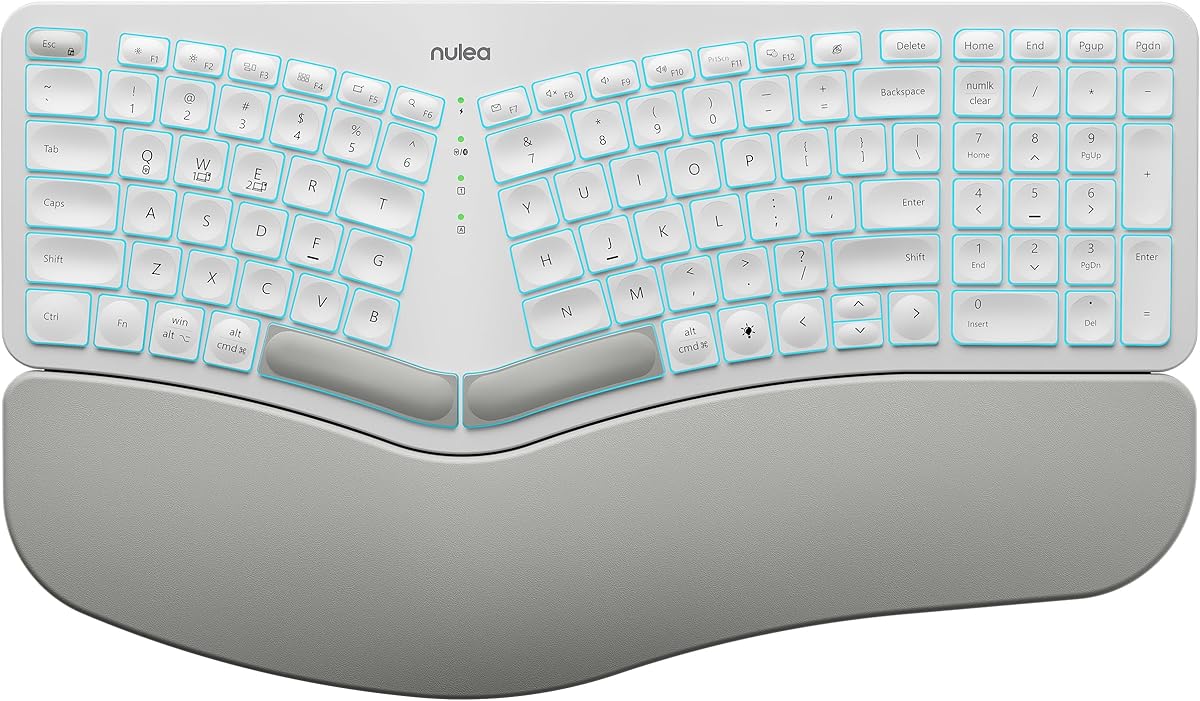
The Nulea RT05 is a feature-rich wireless split keyboard rated 4.2. It combines a splayed and curved ergonomic layout, a padded wrist rest, multi-device connectivity, adjustable tilt legs, and one of the more customizable lighting systems among the picks.
We may earn a commission when you buy through this link, at no additional cost to you.
Bluetooth and 2.4G USB allow the keyboard to establish connections with up to three devices and switch between them using a button. The backlight offers seven colors and three brightness levels, making it practical for low-light work and personalization. Its 2000mAh rechargeable battery is optimized for longer operation when the backlight is off.
Four adjustable tilt legs provide three tilt levels to vary the wrist angle. The lighting is not free from trade-offs: it turns off automatically when the battery falls below 10 percent to preserve basic functionality. The full multi-device arrangement also adds desk bulk compared with a compact wireless keyboard.
This keyboard fits users who alternate between a desktop, laptop, and tablet or want a split layout with a more expressive visual design. It is especially useful for evening typing, flexible workspaces, and anyone who values device switching and backlighting more than maximum desk compactness.
The ability to connect to three devices makes the RT05 useful for mixed setups. A single button press moves between work computer, personal laptop, and tablet without treating the keyboard as a single-device accessory.
Seven colors, three brightness levels, and an automatic low-battery backlight shutdown provide flexible visibility. Users can keep illumination for darker spaces while understanding that sustained backlight use will shorten operating time.
We may earn a commission when you buy through this link, at no additional cost to you.
The SABLUTE Ergonomic Wireless Keyboard and Mouse has the highest listed rating in the group at 4.8. It is a coordinated desktop bundle that combines a full-size split keyboard with a contoured mouse, offering a more complete ergonomic upgrade than a keyboard-only purchase.
We may earn a commission when you buy through this link, at no additional cost to you.
The keyboard uses a curved layout, memory foam wrist rest, soft-touch water-resistant palm support, and four adjustable tilt legs. Dedicated Windows and Mac switching and shortcut keys add everyday utility. The mouse includes palm and thumb rests, four DPI levels, and forward and back navigation buttons.
Both devices recharge over USB-C and communicate through 2.4GHz wireless, with a receiver stored under the mouse. Standby times are stated at up to 250 hours for the keyboard and 350 hours for the mouse, while auto sleep conserves power. The principal drawback is physical: the keyboard measures 19 by 10.45 inches and requires considerably more desk space than a compact model.
The SABLUTE bundle is a strong fit for users setting up a complete workstation who want coordinated ergonomic accessories without selecting a separate mouse. It is less suitable for compact desks or anyone who already owns a preferred pointing device, so desk dimensions should be checked carefully before buying.
The included mouse mirrors the keyboard's ergonomic goal with palm and thumb support. Pairing both devices creates a more consistent desktop setup for users who spend much of the day switching between typing and pointing.
The full-size keyboard includes a number pad and a broad palm-rest area, which benefits spreadsheet users but consumes more room. Measure the available desktop before committing to the bundle.
We may earn a commission when you buy through this link, at no additional cost to you.
The RK Royal Kludge S70 combines an independently split mechanical design with a compact 75% layout. Its 4.3 rating makes it an attractive option for gamers, programmers, and writers who want direct control over separation, tenting, switches, macros, and lighting.
We may earn a commission when you buy through this link, at no additional cost to you.
Eight adjustable feet allow the halves to be repositioned or tented, and a coiled cable links them. The left half contains a battery that preserves wireless connectivity and macro functionality for one-handed use. Low-latency 2.4GHz, Bluetooth, and USB-C connectivity cover several operating environments.
The hot-swappable PCB accepts three-pin and five-pin switches, while the supplied pre-lubed linear creamy switches provide a smooth, relatively quiet feel. Five programmable macro keys and RK software expand control, and RGB lighting includes status indicators for function keys, Caps Lock, and battery state. Its compact layout omits some keys found on full-size models, so users must adjust to the 75% arrangement.
The S70 is a compelling match for enthusiasts who want a conventional tenkeyless-style footprint with genuine split ergonomics. Its independent halves and macro tools reward experimentation, making it less suitable for users who prefer a fixed, immediately familiar full-size layout.
Eight feet let users refine the gap and angle between the two halves. That level of positioning is particularly useful when the shoulders, hands, or desk setup require a more individualized posture.
Hot-swappable sockets support common three-pin and five-pin switches, allowing users to change feel without soldering. Five macro keys, software remapping, and RGB lighting add further control for gaming and technical workflows.
We may earn a commission when you buy through this link, at no additional cost to you.
The Wired Split RGB Keyboard is a full-size, illuminated option for users who value visual effects and dedicated shortcut keys more than wireless flexibility. It has a 4.2 rating and combines an integrated wrist rest with an adjustable split frame.
We may earn a commission when you buy through this link, at no additional cost to you.
The lighting system provides 10 dynamic rainbow patterns, seven solid colors, 17 customizable effects, and five brightness levels. Two pairs of kickstands allow users to fine-tune the tilt. A 5.6-foot USB-A cable provides stable plug-and-play operation, and a USB-C adapter supports laptops and desktops with different port styles.
The full-size layout includes a number pad and 17 dedicated shortcuts for media, volume, screen brightness, calculator, emoji, search, home, and Print Screen. It is compatible with Windows, macOS, Chrome OS, and Linux without drivers, although key behavior may differ between operating systems and dual-boot environments. Gaming consoles are not supported.
This model is a practical fit for office workers, late-night typists, and desktop builders who want pronounced lighting without managing batteries or wireless pairing. Users who need a freely movable keyboard or console support will find the wired format and compatibility limitations restrictive.
Seventeen effects, seven solid colors, and multiple brightness levels provide more visual choice than a simple two-color backlight. The result is well suited to gaming setups and low-light desks.
The keyboard works immediately across major desktop operating systems and includes dedicated keys for frequently used functions. Its number pad and shortcut row serve productivity tasks without requiring additional desktop hardware.
We may earn a commission when you buy through this link, at no additional cost to you.
The Cloud Nine C989M is a premium full-size mechanical split keyboard built for users willing to tailor their setup carefully. It carries a 4.3 rating and offers adjustable separation, built-in palm support, tactile switches, RGB lighting, programmable macros, and a number pad.
We may earn a commission when you buy through this link, at no additional cost to you.
Its key modules can be separated by as much as eight inches, helping users align their hands and forearms. The integrated wrist rests have a seven-degree angle, creating a built-in tenting position intended to reduce outward wrist rotation during long sessions.
Kailh tactile brown switches provide a relatively low activation force with clear tactile feedback. Selectable RGB lighting improves key visibility, while ten programmable macro keys support productivity and gaming shortcuts. A full number pad and USB pass-through complete the feature set. Since the product is listed for PC, buyers should confirm compatibility with their exact system and software before purchasing.
The C989M is ideal for PC-focused power users, creators, and professionals who want extensive physical adjustability and macro access. Its size and complexity make it less appealing to first-time split keyboard owners, who may prefer a fixed frame and fewer configuration options.
Independent separation and built-in seven-degree tenting provide a more refined posture than a fixed split design. The full-size layout preserves productivity keys while allowing the user's hands to adopt a more neutral arrangement.
Tactile brown switches give noticeable feedback without the extreme bottom-out feel associated with many clicky options. Ten macro keys create room for shortcuts in games, creative applications, and repetitive office workflows.
We may earn a commission when you buy through this link, at no additional cost to you.
The Logitech Ergo K860 Business is a wireless split keyboard oriented toward IT departments and large managed deployments. Its 4.1 rating reflects a solid ergonomic platform paired with security and administration features that are less visible on consumer models.
We may earn a commission when you buy through this link, at no additional cost to you.
Logi Bolt wireless technology supports a Secure Connections Only mode with full encryption. The product is certified in more than 100 countries and supports remote mass deployment and device firmware updates through Logitech Options. These features make it easier for IT teams to standardize equipment across distributed workplaces.
The split, curved, sloping design improves wrist and forearm positioning, while the pillowed wrist rest and three palm-lift positions improve all-day comfort. A full-size number pad preserves familiar productivity functionality, and the keyboard can connect to up to three devices. Its stated two-year battery life suits intensive office use.
This business model is best for organizations that value centralized management and secure connectivity more than independently separated halves. Individual users may find the standard Logitech K860 more immediately relevant, while managed teams will appreciate the deployment and security emphasis.
Secure Connections Only mode and encrypted Logi Bolt connectivity address organizations that need stricter wireless controls. Remote firmware management and broad certification support standardized deployment across many users.
The curved split layout, wrist rest, number pad, and three-device connectivity preserve the features expected in an office keyboard. It remains more approachable for users than a compact mechanical split model.
We may earn a commission when you buy through this link, at no additional cost to you.
The Kinesis Freestyle2 is the most highly adjustable split keyboard in this roundup. Its independently rotating and movable modules can be separated by as much as nine inches, allowing users to position their hands, wrists, and forearms around individual body dimensions and desk preferences.
We may earn a commission when you buy through this link, at no additional cost to you.
The included V3 tenting accessory supports 5, 10, and 15 degrees, giving users several ways to raise the key modules and maintain a neutral forearm position. A pivot tether helps retain the chosen splay while allowing the halves to move independently. Adhesive cushioned palm pads add another layer of support.
The standard Windows layout includes familiar hotkeys and an embedded numeric 10-key. Custom membrane switches use low activation force and tactile feedback to reduce finger fatigue, impact, and strain. No special software or drivers are required. The trade-offs are a specialized price tier and a setup process that demands more experimentation than a fixed split keyboard.
The Freestyle2 is a strong recommendation for dedicated ergonomic users, typists with specific positioning needs, and anyone willing to spend time refining the setup. New users should begin with moderate separation and tenting, then make small adjustments rather than forcing an aggressive posture immediately.
Nine inches of separation and independently rotating modules offer much more latitude than a one-piece split frame. This makes the Freestyle2 suitable for users whose shoulders and forearms require a more individualized configuration.
The custom membrane switches provide tactile feedback with low activation force, reducing the effort required for each keystroke. The included palm pads and multiple tenting levels further support long work sessions.
We may earn a commission when you buy through this link, at no additional cost to you.
The right split keyboard depends on your body, desk, devices, and tolerance for a learning curve. Consider the degree of adjustability, key feel, connectivity, layout, and support features before choosing.
A fixed split frame divides the keys into two zones but keeps the overall structure intact, making it easy to learn and usually less demanding on desk space. A fully separated design lets each half move independently, which can help align the hands and forearms more precisely. The Kinesis Freestyle2 offers the broadest separation range, while the Cloud Nine C989M and RK Royal Kludge S70 support independently positioned modules.
Choose a fixed frame for convenience, or an adjustable design when you have a specific shoulder, forearm, or wrist-positioning concern.
Tenting raises the inner edges of the keyboard so the hands approach the keys from a more neutral angle. Adjustable feet, palm-lift legs, and fixed angles all serve this purpose, but independent controls provide more precise refinement. The Freestyle2 supports three defined tenting levels, the Cloud Nine includes a seven-degree position, and the Logitech K860 offers three palm-lift settings.
Look for multiple adjustment points when fine-tuning matters, but start conservatively and allow several days to evaluate each setting.
A raised palm rest can reduce the need to hold the wrists off the desk during pauses, while a cushioned wrist rest can make long sessions more comfortable. The Arteck and SABLUTE products emphasize substantial integrated supports, and the Logitech K860 uses a curved memory foam layer. Keycap shape also influences comfort because it changes how the fingers contact each switch.
Prioritize a rest that matches the depth of your hands and keeps your wrists neutral rather than pressing into a sharp edge.
Membrane switches generally deliver consistent operation with lower maintenance, while mechanical switches offer a broader selection of tactile responses and greater customization. The Perixx model uses membrane switches with extended travel, the Cloud Nine uses tactile brown mechanical switches, and the RK S70 ships with pre-lubed linear switches and hot-swappable sockets. Key travel, force, noise, and feedback preferences are personal.
Choose tactile feedback if you want confirmation without excessive noise, linear switches for smooth travel, and membrane construction for a simpler everyday experience.
Wired keyboards offer immediate operation and eliminate pairing, batteries, and receiver management. Wireless models provide more freedom and can serve several computers or devices, but they introduce charging and connection considerations. The Arteck and SABLUTE use 2.4GHz receivers, the Nulea adds Bluetooth, and the RK S70 supports both 2.4GHz and Bluetooth.
Select a wired model for a fixed workstation and a wireless model for a flexible multi-device desk, then verify that every required port is supported.
Full-size models include a number pad and more dedicated keys, which benefits accounting, spreadsheets, and navigation-heavy work. Compact 75% models save desk space but require users to adapt when familiar keys are absent. The RK S70 uses a compact layout, while the Arteck, SABLUTE, Cloud Nine, and Logitech models preserve number pads.
Choose full size for productivity and navigation, or a compact split model when desk space and portability matter more than having every key.
Backlighting improves visibility in dim spaces, while macro keys can accelerate repetitive commands in games and productivity software. The Nulea offers seven colors and multiple brightness levels, the wired RGB model provides numerous animated effects, and the Cloud Nine and RK models add macro controls. These features are useful but should complement rather than dictate the core ergonomic fit.
Prioritize comfort and key feel first, then consider lighting and programming if they will genuinely improve your regular workflow.
Compatibility varies across the category. Many models support Windows, macOS, Linux, Chrome OS, tablets, and phones, while the Cloud Nine is specifically presented for PC. The Logitech business model adds remote firmware management and secure wireless deployment for IT teams. Gaming-console support is explicitly absent from the wired RGB model.
Check the manufacturer's current system list, required software, port type, and intended environment before purchasing, especially for managed offices.
Begin by placing the two key groups directly in front of you rather than aligning them as one conventional keyboard. Keep shoulders relaxed, elbows near the sides of the body, and forearms approximately level. A correctly positioned split keyboard should reduce the need to bend the wrists outward, but it should not force the arms to reach or hunch.
Tune the setup gradually. Adjust the separation, tenting angle, or tilt feet in small steps and type for several days before making another change. Users of fully separated models should try moderate settings first. Wireless keyboards should be paired before arranging the desk, while wired models need enough cable length to avoid pulling the halves out of position.
For care, switch off a powered keyboard before cleaning it and use a soft, lightly dampened cloth on the housing and wrist rest. Avoid spraying liquid directly onto the keys or openings. Keep food and drinks away from the switches, remove debris with compressed air when appropriate, and follow the manufacturer's charging instructions for rechargeable models.
A split keyboard can help many users maintain a more neutral wrist position by reducing outward bending and forearm rotation. It does not guarantee relief from every type of pain, and an improper setup may still cause discomfort. Anyone experiencing persistent pain, numbness, weakness, or reduced mobility should consult a qualified healthcare professional rather than relying on a keyboard alone.
Most users need several days to a couple of weeks to become comfortable with the new key geometry and hand position. Short daily sessions are often more comfortable than abruptly switching an entire workday. Adjust separation and tenting gradually, and allow time for the shoulders, forearms, and wrists to adapt to the new movement pattern.
A fixed split design is simpler, more consistent, and easier for beginners to use. Adjustable models are preferable when you want to control separation and tenting or have specific ergonomic requirements. Adjustable models require more setup, but they can be refined over time as you learn which positioning feels natural.
That depends on your work. A number pad is useful for spreadsheets, accounting, data entry, and quick numeric navigation. It also increases the keyboard's overall footprint, which matters on a compact desk. Compact 75% models save space but remove some familiar keys, so consider your most frequent shortcuts before deciding.
Wireless performance depends on the specific connection technology. The RK Royal Kludge S70 supports low-latency 2.4GHz wireless and includes gaming-oriented features such as RGB lighting and macro keys. Wired models eliminate wireless variables altogether. Check the manufacturer's latency and compatibility information, and keep the receiver in a clear, nearby position.
Many split keyboards in this roundup are designed for Windows and macOS, and several also list Linux or broader platform support. Feature behavior can differ across operating systems, especially for dedicated shortcut keys, macros, and wireless switching. Review the compatibility notes and test important commands before relying on the keyboard for a full workflow.
Splitting divides the key groups to reduce outward wrist rotation, while tenting raises the inner edges of those groups. A keyboard can be both split and tented, as several models here are. Splitting changes the overall hand position; tenting changes the angle of approach and can help keep the forearms more neutral.
Most do, but the connection method matters. Wired USB models generally require an available port, while 2.4GHz models require the included receiver. Bluetooth models can pair with compatible devices more flexibly. Users of laptops without a USB-A port should verify whether an adapter or receiver is included.
The Logitech Ergo K860 stands out as the most balanced overall recommendation, combining a proven curved split design, full-size layout, wireless flexibility, and adjustable palm support. The Perixx PERIBOARD-512B is an excellent wired choice for a fixed desk, while the Kinesis Freestyle2 offers the deepest control over separation and tenting for dedicated ergonomic users.
Other shoppers should consider their exact priorities. Nulea prioritizes multi-device switching and lighting, SABLUTE provides a coordinated keyboard-and-mouse bundle, RK targets mechanical customization, the wired RGB model serves full-size illuminated setups, and Cloud Nine combines extensive adjustability with programmable macros. The business Logitech model is especially relevant to managed IT environments.
Before purchasing, verify the keyboard's dimensions, supported operating systems, connectivity requirements, layout, and included accessories. Check current ratings, warranty details, availability, and prices at the time of purchase, since specifications and promotions can change over time.

