
ASRock B650I Lightning WiFi
4.1Editor score
AM5 Ryzen processor support
PCIe 5.0 M.2 storage
WiFi 6E and 2.5G LAN
Explore the 10 best Mini Itx Motherboards for compact AMD and Intel builds, comparing sockets, power delivery, memory, storage, networking, and features.
Mini Itx Motherboards make it possible to assemble a powerful desktop in a remarkably small enclosure. Their compact 170 by 170 millimeter dimensions suit living-room systems, gaming rigs, office builds, and portable workstations, but choosing one requires balancing expansion, cooling, power delivery, and connector availability against limited space.
We compared all 10 boards in this guide across processor support, memory capabilities, power phases, M.2 storage, networking, rear and front-panel USB, display outputs, BIOS features, and practical Mini-ITX fit. The list includes current AMD AM5 and Intel options as well as AM4 and LGA 1700 boards that may suit particular component inventories.
Each review identifies the strongest reason to consider the board and the compromises that buyers should understand. Our top three represent a balanced recommendation, a feature-rich enthusiast option, and a premium connectivity-focused choice. Product availability, bundle contents, and prices can change, so verify the current listing before ordering.
4.1Editor score

5.0Editor score

4.4Editor score
The following comparison highlights the processor platform, primary expansion, memory generation, storage capability, and networking found across the 10 recommended Mini Itx Motherboards.




The ASRock B650I Lightning WiFi is a compact AM5 board that combines current platform fundamentals with a restrained set of extras. Its 4.1 rating reflects a practical design rather than an enthusiast-heavy specification list. The strongest attractions are support for three generations of Ryzen desktop processors, DDR5 memory, a PCIe 5.0 M.2 slot, 2.5G Ethernet, and WiFi 6E.
We may earn a commission when you buy through this link, at no additional cost to you.
The 8+2+1 power design uses Dr.MOS components and is intended to provide stable power delivery despite the board's limited surface area. Its two DDR5 DIMM slots support overclocked memory speeds up to 7200+ in a dual-channel configuration. Storage flexibility is better than the number of slots might initially suggest because one M.2 connector supports PCIe 5.0 x4, another supports PCIe 4.0, and two SATA3 ports are also included.
Connectivity covers the most common compact-build needs with a 2.5G LAN port, Intel WiFi 6E, multiple USB 3.2 Gen2 ports, and front- and rear-facing Type-C connections. Realtek ALC897 audio with Nahimic enhancement is serviceable, although it is less advanced than the codec found in many premium boards. The two-DIMM layout also means memory upgrades require replacing both modules rather than simply adding another stick.
This is a strong recommendation for a small Ryzen gaming system, general-purpose compact PC, or workstation that needs modern expansion without every premium feature. Buyers should pair it with a suitable Mini-ITX case and low-profile cooler, confirm the graphics-card clearance they need, and use a supported DDR5 memory kit. For straightforward AM5 performance and generous everyday connectivity, it remains one of the strongest balanced options in this list.
A dedicated PCIe 5.0 x4 M.2 slot allows a compatible high-speed NVMe drive to operate at its intended bandwidth, while a second PCIe 4.0 M.2 slot and SATA connectors provide room for more storage. The arrangement makes it easier to build a compact system with both a fast boot drive and a larger secondary drive.
The combination of 2.5G Ethernet, WiFi 6E, and BIOS Flashback makes the board convenient for both wired and wireless deployments. BIOS Flashback also allows firmware maintenance without relying on a fully installed processor, provided the required support hardware and compatible BIOS image are used.
We may earn a commission when you buy through this link, at no additional cost to you.
The ASUS TUF Gaming B850I WiFi NEO earns the Editor's Choice position by balancing a robust AM5 foundation, polished practical features, and a complete connectivity package. Its perfect 5.0 listed rating should be understood as customer feedback rather than a laboratory result, but it still signals a broadly well-received product. The board supports Ryzen 9000, 8000, and 7000 series processors.
We may earn a commission when you buy through this link, at no additional cost to you.
Its 8(80A)+2(80A)+1(80A) DrMOS power stage and 10-layer PCB are meaningful specifications in a compact board where VRM area is limited. One PCIe 5.0 M.2 slot and one PCIe 4.0 M.2 slot support a fast primary drive plus additional storage. Networking includes WiFi 6E and Realtek 2.5Gb Ethernet, while the USB selection includes a rear 20Gbps Type-C and a front-panel 10Gbps Type-C header.
Assembly convenience is a notable strength. The pre-mounted I/O shield saves one of the fiddlier installation steps, while Q-Antenna, Q-Dashboard, Q-LED, a Clear CMOS button, and BIOS FlashBack improve setup and troubleshooting. AI Cache Boost, AI Cooling II, ASUS AI Advisor, and AEMP are software features rather than substitutes for physical cooling, but they can make configuration easier for newer builders.
The board is best for users who want an AM5 Mini-ITX platform with strong power delivery, modern storage, fast wired networking, and wireless convenience without moving directly into the most expensive enthusiast tier. Its two-DIMM memory layout and dense feature set require some planning, but the combination is unusually complete. For a compact PC that may be upgraded or reconfigured over time, it is an especially coherent all-round choice.
The pre-mounted I/O shield, BIOS FlashBack button, Clear CMOS button, and Q-LED diagnostics reduce several common sources of installation friction. These details do not change core performance, but they can make a first Mini-ITX build noticeably more approachable.
The high-current DrMOS stages and multilayer PCB are especially relevant when pairing the board with a powerful Ryzen processor. Actual performance still depends on the chosen CPU, cooling system, firmware settings, and case airflow, so the board should not be treated as a guarantee of unlimited overclocking headroom.
We may earn a commission when you buy through this link, at no additional cost to you.
The ASRock B550M-ITX/AC is a focused AM4 option for builders who already own compatible Ryzen 5000, 4000 G-Series, or 3000-series processors and DDR4 memory. It carries a 4.3 rating and delivers the core features needed for a small desktop without pretending to offer the newest platform. DisplayPort and HDMI outputs support integrated graphics when a compatible Ryzen processor is installed.
We may earn a commission when you buy through this link, at no additional cost to you.
Its two-DIMM DDR4 configuration can run memory speeds up to 4733+ with overclocking, a potentially useful advantage for compact gaming builds. The board also provides 7.1-channel Realtek ALC887 audio. The title references support for future AMD Ryzen processors, while the supplied details more specifically list Ryzen 3000, 3000 G-Series, 4000 G-Series, 5000, and 5000 G-Series desktop processors and exclude Athlon processors.
The main limitation is platform age. AM4 boards do not accept Ryzen 7000, 8000, or 9000 processors, and the board's listed specification summary does not highlight modern features such as WiFi 6E, 2.5G Ethernet, PCIe 5.0, or USB4. If a new system is being assembled from scratch, an AM5 board offers a longer upgrade path and a more forward-looking feature set.
This recommendation makes the most sense for an AM4 upgrade involving a compact case, an existing processor, and reusable DDR4 memory. It can also be a practical way to reuse compatible components while avoiding the cost of replacing an entire platform. Verify the exact processor list, memory type, case fit, and cooler clearance before purchase, and inspect the current board condition if buying a used or renewed unit.
The strongest value case for this board comes from reusing a supported Ryzen processor and DDR4 memory. That can make a small-form-factor rebuild more economical while preserving the AM4 platform's established processor and motherboard ecosystem.
The supplied compatibility list explicitly excludes AMD Athlon processors and focuses on named Ryzen families. Because model suffixes and generation support can be confusing, buyers should verify their exact CPU against the manufacturer or seller documentation before ordering.
We may earn a commission when you buy through this link, at no additional cost to you.
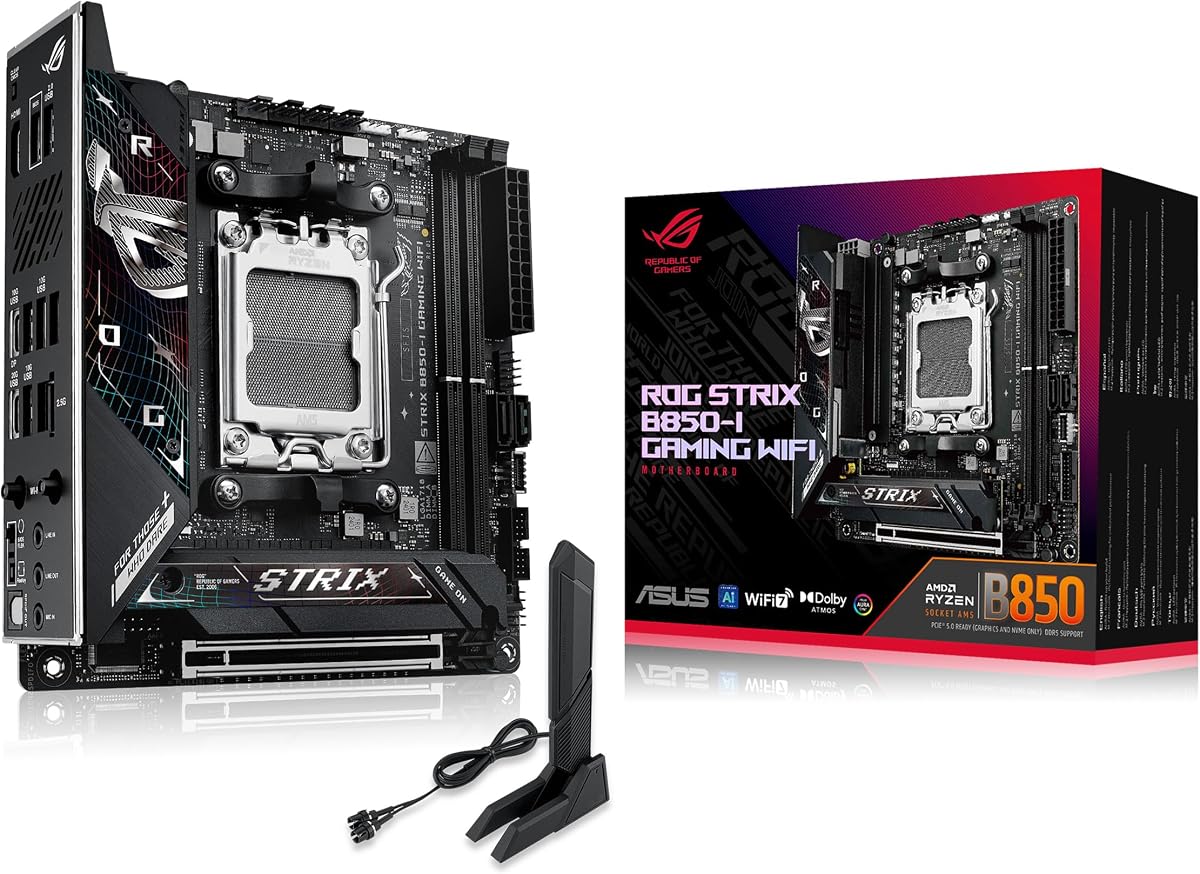
The ASUS ROG Strix B850-I Gaming WiFi is a premium Mini-ITX AM5 board aimed at compact systems where enthusiasts still expect high-end power delivery, networking, and storage. Its 4.3 rating places it well within this group, while the 10+2+1 power solution can supply up to 70A per stage according to the supplied specifications. It supports Ryzen 9000, 8000, and 7000 desktop processors.
We may earn a commission when you buy through this link, at no additional cost to you.
Storage is a major strength because both onboard M.2 connectors support PCIe 5.0. One includes a large heatsink for the primary drive, allowing a high-bandwidth NVMe SSD to benefit from more effective cooling. The primary graphics slot also supports PCIe 5.0 x16. A 2.5G LAN port and WiFi 7 provide modern networking without requiring a separate add-in card.
Large VRM heatsinks, an integrated I/O cover, and high-conductivity thermal pads address the thermal demands created by fitting a substantial power system into 170 by 170 millimeters. AI Advisor, AI Overclocking, AI Networking II, and AEMP round out the software layer. These utilities should be treated as configuration aids; stable overclocking still depends on silicon, cooling, firmware behavior, and the power limits selected by the user.
This board is a compelling fit for a small high-performance gaming PC or compact workstation that needs two very fast NVMe drives and modern wireless connectivity. Its feature set is more elaborate than a basic AM5 board, and the overall cost may exceed what a straightforward home build requires. Buyers who value premium features and have a compatible case and cooling plan should give it serious consideration.
The dual PCIe 5.0 M.2 arrangement is unusual in this form factor and gives compact builders two direct high-bandwidth storage connections. The larger heatsink over one slot is particularly useful for sustained workloads that can warm a fast NVMe drive.
Large VRM heatsinks, an integrated rear cover, and high-conductivity pads help the board manage heat around dense power components. Case airflow and CPU cooler selection remain important because a low-profile enclosure can trap heat that a larger motherboard would dissipate more easily.
We may earn a commission when you buy through this link, at no additional cost to you.
The ASRock B850i Lightning WiFi is a specification-forward AM5 Mini-ITX board with a 3.8 rating, the lowest among the products in this guide. Despite that comparatively modest customer feedback score, its core hardware is impressive: a 10+1+1 power design with a 110A Smart Power Stage, DDR5 support up to 8200+ with overclocking, and one PCIe 5.0 x16 slot.
We may earn a commission when you buy through this link, at no additional cost to you.
Storage includes a Blazing M.2 PCIe 5.0 x4 connector and a Hyper M.2 PCIe 4.0 x4 connector, along with SATA3 support. Killer 2.5G LAN and WiFi 6E with Bluetooth cover common network requirements. Display connectivity includes HDMI and USB Type-C with DisplayPort Alt Mode, while the rear USB selection features Type-C and multiple high-speed Type-A ports.
The 128GB memory capacity and extreme advertised memory speed are attractive for specialized compact builds, but the achievable result depends on the processor's memory controller, the selected DIMMs, BIOS settings, and the board's supported configuration. High-speed DDR5 kits also demand careful memory training, and users should be comfortable troubleshooting firmware or stability if the first settings do not work as expected.
This board suits an enthusiast who wants a tiny AM5 system with very fast memory, modern storage, and a full complement of I/O. Its lower rating warrants a closer examination of customer feedback and the exact configuration being purchased. Confirm case dimensions, graphics-card clearance, and low-profile cooler support before finalizing a system design around it.
Support for up to 128GB and advertised DDR5 speeds of 8200+ can benefit compact workstations that need both capacity and bandwidth. Real-world memory performance depends on the CPU and DIMM configuration, so buyers should avoid assuming that every memory kit will run at the headline figure.
HDMI and USB Type-C with DisplayPort Alt Mode provide useful choices for a compact living-room or desk system. The selected monitor cable and GPU output must support the intended resolution and refresh rate, particularly when using an integrated graphics processor.
We may earn a commission when you buy through this link, at no additional cost to you.
The ASUS ROG Strix X870-I Gaming WiFi is an enthusiast-oriented Mini-ITX board for builders who want extensive tuning controls and premium connectivity. Its 4.1 rating and strong specification list make it a serious option for compact Ryzen 7000, 8000, and 9000 systems. The 10+2+1 power solution is rated for 110A per stage and uses ProCool II connectors, alloy chokes, and durable capacitors.
We may earn a commission when you buy through this link, at no additional cost to you.
The board distinguishes itself through Dynamic OC Switcher, Core Flex, Asynchronous Clock, PBO Enhancement, and AI Overclocking. AI Cooling II and AI Networking provide additional configuration support, while DDR5 AEMP relates to memory performance profiles. These features can make experimentation more convenient, although users still need to understand each setting and monitor temperatures during sustained workloads.
Two M.2 connectors, PCIe 5.0 support, WiFi 7, and USB4 make the platform well equipped for current high-speed components. The Q-Release Slim mechanism is a particularly practical detail for a cramped enclosure, where removing a graphics card and managing attached power cables can otherwise be difficult. As with all dense Mini-ITX designs, proper airflow and a compatible low-profile cooler are essential.
This board is best suited to an enthusiast compact gaming PC, ambitious workstation, or system intended for later processor tuning. It may be excessive for basic office work, and the two-DIMM layout remains the standard Mini-ITX limitation. Buyers should review BIOS requirements, device compatibility, case dimensions, and the exact accessory bundle before ordering.
Dynamic OC Switcher, Core Flex, PBO Enhancement, and related firmware tools provide several routes for processor and memory tuning. They offer flexibility rather than automatic performance, and responsible use still requires stress testing, sensible thermal limits, and stable memory settings.
A compact case can make graphics-card access unnecessarily difficult. The Q-Release Slim mechanism addresses that physical constraint by reducing the effort required to remove or position a card, which is useful whenever the system needs servicing or a cooler change.
We may earn a commission when you buy through this link, at no additional cost to you.
The ASRock A620AI WiFi is an AM5 Mini-ITX board with an emphasis on flexible networking and modern memory support. Its 4.0 rating reflects a solid but less universally praised product than the leaders in this guide. It supports Ryzen 9000, 8000, and 7000 series processors, dual DDR5 DIMMs, and advertised memory speeds up to 8200+ with overclocking.
We may earn a commission when you buy through this link, at no additional cost to you.
Networking is the standout feature because it combines Realtek 2.5G LAN, Gigabit LAN, and WiFi 6E with Bluetooth. The two wired ports can also support link aggregation, depending on the complete network and switch configuration. This is useful for a compact server-like system, a workstation with redundant network paths, or a desktop that regularly transfers large files over a wired connection.
Storage and expansion lean toward the practical rather than premium. The primary graphics slot is PCIe 4.0 x16, while two M.2 connectors support PCIe 4.0 x4 and PCIe 3.0 x4. Two SATA3 ports are present for conventional drives. BIOS Flashback allows firmware updates without an installed processor, and a USB 3.2 Gen2 Type-C port plus several high-speed USB ports cover common peripheral needs.
This is a good match for a compact PC where networking matters more than the newest PCIe generation. Buyers can accept PCIe 4.0 storage and expansion because that limitation is meaningful when comparing it with newer boards. Confirm that the board's physical clearance works with the selected case, graphics card, and cooler, and verify the desired link-aggregation configuration before relying on both LAN ports.
Realtek 2.5G and Gigabit Ethernet provide more wired connectivity than most Mini-ITX boards. They can suit a compact server, a dual-homed workstation, or a system that wants a faster path to a NAS and a separate connection to another network segment.
The supplied data confirms PCIe 4.0 rather than PCIe 5.0 expansion, and the storage options do not include a PCIe 5.0 M.2 slot. Those limitations matter most for builders who require the newest graphics or storage bandwidth; ordinary gaming and productivity use remains a valid target.
We may earn a commission when you buy through this link, at no additional cost to you.
The Gigabyte B550I Aorus Pro AX is a well-regarded AM4 board with a 4.3 rating. It supports Ryzen 3000, 4000, and 5000 series processors and remains useful when a builder wants a small, established platform with good connectivity. The Pure Digital Direct 8 power phase, eight-layer PCB, premium chokes, and capacitors provide a robust foundation for compatible Ryzen chips.
We may earn a commission when you buy through this link, at no additional cost to you.
Its storage layout is more flexible than many entry-level Mini-ITX boards. One M.2 connector supports PCIe 4.0 and the other PCIe 3.0, while the primary graphics slot is a reinforced PCIe 4.0 x16 design. External connectivity includes USB 3.2 Gen2 Type-C, USB 3.2 Gen2 Type-A, and four USB 3.2 Gen1 Type-A ports.
Thermal Armor extends to the VRM heatsink and aluminum backplate, while an integrated I/O shield streamlines assembly. Q-Flash Plus supports firmware maintenance without a full CPU installation, and WiFi EZ-Plug simplifies antenna attachment. WiFi 6 and 2.5GbE give the board more capable networking than older AM4 models, while RGB Fusion adds cosmetic control for compatible components.
The board is recommended for an AM4 build that values networking, dual M.2 storage, and a polished feature set over the newest CPU platform. It can be especially attractive alongside Ryzen 5000 processors and DDR4 memory, but new AM5 processors cannot be used. Confirm case, cooler, and graphics clearance, and ensure the chosen processor is included in the supported family list.
WiFi 6 and 2.5GbE make the B550I Aorus Pro AX more relevant for contemporary networks than many earlier AM4 boards. Wired networking is especially useful for large game installs, NAS access, media transfers, and remote workstation workflows.
The extended VRM heatsink, aluminum backplate, and integrated I/O shield add both thermal support and installation convenience. Backplate heat dissipation depends on the case's contact with the board, but the component can also help protect the board during handling and mounting.
We may earn a commission when you buy through this link, at no additional cost to you.
The ASUS Prime H610I-Plus D4 is a straightforward Intel LGA 1700 option built around 12th-generation processors and DDR4 memory. Its 4.2 rating indicates a generally positive reception, while the feature set focuses on the essentials rather than premium networking or advanced power stages. It is most relevant to builders with a compatible processor and memory already in hand.
We may earn a commission when you buy through this link, at no additional cost to you.
The board includes a PCIe 4.0 slot, a 32Gbps M.2 connector, Realtek 1Gb Ethernet, and USB 3.2 Gen1 connectivity. A V-M.2 Key E slot allows a compatible wireless module to be added, although the supplied information does not indicate that wireless hardware is included. Display outputs include DisplayPort, HDMI, and D-Sub, offering useful options for office and integrated-graphics systems.
VRM and PCH heatsinks are joined by Fan Xpert support for cooling configuration. Q-LED provides visible diagnostic cues, and the mono-out header with amplifier IC can support compatible display arrangements. A dedicated SPI TPM header adds a path to a discrete trusted platform module, although the specific module and any firmware requirements must be confirmed separately.
This is a sensible compact-office or general-purpose build platform for someone already invested in LGA 1700 components. The 1Gb Ethernet is the most obvious limitation for a modern workstation, while the lack of included WiFi means additional planning is needed for wireless use. Verify socket generation, CPU support, memory type, case fit, and cooler clearance before ordering.
LGA 1700 and DDR4 support can be valuable for a builder reusing compatible components. The board prioritizes core functionality, visible diagnostics, and flexible display outputs rather than premium features, making it more practical than aspirational.
The V-M.2 Key E slot provides a route to wireless connectivity, but the module and antennas are separate considerations. Buyers should confirm the required module type, antenna placement, operating-system support, and any regulatory or fitting requirements for the enclosure.
We may earn a commission when you buy through this link, at no additional cost to you.
The MSI MPG B850I Edge TI WiFi combines premium connectivity, current AM5 support, and high-speed expansion in the standard 170 by 170 millimeter Mini-ITX format. Its 4.4 rating is the second-highest listed score in this group. The board supports Ryzen 9000, 8000, and 7000 processors and uses a Direct eight-phase 90A SPS power design for the AMD B850 platform.
We may earn a commission when you buy through this link, at no additional cost to you.
Networking sets it apart from most competitors because it combines full-speed WiFi 7, Bluetooth 5.4, and 5Gbps LAN. That is particularly useful for large file transfers, local media workloads, high-resolution game asset handling, and systems expected to grow beyond typical home-network speeds. The networking capability must be paired with compatible infrastructure, including switches, routers, storage devices, and client hardware.
Expansion includes a steel-armored PCIe 5.0 x16 slot, a PCIe 5.0 x4 M.2 connector, and a PCIe 4.0 x4 M.2 connector. Two DDR5 DIMM slots support advertised speeds of 8200+ MT/s in a 1DPC 1R configuration. Cooling provisions include 7W/mK MOSFET thermal pads, additional choke thermal pads, an extended heatsink, M.2 Shield Frozr, and a combo fan header rated for pumps and system fans.
This is a strong recommendation for a premium compact workstation, advanced gaming system, or enthusiast build that values fast networking without giving up current storage and graphics standards. Its cost and feature density may exceed a simple home-office requirement, but the platform is well differentiated. Confirm the enclosure's GPU clearance, CPU cooler fit, antenna placement, and the availability of compatible 5Gbps network equipment before purchase.
Five-gigabit Ethernet is meaningful for NAS transfers, large project files, local collaboration, and high-bandwidth storage. The benefit depends on the rest of the network: a 1Gb switch or storage target can prevent the connection from delivering its full potential.
Extended VRM cooling, high-conductivity thermal pads, and the M.2 Shield Frozr help manage heat in a confined board layout. The combo fan header offers flexibility for a compact liquid cooler or pump arrangement, but radiator size and case support must be verified independently.
We may earn a commission when you buy through this link, at no additional cost to you.
A good Mini-ITX motherboard is more than a smaller version of a full-size board. The right choice depends on processor compatibility, memory generation, expansion needs, cooling constraints, networking, and the physical dimensions of the complete system.
Begin with the processor platform because the socket determines which CPUs and memory the board can accept. Eight of the selections here use AMD AM5 and support multiple Ryzen 7000, 8000, and 9000 families, subject to the exact board's support list. The ASRock B550M-ITX/AC and Gigabyte B550I Aorus Pro AX use AM4, while the ASUS Prime H610I-Plus D4 uses Intel LGA 1700. These older platforms may reduce the cost of reusing components, but they do not provide the same processor upgrade path as AM5.
Choose AM5 for a new high-performance system with the longest platform runway. Choose AM4 when you already own a supported Ryzen processor and DDR4 memory. Choose LGA 1700 when a compatible Intel CPU and DDR4 kit are already available. Always verify the exact CPU model rather than relying only on a generation name.
Mini-ITX boards normally provide only two DIMM slots, so memory configuration deserves more attention than on larger boards. The AM5 options use DDR5 and advertise overclocked speeds ranging from 7200+ to 8200+, while the AM4 and Intel boards use DDR4. The ASRock B550M-ITX/AC lists DDR4 support up to 4733+ with overclocking, and the Gigabyte and ASUS legacy-platform boards also use DDR4.
Do not assume a high advertised speed will be reached in every system. The CPU's memory controller, BIOS version, DIMM layout, and memory kit all matter. If you may upgrade later, compare whether replacing both sticks is acceptable. For stable plug-and-play operation, select a memory kit explicitly supported by the motherboard and processor.
Power delivery is critical because high-performance desktop processors concentrate substantial current into a very small PCB. Several AM5 boards use high-current DrMOS or SPS stages, while the B550 and H610 options provide more modest designs. A larger stage rating is useful, but it should be considered alongside VRM heatsinks, thermal pads, case airflow, and CPU cooling rather than as a stand-alone guarantee.
Match the board to the processor and thermal solution. A compact system with a tall air cooler may be incompatible with a particular case even when the motherboard itself fits. Low-profile coolers, rear-mounted or side-mounted fans, and carefully positioned intake airflow can make a dense power design more effective. Avoid using maximum power settings unless cooling and stability have been validated.
Every board listed offers a primary PCIe x16 graphics slot, but generation matters. Current premium choices include PCIe 5.0 x16, while the ASRock A620AI and legacy-platform boards use PCIe 4.0. For most gaming systems, a PCIe 4.0 slot remains highly practical, especially when the graphics card itself does not saturate that bandwidth during normal play. Storage ranges from one high-speed M.2 connector to two, with some premium boards providing PCIe 5.0 x4 support.
Count the M.2 slots, SATA ports, and rear USB ports against your actual storage and peripheral needs. A graphics card also occupies space, and a thick card may interfere with cooler fans, drive cages, or the side panel. Check the maximum GPU length, height, and slot width allowed by the case before choosing a board with no expansion slots to spare.
Networking ranges from the ASUS Prime's 1Gb Ethernet to the MSI MPG B850I Edge TI's 5Gbps LAN. Several options include 2.5Gb Ethernet, which is a practical middle ground for a compact workstation or gaming system. The ASRock A620AI adds a second Gigabit port and supports link aggregation, while the MSI board combines 5G networking with WiFi 7 and Bluetooth 5.4.
Decide whether the build needs only basic internet access, fast local file transfer, or redundant wired connections. Wireless-capable boards usually include WiFi and Bluetooth, but antenna placement can be awkward in a metal case. The ASUS Prime H610I includes a V-M.2 Key E slot rather than confirmed integrated wireless hardware, so a module and antennas may need to be added separately.
Connector selection can determine how painless the finished system is to use. Look for USB Type-C on the rear for modern peripherals and a front-panel Type-C header if the case provides one. The ASUS TUF includes a rear 20Gbps Type-C port and a 10Gbps front-panel Type-C connector, while several other boards provide USB 3.2 Gen2 Type-C connectivity. Display outputs matter when using a supported processor with integrated graphics.
Audio codec quality matters for users who expect rich gaming or media sound through analog outputs, although external digital audio can provide a better result. Check the number and type of display outputs, not merely their presence. Also verify that the case's front-panel USB header matches the board's connector layout, as Mini-ITX cases vary considerably in cable support.
BIOS Flashback or an equivalent feature can be invaluable in a compact system where reaching the Clear CMOS header is inconvenient. It can update the firmware without requiring a fully installed processor, provided a supported CPU is present for initial POST on some boards or the function works exactly as documented by the manufacturer. Clear CMOS buttons, diagnostic LEDs, and easy-to-access power controls improve troubleshooting as well.
Consider software quality alongside physical features. ASUS provides a broad UIE dashboard, driver management utilities, fan and power tools, and memory tuning options, while ASRock offers Auto Driver Installer and BIOS Flashback. The exact bundled software and utilities can change with the chipset and BIOS revision. Read current user documentation and avoid using undocumented overclocking profiles as a substitute for stability testing.
Begin by reading the board's manual, checking the supported CPU and memory list, and comparing the motherboard's I/O layout with the ports available on the case. Confirm the case accepts the standard 170 by 170 millimeter Mini-ITX format, the graphics card fits, and the selected cooler has sufficient clearance. Install the processor, memory, storage, and power connections according to the manual rather than relying on generic guidance, because headers can differ between models.
Before applying power, inspect the board for loose screws, bent pins, misplaced standoffs, and disconnected cables. Confirm that the CPU socket latch is closed and that the cooler is firmly mounted. Use the memory configuration and BIOS settings recommended for the installed kit. If the system does not start, check the diagnostic LEDs, power connections, and Clear CMOS procedure before changing multiple components at once.
After installation, update the firmware if a newer stable release is available, install the operating system, networking driver, chipset utility, and any manufacturer control software, and then test memory, storage, networking, and thermals. Keep the case filters clean, maintain unobstructed airflow, and listen for unusual fan noise. Periodic firmware and driver updates are useful, but major-version changes should be applied with a stable power supply and a clear recovery plan.
Mini-ITX measures 170 by 170 millimeters, while micro-ATX is larger at 244 by 244 millimeters. The larger format generally provides more expansion slots, rear ports, and storage connectors, although many full-size cases support both standards. Mini-ITX is ideal when enclosure volume is the priority, whereas micro-ATX offers more flexibility for expansion cards and additional M.2 devices.
Yes, a Mini-ITX gaming PC can use many of the same processors, graphics cards, memory kits, and fast NVMe drives as a larger system. The main challenges are cooler clearance, power-cable routing, airflow, and limited upgrade slots. Careful component selection is especially important when the case is narrow or the graphics card is unusually thick.
Choose AM5 for a new build because it supports current Ryzen 7000, 8000, and 9000 processors and offers a broader future platform path. AM4 is more practical when you already own a supported Ryzen processor and DDR4 memory. An AM4 board may reduce component costs, but it cannot accept newer AM5 processors.
Yes, the AM5 boards in this guide use DDR5 memory and are not compatible with DDR4 DIMMs. The older AM4 and LGA 1700 boards use DDR4. Match the memory generation to the motherboard and then select a kit supported for the exact processor and board, particularly if you plan to overclock.
The Mini-ITX boards listed here provide one full-length PCIe x16 graphics slot and do not offer the multi-card space found on larger motherboards. They may include smaller expansion slots for capture cards, storage controllers, or network adapters, but the graphics configuration is designed around a single card. Check case clearance before choosing a multi-slot GPU.
BIOS Flashback allows a compatible firmware image to be loaded with a USB drive and a dedicated button, making updates and recovery more convenient. It is especially helpful in compact cases where the Clear CMOS header may be difficult to reach. Availability varies by board, and the exact update procedure should always follow the manufacturer's instructions.
It can help with local downloads, game installation, streaming, and traffic between devices on a fast local network. Internet game performance usually depends more on the service's servers, the connection's latency, packet loss, and ISP routing. A 2.5G or 5G port therefore offers clear benefits for local transfers and high-bandwidth storage rather than a universal latency improvement.
Confirm that the case supports the Mini-ITX form factor and compare its maximum motherboard dimensions, graphics-card clearance, CPU cooler height, and power-supply options. A board can match the standard size while still conflicting with a tall cooler, thick GPU, mounting bracket, or proprietary case components. Review the chassis specifications and physical layout before buying the complete system.
The ASRock B650I Lightning WiFi is the most balanced recommendation, combining AM5 support, PCIe 5.0 storage, 2.5G Ethernet, WiFi 6E, and practical maintenance features. The ASUS TUF Gaming B850I WiFi NEO is the Editor's Choice for builders seeking stronger power delivery, excellent feedback, modern USB, and easier assembly. The MSI MPG B850I Edge TI WiFi stands out as the premium selection because of 5G LAN, WiFi 7, and current PCIe 5.0 expansion.
For most new compact builds, prioritize processor support, cooling fit, memory compatibility, and the number of storage devices actually needed. Premium networking, specialized VRM ratings, and AI-assisted utilities matter most in specialized workstations or enthusiast systems. Older AM4 and LGA 1700 boards can be excellent choices when reusing a processor, memory kit, or other existing platform components.
Finally, check the current product listing, exact board revision, included accessories, case dimensions, and current market conditions before ordering. Availability, bundle contents, BIOS features, and prices can change over time. Confirm that the complete system fits physically and that every essential connector is supported before making the final purchase.