
Canon GI-21 Genuine Pigment Black Ink Bottle
4.8Editor score
Genuine Canon pigment ink
Wide MegaTank model support
Spill-conscious specialized nozzle
Discover the best pigment ink printer options by comparing compatibility, ink type, page yield, printer support, and refill convenience.
A pigment ink printer can deliver sharp text, durable color, and dependable everyday output, but the right choice depends heavily on the printer model and the type of ink system it uses. Important distinctions include cartridge-based, refillable-tank, and continuous ink systems, along with differences between black pigment and color dye ink.
This guide compares ten pigment ink options across HP, Canon, and Epson-compatible products, with particular attention to supported models, pigment or dye composition, included supplies, approximate page yield, refill design, and intended printing tasks. The list includes cartridges, refill bottles, multipacks, and one DTF-focused white pigment ink product.
Each pick demonstrates what makes it useful for a particular workflow, from sharp document printing to high-volume office output, vivid photo-style color, large-format work, or apparel decoration. Customer ratings and stated specifications provide the basis for comparison, while current prices, availability, and printer support should always be confirmed before ordering.
4.8Editor score

5.0Editor score

4.3Editor score
The comparison below covers ten pigment-focused ink products, distinguishing cartridge systems, refillable-tank bottles, continuous ink cartridges, and a white DTF pigment formula by compatibility, pigment content, color range, and intended use.



The Aomya Printer Ink Refill Kit for HP 60 62 63 67 Refillable Ink Cartridges is a versatile four-color solution for people using refillable HP cartridges, CIS, or CISS arrangements. It holds a 4.2 customer rating and stands out for its generous stated volume of 400 ml, divided among black, cyan, magenta, and yellow supplies.
We may earn a commission when you buy through this link, at no additional cost to you.
Compatibility is one of the kit's strongest features. The listed supported group includes HP 61, 60, 62, 63, 64, 65, 932, 933, 950, 951, 564, 902, 920, and 901 cartridge applications, as well as refillable cartridges and CIS/CISS systems. The manufacturer also describes strict inspection, smooth ink-dot delivery, and materials intended to support vivid, realistic color output.
The main limitation is that this is not a conventional plug-and-play retail ink product. It is intended specifically for refillable setups, so the user must already have compatible hardware or be prepared to establish one. Ink-system configuration, cartridge filling, and printer head maintenance are more relevant than they would be with a sealed cartridge or an OEM tank bottle.
This pick makes the most sense for an HP owner who already uses refillable 60-series-style cartridges and wants to keep four colors available in one package. It is less appropriate for a standard consumer printer that accepts sealed cartridges or for a Canon, Epson, or DTF workflow. For those users, one of the more specialized options in this guide will provide a cleaner match.
The kit is especially relevant to CIS/CISS users and refillable-cartridge owners because it provides all four colors in a coordinated refill package. That makes inventory management simpler than sourcing each color independently.
A stated 400 ml total volume offers useful room for regular document, school, and home-office printing. Actual results vary with page coverage, images, and printer settings.
We may earn a commission when you buy through this link, at no additional cost to you.
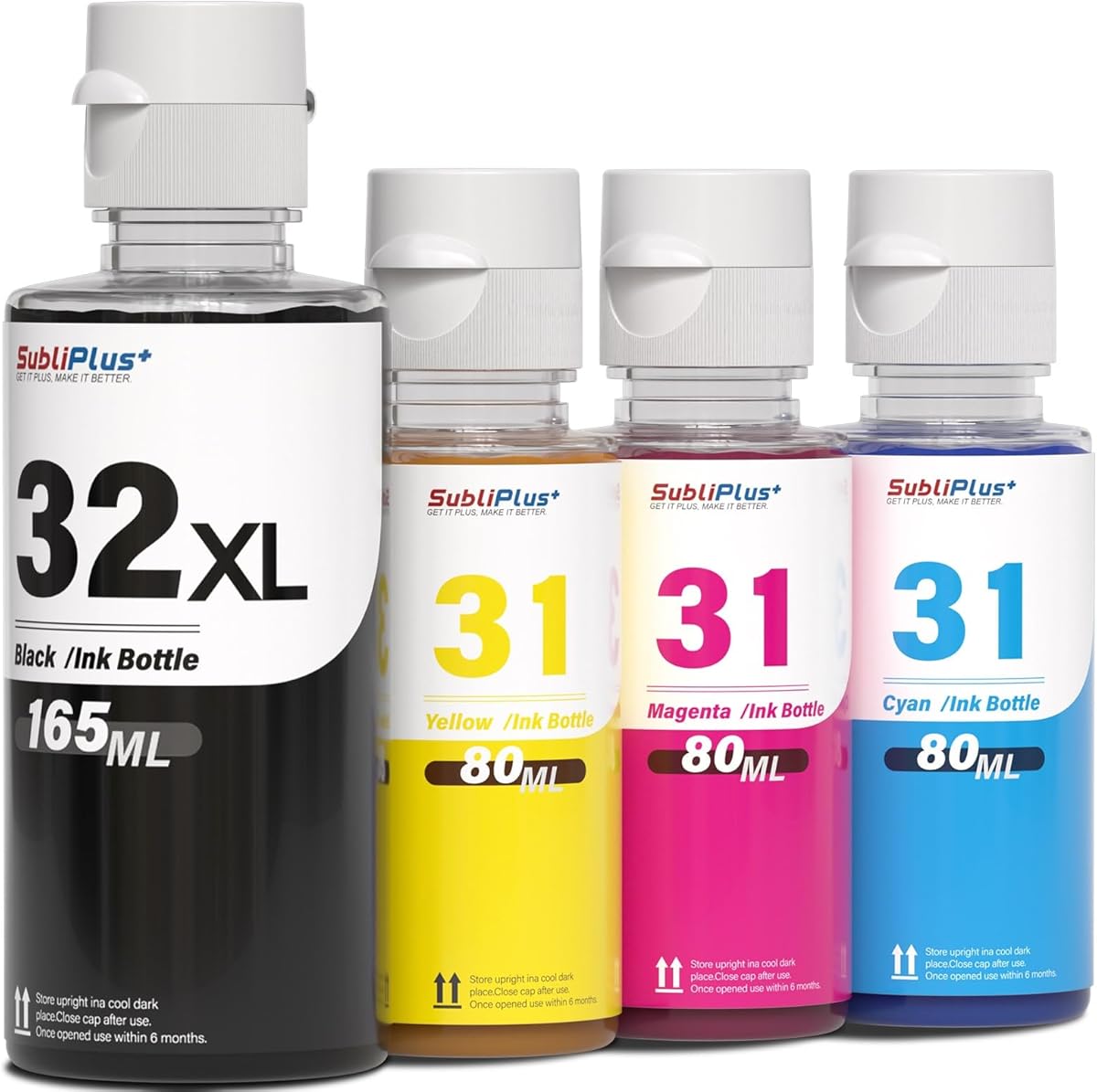
This four-bottle set is designed for owners of compatible HP Smart Tank and Smart Tank Plus printers who want one package for black and color refills. Its 4.7 rating is among the strongest in the group, and the automatic-stop bottle design is intended to make filling cleaner and reduce overflow or clogging problems.
We may earn a commission when you buy through this link, at no additional cost to you.
The set combines one 165 ml 32XL black bottle with three 80 ml 31 color bottles for cyan, magenta, and yellow. The stated page yield reaches 8,000 pages for the black bottle and about 7,000 pages in total for the color set under the product's testing conditions. It also includes a pair of gloves and a bottle-cap opening tool.
An important technical distinction is that the 31 colors are dye-based while the 32XL black is pigment-based. The listing explicitly advises against mixing them in one printer, so buyers should verify the ink configuration of their existing Smart Tank model before installing anything. This is more than a minor label distinction because black and color inks may also use different tank or cartridge channels on some models.
The product is a good fit for a compatible HP Smart Tank owner who wants a straightforward refill bundle and values the automatic-stop design. It is less appropriate for printers that use sealed cartridges, older models outside the listed range, or any setup that would require mixing dye and pigment inks. Checking the exact model number is the essential first step.
Each bottle is designed to stop automatically when the appropriate tank is filled, which can reduce spills and makes the refill process more approachable. Users should still remove and store bottles correctly between uses.
The stated yields suggest this bundle can suit active homes and offices that print frequently. Real output depends on ink density, coverage, cleaning cycles, and the printer model.
We may earn a commission when you buy through this link, at no additional cost to you.
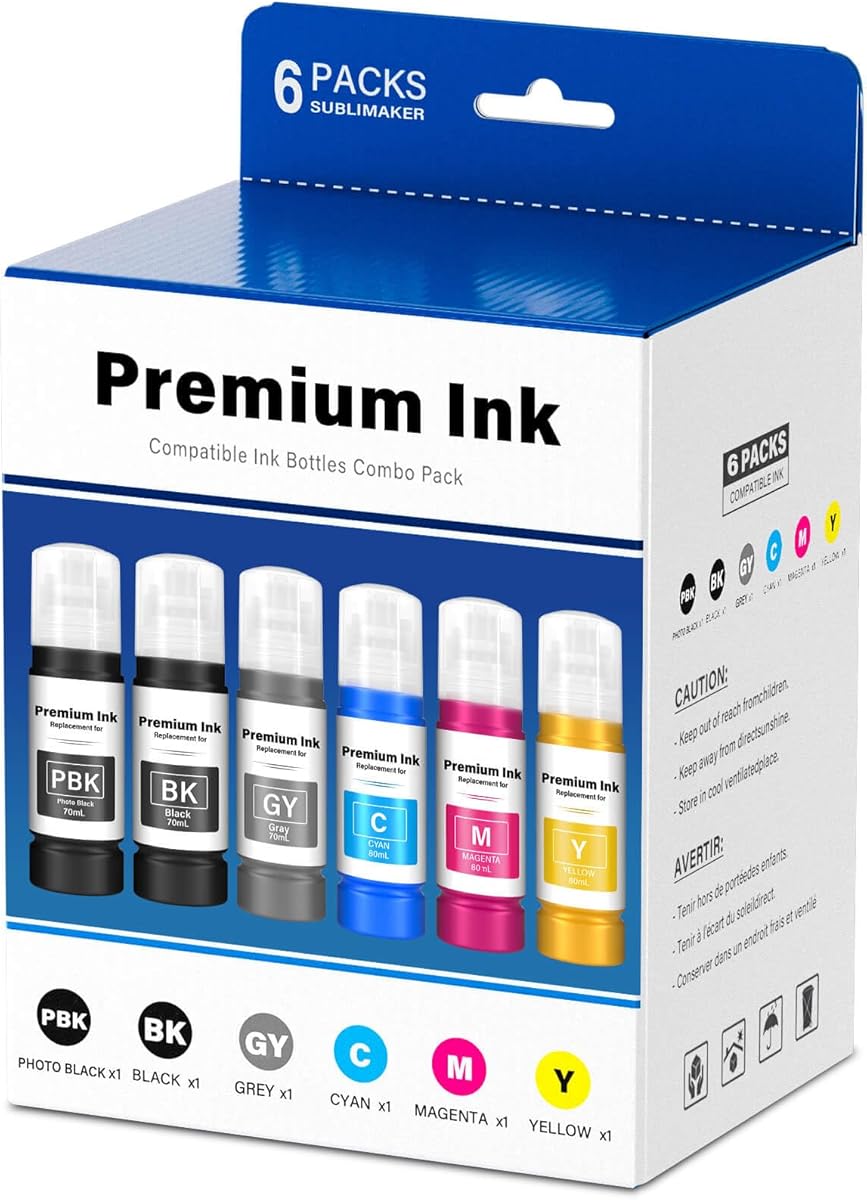
The Epson T552 refill bottle package targets compatible EcoTank Photo ET-8550 and ET-8500 models and combines pigment black with dye cyan, magenta, yellow, and gray. It carries a 4.6 customer rating, and its six-pack naming refers to the broader package format while the listed contents comprise five 70 ml ink bottles.
We may earn a commission when you buy through this link, at no additional cost to you.
The auto-stop bottle design is intended to simplify filling by snapping into the receiving tank and stopping when the fill is complete. The manufacturer states that the set can print up to 8,500 pages based on 5 percent coverage on A4 paper. It also cites ISO-9001 and MSDS certification and describes factory testing before shipment.
The most important caveat is compatibility and ink composition. This is explicitly not sublimation ink, and it is not a universal Epson EcoTank refill. The color bottles are dye-based, while black is pigment-based, which aligns with the listed T552 configuration. Users should confirm both model number and accepted ink type rather than relying on a broad EcoTank label.
For a compatible ET-8550 or ET-8500 owner seeking a full color setup in one purchase, this is one of the strongest matches in the guide. It is particularly useful for users who print both sharp black documents and color content and prefer bottle refills over changing small cartridges.
The included pigment black, gray, cyan, magenta, and yellow bottles cover both monochrome work and a broad range of color output. The gray bottle can support subtler shades than a basic three-color setup.
The keying and auto-stop format are intended to make each bottle easier to insert correctly. Following the printer's tank guide helps preserve a clean filling process.
We may earn a commission when you buy through this link, at no additional cost to you.
The hehua Pigment GI-25 Ink Refill Bottles are aimed at owners of compatible Canon MAXIFY GX2020 and GX1020 MegaTank printers. The set includes black, cyan, magenta, and yellow pigment ink, earning a 4.3 customer rating and providing a direct alternative to single-bottle purchases.
We may earn a commission when you buy through this link, at no additional cost to you.
Each bottle uses an auto-stop nozzle intended to prevent spills and simplify tank filling. The listing states estimated yields of up to 3,000 pages for the black bottle and up to 3,000 pages per color bottle at 5 percent coverage on A4 paper. Pigment-based ink is highlighted for vivid, long-lasting output and smooth printing.
Compatibility remains the central issue. While the product title refers to Canon GI-25 and GI-25, regional cartridge and tank configurations can differ, and the listing names specific MAXIFY models rather than the entire range. Buyers should confirm the exact printer model and the bottle code printed near the tank.
This is a sensible choice for a compatible MAXIFY user who wants all four colors and a spill-conscious refill design in one package. It offers a broader creative toolkit than a black-only bottle set while remaining more focused and less expensive in scope than a professional large-format ink bundle.
The refill bottles are designed to stop flow when the tank reaches the proper level. This feature can simplify filling, although the tank and bottle must still be correctly aligned.
The four pigment colors are intended to support clear documents, reports, charts, and general color projects. Heavy photo use may place greater demands on the printer and ink system.
We may earn a commission when you buy through this link, at no additional cost to you.
The Canon 280 and 281 XXL five-cartridge value pack is a convenient one-order solution for owners of numerous compatible Canon PIXMA TR and TS series printers. Its 4.4 rating reflects a broadly useful package that includes both large black and standard black cartridges alongside cyan, magenta, and yellow.
We may earn a commission when you buy through this link, at no additional cost to you.
The listed yields are 1,800 pages for the PGBK 280XXL large-black cartridge, 850 pages for the standard black cartridge, and 800 pages per color cartridge. Compatibility covers a wide group of TR, TS, and related models, making this one of the more flexible cartridge packages in the selection.
Users should note that the package mixes 280 and 281 cartridge formats and includes both PGBK and standard black products. The word XXL in the listing does not mean every ink channel is pigment-based, even though the headline emphasizes the 280 large-black cartridge. The product is primarily a cartridge replenishment pack rather than a refill-bottle system.
This multipack is most useful for a household or office that wants several Canon ink types ready at once and appreciates a broad compatibility list. It is less appealing to someone with only one printer and a single known cartridge, where a smaller targeted purchase may leave less unused inventory.
Keeping two black choices and all three standard color cartridges together reduces the need for several separate orders. It is a practical approach for a busy shared printer.
The stated page figures suggest a cartridge-oriented product capable of supporting substantial output. Actual page counts change with coverage, color use, and printer settings.
We may earn a commission when you buy through this link, at no additional cost to you.
The Canon GI-21 Genuine Pigment Black Ink Bottle is an OEM-style refill for a wide group of compatible PIXMA MegaTank printers. It carries a 4.8 customer rating and offers an up-to-6,000-page stated yield, making it a strong choice for owners who print many black-and-white documents.
We may earn a commission when you buy through this link, at no additional cost to you.
The compatible list includes the PIXMA G1220, G2260, G3260, G1230, G2270, G3270, G4270, G3290, and G4280. Its specialized nozzle is designed to pour into supported MegaTank systems without spills or mess, while the black pigment formulation is suited to sharp text and professional-looking monochrome output.
The product description includes references to GI-20 and GI-26 in different passages, so buyers should pay close attention to the model label on their printer rather than relying only on the broader family relationship. Genuine Canon packaging and logo are also emphasized as a way to distinguish the product from imposters.
This bottle is a strong recommendation for a compatible PIXMA MegaTank user who prioritizes dependable black output and straightforward filling. Because it covers only black, color users will need separate ink. Those seeking a full set or a specific large-format workflow should examine the dedicated multipacks later in this guide.
Pigment black is especially appropriate for contracts, reports, invoices, and other text-heavy pages where clear edges and readable output matter.
The bottle's nozzle is engineered for supported MegaTank filling positions. Correct alignment and an unobstructed tank opening help maintain a clean refill.
We may earn a commission when you buy through this link, at no additional cost to you.
The Printium White DTF Ink is unlike the standard document and photo products in this guide because it is formulated specifically for direct-to-film heat-transfer printing. Its 1000 ml volume, high-opacity pigment, and garment-focused claims give it a clear role in custom apparel and textile production.
We may earn a commission when you buy through this link, at no additional cost to you.
The listing describes compatibility with numerous DTF and converted DTG systems, including models using L1800, L805, ET-8550, ET-8500, ET-2800, XP15000, R1390, I3200, XP600, TX800, and other printheads. It states that the water-based, low-odor formula is designed for PET film transfers to cotton, polyester, denim, nylon, leather, canvas, and other materials.
Key performance claims include high opacity over dark and light garments, crack and peel resistance, flexibility after pressing, reduced sedimentation, and clog-resistant flow. An ICC profile is also said to be available for optimized color output. These features make the product more relevant to a print-shop owner or serious apparel hobbyist than to an ordinary home document printer.
The product is a good fit for someone already running a compatible DTF workflow and needing a large quantity of white underbase ink. It is not a substitute for standard black, cyan, magenta, or yellow ink. Printhead compatibility, film, powder, curing equipment, and print settings all affect the final garment result.
White underbase is used to help lighter inks remain visible over dark fabric. The listing claims single-pass coverage, though curing and garment preparation can influence the finished transfer.
The fine-milled pigment is designed to remain suspended and support continuous flow. Shaking the bottle before use is still recommended, and the printhead should be maintained according to the printer maker's guidance.
We may earn a commission when you buy through this link, at no additional cost to you.
The Yellumyn PFI050 four-pack is a complete pigment ink solution for compatible Canon imagePROGRAF TC-series printers. It has a 5.0 customer rating, the highest listed score, and combines black, cyan, magenta, and yellow bottles in a package with 280 ml of stated total capacity.
We may earn a commission when you buy through this link, at no additional cost to you.
Compatible models include the imagePROGRAF TC-20, TC-20M, TC-21, TC-21M, and closely related variants. The listing identifies the relevant PFI-050 product numbers for each color and describes straightforward installation into the appropriate ink-tank slots. This makes the set especially suitable for a professional or high-volume user who prefers a complete refill bundle.
Because the product targets a specialized printer family, model verification is more important than it would be with a general-purpose cartridge. Users should also follow the printer's installation and maintenance sequence, as large-format pigment systems may require particular priming, calibration, and leveling procedures.
This is a compelling premium choice for an imagePROGRAF TC owner who needs all four colors. The complete set, generous total volume, and strong customer feedback distinguish it from single-bottle purchases. Those with a different Canon model or a basic home printer should choose a product explicitly designed for their tank or cartridge system.
All four pigment colors arrive together, reducing the need to source individual refill bottles separately. That convenience is valuable for users who print mixed-color technical and design work.
Four 70 ml bottles provide a substantial stated refill volume. The actual number of jobs depends on coverage, color use, and the printer's maintenance requirements.
We may earn a commission when you buy through this link, at no additional cost to you.
The Compatible Canon PGI-280XL PGBK is a single black cartridge for a broad selection of PIXMA TR and TS models. Its 4.6 rating and focus on sharp, crisp text make it a practical option for users who need dependable monochrome output without buying a full color pack.
We may earn a commission when you buy through this link, at no additional cost to you.
The supported list includes the TR7520, TR8520, TR8620, TS6120, TS6220, TS6320, TS702, TS8120, TS8220, TS8320, TS9120, and TS9520. As an XL cartridge, it is designed to offer more output between replacements than a standard small cartridge and is intended primarily for document printing on plain paper.
Compatibility is straightforward for the listed printers but depends on using the right cartridge and installed model. The product also references genuine Canon features and creative park Premium content, although that statement should be interpreted carefully when considering a compatible rather than explicitly branded OEM package.
This cartridge is best for a compatible PIXMA owner with a clear need for black text and a preference for cartridge replacement over bottle refilling. It does not address color needs, so users who regularly produce charts, school projects, or photo prints should plan a separate color solution.
The pigment black formulation is intended to produce defined letters and lines on ordinary paper. This makes it suitable for reports, forms, and high-volume monochrome jobs.
A single-cartridge format is convenient when only black is needed. It avoids the inventory and setup complexity of a full multipack.
We may earn a commission when you buy through this link, at no additional cost to you.
The Canon GI-20 Genuine PGBK Ink Bottle is built for the PIXMA G5020, G6020, and G7020 MegaTank printers. It earns a 4.8 rating and states a yield of up to 6,000 pages, making it a focused, reliable-looking option for owners of these supported models.
We may earn a commission when you buy through this link, at no additional cost to you.
The bottle uses a specialized nozzle intended to pour into compatible MegaTank systems without spills or mess. Its genuine Canon identity may appeal to buyers who want an established OEM refill for a printer that has a limited set of compatible alternatives.
Compatibility is narrower than it may first appear. The supported list contains three models rather than the broader range found with the GI-21 product in this guide. Buyers should check the printer's model label and tank marking before ordering, especially if their MegaTank was purchased in a different market.
This is an excellent match for a G5020, G6020, or G7020 owner who primarily needs sharp black documents and wants a genuine refill bottle. It is less flexible for users seeking all colors, a wider model range, or a bottle-fed system for a different Canon family.
Using an ink made for the specified printer family can support consistent operation and straightforward setup. Verify the bottle code and model before opening the package.
The stated yield of up to 6,000 pages indicates a high-capacity option for document-heavy users. Actual output changes with ink coverage and printer maintenance.
We may earn a commission when you buy through this link, at no additional cost to you.
The right pigment ink product depends less on brand preference than on exact printer compatibility, ink channel design, and the type of output you expect to create. Use the following factors to narrow the field before purchasing any refill or cartridge.
Printer-family names can be misleading because Canon, Epson, and HP models often share a platform while using different cartridge or bottle codes. Start with the complete model number from the printer body, rear label, or software information panel, then compare it with the seller's supported list. For refill bottles, also inspect the code printed beside the ink tank. A close visual match is not enough; the ink channel, bottle key, and cartridge identifier must all align with what the printer accepts.
Pigment ink is especially valued for sharp dark text, water resistance, and durability, while dye ink is often associated with smoother color gradations and broader photo-style output. Several products in this guide deliberately mix pigment black with dye colors. That configuration can be appropriate, but mixing ink formulations within an unsupported channel or printer can increase the risk of poor results or maintenance problems. The seller's formulation notes and the printer manufacturer's guidance should both be followed.
Cartridge products are convenient for printers designed around sealed replaceable cartridges. Refill bottles suit tank-based models, including MegaTank, Smart Tank, EcoTank, and compatible continuous ink systems. Bottles are usually more useful for frequent printing, while cartridges can be easier for occasional users. Do not assume a bottle will fit a cartridge printer or that an aftermarket cartridge will work in a tank printer. The physical refill system is part of the compatibility decision.
A black pigment cartridge is often enough for contracts, invoices, reports, and ordinary schoolwork. Full CMYK bundles are more useful for charts, presentations, craft projects, and photographs. Dye-based color inks may be preferred for smooth gradients, while pigment sets can be better suited to sharpness and longevity. Consider the mix of documents and images you actually print rather than selecting a large color package for a monochrome-only workflow.
Auto-stop bottles, keyed nozzles, and guided tank positions can reduce spills and incorrect insertion. They do not eliminate the need for basic care: keep the tank opening clean, do not force a bottle, and follow the printer's filling instructions. Cartridge systems offer a different kind of convenience because the unit is replaced rather than manually poured, but they still need proper installation. Evaluate both the filling experience and the printer's cleaning requirements.
Advertised page yields are useful for comparison but are not guarantees. Yields typically assume a particular coverage level, often around 5 percent on A4 paper, and exclude the extra ink used for cleaning and setup. A page with dense graphics consumes more ink than a standard text page. Compare yields only when they use similar test assumptions, and treat the figures as directional rather than exact for a home or office workload.
Occasional users may prefer a single cartridge or bottle that minimizes leftover inventory, while busy households, schools, and small businesses benefit from multipacks and higher-capacity options. High-volume workflows also need enough storage and stable results across long runs. For DTF production, consider pigment stability, sedimentation, and printhead compatibility in addition to volume. Choose a refill format that matches how often the printer runs, not simply how much ink the package contains.
For specialized equipment, compatibility extends beyond the printer's marketed brand. The white DTF ink in this guide, for example, applies to heat-transfer systems and a broad list of printheads rather than ordinary office printers. Large-format Canon imagePROGRAF users should also verify the exact TC-series model and cartridge identifiers. Reviewing the printer manual alongside the ink listing reduces the chance of buying a product that cannot be installed or maintained correctly.
Begin by confirming the printer model, installed ink codes, and the fill type required by the manufacturer. Bring the printer to a stable, level surface, prepare the correct tank or cartridge position, and use a clean cloth and appropriate cleaning solution for the surrounding area. For a bottle refill, shake the container as directed, remove the protective packaging, and align the keyed nozzle with the receiving port without forcing it.
Fill each channel slowly and avoid lifting the bottle away from the tank before the automatic stop has completed its cycle. Do not mix formulations or products unless the printer manufacturer and ink supplier explicitly state that the combination is supported. After installation, run the printer's prescribed setup or calibration sequence before judging color, sharpness, or flow. Allow all containers to be stored or discarded according to their labels and local requirements.
For ongoing care, keep tanks and cartridge areas clean, avoid prolonged storage of a partially filled system, and use the printer's built-in maintenance cycles as directed. Printhead cleaning is especially important for pigment and white DTF inks. Store bottles tightly closed in a cool, stable environment, and consult the ink supplier or printer maker if you notice persistent clogs, leakage, streaking, or unusual color shifts.
Pigment ink uses fine, solid color particles and is generally valued for sharp text, strong dark output, and improved durability. Dye ink dissolves in the liquid carrier and is often associated with smooth color transitions and photo-style results. Many legitimate printer systems use a combination, such as pigment black paired with dye color inks, so the correct setup should always be confirmed in the printer manual.
No. Even printers from the same brand can use different cartridge codes, tank configurations, bottle keys, and ink channels. Match the complete printer model and the ink code printed near the tank or cartridge bay. If the listing omits the model or code, the purchase should be delayed until compatibility can be confirmed with the supplier or manufacturer.
Not usually. Stated yields generally rely on a standardized page-coverage assumption, commonly 5 percent on A4 paper. Dense images, solid backgrounds, headers, and color-heavy pages consume more ink, while cleaning and setup cycles can also use some supplies. Treat the published figure as a comparison aid rather than a guaranteed result for your own pages.
Different formulations can have different flow, drying, and maintenance characteristics, and the printer may not be designed to manage them in the same channel. Unsupported mixing can contribute to inconsistent results or clogged printheads. Use the black and color inks specified for the model, and change formulations only according to the printer maker's instructions.
Auto-stop bottles are designed to stop flow when the tank reaches the proper level, which reduces overflow risk. They still require correct alignment, a clean tank port, and an upright insertion. A damaged nozzle, an incorrect bottle, or premature removal can still cause leakage, so following the filling procedure remains important.
White DTF pigment ink is used as an underbase when transferring designs to dark or light fabric through PET film. It helps subsequent colors remain visible over the garment. A complete apparel workflow also requires compatible printers, transfer powder, film, curing equipment, and appropriate settings, so this product is intended for specialized DTF users rather than normal document printing.
Cartridge sets are usually simpler for occasional printing and sealed cartridge systems. Individual bottles or a full bottle multipack are often more practical for compatible tank printers that print frequently. The right choice depends on the printer's refill method, available storage, and the mix of black and color ink you use every month.
Use only ink approved for the printer, keep refill ports clean, and run the manufacturer's recommended cleaning cycle when necessary. Avoid leaving a tank system open or partially prepared for long periods, and store bottles tightly closed. For DTF ink, follow the supplier's shaking and filtration guidance because pigment settling and printhead maintenance are especially important.
The strongest all-around choices in this guide are the Canon GI-21 for compatible PIXMA MegaTank users, the Yellumyn PFI050 set for imagePROGRAF TC printers, and the hehua GI-25 package for supported Canon MAXIFY models. Each provides a clear combination of pigment color, practical capacity, and refill convenience, but their compatibility ranges are entirely different.
Prioritize exact printer and ink-code compatibility before comparing yield or package size. Choose black-only supply for a document-centered workflow, a full CMYK set for mixed professional or creative output, and a DTF-specific white pigment formula only when the printer, film, powder, and curing process are ready for garment transfers. For existing refillable or continuous systems, a dedicated multipack such as the Aomya kit may provide better value than an unrelated sealed cartridge.
Before ordering, confirm the full model number, current ink requirements, package contents, and any manufacturer cautions. Customer ratings and specifications are useful starting points, but printer support and formulation remain the decisive factors. Prices, promotions, and availability can change, so check the current listing and compare the complete package before making a final purchase.