
Canon MegaTank G3270
4.1Editor score
Up to two years included
6,000 monochrome page estimate
7,700 color page estimate
Wireless print copy and scan
A printer with liquid ink can combine refillable ink tanks with the convenience of an all-in-one device, helping households and home offices print more without replacing small cartridges as frequently. The strongest options offer useful page yields, wireless connectivity, borderless printing, scanning, copying, and straightforward tank refilling.
We compared the ten models in this guide using their published specifications and customer ratings, focusing on ink capacity, included page estimates, refill convenience, print quality, productivity, connectivity, and included functions. The list covers HP Smart Tank models and Epson EcoTank models from basic home units to higher-volume EcoTank Pro equipment.
Each review identifies the feature that makes a printer most suitable for a particular type of user, while the comparison table makes the differences easier to scan. Ratings and included-ink claims can vary by market and usage pattern, so readers should verify current specifications, printer compatibility, and prices before purchasing.
4.1Editor score

4.1Editor score

4.0Editor score
As an Amazon Associate we earn from qualifying purchases.
This side-by-side comparison highlights the major differences among the ten refillable-ink models, including their rated customer scores, included page estimates, wireless capabilities, and core scanning or copying functions.




The HP Smart Tank 5003 is a cartridge-free all-in-one designed for households and home offices that want to reduce cartridge replacement. It has a 3.9 customer rating, but its broad feature set, generous initial ink allowance, and straightforward refill process make it a strong all-around recommendation.
We may earn a commission when you buy through this link, at no additional cost to you.
HP advertises up to three years of included ink, with page estimates of up to 6,000 black or color pages. It prints, copies, and scans, while wireless and mobile printing make it convenient for use beyond a desk. Borderless output expands its usefulness for photos, craft projects, and documents that need more natural margins.
The tank system is designed to be less wasteful than conventional cartridges. Users plug compatible ink bottles into the easy-access tanks and allow the ink to drain, avoiding the squeezing and spilling associated with some refill systems. The trade-off is that the 3.9 rating indicates some customer experiences are less satisfactory than those of several Epson and Canon models in the list.
This printer makes the most sense for a home user who regularly prints forms, school projects, recipes, photographs, and ordinary documents. Those who prioritize the longest advertised included-ink period, easy refilling, wireless access, and scanning will find the package especially compelling. It is our leading choice for overall balance rather than speed.
The easy-access, mess-free tank design lets users replenish ink by connecting bottles and letting them drain. This makes routine refilling more approachable for people who do not want to handle conventional replaceable cartridges.
Printing, copying, scanning, borderless output, and wireless mobile support provide a broad set of everyday functions. The result is a versatile choice for households that want one device to cover documents, photos, and basic office tasks.
We may earn a commission when you buy through this link, at no additional cost to you.
The Canon MegaTank G3270 is an approachable wireless all-in-one for buyers seeking a refillable-ink printer without moving to a premium model. Its 4.1 rating ties for the second-highest score among the products compared, indicating generally favorable customer feedback.
We may earn a commission when you buy through this link, at no additional cost to you.
Canon states that up to two years of ink are included. A single set can produce as many as 6,000 black-and-white pages or 7,700 color pages under the manufacturer's stated conditions, making the model particularly interesting for color-heavy users. It also supports wireless printing, copying, and scanning, with a 1.35-inch square color LCD for straightforward operation.
The principal limitation is that the published specification identifies single-sided printing only. Buyers who routinely need automatic duplex printing may need to look elsewhere. The included-ink period also falls short of the three-year claims associated with some HP and Epson options, although the listed color page estimate is highly competitive.
For students, families, and budget-conscious home offices, the G3270 is an easy recommendation. It offers the key advantages of liquid ink, wireless operation, a useful display, and substantial estimated page output in a focused package. It earns the Best Budget designation because it delivers those fundamentals without the premium positioning of the EcoTank Pro model.
The stated yield of up to 7,700 color pages per ink set is among the strongest in this guide. That makes the G3270 relevant to users who print photographs, school projects, menus, or other color-heavy material regularly.
Wireless print, copy, and scan functions allow the printer to serve multiple devices without a direct connection. The square color LCD also gives users a more visual interface for common tasks and status checks.
We may earn a commission when you buy through this link, at no additional cost to you.
The Epson EcoTank ET-2803 is a wireless color all-in-one with the highest customer rating in this guide at 4.2. It balances useful page yields, refill-based ink, scanning, copying, and modern connectivity in a home-oriented EcoTank model.
We may earn a commission when you buy through this link, at no additional cost to you.
Each set of ink bottles is stated to be equivalent to about 80 individual cartridges, with estimated yields of up to 4,500 black pages or 7,500 color pages. Epson includes up to two years of ink, and its Micro Piezo Heat Free technology is designed to produce sharp text and impressive color photos and graphics across different paper types.
The flatbed scanner and copier expand the device beyond printing, while AirPrint, Epson Smart Panel, and hands-free voice-activated printing broaden its appeal to connected users. Epson recommends genuine ink for optimal quality and performance and notes that non-genuine ink could cause damage outside its limited warranty. Automatic duplex printing is not identified in the supplied specifications.
This is a strong recommendation for a household that wants excellent color capability, reliable wireless features, and a highly rated product at a manageable tier. It may be the right choice for someone who values day-to-day convenience and output quality over having the longest advertised included-ink period or the fastest office-oriented speeds.
With a 4.2 rating, the ET-2803 leads the ten models in customer feedback. Its combination of productive page estimates, flexible connectivity, and a built-in scanner makes that favorable reception easy to understand.
AirPrint, Epson Smart Panel, and voice-activated printing support several convenient ways to begin a job. These features are especially useful for households where different family members or guests may print from their own devices.
We may earn a commission when you buy through this link, at no additional cost to you.
The Epson EcoTank ET-2800 is a wireless color all-in-one built around refillable tanks, a flatbed scanner, and a copier. Its 4.0 rating places it among the stronger customer-rated options, while the 10-page-per-minute black ISO speed gives it useful productivity for a home printer.
We may earn a commission when you buy through this link, at no additional cost to you.
The manufacturer states that a set of ink bottles is equivalent to about 90 individual cartridges, with output of up to 4,500 black pages and 7,500 color pages. Up to two years of ink are included, reducing the need for early cartridge replacement and supporting the printer's cartridge-free waste-reduction goal.
Micro Piezo Heat Free technology is used to create vivid, detailed documents and color output, while wireless connectivity allows flexible placement around the home. Epson strongly recommends genuine ink to maintain optimal quality and performance, and warns that non-genuine ink could cause damage not covered by the limited warranty. Automatic duplex printing is not included in the supplied details.
The ET-2800 suits users who want more speed than a basic home model without moving to a business-oriented EcoTank Pro device. It is a sound pick for mixed-color households and home offices that regularly scan or copy documents, although buyers should compare its current availability and features with newer EcoTank variants.
A black ISO speed of up to 10 pages per minute improves throughput over entry-level models. Combined with wireless operation and an all-in-one design, it suits users who print a mixture of long documents, forms, and color materials.
The cartridge-free system is designed to reduce the plastic waste associated with repeatedly replacing small cartridges. Its high estimated yields also reduce the frequency at which replacement ink is needed.
We may earn a commission when you buy through this link, at no additional cost to you.
The Epson EcoTank ET-4800 combines high-capacity refillable tanks with printing, scanning, copying, and a color display. It is a flexible home and office option, although its 3.8 rating is lower than the scores recorded by most competitors in this guide.
We may earn a commission when you buy through this link, at no additional cost to you.
Its central advantage is the high-capacity EcoTank format, which uses ink bottles instead of small replaceable cartridges. Epson says the EcoFit bottles are designed to make filling straightforward, while Micro Piezo Heat Free technology produces sharp text and detailed color photographs and graphics on virtually any paper type.
A high-resolution flatbed scanner and color display make the ET-4800 more versatile than a dedicated single-function printer. The supplied information does not state a specific ISO page speed or included page total, so comparison with the ET-2800, ET-2803, and ET-2903 should focus on confirmed features rather than unlisted assumptions.
This model is worth considering for users who want substantial ink capacity, a color-guided interface, and integrated scanning and copying. Its lower rating encourages a closer look at current customer feedback, while the absence of stated speed figures may make it less attractive for those who require a clearly documented productivity level.
The large tank system is intended for users who want to replenish ink in larger quantities. Epson's keyed EcoFit bottles support a process designed to be easier and less wasteful than changing conventional cartridges.
The integrated color display gives users an on-device way to navigate scanning, copying, and printing functions. That is convenient for shared spaces where working directly at the printer is common.
We may earn a commission when you buy through this link, at no additional cost to you.
The HP Smart Tank Plus 570 is a cartridge-free wireless all-in-one for users who want substantial starting ink and flexible access from mobile devices. Its 3.8 rating is tied for the lowest in this guide, so the technical capacity should be weighed alongside current customer feedback.
We may earn a commission when you buy through this link, at no additional cost to you.
HP advertises up to two years of included Original HP Ink, with as many as 8,000 color pages or 6,000 black pages from the initial supply. That color estimate is the highest explicitly listed in this roundup and is particularly relevant for photo, school-project, and creative printing.
The printer supports printing, copying, scanning, borderless output, and wireless mobile printing. Its easy-access tank system accepts refill bottles that plug into place and drain without squeezing, reducing the chance of spills. The claimed sharp text and richer colors are associated specifically with HP Smart Tank, and maintaining those results may depend on using compatible HP ink.
The Smart Tank Plus 570 is best suited to color-oriented households that want a long initial printing runway and a simple refill process. Buyers should check whether the attractive included yield matches their actual mix of photos and text, and whether current availability justifies choosing it over higher-rated alternatives with similar core functions.
The stated initial estimate of up to 8,000 color pages is a major selling point. It offers substantial capacity for users who create lots of image-heavy school, hobby, or household documents.
The plug-and-drain refill process is designed to minimize squeezing and spilling. This makes the system more approachable for households that want to avoid handling and replacing many small cartridges.
We may earn a commission when you buy through this link, at no additional cost to you.
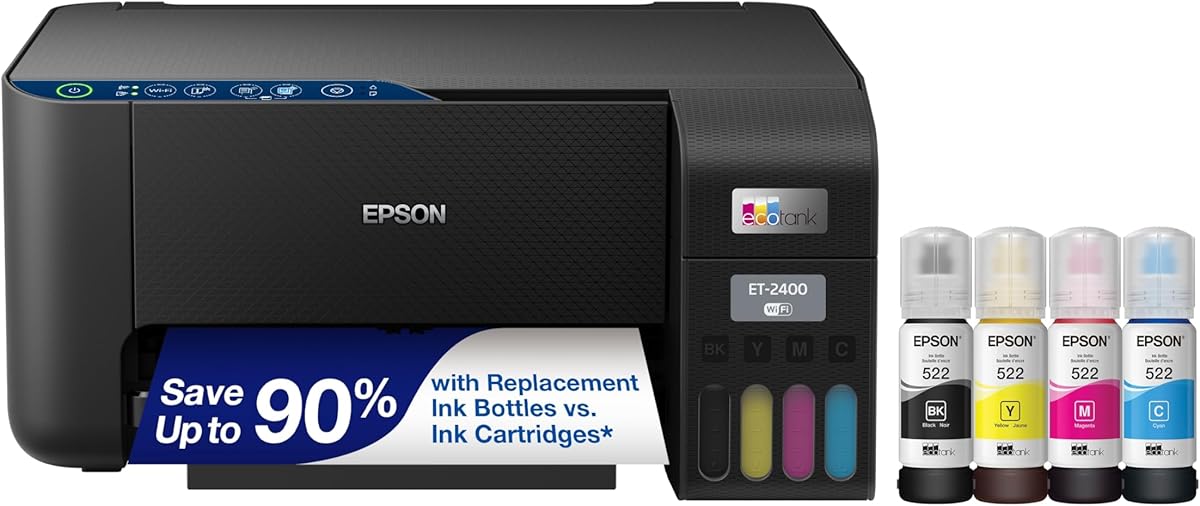
The Epson EcoTank ET-2400 is a wireless color all-in-one aimed at households that want a balanced combination of capacity, quality, and refill convenience. Its 4.0 rating reflects positive customer feedback and places it alongside the ET-2800 in the middle of this guide's rating group.
We may earn a commission when you buy through this link, at no additional cost to you.
Epson states that each ink bottle set is equivalent to about 80 individual cartridges. A set can provide up to 4,500 black-and-white pages or 7,200 color pages, while up to two years of ink are included. The high-capacity tanks use keyed EcoFit bottles intended to make replenishment easier and reduce the risk of mixing them incorrectly.
The printer also includes scanning and copying, along with wireless support. Micro Piezo Heat Free technology is designed to produce sharp text alongside colorful photos and graphics on a broad range of paper. Automatic duplex and a specific ISO speed are not identified in the supplied information, so buyers who require those details should confirm them directly.
This is a sound recommendation for a family that regularly mixes schoolwork, household documents, and color projects. Its generous page estimates and two-year initial supply reduce early refill pressure, while the all-in-one configuration saves space and provides useful scanning and copying functions.
The combination of 4,500 black pages and 7,200 color pages supports varied printing habits. It is especially useful for users who alternate between text-heavy school assignments and colorful personal projects.
Epson's EcoFit bottles are designed to make filling the high-capacity tanks easier. The keyed format also helps reduce the chance of selecting the wrong bottle during a refill.
We may earn a commission when you buy through this link, at no additional cost to you.
This HP Smart Tank 5003 listing shares the core design of the first-ranked model but has a different customer rating and image listing. It provides up to three years of included ink, wireless printing, and integrated copy and scan functions for home users seeking fewer cartridge interruptions.
We may earn a commission when you buy through this link, at no additional cost to you.
The initial supply is stated to cover up to 6,000 black or color pages. The equal estimates provide a straightforward starting point, while borderless output expands support for photographs and graphics. Mobile and wireless printing make the device accessible from compatible devices around the home.
Refilling uses HP's easy-access, mess-free system: compatible bottles plug into the cartridge-free tanks and drain naturally. As with the other Smart Tank model in the guide, single-sided printing is the only output method stated in the supplied specifications. The 3.8 rating is tied with the lowest score in the lineup.
The model is a reasonable option when a long included-ink period and HP's refill system matter more than a higher customer rating. Comparing the current listing, warranty terms, and included accessories with the other Smart Tank 5003 entry is advisable because the supplied product information is otherwise very similar.
An advertised allowance of up to three years reduces the likelihood of an immediate replacement purchase. This can be valuable for users who want predictable printing capacity before establishing a refill routine.
Wireless and mobile printing remove the need to remain beside the printer. Borderless output and integrated copy and scan functions broaden its use beyond ordinary text documents.
We may earn a commission when you buy through this link, at no additional cost to you.
The Epson EcoTank ET-2903 is a highly capable refillable-ink all-in-one for modern homes and home offices. It combines up to three years of included ink, an 11-page-per-minute black speed, a 100-sheet tray, and a color display in one well-specified home printer.
We may earn a commission when you buy through this link, at no additional cost to you.
Its stated page estimates reach 3,600 black pages and 6,500 color pages, with each replacement bottle set described as equivalent to about 80 cartridges. The 5760 by 1440 dpi resolution is designed for detailed text and photographic output, and Epson's Heat Free technology uses a permanent printhead intended to last for the printer's life.
Smart-device printing and scanning are available through Epson Smart Panel, with support for Apple AirPrint, Mopria Print Service, and Mopria Scan. The 1.44-inch color display aids navigation, while the scanner supports copying and document workflows. Epson recommends genuine ink because non-genuine ink could cause damage outside the limited warranty.
This printer is a leading recommendation for users who need more speed and connectivity than a basic model. Its three-year ink claim, 100-sheet tray, strong resolution, and productivity features create a versatile package for students, families, and home offices that print frequently and want fewer refills.
The 11-page-per-minute black ISO speed and zero-warmup claim support productive document handling. A 100-sheet input tray also reduces the need for frequent paper loading during larger jobs.
The stated 5760 by 1440 dpi resolution supports sharp text and detailed photographic images. Epson positions the model for use across a wide range of media and everyday creative projects.
We may earn a commission when you buy through this link, at no additional cost to you.
The Epson EcoTank Pro ET-5150 is the most performance-oriented printer in this guide, with an established 4.0 rating and specifications aimed at busy offices. It is a logical premium pick for users who need faster output, larger supplies, and professional-style productivity.
We may earn a commission when you buy through this link, at no additional cost to you.
The printer reaches up to 17 black pages and 9.5 color pages per minute, the fastest black speed listed here. It offers fast first-page output, no warmup time, and a permanent PrecisionCore printhead designed for the printer's working life. Epson's DURABrite ET pigment inks are intended to deliver crisp, vibrant black and color documents.
Each replacement bottle set is stated to cover up to 7,500 black pages or 6,000 color pages, while the cartridge-free EcoTank Pro design is intended to reduce plastic waste. Genuine Epson ink is recommended for optimal quality and performance, and non-genuine ink could cause damage not covered by the limited warranty.
The ET-5150 is best for busy home offices, small businesses, and shared workspaces that value speed and reliable output. Buyers should assess whether their printing volume justifies the premium tier, but the combination of fast color performance, high-yield bottles, and a permanent printhead makes it the strongest productivity-focused option here.
Speeds of up to 17 black and 9.5 color ISO pages per minute make this the fastest model listed. Fast first-page output and no warmup time further support a smooth workday workflow.
The permanent PrecisionCore printhead is engineered to last for the life of the printer. Combined with high-yield replacement sets, it is designed for organizations that print substantial volumes.
We may earn a commission when you buy through this link, at no additional cost to you.
A liquid-ink printer should be evaluated as a complete printing system rather than by tank capacity alone. Page yield, refill handling, print speed, wireless access, copy and scan functions, and the cost and availability of compatible ink all influence the experience.
Liquid-ink printers use refillable tanks that are replenished with ink bottles instead of small removable cartridges. HP Smart Tank models use an easy-access plug-and-drain system, while Epson EcoTank bottles are uniquely keyed to make filling easier and reduce the chance of bottle mix-ups. Consider the tank capacity, bottle design, and whether the design is comfortable for everyone expected to perform refills.
Choose a tank system that is easy to replenish and that provides the ink volume your household actually needs. A convenient refill process can prevent interruptions and reduce frustration.
Page estimates indicate how much output may be available from an included set of ink. The products here range from advertised periods of up to two years to as many as three years, with page estimates varying by color, black, test conditions, and printing habits. Higher estimates can be useful, but actual results depend on image coverage, document density, and maintenance use.
Prioritize a yield that matches a typical printing mix rather than selecting on the largest number alone. If you regularly print photos, compare color estimates; for office documents, monochrome capacity may matter more.
ISO pages per minute offer a more comparable measure of speed than vague words per minute. The Epson ET-2903 is listed at 11 black pages per minute, the ET-2800 at 10, and the EcoTank Pro ET-5150 at up to 17 black and 9.5 color pages per minute. Several other models do not provide speed figures in the supplied information, so buyers should confirm those details when speed is a priority.
Faster black output and color speed can improve workflow in shared offices. For occasional home printing, the all-in-one features may matter more than the difference between a few pages per minute.
Wireless printing lets a printer serve phones, tablets, laptops, and computers throughout the home or office. Epson models in this guide support smart-device functions through Epson Smart Panel, with additional support for AirPrint or Mopria depending on the model. HP Smart Tank options also advertise mobile and wireless printing.
Check the apps and operating systems you use, along with scan support if you need mobile document workflows. Convenience depends on software compatibility as much as the presence of a wireless radio.
Every model in this roundup is described as an all-in-one or includes print, copy, and scan functions. A flatbed scanner is useful for documents, receipts, photographs, and worksheets, while copying can save trips to a separate device. The Canon G3270 adds a 1.35-inch color LCD, and the ET-2903 includes a 1.44-inch color display for direct navigation.
Choose an all-in-one if space is limited or document handling matters. A display is useful for confirming settings without a computer, though it is not essential for every user.
Epson's Micro Piezo Heat Free and Heat Free technologies are intended to produce sharp text and detailed color photographs and graphics. The ET-2903 lists a resolution of 5760 by 1440 dpi, while other models emphasize vivid color output and borderless printing. Quality also depends on using the ink and paper combinations supported by the manufacturer.
For photo-centric use, review resolution, color claims, borderless capability, and compatible media. For everyday documents, sharp text and reliable color should be the main priorities.
Refillable systems can lower the cost of routine printing, but the long-term expense depends on the price and availability of replacement bottles. Epson explicitly recommends genuine ink for optimal quality and performance, noting that non-genuine ink could cause damage outside its limited warranty. HP's sharper text and richer color claims are also tied to HP Smart Tank.
Verify compatible ink, bottle yields, and regional availability before purchase. A printer is a long-term system, so reliable ink supply matters as much as the initial allowance.
Physical footprint, paper capacity, and controls can influence daily convenience. The ET-2903 includes a 100-sheet tray and 1.44-inch color screen, while the Canon G3270 provides a 1.35-inch square LCD. Automatic duplex printing is not stated for most models in the guide, so two-sided printing needs should be confirmed separately.
Measure the intended location and check paper-handling requirements before ordering. A larger display and deeper tray may add convenience, but the machine should still fit comfortably in the intended room.
Begin by unpacking the printer, removing any transport restraints, and placing it on a stable, level surface. Install the supplied ink bottles according to the manufacturer's setup guide, confirm that each tank is correctly seated, and complete the initial nozzle preparation. Keep the printer connected during setup if the instructions require software installation, alignment, or firmware updates.
Choose the correct media type in the printer software before each job, and use the appropriate paper tray or feed setting. For the best results, select the print quality that matches the task, such as a standard setting for routine documents or a photo-oriented mode for images. Refill tanks only with compatible ink, plug bottles into the correct keyed or marked ports, and allow ink to drain as directed.
Keep the printhead and paper path clean, and use the printer's maintenance prompts to check nozzles, align cartridges or printheads, and remove jams. Avoid leaving the printer uncovered where dust can collect, and keep liquids away from the electrical area. If colors look inconsistent, run the supplied cleaning cycle before changing ink. Epson recommends genuine Epson ink, while HP's stated print-quality claims are associated with HP Smart Tank products.
Liquid-ink printers use refillable tanks that are replenished with larger ink bottles, while conventional cartridge printers use small replaceable cartridges. The tank approach can reduce cartridge waste and the frequency of replacements. Actual running costs still depend on ink prices, page coverage, and how often each color is used.
The included coverage varies by model, with advertised periods ranging from up to two years to up to three years. Canon states up to 6,000 black pages or 7,700 color pages, while the Epson ET-2903 lists up to 3,600 black or 6,500 color pages. These are estimates based on specified conditions rather than guaranteed results for every user.
Yes. The HP Smart Tank models support borderless printing, and Epson's EcoTank models advertise sharp text and impressive color photographs and graphics. The Epson ET-2903 lists 5760 by 1440 dpi resolution and supports printing across a wide range of media. Photo quality also depends on the original image, ink, and paper used.
Most models include wireless connectivity, scanning, and copying, making them well suited to a home office. The Epson ET-2903 offers 11 black pages per minute, a 100-sheet tray, and a color display, while the EcoTank Pro ET-5150 reaches up to 17 black and 9.5 color pages per minute for heavier workloads. Check whether automatic duplex printing is required, as it is not stated for most models.
Epson recommends genuine ink for optimal print quality and performance and warns that non-genuine ink could cause damage not covered by the printer's limited warranty. Similar concerns apply to other manufacturers' systems because compatibility, formulation, and installation can affect results. Using ink specifically approved for the model is the safest way to protect the printer and maintain consistent output.
Open the correct tank and insert a compatible refill bottle into the marked or keyed filling port. On supported HP models, the bottle plugs in and the ink drains without squeezing. Epson's EcoFit bottles use a keyed fitting, which helps prevent mix-ups. Follow the manufacturer's instructions, remove the bottle after filling, and close the tank securely.
Scanning and copying do not normally consume ink, although printing a scanned or copied document does. Routine maintenance may also use a small amount of ink for nozzle checks and cleaning. Keep adequate ink available if you expect to print often, but document handling itself remains possible when the printer is connected to power and the relevant supplies are available.
Choose a single-function model if you only print and want a smaller, potentially simpler setup. An all-in-one adds a flatbed scanner and copier, which is useful for signed documents, receipts, photos, and household paperwork. Every product in this guide provides printing, copying, and scanning, making it a versatile category for mixed-use homes and offices.
The Epson EcoTank ET-2903 stands out as the most versatile modern home choice, combining up to three years of included ink, an 11-page black speed, a 100-sheet tray, advanced wireless support, and a color display. The Canon MegaTank G3270 is the value-focused option, while the Epson EcoTank Pro ET-5150 provides the strongest productivity specifications for busy workspaces.
Before choosing, prioritize the type and volume of printing you perform. Color-heavy households should compare the stated color yields, while offices may place more weight on speed, paper capacity, and duplex requirements. Refill convenience, genuine ink availability, wireless compatibility, and the need for scanning or copying should all influence the final decision.
Ratings, bundle contents, software, warranty terms, and prices can change over time, so check the current listing and manufacturer documentation before ordering. The linked listings are convenient starting points, but the final purchase should match both the printer's confirmed specifications and the ink system you are comfortable maintaining.