
aikeec 64 Bit USB Handbrake
4.4Editor score
64-bit Hall-effect sensing
Automatic calibration system
Windows and game compatibility
Adjustable clamp mounting
This Racing SIM Handbrakes guide compares 10 models for precision, adjustability, compatibility, construction, and easier rally drifting.
A racing SIM handbrake can transform a compatible driving setup by adding progressive, physical braking control for slides, hairpins, launches, and off-road traction challenges. The best unit should feel predictable, respond smoothly, mount securely, and suit the games and steering equipment you already use.
We compared all ten products by examining their stated sensor precision, materials, calibration behavior, adjustment options, mounting methods, platform support, and game compatibility. The list covers budget USB models, adjustable aluminum handbrakes, 16-bit and 64-bit Hall-sensor designs, and a premium hydraulic racing-simulator option.
Each review highlights the strongest reason to consider the product while also identifying practical limitations. Ratings reflect the supplied customer feedback rather than personal testing, and availability, software support, game mappings, and prices can change, so readers should verify current details before buying.
4.4Editor score

4.4Editor score

4.7Editor score
The comparison below places every handbrake on the same practical criteria, including input resolution, construction, adjustability, platform limitations, and mounting approach. It is designed to clarify which model best matches a particular rig, game library, and preferred style of rally or endurance driving.


The aikeec USB Sim Racing Handbrake carries a 4.3 customer rating and stands out for straightforward PC integration. It connects through USB, works as an independent input device, and avoids the need to install drivers or connect through a particular wheelbase. That simplicity makes it a practical option for a first sim-racing handbrake setup.
We may earn a commission when you buy through this link, at no additional cost to you.
Its non-contact Hall sensor uses automatic calibration, while the handle can be adjusted for height and angle. The product description lists support for popular Logitech and Thrustmaster wheels and mentions games including Euro Truck Simulator 2, American Truck Simulator, the Forza Horizon series, Assetto Corsa, DiRT Rally 2, Project CARS 2 and 3, and several WRC titles. Compatibility with a wheel or game does not guarantee every title maps the axis automatically, so the relevant game settings may still need checking.
The main limitation is platform concentration. This is explicitly a Windows PC peripheral and is not intended for Xbox One, PS4, PS5, or Mac systems. It also relies on a direct USB connection rather than a wheelbase handbrake port or CAN interface. A rigid, specialized cockpit may therefore need a separate mounting solution, although the adjustable handle helps it fit different wheel seats, brackets, and cockpits.
This handbrake is best for Windows players who want a simple, independent e-brake for rally games and occasional sideways driving. It offers fewer customization features than the PXN or MOZA models, but it covers the essentials with automatic calibration and broad stated game support. Verify your game, operating system, and mounting arrangement before ordering.
Because the handbrake operates as a separate USB device, it can sit beside an existing steering wheel without requiring a special wheelbase port. The stated driver-free setup reduces configuration friction, although each game may still need its handbrake axis assigned manually.
Height and angle adjustments make the unit easier to accommodate alongside different wheel seats and cockpit layouts. The adjustment range cannot replace a purpose-built mounting plate, but it adds useful positioning flexibility for a standalone installation.
We may earn a commission when you buy through this link, at no additional cost to you.
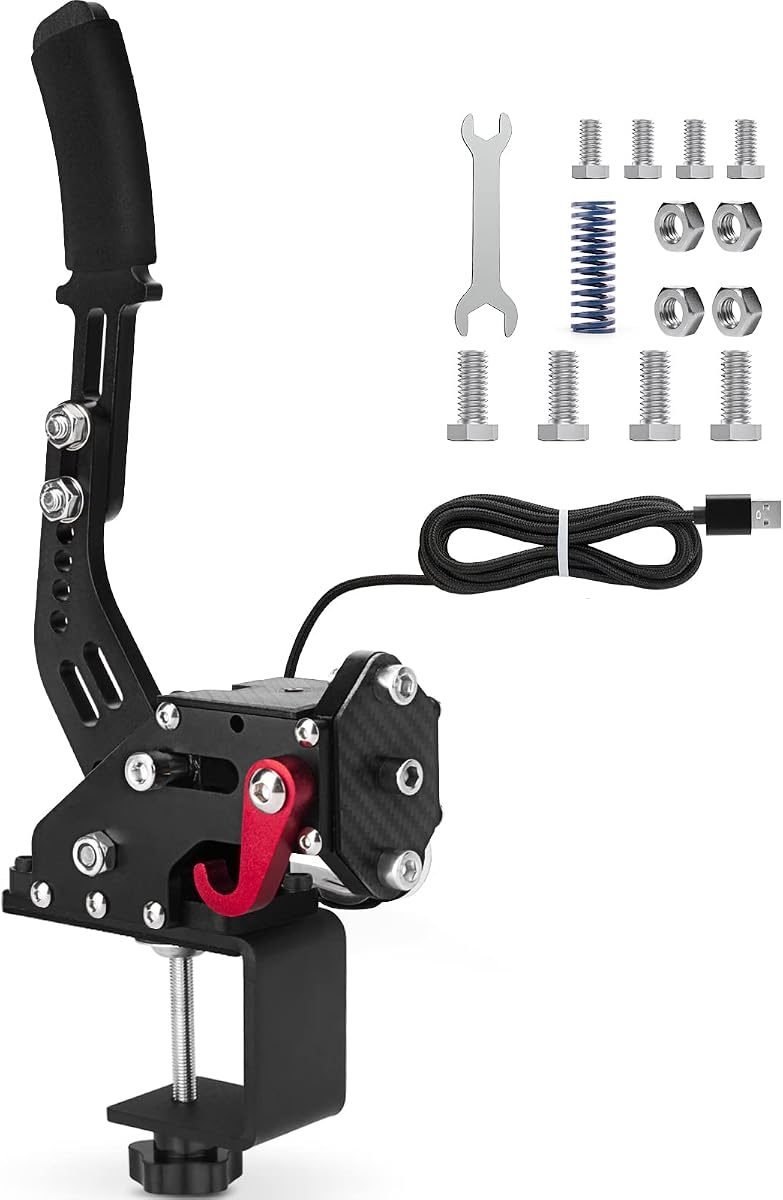
The aikeec 64 Bit USB Handbrake earns a 4.4 rating and is the strongest budget-oriented recommendation in this guide. Its combination of a stated 64-bit on-contact Hall sensor, automatic calibration, and a clamp gives it a more purposeful specification than a basic plug-in lever while retaining straightforward USB operation.
We may earn a commission when you buy through this link, at no additional cost to you.
The body combines light CNC-machined aluminum with mild steel, and the clamp is intended to secure the unit to a compatible rig or wheel-mounting arrangement. The product supports Windows 7 and later, works with linear or nonlinear game configurations, and is listed for Logitech G25, G27, G29, T300, and T500 setups along with FANATECOSW equipment. Stated game support includes Assetto Corsa, several DiRT Rally entries, the Forza Horizon and Motorsport series, Euro Truck Simulator 2, WRC 9, Richard Burns Rally, Project CARS, Live for Speed, and TOCA Pro Race Driver.
There are limits to the broad compatibility claims. The handbrake is an independent Windows device rather than a console peripheral, and game behavior varies by title. The clamp must also physically fit the chosen wheel or cockpit, while the product description does not promise every possible mounting shape. Checking the listed hardware and confirming the game’s handbrake settings can prevent disappointment.
Choose this model when you want a relatively sophisticated sensor and secure clamping approach without moving into a full hydraulic cockpit system. It is especially appealing for rally and drifting on Windows, where progressive brake input matters. The aikeec is our Best Budget pick because it balances sensor specification, adjustability, and rig integration more convincingly than a basic lever.
A stated 64-bit Hall-sensor system supports fine control over the handbrake axis. The practical benefit should appear as smoother, more gradual changes in braking force, although actual in-game resolution also depends on the game’s own axis handling.
The included clamp provides a more convincing alternative to simply balancing a handle on a tabletop. Its effectiveness depends on rail dimensions and nearby hardware, so users with a custom cockpit should compare the attachment area before purchase.
We may earn a commission when you buy through this link, at no additional cost to you.
The PXN HB S PC Handbrake has a 4.4 rating and is our Editor's Choice because it combines a precise stated sensor, substantial physical adjustment, and flexible mounting options in one accessible Windows device. It supports Windows 7, 8, 10, and 11 and is compatible with PXN V3, V900, V9, V10, and V12 wheels as well as popular Logitech and Thrustmaster models.
We may earn a commission when you buy through this link, at no additional cost to you.
Its aluminum-alloy body contains a 16-bit Hall-effect sensor. More importantly for feel, the force and travel can be changed by replacing springs or damping rubber. The default stroke is listed as 16 mm and can be reduced to 10 mm through a component swap. The grip can also move between horizontal and vertical modes, allowing the user to approximate a road-car arrangement or use a more compact orientation depending on the available cockpit space.
The compromises come with the breadth of configuration. Altering force and travel may involve opening the unit and changing parts, so it is not as approachable as a model with a simple external dial. It also remains PC-only, and no support is listed for Xbox, PlayStation, Switch, or Mac. The included fixed clip provides a starting point, but custom rigs may still need additional mounting work.
This is the most balanced choice for Windows racers who want to fine-tune the handbrake rather than accept a fixed feel. It is less specialized than a hydraulic simulator and lacks the software-driven pressure display of the SIMSONN, yet it offers a persuasive combination of material quality, switchable grips, and tuning. It is our most versatile recommendation for regular rally, drift, and endurance use.
Replaceable springs and damping components let the user change the handbrake’s physical resistance rather than accepting one universal feel. This is valuable when a game’s default axis response feels abrupt or when a particular car setup rewards a lighter pull.
Switching between vertical and horizontal grips changes both the visual realism and the space required by the unit. The vertical mode suits constrained layouts, while the horizontal mode more closely resembles the handbrake position in many road cars.
We may earn a commission when you buy through this link, at no additional cost to you.
The CNRAQR 16-Bit USB Handbrake carries a 4.2 rating and offers a compact, straightforward way to add linear braking to a Windows racing setup. It uses a 16-bit non-contact sensor, connects by USB, and is designed to work without additional driver installation. A fixed clip and plate are included for installation with compatible wheels or rigs.
We may earn a commission when you buy through this link, at no additional cost to you.
Its curved handle is intended to improve the operating feel, while the height adjustment helps the lever fit different steering-wheel seats and cockpit arrangements. Compatibility is listed for Logitech G25, G27, G29, G920, G923, T300, and T500 wheels, plus FANATECOSW equipment. Windows 11 and earlier versions are supported, and the product is presented as plug-and-play for PC systems.
The primary practical drawback is cable reach. At two meters, the supplied USB lead is adequate for a compact desk or basic cockpit, but it can be restrictive in a full racing frame where the PC is positioned farther away. The construction description also centers on low-carbon steel rather than aluminum, and there is no advertised mechanism for tuning spring force beyond the handle-height adjustment.
CNRAQR is most suitable for players who want a compact 16-bit handbrake and already own a compatible PC steering setup. It is easy to add to a simple rig, and the included plate reduces the need for additional mounting hardware in some configurations. Those wanting broader physical tuning, longer reach, or a more premium material mix should look toward the PXN, MOZA, or SIMSONN alternatives.
The 16-bit sensor is intended to provide more detailed axis values than a basic 14-bit implementation. This can produce smoother transitions when easing off a slide or modulating a long handbrake turn in a compatible game.
The compact body and included attachment pieces make the unit practical for a lightweight setup or a setup that changes location. Users should account for the shorter cable when planning where the computer will sit relative to the wheel.
We may earn a commission when you buy through this link, at no additional cost to you.
The CXCESNS 16-Bit USB E-Brake has a 4.2 rating and emphasizes robust construction, progressive control, and easy setup. It uses a stated 16-bit non-contact Hall sensor with automatic calibration, allowing the brake input to be pulled, held, and released without the fade associated with some basic contact-style devices.
We may earn a commission when you buy through this link, at no additional cost to you.
A 95-percent metal body, high-rigidity compression springs, and an integrated motherboard connection form the core of the design. The long 63-inch nylon USB cable offers more freedom when arranging a full cockpit. The product also offers adjustable handle height and angle, and it is stated to fit Logitech G25, G27, G29, G920, G923, and Thrustmaster T300 and T500 wheels on Windows PCs.
Compatibility remains the main constraint. It does not support PS4, PS5, Xbox, or Mac, and even when a racing title recognizes an e-brake axis, mapping behavior can vary. The product description appropriately advises checking the relevant setup instructions. The device is also less configurable in terms of spring replacement and grip orientation than the PXN, MOZA, or SIMSONN.
This handbrake is a good fit for PC racers who prioritize a sturdy metal mechanism and a lengthy cable over extensive user customization. It can serve well in rally titles, drift games, and open-wheel racers where a long trailing handbrake pull is useful. It is not the leading option for console users or for builders who require software-adjustable force and dead-zone control.
The mostly metal construction and rigid compression springs create a solid foundation for repeated pulling and releasing. A durable body is especially relevant for rally and drift sessions in which the lever may see frequent abrupt movements.
The extended USB cable gives the handbrake more placement freedom than shorter two-meter alternatives. It can simplify connections in a cockpit where the computer sits behind or beneath the wheel assembly.
We may earn a commission when you buy through this link, at no additional cost to you.
The 64-Bit USB Sim Racing Handbrake has a 4.5 rating, making it one of the strongest-rated conventional USB models in the group. Its headline specification is a 64-bit Hall-effect sensor, while its light CNC-machined aluminum and mild-steel construction is intended to balance rigidity with manageable weight.
We may earn a commission when you buy through this link, at no additional cost to you.
Installation is designed to be accessible. The device connects through USB without driver installation, and the integrated motherboard connection is intended to remain secure during use. Compatibility is listed for Logitech G920, G923, G25, G27, G29, T300, and T500 equipment on PC. The stated game range includes WRC 7, 8, and 9, Assetto Corsa, ETS2 and ATS, DiRT Rally 2, and Project CARS 2 and 3.
Its weaknesses reflect the focus on a simple standalone product. There is no stated console support, no Mac support, and no wheelbase-native connection. The supplied two-meter cable may be less convenient in a larger cockpit, while the description does not highlight interchangeable springs, switchable grip positions, or a software dead-zone control.
This handbrake is most compelling for a Windows player who values a high stated bit depth, uncomplicated setup, and broad game compatibility. It is a particularly reasonable option for a beginner creating a first dedicated rally setup, as long as the physical position and cable reach suit the chosen wheel. Users who want to fine-tune resistance should compare it with the PXN and MOZA.
The 64-bit specification is a major selling point for users seeking granular control over the handbrake axis. It can support smoother modulation during a slide, although the full benefit depends on the game and its selected axis range.
Connecting the USB cable is the main installation requirement, and the described setup process is approachable for newcomers. The game may still require users to select the appropriate axis and confirm the input range.
We may earn a commission when you buy through this link, at no additional cost to you.
The 64-Bit USB PC Handbrake has a 4.3 rating and combines a stated 64-bit Hall sensor, a long cable, and a clamp in a conventional Windows handbrake. The non-contact sensor includes automatic calibration, while the lever can be adjusted in height and angle to suit different wheel seats, brackets, and cockpits.
We may earn a commission when you buy through this link, at no additional cost to you.
Its 78-inch USB cable is among the longest in this comparison, providing useful reach for full-size rigs. The included clamp offers a sturdier attachment method than a loose tabletop placement, and the independent USB connection means no wheelbase port is required. Logitech G25, G27, G29, G920, G923, T300, and T300 setups are among the listed compatible equipment.
The product still focuses on conventional functionality rather than extensive personalization. There is no advertised interchangeable spring system, dual grip mechanism, hydraulic construction, or software-controlled pressure display. It also cannot be used with Xbox One, PlayStation consoles, or Mac, and some game titles may require manual axis assignment.
This is a solid selection for a builder who wants cable reach and a clamp but does not need a premium hydraulic unit. It should work well for PC rally and drifting, particularly when the wheel is mounted on a larger frame. Those who need a more natural grip position or extensive resistance tuning may find the PXN HB S more accommodating.
The extended USB lead is particularly useful when the computer sits well behind the steering wheel. It reduces the need for a hub or extension lead and gives the user greater freedom in laying out a full cockpit.
The clamp gives the lever a more deliberate place in the cockpit, while the height and angle adjustment help bring the handle within comfortable reach. Users should still confirm that the clamp and cockpit geometry cooperate.
We may earn a commission when you buy through this link, at no additional cost to you.
The SIMSONN HB Pro V2 is the premium specialist in this roundup. It uses a hydraulic handbrake mechanism, an upgraded internal structure, and processing hardware built around two independent 32-bit processors, a dedicated 16-bit high-resolution analog-to-digital converter, and a fully differential signal-amplification chip. These specifications distinguish it clearly from the direct USB lever designs.
We may earn a commission when you buy through this link, at no additional cost to you.
The handbrake can connect by CAN port to a compatible wheelbase or directly to a PC with a Type-C connection. It supports horizontal or vertical lever mounting, three angle adjustments, customizable resistance through an included 70HA rubber damper, and software-adjustable dead zone through SIMSONN Manager. Dynamic RGB lighting can indicate handbrake pressure and synchronize with other supported SIMSONN devices.
It is not a casual desktop peripheral. The hydraulic design, specialized connections, optional vibration-feedback module, and reliance on companion software make installation more involved than plugging a USB handbrake into Windows. The supplied data does not provide a customer rating, so buyers should not interpret the absence of feedback as either a positive or negative performance signal. They should also confirm that their wheelbase supports the appropriate connection and that their games can map the input.
The HB Pro V2 is best for committed sim-racing enthusiasts who want the most elaborate handbrake experience in the group. It is particularly attractive for users building a high-end cockpit, adding vibration feedback, or seeking a more substantial lever with visible pressure information. For simpler setups, the MOZA or PXN models deliver much of the essential functionality with less complexity.
Separate processors, a dedicated high-resolution converter, and differential signal amplification are designed to improve stability, responsiveness, and noise resistance. This level of electronics is aimed at users who view the handbrake as part of a serious racing simulator rather than a simple game controller.
The ability to adjust dead-zone behavior and resistance gives users more control over how early the input registers and how strongly it feels. Customizable RGB pressure effects add visual information while the handle is engaged, complementing rather than replacing the physical feedback.
We may earn a commission when you buy through this link, at no additional cost to you.
The MOZA HBP Handbrake has a 4.7 rating, the highest numerical customer rating among the listed products. It combines a CNC-machined aviation-grade aluminum body with an anodized finish, giving it a premium appearance and a rigid structure suited to regular sim-racing use.
We may earn a commission when you buy through this link, at no additional cost to you.
A non-contact 16-bit high-precision angle sensor handles the input, while replaceable springs allow users to adjust rebound strength and brake travel. The lever can be mounted horizontally or vertically, with its angle adjusted to suit the driver and vehicle. It can connect directly to a PC or to a compatible MOZA wheelbase through a handbrake port, and the ergonomic design is intended to fit most racing rigs.
The MOZA does not provide the SIMSONN’s software-managed dead zone, RGB pressure display, or CAN connection, so its premium appeal comes from materials, machining, construction, and refined adjustment rather than an expansive software ecosystem. The instruction to change springs and stop position is helpful for fine-tuning but less convenient than changing a setting in an application.
This is the best choice for a builder who wants a refined, sturdy, and highly rated conventional handbrake without moving to a hydraulic system. It is particularly attractive for owners of a compatible MOZA wheelbase and for anyone building a dedicated cockpit who values rigidity and a clean industrial design. Confirm the correct port and mounting arrangement before ordering.
CNC machining and an anodized finish create a rigid, clean-looking unit intended for a visible cockpit component. The material choice also helps the handbrake present a substantial, premium feel without relying on a hydraulic mechanism.
Replaceable springs let the user change rebound resistance and travel, while the adjustable stop position provides another layer of control. This hands-on tuning can produce a more personalized feel than a device with a fixed spring and axis curve.
We may earn a commission when you buy through this link, at no additional cost to you.
The PXN HB S USB Handbrake has a 3.7 rating and shares several core features with the other PXN HB S model, including an aluminum-alloy body, 16-bit automatic-calibrating Hall sensor, adjustable resistance, adjustable stroke, and switchable grip orientations.
We may earn a commission when you buy through this link, at no additional cost to you.
The default travel is listed as 16 mm and can be changed to 10 mm by replacing a part. Springs or shock-absorber rubbers can also be substituted to alter the force. The handle height and angle are adjustable, and the grip can move between a horizontal road-car-style position and a vertical arrangement. The device supports PXN V99, V10, and V12 wheels along with Logitech G27, G29, G920, G923, T300, and T500 models.
Its lower customer rating warrants attention when comparing it with the other PXN option. In addition, this version excludes the fixing clip and is intended for use with a bracket, meaning a buyer with no suitable rig hardware may need to purchase an attachment solution. The statement also contains an abbreviated operating-system reference, although the body consistently describes PC Windows support.
Despite that caution, the handbrake remains a capable choice for Windows users who want a physical handbrake with meaningful customization. It can be especially useful for users already owning a compatible PXN setup or a cockpit with a proper bracket. Most buyers should compare its warranty and included hardware with the higher-rated PXN HB S before making a final decision.
Interchangeable springs and damping rubbers make it possible to tune the lever’s physical response. The option to reduce stroke from 16 mm to 10 mm can also help recreate a shorter handbrake movement for players who prefer a compact pull.
The switchable grip and adjustable height make the unit adaptable to different seating positions and cockpit dimensions. Because the fixing clip is not included, however, ownership of a suitable bracket or mounting point should be confirmed before purchase.
We may earn a commission when you buy through this link, at no additional cost to you.
Choosing a sim-racing handbrake involves balancing sensor behavior, physical construction, adjustment, electrical connection, mounting, and software compatibility. The most important first step is confirming that the device will work with your computer, wheel, cockpit, and chosen games before focusing on finer feel preferences.
Sensor resolution determines how finely the handbrake can report changes in lever position. The products in this guide range from stated 16-bit and 64-bit Hall-effect systems to a premium unit with dedicated 16-bit signal acquisition and dedicated processors. A higher stated resolution can support more granular control when modulating a slide, but raw bit depth is only one part of the chain. The game must also recognize the axis, map the correct direction, and apply a suitable response curve.
Prioritize a non-contact Hall sensor when smooth, repeatable input is important. Hall-based designs are presented as resistant to accuracy loss over time, while automatic calibration can simplify the transition between a released and engaged position. Do not treat bit depth as a substitute for software configuration.
Nearly every product here is designed for Windows PC rather than consoles or Mac. This is an important limitation for people who switch between PC and PlayStation or Xbox. Within Windows, compatibility lists can include Logitech, Thrustmaster, FANATECOSW, and PXN wheels, but this normally describes physical or ecosystem support rather than a guarantee that every control appears automatically.
Review your intended game list before buying. The descriptions mention titles such as Assetto Corsa, DiRT Rally, WRC entries, Forza Horizon and Motorsport, ETS2, ATS, and Project CARS, but support can change by edition and settings. Plan to check the handbrake axis and calibration range after installation.
The physical body should feel solid enough to withstand repeated pulling without unwanted flex, and its mounting points should remain stable under load. Aluminum alloy and CNC-machined aluminum offer a rigid, refined approach, while steel can also provide strength in a conventional lever design. The SIMSONN goes further with a hydraulic mechanism, high-strength alloy steel, and a bearing-supported structure intended for a serious simulator environment.
Choose a material mix based on your goals rather than weight alone. A premium metal body can improve durability and cockpit consistency, but the sensor, spring, cable, and mounting system determine whether the unit feels good during use. Check the full parts list before assuming essential hardware is included.
Useful adjustability includes lever height, lever angle, spring strength, damping, travel, and sometimes grip orientation. The PXN models support spring or damping changes and offer a shorter 10 mm travel option. The MOZA allows spring replacement, travel adjustment, and stop-position changes. The SIMSONN goes further with a custom rubber damper and software-adjustable dead zone.
More adjustment can produce a better match for a particular car or game, although component swaps are less convenient than menu-based settings. Height and angle adjustment remain important for comfort and accessibility even if you never alter the internal spring or damping.
Direct USB is the most straightforward connection and works with a wide range of PC configurations. It is especially convenient when the handbrake must sit near a wheel that lacks a dedicated e-brake socket. Wheelbase-native handbrake ports can offer a cleaner integrated setup, while CAN and Type-C connections on the SIMSONN are designed for more specialized rigs.
Check both sides of the connection. The computer must recognize the device, the game must offer a bindable handbrake axis, and the physical cable must reach the computer without tension. Users with proprietary wheelbases should verify the supported interface before ordering.
A clamp, bracket, fixing clip, or mounting plate can make the difference between a stable handbrake and one that shifts during a hard pull. The product lists vary: one aikeec model includes a clamp, the CNRAQR includes a clip and plate, while one PXN version explicitly excludes the fixing clip. The MOZA is designed for racing rigs, and the SIMSONN supports multiple mounting orientations and angles.
Measure the available space around your wheel, seat, and table before purchasing. Consider hand reach, legroom, cable direction, and the location of the mounting rails. A vertically mounted lever may fit a compact setup better, while a horizontal lever can feel more familiar in a road-car-inspired cockpit.
Cable length matters more in a full cockpit than it does for a small desk setup. The conventional models in this roundup include stated leads ranging from two meters to 63 or 78 inches. Longer cables provide more freedom when the computer is mounted behind the wheel, while shorter leads keep a desktop installation tidy and may be sufficient for a simple wheel and handbrake combination.
Avoid leaving a taut USB cable stretched across the driving area. Route it along the rig, allow enough slack for lever movement, and check whether a hub or extension is needed. Cable length does not affect the input’s stated resolution, but poor routing can restrict movement or reduce convenience.
Most handbrakes in this guide provide a physical lever and a digital input axis rather than simulated vibration. The SIMSONN HB Pro V2 is the exception: its upgraded structure supports an optional vibration feedback module, and its RGB lighting can display pressure and synchronize with other supported devices. These features are appealing for enthusiasts building a fully integrated simulator.
Consider whether specialized feedback will actually be used in your games and setup. A sophisticated sensor or lighting system cannot compensate for an unsuitable game mapping, while a straightforward 16-bit unit with well-tuned springs may be more satisfying in regular rally play. Prioritize the feedback you will use frequently.
Begin by mounting the handbrake in a stable position beside or behind the steering wheel. Tighten the clamp, clip, bracket, or plate according to the supplied instructions, then adjust the lever height and angle so it can be reached comfortably without moving the body. Connect the USB cable or the appropriate wheelbase, CAN, or Type-C connection, keeping enough cable slack for full lever travel.
Install the game and open its controller or handbrake settings. Select the relevant axis, confirm the input direction, and set a suitable dead zone or calibration range. When using automatic calibration, start with the lever fully released and follow the product-specific sequence. Make small, controlled pulls to verify that the on-screen value rises smoothly and that a held position remains stable.
For ongoing care, keep the mechanism free of dust, liquids, and metal debris, and avoid forcing the lever beyond its designed travel. Clean the grip and housing with a soft, dry cloth rather than soaking the product. If you change springs, damping parts, or the grip orientation, power the system down, follow the assembly instructions, and retest the axis and travel before returning to a race.
Most of the handbrakes in this guide are designed specifically for Windows PC. The aikeec, PXN, CNRAQR, and CXCESNS models explicitly do not support PlayStation or Xbox systems, and the MOZA and SIMSONN should also be checked for the exact connection and platform requirements. A console user should look for a product explicitly designed for the relevant console and verify that the game accepts its input.
The conventional USB models in this roundup are presented as plug-and-play devices that do not require driver installation. That does not remove the need to configure the handbrake inside the game. You may still need to assign the axis, choose an input range, or set a dead zone before the lever behaves correctly.
A game must support a separate handbrake or analog axis before the device can be mapped. The listed products mention many popular PC racers, but compatibility can change with game editions and settings. Check the current game documentation and verify that the lever moves the correct on-screen control before assuming full support.
A higher stated resolution can offer finer input granularity, but the difference may be subtle in ordinary driving. Spring design, lever travel, game response curves, and calibration often influence the perceived feel as much as bit depth. Compare the full feature set rather than selecting solely by the number printed in the specification.
A hydraulic model is not required for every drifting setup. The MOZA, PXN, aikeec, CNRAQR, and CXCESNS handbrakes are conventional levers that can provide progressive input when configured correctly. The SIMSONN HB Pro V2 is the specialized hydraulic option in this guide and adds a more elaborate mechanism, software control, lighting, and optional vibration support.
Use the supplied clamp, clip, plate, or compatible bracket where available, and ensure that the lever cannot shift when pulled firmly. Position the grip within easy reach while maintaining comfortable clearance from the wheel and seat. If no suitable mounting hardware is included, purchase a compatible bracket rather than relying on an unsecured tabletop placement.
Start by checking that the correct axis is selected in the game and that the input range covers the lever’s full travel. Automatic calibration should be performed with the lever released, followed by the game’s axis mapping or inversion setting. A loose USB connection or incompatible game axis can also cause erratic behavior, so check the cable and game configuration.
It depends on the model. The PXN HB S products support spring or damping changes, the MOZA permits spring replacement and stop-position adjustment, and the SIMSONN includes a custom rubber damper plus software-based dead-zone settings. Simpler models may offer only handle-height and angle adjustments, so check the replacement parts and tool requirements before buying.
The aikeec 64 Bit USB Handbrake is the Best Budget option because it pairs a high stated sensor resolution, automatic calibration, a clamp, and broad Windows game support. The PXN HB S PC Handbrake takes the Editor's Choice for its more complete tuning package, including adjustable force, selectable travel, dual grip orientations, and compatibility across major wheel families.
For a premium conventional handbrake, the MOZA HBP combines the highest available customer rating with a CNC-machined body, 16-bit sensing, and easy connection to a PC or compatible wheelbase. The SIMSONN HB Pro V2 is the specialist choice for users seeking hydraulic operation, sophisticated electronics, software-adjustable control, and optional vibration feedback. Your priority should be platform, game, mounting, and connection compatibility first, followed by the physical feel and adjustability you actually need.
Ratings, product availability, included accessories, software behavior, and prices can change over time, so check the current listing and recent customer feedback before ordering. Also verify the game-specific mapping instructions and make sure you have the necessary bracket or mounting hardware for your particular rig.