
DSSWEN Ergonomic Mouse Grip Adapter
1.9Editor score
Vertical mouse-style ergonomics
Precision slide-in fit
Unobstructed button access
Best mouse grip adapter for Switch 2 guide comparing ergonomic grips, magnetic wrist straps, grip cases, thumb grips, and keyboard-mouse adapters.
A mouse grip adapter for Switch 2 is designed to make handheld gaming feel steadier, more comfortable, and more familiar to mouse users. The best option depends on whether you want a full ergonomic shell, magnetic wrist straps, protective controller grips, added analog-stick control, or keyboard-and-mouse conversion support.
We compared the listed products by Switch 2 compatibility, grip design, control access, installation method, platform support, customization options, and suitability for different play styles. The roundup covers dedicated mouse-style accessories alongside related controllers, wrist straps, thumb grips, cases, and console input converters.
Each entry highlights a distinct approach, from the Belkin case's dock-friendly design to the DSSWEN adapter's vertical mouse shape and the AIMZENIX converter's remapping tools. Ratings and availability can change over time, so confirm current product details and retailer terms before purchasing.
1.9Editor score

4.2Editor score

3.0Editor score
The products below solve different Switch 2 control and comfort problems, so this comparison separates true mouse-style grips from wrist straps, protective cases, analog-stick covers, and keyboard-and-mouse converters before comparing their key features.



This NEW Game Controller Grip Mouse Accessory is explicitly marketed as compatible with the Nintendo Switch 2 and includes support for both the left and right mouse adapters. It is one of the most directly aligned products in the roundup, although its supplied information does not include a customer rating or detailed material and control-access specifications.
We may earn a commission when you buy through this link, at no additional cost to you.
Its defining benefit is the dedicated mouse-oriented format. Rather than asking players to adapt a conventional controller grip to mouse movement, this product is intended to give each Switch 2 controller a grip accessory that better reflects mouse-style handling. The inclusion of both sides makes it a more complete option than an accessory designed for only one Joy-Con.
The main limitation is the scarcity of verifiable information. The product description does not explain the attachment mechanism, exact dimensions, button clearance, material, weight, dock compatibility, or whether the adapters remain attached during all activities. Those details should be checked in the listing and customer imagery before ordering, especially if precise fit is important.
This is a practical recommendation for Switch 2 owners who specifically want a mouse-style grip for both sides and prioritize direct platform relevance over a long feature list. It may also appeal to players transitioning from PC controls who want the Switch 2 to feel more natural in handheld sessions.
The product's defining mouse accessory format makes it relevant to players who find the standard controller layout less comfortable during extended handheld sessions. Its dual-side coverage is particularly useful for games played with both controllers.
Because the supplied listing information is limited, buyers should verify attachment points, openings around buttons and sticks, and intended placement before purchasing. Images can reveal whether the design suits their preferred grip style.
We may earn a commission when you buy through this link, at no additional cost to you.
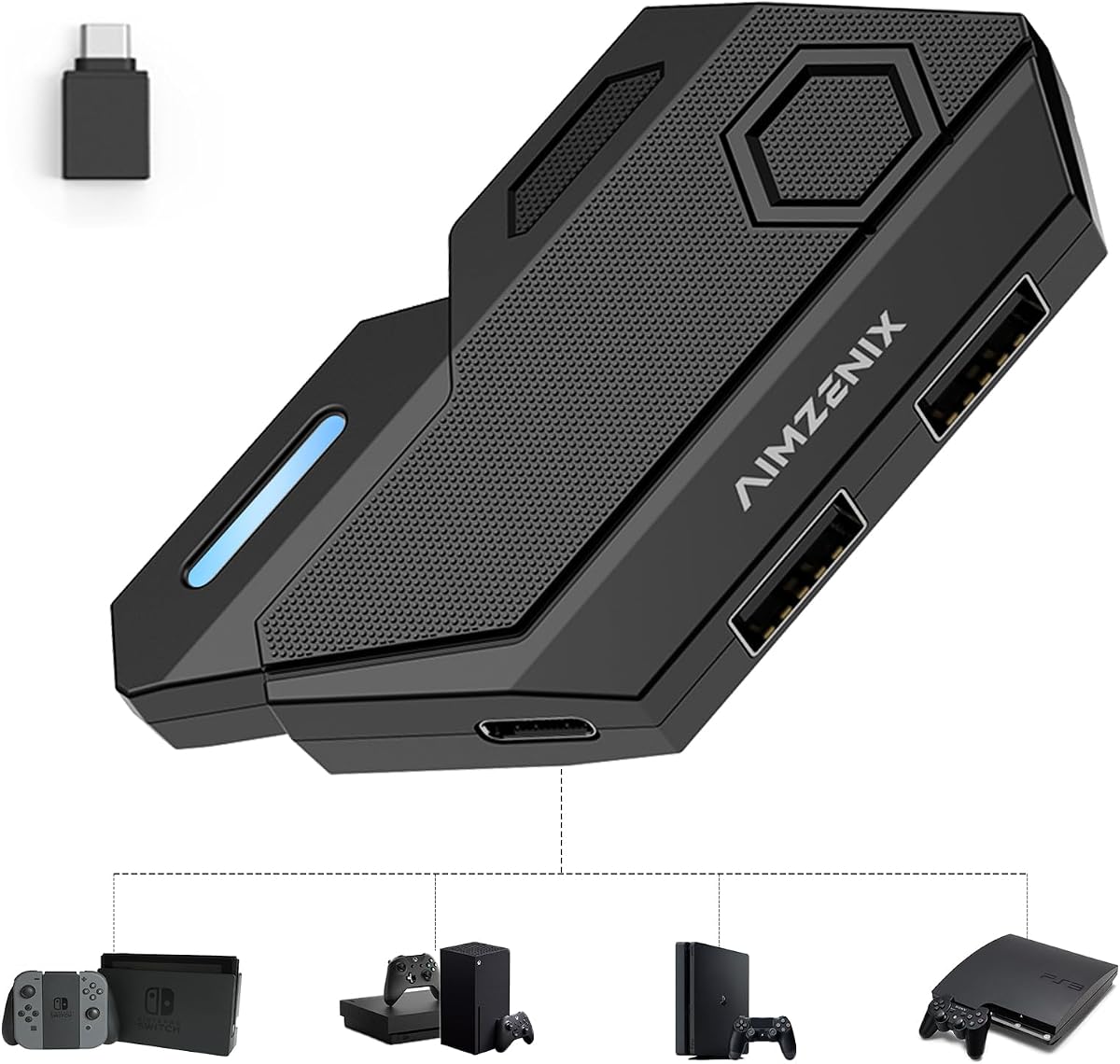
The AIMZENIX BLADER adapter translates keyboard and mouse activity into controller signals for Switch 2, Switch, Xbox One, Xbox Series X/S, and PS4. Its 4.0 rating reflects a generally positive reception, while the strongest feature is the combination of shortcut mapping, sensitivity adjustment, and broad platform support.
We may earn a commission when you buy through this link, at no additional cost to you.
For Switch 2 mouse-mode users, the adapter offers a different solution to physical grip problems. Rather than reshaping the Joy-Con or changing how it rests in the hand, it allows a conventional keyboard and mouse to serve as the input devices. Custom shortcut mappings can assign keyboard and mouse functions to controller inputs, and separate sensitivity controls can help tune aiming behavior.
There are important setup conditions. The mouse switching feature assumes that view sensitivity and related in-game settings are maximized. A corresponding original controller is required for console connection, third-party controllers are not supported, mice requiring driver installation cannot be used, and the controller's 3.5 mm headphone jack stops functioning once the adapter is connected.
This is best for a player who wants PC-style aiming on Switch 2 and owns a supported wired mouse and keyboard setup. It is less suitable for someone seeking a passive ergonomic grip, avoiding extra equipment, or retaining controller headphone functionality.
The adapter converts conventional keyboard and mouse input into signals the console can interpret through a controller. This can provide a more familiar aiming experience for shooters, strategy games, and other competitive titles.
Shortcut customization and mouse sensitivity adjustment make the adapter more versatile than a fixed converter. The included manual or tutorial is important because the exact editing process determines how well inputs can be tailored to individual games.
We may earn a commission when you buy through this link, at no additional cost to you.
This arVin adapter supports Switch, Switch OLED, PS3, PS4, and several Xbox One and Xbox 360 variants, but its supplied specifications do not list Nintendo Switch 2 compatibility. For that reason, it belongs in this roundup as a comparison option rather than a straightforward Switch 2 recommendation.
We may earn a commission when you buy through this link, at no additional cost to you.
Its feature set is substantial for players who own older consoles. Wired and 2.4G wireless keyboards and mice are supported, while Bluetooth devices and third-party controllers are excluded. The PS4 and PS3 modes can store as many as eight separate keyboard and mouse mapping sets, and the Xbox One and Xbox 360 modes support mouse-sensitivity adjustments through keyboard shortcuts.
Configuration is handled with an original game controller, which guides the process of assigning keyboard and mouse buttons to controller functions. The adapter uses a plug-and-play approach without an app or driver installation, although the manual or instructional video is important for understanding the shortcut combinations and platform-specific limitations.
Choose this product if your console library centers on the original Switch, Switch OLED, or the listed PlayStation and Xbox systems. It is a strong mapping converter for those platforms, but Switch 2 buyers should not assume compatibility merely because the product name refers to a Switch adapter.
The adapter's support for several console generations makes it useful for players who regularly switch between systems. Its broad device support can also reduce the need to buy a separate converter for each platform.
Eight mapping sets allow players to keep configurations for different games or control styles. This is especially helpful when movement, aiming, and action keys need to be assigned differently across genres.
We may earn a commission when you buy through this link, at no additional cost to you.
The DSSWEN adapter is one of the clearest matches for the search phrase because it transforms a next-generation controller into a vertical, mouse-shaped grip. It carries a 1.9 rating, so the physical concept should be considered alongside meaningful concerns about customer satisfaction.
We may earn a commission when you buy through this link, at no additional cost to you.
Its guide-rail mechanism lets the controller slide into a contoured shell intended to follow the natural curvature of a hand. Openings preserve access to triggers, bumpers, face buttons, and analog sticks, allowing the grip to change hand position without blocking the controls used during gameplay. High-density, impact-resistant polymer is used for the shell.
The ergonomic promise is substantial: holding the controllers in a more vertical arrangement may reduce finger cramping and distribute wrist pressure differently than standard rectangular grips. However, the low rating means buyers should not assume that every hand will find the sculpted shape comfortable. The single-pack format and uncertain fit for different hand sizes are additional considerations.
This adapter makes the most sense for Switch 2 players who specifically value a mouse-like palm support and can confirm that the geometry fits their grip. It is less suitable for players who want a minimal accessory, need a complete matched set, or prefer an established controller case with quick-release features.
Unlike simple finger caps or wrist straps, this shell repositions the controller into a vertical layout. That makes it one of the most meaningful ergonomic options for desktop-style aiming and extended handheld play.
The product description emphasizes access to every trigger, bumper, face button, and analog stick. This control clearance is essential because a more sculpted grip is only useful if it does not interfere with frequent inputs.
We may earn a commission when you buy through this link, at no additional cost to you.
This converter supports Nintendo Switch 2 along with the original Switch, Switch OLED, several Xbox systems, and PS3 and PS4 models. Its 2.7 rating suggests mixed experiences, making careful attention to platform-specific instructions especially important.
We may earn a commission when you buy through this link, at no additional cost to you.
The adapter includes customizable keyboard mappings, mouse sensitivity, scope sensitivity, and deadzone adjustments. It also uses an alien-inspired design with three support posts, adjustable RGB lighting, and both sound-activated and standard lighting modes. Three USB ports and a Type-C port offer connection options for a keyboard, mouse, and related accessories.
Switch 2 installation has a significant caveat: connection must use the console's Type-C interface rather than a USB port. The original controller is required for key mapping, and the product does not support the Switch 2 C key or wake-up function. If connection fails, the listed troubleshooting is to unplug all devices and reconnect them.
This is a good fit for a player who wants an expressive desktop setup, full mouse-and-keyboard control, and adjustable visual effects. It is less attractive for someone who wants a passive grip or needs the C button and wake functionality to operate through the adapter.
Separate controls for keyboard mapping, mouse sensitivity, scope sensitivity, and deadzone provide useful tuning options. Players can tailor the converter more closely to different shooters and strategy games.
The RGB lighting and supported desktop connections create a distinctive setup for players who regularly use a keyboard and mouse. The decorative features add atmosphere but should remain secondary to correct connection and mapping.
We may earn a commission when you buy through this link, at no additional cost to you.
This keyboard and mouse converter is designed around the Switch, PS4, PS3, Xbox One, and Xbox 360. Its 3.7 rating is moderate, and the supplied information does not explicitly identify Nintendo Switch 2 compatibility, so buyers should confirm the latest listing before assuming it supports the newer system.
We may earn a commission when you buy through this link, at no additional cost to you.
Its primary strength is flexibility. An original gamepad acts as a guide for assigning keyboard and mouse buttons to controller functions. The adapter supports most keyboards, mice, and third-party wired game devices, and it offers a plug-and-play experience without installing drivers. The compact enclosure is easy to keep near a television or place on a desk.
The product description claims no lag, blocking, input delay, or recognition problems, but such performance claims should be evaluated in the context of the user's devices, games, and connection method. A keyboard using a USB hub interface is not supported, which could be a meaningful limitation for setups with larger gaming keyboards.
This is a sensible converter for original Switch and listed older-console owners who want flexible keyboard-and-mouse input. For Switch 2, the lack of explicit compatibility and the possibility of future firmware updates mean buyers should review current product documentation rather than rely on the broader Switch label.
Using an original controller as the mapping guide makes the system approachable. Players can assign familiar keyboard and mouse actions to console inputs without navigating a complex software interface.
Keyboards connected through a USB hub are explicitly unsupported. Players with gaming keyboards that rely on a hub should verify their connection arrangement before buying.
We may earn a commission when you buy through this link, at no additional cost to you.
The Arvytosty set contains four magnetic wrist straps designed for Switch 2 Joy-Cons, with both blue and light-red options. Its 3.0 rating is moderate, but the accessories directly address mouse-mode handling by adding a secure wrist connection and a textured surface associated with the base.
We may earn a commission when you buy through this link, at no additional cost to you.
Installation is tool-free. Each strap matches the plus or minus marking on the controller, aligns with the bottom slot, and presses down until it clicks. Larger SR and SL buttons improve access to functions that can be difficult to reach while the controller is being held at a mouse-like angle, while a light guide helps display connection status.
Unlike a full shell, these straps do not change the entire shape of the controller. Their value lies in preventing accidental drops, keeping the wrist connected during vigorous movement, and providing a mousepad-like base texture. That makes them particularly relevant for tennis, badminton, motion-oriented games, and mouse-mode sessions.
This is a practical lower-cost choice for players who want added security and easier button access without committing to a bulky grip case. It is less suitable for those seeking palm support, wrist-angle correction, or a complete mouse-shaped enclosure.
The adjustable lanyard keeps each controller connected to the player's wrist during swings and sudden movements. That protection is useful in fast-paced sports games and anywhere a dropped Joy-Con would be disruptive.
The marked alignment and press-down installation eliminate tools and complicated routing. Players can move between controllers without rethreading a traditional wrist strap.
We may earn a commission when you buy through this link, at no additional cost to you.
The Belkin Nintendo Switch 2 Grip Case is purpose-designed for the new console and carries a 4.2 rating, the highest numerical rating among the products in this roundup. It combines an ergonomic textured grip with dock compatibility and a quick-release mechanism for the Joy-Cons.
We may earn a commission when you buy through this link, at no additional cost to you.
Its non-slip surface supports steadier handling during long sessions, while the case remains attached when the console is docked. Players can remove both Joy-Cons without taking off the grip, then use the console's kickstand in tabletop mode. That flexibility makes the accessory useful for handheld play, television play, and mixed gaming locations.
The grip does not claim the mouse-like vertical shape of the DSSWEN design, so players seeking a pronounced PC-mouse posture may prefer that alternative. Belkin's product is instead about a balanced, protected, and practical way to hold the standard controllers. Its construction uses a minimum of 75 percent recycled plastic and includes two-year coverage according to the supplied information.
This is the most versatile pick for a Switch 2 owner who wants one grip that can move between handheld and docked play without repeated Joy-Con removal or reinstallation. It also suits travel because the grip can stay installed while the console is packed.
Dock compatibility is the standout feature because it allows the protective grip to remain in place in the most common television setup. Quick-release Joy-Cons then provide easy access to tabletop play without removing the entire case.
The textured, non-slip construction is intended to improve security and comfort. It offers a subtler ergonomic change than a vertical mouse-style shell, making it a balanced choice for many play styles.
We may earn a commission when you buy through this link, at no additional cost to you.
This Arvin converter supports the original Switch, Switch OLED, Switch Lite, several Xbox One and Series models, and PS3 and PS4 systems. Its supplied information explicitly excludes Nintendo Switch 2, so it belongs in the list as a related comparison for owners of older or differently targeted hardware.
We may earn a commission when you buy through this link, at no additional cost to you.
The adapter accepts wired and 2.4G wireless mice and keyboards, while Bluetooth peripherals are not supported. Up to four custom keyboard and mouse mapping sets can be stored, and mouse sensitivity can be adjusted with a keyboard shortcut. It is designed to operate without software, using an original controller to guide the mapping process.
The enclosure is made from hard ABS material and includes three USB ports, one Type-C port, an OTG adapter, a Type-C charging cable, and an instruction manual. The listed compatibility for PS5 is limited: the adapter can connect through a PS4 controller, but it does not support PS5 controllers or PS5 games.
This is a worthwhile converter for players with compatible older consoles who want a compact, configurable keyboard-and-mouse solution. A Switch 2 buyer should treat it as incompatible unless the manufacturer updates the product information and offers appropriate firmware support.
A keyboard-based shortcut makes it easy to change mouse sensitivity during a session. This is convenient for games with different aiming speeds or for players who prefer to fine-tune the response.
The product's support for PS5 is restricted to using a PS4 controller and PS4 games, while Bluetooth peripherals and Switch 2 are excluded. Checking these boundaries prevents disappointing setup changes later.
We may earn a commission when you buy through this link, at no additional cost to you.
The COOWPS thumb grips are designed specifically for Switch 2 Joy-Cons and the Switch 2 Pro controller. They do not fit the original Switch or OLED model, an important distinction for owners of multiple console generations. Their 4.4 rating is the highest numerical rating shown in the supplied product data.
We may earn a commission when you buy through this link, at no additional cost to you.
These accessories cover analog sticks with soft, high-friction silicone. The textured surface is intended to reduce slippage and improve precision, particularly when fingers become sweaty during intense sessions. The added height and wider shape offer a different feel and can make the stick easier to acquire and control accurately.
Two designs provide different heights. The bottle-cap form is positioned for everyday casual games, while the taller straw-hat style is intended for shooting games where deliberate analog movement may be more important. The grips also protect stick tops from scratches and dirt without covering the surrounding controller controls.
This is a focused solution for players who want better analog-stick feel rather than a complete ergonomic transformation. It is particularly attractive for Nintendo Switch 2 owners who use one controller in mouse mode and prefer additional texture around the stick, though it does not alter the palm-support angle offered by a full grip adapter.
The high-friction texture helps keep a finger from sliding across an analog stick. This can support steadier adjustments and more confident input during fast or tense gameplay.
A low-profile bottle-cap design suits general gaming, while the taller straw-hat option can provide a more pronounced lip for precise stick control. Trying both styles can reveal which feels more natural.
We may earn a commission when you buy through this link, at no additional cost to you.
The best mouse grip adapter depends on whether your priority is physical ergonomics, analog-stick traction, drop prevention, or keyboard-and-mouse conversion. Compatibility, fit, and platform-specific limitations should be evaluated before choosing an accessory.
A product labeled for the Switch may not support Switch 2. Look for an explicit Switch 2 listing and check whether the manufacturer distinguishes between the new console, the original Switch, Switch OLED, and Switch Lite. Some keyboard-and-mouse converters support the original Switch but not Switch 2, while others require the console's Type-C port for connection. Thumb grips can also be generation-specific, as the COOWPS product is designed for Switch 2 controllers and does not fit earlier models.
A physical grip changes how the controller feels in your hands, while a converter changes how input reaches the console. The DSSWEN adapter uses a vertical mouse-style shell, while the Belkin case offers a more conventional ergonomic enclosure. Keyboard-and-mouse products such as AIMZENIX are appropriate when you already prefer a desktop mouse and need input conversion, not when you want the Joy-Con itself to feel like a mouse.
If you intend to use both Joy-Cons in mouse mode, verify whether the package includes both sides. The NEW Game Controller Grip Mouse Accessory is described as including both left and right mouse adapters, whereas the DSSWEN product is listed as a single pack. The Arvytosty wrist-strap set includes four straps in blue and red, providing multiple controller-side options.
A sculpted grip should preserve access to triggers, bumpers, face buttons, analog sticks, and any system buttons that matter to your games. The DSSWEN design specifically highlights precision-cut openings. For wrist straps, accessible SR and SL buttons are important because those controls can be difficult to reach when a controller is held at a steeper angle. Check product images and clearance descriptions before installation.
A grip that remains usable in every mode offers more flexibility. The Belkin case is dock-compatible, allows the Joy-Cons to be removed without taking off the grip, and supports tabletop mode. Compact, pocket-sized designs such as the DSSWEN adapter can also be easier to transport. A wrist strap adds protection during full-motion play, which can be especially valuable in travel or active gaming situations.
Keyboard-and-mouse adapters often require an original controller, even when the mouse is the device providing the aim input. Some permit only certain mouse types and reject mice that need driver installation. Others support wired and 2.4G wireless peripherals but exclude Bluetooth devices. Mapping tools, sensitivity settings, deadzone controls, and stored profiles can improve usability, but they also add configuration steps that should be understood before buying.
The word ergonomic describes many different shapes. A vertical mouse-style grip changes wrist and finger positioning more dramatically than a textured case or analog-stick cap. The most comfortable choice depends on hand size, grip style, session length, and whether you play one-handed or two-handed. Product ratings can offer a general signal, but low ratings on a specialized design may reflect fit differences rather than a universal failure.
The attachment method determines whether the accessory stays stable during active play. Guide rails, magnetic snaps, and press-fit connections each offer different benefits. Magnetic attachments are convenient and allow quick removal, while a guide rail can create a more defined sliding fit. Textured surfaces and stable base designs can limit movement on a desk. Inspect the mechanism and ensure it does not obstruct charging, docking, or Joy-Con removal.
Begin by identifying which kind of accessory you selected and reading its included instructions. Physical grips generally attach to the controller body, while magnetic wrist straps align with the plus or minus markings and the bottom slot. For converters, connect the supported peripherals and original controller first, then follow the manual's mapping procedure. Before attaching anything, make sure the controller is powered off and free of debris.
Install the grip or strap evenly rather than forcing one corner. For the Arvytosty design, align the marked frame and press until you hear a click. For the DSSWEN guide-rail design, slide the controller into position and confirm that it sits securely. Check that buttons, sticks, ports, and magnetic contacts remain accessible. If you use the Belkin case, remove the Joy-Cons using its quick-release mechanism and confirm that the grip does not obstruct the kickstand or docking connection.
For converters, begin with the appropriate original controller and set the console to the required wired-controller connection mode. Switch 2 converter models may need the console's Type-C port, and certain system-button functions may not be supported. Configure keyboard mappings, mouse sensitivity, scope sensitivity, or deadzone settings gradually, then test them in a low-stakes match. Clean removable parts with a soft, dry cloth, avoid moisture around electronics, and inspect attachment points for loosened screws, damaged rails, or frayed straps.
It is an accessory that makes a Switch 2 controller feel more like a mouse or improves the way it is held. Some products reshape the controller into a vertical grip, while others add wrist straps, textured surfaces, or analog-stick caps. A keyboard-and-mouse converter serves a related but different purpose by translating desktop input into controller signals.
No. Products made for the original Switch, Switch OLED, or Switch Lite may not fit Switch 2 correctly. The listing should explicitly state Switch 2 compatibility, and buyers should also verify the required connection method, particularly for keyboard-and-mouse adapters that must use the console's Type-C port.
It depends on the problem you want to solve. A full grip changes palm support, hand position, and potentially the angle at which you hold the controller. Thumb grips focus narrowly on analog-stick traction, stick height, and surface protection. Players with hand discomfort may benefit more from a full shell, while those who are satisfied with the controller shape may only need improved stick feel.
Some adapters explicitly support Switch 2, including the AIMZENIX BLADER and the RGB converter in this roundup. Most still require a corresponding original controller for console connection, and some mice requiring special drivers are excluded. Switch 2 models may also have restrictions involving USB connections, the C key, or wake-up functionality.
That depends on the design. The Belkin Nintendo Switch 2 Grip Case is specifically described as dock-compatible and allows the Joy-Cons to be removed without taking off the grip. Other shells may interfere with the dock, kickstand, or magnetic rail, so confirm those compatibility claims before buying.
A secure wrist strap is one of the simplest safeguards. The Arvytosty set uses magnetic snap-on frames, adjustable lanyards, and mouse-mode-oriented base textures. Keep the strap adjusted so it remains snug without restricting wrist movement, and verify that the magnetic attachment is fully seated before vigorous play.
Not universally. The arVin and Arvin products in this roundup support wired and 2.4G wireless peripherals but exclude Bluetooth devices. The AIMZENIX adapter also warns that mice requiring driver installation are unsupported. Check the specific peripheral requirements before purchasing a converter.
A magnetic wrist strap or a dedicated analog-stick thumb grip is generally the simplest for one-handed use because it does not require adopting an entirely new controller shape. Full grip cases and vertical mouse adapters are better suited to players comfortable changing the position and angle of a controller.
The Belkin Nintendo Switch 2 Grip Case is the most versatile overall choice because it combines textured handling, dock compatibility, quick-release Joy-Cons, and a clear Switch 2-specific design. The DSSWEN adapter stands out for players seeking a pronounced vertical mouse shape, while the Arvytosty magnetic straps offer a lightweight way to improve security and button access in mouse mode.
Your priority should determine the category you choose. Choose a full grip for palm support and hand positioning, thumb grips for analog-stick traction, wrist straps for drop prevention, or a keyboard-and-mouse converter when you want desktop input methods on a supported console. Always verify model compatibility, original-controller requirements, connection ports, and the availability of any excluded buttons.
Ratings, product information, and retailer terms can change, so review the current listing before purchasing. Comparing the latest fit details and instructions with your games, controller setup, and preferred grip style will give you the best chance of choosing an accessory that remains comfortable and practical.
