
AURSINC TinySA Ultra+ ZS407
4.4Editor score
Spectrum analysis to 7.3GHz
Sine and square wave generation
Built-in 5000mAh battery
Included 32GB storage card
Signal generators produce controlled electrical, RF, audio, or video signals for testing circuits, calibrating equipment, diagnosing faults, and validating systems. A useful model must match the target frequency, waveform, output level, connectivity, and control requirements of the project rather than simply offering the widest headline specification.
The ten products in this guide cover desktop DDS function generators, handheld spectrum analyzers with signal-generation modes, an RF tracking source, an HDMI pattern generator, a consolidated audio tester, and a compact low-frequency wellness device. We compared their documented capabilities, output ranges, channels, waveforms, displays, interfaces, portability, and practical specializations.
Each review explains what the product does best, where its specification sheet is less demanding, and which users should consider it. The ranking reflects the supplied product information and customer ratings, while detailed features, compatibility, and current availability should always be confirmed before purchase because prices and product configurations change.
4.4Editor score

5.0Editor score

4.5Editor score
As an Amazon Associate we earn from qualifying purchases.
This side-by-side comparison highlights the different roles each signal generator plays, from general-purpose DDS waveform production and wideband RF analysis to HDMI pattern testing and audio-system troubleshooting.


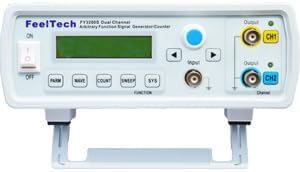

The FY6900 20M is a dual-channel DDS function and arbitrary waveform generator built around accurate, stable, low-distortion signal production. Its 5.0 customer rating is the highest among the listed products, and the supplied specifications combine a frequency ceiling of 100MHz for sine waves with a 250MSa/s sampling rate and 14-bit vertical resolution.
We may earn a commission when you buy through this link, at no additional cost to you.
Its strongest feature is the breadth of the instrument. It can handle ordinary function-generator work, arbitrary waveform playback, and frequency-counter tasks without being tied to one narrow test protocol. The color display improves visibility in a lab, while support for as many as 98 sets of functions and arbitrary waveforms gives users a substantial library to work from. AC input across a 100–240V range also makes it suitable for varied bench environments.
There are practical limitations to consider. It is a desktop unit with an ABS plastic enclosure rather than a handheld RF analyzer, and it does not replace a dedicated tracking source or wideband spectrum analyzer. Users working with high-frequency RF circuits must also check the actual output arrangement, attenuation, and interface requirements before assuming the headline frequency range suits their application.
The FY6900 20M is the strongest all-around recommendation for electronics education, repair, prototyping, and general bench testing. Its two channels allow comparison, differential-style experimentation, and phase-related work that a single-channel generator cannot provide as conveniently. For a versatile signal source with strong ratings and broad waveform capabilities, it is the most balanced choice in this guide.
Two output channels make it easier to generate reference and test signals together. This is useful when comparing amplifier response, timing relationships, phase behavior, or the response of one circuit stage against another.
A 250MSa/s sampling rate, 14-bit vertical resolution, and up to 98 stored function or arbitrary waveform sets give the instrument more depth than a simple tone-only source. The included waveform library also reduces setup time for common bench experiments.
We may earn a commission when you buy through this link, at no additional cost to you.
The RF Explorer RFE6GEN is a portable RF source covering 24MHz to 6GHz, with a supplied customer rating of 4.1. It is designed for engineers and technically experienced users who need continuous-wave output, a controlled sweep, or a tracking-source workflow rather than ordinary low-frequency function generation.
We may earn a commission when you buy through this link, at no additional cost to you.
Its most valuable feature is integration with RF Explorer spectrum analyzers. Through the supplied PC software, it can act as a tracking generator for S11 return-loss and filter analysis, turning the combination into a scalar network analyzer setup. A dedicated sweep function supports adjustable endpoints, step size, and speed, which can accelerate component and circuit validation across the supported frequency range.
The product is not a general-purpose arbitrary waveform generator. Its strength lies in stable RF CW and sweep signals, and its usefulness depends on compatible software and, for tracking measurements, an appropriate RF Explorer analyzer. The 1kHz resolution is also a meaningful constraint when a task requires much finer control than the advertised stepping provides.
Choose the RFE6GEN when portable RF characterization, antenna or filter work, and spectrum-analyzer pairing are central to the task. For fixed, inexpensive bench sourcing of basic waveforms, a DDS function generator may be more direct. Within RF tracking and sweep workflows, however, this model offers a capable and specialized combination of functions.
When paired with a compatible RF Explorer spectrum analyzer through the PC software, the RFE6GEN can function as a tracking source. That makes it possible to investigate S11, return loss, and filter behavior rather than relying only on signal presence.
The compact aluminum body and included EVA hardshell case make the unit easier to carry between bench and field locations. Programmable CW and sweep output supports repeatable RF tests without requiring a separate source for every basic measurement.
We may earn a commission when you buy through this link, at no additional cost to you.
The OREI HDMI 2.1 Signal Generator is a focused video test tool with a 4.5 rating. It generates HDMI signals for calibration and troubleshooting rather than producing arbitrary electrical waveforms, making it most useful to AV technicians, installers, display specialists, and anyone troubleshooting modern home-theater equipment.
We may earn a commission when you buy through this link, at no additional cost to you.
It supports HDMI 2.1 and HDCP 2.3, generates video up to 8K at 30Hz, and offers total bandwidth up to 40Gbps with a maximum of 10Gbps per lane. Thirteen built-in patterns, including color bars, checkerboards, and gradients, help reveal resolution, color, synchronization, cable, and display problems. Selectable RGB and YUV formats add useful control when investigating different display pipelines.
The product title refers to 8K at 60Hz, while the supplied feature details specifically state support up to 8K at 30Hz. Buyers should therefore verify the exact refresh-rate behavior required by their display and source equipment before purchase. This unit should not be evaluated as a general-purpose function generator because its value comes from HDMI-specific pattern output.
Despite that specialization, the OREI is an excellent choice for technicians who need a self-contained pattern source in a compact package. Its metal enclosure suits both bench use and field service, while the broad selection of patterns helps shorten diagnostic workflows. It is the budget recommendation for HDMI troubleshooting and display calibration.
Color bars, checkerboards, gradients, and other built-in patterns make it easier to distinguish a source problem from a cable, display, or color-format issue. The generator can provide a known visual reference without relying on a commercial media source.
HDMI 2.1 compatibility, HDCP 2.3 support, and up to 40Gbps total bandwidth position the tool for current high-resolution display testing. Check exact resolution and refresh-rate compatibility with the intended display before relying on it in a client installation.
We may earn a commission when you buy through this link, at no additional cost to you.
The FY8300S-20M is a highly versatile three-channel generator with a 4.0 customer rating. It combines function and arbitrary waveform generation, pulse generation, four-channel TTL logic output, a VCO, frequency sweeping, a counter, and a frequency meter in one desktop instrument.
We may earn a commission when you buy through this link, at no additional cost to you.
Its three main outputs are completely independent and can operate synchronously with precisely adjustable phase differences. That is a major advantage over simpler dual-channel units. The 100MHz frequency-meter function supports frequency, period, positive and negative pulse-width, and duty-cycle measurements, while host software allows users to edit waveforms, save them to the instrument, and control functions remotely.
Short-circuit protection allows signal outputs to operate under loaded short-circuit conditions for 60 seconds, which can reduce stress during initial setup. On the other hand, the large feature set and many shortcut controls take more time to learn, and the unit is a fixed AC-powered design rather than a portable field instrument.
This is the pick for users who need several related outputs or a deeper collection of bench functions. It is especially suitable for digital control testing, multi-channel phase experiments, pulse work, and mixed analog/digital troubleshooting. Users who only need one clean tone should consider a simpler instrument, but those who value programmability and channel flexibility will find this model highly capable.
Three independent channels allow separate outputs with individually configured parameters and precise phase adjustment. Synchronized operation and channel tracking add speed when several outputs need to change together.
The integrated frequency meter measures frequency, period, positive and negative pulse width, and duty cycle. Four TTL level outputs extend the instrument beyond conventional analog waveform generation into digital logic testing.
We may earn a commission when you buy through this link, at no additional cost to you.
The AURSINC TinySA Ultra+ ZS407 is a handheld spectrum analyzer and RF signal generator with a 4.4 rating. Its analysis coverage extends from 100kHz to 7.3GHz, while Ultra mode extends operation and calibration to the upper end of that range, making it a versatile tool for field RF investigation.
We may earn a commission when you buy through this link, at no additional cost to you.
The four-inch IPS-TFT screen displays up to 450 scan points per sweep, and the built-in LNA offers up to 20dB gain to 7.3GHz for weak-signal reception. The device can generate sine waves from 0.1MHz to 900MHz, square waves, and RF test signals up to 7.3GHz. That combination allows users to observe a signal and then introduce a source during troubleshooting without carrying two major instruments.
Its generator is not intended to compete with a high-resolution arbitrary waveform generator. The base sine range, square-wave support, and upper-frequency test output should be checked against the exact signal shape and modulation required. It is also important to understand how the base range and Ultra mode differ when planning measurements near the upper limit.
The ZS407 is especially attractive for field technicians, radio experimenters, and users who need both spectrum analysis and a useful test source in a handheld format. A 5000mAh battery, PC control, a 32GB MicroSD card, SMA cables, an antenna, and a USB cable form a practical package. It is the most versatile option here for mobile RF work.
The integrated generator can be used to verify signal presence, support RF testing, and aid troubleshooting while the spectrum analyzer displays the surrounding activity. This two-in-one design is useful when carrying a full bench to a remote site would be impractical.
The rechargeable 5000mAh battery, four-inch display, PC control, and included 32GB MicroSD card support extended mobile workflows. A lanyard, antenna, SMA cables, barrel connector, USB cable, and stylus complete the supplied field package.
We may earn a commission when you buy through this link, at no additional cost to you.
The Xvive AT-2 Audio Tester Pro has a 4.8 customer rating, the highest among the ten listed models, and packages five functions into one compact audio tool. It combines a signal generator, XLR cable tester, phantom-power checker, input-level meter, and headphone or built-in-speaker monitor.
We may earn a commission when you buy through this link, at no additional cost to you.
Its generator provides a 1kHz sine tone and pink noise with three output pad levels of -10, -20, and -40dB. These are practical signals for testing mixers, DI boxes, wireless systems, pedals, active PA speakers, and in-ear monitor rigs. The input meter uses signal and peak indicators to show whether a signal is present and warn when levels are hot.
The XLR tester checks all three pins individually, automatically cycling or allowing manual pin selection, while the phantom-power function reports approximately 44–52V with a solid indicator and 24–44V with a flashing indicator. A 1/8-inch headphone output and onboard speaker permit audible monitoring, and USB-C charging offers a stated full-charge time of about 1.5 hours.
This is not a substitute for a programmable laboratory source, but it is exceptionally convenient for live audio work. It helps establish a signal, diagnose cabling, confirm phantom power, and monitor levels in one device, reducing the need to carry several separate tools. For sound engineers and working audio technicians, it is the most purpose-built choice on this list.
A 1kHz tone and pink noise provide recognizable test signals for tracing audio paths. Three pad levels help match the output to common input conditions, while the meter confirms signal presence and highlights potentially excessive levels.
Pin-by-pin XLR testing helps identify broken or intermittent conductors, and the phantom-power check helps separate a missing-power problem from a cable or signal issue. Together, these functions speed up common stage troubleshooting.
We may earn a commission when you buy through this link, at no additional cost to you.
The AURSINC TinySA Ultra+ ZS406 is a 4.5-rated handheld spectrum analyzer with signal-generation capability. Its four-inch 480 by 320 touchscreen, 100kHz to 5.4GHz measurement range, and Ultra mode extending to 6GHz make it particularly approachable for users who prefer direct on-screen control.
We may earn a commission when you buy through this link, at no additional cost to you.
Resolution bandwidth can be switched from 200Hz to 850kHz, and the 200Hz minimum helps separate nearby signals. The analyzer displays up to 450 points, includes a 0–31dB input-step attenuator, and offers an integrated LNA with 20dB of gain for low-level signals below 3.5GHz. Documented phase noise reaches -108dB/Hz at a 100kHz offset and -115dB/Hz at a 1MHz offset at 30MHz.
As a signal source, it can produce MF, HF, and VHF sine waves from 100kHz to 900MHz, UHF square waves from 800MHz to 4.4GHz, and mixed signals from 4.4GHz to 5.4GHz. A calibration source supports self-test and low-input calibration, while USB connection enables PC control through the TinySA-APP. This source section is less flexible than a full arbitrary waveform generator.
The ZS406 is well suited to education, radio troubleshooting, bench work, and portable RF surveys. Its included 5000mAh battery is stated to provide at least three hours of continuous operation, while the 32GB card, cables, antenna, and USB lead make data collection convenient. It is an excellent analysis-first option with a useful secondary generator mode.
The adjustable resolution bandwidth and 200Hz minimum allow narrow windows around crowded signals. This is useful for adjacent-channel observations, filter checks, and the supplied support for SSB two-tone intermodulation testing.
The LNA improves weak-signal reception, while the documented phase-noise figures support frequency-stability and spectral-purity observations. A gapless 450-point display helps present the full measured band in a single view.
We may earn a commission when you buy through this link, at no additional cost to you.
This FY6900 20M DDS listing offers a dual-channel function and arbitrary waveform generator with a 3.5 customer rating. The documented capabilities closely match the related FY6900 listing: 100MHz maximum sine-wave frequency, a 250MSa/s sampling rate, 14-bit vertical resolution, and support for up to 98 function or arbitrary waveform sets.
We may earn a commission when you buy through this link, at no additional cost to you.
DDS technology is used to produce accurate, stable, and low-distortion outputs. A 2.4-inch 320 by 240 color display makes menu navigation and signal selection clearer, and the desktop ABS enclosure is powered from a broad 100–240V AC range. The dual-channel configuration supports simultaneous outputs for comparative and phase-related work.
The most important consideration is that this listing has the lowest rating in the group, even though its stated specifications are strong. That gap may reflect differences in component condition, fulfillment, seller variation, or user experience. Buyers should compare the complete package, accessories, warranty support, and exact configuration with the higher-rated FY6900 listing before choosing.
For a desktop generator user who values two channels, a detailed color screen, and broad arbitrary-waveform support, the documented specification set remains attractive. It is best treated as an alternative to the top-ranked FY6900 rather than an automatic choice. Reviewing the seller's current product details and support can help distinguish the two configurations.
The 2.4-inch color display provides a practical way to review parameters and waveforms without relying entirely on menu codes. This is useful for quick bench setup and repeated switching among stored signal sets.
Because a closely related FY6900 listing has a much stronger customer rating, buyers should verify the channel configuration, included accessories, seller support, and warranty terms. Matching the exact model suffix to the required frequency range is essential.
We may earn a commission when you buy through this link, at no additional cost to you.
The FY3200S 6M is a dual-channel digital DDS function source with a 5.0 customer rating. It is designed for users who need dependable arbitrary waveforms, independent channel settings, and pulse or frequency-measurement functions without the broader frequency ceiling of the higher-range FY6900 models.
We may earn a commission when you buy through this link, at no additional cost to you.
Both channels can be configured independently, and the instrument uses 2048 by 12-bit arbitrary waveform memory with a 250MSa/s sampling rate. Its bandwidth is described as up to 12-bit, while the listing variant is marked FY3200S 6M and the broader title contains several selectable frequency options. Output amplitude reaches 20Vpp, with a minimum of 10mVpp, offering useful flexibility for circuit excitation.
The naming is potentially confusing because the title presents several frequency variants even though this specific listing is identified as the 6M version. Buyers should verify the actual output ceiling and the configuration included with the selected ASIN. The 12MHz figure also appears in relation to bandwidth, so it should not be confused with a separately stated maximum output frequency.
This model is a good fit for analog circuit experimentation, amplifier testing, education, pulse generation, and general repair where two independently adjustable channels are valuable. Its 5.0 rating supports a favorable initial impression, although the listed rating alone cannot establish long-term reliability. Confirm the exact variant, output range, accessories, and seller support before ordering.
Each channel can be set separately, allowing different waveforms, frequencies, and amplitudes to be produced simultaneously. That makes the unit useful for gain comparison, differential tests, and multi-stage circuit analysis.
The documented 10mVpp minimum and 20Vpp maximum provide a broad adjustment range for many analog experiments. The 250MSa/s rate supports detailed arbitrary waveform playback, although the exact waveform shape should be verified against the unit's supported modes.
We may earn a commission when you buy through this link, at no additional cost to you.
The Schumann Resonance Generator is a compact sine-wave source designed for low-frequency experimentation, sound-therapy use, and wellness-oriented applications. It has a 4.2 customer rating and covers an adjustable range from 0.01Hz to 299999Hz, including the commonly discussed 7.83Hz Schumann-resonance frequency.
We may earn a commission when you buy through this link, at no additional cost to you.
The generator operates silently and is powered through a standard 5V USB interface. Its compact acrylic enclosure measures 4.3 by 6.3 by 0.8 inches, making it easy to carry between home, office, and travel locations. Headphones can be connected temporarily to verify that an output is present, although the supplied information notes that the device itself produces no regular audible sound.
This is not a precision laboratory instrument in the way a DDS generator or RF source may be. The product information does not describe calibrated amplitude accuracy, distortion, impedance, waveform controls beyond sine output, or a professional output interface. It should therefore be evaluated as a specialized low-frequency generator rather than as a general electronics test source.
The product is most appropriate for users seeking a simple personal frequency generator, a hands-on demonstration of very low and ultrasonic sine waves, or a wellness-oriented routine. For engineering measurements, calibrated equipment and verified output characteristics should take priority over a broad advertised range. Its simplicity and portability are meaningful advantages within that narrower use case.
The unusually broad 0.01Hz to 299999Hz adjustment range makes it possible to move from extremely low frequencies through the audio region and into higher audio-band values. The specific 7.83Hz setting supports the product's named wellness use case.
USB power and a slim enclosure remove the need for a dedicated mains adapter or bulky bench housing. Silent operation allows continuous use in settings where a normal audible tone generator would be disruptive, with headphones serving only as a temporary output check.
We may earn a commission when you buy through this link, at no additional cost to you.
The right signal generator depends less on the largest headline number and more on the exact test you need to perform. Start with the signal domain, required bandwidth, output format, and environment, then consider display quality, portability, software, accessories, and seller support.
A signal generator can produce audio-frequency analog waves, digital logic, RF carriers, sweep or tracking signals, video patterns, or very low-frequency waveforms. Begin by identifying what the device under test expects. Analog amplifiers and filters usually call for sine waves, pulse and timing circuits benefit from square or arbitrary waveforms, RF work requires a compatible source and impedance context, and display troubleshooting calls for a video pattern generator.
The maximum output frequency is only one part of the calculation. Check the minimum frequency, harmonic or subharmonic behavior, sweep range, and whether the advertised figure refers to the signal source, analyzer, or occupied bandwidth. DDS models offer stable synthesized output, while RF sources emphasize carrier coverage, resolution, and tracking. The FY3200S listing, for example, contains several variant names, so its exact selected configuration should be verified.
A basic tone source may be sufficient for filter alignment, but arbitrary waveform capability expands testing into pulse shapes, transient simulations, communication symbols, and custom signals. Look at waveform memory depth, sample rate, vertical resolution, supported modulation, and editing software. None of these figures replaces the need to verify signal integrity with a separate oscilloscope when accurate waveform shape is essential.
Multiple channels let users create comparisons, clock relationships, phase offsets, or simultaneous test stimuli. The FY6900 offers two channels, the FY8300S provides three independent outputs with phase adjustment, and the FY3200S supports independently configured dual channels. If your test depends on synchronization, check channel tracking, phase resolution, trigger inputs, and whether all outputs are genuinely independent rather than simple copies.
The output must deliver enough voltage, current, and power to excite the circuit without damaging it. Useful specifications include minimum and maximum amplitude, attenuation range, output impedance, and protection behavior. The FY3200S lists a 10mVpp to 20Vpp range, while the Xvive AT-2 uses -10, -20, and -40dB pads. RF outputs also require attention to connector type, impedance, and potential signal reflections.
Desktop instruments are appropriate for sustained bench work, while handheld products suit site visits, quick interference checks, and portable troubleshooting. The TinySA Ultra+ models combine a spectrum analyzer with a generator and use rechargeable batteries, and the RF Explorer RFE6GEN includes a protective carrying case. The HDMI pattern generator and audio tester are compact specialized tools designed to move easily through service workflows.
A clear screen, straightforward controls, and useful PC software can materially improve a test workflow. The ZS406 uses a four-inch touchscreen, the ZS407 uses a four-inch IPS-TFT display, and the FY6900 provides a 2.4-inch color screen. The RFE6GEN depends on PC software for sweep and tracking operation, while the TinySA models support USB control through their application environment. Confirm operating-system compatibility and whether essential controls remain available without a computer.
Useful cables, adapters, antennas, cases, storage media, and power supplies can determine whether a product is ready to use on arrival. The TinySA packages include SMA cables, an antenna, USB cable, connector, stylus, and 32GB card, while the RFE6GEN includes an EVA case. Also check the applicable warranty, return arrangement, seller support, and documentation because technical performance alone cannot guarantee a smooth ownership experience.
Begin by identifying the required waveform, frequency, amplitude, and output connection. Read the manual for the selected model, confirm that the output is disabled before changing cables, and verify the source impedance and voltage limits of the circuit under test. For a DDS generator, select the channel and waveform before adjusting amplitude; for an RF or tracking source, use the correct cable and impedance; for a video or audio tester, connect the dedicated signal output to the intended input.
Configure the test conservatively. Begin with a low output level, increase it gradually, and watch for distortion, unexpected reflections, or indications of overloading. When using multiple channels, document the relationship between outputs rather than assuming they start synchronized. On portable analyzers, save measurements to the included storage and use the supplied PC software for deeper review. For troubleshooting workflows, record the source settings alongside each observation so results can be reproduced.
Care for the device by using stable, clean power and avoiding overload on outputs. Keep the housing dry, protect the display from impact, and strain-relax attached cables. Clean SMA and coaxial connections carefully, and do not use aggressive solvents on displays or plastic panels. Store portable units with adequate battery charge, update firmware or application software through the supported method, and keep the case, antennas, cables, and documentation together so the instrument remains ready for the next test.
A signal generator creates a controlled output so engineers can test how another device responds to a known input. Depending on the model, that output may be an analog waveform, digital logic pattern, RF carrier, sweep, tracking source, audio test tone, or HDMI test image. It is used for circuit development, troubleshooting, calibration, filtering, signal-path verification, and equipment testing.
No. A higher frequency ceiling is useful only if the test requires signals near that limit. Output quality, waveform fidelity, amplitude control, channel flexibility, stability, and the intended connectors often matter more. A broad-range RF source may be essential for antenna work, while a lower-frequency multi-channel DDS unit can be better for analog and timing experiments.
No. A generator produces the test input, while an oscilloscope observes the resulting voltage or waveform. For accurate work, use the generator to apply a known signal and the oscilloscope to inspect amplitude, frequency, distortion, timing, and noise. Some combined spectrum analyzers provide useful measurement functions, but they do not remove the value of independent verification.
Continuous-wave output holds a steady carrier at one frequency, which is useful for gain and level measurements. Sweep output moves between selected endpoints with adjustable step size and speed. Tracking output is coordinated with a compatible spectrum analyzer to follow the measured frequency, supporting return-loss, S11, and filter analysis workflows.
It can be highly useful for portable identification, monitoring, troubleshooting, and basic source-and-response checks. The TinySA Ultra+ models combine wideband analysis with sine, square, or mixed test outputs. More formal RF characterization may still require a dedicated tracking generator, calibrated power measurement, appropriate impedance accessories, and a controlled test setup.
Choose an HDMI generator when troubleshooting displays, cables, receivers, or video synchronization, as the OREI model provides test patterns and HDMI 2.1 signals. Choose a function or arbitrary waveform generator when testing analog or digital circuits that require sine waves, pulses, square waves, or custom waveforms. The two instruments solve different diagnostic problems.
Multiple channels are valuable when a circuit must receive two or more related signals, such as a reference and test waveform. They can support comparisons, phase adjustments, differential testing, and synchronized logic work. A single channel is often enough for simple amplifier or filter tests, while the FY6900, FY8300S, and FY3200S address more complex multi-signal scenarios.
Use a properly configured oscilloscope, frequency counter, spectrum analyzer, or calibrated reference instrument to measure the output. Check frequency, amplitude, waveform shape, and distortion at the actual load and termination. The instrument's own counter or calibration routines can help, but independent measurement is preferable when the result will determine production, safety, or compliance decisions.
The FY6900 20M is the strongest general recommendation because it combines a 5.0 rating, dual channels, a 100MHz sine-wave ceiling, 250MSa/s sampling, and 14-bit vertical resolution. For specialized needs, the RF Explorer RFE6GEN offers wideband RF sweep and tracking capability, while the OREI HDMI 2.1 unit is the focused choice for display and cable diagnostics.
Prioritize the test rather than the product category label. Audio technicians should consider the Xvive AT-2's tone, pink-noise, XLR, phantom-power, and metering functions. Mobile RF users should compare the TinySA Ultra+ ZS407 and ZS406, and users needing three coordinated outputs or extensive counter and TTL functions should examine the FY8300S-20M.
Before ordering, confirm the exact model variant, output range, connector format, required accessories, software compatibility, warranty, and seller support. Prices and configurations can change, so check current listings rather than relying only on this guide. The most suitable signal generator is the one that produces the needed signal accurately, conveniently, and safely for the actual test environment.
