
OBD2 Power Cable for Dash Cam OBD Hardwire Kit USB Type C with Parking Mode
4.5Editor score
Dual daily and parking modes
Low-voltage cutoff protection
Stable 5V/3A output
Tool-free OBD installation
Our OBD2 to USB C Power Adapter for Dash CAM guide compares parking modes, voltage protection, vehicle fit, cable design, and installation ease for shoppers.
An OBD2 to USB C power adapter gives a dash cam a clean, permanent power source without taking the vehicle’s 12V socket or requiring a conventional fuse-box installation. The best adapters balance parking surveillance, low-voltage cutoff, stable 5V output, and broad dash cam compatibility, while avoiding a crowded dashboard or exposed wiring.
This guide compares ten adapters using the specifications and customer information supplied for each product. We examine operating modes, voltage thresholds, cable length and connector design, circuit safeguards, supported vehicle systems, and the practical compatibility checks that should be completed before installation.
The list highlights a budget-friendly daily-and-parking cable, a feature-rich adapter with an LED voltmeter, and a premium option with broad voltage input. Every product has distinct strengths, so the right choice depends mainly on your dash cam’s pin definition, your vehicle’s OBD port behavior, and how much parking surveillance you intend to use.
4.5Editor score

4.3Editor score

4.4Editor score
The comparison below places the ten adapters side by side, focusing on operating modes, low-voltage management, output, compatibility, and practical installation considerations. Ratings reflect the supplied customer feedback, while specifications may vary by vehicle and dash cam configuration.
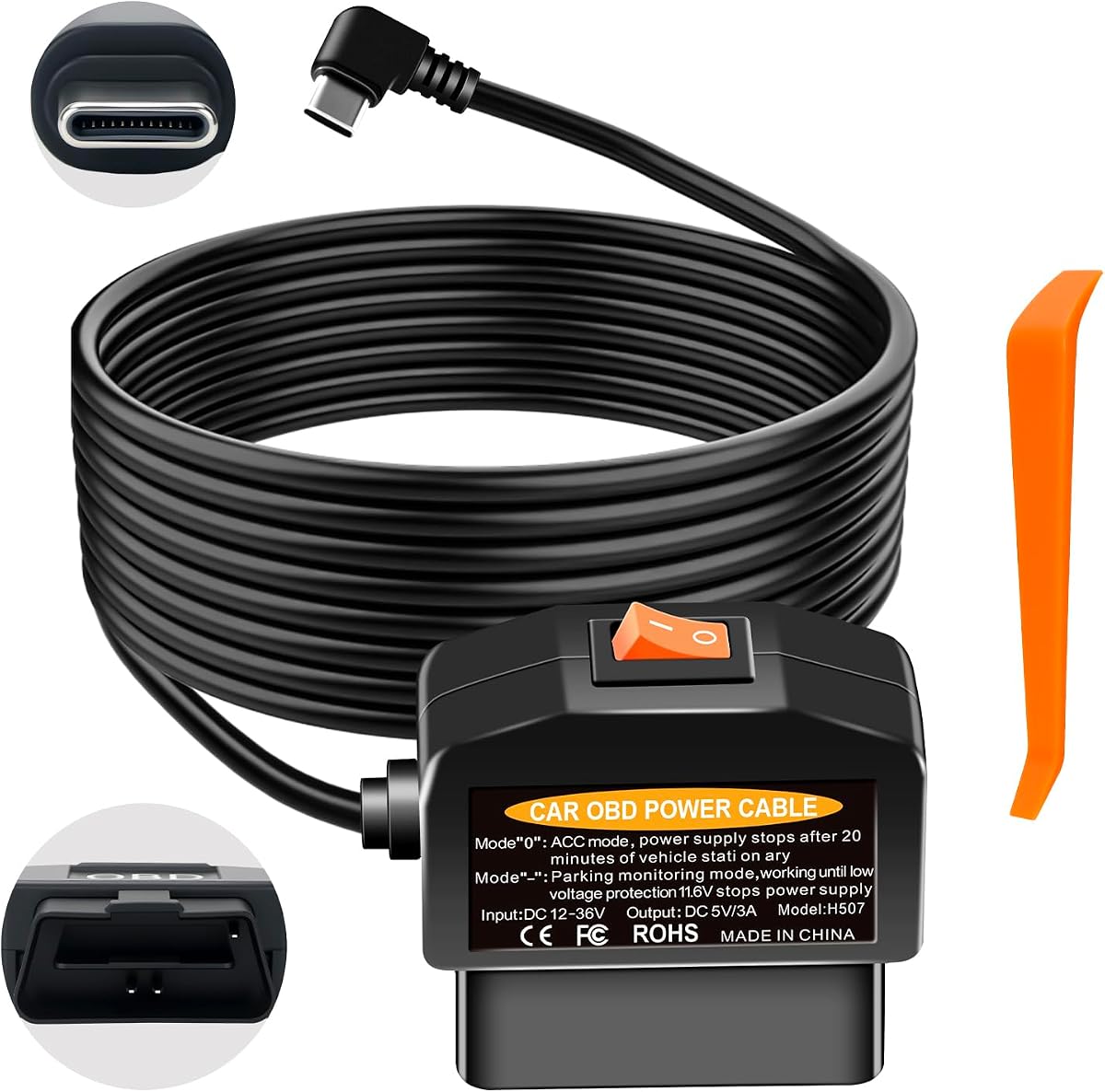


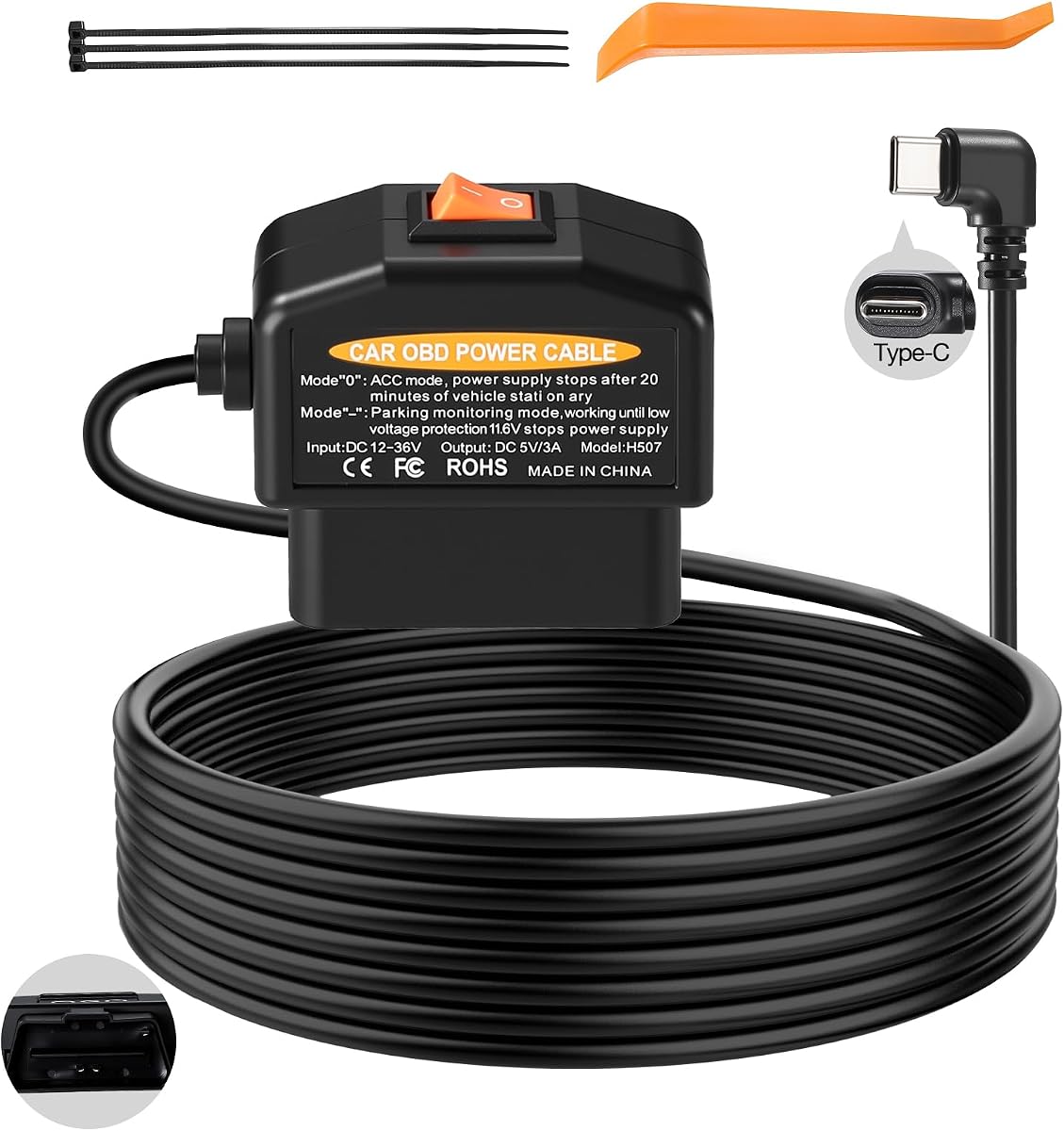


The BNnYY adapter is an all-around hardwire-style solution for USB-C dash cams that use an A5-B5 power configuration. It earns a 4.4 customer rating and stands out for its simple physical mode switch, regulated 5V/3A output, and ability to handle both 12V and 24V vehicle systems. Installation avoids cutting into factory wiring or occupying the cigarette-lighter socket.
We may earn a commission when you buy through this link, at no additional cost to you.
Its two operating modes provide useful control. Daily mode shuts power approximately 20 minutes after the engine stops, while parking-surveillance mode maintains power for continuous monitoring. A smart monitoring chip cuts output at 11.6V in 12V vehicles or 23.4V in 24V vehicles. Over-current and short-circuit protection add further safeguards, while the long cable can be routed along trim panels for a hidden appearance.
Compatibility is the main limitation. The USB-C connector uses A5-B5 pin definition and will not work with cameras requiring A8-B8 pins or a direct 12V input. Some vehicles also stop powering the OBD port after shutdown. The stated workaround is to drive to roughly 20 km/h, or 12 mph, so the port begins supplying power.
This is a strong general recommendation for owners who want tool-free installation, straightforward daily or parking operation, and useful 12V and 24V support. Confirm the dash cam’s pin arrangement and your vehicle’s OBD behavior first. If both match, this adapter offers a practical balance of installation simplicity, power control, and protection.
The plug-and-play OBD connector makes this adapter attractive to drivers who do not want to locate a fuse box or identify an ACC circuit. Route the 3.5-meter cable beneath interior trim, connect the USB-C end to the camera, and the socket remains available for other accessories.
Parking mode keeps the camera supplied, but low-voltage cutoff is the crucial secondary safeguard. Treat the threshold as protection rather than a guarantee, and select the operating mode that best matches how long the vehicle will remain parked.
We may earn a commission when you buy through this link, at no additional cost to you.
This OBD2 parking-mode cable combines a 4.5 customer rating with a straightforward selector switch and 5V/3A regulated output. It is a compelling budget-oriented choice for a USB-C dash cam using A5-B5 pins. The installation requires no permanent alteration to the vehicle’s wiring and leaves the 12V socket available for other equipment.
We may earn a commission when you buy through this link, at no additional cost to you.
Daily mode shuts down roughly 20 minutes after the engine is turned off, whereas parking mode is intended to maintain surveillance and support vibration wake-up, time-lapse, and low-power parking recordings. The stated protection levels are 11.8V for 12V vehicles and 23.4V for 24V vehicles, with a short delay before power is removed when voltage becomes insufficient.
The package includes installation tools and a user manual, which helps with cable concealment. Dual over-current and short-circuit protection are also listed. As with many OBD power cables, severe or prolonged vibration should be avoided because it can interfere with stable operation or trigger parking behavior unintentionally.
This adapter is best for drivers who want dependable hardwire-style power without a large feature set or complicated installation. It suits daily recording with the option of parking surveillance. Verify that the camera accepts A5-B5 and that the vehicle’s OBD port remains responsive, then choose the mode that reflects the expected parking duration.
The one-button switch makes it easy to change between a battery-conscious daily cycle and uninterrupted parking power. That simplicity makes the cable approachable even when the OBD connector is located in an awkward part of the dashboard.
The included trim tool, user guide, regulated output, and dual electrical protections create a useful installation package. It is a sensible pick for owners who value straightforward operation over a built-in voltage display or multiple selectable cutoffs.
We may earn a commission when you buy through this link, at no additional cost to you.
The ACC Detection OBD2 USB-C cable is the most feature-rich option in this roundup, earning a 4.3 rating. It combines automatic driving and parking-mode switching, four adjustable low-voltage cutoffs, an LED voltmeter, and stable 5V/3A output. The included A8B8 adapter is especially useful for cameras that use the alternate pin definition.
We may earn a commission when you buy through this link, at no additional cost to you.
For 12V vehicles, the selectable thresholds are 11.6V, 11.9V, 12.5V, and a 20-minute timer. For 24V systems, the corresponding voltage options are 23.4V, 23.8V, and 25V, alongside the timer. These choices let the owner respond to battery age, weather, and parking duration rather than relying on one fixed threshold.
Its protection system includes over-current handling, short-circuit shutdown, overheating cutoff, and automatic thermal recovery. ACC detection is designed to switch the camera automatically when the engine starts and the vehicle stops, reducing the need for manual mode changes. The display also gives users a quick indication of battery voltage without a separate meter.
This is the top pick for owners who want granular battery management, a visible voltage reference, and broad compatibility options. The key caveat is that no dash cam brand combination can be guaranteed. Confirm your camera’s USB-C power arrangement and whether it needs A5-B5 or A8-B8 before buying, and use the supplied adapter when appropriate.
The four-level cutoff selection is the adapter’s defining advantage. Owners can choose a higher threshold for a newer battery or a more conservative setting for an older vehicle, while the 20-minute option supports a short post-shutdown recording window.
The integrated LED display turns an otherwise invisible OBD connection into a useful diagnostic tool. It can help reveal whether the port is supplying power and whether the vehicle battery is sitting at an expected voltage after shutdown.
We may earn a commission when you buy through this link, at no additional cost to you.
The LED Display OBD2 USB-C Kit combines a 4.3 rating with a visible voltage meter and four selectable low-voltage settings. Its ACC chip is intended to move between continuous driving recording and parking surveillance automatically, reducing the chance that a dash cam remains powered longer than intended.
We may earn a commission when you buy through this link, at no additional cost to you.
The four choices are 11.6V, 11.9V, 12.5V, and a 20-minute timer. The description recommends starting at 12.5V for older batteries or cold conditions, which is a conservative way to preserve starting power. The real-time LED readout allows the user to monitor voltage and identify when an OBD port is not behaving as expected.
Compatibility is extensive across USB-C dash cams, including cited examples such as VIOFO, 70mai, Wolfbox, Rove, and RedTiger. The vehicle must provide OBD power after the engine is off, and the dash cam itself must support parking recording. On some European vehicles, including certain Mercedes-Benz, BMW, and Volkswagen models, the port may continue signaling ACC after shutdown.
This is a strong choice for drivers who want a visible battery reference and broad brand compatibility. It is less suitable where the OBD port is switched off with the ignition or where ACC detection remains active after shutdown. Checking the owner’s manual or measuring the port before installation can prevent disappointing parking-mode behavior.
The LED voltmeter is particularly valuable during setup because it provides immediate feedback about the OBD connection. It can also make recurring battery checks easier when a vehicle is parked for extended periods.
Once properly configured, the ACC-aware chip is intended to handle the transition between driving and parking operation. This is convenient for daily use, provided the vehicle’s OBD logic matches the adapter’s expectations.
We may earn a commission when you buy through this link, at no additional cost to you.
The CERRXIAN OBD2 Type-C cable offers a wide 13V to 40V input range, 5V/3A output, and a right-angle USB-C connector. It carries a 4.3 rating and is particularly useful for cameras with side-mounted or awkwardly positioned USB-C ports. A 3.5-meter cable and included trim tool support concealed routing.
We may earn a commission when you buy through this link, at no additional cost to you.
Its switch provides an ACC mode that powers off between 10 and 200 seconds after engine shutdown, with timing determined by vehicle settings. Parking mode maintains power for monitoring and uses an 11.6V cutoff. The manufacturer is unusually direct about the risk: reaching 11.6V is a deep discharge level and may still affect battery health or starting ability.
Because the adapter is power-only, it cannot serve as an OBD diagnostic cable and should not be used with a scanner that expects data communication. It can power suitable USB-C dash cams, mirror recorders, phones, and tablets, but the intended use remains vehicle accessory power.
This cable is a good fit for owners with a tight connector area and a device that accepts a broad vehicle input range. It is less attractive for long-term parking on an older battery because the single cutoff provides limited adjustment. Use parking mode responsibly and consider battery health before leaving a vehicle unattended for extended periods.
The right-angle connector keeps the cable from projecting directly away from the camera. That can reduce strain, simplify cable management, and keep the connector from interfering with a camera mounted close to a windshield or trim panel.
An 11.6V cutoff is useful as a final safety measure, but it is not a promise that a deeply discharged battery will start the vehicle. Parking runtime depends on battery condition, capacity, and the camera’s consumption, so shorter unattended periods remain the safest choice.
We may earn a commission when you buy through this link, at no additional cost to you.
The Six-Protection OBD2 USB-C Kit is defined by its extensive safety architecture while retaining the convenience of a plug-and-play hardwire alternative. It has a 4.4 rating, 5V/3A output, and compatibility with both 12V and 24V vehicle systems. A physical selector gives users direct control over daily operation or continuous parking surveillance.
We may earn a commission when you buy through this link, at no additional cost to you.
Daily mode is described as cutting power about 20 minutes after engine shutdown, although some vehicles may require 20 to 30 minutes or longer because of their OBD logic. Parking mode maintains power and stops after five minutes of low-voltage detection at 11.6V or 23.4V. The six safeguards include low-voltage cutoff, anti-drain protection, over-current protection, short-circuit protection, reverse-polarity protection, and overheat protection.
The OBD connection draws power without accessing or interfering with ECU data, leaving the 12V accessory socket free. The 3.5-meter cable is intended to fit cars, SUVs, trucks, and large vehicles. A5-B5 pin definition is required, so cameras using A8-B8 or a 12V input are excluded.
This adapter is a compelling choice for users who prioritize electrical protection and want a single cable to cover both driving and parking. It is less flexible than the model with four adjustable thresholds, but its safeguards are extensive. Confirm the camera’s pin layout and drive the vehicle if the OBD port initially fails to supply power.
The protection suite addresses more than battery drain. Over-current, short-circuit, reverse-polarity, and overheat controls help reduce the likelihood that a wiring error or unstable vehicle supply will damage the connected dash cam.
Support for 12V and 24V systems broadens the adapter’s relevance to trucks, commercial vehicles, and larger passenger vehicles. The long lead remains easy to conceal while reaching a camera connection away from the OBD port.
We may earn a commission when you buy through this link, at no additional cost to you.
This switch-controlled cable offers unusually clear operating guidance, making it easier to understand when the dash cam should stop receiving power. Its 4.4 rating reflects a generally favorable customer reception, and the one-button control distinguishes daily ACC operation from parking surveillance without complicated menus.
We may earn a commission when you buy through this link, at no additional cost to you.
ACC mode is described as shutting off after five minutes when the vehicle’s ACC is off, with an additional delay when battery voltage is below 12.9V. Surveillance mode continues until the 11.6V low-voltage threshold is reached. The documentation also explains how to diagnose both no-power and continuous-power situations by checking connections, starting voltage, and post-shutdown voltage decline.
The adapter works with OBD-equipped fuel vehicles such as Jeep Cherokee, Chevy, and Toyota examples listed in the product information. It can also supply suitable GPS units, DVRs, and radar detectors with Type-C ports. A5-B5 pin definition must be confirmed before purchase, and the listing directs hybrid and electric vehicle users toward a separate vibration-detection product.
This is a strong recommendation for drivers who prefer explicit switch positions and understandable electrical behavior. It is less universal than adapters offering included pin adapters or 24V support, but the documentation makes operation more transparent. Verify the dash cam’s power definition and use the supplied mode that matches your parking needs.
The product’s voltage guidance helps owners distinguish normal shutdown behavior from a genuine connection problem. That transparency is valuable when the OBD port behaves differently from the assumptions of a particular vehicle model.
Beyond dash cams, the cable can support compatible Type-C GPS devices and radar detectors. The OBD connector obtains power only, so it does not interfere with normal diagnostic data communication elsewhere in the vehicle.
We may earn a commission when you buy through this link, at no additional cost to you.
The OBD2 USB-C Parking-Mode Cable earns a 4.2 rating and includes an A5-to-A8 signal adapter, making it a notable choice for certain dash cams that otherwise require a different connector definition. It provides ACC and 24/7 parking modes, 11.6V automatic cutoff, and an 11.5-foot lead for concealed installation.
We may earn a commission when you buy through this link, at no additional cost to you.
The supplied A5-to-A8 adapter is highlighted for models such as WolfbG900, ThinkwU1000, and similar cameras affected by parking-mode compatibility issues. The main cable supports USB-C dash cams, GPS units, and radar detectors. A surge-protection feature is also listed, along with automatic shutdown during short circuits or overloads and heat-resistant materials rated to 185°F.
The most important restriction is constant 12V OBD power when the vehicle is off. If the port disconnects after ignition is switched off, the adapter will not provide USB output or parking-mode operation. It is also limited to 12V vehicles and is not suitable for electric vehicles manufactured before 2005.
This cable is best for an owner whose camera has a recognized A5-to-A8 compatibility need and whose vehicle maintains constant OBD power. It is less broadly compatible than dual-voltage or more adjustable options. Check the vehicle manual or use a voltmeter, allow for any post-shutdown delay, and keep the correct adapter attached if needed.
The A5-to-A8 adapter is the standout feature because it can resolve a specific class of parking-mode connection issues. It should only be used with cameras for which that conversion is supported, as the connector arrangement must match the camera’s power input.
A vehicle that shuts off its diagnostic port after ignition will not support parking surveillance through this design. Checking that behavior before installation avoids mounting and routing a cable that cannot remain operational while the vehicle is parked.
We may earn a commission when you buy through this link, at no additional cost to you.
The LED Voltmeter OBD2 USB-C Cable combines a 4.0 rating with a 90-degree connector, four selectable protection settings, and a real-time voltage display. It converts 12V-24V vehicle power to a stable 5V/3A output and is designed for USB-C dash cams, GPS units, and radar detectors used in cars, trucks, SUVs, and commercial vehicles.
We may earn a commission when you buy through this link, at no additional cost to you.
Its protection choices are 11.6V, 11.9V, 12.5V, and a 20-minute timer. The timer cuts power after the vehicle stops, while the other choices are intended to preserve battery charge during parking use. Over-current, short-circuit, overheat, and reverse-connection protection are also listed, giving the cable more safeguards than a basic power lead.
The package includes a 3.5-meter cable, pry tool, and four wire ties for routing. A5-B5 pins are used, so cameras requiring A8-B8 are not directly supported. The right-angle plug can be especially useful where a straight connector would protrude awkwardly or interfere with a side-mounted camera port.
This is a useful pick for owners who prioritize tidy installation, visible battery information, and flexible cutoff settings. Its lower rating suggests some variability in customer experience, so compatibility checks are important. Confirm the camera pin definition, ensure the vehicle supports parking recording, and test the port behavior before routing the cable permanently.
The angled design improves cable routing around a side-mounted socket and can reduce visual clutter. Combined with the included pry tool and ties, it supports a cleaner installation in vehicles where dashboard space is limited.
The LED display and four protection settings make it easier to observe and manage battery behavior. This is advantageous when the vehicle has an older battery, experiences cold weather, or is regularly left parked for long periods.
We may earn a commission when you buy through this link, at no additional cost to you.
The 12V-36V OBD Dash Cam Cable is the most broadly ranged input option in the list, with a 4.4 rating and regulated 5V/3A output. That range makes it especially interesting for owners of vehicles with higher electrical systems, while its one-button control preserves a simple daily or monitoring workflow.
We may earn a commission when you buy through this link, at no additional cost to you.
In daily mode, power ends 20 minutes after the car is shut off, provided it is left stationary without substantial vibration. Monitoring mode continues supplying power until the stated 11.7V low-voltage threshold activates a five-minute delay and cuts output. The intelligent control chip is designed to monitor battery voltage and protect the vehicle’s ability to start.
The connector uses A5-B5 pins, making camera compatibility the most important pre-purchase check. Some vehicle OBD ports do not provide power immediately after startup; driving until the vehicle reaches 20 kilometers per hour is identified as a way to trigger the connection. While generally suitable for Type-C electronics, the cable may not work with every phone charging protocol.
This is a strong recommendation for a dash cam owner who values a wide vehicle input range and explicit operating guidance. It is less flexible for cameras requiring A8-B8. Verify the camera’s power definition, check the OBD port’s shutdown behavior, and use continuous vibration-free parking to encourage the daily timer to operate correctly.
A 12V-36V input specification provides more flexibility than adapters limited to conventional passenger-car voltage. It is a notable feature for owners of compatible commercial vehicles or electrical systems operating outside the usual 12V range.
The daily mode is designed to stop after 20 minutes, but substantial vibration can keep the system active. Leaving the vehicle stationary after shutdown helps ensure the timer operates as intended and does not extend power consumption unexpectedly.
We may earn a commission when you buy through this link, at no additional cost to you.
Choosing an OBD2 to USB C adapter requires matching the cable to both the dash cam and the vehicle. Pin definition, OBD port behavior, battery safeguards, parking behavior, and connector placement matter more than the number of advertised features.
The most consequential compatibility check is the signal-pin arrangement used by the dash cam’s USB-C power input. Many products in this roundup use A5-B5, while some cameras require A8-B8. A cable that looks like a standard USB-C plug can still fail if its internal pin mapping does not match the camera. The product descriptions repeatedly warn buyers to ask the camera seller when the definition is unknown.
Choose the adapter whose connector is explicitly compatible, or select a model that includes the required conversion cable. Do not assume that every USB-C dash cam accepts the same OBD power lead.
Parking surveillance depends on the OBD port continuing to provide power after the engine is shut off. Some vehicles keep the port active, while others disconnect it. The owner’s manual is a useful starting point, and a voltmeter can confirm the behavior when instructions are unclear. A few products also mention that a short drive can activate an initially inactive port.
If the port disconnects with the ignition, choose a different OBD-based solution or use a conventional hardwire kit designed for the vehicle. Spending time on this check prevents a neatly installed cable from failing when it is needed most.
Low-voltage protection is a safeguard against excessive battery drain, not a guarantee that the vehicle will always start. Most adapters in this list cut off around 11.6V, while others offer thresholds near 11.8V, 11.9V, 12.5V, or an 11.7V monitor setting. A higher threshold generally leaves more starting reserve but may stop parking recording sooner.
Battery age, temperature, capacity, and parking duration all influence the practical runtime. Select an adjustable model when the vehicle’s battery condition varies, and use a fixed-threshold adapter only when the vehicle and parking pattern are predictable.
Daily mode usually stops power shortly after engine shutdown, while parking or surveillance mode maintains it for unattended recording. Some kits switch automatically through ACC detection; others require a physical switch. Automatic operation is convenient, but it depends on accurate interpretation of the vehicle’s ACC behavior. Manual control gives the owner greater certainty over when the dash cam is active.
Consider how often the vehicle is parked, how long it remains unattended, and whether the camera supports parking or time-lapse recording. A cable cannot enable a feature the dash cam itself does not support.
Most passenger vehicles use a 12V electrical system, while trucks and commercial vehicles may use 24V. Several adapters support both, while others are limited to 12V or specify a broader range such as 12V-36V. The output side is commonly a regulated 5V/3A, which is suitable for many USB-C dash cams and helps prevent restarts or recording lag.
Match both ends of the specification: vehicle input to the car and regulated output to the camera. Also check the camera’s own power-rating requirements if they are available.
A 3.5-meter, or roughly 11.5-foot, cable is common because it can reach from an OBD port near the steering wheel to a camera mounted near the windshield. A right-angle USB-C plug is useful when the camera’s port faces sideways or sits close to trim. It can reduce strain and make the installation look neater.
Plan the route before buying. Check whether the cable must cross a threshold, whether the connector can fit in the available space, and whether the OBD plug will be easy to remove when a scanner is needed.
Over-current, short-circuit, reverse-polarity, overheat, and anti-drain protection can reduce the risk of damage when a connection is disturbed or the vehicle electrical system changes unexpectedly. Products with multiple safeguards and clearly stated cutoffs are easier to evaluate. A built-in fuse, intelligent control chip, or thermal recovery function can add further confidence.
Protection features do not eliminate the need to use a correctly seated connector or maintain a healthy battery. They are one layer of a safe installation rather than a substitute for sound vehicle maintenance.
The adapters listed here are power-only devices. They obtain electrical power from the OBD port without using the vehicle’s diagnostic data channels, which means they are not substitutes for OBD scanners. Several packages include a trim tool, wire ties, user guide, or alternate signal adapter, improving the convenience of setup and routing.
Check the package contents and included instructions before ordering. A simple installation is more likely when the necessary routing and compatibility accessories are supplied in the box.
Begin by identifying the vehicle’s OBD-II port and confirming that the dash cam uses a compatible USB-C power arrangement. Review the camera manual or ask its seller whether the input requires A5-B5, A8-B8, or a different configuration. For vehicles that switch off the diagnostic port, check the owner’s manual or test it with a voltmeter before beginning the permanent routing.
Connect the adapter to the dash cam first, then plug the OBD connector into the vehicle. Start the engine and confirm that the camera receives stable power. Select daily mode for automatic shutdown after a short delay, or parking mode for continuous power. If the port does not activate immediately, the instructions for several products suggest driving to approximately 20 km/h, or 12 mph, to trigger it.
Route the cable along the dashboard, door trim, or A-pillar and use the supplied ties or trim tool to conceal it. Keep the connector away from sharp edges and avoid areas with constant heavy vibration. Periodically inspect the connection, watch the voltage display where available, and remove the cable before using the OBD port for diagnostics.
No. The physical USB-C shape does not guarantee compatibility because the internal power-pin definition must match the camera. Many adapters use A5-B5, while some cameras require A8-B8. Check the camera manual, ask the camera seller, and use an included conversion cable only when the manufacturer supports it.
The products in this guide are designed to draw power only and not communicate with or alter ECU data. They can therefore leave the vehicle’s diagnostic connection available, although the physical adapter must be removed before plugging in a scanner. None should be treated as an OBD data cable.
Yes, provided the vehicle’s OBD port remains powered after shutdown, the adapter supports parking mode, and the dash cam itself includes parking or time-lapse recording. Continuous parking use increases battery consumption, so select an appropriate low-voltage cutoff and avoid leaving the vehicle unattended longer than necessary.
It means the adapter is designed to stop supplying power when the vehicle battery falls to roughly 11.6V. This protects against further discharge, but it is a deep-discharge level and does not guarantee that the vehicle will start. Battery age, cold weather, capacity, and the dash cam’s power draw can affect the result.
Some vehicles do not energize the OBD port until the car has been driven or the port has otherwise been activated. Several product instructions recommend driving to approximately 20 km/h, or 12 mph. If power still does not appear, check the pin definition, connector seating, vehicle voltage, and whether the port disconnects when the engine is off.
Only if the adapter explicitly supports 24V systems. Models that state 12V-24V input, 13-40V input, or 12V-36V input may suit more demanding vehicle electrical systems. Products limited to 12V should not be used with a 24V vehicle unless the manufacturer expressly permits it.
Adjustable cutoffs are more useful when the battery is older, the vehicle faces cold weather, or parking duration varies. They allow a higher threshold to preserve starting power or a lower threshold to extend recording. A fixed cutoff is simpler, but offers less control over the balance between parking runtime and battery reserve.
It can be. A right-angle plug may sit more neatly against a side-mounted camera port, reduce strain on the cable, and make routing around trim panels easier. It does not change the electrical compatibility rules, so the dash cam’s pin definition and the vehicle’s power requirements still need to be confirmed.
The OBD2 Power Cable with Parking Mode is a strong budget choice for its 4.5 rating, clear daily and parking modes, and 5V/3A output. The ACC Detection OBD2 USB-C Cable is the feature-rich editor’s choice, with four cutoff levels, a real-time LED voltmeter, and an included A8B8 adapter. For broad electrical input, the 12V-36V OBD Dash Cam Cable offers the most expansive stated vehicle range.
Before choosing any model, verify the dash cam’s pin definition and whether the vehicle’s OBD port remains powered after shutdown. Then prioritize a low-voltage threshold that suits the battery’s condition, select a daily or parking mode based on actual use, and make sure the cable can be hidden without creating strain or interfering with other ports.
Ratings and product availability can change, and current prices should always be checked at the linked listing before purchase. Taking a few minutes to confirm compatibility can prevent the most common problems: a connector that does not match the camera, a port that switches off, or parking use that leaves too little battery reserve.