
Zigbee Motion Sensor with Light Sensor
Two-in-one motion and lux sensing
Three adjustable sensitivity levels
Low-battery status reporting
Requires compatible Zigbee hub
This expert guide compares the best light sensor for home security options, including motion, contact, outdoor photocells, smart lighting, compatibility, and
Light sensors for home security can add useful context to an existing alarm system by detecting motion, opening doors or windows, measuring ambient brightness, or activating outdoor lighting. The right choice depends on whether you need real-time intrusion alerts, occupancy-based automations, dusk-to-dawn control, or a combination of these functions.
We compared all ten products by examining their sensing methods, detection coverage, ecosystem requirements, power options, installation needs, and practical security roles. The list covers Zigbee, Wi-Fi, Sub-1G, LoRa, contact, and hard-wired photocell solutions, including products intended for indoor rooms, entry points, and exposed outdoor areas.
Each review explains what the sensor does best, where it fits into a smart-home setup, and which compromises should be considered. Ratings reflect available customer feedback, while products without a published rating are identified accordingly. Prices and availability can change, so confirm current listings and compatibility before purchasing.

4.4Editor score

4.4Editor score
The comparison below highlights each product's sensing approach, range, connection method, and power requirements. These details reveal whether a device is better suited to indoor automation, entry monitoring, broad-area presence detection, or outdoor lighting control.


This compact Zigbee sensor combines PIR motion detection with a real-time ambient light measurement, making it one of the most directly relevant products in this guide. It is designed for people who want more than a conventional motion detector: the lux reading can prevent a hallway light from switching on during daylight while still activating when motion occurs in a dark room. The product does not have a published rating, so its appeal rests on its stated functionality and flexibility rather than customer-score evidence.
We may earn a commission when you buy through this link, at no additional cost to you.
Its 26-foot maximum range and 90-degree field of view make it suitable for entryways, staircases, closets, garages, and other active areas. Three sensitivity levels can be changed through Zigbee2MQTT, allowing owners to tune the detector for large rooms or spaces prone to false triggers. The 360-degree adjustable ball joint also makes aiming the sensor more practical than mounting a fixed rectangular unit.
The most important limitation is ecosystem dependence. It requires a Zigbee hub and does not connect directly to Wi-Fi, a phone, Alexa, or Google Home. Home Assistant support is described through Zigbee2MQTT, while Home Assistant ZHA is not fully supported. SmartThings is also supported. Users who need direct voice-assistant operation may therefore find another option easier to deploy.
This is a compelling budget choice for a compatible Zigbee household, particularly when both motion and darkness conditions matter. It offers adjustable mounting, three sensitivity levels, and battery reporting in a small package. Confirm your hub, pairing method, and automation platform before ordering; those compatibility details matter more than any small difference in detection specifications.
Because the sensor reports both motion and ambient lux, it can trigger lighting only when a room is dark. That makes it useful for reducing unnecessary illumination without giving up responsive entryway or hallway control.
The adjustable ball joint and three selectable sensitivity levels let you position the detector around corners, entrances, and stairways. This reduces the need for a fixed viewing angle when the ideal coverage area is not directly in front of the wall.
We may earn a commission when you buy through this link, at no additional cost to you.
The Tapo T100 is a straightforward motion sensor for households already invested in the Tapo ecosystem. Its 4.5 rating reflects generally favorable customer feedback, while its key selling point is the combination of Sub-1G wireless communication, adjustable detection, and Tapo Smart Actions. It can serve as the trigger for lighting, notifications, or other supported Tapo devices without requiring the sensor itself to join the home Wi-Fi network.
We may earn a commission when you buy through this link, at no additional cost to you.
The sensor detects motion within a 120-degree angle and at distances of up to 23 feet. Users can select 3-meter, 5-meter, or 7-meter ranges, which makes it easier to control sensitivity in smaller or more confined spaces. A single included CR2450 battery can provide up to two years of operation when motion is detected fewer than 100 times per day.
A Tapo H100 hub and a secured 2.4GHz Wi-Fi network are required. The hub can connect as many as 64 sensors, includes a 90dB ringer with 19 tones, and can execute Smart Actions even when the network is disconnected. That offline capability is a meaningful advantage for anyone who wants local automations to continue during an internet outage.
This is a good fit for Tapo users seeking straightforward motion-triggered lighting and alerts. It is not the right choice for someone specifically seeking an ambient light measurement, because the T100 detects movement without reporting room brightness. It is also unsuitable for a mixed ecosystem unless you are prepared to add the required Tapo hub.
Scheduled notifications and Smart Actions make the T100 practical for entryways, staircases, and hallways. A motion event can serve as the condition for turning on lights or initiating an alert without complicated configuration.
The Sub-1G protocol provides a wider coverage area than Wi-Fi for the sensor while supporting long battery life. It is a sensible choice in larger homes where numerous Wi-Fi clients could otherwise compete for network capacity.
We may earn a commission when you buy through this link, at no additional cost to you.
The Akamatis Litos v3 is the most technically ambitious sensor in the guide because it combines 24GHz mmWave presence detection with an integrated VEML7700 ambient light sensor. Its 4.4 rating indicates generally positive customer feedback, and the product's local-control focus makes it particularly interesting for Home Assistant users who want occupancy and brightness information in the same device.
We may earn a commission when you buy through this link, at no additional cost to you.
The radar module can detect both motion and stationary objects up to 20 feet indoors. Unlike a simple PIR sensor that primarily responds to changes in infrared energy, radar presence detection can continue to report occupancy. Combined with the light sensor, it enables nuanced rules such as illuminating a room only when a person is present and the surrounding light level is low.
The light-permeable 3D-printed front panel allows ambient light to reach the sensor while maintaining a subtle appearance. The unit uses an ESP32-C3 platform with an external antenna for 2.4GHz Wi-Fi, and it arrives with ESPHome firmware already installed. Those are meaningful setup advantages for users who prefer local automations without manually flashing custom firmware.
The trade-off is a firm platform requirement: the Litos v3 works exclusively with an existing Home Assistant installation. It is not a beginner-friendly standalone alarm sensor, and buyers without a Home Assistant system may get little value from it. For an enthusiast who already operates Home Assistant, however, its combination of presence and light sensing is unusually capable.
The mmWave radar can identify both movement and stationary occupancy. That distinction helps create automations for spaces where simply walking into a room should not immediately extinguish the lights.
The VEML7700 sensor provides ambient readings that closely match human-eye sensitivity. Combined with presence data, it enables occupancy-aware lighting that responds to actual darkness rather than a fixed schedule.
We may earn a commission when you buy through this link, at no additional cost to you.
The Philips Hue Secure Smart Contact Sensor takes a different approach from motion detection by monitoring whether doors, windows, cabinets, or safes have been opened. It carries a 4.6 rating, making it one of the better-rated products in the list, and it is particularly relevant to entry security and household routines.
We may earn a commission when you buy through this link, at no additional cost to you.
When the system is armed, opening a monitored contact can generate a real-time mobile alert and trigger a Hue light. The app also displays when the sensor was triggered and whether someone may have tampered with it. That event history can be more useful than a generic notification because it tells you which opening was involved and when it occurred.
A Hue Bridge is required for full operation, including access to the wider Hue security features, light alarms, and mimic-presence automation. The sensor can also serve as a convenient automation trigger, such as switching on a hallway light when the front door opens. Adhesive backing makes installation quick, although the sensor is intended for indoor doors and windows.
Choose this product when perimeter entry awareness matters more than detecting movement through a room. It does not measure ambient brightness and will not replace a motion sensor for occupied-room lighting. Within the Hue ecosystem, however, it offers a polished, straightforward way to monitor openings and connect them to both notifications and lighting automations.
Contact sensors identify a specific door or window opening rather than merely reporting unexplained movement. That makes them useful for monitoring known access points without placing a motion detector in every hallway.
The contact event can activate a hallway or entry light as soon as the door opens. It is a simple security and convenience feature that works well within the Hue app's automation environment.
We may earn a commission when you buy through this link, at no additional cost to you.
The Philips Hue Outdoor Motion Sensor is designed to cover exterior spaces where an indoor contact sensor or compact room detector would be unsuitable. Its 4.4 rating reflects solid customer feedback, and its wide 160-degree detection area makes it useful for porches, driveways, patios, garages, and front approaches.
We may earn a commission when you buy through this link, at no additional cost to you.
The sensor can activate indoor and outdoor Hue lights when someone passes through the detection zone. A Hue Bridge is required, but the broader Hue ecosystem supports integrations with Alexa, Google Assistant, and Apple HomeKit. This gives users several ways to incorporate the sensor into an existing mixed smart-home setup while retaining Hue's lighting controls.
Its IP44 rating and outdoor-oriented construction make it more suitable for exposed locations than an adhesive indoor contact sensor. Installation flexibility is another advantage: it can mount on a flat wall or around the inner or outer corner of a wall or post, helping the wide detection area cover awkward approaches.
The primary drawbacks are the need for a Hue Bridge and ongoing battery maintenance. It is a premium choice for existing Hue households needing outdoor motion-triggered lighting rather than a dedicated intrusion alarm. Its strongest security value comes from illuminating activity around the home, detering visibility, and sending motion events into a broader smart-home platform.
The 160-degree field provides substantial coverage around a porch, driveway, or patio. Flexible corner mounting helps direct that coverage toward entrances rather than forcing a fixed wall-facing position.
Because the sensor can control both indoor and outdoor Hue lights, one exterior event can illuminate an entry route and nearby rooms. This is especially valuable when occupants want visible confirmation of activity without manually finding a light switch.
We may earn a commission when you buy through this link, at no additional cost to you.
The YCA1030 is a hard-wired photoelectric light-control switch designed for outdoor fixtures rather than app-based home security. Its 4.4 rating reflects favorable customer feedback, and its strengths center on reliable dusk-to-dawn operation, broad electrical compatibility, and a familiar installation format.
We may earn a commission when you buy through this link, at no additional cost to you.
The sensor automatically switches compatible outdoor lights on at dusk and off at dawn. A built-in time delay helps prevent brief interruptions from passing headlights, lightning, or other sudden light changes. Its internal electronic trigger circuit is intended to deliver more consistent performance than older photocell designs using exposed squiggly wires.
The YCA1030 supports 120–277V at 60Hz and can handle tungsten loads up to 600 watts. It is compatible with incandescent, fluorescent, LED, halogen, mercury vapor, high-pressure sodium, and CFL fixtures. An IP65 rating protects it against rain and dust, while the through-hole design fits common residential outlet boxes, lamp posts, and wall packs.
This is a practical choice for someone who wants automatic exterior lighting but does not need an app, alert, or motion event. Installation is less approachable than adding a wireless sensor because power must be disconnected and the unit wired into the fixture. Its security contribution is indirect: dependable exterior lighting can improve visibility and deter activity around entrances.
The photocell continuously responds to changing ambient light and removes the need to operate exterior fixtures manually. A delay circuit also helps prevent temporary switching caused by brief flashes or nearby headlights.
Support for common residential and commercial bulb types makes the unit useful across multiple outdoor installations. Its voltage and load ratings provide a clear framework for checking fixture compatibility before wiring.
We may earn a commission when you buy through this link, at no additional cost to you.
This two-pack of photoelectric switches is built for property owners who want automatic dusk-to-dawn control at more than one outdoor fixture. Its 4.5 rating is among the stronger scores in the guide, and the inclusion of two switches makes it convenient for matching front and rear areas or separate lamp posts.
We may earn a commission when you buy through this link, at no additional cost to you.
Each unit turns outdoor lighting on at dusk and off at dawn. A delay feature is designed to avoid accidental shutoff when headlights, lightning, or another brief light source crosses the sensor. The switches support LED, CFL, fluorescent, incandescent, and other common bulb types across a 120–277V input range at 50/60Hz.
The swivel mount allows adjustment to a precise location, which can improve how the photocell evaluates ambient light. Installation involves disconnecting power, threading the sensor through the fixture knockout, and securing it with a rubber gasket and zinc-alloy lock nut. The product is UL listed, surge protected, and rated IP65 for water resistance.
The set does not connect to a smart-home platform, so it cannot generate phone notifications or support conditional security routines. Its value lies in dependable lighting control that improves exterior visibility around the property. For installers comfortable with outdoor electrical work or those hiring an electrician, it offers a practical way to standardize automatic lighting across two fixtures.
The two-pack is useful when a home has more than one exposed entrance or exterior light. Matching sensors maintain consistent automatic operation instead of leaving one fixture on a manual schedule.
The swivel design lets installers orient the sensing area away from nearby illumination when practical. Correct positioning helps the switch distinguish true dusk from light emitted by another fixture or reflected from a wall.
We may earn a commission when you buy through this link, at no additional cost to you.
The Ring Motion Detector focuses on fast, room-level intrusion alerts without requiring a separate base station. Its 4.6 rating is tied for the highest available score among the products here, and the no-base-station design simplifies deployment for people who do not want to operate a full alarm panel.
We may earn a commission when you buy through this link, at no additional cost to you.
One sensor can monitor an entire room, with a stated range of 9.1 meters and a 90-degree field of view. The pet-friendly mode is designed to reduce false alerts caused by pets under 50 pounds. Those controls are particularly helpful in a home where a conventional motion detector might repeatedly trigger on animals moving through a hallway or living space.
Connectivity runs through Amazon Sidewalk, which is required for use and may offer coverage that varies by location. Optional 24/7 Pro Monitoring can be added with a compatible Ring subscription for emergency response related to break-ins, fires, and other incidents. That turns the device from a standalone notification tool into part of a professionally monitored service.
This is an attractive choice for straightforward motion alerts in a room, especially for Ring users who prefer avoiding a base station. It does not measure ambient light, so it cannot support darkness-aware lighting by itself. It also introduces a service dependency through Sidewalk, and optional professional response requires a separate subscription.
Without a base station, setup focuses on adding one sensor and configuring alerts. This makes the detector approachable for rooms that need basic intrusion notification without building a more extensive alarm network.
The customizable pet-friendly mode is designed for pets under 50 pounds. Users can tune sensitivity to preserve useful household motion detection while limiting unnecessary alerts from smaller animals.
We may earn a commission when you buy through this link, at no additional cost to you.
The YoLink Indoor Motion Sensor YS7804 stands out for its long-range LoRa-based connection, with a stated maximum coverage of 2,034 feet. Its 4.5 rating reflects positive customer feedback, and the range claim makes this sensor particularly attractive for large properties, multi-floor homes, barns, workshops, or separate buildings.
We may earn a commission when you buy through this link, at no additional cost to you.
Instead of connecting directly to Wi-Fi, the sensor communicates with a YoLink hub. Setup uses the hub's plug-and-play process and the app's QR-code scanning method. Installation at the sensor is also tool-free: it has a built-in magnet for metal surfaces, while the included metal disc and 3M tape support other locations.
The YS7804 can support lighting automation while the home is occupied and intrusion protection while it is away. Notification options include text, email, and phone push messages, with stated limits on SMS usage. Control-D2D pairing can link sensors to compatible devices such as a siren so selected functions continue even if internet service is unavailable.
A compatible YoLink hub is required for full functionality, including app access, so the sensor should be evaluated as part of an ecosystem rather than a standalone purchase. It also does not report ambient brightness. For users who already operate YoLink equipment or need unusually broad wireless coverage, it is a strong and flexible indoor motion solution.
LoRa communication allows the sensor to cover multiple floors or separate buildings over a much greater distance than ordinary Wi-Fi. That makes it useful for outbuildings and properties where conventional sensors would require additional network infrastructure.
Control-D2D pairing allows selected sensor functions to work even during an internet or power interruption. Compatible local links can therefore preserve basic protection instead of making every alert dependent on cloud connectivity.
We may earn a commission when you buy through this link, at no additional cost to you.
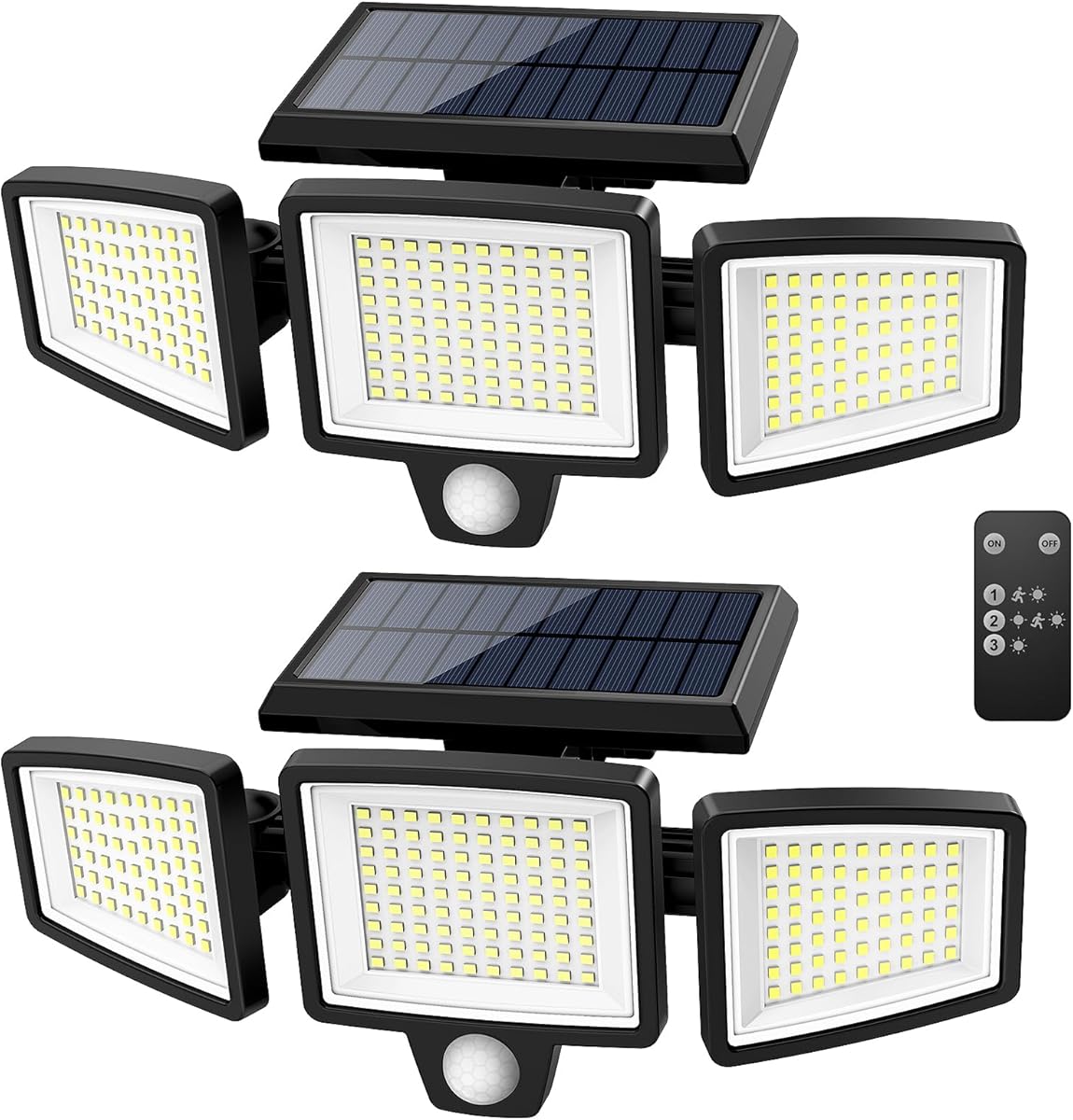
The Tuffenough Solar Outdoor Lights set is an all-in-one exterior lighting solution rather than a standalone sensor or alarm accessory. Its 4.4 rating indicates favorable feedback, while the two-pack, three adjustable heads, PIR motion detection, and remote control make it especially convenient for covering larger exterior areas without wiring.
We may earn a commission when you buy through this link, at no additional cost to you.
Each fixture contains 210 LEDs and can produce up to 2,500 lumens at a stated color temperature of 6500K. The lights offer strong light sensor mode, dim light sensor mode, and strong long light mode, all selected through the included wireless remote. This gives users more control than a simple all-on or all-off motion fixture.
The PIR detector provides up to 270 degrees of lighting coverage and a sensing distance of 26 feet. Three adjustable heads let the installer direct illumination toward a driveway, courtyard, garage, or pool area. An IP65 rating supports outdoor use in rain and snow, and the solar design removes the need for electrical wiring or disposable batteries.
The key limitation is that these lights cannot send security alerts or connect to a home automation platform. Their built-in rechargeable battery needs adequate sunlight and may require a few charging cycles before dependable operation in consistently cloudy weather. The stated installation guidance recommends a height of 6.5 to 8 feet with the solar panel facing direct sunlight.
Solar power eliminates the need to run cables to a wall, post, or electrical box. This makes the fixtures easier to add in remote areas of a property, provided the panels receive enough direct sunlight to maintain their rechargeable battery.
Three movable heads and a wide PIR sensing area allow light to cover entrances, yards, garages, and pools. The remote-controlled modes let owners choose between full security-style illumination, dim nighttime guidance, and continuous strong light.
We may earn a commission when you buy through this link, at no additional cost to you.
The most useful light sensor depends on the space, the existing smart-home platform, and the type of response you want. Review sensing capability, coverage, connectivity, power, and installation requirements before making a selection.
Motion sensors respond to movement, presence sensors can distinguish occupied space from an empty room, and contact sensors report the opening of a door or window. PIR and radar devices are best for observing activity within a room, while contact sensors are better for known entry points. Choosing the wrong category can leave an important gap in your security coverage even if the selected device works exactly as advertised.
Choose based on the question you want answered: Is someone moving through this area, is the room occupied, or has a protected opening been accessed? Select the sensing type that directly matches that need.
A true ambient light sensor reports brightness in lux or an equivalent measurement, allowing a system to distinguish daylight from darkness. This supports automation such as turning lights on only when motion is detected and the room is dark. Products that merely activate at dusk use light internally but may not expose brightness readings to an app or automation platform.
Choose a product with a reported light sensor when you want darkness-aware rules. Choose a basic photocell or motion light when automatic outdoor illumination is the primary goal.
Range tells you how far the sensor can detect an event, while the field of view determines the area around that sensor. A wide angle can cover a room or approach but may also increase unwanted triggers from hallways, windows, or moving curtains. A narrower view can be more precise in focused entry areas. Adjustment options are especially valuable when a sensor must cover a corner or avoid a busy route.
Compare both range and angle, then consider the room layout rather than selecting by the largest stated number. Adjustable sensitivity and mounting can be as important as raw reach.
Many capable sensors require a hub, bridge, or other ecosystem infrastructure. Zigbee sensors typically need a compatible controller, Tapo devices require a Tapo hub, and Home Assistant products require an existing installation and the appropriate integration. Some products connect over Wi-Fi, while others use Sub-1G or LoRa to reduce network load and improve range. Amazon Sidewalk introduces its own network and geographic availability considerations.
Choose a sensor that matches the platform you already operate and understand every required hub. Verify whether local control, cloud dependence, voice-assistant support, and offline behavior meet your needs.
Battery-powered sensors are easiest to reposition, but they require periodic maintenance. Hard-wired photocells avoid battery replacement but involve safe electrical installation. Solar lights offer cable-free outdoor placement, although their performance depends on sunlight and charging conditions. The product's mounting method also matters: adhesive, magnets, ball joints, swivel brackets, and threaded electrical fittings suit different surfaces.
Choose based on installation access and willingness to maintain the device. For outdoor wiring, power down the circuit and use appropriate professional guidance when needed.
A sensor can be useful without sending alerts if it primarily controls lighting, but security buyers should determine whether the app provides push notifications, schedules, event history, and tamper status. Smart Actions can turn motion into broader routines involving other devices. Contact sensors are especially useful for identifying exactly which door or window was opened.
Choose a product with the specific notifications and automations you need. A larger sensor ecosystem may be unnecessary if you only want one hallway light to respond after dark.
Indoor contact and motion sensors are not automatically suitable for outdoor exposure. Outdoor products need appropriate weather resistance and a suitable mounting position. An IP44 rating indicates protection against limited water ingress, while IP65 offers a higher level of protection against water and dust. Photocell switches intended for wired fixtures have different installation requirements from wireless room sensors.
Check the stated environment and IP rating before placing a product outside. Also consider whether direct rain, sunlight, extreme temperature, or reflected light could interfere with the sensor.
Battery-life estimates depend on sensor technology, event frequency, and radio behavior. A motion sensor triggered many times per day will consume more power than one in a low-traffic hallway. Some products report low-battery status, while others send an alert before power is fully depleted. Replacing a coin cell is usually simple, but devices with sealed housings or solar batteries may require different maintenance.
Choose a battery life that suits the location and check how alerts are delivered. In frequently triggered areas, prioritize low-power communication and accessible battery replacement.
Begin by defining the area or event the sensor should monitor. For room lighting, place a motion or presence sensor at a useful height and aim it across likely traffic paths rather than directly at a door or window. For entry monitoring, position a contact sensor on the door or frame surface specified by the manufacturer and pair it with notifications or lighting automations.
Connect the sensor through its required hub or platform, then update the hub, app, and device firmware when available. Create test automations before relying on them for security. Walk through the coverage area, open monitored entries, or allow the light level to change to confirm that events are reported and the intended lights, alarms, or notifications respond.
For maintenance, replace batteries when the system reports a low level and clean outdoor lenses periodically so dust, dirt, leaves, and weather do not distort readings. Recheck alignment after seasons or furniture changes. Hard-wired units should only be serviced with the circuit disconnected, and solar fixtures should be positioned to receive unobstructed sunlight.
The best type depends on the area and the information you want. Motion and presence sensors are useful for detecting activity in rooms and hallways, while contact sensors are better for identifying when a door or window opens. Outdoor security often benefits from motion-activated floodlights or photocell-controlled fixtures.
Only if you want automations that depend on darkness rather than time alone. An ambient light sensor can turn on a hallway light only when motion occurs in a dark room, even when daylight levels change throughout the day. Basic motion lights and hard-wired photocells automate lighting but may not expose brightness readings to the app.
Some products can operate independently, but many require a hub, bridge, or existing Home Assistant installation. The Zigbee Motion Sensor requires a compatible Zigbee controller, the Tapo T100 requires a Tapo H100, and the Litos v3 requires Home Assistant. The Ring Motion Detector uses Amazon Sidewalk rather than a traditional hub.
They can complement cameras by detecting movement and activating exterior lighting, but they do not provide video or identify a person. A motion-activated light can improve visibility and deter activity, while a camera can record evidence. Contact sensors add a different kind of information by reporting exactly which opening was accessed.
Start with a narrower range or lower sensitivity if the device allows it, then aim the sensor across rather than directly toward frequently disturbed areas. Pet-friendly modes can help in homes with smaller animals. For lighting automation, an ambient brightness condition reduces unnecessary responses during daylight, but it does not eliminate all motion-triggered events.
PIR sensors generally detect changes in infrared energy caused by movement, so they may report a room as empty after movement stops. MmWave radar can detect both motion and stationary presence. That makes radar more suitable for occupancy-based lighting, while PIR remains a simpler and often less demanding approach for basic motion alerts.
Yes, although it controls lighting according to ambient light rather than sending intrusion alerts. A photocell turns exterior fixtures on at dusk and off at dawn, improving visibility and deterring activity. Motion-activated solar or smart floodlights add detection of movement on top of illumination.
Clean the lens periodically, keep solar panels unobstructed and facing sunlight, and remove debris that could interfere with motion detection. Check battery alerts for wireless products and replace batteries promptly. Hard-wired photocell sensors require the circuit to be turned off before inspection or installation.
The Akamatis Litos v3 stands out for combining mmWave presence sensing with a true ambient light sensor in a Home Assistant environment. The Zigbee Motion Sensor with Light Sensor offers the most budget-friendly two-in-one design for compatible Zigbee2MQTT or SmartThings users, while the Philips Hue Outdoor Motion Sensor is the strongest premium option for broad exterior Hue lighting coverage.
Prioritize the type of event you need to know, then confirm the required ecosystem. A room needs motion or presence detection, an entry needs contact monitoring, and an exposed exterior may need a weather-rated motion light or photocell. Range, mounting flexibility, notifications, local control, and maintenance should be evaluated together rather than in isolation.
Ratings, product availability, and prices can change over time, so review the current listing before buying. Most importantly, verify hub compatibility, sensing direction, power requirements, and installation restrictions so the chosen sensor can be integrated successfully and provide dependable security value.

