
MINISFORUM NAB9S
4.5Editor score
Dual 2.5G Ethernet ports
Four independent 4K displays
Tool-free storage access
Explore our Intel Core i9 Mini PC guide comparing 10 compact powerhouses for performance, connectivity, expansion, displays, cooling, and everyday value in
An Intel Core i9 Mini PC packs desktop-class processing into a remarkably small enclosure, making it appealing for creative workstations, engineering tools, compact office systems, and power users with limited desk space. The strongest models combine high core counts, fast memory, capable integrated graphics, flexible storage, and enough ports to reduce dependence on adapters and external docking stations.
We compared all ten systems using the supplied specifications, focusing on processor capability, memory configuration, storage expansion, display support, networking, cooling, dimensions, and upgrade potential. The list covers complete desktop configurations, enterprise-oriented systems, AI-focused alternatives, a barebone workstation, and a business mini PC with keyboard, mouse, and Windows 11 Pro included.
Each review explains where a particular model stands out and where compromises may apply, helping you match the hardware to your actual workload. Ratings and product details reflect the supplied listing information, while availability, configurations, and prices can change. Always verify the current listing and included accessories before ordering, especially for barebone systems.
4.5Editor score

4.6Editor score
4.6Editor score
The comparison highlights the processor, memory, storage, display, and networking capabilities of all ten mini PCs, showing which models best suit general productivity, content creation, network-heavy use, compact gaming, and expandable workstation builds.


The Beelink GTi13 stands out as the most balanced mini PC in this group, earning a 4.6 rating in the supplied information. Its Intel Core i9-13900HK combines 14 cores, 20 threads, a maximum clock of 5.4GHz, and a 65W processor design. The supplied 32GB DDR5 configuration gives it a stronger foundation for demanding office work, programming, live production, rendering, and video editing than a basic entry model.
We may earn a commission when you buy through this link, at no additional cost to you.
Connectivity is the GTi13's defining strength. It includes Thunderbolt 4 with 40Gbps data transfer and 100W power delivery, a PCIe expansion slot, an SD card reader, dual 2.5G Ethernet ports, Wi-Fi 6, Bluetooth 5.2, five 10Gbps USB ports, and display outputs. The fingerprint sensor adds convenient login and file-encryption functionality, while the built-in speakers and AI voice features broaden its usefulness for meetings and smart-home control.
The main limitation is that the 13900HK has fewer cores than the 24-core i9-13900HX and i9-14900HX alternatives. It may therefore trail those models in heavily threaded workloads, although its 65W design and 24MB cache remain well suited to demanding mixed workloads. Users who want a simple compact PC with no extra equipment will also need to verify exactly which display, storage, and external components are supplied for their particular configuration.
This is our top overall recommendation because it does not concentrate on a single headline feature. It balances fast memory, expandable storage, excellent networking, modern external connectivity, and a useful set of convenience features in one small system. Choose the GTi13 for a high-end office, development setup, media workstation, or compact system where ports and future expansion matter as much as raw multi-core throughput.
Thunderbolt 4, the PCIe slot, dual 2.5G Ethernet, and the SD reader make the GTi13 unusually adaptable for a mini PC. A compatible dock can simplify a desk with several peripherals, while the built-in card reader is convenient for photographers and video editors.
The 32GB DDR5 memory and 1TB SSD provide a useful starting point for multitasking and media-heavy work. Memory can be expanded to 96GB, while two storage positions offer room for larger libraries, separate project drives, or a fast cache volume.
We may earn a commission when you buy through this link, at no additional cost to you.
The MINISFORUM NAB9S is a value-focused Core i9 mini PC with a 4.5 rating. Its Intel Core i9-13900HK provides 14 cores, 20 threads, and up to 5.4GHz, giving it enough processing capability for office suites, web applications, development tools, communication platforms, and lighter content creation. The 16GB DDR4 memory and 500GB PCIe 4.0 SSD form a more modest foundation than several fully equipped competitors.
We may earn a commission when you buy through this link, at no additional cost to you.
Its networking and display support are unusually strong for this tier. Two 2.5G Ethernet ports can serve advanced home offices, firewalls, link aggregation, or network storage tasks, while Wi-Fi 6 and Bluetooth 5.2 provide convenient wireless connectivity. Dual HDMI and dual USB-C video outputs allow up to four independent displays at 4K 60Hz, making the NAB9S appealing for trading dashboards, control rooms, monitoring, and multi-window productivity.
The tool-free removable top cover makes the system easier to service than a sealed mini PC. It supports one M.2 PCIe 4.0 NVMe SSD plus a 2.5-inch SATA SSD or hard drive, while its two DDR4 SO-DIMM slots allow memory expansion up to 32GB. A redesigned cooling system uses dual heat pipes, dual airflow channels, active SSD cooling, and dual-side ventilation to help sustain performance during extended workloads.
The NAB9S makes the most sense for buyers who prioritize a capable processor, high-speed networking, and extensive monitor support without selecting a top-tier workstation. Its 16GB memory and 500GB storage should be checked against your needs, and upgrades may be necessary for large media libraries or many simultaneous applications. Otherwise, it is a compelling entry point into compact Core i9 computing.
The combination of two HDMI and two USB-C video outputs gives the NAB9S unusual flexibility for a compact system. It can support information-dense desks, media monitoring, digital signage, and other setups where seeing multiple streams at once is more important than gaming performance.
A removable top cover, two memory slots, and both M.2 and 2.5-inch storage options make the chassis easier to expand. The supplied 16GB and 500GB configuration may be upgraded to better match demanding projects.
We may earn a commission when you buy through this link, at no additional cost to you.
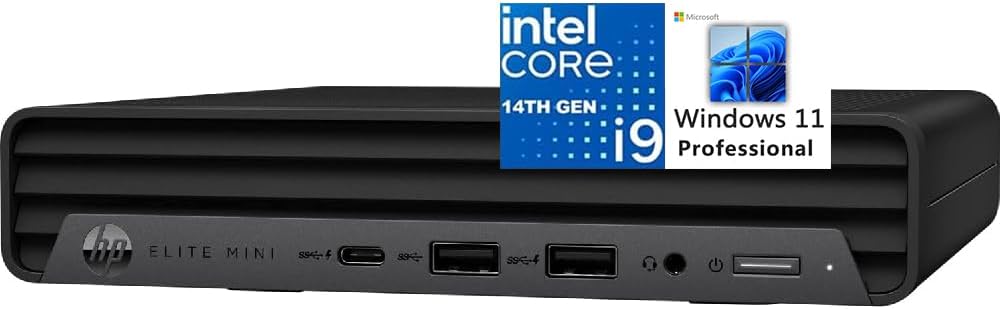
The HP Elite Mini 800 G9 is a polished business mini PC with a 4.6 rating. Its Intel Core i9-14900T processor offers 24 cores split between 8 performance and 16 efficiency cores, 32 threads, up to 5.5GHz, and a 32MB cache. That substantial core count is well suited to parallel office tasks, engineering applications, development environments, media processing, and multi-application workspaces.
We may earn a commission when you buy through this link, at no additional cost to you.
Unlike many competitors, the package includes Windows 11 Pro, a full-size wired keyboard, and a mouse. That makes it more approachable for a first office PC, employee deployment, or home installation. It also provides 16GB DDR5 memory, a 1TB PCIe NVMe M.2 SSD, Intel UHD Graphics 770, Wi-Fi 6, Bluetooth, five USB-A ports, a 20Gbps USB-C port, and wired Ethernet.
Display connectivity is another strength. Two DisplayPort 1.4 outputs and one HDMI 2.1 output can support high-resolution monitors, with the listing noting up to three 4K displays at 60Hz. The system also includes a 3.5mm headphone and microphone combo jack. Its primary limitation is that the supplied 16GB of memory may become restrictive for power users, and the listing does not highlight a dedicated graphics option or extensive high-speed networking.
The Elite Mini 800 G9 is our premium recommendation for buyers who want a recognizable business platform, a complete ready-to-use package, and a high-core-count processor in a compact enclosure. It is particularly well matched to offices, professional desks, and users who appreciate the inclusion of Windows Pro, input accessories, and a straightforward business-oriented design.
Windows 11 Pro, a wired keyboard, and a mouse reduce the number of extra items needed for a basic office setup. The 24-core processor also provides ample headroom for demanding multitasking compared with a conventional office mini PC.
Two DisplayPort outputs and one HDMI 2.1 connection support productive desk arrangements. The combination of legacy-friendly USB-A and a 20Gbps USB-C port helps accommodate both existing accessories and newer high-speed peripherals.
We may earn a commission when you buy through this link, at no additional cost to you.
The MINISFORUM M1-1390 brings 24 cores and 32 threads to a small desktop, and its supplied 4.5 rating reflects a strong overall reception. The Intel Core i9-13900HX operates at up to 5.4GHz and combines eight performance cores with 16 efficiency cores. It is a compelling choice for users whose work benefits from high parallel throughput, including development, rendering, video processing, and heavy multitasking.
We may earn a commission when you buy through this link, at no additional cost to you.
It arrives with 32GB DDR4 memory at 3200MHz and a 1TB M.2 2280 PCIe 4.0 NVMe SSD. Memory can be expanded to 96GB, and the dual storage arrangement supports up to two 4TB SSDs for a combined 8TB. Integrated Intel UHD Graphics at 1.65GHz handle 4K 60Hz video and three-display output through HDMI 2.1, DisplayPort 1.4, and USB-C.
Networking includes one 2.5G Ethernet port, Wi-Fi 6E, and Bluetooth 5.2. Five USB ports cover high-speed and legacy peripherals, while a 2.5G LAN is useful for fast local transfers. The main trade-off is the single wired network interface compared with models offering two. DDR4 also trails newer DDR5 systems in bandwidth, although the large 32GB starting capacity and 96GB ceiling help offset that limitation.
The M1-1390 is ideal for buyers who prioritize processor core count and storage headroom in a compact form. Its white-and-silver design also suits offices, conference rooms, and visible desk setups better than an anonymous black box. For users needing only general productivity, the extra processor capacity may be unnecessary, but for heavy parallel work it offers a persuasive mix of capability and compactness.
The 24-core, 32-thread processor is the M1-1390's defining advantage. It can divide demanding tasks across performance and efficiency cores, making it well suited to software builds, 4K timelines, 3D work, and users who keep many applications active simultaneously.
Two M.2 storage positions and support for a combined 8TB allow large project libraries to remain local. This is particularly helpful for video editors, developers, and creators who do not want to rely continuously on external drives or remote storage.
We may earn a commission when you buy through this link, at no additional cost to you.
The KAMRUI Hyper H2 pairs a high-clock 14th-generation Core i9 processor with a very small enclosure. It has a 4.5 rating and uses the Intel Core i9-14900HX, offering 24 cores, 32 threads, up to 5.8GHz, 36MB of cache, and a 55W TDP. This makes it attractive for creators, developers, and compact gaming builds that need strong CPU performance without a full-size tower.
We may earn a commission when you buy through this link, at no additional cost to you.
The included 32GB dual-channel DDR4 memory is expandable to 64GB. Storage begins with a 1TB M.2 2280 PCIe 4.0 SSD, and a second M.2 position allows expansion up to 4TB as described in the supplied listing. HDMI 2.0, DisplayPort 1.4, and a 10Gbps USB-C port support triple 4K 60Hz output through Intel UHD Graphics.
Cooling receives considerable attention. The system uses an upgraded centrifugal fan, dual copper heat pipes, a dual-fin module, an aluminum heatsink, and a stated airflow improvement of 35% and overall heat-dissipation improvement of 40%. The listed connectivity includes 1Gbps Ethernet, Wi-Fi 6E, Bluetooth 5.2, seven USB-A connections, a USB-C port, and a 3.5mm audio jack. A VESA mount allows placement behind a monitor.
Its limitations are relatively clear. The 1Gbps Ethernet port is slower than the dual 2.5G arrangements found on several rivals, and integrated Intel graphics are not a substitute for a dedicated gaming GPU. Even so, the H2 is one of the strongest compact options for CPU-heavy gaming, emulation, 3D creation, and general desktop work where a small footprint and flexible mounting matter.
The M1-1390's 24-core, 32-thread processor and up to 5.8GHz clock provide substantial headroom for demanding multitasking. Its 5.04-inch-square dimensions make it easy to hide behind a display or place inside a compact workstation.
The centrifugal fan, copper heat pipes, dual-fin module, and aluminum SSD heatsink form a focused thermal design. These features are particularly relevant when a high-core-count processor is expected to handle extended rendering, compilation, or gaming workloads.
We may earn a commission when you buy through this link, at no additional cost to you.
The MINISFORUM MS-01 is built for technically demanding users who need network speed and expansion rather than the smallest possible enclosure. It carries a 4.5 rating and uses the Intel Core i9-13900H, with 14 cores, 20 threads, 24MB of cache, and up to 5.4GHz. Intel Iris Xe integrated graphics support the system, but the main attraction is the workstation-style feature set.
We may earn a commission when you buy through this link, at no additional cost to you.
Networking is exceptional. Two 10Gbps SFP+ ports support high-speed LAN, server, and storage connections, including link aggregation, while two 2.5G RJ45 ports use Intel I226 controllers. Two USB4 ports can also support 20Gbps Thunderbolt Ethernet, and the supplied information describes combined transmission capability of up to 65Gbps. This makes the MS-01 particularly suitable for network administrators, homelab builders, file-server users, and businesses needing flexible high-speed links.
Storage is similarly ambitious. The system supports three M.2 NVMe positions, including a PCIe 4.0 interface capable of 7000MB/s according to the listing. It can use 2280 and 22110 drives, supports RAID 0 and RAID 1, and includes a U.2-to-M.2 adapter. A full PCIe 4.0 x16 slot can accommodate a high-performance graphics card, network card, or storage controller.
The trade-off is that the MS-01 is a specialized compact workstation rather than a minimalist home PC. Its network interfaces, enterprise support, storage flexibility, and expansion slot are excellent for the right user, but a typical home office can benefit from none of them. Choose it when high-speed networking, RAID, enterprise storage, or a dedicated GPU are genuine requirements.
Dual SFP+ and dual 2.5G Ethernet interfaces create an exceptional foundation for NAS access, firewall work, aggregation, and professional network infrastructure. They also provide a clear reason to choose this model over a conventional office mini PC.
Three M.2 positions, U.2 support, RAID options, and a PCIe slot allow storage to scale in ways most mini PCs cannot. A separate high-speed drive, working project volume, and boot drive can all be accommodated without relying on external media.
We may earn a commission when you buy through this link, at no additional cost to you.
The GEEKOM IT13 MAX is an adjacent Intel Core Ultra alternative for buyers interested in local AI acceleration. It has a 4.6 rating and combines the Intel Core Ultra 9 185H processor's 65W design with DDR5 memory and a 1TB SSD. The supplied listing emphasizes local NPU performance for language models, computer vision, machine learning, and privacy-conscious document processing.
We may earn a commission when you buy through this link, at no additional cost to you.
The system is described as offering two times the graphics performance and two to three times the AI power of an i9, along with 20 to 30 percent faster video editing. Those comparisons are manufacturer claims in the supplied information, so actual results will depend on software, model, cooling, and workload. The practical advantage is architectural: the dedicated neural hardware can accelerate compatible AI tools without sending every task to the cloud.
Its 16GB DDR5 configuration is less generous than several competitors, though the overall platform is clearly intended for creators, developers, engineers, and studio users. IceBlast 3.0 cooling is claimed to operate quietly at 65W sustained performance, making the system suitable for offices, schools, hospitals, or shared workspaces where fan noise would be disruptive. Dual Ethernet and support for up to four displays add practical flexibility.
The IT13 MAX is a strong choice for users who value AI capability, quiet operation, and operating-system choice. It supports Windows and major Linux distributions, making it relevant for developers using containers, Proxmox, or embedded tools. Buyers with large local models or memory-heavy editing sessions should consider whether 16GB is sufficient or whether a higher-memory configuration is more appropriate.
Local neural acceleration can improve privacy and responsiveness for compatible document, image, coding, and language tasks. It also allows sensitive files to remain on the device when a workflow does not require remote services.
The stated IceBlast 3.0 cooling approach is designed to sustain 65W performance with lower noise than typical mini PCs. That makes the IT13 MAX relevant to offices, studios, classrooms, and home desks where quiet operation is a practical requirement.
We may earn a commission when you buy through this link, at no additional cost to you.
The barebone MINISFORUM MS-01 gives experienced builders control over memory, storage, operating system, and graphics. It shares the Core i9-13900H platform with the fully configured MS-01, including 14 cores, 20 threads, up to 5.4GHz, and Intel Iris Xe Graphics, and it carries a 4.5 rating. Because no RAM, SSD, or operating system is supplied, setup requires additional components and familiarity with a PC build.
We may earn a commission when you buy through this link, at no additional cost to you.
Its expandability is the defining advantage. Two DDR5-5200 memory slots and several M.2 2280 and enterprise-class 22110 SSD positions support considerable memory and storage capacity. Compatible drives can be arranged using RAID 0 or RAID 1, and the listed specifications also mention U.2 enterprise SSDs. A PCIe 4.0 x16-compatible slot provides a path to a dedicated graphics card, with an RTX 3050 identified as tested in the supplied data.
Networking is equally serious. Two 10G SFP+ ports support link aggregation and high-speed storage or server access, while two 2.5G RJ45 ports handle conventional networks. Display options include HDMI and two USB4 outputs, with the supplied information noting support for 4K 60Hz, 8K 30Hz, and 4K 144Hz output. Two USB4 ports also support 20Gbps Thunderbolt Ethernet.
This version makes the most sense for a homelab enthusiast, system integrator, or technically confident buyer who wants to build a tailored compact workstation. It is less attractive for a first-time PC user because the absence of memory, storage, and software adds setup work. When compatibility matters, the buyer should also plan all components and operating-system installation around the barebone package.
Choosing RAM, SSDs, and a discrete graphics card yourself can prevent paying for components you do not need. It also creates an opportunity to select memory capacity, drive organization, and graphics performance according to a specific workflow.
Dual SFP+ and dual 2.5G Ethernet make the barebone suitable for high-speed NAS, server, and aggregation tasks. The design is closer to a compact professional workstation than a basic home desktop.
We may earn a commission when you buy through this link, at no additional cost to you.
The GEEKOM XT13 Pro differentiates itself with a generous 32GB of memory and 2TB PCIe 4.0 SSD. Its supplied rating is 4.1, the lowest among these ten products, but the underlying configuration is still well suited to virtual machines, 4K editing, 3D work, and extensive game libraries. The Intel Core i9-13900H provides 14 cores and 20 threads at up to 5.4GHz.
We may earn a commission when you buy through this link, at no additional cost to you.
The larger starting storage is particularly helpful for creative professionals and gaming collectors who want fewer external drives. Memory can be expanded to 96GB, while storage is listed as expandable to 4TB. Intel Iris Xe Graphics includes AV1 encoding and decoding support, adding useful media capabilities for modern video workflows. Tri-band Wi-Fi 6E and Bluetooth 5.3 provide modern wireless connectivity.
The listing emphasizes reliability testing, a three-year hardware warranty, local fast repair support, and lifetime professional guidance. Those are meaningful benefits for an office or creation system, although the lower customer rating suggests that buyers should carefully assess the current configuration and support terms. Compared with rivals, the supplied data gives less detail about the physical cooling system and display connectors.
The XT13 Pro is best for buyers who value ready-made memory and storage more than unusual connectivity. It is a straightforward high-capacity Core i9 mini PC for a studio desk or home office, with enough configuration for demanding multitasking from the outset. As always, confirm the current display, port, and accessory details in the listing before purchase, particularly if a particular peripheral is essential.
The 2TB SSD offers ample room for source media, project files, and installed applications. That makes the XT13 Pro less dependent on external storage during everyday creative and multitasking sessions.
Thirty-two gigabytes of RAM provides a practical starting point for multiple virtual machines, browsers, and development tools. The stated 96GB ceiling gives experienced users an additional upgrade path.
We may earn a commission when you buy through this link, at no additional cost to you.
The GEEKOM GT13 MAX is a professional mini PC centered on modern hybrid computing. It has a 4.4 rating and uses the Intel Core Ultra 9 185H with 16 cores, 22 threads, Intel Arc Graphics, and an AI Boost NPU capable of up to 11 TOPS. The platform is especially relevant to users who want local AI inference, private document question answering, OCR, transcription, image processing, subtitles, and coding assistance.
We may earn a commission when you buy through this link, at no additional cost to you.
Its 16GB DDR5 memory is modest for some local AI models and professional editing, but it can be expanded to 96GB. The supplied 1TB SSD can be supplemented for up to 6TB of total storage. Intel Arc Graphics with eight Xe cores supports ray tracing and AV1 decoding, giving the system more visual capability than a basic integrated-graphics mini PC.
Connectivity is comprehensive. Dual USB4, dual HDMI 2.0, and Mini DisplayPort 1.4 support up to four displays, while Wi-Fi 7, Bluetooth 5.4, and dual 2.5G LAN provide modern and flexible networking. IceBlast 2.0 cooling, a full-copper heatsink, and a large quiet fan are designed for stable operation. The reinforced ABS housing also includes a Kensington lock slot and a three-year limited warranty.
The GT13 MAX is most suitable for developers, engineers, analysts, and creative professionals experimenting with local AI while retaining a conventional desktop workflow. Its limitation is that available AI software must properly support the NPU, and 16GB may become the limiting factor before compute does. It is still a compelling compact platform for users who want current connectivity and AI features in a professional enclosure.
The 11-TOPS NPU can accelerate compatible local workflows involving transcription, OCR, image processing, retrieval, and lightweight language models. Keeping suitable data on-device may improve control over sensitive documents and reduce reliance on cloud uploads.
Wi-Fi 7, dual 2.5G Ethernet, USB4, and four-display support create a flexible platform for development, trading, previewing, and cross-display work. The option to expand memory and storage supports longer-term growth.
We may earn a commission when you buy through this link, at no additional cost to you.
A useful Core i9 mini PC should fit the workload, display setup, networking needs, and physical space rather than simply provide the largest processor specification. Review these factors before comparing configurations or choosing a complete system.
Core count matters most when many applications or threads operate simultaneously, while maximum clock speed influences short tasks and responsive single-threaded work. The group includes 14-core, 20-thread processors such as the i9-13900HK and i9-13900H, as well as 24-core, 32-thread configurations in the i9-13900HX and i9-14900HX. The newer Core Ultra 9 alternatives use 16 cores and 22 threads but add neural hardware and newer graphics.
Choose the processor according to the workload. Heavy rendering, compiling, coding, video processing, and large virtual-machine environments benefit from more cores, while general office use may not require the highest specification. Always consider sustained thermal behavior, because a compact enclosure can limit how long peak processor performance is maintained.
Memory determines how many applications can remain active without frequent paging and influences performance in large editing timelines, development projects, and virtual machines. Configurations in this guide range from 16GB to 32GB, with expansion ceilings as high as 96GB. DDR5 provides higher bandwidth and newer platform support, while DDR4 remains perfectly useful in the high-core-count HX and HK systems when its capacity is sufficient.
Do not choose memory by capacity alone. Check whether the system uses dual-channel configurations, confirm the maximum supported capacity and module type, and consider whether both memory slots are occupied. For general productivity, 16GB can work; for professional multitasking, 32GB is more comfortable; and for memory-intensive applications, expansion to 64GB or 96GB may be worthwhile.
A fast SSD reduces application launches, boot times, and file-transfer delays, but the starting capacity can determine whether upgrades are immediately necessary. The smallest configuration here includes 500GB, while others include 1TB or 2TB. Several systems support multiple M.2 NVMe drives, and the MS-01 models add 2.5-inch, U.2, RAID, and PCIe expansion possibilities.
Plan around both speed and usable capacity. PCIe 4.0 drives are widely supported, while the MS-01 can accommodate enterprise-oriented storage. If you edit video, store large libraries, or use virtual machines, favor more capacity and multiple drive positions. Also consider whether a separate system drive or cache drive would improve your particular workflow.
A mini PC's display support determines how many monitors you can operate independently and which refresh rates and resolutions are available. Triple-display configurations use combinations of HDMI, DisplayPort, and USB-C, while the NAB9S and several AI models support four displays. Integrated Intel UHD or Iris Xe graphics are suitable for office work, media playback, and lighter 3D tasks, but they are not equivalent to a discrete gaming GPU.
Match the outputs to your existing monitors and check cable standards as well as count. USB-C video support depends on the port carrying DisplayPort Alternate Mode, while DisplayPort and HDMI are often the simplest choices for desktop arrangements. For gaming, 3D rendering, or GPU-accelerated work, verify whether an expansion slot is available and whether the system has sufficient power and cooling.
Network options range from 1Gbps Ethernet to dual 2.5G ports and dual 10G SFP+ connections. Faster Ethernet can improve transfers to NAS devices and network storage, while dual ports may support firewall functions, aggregation, or separate network paths. Wi-Fi 6, Wi-Fi 6E, and Wi-Fi 7 offer convenient wireless access, with newer standards providing greater bandwidth and reduced congestion in suitable environments.
External ports matter just as much. Look for USB-A for legacy accessories, high-speed USB-A and USB-C for external drives, Thunderbolt or USB4 for docks and fast peripherals, an SD reader for media workflows, and enough audio connections for your desk. The Beelink GTi13 and MS-01 models provide the strongest high-speed expansion, while the NAB9S stands out for its dual wired networking and four-display support.
Compact processors generate heat in a restricted area, making cooling design essential for sustained performance. Features highlighted across the group include dual heat pipes, centrifugal fans, copper thermal components, dual airflow channels, active SSD cooling, full-copper heatsinks, and dual-side ventilation. Quiet cooling is particularly valuable in offices, studios, classrooms, hospitals, and shared living spaces.
Look for evidence that the cooling system supports the processor's stated sustained power level. Fan design alone is not enough; airflow paths, heat pipes, heatsink area, vents, and the ability to maintain clean filters all influence results. A system intended for long rendering or compiling should have more thermal headroom than one intended for intermittent office use.
Mini PCs range from compact gaming-style enclosures to larger workstation bodies with more expansion slots. The KAMRUI Hyper H2 measures just 5.04 by 5.04 by 1.63 inches and includes a VESA mount, making it easy to place behind a monitor. The MS-01's additional network and expansion hardware naturally requires a larger chassis but remains substantially smaller than a conventional tower.
Before ordering, measure the intended location and check whether wall mounting, behind-monitor mounting, or shelf placement is possible. Consider airflow around the unit and whether cables will be difficult to reach. Small systems are most useful when their footprint creates meaningful desk space without making ports inconvenient to access.
A ready-to-use configuration may include Windows, memory, storage, and even a keyboard and mouse. The HP Elite Mini 800 G9 includes Windows 11 Pro and input accessories, while the MS-01 barebone requires you to supply RAM, an SSD, and an operating system. Barebones can reduce waste and deliver a tailored build, but they add assembly, compatibility, and setup responsibility.
Compare warranty and support terms where reliability matters. The supplied information cites three-year coverage for the GEEKOM IT13 MAX and GT13 MAX, three-year hardware coverage for the XT13 Pro, and one-year service for the KAMRUI Hyper H2. Check the current listing for complete terms, included accessories, operating-system details, and regional support availability.
Before initial setup, confirm that the package contains the processor-based mini PC, power adapter, and any listed peripherals. Barebone systems also require compatible memory, storage, and an operating-system installation medium. Place the unit on a stable, hard surface with clear space around its vents, and avoid placing it inside a closed cabinet unless the manufacturer explicitly permits that arrangement.
Connect the display and essential peripherals first, then complete operating-system setup and install the correct drivers for the processor, network interface, graphics, and audio. Configure automatic storage monitoring, available system updates, and a reliable backup routine. If your workflow depends on local AI, network aggregation, RAID, or specialized storage, test those functions before moving important projects onto the machine.
For routine care, keep vents free of dust and maintain adequate clearance around the chassis. Monitor storage health and system temperatures during sustained workloads, particularly on systems using 55W or 65W processors. Save work before major firmware, BIOS, driver, or storage changes, and follow the manufacturer's guidance when opening the enclosure or adding memory and drives.
Yes, for many professional editing workflows, especially when the project is supported by fast storage and sufficient memory. The 24-core models are especially attractive for 4K timelines, rendering, and parallel tasks, while integrated graphics can handle playback and moderate editing. A discrete GPU is advisable for demanding 3D work, intensive color pipelines, or heavily demanding effects, and the MS-01's PCIe slot provides one expansion path.
The suffixes indicate different processor power and platform characteristics. HX models generally offer high core counts and substantial sustained power, HK models provide strong performance in a lower-power mobile platform, H models emphasize efficiency, and T models prioritize lower power and quieter operation. Actual performance also depends on the system's cooling and configured power limits.
Yes, depending on the model and its display outputs. The NAB9S supports up to four independent displays, while many other models support three, and the IT13 MAX and GT13 MAX also offer four-display configurations. Check the exact HDMI, DisplayPort, and USB-C capabilities, along with supported resolution and refresh rate, before connecting an existing monitor arrangement.
A complete system is easier for beginners and office deployments because the core components and often the operating system are ready to use. A barebone system is better for builders who want specific memory, storage, or graphics and are comfortable installing the operating system. The MINISFORUM MS-01 barebone also appeals to advanced homelab and network users because of its expansion capabilities.
A standard 1Gbps connection is sufficient for most web work, office use, and moderate local file transfers. Dual 2.5G ports can benefit fast NAS access, large file transfers, and advanced network configurations, while 10G SFP+ is intended for high-speed servers, storage arrays, and professional network infrastructure. Select advanced networking only when the rest of your network and devices can take advantage of it.
Yes, particularly for users interested in local AI acceleration, newer integrated graphics, and efficient performance. The GT13 MAX and IT13 MAX include dedicated neural hardware and support features such as AV1 decoding, modern wireless standards, and multi-display output. They are especially relevant for AI-assisted development, document processing, transcription, image work, and modern media tasks.
A mini PC is usually a better fit when desk space, simple setup, and low visual clutter are priorities. A small-form-factor desktop may offer better internal expansion, replaceable components, and more flexible cooling options. Choose the mini PC when its listed ports and expansion satisfy your needs; otherwise, a compact desktop tower can provide a more conventional upgrade path.
For general office use, 16GB and a 500GB or 1TB drive can be workable, but many professionals benefit from 32GB. Video editing, large application libraries, virtual machines, and local AI workloads may require 64GB or more, plus 2TB or greater of fast storage. The included memory and drive should be treated as a starting point rather than a permanent limit if the system supports upgrades.
The Beelink GTi13 is the strongest all-around choice because it combines a capable Core i9 processor, 32GB DDR5 memory, dual high-speed Ethernet, Thunderbolt 4, a PCIe expansion slot, and useful everyday conveniences. The MINISFORUM NAB9S is the budget-minded alternative for buyers who value four displays, dual 2.5G networking, and straightforward expansion, while the HP Elite Mini 800 G9 is the premium business package with Windows 11 Pro and input accessories.
For highly parallel workloads, the MINISFORUM M1-1390 and KAMRUI Hyper H2 provide 24 cores and 32 threads, but buyers should distinguish processor throughput from graphics performance. The MINISFORUM MS-01 and its barebone counterpart suit users who need serious networking, storage, and expansion, while the GEEKOM models are better aligned with AI acceleration, modern connectivity, generous memory, or quiet operation.
Before ordering, verify the current configuration, supported displays, ports, included accessories, and upgrade limits. Product listings and prices can change, so check current availability and terms on the linked Amazon pages. The right Intel Core i9 Mini PC is ultimately the one that meets your workload and connection requirements while fitting the space and expansion limits of your intended setup.