
YosaToo Kids Tablet
4.2Editor score
Android 16 with Google Play
Offline learning activities included
Adjustable protective stand
Kids tablets for children ages 3 to 7 need to combine simple navigation, durable construction, age-appropriate controls, and enough engaging content for both learning and play. A good first tablet should withstand drops, resist unnecessary distractions, and be easy for small hands to use without requiring constant adult intervention.
We compared all ten featured models across screen size, operating system, memory, storage, battery claims, parental controls, included software, cameras, connectivity, and protective-case features. The list covers compact seven-inch options, larger ten-inch screens, Amazon-curated ecosystems, and Android tablets with expandable storage.
Each review identifies the strongest use case, important trade-offs, and the families most likely to benefit from that model. Ratings reflect the supplied customer feedback, while availability, subscription terms, features, and prices can change, so readers should confirm current listing details before purchasing.
4.2Editor score

4.6Editor score

4.0Editor score
As an Amazon Associate we earn from qualifying purchases.
The comparison highlights the main differences in display size, software environment, memory, storage, battery expectations, and built-in family controls, helping families identify the model that matches their child's age, routines, and need for portability.




The Amazon Fire 7 Kids is explicitly designed for children ages 3 to 7 and holds a 4.3 customer rating. Its strongest qualities are a focused seven-inch display, a sturdy kid-proof case, straightforward age filtering, and a curated library of books, games, videos, and apps through Amazon Kids+.
We may earn a commission when you buy through this link, at no additional cost to you.
The parent dashboard is a major advantage for younger children because caregivers can filter content by age, set time limits, establish educational goals, and approve additional services such as Netflix and Disney+. The supplied package also includes a one-year Amazon Kids+ subscription and a two-year worry-free replacement guarantee, adding useful value beyond the hardware alone.
The main limitation is the 16 GB internal storage capacity, which can become restrictive if parents download many videos, games, or books. The Amazon Kids+ subscription also automatically renews after its initial term unless canceled, so families should understand the renewal terms before making their decision.
This is a strong recommendation for parents seeking a dedicated first tablet for a child between three and seven. It balances a child-friendly interface, manageable screen size, robust controls, and durable construction without overwhelming a preschool-aged user with a large display.
Unlike a general-purpose tablet with a child mode added later, this model is presented specifically for ages 3 to 7. Its streamlined content approach, simple interface, and included case make it an accessible introduction to touchscreens.
The age-based filters, educational goals, time limits, and activity dashboard allow caregivers to adapt the experience as the child develops. These tools reduce the need to supervise every tap, particularly when the tablet contains purchased or subscription-based content.
We may earn a commission when you buy through this link, at no additional cost to you.
The Amazon Fire HD 8 Kids is the strongest all-around choice in this roundup, combining a 4.6 rating with an eight-inch HD display, 3 GB of RAM, and 32 GB of storage. It is explicitly intended for children ages 3 to 7 and includes a one-year Amazon Kids+ subscription.
We may earn a commission when you buy through this link, at no additional cost to you.
Its larger screen gives children more room for illustrated books, games, and videos, while the claimed battery life of up to 13 hours supports road trips and long learning sessions. Parents can remotely review activity, set limits, and prioritize books and educational applications over entertainment through the dashboard.
The strengthened aluminosilicate glass and included kid-proof case add useful protection, and the case includes a stand and handle. A family that only needs a very small device may find eight inches unnecessary, and the Amazon Kids+ subscription renews after the first year unless the account is managed in the parent dashboard.
For a child who is moving beyond the simplest toddler tablet but remains within the targeted 3-to-7 range, this model offers an excellent balance of screen quality, endurance, content, and controls. It is the most versatile choice for everyday learning and entertainment.
The eight-inch panel makes books, drawing apps, puzzles, and video content easier to see without making the device excessively large. That makes the model particularly useful for children who are beginning sustained reading and creative activities.
The up-to-13-hour battery claim and 32 GB storage give families more flexibility for downloaded content. The included stand also encourages hands-free viewing, although younger children may still need guidance when changing activities.
We may earn a commission when you buy through this link, at no additional cost to you.
This seven-inch Android 12 model offers a familiar app-based experience for children ages 3 to 9 and carries a 4.0 rating. It combines 32 GB ROM, 4 GB of stated RAM with 2 GB of expansion, Google Play certification, and a protective case with an adjustable stand.
We may earn a commission when you buy through this link, at no additional cost to you.
Parental features include screen-time limits, password protection, separate child profiles, app blocking, and webpage filtering. The 1024-by-600 IPS display supports automatic brightness adjustment, while front and rear cameras, speakers, a headphone jack, Wi-Fi, and Bluetooth make it a versatile compact tablet.
The stated RAM includes a 2 GB expansion component, which may not deliver the same real-world responsiveness as dedicated physical memory. Its 4.0 rating also trails the strongest models, so buyers should consider recurring user feedback alongside its generous app access and storage expansion.
This tablet suits families that want a compact Android device with a broad app catalog and detailed controls. It is especially attractive when microSD expansion and a seven-inch form factor matter more than Amazon-specific content or a subscription-based curated library.
Besides 32 GB of internal storage, the tablet supports microSD cards up to 512 GB. That gives parents room to add carefully selected apps, music, books, and videos without relying entirely on cloud streaming.
Separate profiles, app restrictions, password support, and filtered webpages are valuable for siblings or shared family devices. The controls are more granular than those found on many simplified tablets, though parents must still manage app quality themselves.
We may earn a commission when you buy through this link, at no additional cost to you.
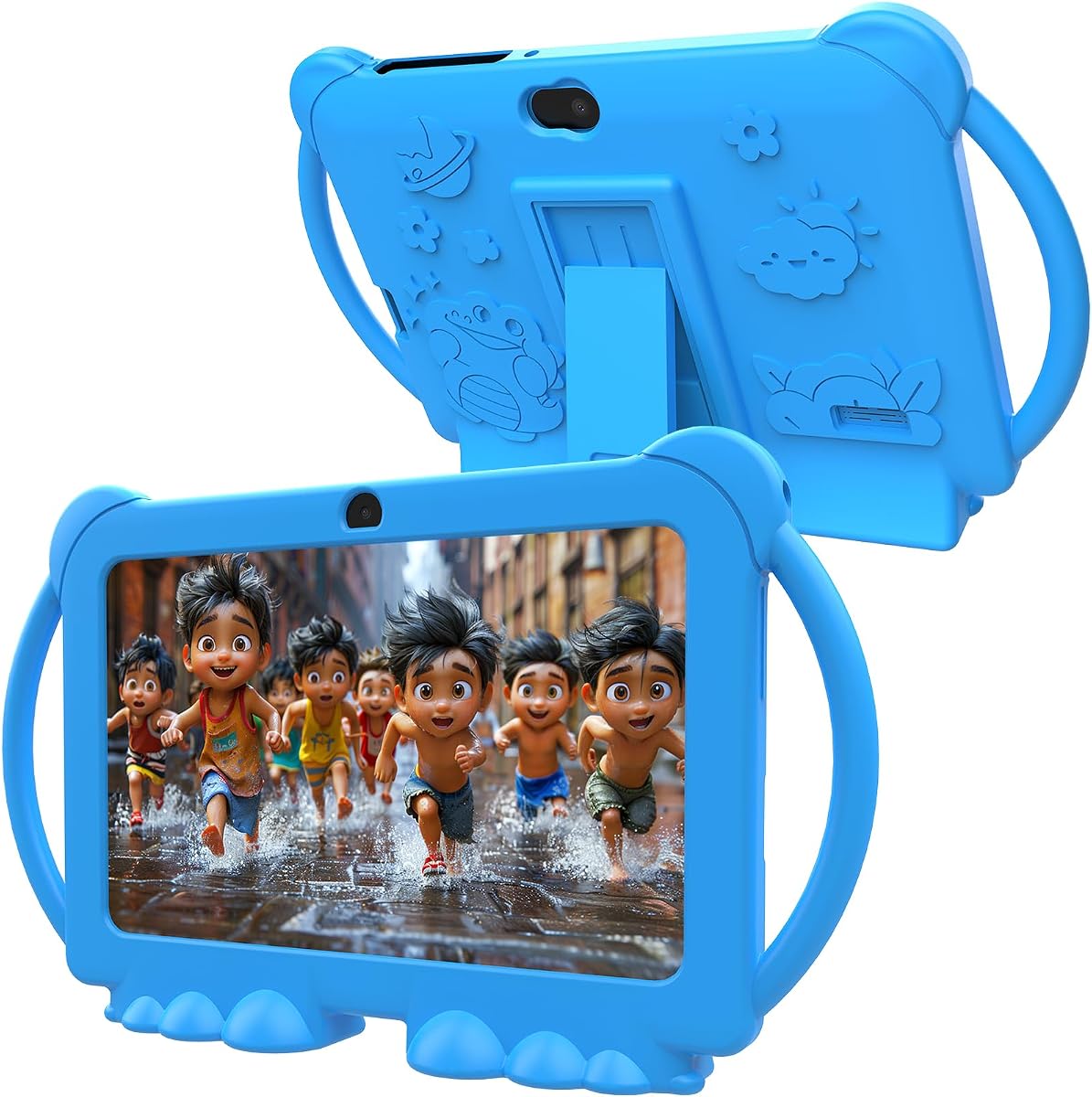
The YosaToo Kids Tablet combines Android 16, 4 GB of RAM, 32 GB of storage, and a 4.2 rating in a seven-inch format aimed at children ages 3 to 12. Its most distinctive advantage is the preloaded YUBABE learning application with offline Montessori, mini-game, STEM, and art activities.
We may earn a commission when you buy through this link, at no additional cost to you.
Google Kids Space is also preinstalled, and the tablet provides full Google Play access for additional family-approved apps. Parental tools allow caregivers to filter age-appropriate content, set daily limits, monitor app usage, block unwanted applications, and adjust the security settings as the child changes.
Offline activities are especially useful during flights, road trips, or periods of unreliable internet, reducing the chance that a child becomes frustrated when a stream will not load. The included silicone case and adjustable stand improve portability and allow the tablet to be used without being held continuously.
Because the stated age range extends well beyond the focus of this guide, correct configuration is important. Nevertheless, this is a compelling budget-oriented option for families who value offline learning, broad Android access, and physical protection in a compact tablet.
The preloaded offline learning app gives children meaningful activities without requiring a constant connection. This makes the tablet more dependable in airports, remote locations, or homes with intermittent internet service.
Google Kids Space offers a controlled starting point, while Google Play allows families to add selected educational tools. Parents should pair that flexibility with the available filters, app blocking, and daily limits to preserve a child-friendly environment.
We may earn a commission when you buy through this link, at no additional cost to you.
The Amazon Fire HD 8 Kids Pro earns a 4.6 rating and combines an eight-inch HD screen, 64 GB of storage, up to four GB of RAM, and a claimed 13-hour battery. Its stated audience is ages 6 to 12, making it a crossover option rather than a dedicated preschool tablet.
We may earn a commission when you buy through this link, at no additional cost to you.
It offers a larger content allowance than the younger Fire Kids model, a more powerful hexa-core processor, and safe browsing designed to filter inappropriate sites. Parents can review activity, approve or deny purchases and downloads, manage content, and use voice or video calls over Wi-Fi with approved contacts.
Its central drawback is the age positioning. A three-year-old may find the interface and feature set more advanced than necessary, while the slimmer case is designed for older hands rather than maximum protection for a toddler. It is therefore a better fit for children near the upper end of the requested range.
For a six- or seven-year-old who is ready for more advanced content, games, and web-based activities, this is an excellent choice. It offers the same strong battery life as the younger Fire HD 8 Kids model with considerably more internal storage and stronger performance specifications.
The 64 GB capacity accommodates a larger mix of games, books, videos, and music. It is a meaningful advantage for a child who moves beyond introductory preschool content and begins saving more favorites.
Guardrailed web browsing gives older children more independence without removing parental oversight. Caregivers can block specified sites, review activity, and manage requests, making this a useful middle ground between a curated kids tablet and an unrestricted general-purpose device.
We may earn a commission when you buy through this link, at no additional cost to you.
The PEICHENG 7-Inch Kids Tablet is an Android 12 tablet with a 4.0 rating, 32 GB of storage, and a stated 4 GB of RAM that includes a 2 GB expansion. It targets toddlers and young children with preinstalled kids apps, a child-friendly mode, and an included shockproof case.
We may earn a commission when you buy through this link, at no additional cost to you.
Its parental system supports screen-time limits, password protection, separate profiles, app blocking, and unsafe-page filtering. The 1024-by-600 IPS display includes automatic brightness adjustment, while dual cameras, dual speakers, Wi-Fi, Bluetooth, and a 3.5 mm headphone jack cover common entertainment needs.
One important setup detail is that the default kids-mode password is 0000. Families should change it immediately so that a child cannot bypass restrictions, and they should review installed applications before handing over the device. Its 3.9 rating also suggests more mixed customer experiences than the leading Fire models.
This is a practical choice for parents seeking a compact Android tablet with standard family controls and expandable storage. It works best when caregivers are willing to configure the password, select apps carefully, and use the supplied stand to create comfortable viewing angles.
Screen-time limits, app controls, separate profiles, and web filtering cover the essential needs of most family use. Changing the default password is essential because it is the main barrier preventing a child from exiting the restricted environment.
The seven-inch device includes cameras, speakers, Wi-Fi, Bluetooth, and a headphone connection, covering common needs without adding unnecessary complexity. It is also easier for small hands to carry than a larger tablet.
We may earn a commission when you buy through this link, at no additional cost to you.
The ApoloSignage 10-Inch Kids Tablet stands out with a 10-inch 1280-by-800 IPS HD display, Android 16, 8 GB of stated RAM, 64 GB of storage, and a 3.8 rating. It is designed for children ages 3 and older, covering both preschool use and a broader range of older children.
We may earn a commission when you buy through this link, at no additional cost to you.
Google Kids Space and educator-approved applications are preloaded, with activities involving coloring, crafts, stories, and puzzles. The parental system supports age filtering, daily learning goals, and screen-time management, while automatic brightness and blue-light reduction are intended to make extended viewing more comfortable.
Its larger size provides ample space for reading and creative work but may be less convenient for a preschooler to hold independently. The 3.8 rating is the lowest among the featured products, and buyers should investigate specific customer feedback to understand the source of any recurring concerns.
This model makes the most sense for families that want a large Android display and broad expandable storage rather than a small, tightly curated Amazon experience. It is a strong choice for shared creative activities and a less suitable choice for children who need a very portable first tablet.
The 1280-by-800 screen gives books, drawing tools, and puzzle apps room to remain legible and engaging. A larger viewing area can also reduce the temptation for a child to crowd close to the display during longer sessions.
Storage can expand to 1 TB, and the 5000mAh battery supports extended use between charges. The eye-comfort features, protective case, and adjustable stand add practical value for regular home learning or travel.
We may earn a commission when you buy through this link, at no additional cost to you.
The HOTTABLET 7-Inch Kids Tablet is an Android 12 model with a 4.0 rating, 32 GB of storage, and 4 GB of stated RAM that includes 2 GB of expansion. Its seven-inch 1024-by-600 IPS display, child mode, protective silicone cover, and support for up to 1 TB expansion make it a simple general-purpose option.
We may earn a commission when you buy through this link, at no additional cost to you.
Parents can create customized child profiles, control screen time, filter websites, apps, and video channels, and select how long the tablet is used. Google Play provides access to educational applications, while the preinstalled iwawa app offers games, painting activities, brain training, and kid-focused television content.
Its 3000mAh battery and claimed eight hours of mixed use trail the endurance of the larger models in the list. As with the PEICHENG tablet, the default kids-mode password is 0000, so changing it is a necessary step. A one-year warranty provides some reassurance, but the 4.0 rating points to a more ordinary overall experience.
This is a reasonable choice for families wanting an inexpensive seven-inch tablet with recognizable Android features and a protective stand. It is best for lighter use involving downloaded content and selected educational applications rather than intensive gaming or all-day streaming.
Customized profiles, screen-time controls, and filtered websites, apps, and channels provide a useful baseline for shared family tablets. Password protection should be changed immediately because the supplied kids-mode default is publicly stated.
The iwawa bundle, Play Store access, cameras, Bluetooth, speakers, and a headphone jack cover a broad mix of learning and entertainment. The included case and stand reduce the need to hold the tablet during short activities.
We may earn a commission when you buy through this link, at no additional cost to you.
The aiprotablet 10-Inch Kids Tablet is a specification-focused Android 16 model with a 4.0 rating. It pairs a 10-inch 1280-by-800 IPS display with 24 GB of stated RAM, 64 GB of internal storage, an octa-core Unisoc T606 processor, and a 6000mAh battery.
We may earn a commission when you buy through this link, at no additional cost to you.
Parental controls include screen-time management, learning goals, app-usage controls, and age-appropriate content filtering. The tablet is GMS certified, includes a kids app store, supports Google Play, and provides dual-band Wi-Fi, dual speakers, Bluetooth, an FM radio, and video-call functionality.
Most of the 24 GB RAM figure includes a 20 GB expansion, so it should not be interpreted as 24 GB of dedicated physical memory. Its large body may also be cumbersome for a three-year-old, and the 4.0 rating suggests that the impressive specifications do not translate into uniformly exceptional experiences.
For families seeking a large screen, generous battery capacity, broad connectivity, and substantial expandable storage, this is the premium-specification choice. It is most suitable for children near the older end of the requested age range or for shared family use where a larger display is worthwhile.
The octa-core processor, large RAM allocation, 64 GB storage, and expandable capacity provide ample room for apps, videos, and games. These specifications make the tablet well suited to a child whose content library will grow quickly.
The 6000mAh battery and 18W PD fast charging support extended use and quicker recharging. Dual-band Wi-Fi, Bluetooth, stereo speakers, and an FM radio add flexibility for learning, communication, and entertainment.
We may earn a commission when you buy through this link, at no additional cost to you.
The PRITOM 7-Inch Kids Tablet is a compact Android 13 device with a 3.9 rating, 32 GB of storage, 4 GB of stated RAM including 2 GB of expansion, and a 1024-by-600 IPS HD display. It is intended for children ages 3 to 12 and includes a child-friendly interface and preinstalled iWawa software.
We may earn a commission when you buy through this link, at no additional cost to you.
Its control system is unusually broad for an entry-level model, covering app and network filters, content management, child locks, spending limits, game-time limits, preference data, themes, and user settings. Wi-Fi, Bluetooth, dual cameras, a touchscreen, speakers, and microSD expansion cover common entertainment and communication needs.
The Android 13 release is older than several newer models, and its 3.9 rating sits below the strongest Fire tablets and more recent Android alternatives. Buyers should also consider that the included case, stand, and child interface provide useful protection but do not replace active parental supervision.
This remains a well-rounded basic tablet for families seeking compact size, educational apps, and detailed controls. It is particularly suitable for a preschool child using downloaded games and learning content, provided the parent configures the security settings before the device is handed over.
App filtering, network controls, child locks, game limits, spending restrictions, and content recommendations give caregivers several ways to shape the experience. This makes the tablet useful for children who begin exploring beyond a highly restricted interface.
The impact-resistant silicone case helps guard against scratches, dirt, bumps, drops, and dust, while its integrated stand supports hands-free use. USB Type-C charging provides a modern and convenient connection for the included daily routine.
We may earn a commission when you buy through this link, at no additional cost to you.
The right tablet for a child should balance age-appropriate simplicity with enough performance, storage, protection, and parental control for regular use. The most important factors vary depending on whether the device is mainly for learning at home, travel, shared family use, or independent entertainment.
Seven-inch screens are easy for small hands to hold and generally work well for portable learning, games, and short video sessions. Eight-inch models offer a more comfortable reading area without becoming excessively large, while ten-inch screens are better for drawing, shared viewing, and children who spend longer periods using educational applications. Young children may also hold smaller devices closer to their faces, making display size and viewing comfort worth considering together.
Look for age filters, screen-time limits, separate child profiles, app blocking, password protection, and filtered web access. A parent dashboard that can be reached remotely is particularly useful when a tablet is used by more than one caregiver. Also verify how purchasing permissions work, since a child should not be able to add apps or content without an appropriate adult decision. A device with many controls is most useful when the parent establishes clear limits during the initial setup.
Curated subscriptions can provide a safer and less overwhelming selection of books, games, videos, and lessons, but offline content is valuable during flights, road trips, and poor connectivity. Android tablets provide a wider app catalog, although that freedom requires more careful curation by parents. Check whether educational content is included, whether it works without an internet connection, and whether the library contains age-appropriate material for children who are just beginning to read independently.
Memory helps a tablet run multiple apps and background services, while storage determines how many games, books, videos, and photos can be kept locally. For children ages 3 to 7, at least 32 GB of internal storage is generally practical, while 64 GB offers more room for a growing library. Memory figures that include a virtual expansion component should be considered carefully because they do not always behave like dedicated physical RAM. MicroSD support can add local storage, but not every app or streaming service will permit files to be moved onto it.
Battery claims usually reflect specific test conditions, so the most useful comparison is how long the tablet can support the activities a family expects. Ten to thirteen hours can accommodate many school days, travel days, or long creative sessions, while smaller batteries may require more frequent charging. A protective case with a stand and a charging cable included in the package can improve convenience. Families should also establish a charging routine rather than relying on a tablet to remain powered indefinitely.
Young children frequently drop, squeeze, and pull at devices, so the included case matters more than it would for an adult tablet. Look for a raised edge around the screen, shock-absorbing material, secure port covers, and a case that is easy for small hands to grip. A stand is useful for videos and games, but it should not be used as a substitute for supervision. Older children approaching seven may handle a slimmer case more comfortably, while a three-year-old generally benefits from a thicker protective shell.
A curated ecosystem can make setup easier by limiting the number of visible apps and centralizing controls in one parent dashboard. A general Android tablet offers more games, creative tools, and educational applications, but those benefits come with a greater need for active management. Review whether the operating system includes a dedicated child interface, whether the Google Play ecosystem is supported, and whether essential parental settings are easy to reach. The best system is the one your family will actually configure and maintain.
A tablet purchased for a three-year-old may remain in use until the child reaches seven or beyond. Models with broad app access, expandable storage, protected browsing, and adjustable profiles can adapt more easily as reading, gaming, video, and communication needs change. However, the youngest user should still have a straightforward initial experience. A useful compromise is a child-oriented starting profile with optional access to additional applications and services that a parent can enable later.
Begin with a short setup session away from the child. Create the child profile, change any default password, choose age-appropriate filters, establish screen-time limits, and decide which purchases or app downloads require approval. Download the educational and entertainment content before handing over the device so that an initial screen does not lead the child toward the open app store or web browser.
Introduce the tablet gradually by demonstrating how to open approved activities, return to the home screen, close an app, and place the device on its stand. Keep the first sessions calm and short, then increase duration as the child becomes more comfortable. Turn on age-based content filters, review recent activity regularly, and adjust time limits to match meals, sleep, schoolwork, outdoor activity, and family routines.
Protect the hardware by keeping the case on, using a soft surface for the stand, and avoiding charging when the battery is unusually hot. Clean the screen and case with a lightly damp soft cloth rather than harsh liquids, and keep ports free of lint. Check available storage, update the software when prompted, and periodically remove unused applications to keep navigation simple and performance responsive.
A tablet with a simple child interface, strong age filters, a durable case, and a compact seven- or eight-inch screen is generally most appropriate for a 3-year-old. The Amazon Fire 7 Kids is specifically designed for ages 3 to 7, while the Amazon Fire HD 8 Kids offers a larger display and longer claimed battery life. Whichever option is chosen, set the password, filters, and time limits before handing it over.
A seven-inch tablet is easier for small hands to carry and generally works well for short learning sessions and travel. A ten-inch display is more comfortable for books, drawing, puzzles, and shared viewing, but it may be cumbersome for a preschooler to hold. Consider the child’s attention span, hand strength, available space, and whether another adult will use the device with them.
Android tablets can be suitable when they include reliable parental controls and the parent carefully manages the app ecosystem. Enable screen-time limits, app restrictions, web filtering, and purchase approval, and use a separate child profile where possible. Open access to Google Play provides useful flexibility, but the adult should decide which apps are appropriate rather than relying on the operating system to make every judgment.
A protective case is strongly recommended for children ages 3 to 7 because drops, bumps, and squeezing are common. Look for a raised screen edge, shock-absorbing material, secure port covers, and an easy-to-use stand. The protective case is especially important for a three- to five-year-old, while a child approaching seven may handle a slimmer case comfortably.
At least 32 GB is a sensible starting point for a child who will download games, books, videos, and educational applications. Larger collections benefit from 64 GB or more, and microSD support can provide additional local storage. Keep in mind that some streaming apps and protected content cannot be moved to an external card, so internal capacity still matters.
Offline activities can prevent frustration during flights, road trips, or periods of unreliable internet. They also make it easier for a child to complete a short lesson without waiting for content to load. The YosaToo Kids Tablet includes preloaded offline learning software, while several other models depend more heavily on downloaded or streamed content.
A subscription can provide a large, age-filtered library of books, games, videos, and apps, but families should review the renewal terms before purchasing. Some models include an initial subscription period automatically, while others rely on apps and content that can be downloaded once. Set a reminder to manage or cancel any unwanted renewal through the appropriate parent dashboard or account service.
Review the settings at least every few months and whenever the child begins a new developmental stage, school year, or set of activities. Age filters, app permissions, daily limits, and approved contacts may need to change as the child becomes more independent. Regular activity checks can also reveal which educational tools are being used and which apps should be removed.
The Amazon Fire HD 8 Kids is the most complete pick for the stated age group, combining a bright display, 32 GB of storage, a 3 GB RAM allocation, a kid-proof stand case, and up to 13 hours of claimed battery life. The smaller Amazon Fire 7 Kids is a particularly logical first tablet, while YosaToo stands out for offline learning and a full Android environment.
Prioritize the features your child will genuinely use: simple age filtering for a preschooler, a durable case for daily handling, offline content for travel, and enough storage for a growing collection. Larger ten-inch models offer a roomier learning experience, but they are most compelling for children near the older end of the range or for shared family use.
Finally, check the current listing, included subscription, warranty terms, device specifications, and prices before ordering, since marketplace details can change. Confirm the storage option and parental settings as well, and change any default child-mode password immediately after setup.