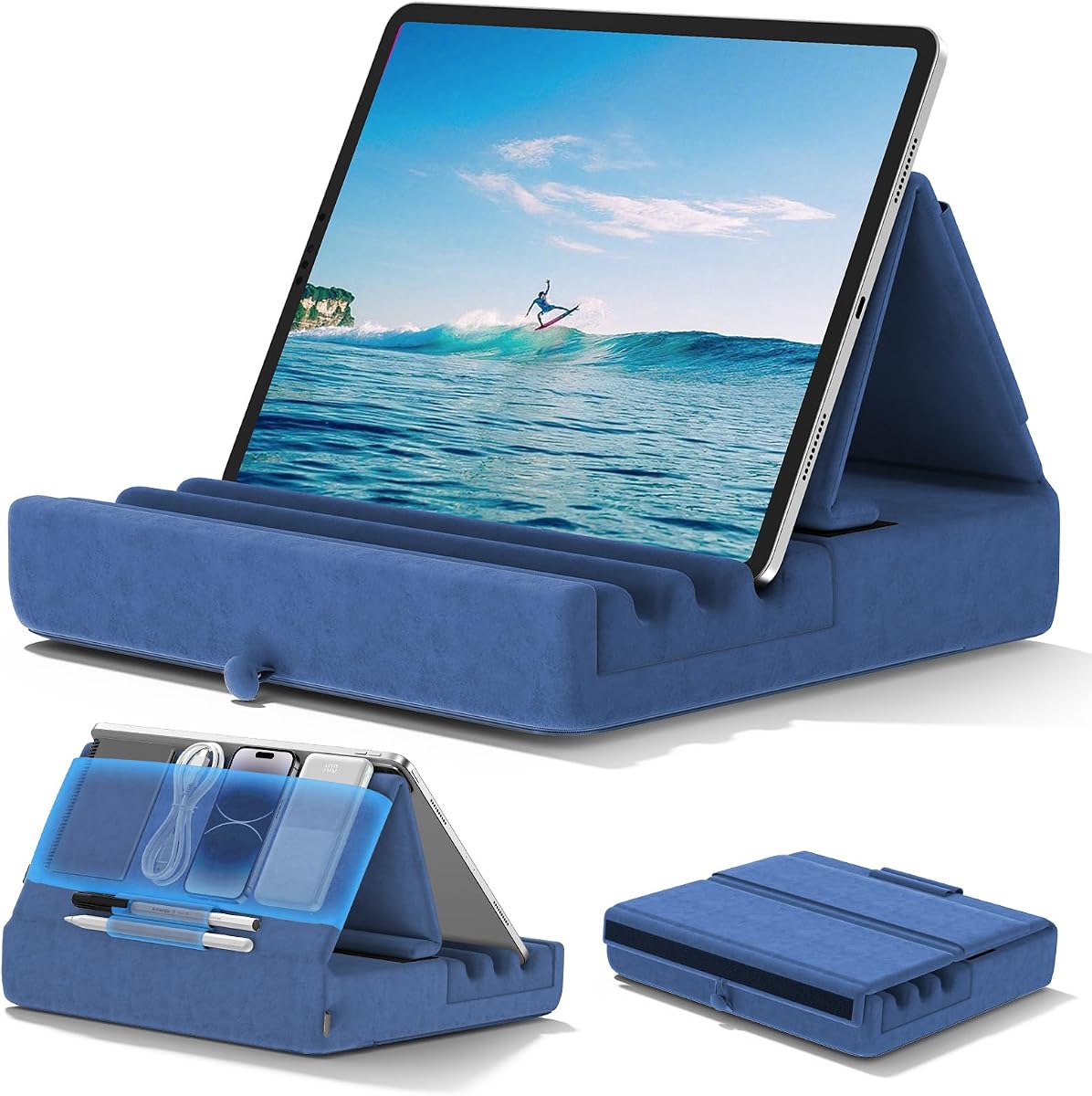
KDD Tablet Pillow Holder
4.6Editor score
Foldable pillow-style support
Storage pouch and pen pockets
Three adjustable viewing angles
An iPad holder for reading in bed should make long sessions more comfortable by keeping the display visible without forcing you to hold it continuously. The right support can also improve viewing angles, reduce arm fatigue, and leave your hands available for turning pages, taking notes, or enjoying entertainment. Clamp, pillow, lap, and floor designs each suit different spaces and routines.
This guide compares ten popular holders using the supplied specifications, customer ratings, mounting methods, supported sizes, adjustability, portability, and intended activities. It covers models for attaching to a headboard, resting on a lap, sitting beside a bed, or standing on the floor. The evaluation emphasizes useful design differences rather than assuming that every reader has the same setup.
The ranking shows where each product is most practical, from a reinforced gooseneck clamp to a soft pillow with storage and a weighted floor stand. The top picks represent the strongest choices for different priorities, while every review covers practical trade-offs. Product availability and customer feedback can change, so readers should confirm current specifications, compatibility, and prices before purchasing.
4.6Editor score

4.4Editor score

4.4Editor score
As an Amazon Associate we earn from qualifying purchases.
The comparison below highlights the support style, mounting approach, adjustability, and device compatibility that distinguish each holder. It shows why clamp-based models suit fixed bedside use, pillow designs suit relaxed portability, and floor stands suit viewers who want broad height and reach adjustments.




The Lamicall Gooseneck Tablet Holder combines a clamp-mounted design with a reinforced tapered aluminum arm, making it a strong overall option for bedside reading. Its 4.4 rating reflects a balance of useful adjustability, broad compatibility, and stable construction. The arm can bend into different shapes, while the rotating clamp changes the display between portrait and landscape orientations.
We may earn a commission when you buy through this link, at no additional cost to you.
A wide base clamp provides the main advantage over lightweight tablet stands. It grips flat surfaces from 0.2 to 3.15 inches thick, which covers many headboards, desks, and table edges. The reinforced arm is designed to support up to 800 grams, and the non-slip pads help protect both the device and furniture. Because the structure is intentionally robust, the arm requires more physical effort to adjust than a basic flexible neck.
The company suggests forming an S, Z, or loop shape to improve stability. Slight movement during touch interaction is normal, so the holder is better suited to extended reading, video viewing, and video calls than to rapid typing or drawing. This limitation is reasonable for the primary use: keeping a screen within reach without holding it. A thicker device or substantial case may also require a secure, balanced shape rather than a fully straight extension.
This is the most suitable choice for someone with a sturdy headboard or bedside table who wants a permanently positioned screen. It handles iPads, Kindles, Galaxy tablets, phones, e-readers, and other supported devices, giving it more practical range than a narrow tablet-only pillow. The top recommendation goes to readers who prioritize stable positioning, rotation, and compatibility over effortless portability or a completely tool-free adjustment process.
The broad clamp and reinforced neck create a more permanent connection than most soft pillow designs. Positioning the loop close to the headboard also reduces leverage on the arm and helps limit movement while you read or watch video.
The 360-degree clamp makes it straightforward to alternate between portrait reading and landscape video. The arm can also be bent to bring the display toward a particular pillow or seating position without moving the furniture.
We may earn a commission when you buy through this link, at no additional cost to you.
The KDD Tablet Pillow Holder is a versatile soft support with a 4.6 rating and a particularly useful collection of storage features. It works on a bed, lap, desk, sofa, car, or airplane, giving it more situational flexibility than a fixed clamp. Its foldable design makes it especially practical for readers who move between rooms or travel with a tablet.
We may earn a commission when you buy through this link, at no additional cost to you.
Wide and deep grooves help keep the device from sliding, while the high-elasticity sponge base is designed to resist deformation. Three viewing positions allow the display to be adjusted for sitting, reclining, or lying down. The plush polyester surface adds comfort around the device and can be wiped with a damp cloth. A large central pouch accommodates items such as earbuds, a phone, a power bank, or charging cables, while two pen pockets help prevent a stylus from being misplaced.
The main limitation is that a cushioned holder is inherently less rigid than a reinforced clamp or weighted floor stand. It may move when someone repeatedly taps the screen or uses a device for intensive typing. Its strengths are passive viewing, reading, browsing, and entertainment, where the soft support can be more comfortable than a hard arm. It also does not need installation or furniture attachment.
Choose this model when you want several functions in one compact accessory and value organization as much as screen support. It is a particularly good option for travel, shared family use, and readers who like changing positions. The included pouch and stylus storage give it more everyday utility than a basic pillow stand, helping it earn the Best Value designation.
Keeping a phone, earbuds, cable, power bank, and stylus in designated spaces reduces the need to search under blankets or bedside tables. This makes the holder useful for extended reading sessions as well as travel.
The folding construction is easier to pack than a rigid floor stand or headboard clamp. The soft base also avoids requiring a specific furniture edge, making it adaptable to changing beds, sofas, and travel seating.
We may earn a commission when you buy through this link, at no additional cost to you.
The Brookstone Tablet Lap Cushion is a memory foam support designed for reading and viewing in bed, on a lap, during flights, and while traveling. Its 4.6 rating places it among the strongest customer-rated options in the group. Rather than attaching to furniture or requiring a weighted base, it creates a raised, angled platform that supports a phone or tablet at a more comfortable viewing height.
We may earn a commission when you buy through this link, at no additional cost to you.
The cushioned construction is intended for longer reading and streaming sessions. It rests on the reader's legs or on a desk and can help reduce wrist strain by taking some of the weight of the device. Its angled support also promotes a better line of sight than laying a tablet directly on a blanket, where the screen can disappear into the bedding. The broad use case includes iPads, iPad Pro models, Samsung Galaxy tablets, and Kindle Paperwhite devices.
Unlike a gooseneck or floor stand, this cushion offers few mechanical controls. That simplicity is an advantage for travel because there is no clamp to install, arm to shape, or base to balance. The trade-off is less precise positioning. It is better for hands-free reading, video, and casual productivity than for heavy touch interaction, drawing, or a screen that must remain perfectly fixed.
This is the right choice for a reader who prefers a soft surface beneath the device and wants a familiar lap-desk style arrangement. It works particularly well on planes, road trips, and evenings when sitting upright in bed. Its 4.6 rating and portable memory foam format make it a compelling alternative to rigid holders, even though it does not offer the same degree of mechanical adjustment.
Memory foam distributes the device's weight across a broader area than a narrow hard clip. That can feel more comfortable during long, passive viewing sessions and can reduce the fatigue associated with supporting a tablet directly on the hands.
The same angled support that works over a blanket can provide a raised platform during flights, commutes, or road trips. It therefore serves readers who want one accessory for both home and travel.
We may earn a commission when you buy through this link, at no additional cost to you.
The MAGIPEA Gooseneck Tablet Holder provides a long, reinforced arm for positioning a display beside a bed, desk, or table. Its 4.2 rating is the lowest among the reviewed group, but the product addresses a distinct need: substantial reach with a clamp-based installation. The arm extends to approximately 30 inches and rotates through 360 degrees for portrait or landscape viewing.
We may earn a commission when you buy through this link, at no additional cost to you.
Its firm aluminum construction is intended to limit sagging and provide more support than a basic bendable neck. The clamp fits surfaces between 0.2 and 3 inches thick, and EVA pads improve grip while protecting furniture. TPE pads inside the holder cushion the device. This is a sensible arrangement for a bedside headboard that is thick and sturdy enough to accept the mount.
The product's stability depends on the shape of the arm. The recommendation to form an S or loop helps reduce movement with larger tablets. The arm is deliberately stiff and should be bent with both hands. Users should also expect slight movement when tapping and swiping, making it better for reading, movies, and video calls than intensive typing. Device thickness should remain within 2 centimeters, and bulky protective cases may need to be removed.
This model is most appropriate for someone who wants to reach a screen across a wider gap than a compact clamp allows. The long arm and rotation system make it practical for fixed bedside entertainment and casual reading. Readers who frequently draw or type should account for its limited resistance to touch movement, while those with a solid headboard can benefit from its dependable reach.
The approximately 30-inch arm can bridge a wider space than a short tablet arm. This is helpful when the mounting surface is behind or beside the pillow rather than directly within arm's reach.
Reinforcement improves support but makes the neck intentionally resistant. Bending it with both hands and maintaining a shaped curve is the best way to balance stability with reach.
We may earn a commission when you buy through this link, at no additional cost to you.
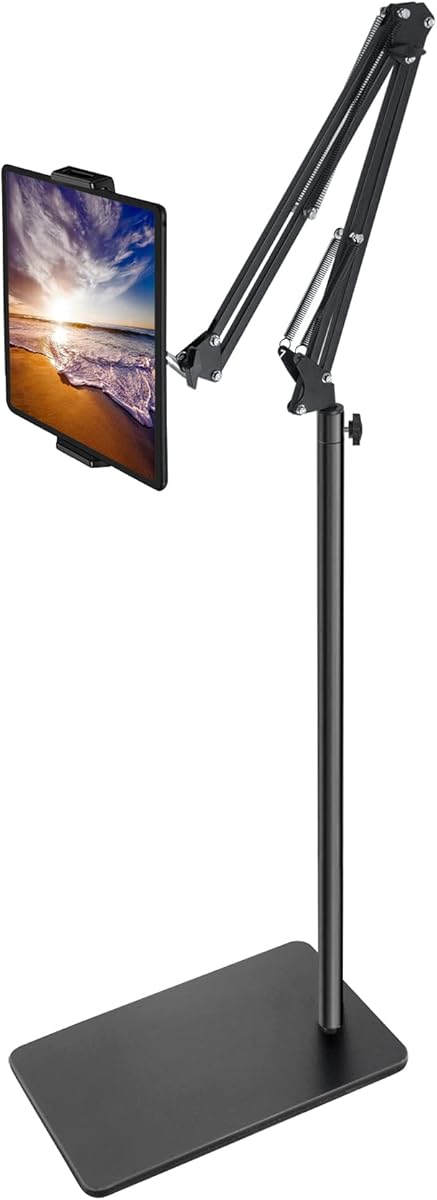
The ELEKPARTS Tablet Floor Stand is a tall, weighted option for anyone who wants to position a tablet over a bed or beside a sofa. It has a 4.5 rating and combines a metal base, carbon steel construction, and a height-adjustable arm. The device bracket rotates through 360 degrees, allowing the screen to be turned toward different parts of the room.
We may earn a commission when you buy through this link, at no additional cost to you.
The stand's height ranges from 27.5 to 55 inches, offering far more vertical positioning than a pillow or compact clamp. Installation requires no tools, and the product can also be disassembled for storage or transport. Its five-pound base is designed to keep the structure steady, while the springs and arm allow the holder to reach over a bed, recliner, or table without requiring attachment to furniture.
Compatibility covers devices from 4.7 to 11 inches that weigh less than 1.5 pounds. The manufacturer recommends adding weight to the base when using a heavier tablet or a tablet fitted with a substantial case. The arm and base should also remain aligned, and the base may need pressure on a heavy object after assembly. These considerations make it more involved than a small pillow stand, but they are reasonable for a full-size stand.
This is a good choice for a bedroom with enough floor space and a reader who wants one stand to serve multiple lying or sitting positions. It also supports phones, e-readers, tablets, and other devices within its limits. Those seeking a compact bedside accessory should choose a clamp or pillow instead, but anyone prioritizing height, reach, and flexible placement will find the floor format especially useful.
The 27.5-to-55-inch adjustment range lets the display sit above a mattress, beside a recliner, or over a seated user. This makes the stand useful for people whose preferred reading position changes frequently.
The weighted metal base provides stability, but larger or cased tablets can create more leverage. Adding weight and keeping the arm and base aligned helps the structure remain steady during longer sessions.
We may earn a commission when you buy through this link, at no additional cost to you.
The Lamicall Tablet Pillow Stand offers six viewing angles in a familiar triangular pillow format. Its 4.4 rating reflects a versatile product that works on a bed, sofa, or table. The wedge can support a device vertically or horizontally, making it suitable for books, videos, games, photos, and everyday reading in different postures.
We may earn a commission when you buy through this link, at no additional cost to you.
A notable feature is the ability to hold two tablets at the same time. That makes the stand useful for families, shared spaces, or readers who want a book and a reference document available together. It accommodates a wide range of 4.7-to-13-inch devices, including iPad Pro, iPad Air, iPad mini, Kindle Fire HD, e-readers, phones, Surface Pro, Galaxy tablets, and the Switch.
The pillow is vacuum-compressed for shipping, so it should be left for 6 to 24 hours after delivery to regain its normal shape. The listed care alternative is to place it in a dryer for 20 minutes so it puffs up. Its detachable cover makes routine cleaning easier, and the resilient materials are designed to resist deformation. As with other soft stands, the triangular support may shift as the user moves, so it is most comfortable for relaxed viewing rather than precise stationary work.
This product is well suited to a reader who changes between upright and reclined positions and appreciates several angle choices without a complicated arm. It requires no installation and can move from bed to sofa with ease. The dual-device capability gives it a distinct advantage, although the initial recovery period from vacuum compression should be considered before first use.
The six-position wedge can be used vertically for reading or horizontally for video. This gives a reader more flexibility than a single-angle soft rest without requiring a separate mechanical bracket.
Holding two tablets creates an option for shared reading, reference material, or simultaneous media. It also gives couples or family members a way to use one stand without crowding a single device cradle.
We may earn a commission when you buy through this link, at no additional cost to you.
The BluuSuuk Tablet Floor Stand is designed for overhead and extended positioning, with a 4.6 rating and a notably substantial base. Its double-support structure uses steel components, while the base has been increased to 6.6 pounds to improve stability. The claw-style holder can extend from 12 to 57 inches off the floor, and the ball head rotates through 360 degrees.
We may earn a commission when you buy through this link, at no additional cost to you.
That range allows the stand to sit beside a bed and reach over a reclined reader, while the lower starting height can support use near a sofa or tabletop. It is advertised for movies, ebooks, games, photography, live streaming, video conferences, online lessons, and workout guides. The orientation flexibility makes it more than a basic reading support and potentially useful as an overhead camera or recording mount as well.
The stand accepts phones, tablets, and other devices weighing less than 1.5 pounds. As with the other full-size floor model, a large or heavy tablet can create leverage at the end of the long arm. The heavy base helps manage that force, but the stand still occupies meaningful floor space and may be less convenient in a compact bedroom than a clamp or pillow. It also requires careful assembly and alignment to achieve the intended stability.
This is the right choice for users who want an overhead view over a bed, especially when reaching a high or distant position is important. Its weighted construction gives it a reassuring sense of solidity, and the long extension range handles varied postures. Those with limited floor space or a tablet above the stated weight limit should consider a compact pillow or bedside clamp instead.
The extended arm can carry the display above a bed or beside a recliner without drilling into a wall or attaching to furniture. It gives users a flexible angle for reading, media, lessons, and recording.
The six-pound-point-six-pound base and double-support frame help resist movement at the end of a long arm. Stable alignment is still important, particularly when the holder supports a tablet with a case.
We may earn a commission when you buy through this link, at no additional cost to you.
The SAIJI Kindle Pillow Stand is a premium soft-support design with a 4.4 rating and a distinctly ergonomic crescent shape. It fits against the reader's belly or lap and holds a device above the body, reducing the need to raise the arms for long sessions. The holder arm uses a dual-axis arrangement that provides extensive rotation for reading, sitting, standing, or lying positions.
We may earn a commission when you buy through this link, at no additional cost to you.
Three points of rotation contribute to its flexibility: the lower axis rotates 360 degrees, the middle axis rotates 240 degrees, and the clamp rotates 360 degrees. The device range extends from 4.7 to 15.6 inches, which is among the broadest in the group and includes e-readers, Kindles, iPads, iPhones, Galaxy tablets, and the Switch. This makes it useful for both dedicated readers and people using larger tablets.
The microbead pillow is constructed with food-grade EPS foam particles and PC and ABS components. It conforms to the lap and helps keep the screen steady without the hard edges associated with rigid supports. The cushion is easy to disassemble and can be machine-washed, which is a meaningful advantage for a soft accessory used close to the body. Users should still keep it away from sharp objects and flames.
This is a strong choice for a reader who spends substantial time in bed and values a contoured, stable surface more than compact travel. Its multi-axis arm reduces the compromises of a basic wedge, while the washable cushion suits everyday use. The premium designation reflects the combination of a broad device range, articulated positioning, ergonomic shaping, and convenient cleaning rather than any single standout specification.
The crescent shape follows the curve of the belly and lap, distributing the device's weight over a broad, soft area. That design can make reclined reading feel more natural than balancing a rigid holder on crossed legs.
Independent rotation at the lower, middle, and clamp sections allows the display to move between several orientations. The removable microbead cushion can be washed, helping a frequently used bedside accessory remain fresh.
We may earn a commission when you buy through this link, at no additional cost to you.
The Lamicall Kindle Holder Tablet Pillow Stand blends a soft U-shaped pillow with an extendable arm and rotating clamp. Its 4.6 rating reflects a versatile product that suits sofas, beds, and other relaxed settings. The arm can bring the screen closer or farther away, while the 360-degree clamp makes it easy to switch between portrait and landscape viewing.
We may earn a commission when you buy through this link, at no additional cost to you.
The plush, skin-friendly fabric and U-shaped support are designed to reduce pressure during long periods of use. The holder accepts devices from 4.7 to 13 inches, including cases up to 0.9 inches thick, which gives it practical flexibility for owners who keep a tablet protected. Compatibility also includes iPads, phones, Surface devices, Kindle Fire HD models, e-readers, and portable monitors.
Storage adds to the design through front pockets, a pen loop, and food-safe bowls for treats. The removable pillow cover is machine-washable, while the food-safe bowls are described as easy to wipe clean. The main trade-off is that the extendable arm and multiple accessories make this holder more elaborate than a plain wedge. It may also be less convenient to pack than a simple folding cushion, although the soft construction remains easier to carry than a full floor stand.
Choose this model when you want a soft bedside surface, a meaningful range of screen placement, and organized essentials close at hand. It is particularly useful for long reading sessions, casual browsing, and watching video. The combination of washable materials, case tolerance, and extendable positioning makes it a well-rounded pillow-style option for anyone who wants more structure than a basic lap cushion.
The extendable arm moves the device closer to the reader or farther toward the edge of the bed. Combined with the rotating clamp, it offers a more personalized viewing position than a fixed pillow angle.
Front pockets, a pen loop, and food-safe bowls keep a stylus, remote, phone, and snacks within reach. This reduces the need to leave a comfortable reading position and search for small items.
We may earn a commission when you buy through this link, at no additional cost to you.
The CreaDream Tablet Pillow Stand is a foldable soft holder designed for beds, sofas, chairs, cars, and airplanes. It carries a 4.6 rating and emphasizes portability, angle flexibility, and simple storage. Velcro fastenings allow the tablet position to be adjusted for sitting, lying down, or reclining, making the support easier to tune than a fixed wedge.
We may earn a commission when you buy through this link, at no additional cost to you.
The design includes a large storage pouch for a phone, power bank, headphones, or charging cable. A side pen pocket helps keep a stylus accessible and reduces the chance of losing it among bedding. The plush outer material has a smooth surface that is easy to clean. Its foldable construction is lightweight and stable enough for travel while avoiding the bulk of a full-size floor stand.
Compatibility covers 4.7-to-13-inch tablets, phones, the Switch, books, and other supported devices, including numerous iPad and Surface models. As with other pillow stands, the soft base can move with the reader, and it is not optimized for drawing, intensive typing, or a display that must remain perfectly stationary. Frequent adjustment may also place additional wear on the Velcro connections over time.
This is a strong option for travelers, commuters, and people who want one lightweight accessory for multiple environments. It gives users more positioning freedom than a simple fixed pillow while remaining easier to pack than a clamp or floor stand. Choose it when portability, storage, and flexible viewing matter more than a rigid connection to furniture.
The holder can be folded for transport and then arranged on a lap or seat in a car, airplane, or unfamiliar room. That portability is its clearest advantage over tall floor stands and furniture-mounted clamps.
A large pouch and dedicated side pocket separate the device from accessories and small electronics. This makes the stand easier to use as a self-contained reading and media station.
We may earn a commission when you buy through this link, at no additional cost to you.
The most useful iPad holder for reading in bed depends on where you read, how you move, and how much support your device needs. Review the mounting method, viewing range, stability, comfort, storage, and compatibility before making a choice.
Clamp-style holders attach to a headboard, desk, or table and keep the screen in a consistent position. Pillow and lap designs rest on the bed or body, making them easy to move but less rigid. Floor stands provide the greatest height and reach but occupy more space. Match the support style to the furniture and whether you want a fixed or portable reading station.
A stable holder should resist sagging while still allowing the screen to be positioned where you can see it. Reinforced aluminum arms and weighted bases are appropriate for larger tablets, while soft bases are more appropriate for passive viewing. Arms may still move slightly during taps, so check whether the product is intended for reading, video, drawing, or frequent typing.
Screen size alone does not determine compatibility. Check the minimum and maximum device dimensions, thickness limits, and any case allowances. Some clamps require a bulky case to be removed, while other pillow stands support devices with protective cases. Confirm that the holder accommodates the exact iPad generation and accessories you intend to use.
Useful angle control lets you read upright, watch video in landscape, or recline without repeatedly propping the device against pillows. Rotating clamps offer simple orientation changes, and articulated arms allow larger position changes. Soft wedge designs with several preset angles are convenient, though they generally cannot match the precision of a mechanical arm.
A comfortable support should raise the display above the mattress, distribute pressure, and avoid forcing the arms to remain raised. Memory foam, high-elasticity sponge, plush fabric, and contoured microbead pillows provide softer contact. For reclined use, also consider whether the shape stays stable against the lap or belly.
Floor stands need enough room for a weighted base and long arm, and clamps depend on suitable furniture edges. Pillow stands are usually the easiest to move between rooms, cars, and airplanes. Foldable models are especially helpful for travel, while a larger pillow or articulated holder may stay beside one preferred bed or chair.
Storage can make a bedside holder more practical by keeping a stylus, phone, earbuds, cable, remote, or snacks within reach. Pouches, pen loops, and food-safe bowls vary in design. Confirm that the compartments suit your habits and that removable covers or other cleaning parts are easy to wash.
Most holders in this category are optimized for reading, video, and hands-free viewing. Tap-heavy work, drawing, and typing can produce movement in flexible arms or soft pillows. If you need a perfectly stable interactive surface, look for a more rigid frame and use a compact loop or shaped arm to reduce leverage.
Begin by choosing the correct mounting or resting location. For a clamp, center the jaws on a solid surface within the stated thickness range, tighten it securely, and confirm that the device does not pull the furniture inward. For a pillow stand, place it beneath or behind the tablet and adjust the viewing angle before settling into your reading position. Floor stands should be assembled with the arm and base aligned in the same direction.
Shape or position the support to suit your posture. With a gooseneck arm, use both hands and form a stable S, Z, or loop rather than leaving the neck fully extended. Rotate the clamp to portrait for books and articles or landscape for video. On a pillow model, set the device in the deepest part of the support and keep the screen raised enough to prevent it from sinking into bedding. For a floor stand, raise the holder gradually and check stability before leaning on it.
For care, follow the material-specific instructions. Wipe soft surfaces with a damp cloth, remove removable covers before washing, and allow the product to dry fully before reassembly. Do not pull on flexible arms by the device clamp, avoid exceeding stated weight or thickness limits, and keep soft pillows away from sharp objects and heat. Check the clamp, joints, and base periodically for looseness, particularly after moving the stand between locations.
A clamp or weighted floor stand is generally more stable than a soft pillow holder because it resists movement and sagging. A gooseneck clamp works especially well when attached to a solid headboard, while a floor stand needs adequate space and careful alignment. Stability still depends on the device weight, case thickness, and how the arm is shaped.
Soft pillow holders can be comfortable because they distribute pressure and avoid a rigid edge pressing against the legs or body. Their main limitation is that the screen may move as the reader shifts position. They are best for passive reading, browsing, and video rather than drawing, typing, or other precise interactions.
It depends on the model's stated thickness allowance. Some pillow stands explicitly accommodate cases up to a specified depth, while certain clamps may require a bulky case to be removed. Check the device thickness, clamp opening, and compatibility notes before mounting to avoid an insecure grip.
The best angle keeps the screen relatively upright and close to eye level without requiring raised arms. Portrait orientation is usually more natural for books and articles, while landscape suits wider documents and video. Adjust the holder before lying down and avoid a position that causes your neck to remain tilted sharply to one side.
Gooseneck holders are generally better for hands-free reading, video, and video calls because touch input can make the arm shift slightly. A more rigid tablet desk or dedicated drawing stand is preferable for sustained typing or precise stylus work. Shaping the gooseneck into a tighter loop can reduce movement, but it does not eliminate the underlying limitation.
A foldable pillow stand is usually the simplest travel option because it has no installation and can be packed into a bag. It can be placed on a lap during a flight, in a car, or on hotel furniture. A clamp provides better positioning but requires a suitable surface, while a floor stand is too large and heavy for most travel.
Most models in this guide support Kindles, e-readers, Galaxy tablets, phones, and several iPad families in addition to iPads. Compatibility depends on the device's dimensions, weight, and case thickness. Check the full device list and the holder's stated limits rather than assuming every similarly sized tablet will fit.
Avoid extending the arm in a straight line. Bend it into an S, Z, or loop shape, position the mass of the arm close to the clamp, and use both hands when reshaping it. Heavier devices and thicker cases may require tighter curves, while very light screens can work well with a moderate bend.
The Lamicall Gooseneck Tablet Holder is the strongest overall choice because it combines a broad clamp, a reinforced arm, 360-degree rotation, and wide device compatibility. The KDD Tablet Pillow Holder stands out for portability, three viewing angles, and unusually useful storage, while the SAIJI Kindle Pillow Stand offers a premium ergonomic design with articulated positioning and washable cushioning.
Prioritize the support method that matches your space. Choose a clamp for a solid headboard, a foldable pillow for travel and changing locations, a contoured pillow for long reclined sessions, or a weighted floor stand for extensive height and reach. Device dimensions, case thickness, permitted weight, and the type of screen interaction are at least as important as appearance.
Finally, confirm the latest compatibility details, included accessories, customer feedback, and current price before ordering. Specifications and product availability can change, and the right holder for one reader may be unsuitable for another. A careful match between your furniture, posture, and reading habits is the surest path to a comfortable and dependable bedside setup.


