
SUNLU Filament Dryer Box S1 Plus
4.3Editor score
Adjustable 35-55°C temperature
Real-time LCD monitoring
Broad filament compatibility
This guide compares Filament Dryer for 3D Printing options, covering capacity, temperature control, airflow, humidity monitoring, material support, and ease.
Moisture can undermine an otherwise successful 3D print, causing stringing, bubbles, clogged nozzles, poor layer adhesion, and brittle surfaces. A filament dryer helps protect material between prints by controlling heat, airflow, and exposure to ambient humidity, making it an essential tool for many FDM workflows.
We compared all ten dryers by examining spool capacity, supported filament formats, temperature and timer ranges, heating methods, airflow, monitoring features, sealing, outlet design, and practical usability. The list covers compact single-spool units, larger multi-spool systems, and dry-and-store designs for different print volumes and workspace constraints.
Each review explains the product's most useful capabilities, realistic trade-offs, and the type of maker it best suits. Ratings and specifications reflect the supplied listing information, while retail listings, availability, and current offers can change, so readers should confirm the latest product details before purchasing.
4.3Editor score

4.5Editor score

4.6Editor score
The comparison below highlights the major differences among ten filament dryers, including chamber size, spool capacity, heating range, airflow, and filament support. Use these comparisons to match a dryer to your material mix, printer count, and available workspace.
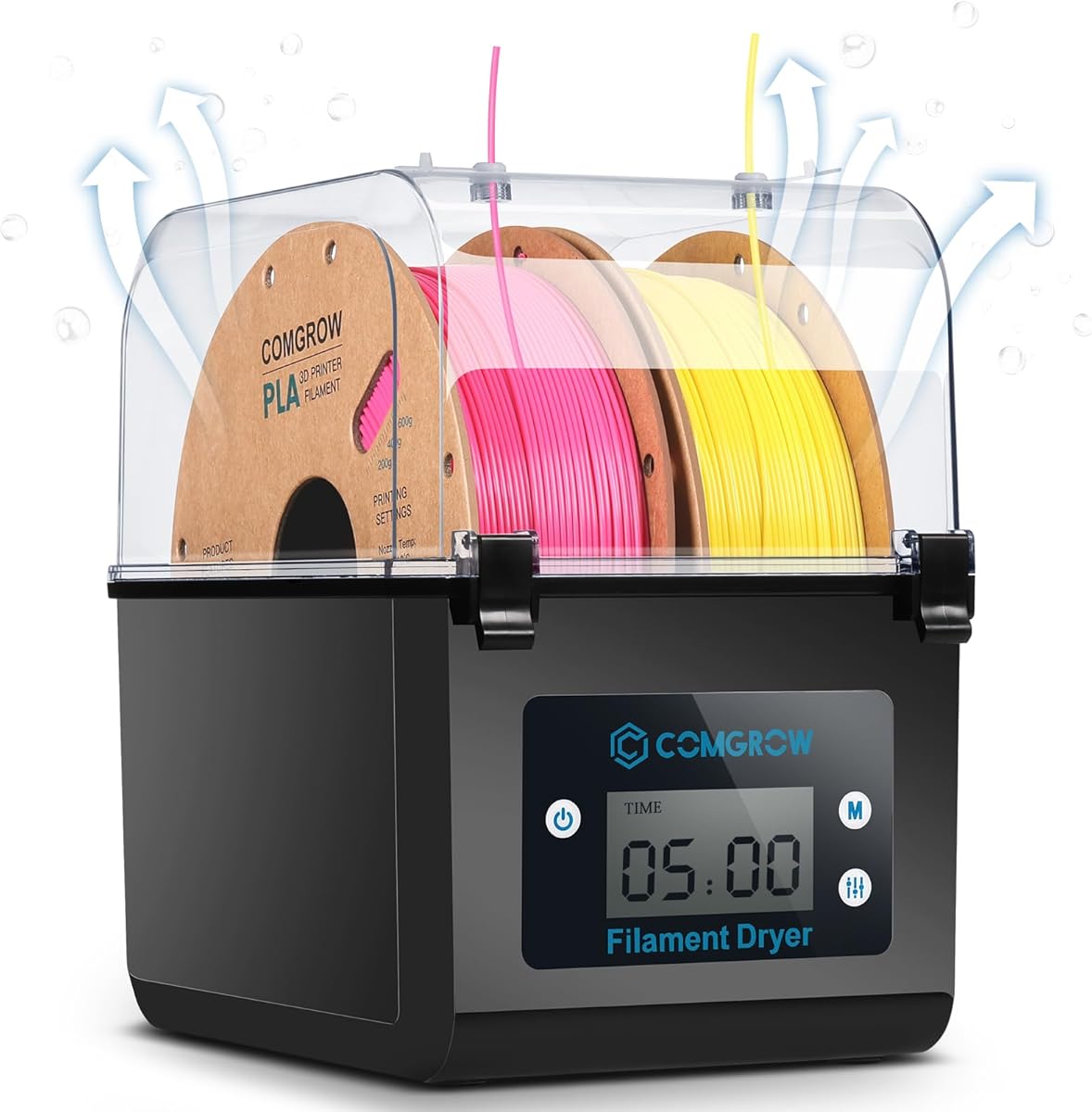



The Comgrow SH01 is a compact filament dryer for makers who need to protect more than one standard spool without operating a large multi-chamber system. Its supplied rating is 4.4, and its defining features include a two-spool chamber, an LCD screen, adjustable temperature, timed drying, and a filament outlet that supports direct feeding during a print.
We may earn a commission when you buy through this link, at no additional cost to you.
Its inner chamber measures 9.29 by 6.49 by 9.13 inches, allowing it to hold two rolls of 1-kilogram filament. The temperature range is 40-50°C, and the drying duration can be set from six to 12 hours. This is a focused range, but it gives users straightforward control without requiring a complicated menu. The two-inch display and touch buttons provide the main operating feedback.
The outlet uses a silicone cable sheath and Teflon tube, and the included plug can close the opening when the unit is not in use. During operation, the outlet should remain open so moisture can leave the chamber. This design makes the SH01 practical for drying while feeding filament, although the limited temperature ceiling may not suit every high-temperature engineering filament.
The SH01 is a sensible choice for home users drying PLA, PETG, or ABS on a regular basis, particularly when the printer is located in a humid environment. It suits makers who value straightforward controls and a two-spool format more than the highest temperature or detailed humidity readings. For a similarly compact option with a wider adjustment range and a visible humidity reading, the SUNLU S1 Plus is worth comparing.
Holding two one-kilogram spools makes the SH01 more useful than a basic single-spool enclosure, particularly for users alternating between two materials. The chamber layout is intended for standard 1.75mm and 2.85mm filament.
The routed outlet allows filament to feed directly from the dryer while drying is underway. Keeping this passage properly configured helps limit the time that filament spends exposed to surrounding humidity.
We may earn a commission when you buy through this link, at no additional cost to you.
The SUNLU S1 Plus is a compact and approachable dryer aimed at everyday filament maintenance. It has a supplied rating of 4.3 and adds meaningful monitoring to a smaller format through a two-inch LCD that displays temperature, time, and humidity. A fan assists the release of excess water, supporting more consistent drying during active use.
We may earn a commission when you buy through this link, at no additional cost to you.
Users can adjust the temperature from 35-55°C, allowing settings for common materials such as PLA, PETG, ABS, TPU, nylon, and PA. The maximum spool size is listed as 210 by 89 millimeters high. Compatible diameters include 1.75mm, 2.85mm, and 3.00mm, giving it one of the broader diameter ranges among the compact products here.
Operation is deliberately simple. Holding the left button changes drying time, while pressing the right button changes the temperature. That direct control scheme is helpful for users who do not want to navigate a complicated touch interface. The trade-off is that the unit handles a single spool and cannot reach the elevated temperatures offered by larger multi-spool or engineering-focused systems.
The S1 Plus is best for a home maker with one frequently used material who wants visible humidity information at an accessible entry point. It also works well for drying a spare spool while another remains in use. Buyers needing several spools, multiple feed paths, or temperatures above 55°C should consider the SUNLU S4 or Creality Space Pi X4 instead.
The built-in humidity display helps users check storage conditions rather than relying entirely on a timer. That visibility can make it easier to determine whether additional drying time is warranted before beginning a print.
Separate button functions for time and temperature keep setup manageable. The result is a dryer that is approachable for beginners and convenient for routine material preparation.
We may earn a commission when you buy through this link, at no additional cost to you.
The Creality Space Pi X4 is the most feature-forward dryer in this guide, with a supplied rating of 4.6 and a design aimed at high-volume users. It holds four standard one-kilogram spools or two large two-kilogram spools and uses two independently controlled 200W heating chambers. The maximum listed temperature of 85°C also gives it the broadest high-temperature range here.
We may earn a commission when you buy through this link, at no additional cost to you.
Independent chambers are a meaningful distinction for mixed workflows. One side can be set for a common material such as PLA or PETG while the other handles a higher-temperature material such as ABS, PET, PC, ASA, PA, or PAHT. The touch interface supports customized temperatures from 50-60°C for common materials and 80-85°C for advanced filaments.
The system is designed for drying and long-term storage rather than drying alone. Its silicone-sealed enclosure helps limit moisture reabsorption, while an illuminated window allows spools to be viewed without interrupting humidity control. The listing states that moisture is removed more quickly than with single-chamber dryers, although actual results depend on material, starting humidity, and the selected program.
The X4 is the strongest choice for serious makers, studios, or small production environments that regularly handle several materials. It removes much of the compromise associated with choosing one temperature for every spool. Its considerable size and more complex chamber arrangement are less attractive for a cramped desk or a hobbyist who only dries one material at a time.
Separate chambers allow different material groups to use different heat levels at the same time. This is particularly useful when switching between everyday filament and higher-temperature composites.
The sealed enclosure continues protecting filament after a drying cycle. This makes the X4 useful for maintaining multiple spools between print sessions without immediately returning them to open storage.
We may earn a commission when you buy through this link, at no additional cost to you.
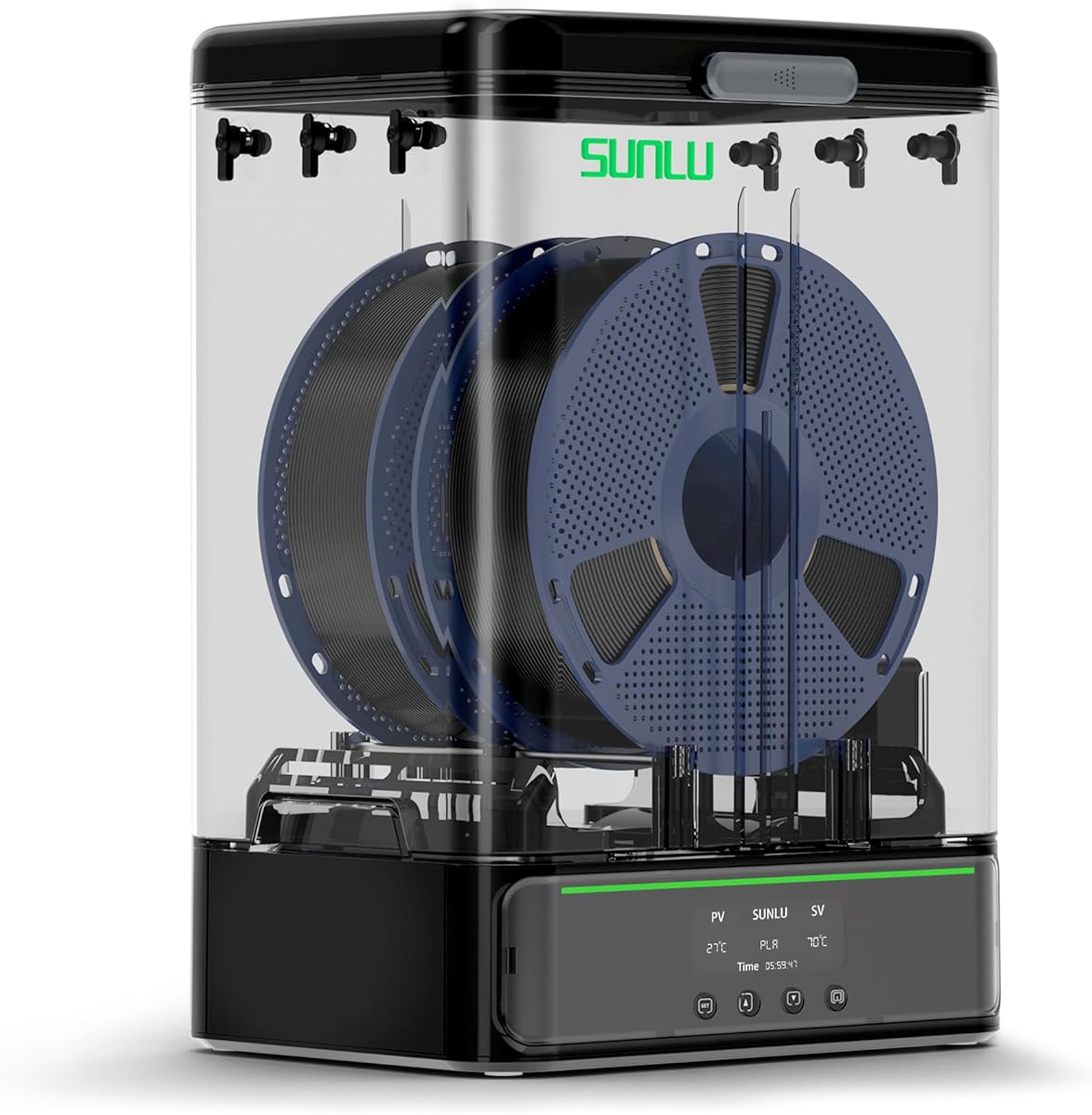
The SUNLU S4 combines four-spool capacity with a broad 35-70°C adjustment range, earning a supplied rating of 4.5. It is a strong all-around choice for makers who maintain multiple filaments, operate several printers, or want the convenience of drying and feeding material without repeatedly moving spools.
We may earn a commission when you buy through this link, at no additional cost to you.
Three circulation fans move air throughout the chamber, supporting more even heating around the spools. The heater is a 350W PTC unit, and the listed specifications describe the system as combining 360-degree heating with consistent internal circulation. Temperature and timer settings are adjustable, with a timer range extending to 99 hours for lengthy drying or storage cycles.
Eight filament outlets offer unusual routing flexibility. They can serve multiple printers or accommodate different loading angles, while the included PTFE tubes and silicone plugs help organize the feed paths. Material compatibility includes PLA variants, PETG, ABS, TPU, PA, PC, and nylon across 1.75mm, 2.85mm, and 3.00mm diameters.
The S4 is recommended for users who want high capacity without moving to a dual-chamber premium system. It handles a wider range of temperatures than most compact dryers and provides more feed outlets than a basic two-spool unit. The main drawback is size: external dimensions are 460 by 220 by 310 millimeters, and the net weight is listed as 4 kilograms.
Three fans help distribute warmed air around multiple spools. This circulation-focused layout is the S4's main advantage over basic heated storage boxes.
Eight outlets allow filament to reach multiple printers from one drying unit. The included short and long PTFE tubes make it easier to adapt the arrangement to different printer locations.
We may earn a commission when you buy through this link, at no additional cost to you.
The Creality Space Pi Plus focuses on making drying settings easier to select through 12 filament presets and a 3.7-inch touch display. With a supplied rating of 4.4, it is designed for users who want guided setup without giving up the ability to select temperatures manually from 45-70°C.
We may earn a commission when you buy through this link, at no additional cost to you.
A 110W PTC heater and built-in fan circulate hot air through the chamber in a 360-degree pattern. The product information emphasizes more uniform heating than systems that rely on a localized heating pad. A 48-hour timer provides longer scheduling flexibility, and the display can switch between Celsius and Fahrenheit for convenient operation.
The preset library covers common and composite filaments, including PLA-CF, PA-CF, and ASA. This is particularly useful for users who know their material but do not want to memorize a temperature every time. The display also provides real-time humidity monitoring, offering more insight than a simple timer-and-temperature interface.
This Space Pi Plus model is a strong middle ground for makers with two active spools. It offers better guidance and monitoring than compact dryers while remaining less specialized than the dual-chamber Space Pi X4. Users needing four spools, independent chambers, or temperatures up to 85°C should evaluate those larger alternatives instead.
One-touch material profiles reduce the chance of choosing an unsuitable temperature. Manual adjustment remains available when a specific filament or environment calls for a custom setting.
The 3.7-inch touchscreen brings temperature, humidity, and timing together. The larger display is also easier to read while checking a chamber from across a workbench.
We may earn a commission when you buy through this link, at no additional cost to you.
The Polymaker Polydryer treats filament care as a continuous process rather than a separate drying task. It combines heated drying, sealed storage, direct feeding, and desiccant protection in a system designed for one-kilogram spools. Its supplied rating is 4.3 reflects a practical approach to moisture control between print sessions.
We may earn a commission when you buy through this link, at no additional cost to you.
The storage-box structure helps protect filament once it has been dried, while direct feeding allows material to move from the protected environment into a printer. A built-in hygrometer gives users a way to monitor humidity rather than depending exclusively on drying time. Together, these features support a workflow that moves from preparation to storage to printing without repeatedly exposing the spool.
Compatibility includes PA nylon, PLA, PVB, PETG, ABS, ASA, and TPU, with support for 1.75mm, 2.85mm, and 3.00mm diameters. That range covers many common desktop printing materials in one compact arrangement. The product is especially relevant to users who alternate between polymers and need a more complete moisture-management routine than a simple open dry box offers.
The Polydryer is best for a maker with one active spool who values sealed storage and clear humidity feedback. It is less suitable for a multi-printer workshop needing several feed paths or for users who require high-temperature drying of specialist composites. Its primary strength is an integrated routine rather than maximum throughput.
Drying, storage, and direct feeding are incorporated into one connected arrangement. This reduces the number of transitions during which filament could absorb moisture.
The integrated hygrometer gives users a practical indication of the storage environment. Combined with desiccant support, it strengthens the system's role between print sessions.
We may earn a commission when you buy through this link, at no additional cost to you.
The Creality Space Pi SE is a compact single-spool dryer that emphasizes quick heating, clear monitoring, and straightforward operation. It has a supplied rating of 4.3, reaches temperatures up to 65°C, and uses a built-in fan to circulate hot air through the chamber. The listing states that it can heat to 65°C within 15 minutes.
We may earn a commission when you buy through this link, at no additional cost to you.
Its display and knob provide an accessible control method, while real-time humidity monitoring and a countdown timer show drying progress. Users can adjust the temperature from 45-65°C and set the timer from zero to 24 hours. The unit requires no assembly, making it convenient for a first dedicated filament dryer or a secondary drying station.
The chamber is designed for most one-kilogram spools and supports 1.75mm and 2.85mm filament. Listed materials include PLA, PLA+, PETG, TPU, ABS, ASA, PP, PC, and PA nylon. Internal thermal insulation helps retain warmth, and pairing the dryer with Teflon tubes supports smoother filament feeding.
The Space Pi SE works well for users who dry one material at a time and want a larger interface than a basic single-spool box. It is less suitable for a busy multi-printer setup or anyone needing to maintain several spools simultaneously. For that scale, the SUNLU S4 or Space Pi X4 offers a more appropriate chamber configuration.
The stated 15-minute heat-up capability makes the SE useful for short-notice material preparation. The internal fan supports circulation while the PTC system raises the chamber temperature.
A knob and display keep adjustment straightforward, while humidity and timer readouts show whether the material has received the intended treatment. No assembly is also appreciated by beginners.
We may earn a commission when you buy through this link, at no additional cost to you.
This SUNLU S4 listing offers the same high-capacity configuration as another version of the four-spool dryer, with a supplied rating of 4.6. It is built for makers who need to dry up to four one-kilogram spools and route them to different printers or loading positions.
We may earn a commission when you buy through this link, at no additional cost to you.
A 350W PTC heater provides the main heat source, while three circulation fans distribute air throughout the chamber. The result is an emphasis on consistent heating around multiple spools rather than warming one roll at a nearby heater. Temperature can be set from 35-70°C, and the timer extends from zero to 99 hours.
Eight filament outlets are among the most generous routing options in the guide. The included package contains four 8-centimeter PTFE tubes, two 100-centimeter PTFE tubes, clips, and silicone plugs, providing the basic components needed to organize feeds. Supported materials include PLA, PLA Plus, PLA Meta, PETG, ABS, TPU, PA, PC, and nylon.
This S4 configuration is recommended for multi-material users who value throughput and flexible routing over a small footprint. It can also be modified for 3-kilogram rolls or used as a shoe dryer according to the supplied instructions, although those optional functions should not distract from its main role as a filament dryer. Buyers with limited desk space may prefer the S1 Plus.
Four standard spools allow a larger collection to be dried together. That is valuable for users who do not want to remove and reposition materials every time the print queue changes.
Eight outlets and multiple included tube lengths make the dryer adaptable to several printers. Silicone plugs can close unused routes when a more focused setup is desired.
We may earn a commission when you buy through this link, at no additional cost to you.
The SUNLU SP2 combines a heated dryer with a detachable storage base, offering a flexible approach to preparing and protecting filament. It has a supplied rating of 4.4 and can hold two one-kilogram spools in the drying section. The storage box can be separated afterward and used to keep filament dry between jobs.
We may earn a commission when you buy through this link, at no additional cost to you.
A 250W PTC heating element is listed as reaching 70°C in 15 minutes, with 360-degree surround heating intended to distribute warmth around the spool. Six silicone holes and two PTFE tubes provide feed access while the upper unit is attached. The detachable design also allows direct feeding from the dryer or from the sealed storage configuration.
The lower storage section includes a dryable hygrometer and desiccant containers. Two sliding latches on the lid and two gaskets at the base support the sealing arrangement, helping restrict moisture entry. Rollers accommodate different spool sizes, while the bar holder supports 250g, 500g, and paper-spool formats as well as rolls up to 3 kilograms.
The SP2 is a good fit for users who want one system to handle preparation, storage, and occasional direct feeding. Its ability to support larger rolls broadens the options for users working with high-volume spools. The removable base and multiple closures add some complexity, but they also make the system more versatile than a basic single-purpose dry box.
The strap handle allows the dryer section to be lifted from the sealed base. This lets users prepare filament first and then retain it in a protected storage environment afterward.
Rollers and the adjustable bar holder accommodate more than standard one-kilogram rolls. Support for large and small spool formats makes the SP2 useful across changing material supplies.
We may earn a commission when you buy through this link, at no additional cost to you.
The SUNLU S2 is a single-chamber dryer built around straightforward filament care. Its supplied rating is 4.3, and it combines a broad 35-70°C temperature range with a timer that can extend to 99 hours. The translucent lid allows users to inspect a spool without opening the chamber.
We may earn a commission when you buy through this link, at no additional cost to you.
A built-in spindle rotates the filament for more even drying, while the unit can also serve as a spool holder and dehydrate material during a print. The large touch screen is used to select drying time and temperature. The stated chamber dimensions are 265 by 274 by 118 millimeters, and supported filament diameters include 1.75mm, 2.85mm, and 3.00mm.
The S2 is particularly relevant for damp or older filament that has developed printing problems. Heating and controlled rotation can help remove excess moisture and prepare it for another use. Its use in a humid location, such as a basement printer setup, can also reduce the likelihood that fresh filament absorbs environmental moisture before loading.
This is a practical choice for one material at a time and users who want a broad temperature range without a multi-spool cabinet. It is less attractive for busy workshops, though, because the single-spool format limits simultaneous capacity. The Space Pi SE offers similar one-spool thinking with humidity monitoring, while the S4 and Space Pi Plus serve users needing more throughput.
The internal spindle keeps the spool moving during the cycle. That movement helps expose more of the filament surface to the heated chamber.
A timer extending to 99 hours supports both drying and longer storage-oriented sessions. It also gives users room to experiment with different durations for particular materials.
We may earn a commission when you buy through this link, at no additional cost to you.
The right filament dryer depends on how many materials you use, which temperatures they require, and whether you need active monitoring or direct printing. These factors help separate a basic maintenance box from a multi-spool workshop system.
Capacity is one of the clearest ways to separate compact and high-volume designs. The Comgrow SH01 and Creality Space Pi Plus hold two standard spools, while the SUNLU S4 holds four one-kilogram spools. The Space Pi X4 can accommodate four one-kilogram spools or two two-kilogram spools, and the SUNLU SP2 supports several spool formats, including larger rolls.
Choose based on your normal material queue rather than the largest spool the unit can physically accept. Multiple spools are useful for alternating materials or serving several printers, but they also increase drying time, energy use, and countertop requirements. A single-spool design can be sufficient when only one material is regularly in use.
The maximum temperature determines which filament families the dryer can handle effectively. The SUNLU S1 Plus reaches 55°C, the Comgrow SH01 reaches 50°C, the Space Pi SE reaches 65°C, and the Space Pi Plus and SUNLU S4 reach 70°C. The Space Pi X4 has the highest listed maximum at 85°C, supporting more demanding materials.
Pick a range that covers the filament you actually use, with some room for different drying conditions. A narrow range may be sufficient for PLA and many PETG workflows, but high-temperature engineering materials can require substantially more heat. Manual adjustment is also important because one material may benefit from different settings depending on humidity and storage history.
A dryer must move moisture away from the filament rather than merely warm the outer chamber. Several products use a fan for this purpose, including the SUNLU S1 Plus, Space Pi SE, Space Pi Plus, and X4. The SUNLU S4 uses three circulation fans, while the S2 uses a rotating spindle to keep filament moving.
PTC heating appears across several choices, including the S4, Space Pi SE, Space Pi Plus, and X4. Multi-fan or rotating designs are worth considering when multiple spools must be treated evenly. A single hot-air outlet is generally simpler and more compact, but chamber layout and spool placement still influence the result.
A humidity display can make a substantial difference when filament has been exposed to a damp environment or has been stored for an extended period. The SUNLU S1 Plus displays temperature, time, and humidity, while the Space Pi SE shows real-time humidity alongside its drying timer. The Polymaker Polydryer includes a built-in hygrometer, and the SP2 supplies a dryable hygrometer in its storage base.
Monitoring does not replace the need to select an appropriate drying program, but it provides useful confirmation that conditions are changing as expected. If your workflow includes frequent material changes, frequent checking, or storage in an uncontrolled environment, a visible humidity reading deserves greater importance.
Compatibility should be checked at two levels: spool geometry and material type. Most models accept common 1.75mm filament, and many also support 2.85mm and 3.00mm diameters. The SUNLU S4 and S2 cover all three listed diameters, while the Comgrow SH01 supports 1.75mm and 2.85mm filament.
Material support also varies. PLA and PETG are broadly covered, while ABS, ASA, TPU, nylon, PC, and composite filaments appear in the more advanced models. The Space Pi Plus includes presets for materials such as PLA-CF, PA-CF, and ASA, making it especially useful for users working with reinforced filaments.
Effective drying is only half of the moisture-control process. Filament can absorb humidity again after the drying cycle, so latches, gaskets, enclosed chambers, and desiccant support deserve attention. The X4 has a silicone-sealed enclosure, the SP2 uses sliding latches and gaskets, and the Polymaker Polydryer combines sealed storage with desiccant protection.
Consider how filament moves after drying. Some boxes can feed directly to a printer, while others separate into a storage section. Direct feeding is convenient for long prints, and sealed storage is valuable for maintaining several opened or frequently handled spools between sessions.
The number and arrangement of outlets determine how easily a dryer can serve multiple printers. The SUNLU S4 provides eight outlets and includes several PTFE tube lengths, making it highly adaptable. The SUNLU SP2 includes six silicone holes and two PTFE tubes, while the Comgrow SH01 uses a single routed outlet that can be closed when not needed.
More outlets do not automatically mean better performance, but they can simplify a multi-printer workshop. Check whether the included tubes and plugs are sufficient for your intended layout. Also consider the physical distance between the dryer and printers, because long unsupported feed paths may be inconvenient.
Controls range from simple buttons and a knob to large touchscreens with material presets. The SUNLU S1 Plus uses two buttons, the Space Pi SE uses a display and knob, and the Space Pi Plus uses a 3.7-inch touchscreen. The SUNLU S2 provides a large touch screen, while the X4 adds a drying-scene interface.
Choose an interface that matches your experience and routine. Presets are helpful for frequently used materials, while manual controls matter for specialized filaments. Longer timers, such as the 99-hour range offered by the S4 and S2, can support unattended drying, whereas a 24-hour timer is enough for many single-spool routines.
Start by identifying the filament type, spool dimensions, and diameter. Place the spool in the chamber with the filament exiting in the correct direction, and use the PTFE tube, guide, or enclosed outlet where applicable. For the Comgrow SH01, the filament is placed counterclockwise so the lower pulley can feed it properly.
Select a temperature and duration appropriate for the material and its condition. Begin with the filament maker's recommendations when available, then adjust based on the dryer's humidity display and subsequent print behavior. Start the unit only after confirming that the working state appears on the display, and ensure any required drying outlet remains open so moisture can escape.
After drying, keep unused filament in the dryer's sealed storage area or in a moisture-protective bag. The Creality Space Pi SE specifically recommends vacuum storage after drying. Clean the chamber gently, keep the seals and cable connections free from damage, replace desiccant when saturated, and never open a heated chamber unnecessarily.
A temperature within the range recommended by the filament manufacturer is the safest starting point. The SUNLU S1 Plus, Comgrow SH01, and Creality Space Pi SE cover common PLA drying needs, while the Space Pi X4 and larger systems offer broader adjustment ranges. Shorter cycles work well for recently opened spools, whereas older or visibly damp filament may benefit from additional time.
A vacuum bag is useful for protecting filament after it has been dried, but it does not remove moisture that has already entered the spool. A dryer is particularly helpful for reviving damp material or managing stock in a humid environment. Some products, including the Polymaker Polydryer and SUNLU SP2, combine heated drying with sealed storage for a more complete routine.
That depends on the number of outlets, chamber capacity, and filament paths. The SUNLU S4 has eight outlets and room for four standard spools, making it better suited to multiple printers than a single-outlet box. You still need compatible PTFE tubes, sufficient reach, and a safe arrangement that does not strain the feed paths.
No. Excessive heat can damage some filament types, while a moderate setting may be entirely adequate. Use the material maker's recommended range and account for the dryer's airflow, chamber size, starting humidity, and drying duration. The X4 reaches 85°C for demanding materials, but that capability is unnecessary for routine PLA drying.
Humidity monitoring provides useful evidence, but the best confirmation comes from a successful test print. Watch for excessive stringing, bubbling, popping, poor adhesion, and irregular layers after drying. If those symptoms continue, a longer cycle or a small temperature adjustment may be needed, depending on the filament and the dryer's specific recommendations.
Several models are designed for direct filament feeding while the drying cycle runs. This is especially useful in humid rooms or during long prints. The filament must enter the outlet in the correct direction, and the feed path should remain smooth and free of sharp bends to reduce tangles and feeding resistance.
A heated dry box primarily warms a chamber, while an active dryer adds features such as a fan, rotating spindle, independent air circulation, or moisture monitoring. Active circulation helps move water away from filament, while visible humidity data helps users judge the result. For routine home use, a simple heated box may suffice; for multiple materials, active airflow offers more control.
Keep the chamber, seals, and feed tubes clean, and inspect cable connections for looseness or damage. Replace or regenerate desiccant according to the product instructions, and use the dryable hygrometer where supported. After each cycle, return filament to protected storage and close unused outlets to limit moisture entering the chamber.
The SUNLU S1 Plus stands out as the best budget option for a single-spool setup with visible humidity monitoring, while the SUNLU S4 provides the more balanced combination of four-spool capacity, three-fan circulation, eight outlets, and broad temperature adjustment. The Creality Space Pi X4 is the premium selection for users who need independent chambers, a four-spool configuration, and temperatures reaching 85°C.
Prioritize capacity, airflow, sealing, and supported materials rather than choosing only by the broadest listed temperature. A smaller dryer with active circulation and a useful humidity display may serve one maker better than an oversized unit, while workshops with multiple printers benefit from additional outlets and larger spools. Match the selected system to the filament you print most often and the space available on your bench.
Before making a final purchase, check the current retailer listing for the exact model, included accessories, compatibility details, and current offers. Product configurations can change even when they share a similar name, so confirming the chamber size, temperature range, outlet count, and supplied tubes helps prevent mismatched expectations.