
Large Aluminum Heat Sink
4.7Editor score
294 passive cooling fins
Pre-applied thermal adhesive
Universal electronics cooling use
This GPU backplates guide compares cooling, fit, materials, installation, and protection across ten options for different graphics cards.
GPU backplates can add structural support, protect exposed circuit boards, and spread heat across the rear of a graphics card. The most useful choice depends on card compatibility, mounting-hole placement, clearance, and whether you need a passive plate, active memory cooler, or separate anti-sag support.
This guide compares ten GPU backplates and closely related graphics-card cooling and support products using the supplied specifications. The list covers universal finned heatsinks, card-specific aluminum plates, active memory radiators, an external slot bracket, and an adjustable support brace, while separating installation requirements and intended uses.
Each review explains the standout features, practical limitations, and likely buyer profile for every product. Ratings and specifications reflect the available product data, while prices and availability can change, so readers should confirm the current listing details and verify card dimensions before making a purchase.
4.7Editor score

4.0Editor score

4.2Editor score
The comparison below organizes the products by cooling approach, construction, compatibility, and installation method, making it easier to identify the option that best matches a particular graphics card and case.

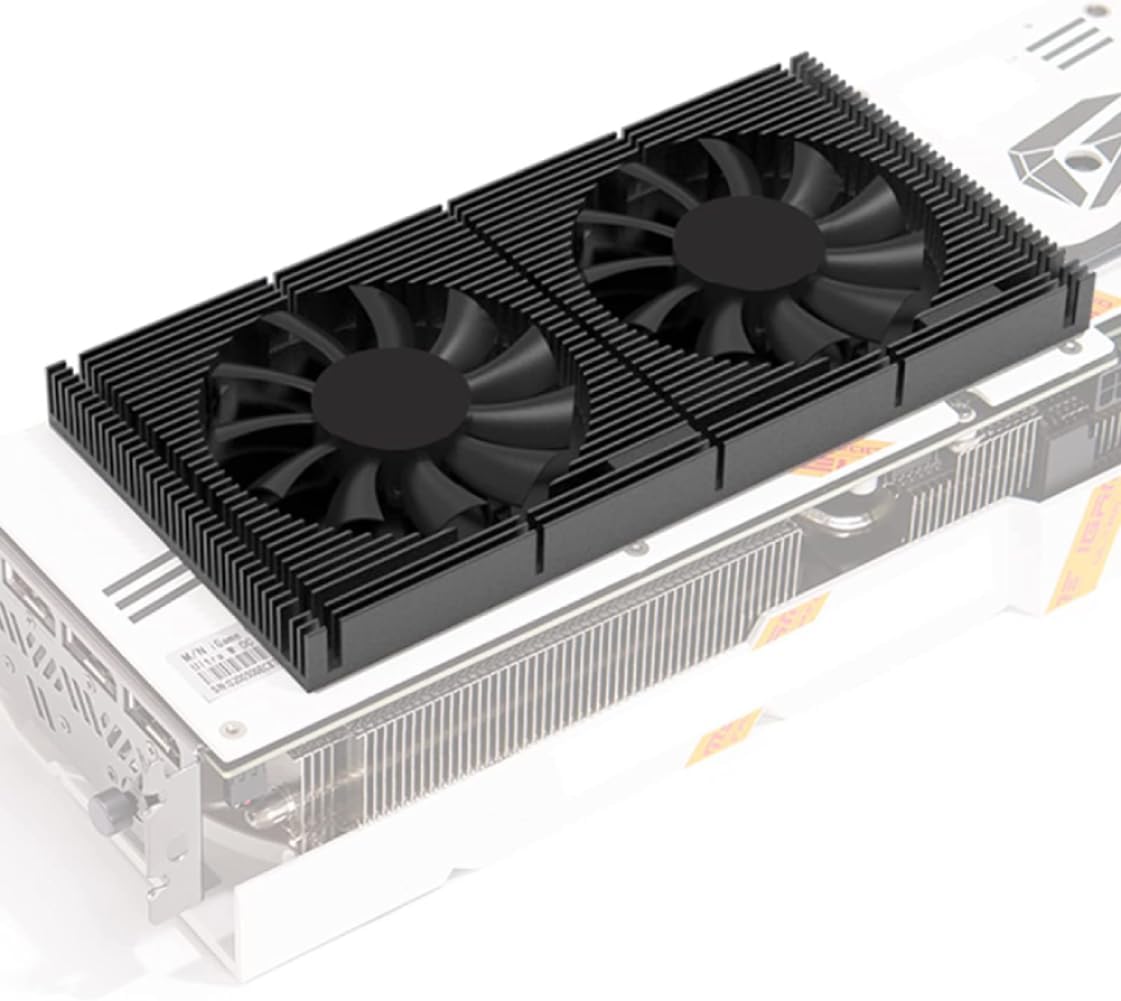


This large aluminum heat sink offers a straightforward way to increase passive heat-transfer area around a compatible PCB or electronic component. It carries a 4.7 rating and stands out for its 294 fins, generous 150 by 93 by 15 millimeter dimensions, and supplied thermal-conductive adhesive backing. It is not a conventional screw-mounted graphics-card backplate, but that versatility makes it useful for several types of electronics.
We may earn a commission when you buy through this link, at no additional cost to you.
The finned construction is the main attraction. Instead of relying on a flat plate, the product exposes many narrow aluminum surfaces to surrounding air, allowing passive convection to move heat away from the contact area. The listed uses include GPUs, HDDs, motherboards, routers, docking stations, power transistors, FETs, ICs, power amplifiers, voltage regulators, MOSFETs, and SCRs, giving it value beyond a single graphics-card model.
Its principal trade-off is installation flexibility rather than function. The pre-applied adhesive eliminates a separate tape application, but there are no stated screw holes or card-specific contours. Builders must therefore confirm that the 15-millimeter height, base dimensions, and adhesive contact area will fit the target location without interfering with ports, fans, drives, or other case components. It is also less convenient than a purpose-built plate for someone who wants a concealed factory-style appearance.
This is a sensible choice for builders seeking inexpensive passive cooling or broad electronics utility. It works especially well when a flat mounting area is available and a finned module will remain exposed to moving air. It is not the safest recommendation for a card requiring a factory-like finish, but it may be the most versatile option in this guide for experimental or component-specific cooling projects.
Because the heat sink contains no motor or wiring, it can add surface area without requiring a fan header, SATA connection, or motherboard power. It works best where airflow already passes over the fins, allowing convection to carry heat away without added electrical complexity.
The pre-applied conductive backing removes the need to position separate thermal tape. Installation still depends on clean, flat contact surfaces, and users should confirm that the adhesive-backed base will sit flush rather than bridging raised components or uneven solder points.
We may earn a commission when you buy through this link, at no additional cost to you.
The GOWENIC GPU Backplate Radiator combines an aluminum-alloy backplate radiator with an integrated four-pin fan, giving it more active cooling capability than a plain protective plate. Its 4.0 rating reflects a practical design aimed at RTX 3070, RTX 3080, and RTX 3090 graphics cards, with a stated thickness of 15 millimeters and included thermal pad.
We may earn a commission when you buy through this link, at no additional cost to you.
One of the product's strongest features is its integrated cooling arrangement. Rather than relying only on the chassis to move air past the rear of the card, the radiator includes a standard four-pin fan intended to provide directed airflow. The fan interface is described as suitable for low noise, while the thermal pad is intended to improve contact between the cooling area and the memory region of the graphics card.
Compatibility remains the decisive issue. Although the product name covers three popular RTX families, the listing does not state that every board size, cooler layout, or PCB revision is supported. The fifteen-millimeter profile also demands sufficient case clearance, particularly in compact enclosures or installations where the graphics card is mounted vertically. Users also need a suitable motherboard fan header and should manage the cable without restricting other components.
This radiator is a strong fit for an RTX 3070-3090 owner who wants more than passive rear coverage and accepts the installation requirements of an active accessory. It is less suitable for other card generations or builders seeking a completely tool-free, power-free plate. For its stated family of cards, it offers a useful balance of active cooling, structural coverage, and a clean black finish.
The integrated fan adds active airflow to the memory-cooling area, which can be particularly valuable on large graphics cards with rear memory components. Thermal pad coverage helps transfer heat from the target region to the aluminum radiator before the fan moves it into the case.
Support for RTX 3070, 3080, and 3090 models makes this a recognizable option for builders working with those cards. Its vertical-mounting support is useful in cases that orient the graphics card on edge, provided case depth and cable routing accommodate the radiator and fan.
We may earn a commission when you buy through this link, at no additional cost to you.
This aluminum GPU backplate is purpose-built for GIGABYTE GeForce RTX 5060 and RTX 5050 OC Low Profile 8GB graphics cards. Its 3.6 rating is lower than several alternatives, but the card-specific fit is the main reason to consider it. CNC-cut contours are designed to match the PCB layout without blocking ports or interfering with low-profile brackets.
We may earn a commission when you buy through this link, at no additional cost to you.
The plate provides a firm rear layer that can help protect sensitive components from dust, cable pressure, and accidental contact during installation or transport. It is also described as helping reduce PCB flex and offering passive heat spreading across the GPU and VRM area. Anti-sag reinforcement is particularly relevant for low-profile cards, which can be heavier than their small size suggests.
This is not a universal GPU backplate. The product is specifically associated with GIGABYTE RTX 5060 and RTX 5050 OC Low Profile 8GB models, so buyers should confirm the exact card model, revision, and mounting arrangement. Because the rear plate is relatively thin compared with an active radiator, its thermal role is supplemental rather than equivalent to a fan-equipped memory cooler.
The product is best suited to a builder with the matching GIGABYTE low-profile card who values a tidy installation and added physical protection. Its pre-drilled holes and included hardware avoid drilling and permanent changes. The lower rating warrants checking recent customer feedback and product dimensions, but for the stated model the design directly addresses fit, protection, and compact-build requirements.
The plate is cut around the intended low-profile PCB and bracket arrangement, reducing the chance of conflicts with display outputs and mounting hardware. Exact-fit products are more useful than universal plates when clearance around ports and neighboring components is limited.
Adding a rigid rear layer helps discourage accidental scratches and can resist the tendency of a heavy graphics card to flex. The same reinforcement can be valuable in compact systems or vertical installations where the card has less conventional support.
We may earn a commission when you buy through this link, at no additional cost to you.
The Hilitand GPU Backplate Radiator is an aluminum-alloy active backplane cooler for RTX 3090, RTX 3080, and RTX 3070 graphics cards. It carries a 4.0 rating and follows a familiar 15-millimeter-thick design with an integrated standard four-pin fan and thermal pad. Its appeal lies in adding rear memory cooling while also covering part of the card.
We may earn a commission when you buy through this link, at no additional cost to you.
The product combines several functions that are often sought separately. Aluminum construction provides a rigid backplane, the attached fan supplies directed airflow, and the thermal pad helps transfer heat from the memory area. The listing also notes support for vertical mounting, making it a candidate for builders rotating large graphics cards in compatible cases.
Users still need to manage practical constraints. The radiator needs clearance for its fifteen-millimeter depth, and the four-pin cable must reach a motherboard header without crossing fans or obstructing drive access. Exact board compatibility should be checked because listing a GPU family does not guarantee that every cooler shroud, PCB revision, or slot arrangement will accept the backplane.
The Hilitand is a sensible active alternative for owners of the supported RTX cards who want memory-focused cooling rather than a thin passive plate. It is less appropriate for compact systems with minimal clearance or for builders unwilling to route fan power. Within that intended use, it provides a practical combination of structural coverage and active heat management.
The included pad is positioned to help move heat from the rear memory region into the aluminum body. Correct contact is important, so installers should verify that the pad aligns with the intended components and that no protective film remains on either contact surface.
The anodized black finish helps the radiator blend into a dark build while CNC machining produces a more deliberate shape than a simple flat rectangle. The aluminum alloy body also adds rigidity to the rear of the graphics card.
We may earn a commission when you buy through this link, at no additional cost to you.
The Four-Pin Backplane Radiator is a black anodized aluminum backplane with an integrated four-pin fan for RTX 3090, RTX 3080, and RTX 3070 cards. Its 4.5 rating is the highest among the active backplane radiators in this roundup, making it a particularly strong option for builders who want rear cooling and a finished appearance.
We may earn a commission when you buy through this link, at no additional cost to you.
The fifteen-millimeter assembly combines a rigid aluminum backplane, a standard four-pin cooling fan, and an included thermal pad. The fan adds airflow where the graphics card's own cooler may not direct air, while the backplane covers the rear memory region. Support for vertical mounting extends its relevance to systems that position a large card on its edge.
Its installation requirements are the main caveat. The radiator needs enough depth for its fan and heatsink, and the four-pin lead must connect to an available fan header. Because the listing names an entire GPU family rather than every board variant, checking the card's dimensions and layout remains essential. Some cases may also restrict the available clearance behind a vertically mounted card.
This radiator is a good match for an RTX 3070-3090 owner seeking an active and visually coordinated backplane. It offers more cooling functionality than a flat aluminum plate without moving into the dual-fan category used by larger premium coolers. Confirm dimensions, connector availability, and memory-pad placement before ordering, but among the listed active backplanes it combines strong customer feedback with a useful feature set.
A 4.5 rating is a favorable signal, although ratings remain subjective and do not replace compatibility checks. The product's active fan and thermal pad provide clear cooling functions beyond the structural benefits of a plain rear plate.
The anodized black CNC finish is intended to coordinate with the dark metal construction common on contemporary graphics cards. That matters for builders who want the back of the card to look finished while also improving rear memory airflow.
We may earn a commission when you buy through this link, at no additional cost to you.
The California JOS GPU Support Bracket is an adjustable anti-sag support rather than a cooling backplate. It carries a 4.7 rating and is designed to support the weight of a graphics card, helping reduce bending of the PCB and strain on the motherboard. Its height adjustment makes it useful across different card sizes and case configurations.
We may earn a commission when you buy through this link, at no additional cost to you.
The bracket uses an all-aluminum construction and includes a stable base for tool-free setup. The stated compatibility includes ATX, micro-ATX, and ITX cases, although the physical dimensions and available floor space should still be checked. A support that works in one chassis may interfere with a PSU shroud, hard drive cage, or another component in a different layout.
Because it supports the card from below, this product does not replace a backplate and contributes no direct heat dissipation. It may also occupy more interior volume than a thin rear plate. Its advantage appears specifically in cases where the graphics card is heavy, lacks native reinforcement, or is mounted vertically and needs a stable support point.
The brace is a strong choice for preventing graphics-card sag rather than cooling the card. It may be especially useful in a small-form-factor or vertically mounted system, provided the base can sit securely. Buyers should compare the bracket's height range and base footprint with their case dimensions. For its stated anti-sag purpose, the 4.7 rating and adjustable aluminum design make it one of the most reassuring products here.
A lower support point transfers some of the card's weight away from the motherboard slot and its mounting points. That can reduce the appearance and progression of sag while helping keep the graphics card in a more consistent position.
Height adjustment allows the user to match the support to the card's height and the case's interior. Because chassis layouts vary substantially, checking the base footprint and nearby components is still necessary before installation.
We may earn a commission when you buy through this link, at no additional cost to you.
The Black Anodized Heat Sink is a 150 by 93 by 15 millimeter aluminum fin module intended for PCs, GPUs, motherboards, routers, and various power components. It carries a 4.6 rating and offers 294 fins in a black anodized finish. Unlike active GPU coolers, it adds passive heat-transfer surface without any electrical connection.
We may earn a commission when you buy through this link, at no additional cost to you.
The construction uses a base board thickness of 4.3 millimeters and fins stated at 2 millimeters thick. The many fins increase exposed area, allowing surrounding air to carry heat away through convection. Its listed applications range from HDDs and LED motherboards to FETs, ICs, docking stations, Wi-Fi routers, voltage regulators, MOSFETs, SCRs, and power amplifiers.
The packaging contains one black anodized aluminum heat sink, and the supplied product data does not mention a pre-applied thermal pad or adhesive. Users may therefore need to add their own thermal interface material and attachment method. The universal dimensions also mean the buyer must check the available flat area, component height, and airflow path before placing the module over sensitive electronics.
This product is most useful for builders comfortable with general-purpose heatsink installation rather than a screw-on backplate. It rewards a flat, uncovered mounting position with good case airflow and can serve multiple electronics categories. For dedicated graphics-card memory cooling, an active radiator or a known card-specific plate may be more convenient, but this module offers a simple and broadly applicable passive alternative.
The 294 fins divide the heat-transfer surface into many narrow sections that can receive air from multiple directions. Passive performance depends on surrounding airflow, so the module should not be buried in a completely sealed or stagnant area.
Since there is no motor or cable, the module adds no fan power, vibration, or fan-control complexity. It also cannot provide controlled airflow, however, and therefore should not be viewed as a direct replacement for a dedicated active memory cooler.
We may earn a commission when you buy through this link, at no additional cost to you.
The EVGA I/O Slot Bracket is a small external graphics-card bracket intended to protect the area near the card's output opening. It is compatible with listed EVGA RTX 3060 Ti, RTX 3070, RTX 3080, and RTX 3090 FTW3 and XC3 variants. Unlike a full backplate, it covers only a narrow portion of the card's exterior.
We may earn a commission when you buy through this link, at no additional cost to you.
Made from black zinc alloy and measuring 12 by 3.8 centimeters, the bracket installs with screws and is designed to fit the graphics-card slot. Its narrow form factor may be useful when a user wants to cover an exposed area without adding a full rear plate. The black finish is also suited to builds where visible zinc or mismatched metal would be undesirable.
No numerical customer rating is supplied for this product, so it cannot be compared on rating strength in the same way as the other selections. The listing also offers limited evidence about additional cooling, structural reinforcement, or anti-sag performance. It should be understood strictly as an external bracket, not as a complete GPU backplate or a substitute for a case-level support bracket.
The product makes sense for an EVGA owner with a matching card who wants a small protective cover at the port opening. It is less appropriate for builders seeking broader rear coverage, active memory cooling, or meaningful resistance to graphics-card sag. Checking the exact model suffix and comparing the bracket's cutouts with the existing rear opening is essential before installation.
The bracket protects a limited area around the graphics-card slot rather than the full PCB. That focused coverage can be useful for reducing visible wear or accidental contact without committing to a larger accessory.
Because the part uses the card's existing mounting points, installation is relatively direct. A mismatch in the EVGA model, bracket geometry, or screw alignment can prevent a proper fit, making model verification essential.
We may earn a commission when you buy through this link, at no additional cost to you.
The ZOTAC RTX Aluminum Backplate is engineered for the ZOTAC RTX 5060 Solo 8GB and RTX 5050 Solo 8GB. It has a 5.0 rating, the highest numerical rating in the guide, and its defining features are exact-fit alignment, CNC-machined aluminum, rear ventilation, and structural reinforcement for the compact Solo cards.
We may earn a commission when you buy through this link, at no additional cost to you.
The product is shaped around the intended PCB layout, mounting holes, and ports to create what the listing describes as a factory-like fit. Its ventilation cutouts are intended to improve airflow without blocking the original cooling system. Structurally, the aluminum plate is presented as a way to discourage GPU sag and long-term PCB bending while protecting the card's rear components.
Its limitations follow directly from the highly specific design. The backplate is intended for the listed ZOTAC Solo models rather than a broad range of RTX cards, and buyers should verify the exact model name, memory configuration, and physical layout. Although the vent pattern supports airflow, the plate has no fan and should not be expected to cool memory as actively as a radiator with powered fans.
This is an excellent choice for a compatible ZOTAC RTX 5050 or 5060 Solo owner who values a clean appearance, added rigidity, and simple installation. Pre-drilled holes and the included installation kit remove the need for drilling or permanent modifications. Its strong rating, exact fit, and restrained design make it one of the most compelling card-specific backplates in this guide.
Strategically placed cutouts preserve airflow while giving the rear of the card a deliberate, finished look. The product's card-specific shaping also helps avoid the conflicts that can occur when a generic plate is used around ports, screws, and differently positioned cooling hardware.
CNC-machined aluminum adds stiffness to the rear of the graphics card, which can help limit sag and protect the PCB. This is particularly useful in compact cases and vertical arrangements where the card may receive less support than it would in a large chassis.
We may earn a commission when you buy through this link, at no additional cost to you.
The Dual 70mm PWM Memory Heatsink is the most substantial active backplate cooler in the guide, with two 70 by 70 by 15 millimeter dual-ball-bearing fans mounted to a 180 by 90 by 15 millimeter aluminum assembly. It carries a 4.2 rating and includes a 1.2-millimeter, seven-watt thermal pad for direct contact with the rear memory area.
We may earn a commission when you buy through this link, at no additional cost to you.
Two larger fans distinguish this design from the single-fan backplane radiators. Their speed can be adjusted from 1500 to 2800 RPM according to operating temperature, and the listed noise range is 16 to 20 dBA. The aluminum body is described as 6061 aviation aluminum with a 1.5-millimeter thickness, balancing rigidity with a comparatively lightweight construction.
This larger cooler requires careful planning. The product is designed primarily for RTX 3090 and may also fit RTX 3080 and RTX 3070 cards, but the listing specifically advises installation on a flat surface. Builders must confirm that the 180-millimeter length, 90-millimeter width, and two raised fans will not obstruct ports, neighboring hardware, a PSU shroud, or a vertically mounted card's case clearance.
The product is best for an owner of a large, flat-backed RTX card who wants substantial active rear memory cooling and adjustable fan behavior. Its 50-centimeter four-pin cable provides some routing flexibility, while the elastic latch is intended to make removal and installation easier. For buyers seeking the strongest active feature set, it offers more cooling hardware than the other backplane radiators, with the corresponding need for more clearance and careful installation.
The pair of 70-millimeter fans provides more active hardware and a larger cooling zone than the single-fan backplane alternatives. Adjustable PWM speed allows the user to balance cooling demand with noise, although the exact airflow benefit depends on case geometry and the card's own cooler.
The included 1.2-millimeter, seven-watt pad is intended to fill the gap between the memory area and the cooling assembly. Confirm that the pad aligns with the intended chips and that both the pad and aluminum contact area are free of protective film before mounting.
We may earn a commission when you buy through this link, at no additional cost to you.
A useful GPU backplate should fit the intended card, fit the available case clearance, and deliver the kind of protection, cooling, or anti-sag support you actually need. These factors help separate a genuine upgrade from an accessory that simply looks appealing in a product photograph.
Start with the full graphics-card model rather than only the GPU family. A backplate designed for the ZOTAC RTX 5060 Solo 8GB or GIGABYTE RTX 5060 and RTX 5050 OC Low Profile 8GB may rely on card-specific hole positions, PCB contours, port cutouts, and cooler layouts. Active backplanes for RTX 3070, 3080, and 3090 cards also occupy a defined area of the PCB. Measure the card and compare the product dimensions, mounting pattern, and intended contact regions with the available space. A similarly named GPU can have a different board partner, memory arrangement, or physical dimensions.
Bottom line: verify the exact board model, revision, dimensions, and mounting points before ordering.
Decide whether you want passive or active cooling. A finned aluminum module adds surface area without power, while a card-specific aluminum plate mainly provides protection and mild passive heat spreading. An active backplane adds a fan and thermal pad for directed airflow over rear memory. A dual-fan assembly offers the most substantial cooling hardware but also requires the greatest depth. More fans do not automatically guarantee better results if the assembly blocks case airflow or cannot be positioned correctly.
Bottom line: match the cooling design to your card, case clearance, and tolerance for power and cable routing.
Case clearance is often more important than the card's own length. A fifteen-millimeter radiator may fit a full-size case but fail in a compact enclosure with a power-supply shroud. Vertical mounting can reduce the space behind the card, and a two-fan cooler adds more depth than a single-fan model. Also inspect display-port and HDMI openings, neighboring expansion slots, drive cages, fans, and radiator tubing. The product should not force a display cable, power connector, or case panel into an unsafe bend.
Bottom line: measure the entire installation area, including connectors and case panels, rather than relying on GPU length alone.
A rear plate and a support bracket solve different problems. A backplate adds a rigid layer over the PCB and may provide modest anti-sag benefits, particularly on a compact card. A separate adjustable brace physically supports the card from below and transfers part of its weight away from the motherboard slot. Heavy cards in vertically mounted systems may benefit more from a dedicated brace than from a thin plate alone. Conversely, a graphics card with strong native reinforcement may need no external support.
Bottom line: use a backplate for rear coverage and use a brace when the primary concern is card weight or sag.
Active backplanes use a four-pin connection, but the connector still needs a suitable header and cable route. Some motherboard headers may only accept a limited number of devices, and powered headers can add load. A PWM fan allows speed control, whereas some basic four-pin designs may rely on the board's default curve. Inspect the cable length, connector type, and nearby headers before installation. If the graphics card occupies an adjacent fan or USB header, route the lead carefully to avoid interference with operating temperatures, performance, or convenient access.
Bottom line: check header availability, control compatibility, cable length, and the route to the connector.
A thermal pad only helps when it sits between the intended memory chips and the radiator. Its thickness, width, and coverage need to match the contact area, while the pad and aluminum surface must be free of dust and protective film. The universal finned heat sinks may require separately supplied adhesive or interface material, whereas the listed active backplanes generally include a thermal pad. Applying the wrong material or bridging the pad over uneven components can reduce contact quality and may make future removal more difficult.
Bottom line: confirm included interface material, pad thickness, contact coverage, and clean mating surfaces.
Aluminum is the dominant material in this category because it combines structural stiffness with useful thermal conductivity. A CNC-machined plate can provide a more exact shape and a cleaner factory-style appearance than a generic rectangle. Fin count, base thickness, anodizing, and black finishing can influence durability and visual integration. These features are secondary to fit and clearance, however. A beautifully finished plate that blocks a port or does not match the mounting holes is less useful than a simpler component that installs correctly.
Bottom line: prioritize accurate fit and clearance first, then consider machining, finish, and construction quality.
Some backplates use pre-drilled holes and included hardware, while universal finned modules rely on adhesive and may need careful positioning. Active coolers add a fan connector and may have a latch or screws that influence removal. Consider whether the card will need routine cleaning, whether cable access will remain convenient, and whether the plate can be removed without disturbing other parts. For a new build, straightforward installation and documented mounting points are valuable. For an existing system, removal access and the amount of case disassembly may matter even more.
Bottom line: choose an installation method you can complete confidently and service later without redesigning the build.
Begin with a fully powered-off computer. Switch off the power supply, unplug the cable, and use suitable anti-static precautions while handling the graphics card. Confirm the backplate model against the card, compare mounting holes and dimensions, and inspect the case for clearance around ports, slots, fans, drive cages, and power cables. Do not begin installation until you are certain the accessory will not interfere with another component.
Prepare the contact surfaces carefully. Remove dust, grease, and protective films from thermal pads, adhesive backings, or aluminum mating areas. Position the plate or radiator so the thermal pad aligns with the intended memory region and the mounting screws enter the correct holes. For adhesive-based universal heat sinks, press the base evenly onto a clean, flat surface and avoid loading one edge before the other. Route four-pin fan cables without pinching them, and secure loose cables so they do not contact moving fans.
After installation, power the system on and verify that any added fan spins as expected. Listen for unusual noise, inspect cable placement, and check that display connectors remain accessible. Allow the system to settle, then monitor the graphics-card temperature and fan behavior through the available software. For a new active cooler, confirm that the motherboard or graphics-card fan-control software recognizes the intended speed range and that the connector is not overloaded. If the backplate interferes with a port, cable, or case panel, power down and correct the fit rather than forcing it.
It depends on the product. A thin aluminum plate can spread some heat and act as a modest heat spreader, while a finned module or active radiator can move more heat away from exposed memory or power components. A backplate cannot replace the graphics card's primary cooler, and its effect is greatest when it has good contact, receives moving air, and is installed on a compatible card.
Most products are only partly universal. The large finned heat sinks can be used on several types of compatible electronics, but active backplanes and aluminum plates are often shaped for particular GPU families or exact models. Always compare the dimensions, mounting holes, port cutouts, and intended contact area rather than relying only on the graphics processor name.
Not necessarily. A card that remains level may already have adequate native support. A backplate can still add rear protection, cover exposed components, and provide a more finished appearance. If sag is the main concern, a separate adjustable support bracket may solve the structural issue more directly than a thin plate.
Only if there is enough clearance. Dual-fan memory coolers can be deeper than single-fan radiators, and vertical mounting may further reduce the available space. Measure the assembly, check the position of the power supply, drive cage, case fan, and expansion-slot area, and confirm that the fan cables can reach a suitable header without being pinched.
Use a compatible four-pin header with enough available power and cable clearance. A PWM-capable motherboard header provides the best control over fan speed, while a basic fixed-speed header may run the fan at its default behavior. Check nearby connectors because the graphics card can occupy headers that a builder might otherwise expect to use for a case fan.
That depends on the card manufacturer, the product, and the circumstances of installation. Some manufacturers permit supported accessories, while others may treat internal modifications differently. Review the graphics-card manufacturer's guidance and keep the accessory installation reversible. If an add-on interferes with a warranty-covered component, removing it may be necessary before service.
A backplate attaches to the rear of the graphics card and can provide physical coverage, modest passive heat spreading, and some added rigidity. A support bracket sits beneath the card and physically resists sag by sharing its weight. The two products can be complementary, especially in a compact case or a system with a heavy, vertically mounted graphics card.
Power off and disconnect the system before cleaning. Use compressed air or a soft, lint-free brush to remove dust from exposed fins and fan openings, and avoid pulling the fan blades. Do not flood the assembly with liquid, and take care not to dislodge a thermal pad or adhesive-mounted heat sink. If the card must be removed, follow the graphics-card manufacturer's handling instructions.
The Large Aluminum Heat Sink stands out as the best budget option because it provides 294 passive fins, broad electronics applicability, and no fan connection. The GOWENIC GPU Backplate Radiator is the editor's choice for supported RTX 3070-3090 cards that need active rear cooling, while the Dual 70mm PWM Memory Heatsink offers the most substantial active cooling hardware in a larger aluminum assembly.
Your priority should be compatibility before cooling. Confirm the exact card model, measure available clearance, and identify the mounting or attachment method. Choose a thin model-specific plate for protection and appearance, a finned passive module for flexible electronics cooling, an active radiator for rear memory airflow, or a separate brace when physical sag is the main concern.
Finally, check the current listing, product dimensions, included hardware, and customer feedback before purchasing. Ratings and specifications can change over time, and current prices also vary. The most suitable GPU backplate is not automatically the one with the most fans; it is the accessory that fits correctly, achieves the intended function, and works cleanly within your particular build.