
Overhead Tripod for Mini Projector
4.8Editor score
360-degree rotating ball head
Eleven-to-seventeen-inch height range
Universal quarter-inch screw
Foldable one-point-two-pound design
A pico projector stand mount does more than hold a compact projector in place. The best models also provide stable positioning, useful angle control, adaptable height, and a secure connection to phones, cameras, webcams, and other creative equipment. That versatility makes the right mount especially valuable for overhead filming, projection, demonstrations, teaching, crafting, and content production.
This guide compares ten pico projector stand mounts across device compatibility, structural design, adjustment range, load capacity, portability, projection control, and suitability for different workspaces. It includes compact desktop options, taller floor stands, and multi-device creator systems, helping readers identify a mount that matches their projector, filming angle, and available space.
Each pick highlights a distinct use case, from portable overhead shooting to more permanent projection setups. Ratings and specifications reflect the supplied product information, while practical trade-offs help explain where a simpler or more specialized design may be preferable. Retailer listings and availability can change, so confirm current product details before purchasing.
4.8Editor score
4.6Editor score

3.9Editor score
As an Amazon Associate we earn from qualifying purchases.
The comparison below shows how each mount differs in mounting method, device support, adjustment range, stability, and intended use, making it easier to choose the right option for a projector, phone, or overhead filming setup.



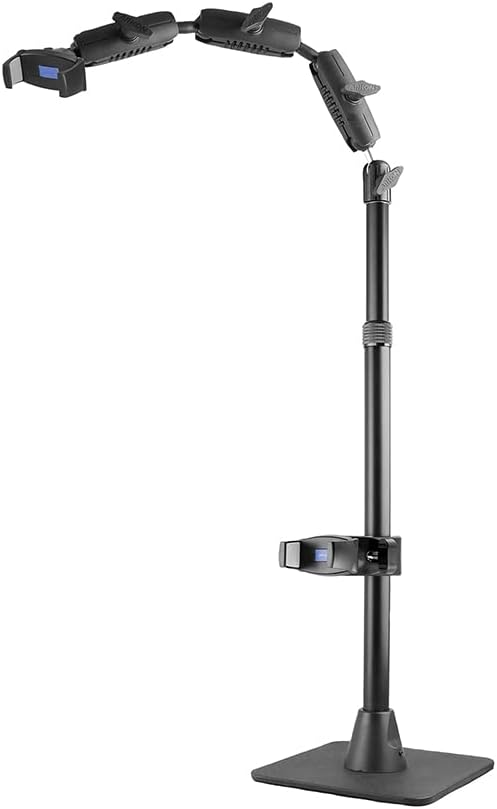
The ARKON Mounts Remarkable Creator Cookie Decorator is a versatile stand for creators who want one system to handle overhead filming and pico projector positioning. It carries a 4.6 rating, supported by a design that combines a weighted base, telescoping stand, extendable overhead arm, and flexible device placement. Its strongest feature is the ability to use two phones at once or pair one phone with a compatible pico projector.
We may earn a commission when you buy through this link, at no additional cost to you.
The universal phone clamp accommodates devices up to 3.9 inches wide, while the projector connection uses a 1/4-20 camera adapter. Clamps can move around the mounting system, including the top arm and vertical post, allowing users to alternate between front-facing and overhead perspectives. The stand reaches up to 41 inches, making it substantially more adaptable than a compact desktop mount and suitable for cooking, drawing, crafting, vlogging, and instructional work.
The weighted non-skid base is important when a camera and projector are used together because it helps limit movement and vibration during recording. The main trade-off is the stand's larger footprint compared with folding desktop models. It also relies on the stated device widths and adapter requirements, so buyers should check the dimensions of their own phone or projector before assembly. Even so, the range of positioning options gives this model broad value for serious creator setups.
This is the strongest all-around choice for a reader who wants more than basic projector support. It suits home creators, educators, bakers, artists, and small production teams that need overhead framing and projection in one system. Choose it when workspace, stability, and device flexibility matter more than a compact footprint.
Two phones or a phone and pico projector can operate simultaneously, reducing the need to dismantle and reconfigure the stand whenever the visual perspective changes.
The telescoping post and extendable overhead arm support eye-level, front-facing, and top-down compositions across a maximum height of 41 inches.
We may earn a commission when you buy through this link, at no additional cost to you.
The ChromLives Photo Copy Stand is a compact tabletop solution built around a spring-loaded phone holder, an adjustable mini tripod, and an aluminum rod. It has a 4.3 rating and is positioned primarily as a phone-oriented copy stand that can also serve in pico projector workflows where the device connection and weight fall within its limits.
We may earn a commission when you buy through this link, at no additional cost to you.
Its height adjusts from 8 to 16 inches, and the shooting angle can be set between 30 and 90 degrees. Wide legs with skid reduction help keep the stand steady on a desk or work surface. The main rod uses an aluminum alloy, while the base is cast iron, giving the small stand a more substantial feel than a basic plastic tripod. A spring clip accommodates phones with widths from 6 to 10 centimeters.
The central limitation is its modest equipment support. The supplied information does not identify a quarter-inch projector attachment, so a user wanting to mount a standard camera interface may need an additional adapter. Its compact dimensions and 1.5-pound weight make it easy to move, but they also limit how far the equipment can be raised and moved. Phone weight can affect how precisely the tilt angle holds.
This stand is a practical choice for close-up filming, document presentation, tabletop demonstrations, and lightweight projection where minimal footprint matters. It is less suitable for a larger projector or a production setup that needs substantial reach. For those wanting a broader range of positioning, the ARKON model offers more mounting flexibility.
The folding legs and short adjustable post make the ChromLives stand easy to reposition on compact desks, kitchen counters, and craft tables.
A spring clip and a broad stated tilt range allow quick framing changes without the complexity of a multi-articulated overhead arm.
We may earn a commission when you buy through this link, at no additional cost to you.
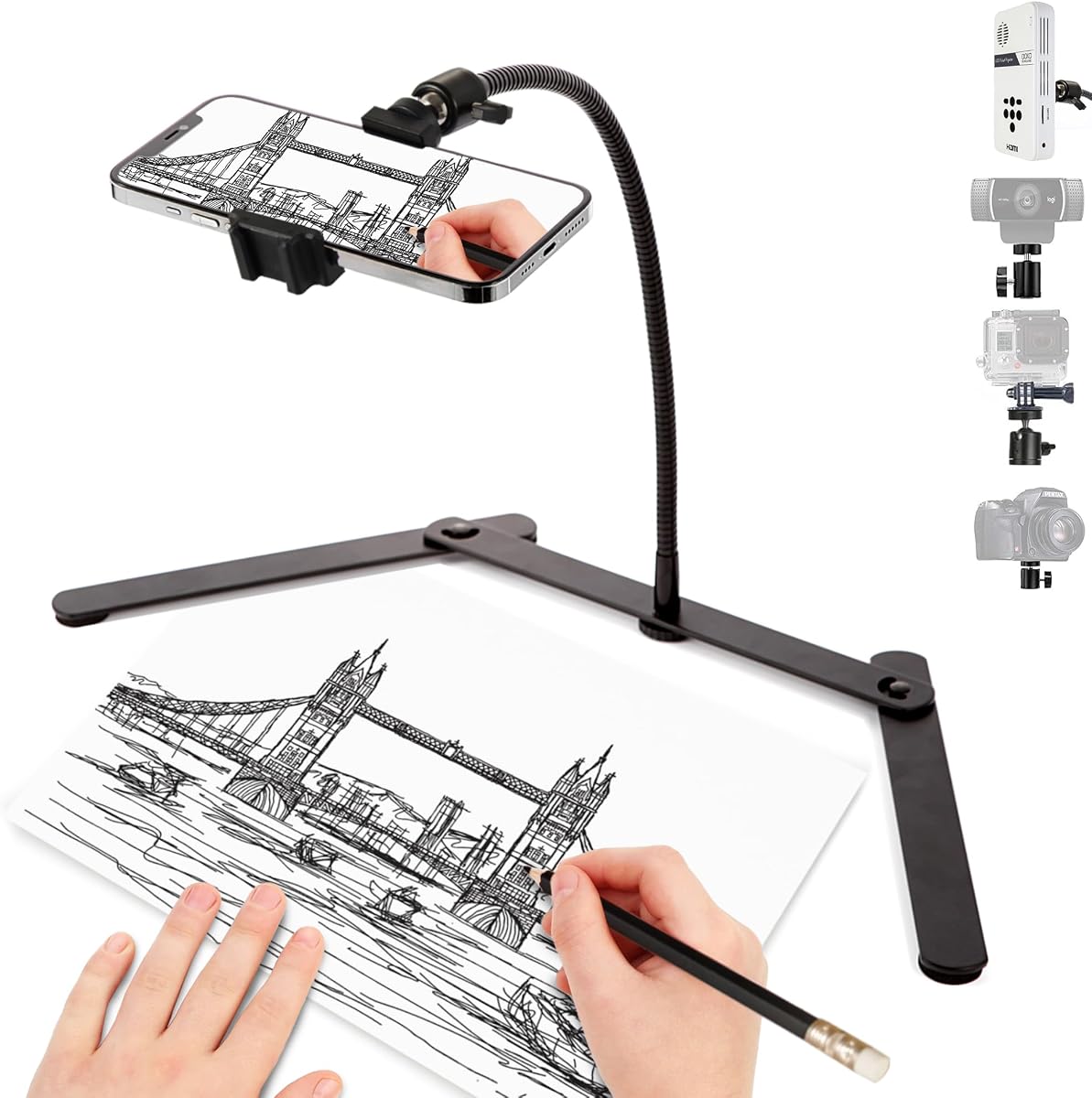
The Foldable Gooseneck Phone Holder offers a compact way to position a phone, mini projector, action camera, webcam, or entry-level DSLR. It has a 3.9 rating, and its defining feature is an upgraded gooseneck arm that can bend through 360 degrees for overhead, vertical, horizontal, and unusual diagonal compositions.
We may earn a commission when you buy through this link, at no additional cost to you.
A standard quarter-inch interface makes the mount more adaptable than the simple spring-clip design of some tabletop stands. The foldable triangular base is designed to reclaim about 80 percent of its desktop space when stored, while a non-slip silicone pad helps prevent movement on smooth surfaces. Installation is also straightforward: attach the arm to the base, install the device, and bend the arm into position.
The flexible construction is convenient, although it is not as rigid as a metal multi-jointed arm or a full-height stand. Users projecting for an audience may find a more substantial structure preferable. The smaller base may also transmit more movement when operating a heavier projector, so the device's weight and the condition of the work surface remain important considerations.
This model is well suited to cookie decorating, drawing, document scanning, teaching, live streaming, and makeup tutorials when a small footprint and rapid repositioning are priorities. It works especially well for light devices and short mobile sessions. Buyers needing a rigid, fixed projection angle or a taller viewing position should consider a stand with a telescoping post and heavy base.
The quarter-inch interface allows the same compact support to function as a projector positioner, overhead camera mount, webcam holder, or camera support.
Its tool-free assembly and collapsible base make it convenient for creators who regularly move between tasks or work in limited space.
We may earn a commission when you buy through this link, at no additional cost to you.
The Portable Desktop Projector Stand is designed for compact projection setups that need a more substantial support than a flexible gooseneck can provide. It has a 4.0 rating and uses an aluminum alloy body, heavy base, and anti-slip rubber pads. The stated maximum load of 11 pounds separates it from many lightweight creator stands.
We may earn a commission when you buy through this link, at no additional cost to you.
A standard quarter-inch screw forms the connection point, allowing the stand to support compatible projectors, cameras, and smartphones. The mount rotates through 360 degrees and tilts up or down by 12 degrees, which is useful for changing the direction of a projected image without relocating the entire base. Its no-installation format means it can be unpacked, positioned, and used with little setup.
The main limitation is the relatively narrow 12-degree tilt range. That may be sufficient for desktop projection but less useful when the projector must be aimed steeply upward or downward. Compatibility is also exact: the device needs a quarter-inch screw hole, and the stand should not be assumed to fit projectors using a different mounting pattern. The listed capacity provides confidence for suitable equipment, though actual stability always depends on balance and surface quality.
This is a compelling option for mini and pico projectors used in home entertainment, meetings, classrooms, offices, and outdoor trips. Its portable construction and substantial base make it particularly attractive for users who want desktop support without a permanent installation. It is less suitable as an overhead filming arm or as a tall floor projector support.
The heavy base and aluminum construction provide a more rigid platform for compatible projectors than lightweight folding tripods.
Full 360-degree rotation makes it easier to redirect a projected image across different surfaces while keeping the base in place.
We may earn a commission when you buy through this link, at no additional cost to you.
The ARKON Mounts Remarkable Creator Cookie Decorators Mount Stand is a polished creator system built around two ARKON Mobile Grip 5 holders, a multi-angle arm, a solid base, and a pink extension pole. It has a 3.9 rating and is intended for cookie art, live streaming, demonstrations, and polished overhead footage.
We may earn a commission when you buy through this link, at no additional cost to you.
The standout capability is dual-device use. Both holders accept phones up to 3.9 inches wide, allowing two phones or one phone and one pico projector to operate together. A 360-degree multi-angle arm supports overhead, unusual, and conventional front-facing views. The extension pole expands from 17 to 29 inches, giving users additional height control without requiring the larger footprint of a full floor-standing creator system.
The solid weighted base is intended to minimize vibration, which is especially helpful when live footage and projection must remain synchronized with the user's hands. The trade-offs are its smaller maximum reach than the similarly focused ARKON model in this guide and the 3.9 rating, which is lower than several alternatives. Its visual design and dual-device arrangement also make it more specialized than a generic projector stand.
This is the top premium pick for a creator who values coordinated appearance, flexible device configuration, and an elevated overhead perspective. It works particularly well for bakers, illustrators, makeup artists, and educators. Buyers should confirm that the separate phone and projector holders meet their device dimensions and that the work surface can accommodate the base.
Pairing a phone with a pico projector creates a coordinated setup for recording the work while projecting a reference image or design.
The extension pole adjusts from 17 to 29 inches, making it easier to alternate between front-facing and elevated overhead compositions.
We may earn a commission when you buy through this link, at no additional cost to you.
The 25-Inch Dual Phone Holder is an extended overhead mounting system with a 4.7 rating and a maximum arm reach of about 31.5 inches. It is built for video recording, tutorials, presentations, vlogging, cooking demonstrations, and multi-angle production. Its dual-device design allows two phones to be mounted together or one phone to be replaced with a compatible mini projector.
We may earn a commission when you buy through this link, at no additional cost to you.
The universal clamp accommodates phones up to approximately 4.33 inches wide, while mini projectors use a 1/4-20 adapter. Clamps can attach at several points, including the arm and vertical pole, so a user can vary the angle and relationship between devices. The long extendable arm reaches overhead while also allowing eye-level framing when the work surface and subject require it.
A weighted non-slip base supplies stability and helps reduce shake during recording. The main question is whether the user needs to relocate the stand frequently: the supplied information does not describe it as foldable, so it may occupy more permanent desk space. The product also uses a separate adapter for projector mounting, which should be included when checking compatibility.
This mount is a strong option for creators who need greater overhead reach than a compact desktop model can provide. It suits instructional filming, hands-free recording, and setups that benefit from simultaneous phone and projector views. Choose it when framing flexibility and extended reach take priority over maximum portability.
The extendable arm can reach about 31.5 inches, providing useful clearance above larger work surfaces and subjects.
Attaching the device holder to different points on the arm or pole creates more options than a fixed-position desktop mount.
We may earn a commission when you buy through this link, at no additional cost to you.
The Overhead Tripod for Mini Projector is the strongest budget-oriented selection in this guide, carrying the highest supplied rating at 4.8. It combines a folding desktop base, an adjustable aluminum pole, a universal quarter-inch mount, and a 360-degree rotating ball head. It is designed for overhead shooting, online classes, live streaming, and compact projection.
We may earn a commission when you buy through this link, at no additional cost to you.
Height adjusts between 11 and 17 inches, while the main rod rotates 180 degrees and the ball head rotates 360 degrees. Those controls allow a device to move from an overhead angle to a low or front-facing position without removing it. The stand also includes a phone holder and an expansion slot for accessories such as a fill light or microphone, making it adaptable beyond basic projection.
Its essential caveat is the stated 0.8-pound maximum load. That makes the tripod appropriate for light pico projectors, phones, webcams, and mini cameras, but it explicitly rules out heavier equipment. The cast iron base and reinforced fixing bar help with stability within that limit. The supplied information also contains an incomplete phrase describing ideal projector tasks, so the universal quarter-inch connection and load rating should guide the final decision.
This is an excellent pick for beginners, teachers, mobile creators, and anyone seeking a light, compact overhead mount without a large assembly. It folds for easier storage and weighs only 1.2 pounds. For a compact pico projector within the stated limit, it offers excellent angle control and useful expansion options at a modest, focused design.
A rotating main rod and 360-degree ball head make it simple to move from overhead framing to low-angle or front-facing views.
The universal quarter-inch mount supports several device types, although the stated load limit requires careful equipment selection.
We may earn a commission when you buy through this link, at no additional cost to you.
The PUTORSEN Universal Projector Stand is a floor-level option for users who want to place a pico or other compatible projector near furniture and direct its image toward a screen or wall. It has a 4.1 rating and combines a carbon steel frame, stainless coating, solid square base, adjustable post, and quarter-inch connection.
We may earn a commission when you buy through this link, at no additional cost to you.
The height ranges from 36.6 to 48.75 inches, and the clamp-style knobs lock the selected height. A ball head offers 360-degree horizontal rotation and 90-degree tilt, providing considerably more directional control than a fixed tabletop stand. The stated load capacity is 11 pounds, and the broad metal base provides a stable footprint for compatible equipment.
The stand is specifically designed for devices with a quarter-inch bottom-center screw hole. It should not be selected for a projector whose connection is elsewhere or uses a different thread. It is also not a dual-device or overhead camera system, so its appeal lies in providing a dedicated elevated projection point. The L-shaped, minimalist form is intended to fit behind sofas, beds, or other furniture with less visual bulk than a large tripod.
This is a strong choice for home cinema, office, bedroom, and outdoor projection where the projector should sit near floor level. It is less suitable for overhead crafting, compact travel, or a creator wanting a phone and projector in one frame. Its strengths are sturdy construction, straightforward height adjustment, and broad directional movement.
The adjustable post can place compatible equipment close to the height of sofas, beds, and other seating arrangements.
The ball head combines 360-degree rotation with 90-degree tilt for projecting toward different surfaces.
We may earn a commission when you buy through this link, at no additional cost to you.
The ARKON Mounts Phone Holder Full Kit is a comprehensive tabletop creator system with a 4.7 rating. It includes an articulated overhead arm, universal phone holders, a tablet holder, a stabilizing base, and a ring light. Rather than being a dedicated pico projector mount, it serves creators who want a complete filming and presentation station.
We may earn a commission when you buy through this link, at no additional cost to you.
Five articulated adjustment points allow the arm to be positioned at different heights, angles, and locations. The phone holders fit devices up to 3.9 inches wide, while the tablet holder supports up to 7 by 18.4 inches. These dimensions cover many current phones and tablets, and horizontal or vertical filming is possible. The included ring light provides a major advantage for users who would otherwise need separate lighting equipment.
The main limitation is that the supplied information does not identify a quarter-inch pico projector connection, so compatibility with a projector should not be assumed. The multiple arms and large base also make this less convenient for rapid transport than a folding desktop stand. It is better understood as an all-in-one content creation kit that happens to fit the broader category of adjustable overhead mounts.
This product is ideal for cooking, art, drawing, painting, baking, makeup, nail work, repairs, and online demonstrations. It is also useful when a tablet must display a recipe, lesson, or reference alongside the phone camera. Choose it for a complete filming station rather than for projector placement alone, and verify device dimensions before assembly.
Bundling the arm, device holders, stabilizing base, and ring light reduces the need to assemble several separate accessories for a recording setup.
Five secure articulation points allow the user to move from overhead views to direct, horizontal, or intermediate angles.
We may earn a commission when you buy through this link, at no additional cost to you.
The HVAYING Floor Projector Stand is a tray-based support for projectors and other equipment that need elevation without a wall-mounted bracket. It has a 4.0 rating, a robust metal frame, a broad tray, and an adjustable height system. The stand is suitable for homes, offices, stages, studios, classrooms, and temporary event areas.
We may earn a commission when you buy through this link, at no additional cost to you.
Its stated load capacity reaches 13 pounds, making it the highest capacity listed in this comparison. The 15.04-by-11.14-inch tray can hold a projector and includes support lips, sponge spacers, and an elastic band to reduce slipping. Height can be adjusted from 16 to 48 inches using clamp-style knobs, while the relatively slim base allows placement close to a wall.
Unlike stands with a quarter-inch connection, this model uses a tray, so it may accommodate equipment with a base that would not accept a threaded screw. The tradeoff is that the projector is not held in the same way as on a ball-head platform, and the larger tray creates a greater footprint. Users moving equipment frequently may also find the floor stand less convenient than a folding desktop model.
This mount is best for a dedicated projection area where a wider support surface, high load capacity, and adjustable height matter more than portability. It can also support recorders, books, notes, and other media equipment. Choose it for a stable semi-permanent arrangement, and verify the tray dimensions and device footprint before use.
The tray's raised lips, spacers, and elastic band help keep a projector or other device from shifting on the platform.
Its slim base is designed to sit near a wall without drilling and to use less space than a spread-out tripod.
We may earn a commission when you buy through this link, at no additional cost to you.
The most useful pico projector stand mount balances the correct attachment, enough stability, appropriate height, and the framing flexibility required for the intended task. The following factors help narrow the options before purchase.
Start with the connection interface. Several stands use a standard quarter-inch screw, making them useful with pico projectors, mini cameras, webcams, and compatible smartphones that have a matching socket. Other products use a spring clip for phones or a full tray for projectors that lack a threaded mount. A projector can only be mounted safely when its underside, tripod socket, or included adapter matches the stand.
Also check the stated load limit. A universal quarter-inch interface does not guarantee that every projector is safe to attach. Lightweight pico models may suit a compact stand, while heavier equipment calls for a larger load rating and broader base. Review the dimensions of the projector and the attachment points before choosing.
A stable base is essential because a projector or phone becomes much more difficult to keep aligned if the stand drifts. Weighted bases, cast iron components, broad legs, and non-slip pads all help resist movement. The importance of stability rises with arm extension, overhead positioning, and heavier equipment. A flexible gooseneck can work well for light tasks, while a rigid arm and substantial base are preferable for extended filming or projection.
Surface conditions also matter. Rubber pads can reduce slipping and protect a desk, but uneven counters may still unsettle a wide-legged model. Check whether the base folds, how much desk area it occupies, and whether the stated stability depends on a level surface. For frequently moved setups, balance should be considered together with portability rather than separately.
Height requirements depend on the subject, camera angle, and viewing arrangement. A short desktop stand works well for close-up tabletop tasks, document scanning, and compact projection. An overhead creator system may need to rise more than 30 inches to clear the user's hands and show an entire work area. A floor stand offers a different function, placing a projector near seating or equipment rather than directly above a desk.
Compare minimum and maximum height rather than looking only at the tallest setting. A wide range is useful if the stand will serve several tasks, but a single-purpose setup may not need extensive telescoping. Also account for the height of the device itself and the angle of projection; a device mounted at eye level may still need a downward tilt to reach the intended surface.
Projection direction and filming angle are not always the same. A 360-degree rotating head is valuable when the image must be aimed toward different walls or when an overhead camera needs to shift between top-down and front-facing views. Up-and-down tilt is especially important for projecting onto a tabletop or directing a phone toward a work surface.
Some compact mounts rely on a flexible gooseneck to curve into position, while creator stands use rigid articulated arms. Flexible designs change angle quickly but may move under heavier loads. Rigid joints usually feel more precise and are better for repeated recording sessions. Choose based on the required directions and the weight of the mounted equipment rather than on the largest advertised rotation figure alone.
Desktop stands are portable, compact, and convenient for kitchens, craft tables, and small workspaces. They usually offer less reach and may have a lower load capacity, making them best for compact pico projectors and light cameras. Floor stands provide greater height, a larger footprint, and more structural mass, which can be beneficial for home cinema, presentations, and semi-permanent installations.
The intended placement should guide the decision. A floor model that crowds a worktable can make overhead filming awkward, while a low desktop arm may be unable to frame a full floor project. Consider where the base will rest, whether outlets and cables are reachable, and whether the stand must be moved between rooms. A folding design is especially useful for mobile creators.
A dual-device stand can improve workflows that require simultaneous recording and projection. One phone can film the creator's hands while a pico projector displays a pattern, reference image, or instructional graphic. Alternatively, two phones can capture front-facing and overhead perspectives at once. These arrangements require balanced weight and enough space for both devices.
The supplied data describes dual-phone and phone-projector options with different clamp and adapter arrangements. Check supported phone widths, adapter inclusion, and whether each holder can move independently. A multi-device mount is valuable for professional demonstrations, but unnecessary complexity may not be worthwhile for occasional viewing.
Portable stands should be judged by more than their folded dimensions. Weight, base shape, assembly steps, and the need for multiple pieces all affect how easily a setup can move. Cast iron and weighted bases improve stability but can be less convenient to carry. Foldable legs, collapsible arms, and a single-piece structure are often easier to store between sessions.
A creator who records in several locations should favor a compact, lightweight design with a simple setup. A user with a permanent workstation may benefit more from a larger weighted system. Always ensure the folded form fits the intended storage area and that the stand can be set up without complicated tools.
Additional features can determine whether a stand works smoothly for a specific creative task. An integrated ring light supports video quality, a tablet holder can display recipes or lesson notes, and an expansion slot may accommodate a microphone or fill light. These additions are useful when they solve a real need, but they can also increase size, weight, and complexity.
For projection, prioritize rotational control, tilt, load capacity, and cable reach. For overhead filming, prioritize arm articulation, device access, and the ability to frame the entire workspace. For teaching, consider a second screen or reference device. Selecting the mount around the complete workflow prevents a technically compatible product from becoming inconvenient in daily use.
Begin by assembling the stand on a flat, clean surface. Tighten locking knobs and joints before attaching a device, then confirm that the base is fully settled. Read the projector or phone manufacturer's mounting guidance, match the appropriate screw, adapter, clip, or tray, and secure the device without forcing it into an unfamiliar connection.
Position the equipment before making final fine adjustments. Turn on the projector or camera, place the intended subject or projection surface within view, and adjust height, tilt, and rotation in small movements. Secure cables so they cannot pull the mount or cross the projected image. During use, avoid extending the arm beyond the intended range or leaning against the device, especially on a lightweight model.
After recording or projection, disconnect the device before folding or moving the stand. Wipe the base and attachment surfaces with a soft dry cloth, and remove dust from vents without pushing debris into openings. Store the unit in a dry location, inspect locking parts periodically, and tighten any loosened hardware. Replace a mount that shows bending, damaged threads, or instability rather than relying on it for valuable equipment.
The best mount depends on the projector's connection and how it will be used. A quarter-inch screw mount offers broad device compatibility, while a tray works with projectors that have a flat base. Overhead creators should prioritize an adjustable arm, and home cinema users may benefit more from a taller floor stand with strong directional control.
Only when the stand provides a compatible attachment and can support the projector's weight. A phone clip by itself is usually insufficient for a projector. Look for a quarter-inch interface or a purpose-built projector adapter, then check the mount's stated maximum load before attaching the device.
The required height depends on the size of the work area and the camera angle. A compact desktop stand may suit small projects, while a large craft table or floor demonstration often needs more than 30 inches of reach. Measure from the base surface to the intended device position and allow clearance for your hands or the subject.
A weighted or broad base is helpful because it reduces movement and makes fine aiming easier. Its importance increases with heavier devices, greater arm extension, and longer filming sessions. Lightweight flexible mounts can still work for small pico projectors, provided the device remains well within the stated load limit and the surface is level.
Yes, several creator mounts include two independent holders and support either two phones or one phone with a pico projector. These dual-device arrangements are especially useful for filming hands while projecting a reference image. Verify phone width, adapter type, device weight, and whether the stand lists projector support explicitly.
A desktop mount is compact, portable, and usually positioned close to a work surface, making it useful for overhead filming and small projections. A floor mount offers greater height and a larger footprint, often placing a projector near furniture for movies, presentations, or events. Choose according to available space and the required viewing direction.
Use a stable base, keep the device within the load limit, and tighten every locking joint before operating it. A level surface and non-slip pad can also reduce movement. Avoid extending a flexible arm too far, and route cables so their weight does not pull the device out of alignment.
They are broadly compatible with many cameras and projectors, but the thread and mounting position still matter. The device needs a compatible quarter-inch socket, and some equipment may place it in an awkward location. Check the projector's underside, confirm its weight, and use the supplied adapter only as intended.
The Overhead Mini Projector Tripod is the most economical and approachable pick for lightweight equipment, with extensive angle control, a folding design, and a universal quarter-inch interface. The ARKON Creator Cookie Decorator Mount is the most complete all-around option, combining two-device support, extended reach, and a stable weighted base for creators who need both filming and projection.
Prioritize the features your setup actually requires. Choose a sturdy floor or tray mount for elevated home projection, a gooseneck for compact overhead flexibility, and a dual-device creator system when a phone and projector must work together. Always check attachment compatibility, load limits, usable height, base stability, and workspace dimensions before making a final decision.
Retailer listings and manufacturer details can change, so confirm the current specifications and included accessories before purchasing. The right pico projector stand mount should hold the device securely, support the intended angle, and fit naturally into the space where you create, teach, present, or watch.