
Quntis Music Sync Curved Monitor Light Bar
4.6Editor score
Twenty-three RGB effects
Ten music-sync modes
Seventeen-to-thirty-four-inch fit
A monitor light bar for late night gaming should balance useful desk illumination with a soft ambient glow behind the display. The best options reduce screen reflections, illuminate the keyboard, provide adjustable color temperatures, and create an atmosphere that complements a dark gaming room without overwhelming the image.
We compared all ten products by examining their lighting coverage, asymmetrical beam design, RGB features, brightness controls, color-temperature ranges, mounting compatibility, eye-care claims, and practical controls. The list covers premium dual-light designs, compact budget bars, remote-controlled models, and options for curved, flat, and irregular monitors.
Each pick highlights a different use case, from wide-curvature gaming displays to compact desks and RGB-heavy setups. Ratings, features, and listings can change over time, so verify the current specifications and compatibility information before buying, especially when your monitor has an unusual shape or a tightly positioned webcam.
4.6Editor score

4.7Editor score

4.2Editor score
As an Amazon Associate we earn from qualifying purchases.
The table below compares all ten monitor light bars by lighting output, screen-fit range, RGB capabilities, controls, and eye-comfort features. It makes it easier to identify a model suited to a curved ultrawide, a compact desk, or a setup that needs both task lighting and music-responsive ambience.




The Quntis Curved Monitor Light Bar is the most complete option in this guide, earning a 4.7 rating for its combination of long reach, flexible positioning, strong desk illumination, and 15 RGB backlight modes. Its foldable dual-light design is especially appropriate for late-night gaming because it can cast a controlled pool of light across the desk while adding diffuse color behind the display.
We may earn a commission when you buy through this link, at no additional cost to you.
The bar extends up to 26 inches and is intended for curved monitors larger than 34 inches, including displays with curvature from 800R to 3000R. The three-section clamp accommodates screen thicknesses up to 3.35 inches, while its angled optical design directs light toward the work surface rather than into the user's eyes. Central illumination can reach 1400 lux, with 500 lux across a wider area, and the front light supports stepless brightness plus a 3000K-to-6500K color range.
A precision ambient sensor automatically responds to changing room light, which is useful for a gaming space that transitions from daylight to darkness. The power-off memory restores the previous settings, and the right-angle USB-C connection helps preserve webcam clearance. The trade-off is size: this is a substantial bar intended for large displays, so it may feel oversized on a compact 24-inch monitor or a narrow desk.
This is the strongest all-around recommendation for a late-night gaming setup with a large curved or ultrawide monitor. It delivers meaningful task lighting, attractive rear ambience, flexible color control, and glare-conscious optics in one package. Gamers who do not need RGB can still use the front light alone, while those building a dedicated battlestation benefit from the full dual-light configuration.
The front beam and rear RGB glow serve different purposes. The front light supports keyboard visibility and focused desk work, while the backlight softens the sharp contrast between a bright game and a dark room without adding distracting reflections to the panel.
Its extended 26-inch span, articulated sections, and heavy-duty clamp reduce the need to angle a short bar awkwardly. That makes it a practical match for broad curved screens where smaller bars can leave portions of the desk visibly darker.
We may earn a commission when you buy through this link, at no additional cost to you.
The Quntis ScreenLinear Light Bar has a 4.6 rating and focuses narrowly on producing comfortable, even task lighting around a monitor. It uses 78 LED beads, an asymmetrical optical design, and a claimed 900-lux output to illuminate the desk without directing light into the screen. For gamers who dislike decorative lighting but want a steady keyboard area, this is a refined alternative to a full RGB setup.
We may earn a commission when you buy through this link, at no additional cost to you.
Its built-in sensor monitors ambient brightness and automatically adjusts the light, while touch controls provide manual changes to brightness and color temperature. The front range extends from 3000K to 6500K, allowing a warm late-evening setting or a cooler, more alert appearance. The Ra98 color rendering index is particularly useful for games and creative work in which subtle colors should appear natural.
The product also states certification to IEC/TR 62778 and IEC/EN 62471, along with flicker-free illumination. That makes it more relevant to comfort-conscious buyers than a basic decorative light bar, though individual sensitivity varies. The main limitation is obvious: there is no RGB backlight, so it cannot create the colored wall glow associated with a gaming-oriented ambience.
Choose this model for late-night sessions where readable controls, natural color, and consistent desk lighting matter more than animated RGB effects. It is particularly effective for a mixed workstation that serves as a gaming and office setup, providing a professional-looking task light that can still be warmed down for evening play.
Automatic dimming responds to surrounding light, so the bar can move from a brighter daytime setting to a softer evening level without repeated manual adjustment. This is a useful feature in rooms where gaming sessions begin before sunset.
The Ra98 rating and 78-LED arrangement support a clean, uniform pool of light. The asymmetrical design keeps that light on the work surface, which can make a keyboard, notes, or controller easier to see without washing out the display.
We may earn a commission when you buy through this link, at no additional cost to you.
The Quntis Remote-Controlled Light Bar carries a 4.4 rating and prioritizes straightforward operation. Its sensitive remote handles stepless brightness and color-temperature adjustment from 3000K to 6500K, allowing a player to alter the lighting without reaching up to the monitor. This is a practical advantage when the bar sits above a large display or behind a wide keyboard.
We may earn a commission when you buy through this link, at no additional cost to you.
The patented triple-fold weighted clamp fits 17-inch to 32-inch flat, curved, and irregular monitors ranging from 0.12 to 3.94 inches thick. A 15-degree adjustable pivot lets the beam be directed precisely, while the 45-degree asymmetrical design illuminates the desk and keyboard rather than producing reflected glare. The stated output is at least 1200 lux, giving it ample illumination for a dark gaming surface.
The ambient sensor can be activated with a double-click on the remote, and a three-second long press turns on a two-hour auto-off timer. That reminder is a small but useful feature during marathon sessions. Although the product is described for gaming and professional use, it has no rear RGB panel, so buyers seeking colored wall illumination will need a different design.
This is a strong fit for players who dislike fumbling with small buttons or want precise desk-level control from the chair. It also works well for curved and unconventional monitors because of the adaptable clamp. The best use case is a serious task-light setup rather than a decorative one, with automatic sensing and remote access providing the main advantages.
Putting frequently used controls in the user's hand reduces the need to reach above the display. Stepless adjustment also allows more precise changes than a short list of preset levels, which is useful when matching a game session to gradually changing room light.
The triple-fold clamp accommodates a broad range of monitor shapes and thicknesses, while the pivot adjusts the final aim. This makes the bar less dependent on a perfectly straight or flat monitor edge.
We may earn a commission when you buy through this link, at no additional cost to you.
The Quntis 15.7-Inch Dual Light earns a 4.5 rating by offering a broad RGB library without requiring a large curved-monitor bar. Its 15.7-inch length is more manageable for a 27-inch or 32-inch display, and the independent rear illumination creates a visible glow behind the screen while the front light keeps the desk readable.
We may earn a commission when you buy through this link, at no additional cost to you.
The front light provides five brightness presets, stepless color temperature from 3000K to 6500K, and up to 900 lux of central desk illumination. Twenty-four RGB modes add atmosphere to the rear of the monitor. The asymmetrical optical structure keeps front light off the screen, and the stated Ra95 rendering plus RG0 and flicker-free certifications make the product more attractive for long sessions and color-sensitive use.
Its triangular counterweight clamp fits monitors from 0.16 to 2.36 inches thick, including curved and unusual rear designs. Silicone pads support a secure grip, and the notched front clip leaves room for a webcam. Smart memory restores the last RGB mode, brightness, and color temperature. Unlike some more elaborate models, it does not offer music synchronization, so animated effects are limited to its built-in selections.
This is an excellent middle ground for gamers who want meaningful RGB ambience and practical task lighting in a less expansive format than a 20-inch or 26-inch bar. It is also suitable for users who want one product to handle daytime work and nighttime play. For anyone who does not need audio-reactive effects, the broad mode count and front-back lighting make it easy to recommend.
Twenty-four modes provide more atmosphere than a basic three-color backlight while keeping the physical bar relatively compact. That balance is useful for gaming desks where large accessories compete for limited space.
The forward beam handles practical visibility while the rear panel softens the contrast between the display and the wall. Memory then preserves the combination, so a player can return to the same setup after restarting the computer.
We may earn a commission when you buy through this link, at no additional cost to you.
The Budget Ultrawide Monitor Light Bar is a straightforward option for players who want effective desk illumination without a large fixture or decorative rear panel. Its 4.2 rating reflects a simple feature set, but the core lighting fundamentals are strong: an 11.8-inch bar produces up to 800 lux at the center and covers an area of approximately 30 by 20 inches.
We may earn a commission when you buy through this link, at no additional cost to you.
The 45-degree asymmetrical beam is designed to illuminate the desk without shining into the user's eyes or creating reflections on the screen. Three color temperatures—3000K, 4000K, and 6500K—cover warm evening, neutral daytime, and cooler focus settings. Stepless brightness control and a memory function make repeated adjustments less necessary.
Installation uses a patented counterweight clip that fits a range of thin-to-thick flat and curved screens without tools. USB power allows connection to a computer, adapter, or power bank, and the side switch handles on/off, color temperature, and brightness. The design leaves desk space open, although its shorter reach may not evenly cover a very large ultrawide keyboard or expansive desk.
This is the best budget-oriented pick for a modest gaming setup where task lighting matters more than RGB effects. It can also serve students, streamers, and office users who want a practical screen-mounted lamp. Buyers seeking a dramatic gaming atmosphere should choose a dual-light model, but those who simply need visible controls in a dark room will find this bar easier to operate.
The 11.8-inch length is easier to center over standard flat monitors and less likely to look visually imposing. It also avoids the need for a wide base, which is beneficial on desks where a conventional lamp would obstruct mouse movement.
A side switch provides direct access to the three temperatures and stepless brightness. The memory function is particularly convenient for recurring use because the preferred setting can return after the light is switched off and on.
We may earn a commission when you buy through this link, at no additional cost to you.
The 15.7-Inch Ultrawide Light Bar has a 4.2 rating and focuses on broad, even desk coverage. Its stated 900-lux central brightness reaches across a 35-by-25-inch area, making it suitable for large desks, wide keyboards, and ultrawide monitors where a shorter bar can leave noticeable dark regions.
We may earn a commission when you buy through this link, at no additional cost to you.
The patented 45-degree asymmetrical design directs light toward the keyboard and work surface, while the bar can be twisted to refine its angle. Color temperature spans 3000K to 6500K, and brightness adjusts steplessly. The included memory recalls the previous setting, and USB power supplies broad compatibility with computers, adapters, and power banks.
Its retractable counterweight clip installs without tools and fits a range of flat, curved, thin, and thick displays. The mechanical control on the right side handles power, temperature changes, and brightness. As with other straightforward task lights, there is no rear RGB panel, remote, or music-responsive mode, so it cannot deliver the colored wall glow popular in gaming rooms.
This model is a good middle ground for a wide desk that needs even task lighting but not elaborate RGB. Its length offers more coverage than the compact 11.8-inch option, while the lack of a remote keeps the controls simple. It is especially appropriate for users who work and play at the same computer and want one lighting profile to support both activities.
The longer optical reach is valuable for large keyboards, streaming controls, notebooks, and other accessories. A wider illuminated area also helps reduce the abrupt brightness transition between the screen and the surrounding desk.
The twist adjustment and mechanical switch cover the essential functions without requiring a remote or app. This keeps setup simple and avoids adding another control device to the gaming desk.
We may earn a commission when you buy through this link, at no additional cost to you.
The Quntis 20-Inch RGB Light Bar has a 4.6 rating and combines polished construction with extensive customization. Its light-grey aluminum body gives it a more refined appearance than many plastic alternatives, while the 20-inch span is suited to larger flat, curved, and ultrawide screens.
We may earn a commission when you buy through this link, at no additional cost to you.
The remote provides access to 15 RGB backlight modes, 100 brightness levels, and four color-temperature settings spanning 3000K to 6500K. The product describes more than 240 possible lighting combinations, giving players considerable control over both front illumination and rear ambience. The front lighting is stated to exceed 800 lux with uniformity above 0.9, producing an even task-light field.
The asymmetric optical system is designed to reduce screen reflections, and the product states IEC/TR 62778 and IEC/EN 62471 compliance, an RG0 blue-light risk level, and flicker-free operation. Ra95 rendering supports accurate colors. Its retractable counterweight clip is designed for ultrawide curved monitors at 1500R curvature or above, and the 90-degree USB-to-USB-C cable helps preserve webcam space.
This bar is an excellent choice for gamers who want a refined, highly adjustable setup rather than a small decorative glow. The 144 LED beads are stated to have a 50,000-hour lifespan, and the extended cable allows connection to a more distant USB source. It lacks music synchronization, so the Quntis Music Sync model is the stronger choice for audio-reactive effects.
A broad temperature range, fine brightness steps, and 15 RGB modes allow the lighting to suit games, reading, work, and relaxation. The remote makes those changes practical during an active session rather than requiring the user to stop and lean toward the monitor.
The aluminum housing gives the fixture a professional finish, while the right-angle connector preserves clearance around a centered webcam. The long cable also makes it easier to reach a USB port without routing a short lead awkwardly across the desk.
We may earn a commission when you buy through this link, at no additional cost to you.
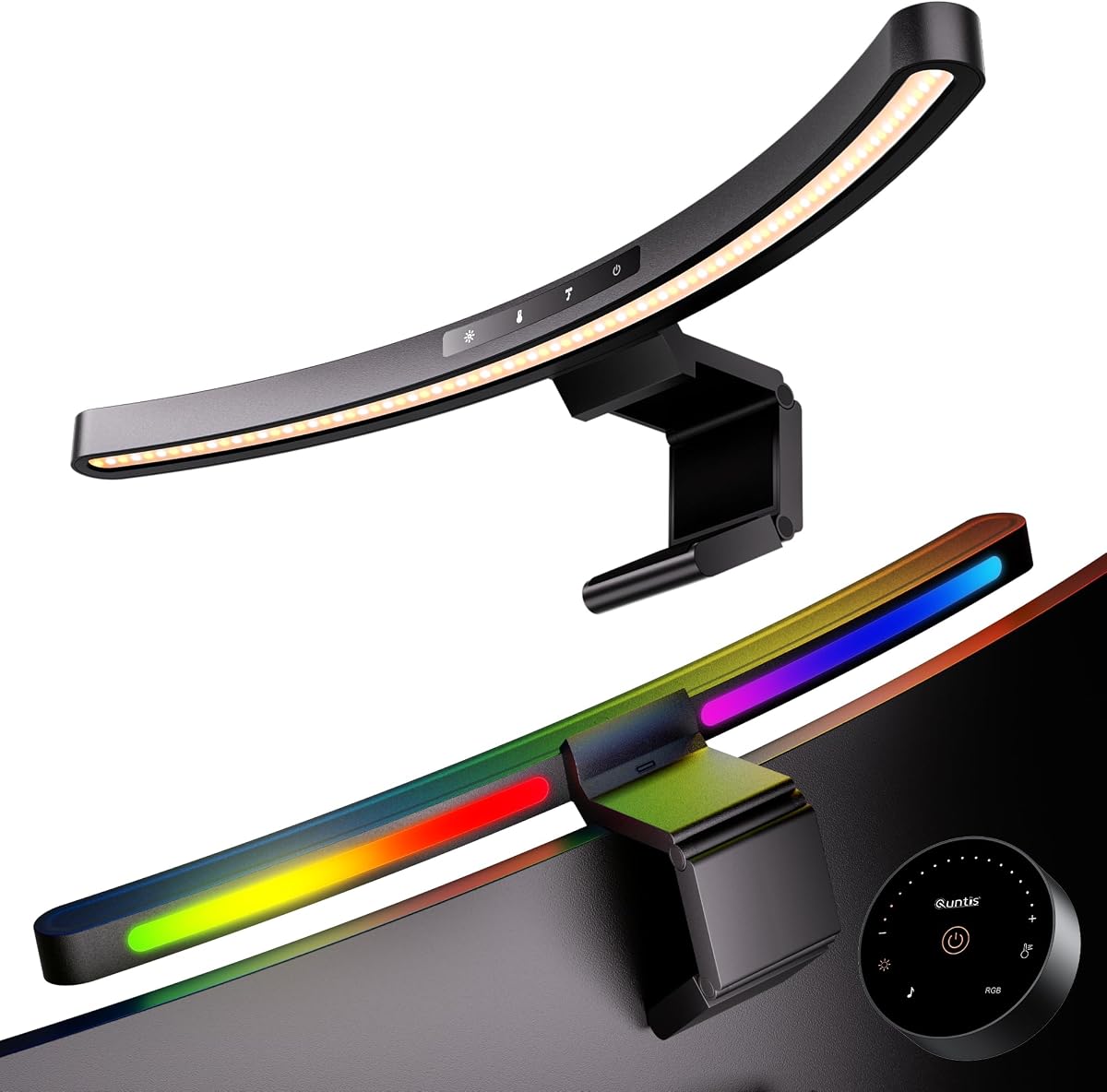
The Quntis Music Sync Curved Bar stands out with 23 RGB effects, including 13 presets and 10 music-sync modes. Its 4.6 rating reflects a well-rounded combination of 900-lux task lighting, remote and touch controls, and a clamp designed for curved, flat, thin, thick, and irregular monitors from 17 to 34 inches.
We may earn a commission when you buy through this link, at no additional cost to you.
Players can select seven solid colors and six dynamic animations, or activate ten sound-responsive effects for games, playlists, and movies. The front light has five brightness levels and five color temperatures from 3000K to 6500K, with stepless control for both. Solid-color effects also support brightness adjustment, while dynamic modes offer animation-speed control.
The weighted clip includes non-slip rubber padding and a flat top that can serve as a webcam base, making it particularly useful for streaming and remote calls. One remote can control multiple light bars in dual-monitor setups. Ra95 rendering, flicker-free output, a two-hour auto-off timer, and settings memory round out the feature set.
This is the best premium selection for a gaming room where music-responsive ambience is central. It offers more dynamic variety than fixed RGB bars while still providing a proper asymmetrical front light. Its effects respond to audio rather than directly coordinating with game events, so players should not expect a software-driven lighting profile, but it creates a convincing atmosphere for the right soundtrack.
Ten music-sync modes add movement and color changes that are more engaging than a static backlight. This makes the bar especially effective during music, cinematic games, and streamed entertainment where the room is intentionally dark.
Touch controls remain available when the remote is out of reach, and the remote makes frequent changes more convenient. Supporting multiple light bars also allows a consistent ambience across a dual-monitor gaming station.
We may earn a commission when you buy through this link, at no additional cost to you.
The SAMPHON RGB Monitor Light Bar has a 4.2 rating and provides a practical dual-light design at a compact 15.75 inches. One side of the bar illuminates the desk while the other casts nine RGB effects behind the display, allowing gamers to combine useful keyboard visibility with a colored gaming atmosphere.
We may earn a commission when you buy through this link, at no additional cost to you.
The front beam uses a 45-degree angle intended to avoid direct light in the eyes and minimize screen reflections. Rotating the bar allows the user to refine its aim. Three front-light color temperatures serve work, reading, and gaming, while the RGB backlight offers nine separate effects. Each light operates independently through its own tactile button.
The retractable universal clip has a soft silicone pad and supports thin, thick, flat, and curved monitors. USB-C power allows use with a laptop, adapter, or power bank. Memory restores the previous lighting configuration. It does not include a remote, music sync, or an auto-dimming sensor, so users who want automatic responses may prefer a more advanced model.
This is a good dual-lighting option for a player who wants RGB ambience but does not need audio-reactive effects or remote operation. Its direct controls are easy to understand, and the independent operation lets the rear glow run while the front task light is turned down for a more cinematic look.
Separate tactile controls for the front and rear lights provide useful flexibility. A player can brighten the keyboard area for setup work, then reduce it for a game while retaining the chosen ambient effect.
The silicone-padded retractable clip grips the monitor without occupying a base. Its broad stated compatibility also makes it suitable for users who may move between a flat office display and a curved gaming panel.
We may earn a commission when you buy through this link, at no additional cost to you.
The YEELIGHT Monitor Light Bar earns a 4.5 rating through a refined full-metal body, stepless controls, and a useful front-only lighting design. Its 250-lumen rating and asymmetrical no-glare approach make it a practical task lamp for a desk where the user wants visible controls and a clean appearance more than decorative RGB.
We may earn a commission when you buy through this link, at no additional cost to you.
Color temperature adjusts from 2700K to 6500K, offering a notably warm setting at the low end for late-night use. Three fixed temperature modes can be activated by touch, while long presses provide stepless brightness and color adjustments. The RG0 blue-light rating, flicker-free output, and glare-minimizing design support the eye-care positioning.
Ra95 rendering across 78 LED beads is useful for both games and color-sensitive work. Its retractable clip fits flat and curved monitors from 0.3 to 1.1 inches thick, and the low-profile body avoids obstructing a webcam. The full-metal construction is also described as aiding heat conduction during extended operation.
This is a strong choice for a mixed gaming and productivity setup that favors a restrained, premium appearance. It lacks an RGB rear panel, and its stated thickness range is narrower than several weighted-clamp alternatives, so compatibility should be checked carefully. Users who want a warmer nighttime color than most competitors and do not need animated ambience will appreciate its focused design.
The 2700K lower limit creates a gentler warm-white light than the 3000K starting point used by many bars. That can complement a dark gaming room when the goal is comfortable peripheral visibility rather than maximum alertness.
The full-metal housing gives the product a premium appearance and supports heat dispersion. Its low profile leaves room for a centered webcam, while touch controls provide quick changes without bulky buttons.
We may earn a commission when you buy through this link, at no additional cost to you.
The most useful monitor light bar balances screen-glare control, useful desk coverage, comfortable color temperature, secure mounting, and the kind of RGB ambience that suits your room. Consider monitor dimensions, available USB power, controls, and whether automatic adjustment or music synchronization will genuinely improve your setup.
Start with the physical dimensions and shape of your display. Compact bars around 11.8 or 15.7 inches can work well over 24- to 27-inch monitors, while 20-inch and 26-inch designs are better suited to 32-inch and larger curved or ultrawide displays. A bar that is too short may illuminate the center of the desk while leaving the edges dark, and an oversized bar can look visually unbalanced on a smaller screen.
Curved displays deserve particular attention because a rigid straight light may not sit evenly or may not direct its beam toward the entire keyboard. Look for an adjustable pivot, articulated sections, or a clamp specifically described for curved monitors. The Quntis Curved Monitor Light Bar, Music Sync model, and other weighted-clip designs offer useful options for broad curved setups.
A monitor-mounted light should illuminate the desk without creating a second bright source in front of the screen. Asymmetrical optical designs direct the front beam downward toward the keyboard and work surface, reducing reflected light on the display. This matters during dark gaming because even a small reflection can compete with dark scenes and make the viewing experience feel less immersive.
Also consider whether the light can be angled after installation. A pivoting or twisting mount lets you fine-tune the beam for your monitor's height, desk depth, and seating position. Look for a design that keeps the source above or slightly behind the screen plane rather than one that produces a visible hotspot directly above the panel.
Front and rear lighting serve fundamentally different purposes. Front task lighting makes the desk and keyboard visible, while rear RGB lighting adds atmosphere and can soften the contrast between the bright display and a dark room. A dual-light bar is preferable when the goal is both useful visibility and a gaming-focused appearance.
The number of RGB modes varies considerably across the list. Fixed or memory-based modes are adequate for many setups, while dynamic effects suit players who frequently change games or music. Audio-reactive modes offer more variety, although they react to sound rather than directly synchronizing with game events. Check the available controls before choosing an animated-light design.
Late-night use calls for fine control rather than simply maximum output. Stepless brightness adjustment lets you lower the light to a comfortable level without jumping between widely separated presets. A broad color-temperature range is also useful: warmer light around 2700K or 3000K feels relaxed, neutral tones suit general work, and cooler settings near 6500K can create a brighter, more alert environment.
Automatic dimming is worth considering in a room that changes throughout the day. A built-in sensor can reduce or increase output as ambient light changes, avoiding repeated manual corrections. However, a sensor does not replace manual adjustment because a player may still want a different level for a particularly dark game or a bright, detailed strategy title.
The clamp should fit the thickness and rear shape of your monitor without slipping, scratching the panel, or obstructing a webcam. Weighted counterweight designs are generally reassuring because they resist movement during cable adjustment or accidental contact. Silicone or rubber pads also reduce the chance of damaging the display's finish.
Pay attention to the stated thickness range, especially with very thin gaming panels or thick curved models. A wide compatibility claim should be read as a general guide rather than a guarantee. The monitor's rear curvature, raised housing, ports, and webcam mount can all affect clearance. The bar's cable direction matters too, as a right-angle connector is preferable when the webcam occupies the central space above the screen.
Choose controls that match your habits. A remote is convenient for adjustments while seated, touch controls provide fast access, and mechanical switches are reliable and easy to understand. Dual-control designs are especially helpful because they remain functional if a remote is lost or its batteries expire. Memory functions are valuable for recurring setups because they restore the last brightness and color configuration.
Most models use USB power, allowing connection to a computer, wall adapter, or power bank. Check the connector type and cable length, especially if your USB port is behind a monitor arm or far from the display. A right-angle plug can reduce cable strain, while a longer lead provides more freedom when the computer is positioned beneath or beside the desk.
Useful eye-comfort indicators include an asymmetrical beam, flicker-free operation, a stated blue-light risk classification, and a high Color Rendering Index. These features do not guarantee that every user will experience the same comfort, but they provide a more considered lighting design than a bare LED strip. High CRI can also make interface colors, game art, and video editing previews appear more natural.
Avoid treating eye-care labels as a substitute for sensible screen habits. A monitor light should support a comfortable room, not encourage users to stare at a bright panel in complete darkness for hours. Regular breaks, appropriate display brightness, and sensible viewing distance remain important, and the light bar should complement rather than worsen those habits.
Begin by positioning the light bar above the center of the monitor and attaching it to a stable portion of the upper bezel or compatible rear housing. Loosen the clamp gradually, position it, and tighten it until it feels secure without pressing excessively against the display. Route the cable away from the panel and webcam, and confirm that the power connector does not strain the bar.
During the first setup, darken the room and cycle through the brightness and color-temperature settings. Begin with the lowest brightness and raise it until the keyboard is readable without competing with the screen. Select a warm color temperature for relaxed play or a neutral setting for better color perception. If the model has rear RGB lighting, choose a subtle effect first and increase the intensity only after confirming that it does not distract you.
For care, clean the light surface with a soft, dry microfiber cloth and avoid spraying liquid directly onto the LEDs or housing. Do not pull the bar away by the cable, and periodically inspect the clamp for looseness. If the light flickers, the connector feels loose, or the housing becomes unusually hot, disconnect it safely and check the outlet, cable, and installation before using it again.
A well-designed light bar can make a dark room less harsh by adding controlled ambient illumination to the desk and, in dual-light models, behind the display. The asymmetrical beam also helps prevent reflected glare that may compete with dark game scenes. It cannot eliminate eye strain, however, and it should be combined with sensible screen brightness, viewing distance, and regular breaks.
RGB lighting is primarily an atmospheric feature rather than a substitute for task illumination. A warm front light can make keyboard controls easier to see, while a dim rear glow can reduce the stark contrast between the monitor and the room. Static, dynamic, and music-reactive effects are useful for different preferences, so buyers should consider how much visual variety they actually want.
Many models include weighted or articulated clamps designed for curved monitors, but you should check the stated screen-size and thickness ranges. Irregular rear housings, raised monitor sections, and webcam mounts can interfere with a clamp. Look for an adjustable pivot or flexible arm and confirm that the product listing specifically mentions curved displays of your approximate size.
Warm settings around 2700K to 4000K are generally more relaxing and may be easier on the eyes in a dark room. Cooler settings near 6500K create a brighter, more alert atmosphere and can make colors appear crisper. The best choice depends on personal preference, the game's contrast, and how bright your surrounding room already is.
Automatic dimming is convenient when a room changes substantially between day and night, because the sensor can adjust the light without repeated manual input. It is not essential if you can easily reach the controls. Manual or memory-based settings may actually be preferable for players who want the same lighting configuration every time they launch a game.
Yes, provided the bar does not block the camera and the mounting area is compatible. A notched clip, low-profile housing, or right-angle power connector can preserve central webcam clearance. Check the product images and installation dimensions, and avoid tightening the clamp against a monitor section that the camera mount requires.
No. Excessively bright desk lighting can compete with the display and reduce the contrast that makes dark games immersive. The best setting illuminates controls and nearby objects without producing a hotspot or reflection on the screen. Start low, increase gradually, and favor stepless adjustment for the most precise result.
Disconnect the light and use a soft, dry microfiber cloth to remove dust from the housing and diffuser. Avoid spraying cleaner directly onto the product, and do not use abrasive pads or strong chemical cleaners. If liquid reaches the controls or power connection, allow the unit to dry fully before reconnecting it.
The Quntis Curved Monitor Light Bar is the strongest overall choice because it combines broad curved-monitor compatibility, useful front illumination, 15 RGB modes, and automatic light adjustment. The Quntis Music Sync Curved Bar is the premium alternative for players who want 23 effects and audio-reactive illumination, while the compact Budget Ultrawide Monitor Light Bar is the practical choice for a smaller desk and a straightforward task-light setup.
Prioritize beam design, color-temperature control, and fit before decorative features. A bar that sits securely, avoids screen reflections, and provides comfortable lighting will serve you better than one with many effects but a poor fit. For RGB-focused gaming, consider whether static presets are enough or whether music synchronization and remote controls will add meaningful value to your routine.
Finally, confirm the current specifications, dimensions, connector type, and monitor compatibility before ordering. Listings and available features can change, so check the product page for the latest information and ensure that the selected light bar complements your monitor, webcam placement, USB access, and preferred late-night atmosphere.