
NZXT H9 Flow RGB+
4.7Editor score
Isolated dual-chamber layout
Nine 140mm fan capacity
Dual 420mm radiator support
Pre-installed RGB fans
Discover the best dual system PC cases, comparing true two-computer builds, dual-chamber airflow, cooling, expansion, and cable management.
Dual system PC cases appeal to builders who want more computing power, cleaner desks, or the ability to run two independent computers inside one enclosure. The term can describe cases hosting two complete systems or cases using a dual-chamber layout to separate cooling zones, so understanding that distinction is essential before buying.
We compared all ten cases on core architecture, processor and graphics-card support, fan and radiator capacity, cable management, accessibility, and suitability for demanding builds. The list includes true dual-system models as well as premium dual-chamber cases that isolate components and improve airflow without hosting two operating systems.
Each review explains where the chassis stands out and where compromises may arise, helping creators, developers, gamers, and system builders find the right balance. Product configurations and availability can change, so verify current specifications and prices with the retailer before making a final purchase.
4.7Editor score

5.0Editor score
The table below compares true two-system enclosures with dual-chamber designs, highlighting processor support, cooling capacity, included fans, and the feature that most clearly distinguishes each chassis.


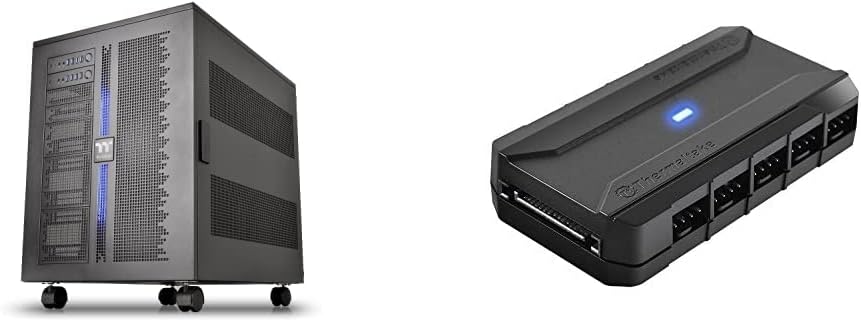
The Thermaltake Core W200 is the clearest example of a true dual-system case in this roundup. Its back-to-back configuration can accommodate two motherboards, two power supplies, and two graphics cards, making it suitable for developers, render farms, traders, and power users who prefer a single enclosure to separate desktop towers. The product listing does not provide a numerical customer rating, so its evaluation here relies on the documented architecture and included features.
We may earn a commission when you buy through this link, at no additional cost to you.
Its standout quality is a fully modular and dismantleable design. Rather than treating the chassis as a fixed frame, it allows builders to rethink the internal arrangement around their components and cooling plan. The bundle also includes a Commander FP hub capable of powering up to 10 PWM fans simultaneously from the power supply. Reusable ties and hook-and-loop tabs help control the wiring generated by a build of this complexity.
Cooling flexibility is the Core W200's strongest argument. Support for up to two 600mm radiators gives serious custom-loop builders a considerable amount of thermal headroom. This is not a case for someone simply adding a second storage drive to an existing computer; it is designed for complete parallel systems and unusually extensive cooling hardware. The specialized format will also demand more space and careful planning than a conventional ATX tower.
We recommend the Core W200 for builders whose two systems are essential to their workflow and who value modularity and liquid-cooling capacity over a modest footprint. It is the premium choice for a genuine two-computer installation, particularly when both systems need independent graphics, cooling, and power hardware.
Unlike a dual-chamber case that simply separates zones within one computer, this chassis supports two complete back-to-back systems with dedicated motherboards, power supplies, and graphics cards. That distinction makes it appropriate for simultaneous production, rendering, testing, or trading workloads.
Support for two 600mm radiators and a 10-port PWM hub gives the system exceptional room for custom cooling. The supplied reusable ties and hook-and-loop tabs are particularly useful when two complete sets of power and data cables must remain organized.
We may earn a commission when you buy through this link, at no additional cost to you.
The Cooler Master HAF II 500 ranks as an excellent high-airflow ATX case, although it does not actually contain two complete computers. Its Mighty40 cooling system pairs two 220 x 40mm front intake fans with a 180 x 40mm rear exhaust fan, a configuration designed to move substantial air through the chassis. Its 4.8 rating reflects a strong customer reception for a case that prioritizes thermal performance.
We may earn a commission when you buy through this link, at no additional cost to you.
Low airflow resistance is central to the design. Large front and rear ventilation openings reduce the obstacles facing incoming and outgoing air, while split-level cable management preserves room for the oversized rear exhaust. The MasterRail system supports several fan and radiator sizes at the front and top, allowing the cooling layout to evolve as hardware changes.
The dual-mode graphics-card holder can secure one graphics card for stability or two cards up to 3.6 slots, or 72mm, each. That is valuable for multi-GPU workstations, but it should not be confused with dual-system support: the motherboard, processor, memory, and power configuration remain those of one computer. The flexible storage cage accommodates 3.5-inch and 2.5-inch drives in layouts based on power-supply length.
This is a strong choice for a single, thermally demanding workstation that needs major airflow and multiple GPUs. If your goal is truly running two independent operating systems, skip it and consider the Capo X or Core W200. If the goal is pushing one powerful PC hard, the HAF II 500 offers a more straightforward and spacious platform.
Moving more air with fewer, larger fans can produce strong cooling while remaining acoustically manageable. The 220mm front pair and 180mm rear fan demonstrate this approach, with low-resistance openings helping the case maintain high airflow.
The dual-mode holder accommodates either one stabilized card or two cards up to 3.6 slots thick. It offers useful workstation flexibility, though the case remains fundamentally a single-system enclosure.
We may earn a commission when you buy through this link, at no additional cost to you.
The NZXT H9 Flow RGB+ is one of the most balanced dual-chamber cases available for a single high-performance computer. It separates the main components from the power supply and drives, creating dedicated thermal zones and a cleaner route for cables. Its 4.7 rating indicates broad customer appeal among builders who value airflow, appearance, and straightforward installation.
We may earn a commission when you buy through this link, at no additional cost to you.
The case includes two F420 RGB Core single-frame fans, one F120 RGB Core rear fan, and an NZXT Control Hub. Mounting positions support up to nine 140mm fans across the top, front-right, and bottom, plus one 120mm rear fan. Perforated steel panels and angled front-right fans help direct airflow toward the hottest components, while the separated chamber keeps heat-producing storage and power hardware away from the primary chamber.
Large cooling hardware is well accommodated, with room for a 420mm radiator at the top and another at the front-right. A wraparound tempered-glass panel gives the build a clean showcase appearance, and the case also supports high-end graphics cards. Extra-wide routing channels, built-in straps, and tie-down points simplify cable management, while compatibility with rear-connecting motherboards can produce an especially tidy result.
The H9 Flow RGB+ is our Editors' Choice for most buyers who search for a dual-system case but actually need a premium dual-chamber system. It is especially attractive for creators, gamers, and enthusiasts combining RGB lighting with serious cooling. It does not run two computers, so buyers with a literal parallel-system requirement should choose the Capo X or Core W200 instead.
Moving the power supply and drives into a separate chamber reduces the amount of heat and cable clutter competing with the primary components. The result is a cleaner interior and a more deliberate airflow path.
Three RGB fans and a control hub are included, while mounting capacity extends to nine 140mm positions. Dual 420mm radiator support makes it possible to begin with a practical package and expand toward a fully liquid-cooled configuration.
We may earn a commission when you buy through this link, at no additional cost to you.
The Antec Flux Pro is a full-tower E-ATX case built around airflow, expandability, and easy cooling changes. It includes six PWM fans and supports as many as 12 simultaneously, making it attractive for workstations that need storage, multiple expansion cards, or a substantial liquid-cooling installation. Its 4.7 rating suggests that many buyers appreciate the roomy, practical approach.
We may earn a commission when you buy through this link, at no additional cost to you.
The multi-directional vent design is complemented by three Tranquil 140 PWM front fans, two P12R PWM reverse fans on the power-supply shroud, and one Tranquil 140 PWM rear fan. Removable brackets on the top, front, and shroud allow cooling hardware to be repositioned. The case can also hold a 420mm radiator and a 360mm radiator at the same time.
An unusual iShift mounting option rotates the power supply by 90 degrees, and the CPU/GPU dual temperature display provides a convenient internal status readout. The case combines metal, glass, and wood, which gives it a more textured appearance than an all-metal tower. These features are practical, but the design does not create separate computer systems or a true back-to-back layout.
Choose the Flux Pro when you want a spacious single workstation with exceptional fan flexibility and straightforward bracket removal. It is less appropriate for someone who needs two complete PCs, but it can be an excellent home for a powerful single system that will be upgraded repeatedly.
The included fans cover front intake, reverse shroud intake, and rear exhaust, providing a balanced foundation. With room for 12 fans, builders can specialize the airflow path as the hardware and cooling strategy evolve.
Removable top, front, and power-supply-shroud brackets simplify installation and repositioning. Simultaneous 420mm and 360mm radiator support adds flexibility for serious custom cooling.
We may earn a commission when you buy through this link, at no additional cost to you.
The ASUS TUF Gaming GT502 uses a divided mid-tower layout to create independent cooling zones for the CPU and GPU. It is a single-system case, but that division makes it relevant to dual-system shopping because it applies the same practical idea of separating heat sources and simplifying airflow. Its 4.6 rating reflects a positive reception for a clean, accessible gaming enclosure.
We may earn a commission when you buy through this link, at no additional cost to you.
The main and rear chambers give builders the freedom to direct cooling toward each major heat-producing area instead of treating the interior as one undifferentiated volume. The graphics card can be mounted vertically with the included bracket, or installed conventionally with a bundled support bracket to reduce sag. Both approaches keep the card stable while accommodating different visual and clearance priorities.
Tool-free side panels improve the build process. Pressing a button hidden at the rear releases the panel, making it easier to reach connectors or make adjustments. Tempered-glass panels at the front and side provide a tinted showcase view without requiring the builder to remove them for basic work. The front panel includes USB 3.2 Gen 2 Type-C, two USB 3.0 ports, and an RGB control button.
The GT502 is a good match for a gaming system where the CPU and GPU are expected to operate at high loads for long periods. It does not satisfy a need for two operating systems, but its two-chamber logic and straightforward maintenance make it a strong alternative for buyers prioritizing organized cooling over literal dual-PC support.
The divided interior allows cooling to be planned around two major heat sources. This focused approach can be especially effective in a gaming case where a strong graphics card sits beside a powerful processor.
Vertical or conventional GPU mounting gives the builder visual and spatial options, while tool-free side panels reduce the effort required for routine access. The included graphics-card support also helps protect heavy cards from sagging.
We may earn a commission when you buy through this link, at no additional cost to you.
The ASUS ROG Strix Helios II is a premium showcase case for demanding single-system builds. Its aluminum front panel uses a diamond-grille design and a three-dimensional filter intended to support effective cooling, while four preinstalled 140 x 28mm fans provide immediate airflow. The 4.3 rating is solid for a premium chassis, though not the highest in this list.
We may earn a commission when you buy through this link, at no additional cost to you.
The case supports E-ATX motherboards, graphics cards up to 450mm long, and radiators up to 420mm. A graphics-card slot clamp and detachable rear power-supply bracket make it easier to secure large components and service the interior. These are useful features for builders using powerful hardware that may otherwise be difficult to fit or stabilize.
Cable management is handled through a multifunction cover, graphics-card holders, a power-supply shroud, a cable cover, and rear cable clips. The advanced I/O panel includes two USB 20Gbps Type-C ports, four USB-A 3.0 ports, an ARGB-lighting button, and a PWM fan-speed button. The result is a polished exterior, but it is not a dual-computer enclosure.
Choose the Helios II when visual presentation, long-GPU support, and a mature suite of mounting features matter most. It is well suited to an E-ATX enthusiast build with a large graphics card and extensive cooling. Buyers seeking two complete systems should instead focus on the Thermaltake models purpose-built for that task.
The aluminum front, structured filter, and dual tempered-glass surfaces create a showcase-oriented enclosure. The design is intended to make a finished build look deliberate from multiple angles.
Graphics cards up to 450mm and radiators up to 420mm provide room for high-end hardware. A slot clamp and detachable power-supply bracket improve both stability and access.
We may earn a commission when you buy through this link, at no additional cost to you.
The HAVN HS 420 is a dual-chamber mid-tower that prioritizes airflow, large cooling hardware, and organized installation. Its hybrid structure is designed to draw cool air from the bottom and direct it toward a centrally positioned graphics card. The 4.6 rating indicates a favorable reception among builders who want extensive thermal options in a conventional tower format.
We may earn a commission when you buy through this link, at no additional cost to you.
Cooling capacity is unusually high for the category. The chassis provides room for eleven 140mm fans, while top, right, and bottom mounting areas can each support a 420mm radiator. Custom panel ventilation is integrated into that layout, and every fan bracket uses flexible rubber pads intended to reduce vibration and resonance.
The SimpliCable system provides grooved guides running from top to bottom, helping cables remain orderly even in a densely populated chassis. A PWM fan hub adds centralized control, while an included VESA display mount creates room for a portable screen. The three-way adjustable graphics-card bracket accommodates different card shapes and sizes while preserving a clean appearance.
The HS 420 is a compelling choice for a single system that will use high-end air or liquid cooling. It is not intended to run two complete computers, and its many mounting positions require a deliberate cooling plan. For buyers who want that thermal capacity without a full tower, it offers one of the strongest feature lists in the roundup.
The lower intake is arranged to feed cool air toward a centrally mounted graphics card, one of the most heat-intensive components in a gaming system. The separated chamber concept supports a more focused cooling path.
Top, right, and bottom support for 420mm radiators creates exceptional liquid-cooling flexibility. Eleven 140mm fan slots make it possible to build a carefully balanced intake-and-exhaust arrangement.
We may earn a commission when you buy through this link, at no additional cost to you.
The NZXT H6 RGB+ is a compact dual-chamber case for builders who value a restrained appearance and efficient organization. A dedicated secondary chamber isolates the power supply and cables from the main build, while angled front-right fans target the system's hottest components. Its 4.4 rating reflects a generally positive response, though the absence of included cooling makes it a more customizable purchase.
We may earn a commission when you buy through this link, at no additional cost to you.
Single-piece curved tempered glass is bent to a tight radius to minimize visual distortion and seams. Ultra-fine mesh spans the top, front-right, and right panels to support airflow, and a removable nylon filter protects the bottom intake from dust without restricting it. These details make the enclosure appropriate for a clean desk setup where visual simplicity matters.
The standardized mounting layout supports up to ten 120mm fans across the top, front-right, bottom, and rear. Fans are not included, allowing the owner to coordinate cooling and lighting without paying for a preset package. An integrated adjustable anti-sag bracket supports large, heavy graphics cards and keeps them aligned, reducing the need for a separate desktop support.
The H6 RGB+ works best for a compact, single-system build where the owner already has a preferred fan ecosystem. Its dual-chamber layout improves separation, but it does not provide two independent computers. Choose it for a minimalist, space-conscious workstation and skip it for a literal parallel-system requirement.
The secondary chamber keeps the power supply and cabling away from the visible main chamber. That separation helps preserve a minimalist interior without sacrificing the useful space around primary components.
With no fans included, builders can select every fan based on performance, noise, and lighting preferences. Ten standardized 120mm positions preserve broad flexibility across the top, front-right, bottom, and rear.
We may earn a commission when you buy through this link, at no additional cost to you.
The Thermaltake Capo X is the most compact true dual-system case in the list. It can house two independent mATX systems simultaneously, allowing a creator, developer, or enthusiast to operate parallel computers while keeping both in one chassis. Its 5.0 rating is the highest numerical customer score among the products with published ratings, reinforcing its appeal among the intended audience.
We may earn a commission when you buy through this link, at no additional cost to you.
Each system has its own I/O, including power, reset, HD Audio, two USB 3.0 Type-A ports, and a USB 3.2 Gen 2 Type-C port. The upper system's I/O appears at the top of the chassis, while the lower system's controls sit at the bottom front foot. That arrangement makes two otherwise separate systems feel like purposeful parts of one workstation.
Cooling remains configurable enough for two installations. The case supports up to thirteen 120mm fans, air coolers up to 180mm high, and 420mm or 360mm radiators. Extra cutouts accommodate hidden-connector motherboards from ASUS, MSI, and GIGABYTE. Two detachable clamp GPU braces attach to the chassis frame and provide top and bottom support for the graphics cards.
This is our Editors' Choice for buyers who genuinely need two computers rather than a divided single system. It preserves more desk space and gives each installation its own controls. The mATX limitation is the principal trade-off, but for compact dual PCs, independent I/O and strong GPU support make the Capo X especially compelling.
The chassis accepts two separate mATX platforms rather than merely separating one motherboard from accessories. This makes it useful for simultaneous workstations, development environments, or specialized computing tasks.
Separate I/O panels let the user start, reset, and connect peripherals to each system independently. Hidden-connector motherboard cutouts can also reduce visible wiring around both installations.
We may earn a commission when you buy through this link, at no additional cost to you.
The Thermaltake View 380 TG is a dual-chamber ATX case offering an accessible route into separated-zone cooling. Its pillarless front and side tempered-glass panels provide a broad view of the components, while four preinstalled 120mm hydraulic-bearing ARGB Lite fans make the initial installation more complete. The 4.7 rating shows a strong response from buyers.
We may earn a commission when you buy through this link, at no additional cost to you.
The chamber layout separates the principal hardware from the power supply and storage area, improving organization and allowing cooler air to move through the main chamber. Compatibility with hidden-connector motherboards can make the visible wiring even cleaner. The front I/O includes one USB 3.2 Gen 2 Type-C port, two USB 3.0 ports, and HD Audio.
Maximum cooling support extends to a 360mm radiator, while graphics-card clearance reaches 415mm. These limits are ample for many mainstream performance builds, although they are less generous than the dual 420mm options in some premium cases. The included fans and ARGB lighting also make it attractive for buyers who want an expressive build without selecting every cooling component separately.
The View 380 TG is a good starting point for a single gaming or productivity system that will benefit from a clean, divided interior. It does not host two complete computers, and builders with unusually large liquid-cooling plans may need a roomier chassis. Even so, its included fans, glass presentation, and tidy hidden-connector support make it an appealing general-purpose recommendation.
Four ARGB Lite fans and pillarless dual tempered glass make the case visually complete out of the box. It is a practical starting point for builders who prefer a finished appearance without separately selecting a full fan suite.
The dual chamber separates the main components from power and storage. Hidden-connector motherboard support and the 415mm graphics-card limit suit a clean, organized ATX build rather than two independent systems.
We may earn a commission when you buy through this link, at no additional cost to you.
The most important decision is whether you need two complete computers or one system with a separated thermal zone. Beyond that distinction, motherboard size, graphics hardware, cooling plans, and available space should guide the decision.
A true dual-system case contains two independent sets of core PC components. The Thermaltake Core W200 can support two motherboards, two power supplies, and two graphics cards in a back-to-back arrangement, while the Capo X hosts two independent mATX systems. A dual-chamber case, by contrast, improves the organization and cooling of one system by separating the power supply, drives, or different heat zones. Products such as the NZXT H9 Flow RGB+, ASUS GT502, HAVN HS 420, NZXT H6 RGB+, and View 380 TG fall into the latter category. Choosing the wrong interpretation can lead to a chassis that looks suitable but cannot run the two platforms you intended.
In short, choose a true dual-system model for parallel workstations and a dual-chamber model for a single PC with more deliberate cooling and cable organization.
Motherboard form factor places a firm limit on what can be installed. The Core W200 accommodates full-size systems in a back-to-back arrangement, whereas the Capo X is designed around two mATX platforms. For dual-chamber cases, ATX is the common target, but the ASUS ROG Strix Helios II and Antec Flux Pro extend support to E-ATX. Check socket access, CPU cooler height, memory clearance, and the position of rear-facing ports before ordering. Large air coolers can conflict with side panels, tall radiators, or the graphics card even when the motherboard itself fits.
Choose the chassis only after confirming motherboard size, processor cooler dimensions, and every clearance specified by the case manufacturer.
Modern graphics cards vary significantly in length, thickness, and weight. The View 380 TG supports cards up to 415mm, the ROG Strix Helios II extends to 450mm, and the Cooler Master HAF II 500 includes a dual-mode holder for one card or two up to 3.6 slots thick. The Capo X uses detachable clamp braces for the cards in its two systems. Long cards also influence radiator placement, so review both dimensions together rather than checking only the published GPU limit.
Match the card's exact length and slot thickness to the case, and use the supplied support system to prevent heavy graphics cards from sagging.
Cooling capacity should reflect both the number of heat sources and the intended workload. The Core W200 supports two 600mm radiators, a substantial option for two fully custom-cooled systems. The H9 Flow RGB+ and HAVN HS 420 offer 420mm radiator positions, while the Antec Flux Pro can hold a 420mm and 360mm radiator simultaneously. Fans, radiators, and power-supply shroud positions can compete for the same volume, so the final configuration may not be possible simultaneously. Count mounting locations rather than assuming every listed size can be combined.
Prioritize adequate radiator positions, practical fan capacity, and a layout that supports the specific CPU and GPU heat sources in your build.
Some cases arrive with a complete cooling foundation, while others are shells designed for the owner to configure. The H9 Flow RGB+ includes two 140mm RGB fans, a 120mm rear fan, and a control hub. The View 380 TG includes four 120mm ARGB Lite fans, while the NZXT H6 RGB+ ships without fans. The Capo X and Core W200 are designed for comparatively dense cooling, and the Capo X supports up to thirteen 120mm fans. Compare included components with the cost and effort of adding the exact fans and controllers needed later.
Check whether a case includes the fan size, lighting, and control hub you want, or whether it offers more freedom as an unconfigured platform.
Cable quality is easiest to assess in a dual-chamber or dual-system design because the case creates natural hiding places for excess wiring. The H9 Flow RGB+ includes wide channels, straps, and tie-down points, while the HAVN HS 420 uses grooved SimpliCable guides. The Core W200 bundle includes reusable ties and hook-and-loop tabs for managing a much larger wiring load. Tool-free panels on the GT502 speed routine access, and removable power-supply brackets can make installation easier. Consider not only the final appearance but also how easily cables can be reached during the build.
Prioritize concealed routing, accessible fasteners, and dedicated cable-management hardware, especially when installing two complete systems.
Dual-system capability often comes with a meaningful increase in size. The Capo X is designed to preserve desk space by placing two mATX systems in one chassis, whereas the Core W200's back-to-back construction is a specialized full-size format. Among dual-chamber options, the NZXT H6 RGB+ is explicitly compact, while the Cooler Master HAF II 500 and Antec Flux Pro occupy more substantial full-tower spaces. Measure desk depth, floor clearance, and the path from the wall to the rear I/O before choosing a large enclosure. Remember that radiator thickness and front fans can increase the effective footprint.
Choose the smallest layout that safely holds your hardware, especially when two systems would otherwise occupy two separate towers.
A large chassis does not automatically provide convenient storage or a tidy front panel. The Cooler Master HAF II 500 uses a flexible cage for 3.5-inch and 2.5-inch drives, with layouts that vary according to power-supply length. The H9 Flow RGB+ and ASUS GT502 provide modern Type-C front connectivity, and the View 380 TG includes USB 3.2 Gen 2 Type-C. The HAVN HS 420 goes further with an included VESA mount for a portable display, useful for compact two-system desks. Confirm the number and position of drive trays, front USB types, audio connections, and any display accessory before ordering.
Verify storage locations, front ports, and display mounting as early as possible, because these everyday details can be harder to change than the processor or graphics card.
Before installing components, inventory each system separately when the chassis supports two complete computers. Assign the upper and lower installations, route their power and data cables through distinct paths, and confirm that each motherboard, processor, memory kit, graphics card, and storage device will remain accessible. For a dual-chamber model, plan the intake and exhaust path around the isolated power supply and storage chamber rather than treating every vent as interchangeable.
Install cooling hardware in stages, checking the manufacturer-specified clearance around the CPU cooler, graphics card, memory, motherboard rear ports, and radiators. Connect fans to the appropriate controller or hub, use the supplied cable ties and straps, and avoid routing power leads across air intakes. Dust filters should be cleaned regularly, particularly in cases with bottom intake fans, because restricted airflow can make a carefully planned thermal layout perform poorly.
For routine care, power down and disconnect both systems before opening the chassis. Remove dust from filters, fans, radiators, and vents with compressed air while holding fan blades so they do not spin freely. Check the graphics-card supports, removable brackets, cable ties, and screws periodically. When cleaning tempered glass, use a soft microfiber cloth and avoid harsh liquids, and confirm that panels are correctly seated before returning the systems to operation.
A dual-system case contains two complete and independent computer platforms, including separate motherboards, processors, power supplies, and typically graphics cards. A dual-chamber case usually contains one system but separates its power supply, storage, or major cooling zones for improved airflow and tidier cables. The Thermaltake Core W200 and Capo X are true dual-system examples, while the NZXT H9 Flow RGB+ and ASUS GT502 use dual-chamber designs.
Yes, if both internal systems are fully assembled and powered, each can boot its own operating system. The cases do not automatically synchronize the computers or provide special switching hardware. The builder must install operating systems, drivers, storage, and networking, and determine how the two systems will exchange files or share peripherals.
They can be, because separating power supplies, drives, and heat-producing components from the primary chamber allows a clearer intake-to-exhaust airflow path. The benefit depends on the case's vent placement, fan configuration, and radiator plan. A well-ventilated single-chamber case with strong fans may still outperform a poorly configured dual-chamber design.
The Thermaltake Capo X is specifically designed to house two independent mATX systems while minimizing the number of separate chassis on the desk. It includes individual I/O for both systems, detachable GPU braces, and support for multiple fans and large radiators. Its mATX requirement is the main constraint, so incompatible processors or boards must be considered before purchase.
No. The listed computer cases may include fans, fan hubs, and accessories, but the product data does not state that processors, motherboards, graphics cards, memory, storage, or power supplies are included. Confirm the retailer's package contents and current listing details before ordering, particularly for bundles such as the Core W200 and its Commander FP hub.
The correct amount depends on the processor, graphics card, workload, ambient temperature, fan performance, and whether the pump and radiator arrangement provides sufficient flow. Cases supporting 420mm or 600mm radiators provide more flexibility than a single 360mm option, but mounting several large radiators may prevent other components from being installed simultaneously. Plan the full cooling layout and check every clearance before purchasing.
Yes. Cases such as the NZXT H9 Flow RGB+, ASUS TUF Gaming GT502, HAVN HS 420, and Thermaltake View 380 TG are well suited to gaming systems that benefit from organized cooling and cable management. A dual-chamber layout does not improve frame rates by itself, but it can help the CPU and GPU receive focused airflow when fans and radiators are configured correctly.
Included fans can make a build faster, more affordable in terms of component selection, and more visually consistent. The H9 Flow RGB+ and View 380 TG include RGB lighting and several fans, while the NZXT H6 RGB+ leaves cooling entirely to the builder. Choose the no-fan option if you already have a preferred fan ecosystem or need different sizes for a custom radiator layout.
The Thermaltake Capo X is the strongest choice for a genuine two-computer build because it fits two independent mATX systems into one chassis and provides separate controls for each. The Thermaltake Core W200 is the premium alternative for builders who want greater motherboard scale, fully modular construction, and exceptional liquid-cooling capacity. For most single-PC buyers, the NZXT H9 Flow RGB+ offers the best balance of separated-zone design, included RGB cooling, radiator room, and tidy construction.
Prioritize the architecture that matches the intended use rather than choosing solely on the words dual chamber or dual system. Confirm motherboard form factor, graphics-card dimensions, radiator combinations, drive locations, front ports, and available desk space. For two complete platforms, independent I/O and reliable GPU support matter; for one system, airflow direction, cable visibility, and included accessories may have a greater impact on daily satisfaction.
Specifications and product configurations can change, and retailer offers vary over time. Check the current listing for compatibility details, included components, warranty terms, and the latest purchase option before ordering. A careful compatibility check is the final step that turns a visually impressive enclosure into a dependable working build.